FARWA
MALIK
Purpose
• To make the existing system more efficient.
• To provide a user friendly environment.
• Make functionalities of library faster.
• Provide a system where the library staff can catch defaulters and not let
them escape.
Purpose
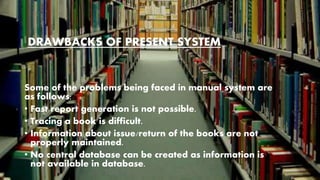
Some of the problems being faced in manual system are
as follows:
• Fast report generation is not possible.
• Tracing a book is difficult.
• Information about issue/return of the books are not
properly maintained.
• No central database can be created as information is
not available in database.
DRAWBACKS OF PRESENT SYSTEM
PROJECT AIM AND OBJECTIVE
• To eliminate the paper work in library.
• To record every transaction in computerized
system.
• To design a user friendly graphical user
interface which suit the user. To save the
cost and time.
Product Perspective
Our Library Management System is a replacement for
the old Library Managements Systems which are
ordinary and depend on manual working for recording
book and user information. It is a new, self-contained
product.
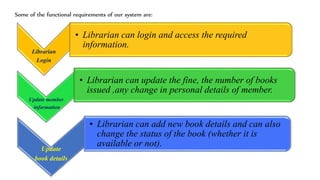
FUNCTIONAL REQUIREMENTS
Librarian
Login
• Librarian can login and access the required
information.
Update member
information
• Librarian can update the fine, the number of books
issued ,any change in personal details of member.
Update
book details
• Librarian can add new book details and can also
change the status of the book (whether it is
available or not).
Some of the functional requirements of our system are:
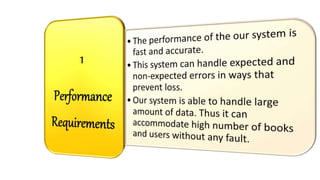
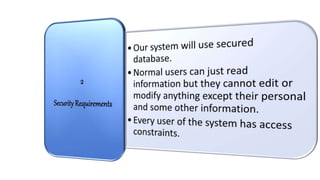
NON FUNCTIONAL REQUIREMENTS
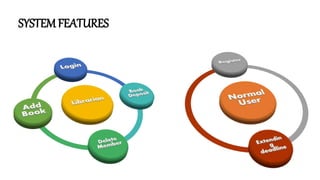
SYSTEMFEATURES
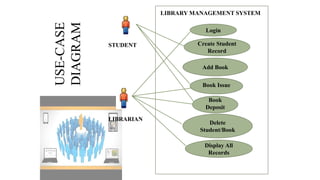
USE CASE DIAGRAM &
USE CASES
Create Student
Record
Add Book
Book Issue
Delete
Student/Book
Book
Deposit
Display All
Records
Login
LIBRARY MANAGEMENT SYSTEM
STUDENT
LIBRARIAN
USE-CASE
DIAGRAM
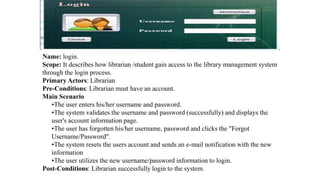
Name: login.
Scope: It describes how librarian /student gain access to the library management system
through the login process.
Primary Actors: Librarian
Pre-Conditions: Librarian must have an account.
Main Scenario
•The user enters his/her username and password.
•The system validates the username and password (successfully) and displays the
user's account information page.
•The user has forgotten his/her username, password and clicks the "Forgot
Username/Password".
•The system resets the users account and sends an e-mail notification with the new
information
•The user utilizes the new username/password information to login.
Post-Conditions: Librarian successfully login to the system.
CREATE RECORD
Name: Create record.
Scope: It describes how a librarian creates a new record of the student.
Primary Actors: Librarian.
Pre-Conditions
• Librarian must log in to the system and the student must exist.
Main Scenario
• Librarian select the option of create new record.
• The window will display the form.
• Librarian has to fill the form.
• Librarian enters the detailed information of student.
• New student record will be saved to the database.
Post-Conditions
• Librarian successfully creates new record of student.
Name: Book Issue
Scope: It describes how student issues a book.
Primary Actors: Student, Librarian.
Pre-Condition:
• Librarian must be authenticated.
• Student must be registered.
• Book to be issued must be available.
Main Scenario:
• Librarian will login to the system.
• Librarian will enter the student id to be searched.
• Student search is successful.
• Librarian will enter the ID of the required book.
• If the book is available it will be issued.
Post condition: Book is successfully issued to student.
BOOK ISSUE
Design Phase
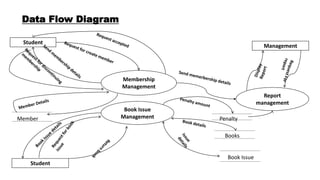
Membership
Management
Book Issue
Management
Report
management
Student
Student
Management
Member
Books
Book Issue
Penalty
Data Flow Diagram
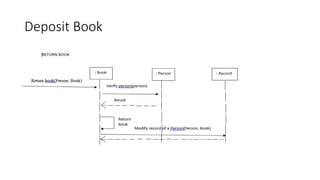
Deposit Book
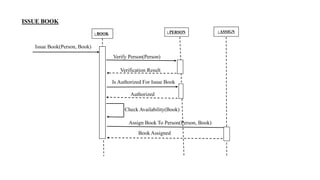
: BOOK : PERSON : ASSIGN
Issue Book(Person, Book)
Verify Person(Person)
Verification Result
Is Authorized For Issue Book
Authorized
Check Availability(Book)
Assign Book To Person(Person, Book)
Book Assigned
ISSUE BOOK
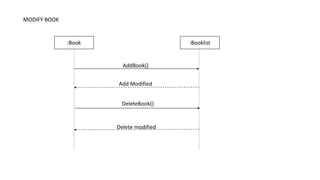
:Book :Booklist
AddBook()
DeleteBook()
Add Modified
Delete modified
MODIFY BOOK
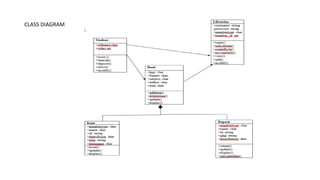
CLASS DIAGRAM
Explanation of code:
In our system, we are adding books and students to the records.
We keep record of books in our catalog.
We also have record of students.
Admin can modify records of students and books.
Admin can also delete records which are not useful anymore.
• void create_book()
In this function, we are adding new book to the catalog.
• void show_book()
In this function, we are displaying information about the
book.
• void modify_book()
In this, we are modifying the information about the book.
• void create_student()
This function is adding student’s information in the record.
• void modify_student()
This function is modifying information about the student.
• void display_spb()
This function is used to search the book.
• void display_sps()
This function is used to search the student.
• void delete_student()
This function is used to delete student’s record.
• void delete_book()
This function is used to delete book from record.
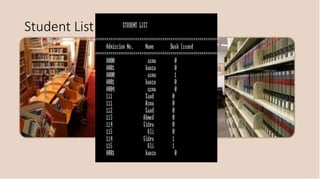
• void display_alls()
This function is displaying information of students.
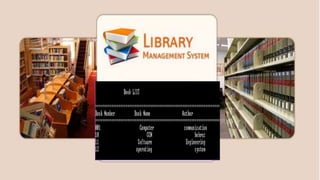
• void display_allb()
This function is displaying information of books.
• void book_issue()
This function is issuing book to the student.
• void book_deposit()
This function is depositing book.
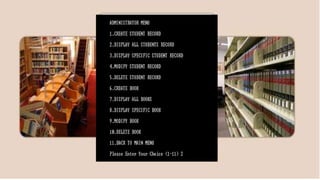
• void admin_menu()
This function is displaying the menu.
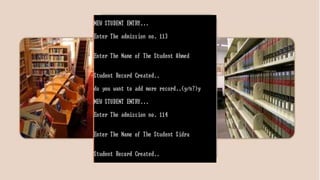
New student entry
Administration menu
Student List
Book List
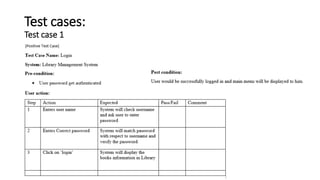
Test cases:
Test case 1
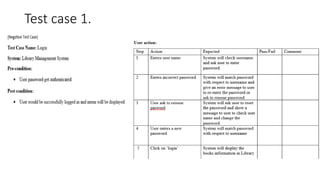
Test case 1.
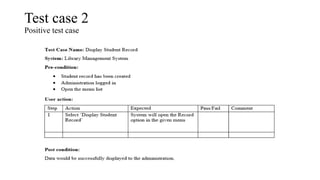
Test case 2
Positive test case
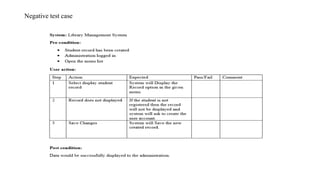
Negative test case
THANK YOU !!

Library management system

  • 2.
  • 3.
    Purpose • To makethe existing system more efficient. • To provide a user friendly environment. • Make functionalities of library faster. • Provide a system where the library staff can catch defaulters and not let them escape.
  • 4.
    Purpose Some of theproblems being faced in manual system are as follows: • Fast report generation is not possible. • Tracing a book is difficult. • Information about issue/return of the books are not properly maintained. • No central database can be created as information is not available in database. DRAWBACKS OF PRESENT SYSTEM
  • 5.
    PROJECT AIM ANDOBJECTIVE • To eliminate the paper work in library. • To record every transaction in computerized system. • To design a user friendly graphical user interface which suit the user. To save the cost and time.
  • 6.
    Product Perspective Our LibraryManagement System is a replacement for the old Library Managements Systems which are ordinary and depend on manual working for recording book and user information. It is a new, self-contained product.
  • 7.
  • 8.
    Librarian Login • Librarian canlogin and access the required information. Update member information • Librarian can update the fine, the number of books issued ,any change in personal details of member. Update book details • Librarian can add new book details and can also change the status of the book (whether it is available or not). Some of the functional requirements of our system are:
  • 9.
  • 14.
  • 15.
    USE CASE DIAGRAM& USE CASES
  • 16.
    Create Student Record Add Book BookIssue Delete Student/Book Book Deposit Display All Records Login LIBRARY MANAGEMENT SYSTEM STUDENT LIBRARIAN USE-CASE DIAGRAM
  • 17.
    Name: login. Scope: Itdescribes how librarian /student gain access to the library management system through the login process. Primary Actors: Librarian Pre-Conditions: Librarian must have an account. Main Scenario •The user enters his/her username and password. •The system validates the username and password (successfully) and displays the user's account information page. •The user has forgotten his/her username, password and clicks the "Forgot Username/Password". •The system resets the users account and sends an e-mail notification with the new information •The user utilizes the new username/password information to login. Post-Conditions: Librarian successfully login to the system.
  • 18.
    CREATE RECORD Name: Createrecord. Scope: It describes how a librarian creates a new record of the student. Primary Actors: Librarian. Pre-Conditions • Librarian must log in to the system and the student must exist. Main Scenario • Librarian select the option of create new record. • The window will display the form. • Librarian has to fill the form. • Librarian enters the detailed information of student. • New student record will be saved to the database. Post-Conditions • Librarian successfully creates new record of student.
  • 19.
    Name: Book Issue Scope:It describes how student issues a book. Primary Actors: Student, Librarian. Pre-Condition: • Librarian must be authenticated. • Student must be registered. • Book to be issued must be available. Main Scenario: • Librarian will login to the system. • Librarian will enter the student id to be searched. • Student search is successful. • Librarian will enter the ID of the required book. • If the book is available it will be issued. Post condition: Book is successfully issued to student. BOOK ISSUE

  • 20.
  • 21.
  • 22.
  • 23.
    : BOOK :PERSON : ASSIGN Issue Book(Person, Book) Verify Person(Person) Verification Result Is Authorized For Issue Book Authorized Check Availability(Book) Assign Book To Person(Person, Book) Book Assigned ISSUE BOOK
  • 24.
  • 25.
  • 26.
    Explanation of code: Inour system, we are adding books and students to the records. We keep record of books in our catalog. We also have record of students. Admin can modify records of students and books. Admin can also delete records which are not useful anymore.
  • 27.
    • void create_book() Inthis function, we are adding new book to the catalog. • void show_book() In this function, we are displaying information about the book. • void modify_book() In this, we are modifying the information about the book. • void create_student() This function is adding student’s information in the record. • void modify_student() This function is modifying information about the student.
  • 28.
    • void display_spb() Thisfunction is used to search the book. • void display_sps() This function is used to search the student. • void delete_student() This function is used to delete student’s record. • void delete_book() This function is used to delete book from record. • void display_alls() This function is displaying information of students.
  • 29.
    • void display_allb() Thisfunction is displaying information of books. • void book_issue() This function is issuing book to the student. • void book_deposit() This function is depositing book. • void admin_menu() This function is displaying the menu.
  • 30.
  • 31.
  • 32.
  • 33.
  • 34.
  • 35.
  • 36.
  • 37.
  • 38.