Karan
Vedaant
Vidhan
 A library management system, also known as an
automated library system is software that has been
developed to handle basic housekeeping functions of a
library.
 It’s a well organized software solution for a library.
 It help to provide information on any book present in
library to the user as well as staff member.
 It keeps a track of book issued, returned and added to
library.
INTRODUCTION
 To make the existing system more efficient.
 To provide a user friendly environment where user can be
serviced better.
 Make functioning of library faster.
 Provide a system where the library staff can catch defaulters and
not let them escape.
 To minimize the loss done to books.
SCOPE OF PROJECT:
 The Library Management System shall be required to maintain
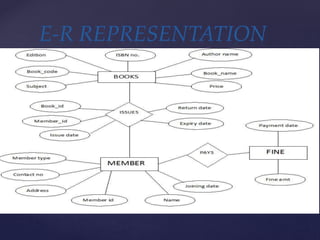
information about its users and books.
 It shall store databases for students, teachers and books.
 The student database stores information about a student’s roll no,
name, address, course and year.
 The book database stores information about a book title, author,
publisher, cost, bill number, year of publishing and pages.
 The teacher database stores information about a teacher’s id, name,
department, designation, address and telephone number.
REQUIREMENTS:
 To eliminate the paper work in library.
 To record every transaction in computerized system so that
problem such as record file missing won’t be happen.
 To design a user friendly graphical user interface which suit the
user.
 To save the cost and time.
PROJECT AIM AND OBJECTIVE
Log In
Add New Member
Update/Delete Member
Add a Book
Update/Delete Book
Search For a Book
Check In Book
Check Out Book
Pay Late Fee
View Book Detail
View Member Detail
Search For a Member
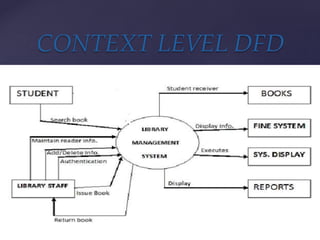
 A data flow diagram(DFD) is graphical representation of the
“flow” of data through an information system.
 A DFD shows what kinds of information will be input to and
output from the system.
 One of the most widely used system analysis process models is
the data flow diagram.
DATA FLOW DIAGRAM
CONTEXT LEVEL DFD
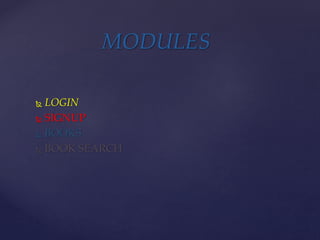
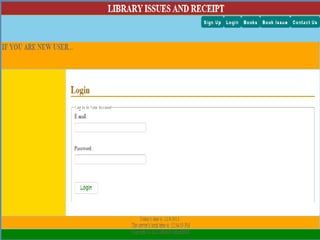
 LOGIN
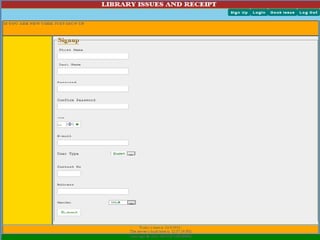
 SIGNUP
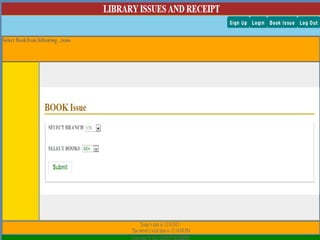
 BOOKS
 BOOK SEARCH
MODULES
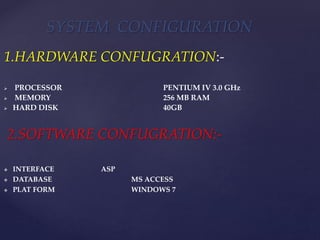
1.HARDWARE CONFUGRATION:-
 PROCESSOR : PENTIUM IV 3.0 GHz
 MEMORY : 256 MB RAM
 HARD DISK : 40GB
2.SOFTWARE CONFUGRATION:-
 INTERFACE : ASP
 DATABASE : MS ACCESS
 PLAT FORM : WINDOWS 7
SYSTEM CONFIGURATION
DATA BASE
DESIGN
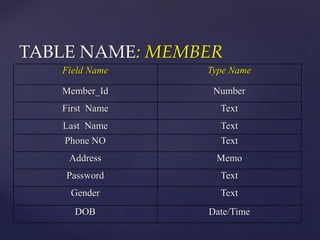
TABLE NAME: MEMBER
Field Name Type Name
Member_Id Number
First Name Text
Last Name Text
Phone NO Text
Address Memo
Password Text
Gender Text
DOB Date/Time
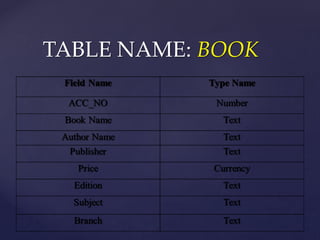
TABLE NAME: BOOK
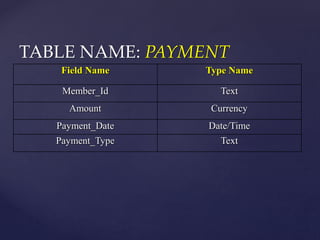
TABLE NAME: PAYMENT
Field Name Type Name
Member_Id Text
Amount Currency
Payment_Date Date/Time
Payment_Type Text
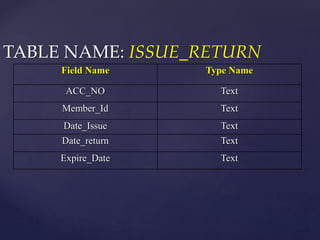
TABLE NAME: ISSUE_RETURN
Field Name Type Name
ACC_NO Text
Member_Id Text
Date_Issue Text
Date_return Text
Expire_Date Text
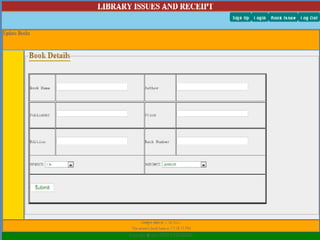
SCREEN SHOTS
 To make the existing system more efficient.
 To provide a user friendly environment where user can be
serviced better.
 Make functioning of library faster.
 Provide a system where the library staff can catch defaulters and
not let them escape.
 To minimize the loss done to books.
PROJECT OUTCOME
The system has been developed using ASP and MS access , the system
was able to process and update the database with more ease. It helped
in developing a total integrated system.
Thus the project “LIBRARY MANAGEMENT
SYSTEM” can be altered in accordance with the future requirements of
the organization.
CONCLUSION
MY FIRST PPT

MY FIRST PPT

  • 1.
  • 2.
     A librarymanagement system, also known as an automated library system is software that has been developed to handle basic housekeeping functions of a library.  It’s a well organized software solution for a library.  It help to provide information on any book present in library to the user as well as staff member.  It keeps a track of book issued, returned and added to library. INTRODUCTION
  • 3.
     To makethe existing system more efficient.  To provide a user friendly environment where user can be serviced better.  Make functioning of library faster.  Provide a system where the library staff can catch defaulters and not let them escape.  To minimize the loss done to books. SCOPE OF PROJECT:
  • 4.
     The LibraryManagement System shall be required to maintain information about its users and books.  It shall store databases for students, teachers and books.  The student database stores information about a student’s roll no, name, address, course and year.  The book database stores information about a book title, author, publisher, cost, bill number, year of publishing and pages.  The teacher database stores information about a teacher’s id, name, department, designation, address and telephone number. REQUIREMENTS:
  • 5.
     To eliminatethe paper work in library.  To record every transaction in computerized system so that problem such as record file missing won’t be happen.  To design a user friendly graphical user interface which suit the user.  To save the cost and time. PROJECT AIM AND OBJECTIVE
  • 6.
    Log In Add NewMember Update/Delete Member Add a Book Update/Delete Book Search For a Book Check In Book Check Out Book Pay Late Fee View Book Detail View Member Detail Search For a Member
  • 7.
     A dataflow diagram(DFD) is graphical representation of the “flow” of data through an information system.  A DFD shows what kinds of information will be input to and output from the system.  One of the most widely used system analysis process models is the data flow diagram. DATA FLOW DIAGRAM
  • 8.
  • 10.
     LOGIN  SIGNUP BOOKS  BOOK SEARCH MODULES
  • 11.
    1.HARDWARE CONFUGRATION:-  PROCESSOR: PENTIUM IV 3.0 GHz  MEMORY : 256 MB RAM  HARD DISK : 40GB 2.SOFTWARE CONFUGRATION:-  INTERFACE : ASP  DATABASE : MS ACCESS  PLAT FORM : WINDOWS 7 SYSTEM CONFIGURATION
  • 12.
  • 13.
    TABLE NAME: MEMBER FieldName Type Name Member_Id Number First Name Text Last Name Text Phone NO Text Address Memo Password Text Gender Text DOB Date/Time
  • 14.
  • 15.
    TABLE NAME: PAYMENT FieldName Type Name Member_Id Text Amount Currency Payment_Date Date/Time Payment_Type Text
  • 16.
    TABLE NAME: ISSUE_RETURN FieldName Type Name ACC_NO Text Member_Id Text Date_Issue Text Date_return Text Expire_Date Text
  • 17.
  • 22.
     To makethe existing system more efficient.  To provide a user friendly environment where user can be serviced better.  Make functioning of library faster.  Provide a system where the library staff can catch defaulters and not let them escape.  To minimize the loss done to books. PROJECT OUTCOME
  • 23.
    The system hasbeen developed using ASP and MS access , the system was able to process and update the database with more ease. It helped in developing a total integrated system. Thus the project “LIBRARY MANAGEMENT SYSTEM” can be altered in accordance with the future requirements of the organization. CONCLUSION