NGINX Installation and 
Tuning 
Introduced by Andrew Alexeev 
Presented by Owen Garrett 
Nginx, Inc.
About this webinar 
You’re ready to make your applications more responsive, scalable, fast and 
secure. Then it’s time to get started with NGINX. In this webinar, you will 
learn how to install NGINX from a package or from source onto a Linux 
host. We’ll then look at some common operating system tunings you could 
make to ensure your NGINX install is ready for prime time.
Agenda 
• Installing NGINX 
– Installation source, NGINX features 
• Tuning NGINX 
– Operating System tuning 
– NGINX software tuning 
• Benchmarking NGINX 
We’re covering a lot of material. 
Please feel free to take screenshots 
and read up afterwards.
BEFORE YOU INSTALL NGINX…
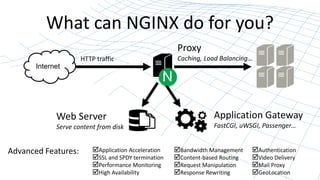
What can NGINX do for you? 
Internet 
N 
Web Server 
Serve content from disk 
Application Gateway 
FastCGI, uWSGI, Passenger… 
Proxy 
HTTP traffic Caching, Load Balancing… 
Application Acceleration 
SSL and SPDY termination 
Performance Monitoring 
High Availability 
Advanced Features: Bandwidth Management 
Content-based Routing 
Request Manipulation 
Response Rewriting 
Authentication 
Video Delivery 
Mail Proxy 
GeoLocation
Deployment Plan 
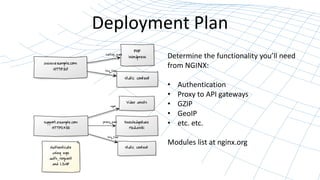
Determine the functionality you’ll need 
from NGINX: 
• Authentication 
• Proxy to API gateways 
• GZIP 
• GeoIP 
• etc. etc. 
Modules list at nginx.org
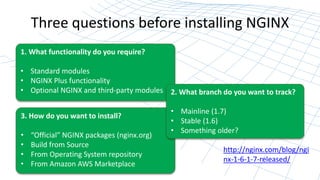
Three questions before installing NGINX 
1. What functionality do you require? 
• Standard modules 
• NGINX Plus functionality 
• Optional NGINX and third-party modules 
3. How do you want to install? 
• “Official” NGINX packages (nginx.org) 
• Build from Source 
• From Operating System repository 
• From Amazon AWS Marketplace 
2. What branch do you want to track? 
• Mainline (1.7) 
• Stable (1.6) 
• Something older? 
http://nginx.com/blog/ngi 
nx-1-6-1-7-released/
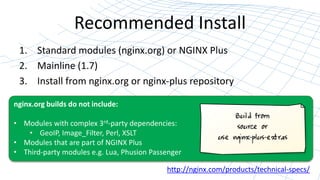
Recommended Install 
1. Standard modules (nginx.org) or NGINX Plus 
2. Mainline (1.7) 
3. Install from nginx.org or nginx-plus repository 
nginx.org builds do not include: 
• Modules with complex 3rd-party dependencies: 
• GeoIP, Image_Filter, Perl, XSLT 
• Modules that are part of NGINX Plus 
• Third-party modules e.g. Lua, Phusion Passenger 
http://nginx.com/products/technical-specs/
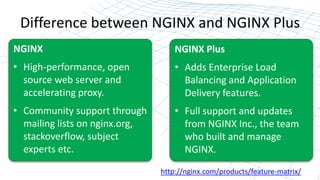
Difference between NGINX and NGINX Plus 
http://nginx.com/products/feature-matrix/ 
NGINX 
• High-performance, open 
source web server and 
accelerating proxy. 
• Community support through 
mailing lists on nginx.org, 
stackoverflow, subject 
experts etc. 
NGINX Plus 
• Adds Enterprise Load 
Balancing and Application 
Delivery features. 
• Full support and updates 
from NGINX Inc., the team 
who built and manage 
NGINX.
INSTALLING NGINX
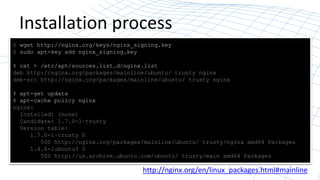
Installation process 
$ wget http://nginx.org/keys/nginx_signing.key 
$ sudo apt-key add nginx_signing.key 
# cat > /etc/apt/sources.list.d/nginx.list 
deb http://nginx.org/packages/mainline/ubuntu/ trusty nginx 
deb-src http://nginx.org/packages/mainline/ubuntu/ trusty nginx 
# apt-get update 
# apt-cache policy nginx 
nginx: 
Installed: (none) 
Candidate: 1.7.0-1~trusty 
Version table: 
1.7.0-1~trusty 0 
500 http://nginx.org/packages/mainline/ubuntu/ trusty/nginx amd64 Packages 
1.4.6-1ubuntu3 0 
500 http://us.archive.ubuntu.com/ubuntu/ trusty/main amd64 Packages 
http://nginx.org/en/linux_packages.html#mainline
Verify that it is working 
# /etc/init.d/nginx status 
* nginx is running 
# /usr/sbin/nginx –v 
nginx version: nginx/1.7.0
TUNING NGINX 
#1: UNDERSTAND WHAT’S HAPPENING
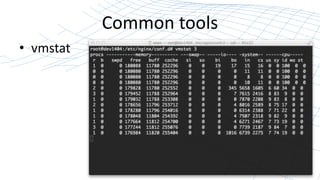
Common tools 
• vmstat
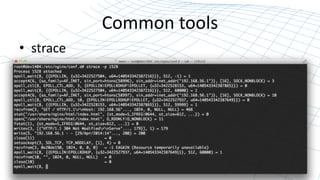
Common tools 
• strace
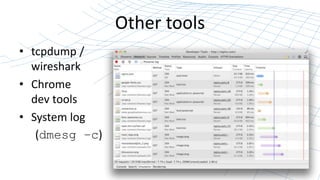
Other tools 
• tcpdump / 
wireshark 
• Chrome 
dev tools 
• System log 
(dmesg –c)
TUNING NGINX: 
#2: TUNING THE OPERATING SYSTEM
Tuning the operating system 
• Basic tunables: 
– Backlog queue: limits number of 
pending connections 
– File descriptors: limit number of 
active connections 
– Ephemeral ports: limit number of 
upstream connections
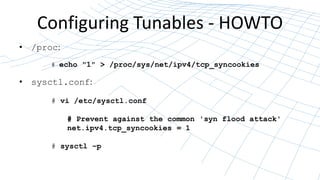
Configuring Tunables - HOWTO 
• /proc: 
# echo "1" > /proc/sys/net/ipv4/tcp_syncookies 
• sysctl.conf: 
# vi /etc/sysctl.conf 
# Prevent against the common 'syn flood attack' 
net.ipv4.tcp_syncookies = 1 
# sysctl –p
The Backlog Queue 
• What happens when a connection is received? 
– SYN / SYNACK [syn_backlog queue] or syncookie 
– ACK [listen backlog queue] / NGINX:accept() 
– net.ipv4.tcp_max_syn_backlog 
– net.ipv4.tcp_syncookies 
– net.core.somaxconn 
• NGINX: listen backlog=1024 
– net.core.netdev_max_backlog
File Descriptors 
• What happens when a connection is processed? 
File descriptors are the key resource – estimate 2 per connection. 
– fs.file_max 
– /etc/security/limits.conf 
– worker_rlimit_nofile 200000;
Ephemeral Ports 
• What happens when NGINX proxies connections? 
Each TCP connection requires a unique 4-tuple: 
[src_ip:src_port, dst_ip:dst_port] 
Ephemeral port range and lifetime: 
– net.ipv4.ip_local_port_range 
– net.ipv4.tcp_fin_timeout
Keep checking kernel messages 
# dmesg -c 
# tail -f /var/log/kern.log
TUNING NGINX: 
#3: TUNING THE SOFTWARE
Tuning NGINX 
#1: You don’t need to “tune” very much 
#2: Don’t tune just for a benchmark 
#3: Use our Prof Services team to help
Common tunings 
worker_processes auto; – set to ‘auto’ or higher 
worker_connections – set to less than file descriptor 
count. 
accept_mutex: disable for busy services
The proxy should use keepalives 
Close TCP Connection 
(two-way handshake) 
Open TCP Connection 
(three-way handshake) 
Write HTTP request Read HTTP response 
Wait 
(timeout) 
NGINX or server 
closes the 
connection 
NGINX re-uses connection for another request 
server { 
listen 80; 
location / { 
proxy_pass http://backend; 
proxy_http_version 1.1; 
proxy_set_header Connection ""; 
} 
} 
upstream backend { 
server webserver1 max_conns=256; 
server webserver2 max_conns=256; 
queue 4096 timeout=15s; 
# maintain a maximum of 20 idle connections to each upstream server 
keepalive 20; 
}
BENCHMARKING NGINX
Why benchmark NGINX? 
1. To find how fast NGINX can go 
2. To tune NGINX for your workload 
3. To find where the bottlenecks are 
4. All of the above
IN CONCLUSION…
In conclusion: 
• Install from the nginx repo 
– NGINX or NGINX Plus 
• Basic tuning and configuration 
– dmesg / kern.log 
• Benchmark / stress test 
http://nginx.com/ 
• NGINX Professional Services and Training
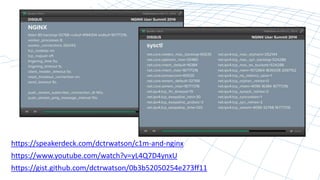
https://speakerdeck.com/dctrwatson/c1m-and-nginx 
https://www.youtube.com/watch?v=yL4Q7D4ynxU 
https://gist.github.com/dctrwatson/0b3b52050254e273ff11

NGINX Installation and Tuning

  • 1.
    NGINX Installation and Tuning Introduced by Andrew Alexeev Presented by Owen Garrett Nginx, Inc.
  • 2.
    About this webinar You’re ready to make your applications more responsive, scalable, fast and secure. Then it’s time to get started with NGINX. In this webinar, you will learn how to install NGINX from a package or from source onto a Linux host. We’ll then look at some common operating system tunings you could make to ensure your NGINX install is ready for prime time.
  • 3.
    Agenda • InstallingNGINX – Installation source, NGINX features • Tuning NGINX – Operating System tuning – NGINX software tuning • Benchmarking NGINX We’re covering a lot of material. Please feel free to take screenshots and read up afterwards.
  • 4.
  • 5.
    What can NGINXdo for you? Internet N Web Server Serve content from disk Application Gateway FastCGI, uWSGI, Passenger… Proxy HTTP traffic Caching, Load Balancing… Application Acceleration SSL and SPDY termination Performance Monitoring High Availability Advanced Features: Bandwidth Management Content-based Routing Request Manipulation Response Rewriting Authentication Video Delivery Mail Proxy GeoLocation
  • 6.
    Deployment Plan Determinethe functionality you’ll need from NGINX: • Authentication • Proxy to API gateways • GZIP • GeoIP • etc. etc. Modules list at nginx.org
  • 7.
    Three questions beforeinstalling NGINX 1. What functionality do you require? • Standard modules • NGINX Plus functionality • Optional NGINX and third-party modules 3. How do you want to install? • “Official” NGINX packages (nginx.org) • Build from Source • From Operating System repository • From Amazon AWS Marketplace 2. What branch do you want to track? • Mainline (1.7) • Stable (1.6) • Something older? http://nginx.com/blog/ngi nx-1-6-1-7-released/
  • 8.
    Recommended Install 1.Standard modules (nginx.org) or NGINX Plus 2. Mainline (1.7) 3. Install from nginx.org or nginx-plus repository nginx.org builds do not include: • Modules with complex 3rd-party dependencies: • GeoIP, Image_Filter, Perl, XSLT • Modules that are part of NGINX Plus • Third-party modules e.g. Lua, Phusion Passenger http://nginx.com/products/technical-specs/
  • 9.
    Difference between NGINXand NGINX Plus http://nginx.com/products/feature-matrix/ NGINX • High-performance, open source web server and accelerating proxy. • Community support through mailing lists on nginx.org, stackoverflow, subject experts etc. NGINX Plus • Adds Enterprise Load Balancing and Application Delivery features. • Full support and updates from NGINX Inc., the team who built and manage NGINX.
  • 10.
  • 11.
    Installation process $wget http://nginx.org/keys/nginx_signing.key $ sudo apt-key add nginx_signing.key # cat > /etc/apt/sources.list.d/nginx.list deb http://nginx.org/packages/mainline/ubuntu/ trusty nginx deb-src http://nginx.org/packages/mainline/ubuntu/ trusty nginx # apt-get update # apt-cache policy nginx nginx: Installed: (none) Candidate: 1.7.0-1~trusty Version table: 1.7.0-1~trusty 0 500 http://nginx.org/packages/mainline/ubuntu/ trusty/nginx amd64 Packages 1.4.6-1ubuntu3 0 500 http://us.archive.ubuntu.com/ubuntu/ trusty/main amd64 Packages http://nginx.org/en/linux_packages.html#mainline
  • 12.
    Verify that itis working # /etc/init.d/nginx status * nginx is running # /usr/sbin/nginx –v nginx version: nginx/1.7.0
  • 13.
    TUNING NGINX #1:UNDERSTAND WHAT’S HAPPENING
  • 14.
  • 15.
  • 16.
    Other tools •tcpdump / wireshark • Chrome dev tools • System log (dmesg –c)
  • 17.
    TUNING NGINX: #2:TUNING THE OPERATING SYSTEM
  • 18.
    Tuning the operatingsystem • Basic tunables: – Backlog queue: limits number of pending connections – File descriptors: limit number of active connections – Ephemeral ports: limit number of upstream connections
  • 19.
    Configuring Tunables -HOWTO • /proc: # echo "1" > /proc/sys/net/ipv4/tcp_syncookies • sysctl.conf: # vi /etc/sysctl.conf # Prevent against the common 'syn flood attack' net.ipv4.tcp_syncookies = 1 # sysctl –p
  • 20.
    The Backlog Queue • What happens when a connection is received? – SYN / SYNACK [syn_backlog queue] or syncookie – ACK [listen backlog queue] / NGINX:accept() – net.ipv4.tcp_max_syn_backlog – net.ipv4.tcp_syncookies – net.core.somaxconn • NGINX: listen backlog=1024 – net.core.netdev_max_backlog
  • 21.
    File Descriptors •What happens when a connection is processed? File descriptors are the key resource – estimate 2 per connection. – fs.file_max – /etc/security/limits.conf – worker_rlimit_nofile 200000;
  • 22.
    Ephemeral Ports •What happens when NGINX proxies connections? Each TCP connection requires a unique 4-tuple: [src_ip:src_port, dst_ip:dst_port] Ephemeral port range and lifetime: – net.ipv4.ip_local_port_range – net.ipv4.tcp_fin_timeout
  • 23.
    Keep checking kernelmessages # dmesg -c # tail -f /var/log/kern.log
  • 24.
    TUNING NGINX: #3:TUNING THE SOFTWARE
  • 25.
    Tuning NGINX #1:You don’t need to “tune” very much #2: Don’t tune just for a benchmark #3: Use our Prof Services team to help
  • 26.
    Common tunings worker_processesauto; – set to ‘auto’ or higher worker_connections – set to less than file descriptor count. accept_mutex: disable for busy services
  • 27.
    The proxy shoulduse keepalives Close TCP Connection (two-way handshake) Open TCP Connection (three-way handshake) Write HTTP request Read HTTP response Wait (timeout) NGINX or server closes the connection NGINX re-uses connection for another request server { listen 80; location / { proxy_pass http://backend; proxy_http_version 1.1; proxy_set_header Connection ""; } } upstream backend { server webserver1 max_conns=256; server webserver2 max_conns=256; queue 4096 timeout=15s; # maintain a maximum of 20 idle connections to each upstream server keepalive 20; }
  • 28.
  • 29.
    Why benchmark NGINX? 1. To find how fast NGINX can go 2. To tune NGINX for your workload 3. To find where the bottlenecks are 4. All of the above
  • 30.
  • 31.
    In conclusion: •Install from the nginx repo – NGINX or NGINX Plus • Basic tuning and configuration – dmesg / kern.log • Benchmark / stress test http://nginx.com/ • NGINX Professional Services and Training
  • 33.

Editor's Notes

  • #6 Does a lot of things… can sit at the center of your web infrastructure… worthwhile building a deployment plan
  • #7 Deployment plan will identify how many, where they are installed, what features are needed and will help to construct the configuration
  • #12 It’s a mess…. When I run apt-cache search nginx on Ubuntu14.04 with the nginx repo, I get 30 hits, 14 of which are nginx installation candidates. Only two of these are the ‘official’ nginx binaries
  • #27 accept_mutex; is on by default, should be off to reduce delay in accepts worker_processes; always auto. default 1. large amounts of diskio - set to larger than number of CPUs. e.g. consider wa column in vmstat, but be aware of other workloads on host keepalive_timeout; 75 seconds (check tcp keepalive) keepalive; (keepalive connection cache) how many sim conns can backend support? worker_connections - must be less than number of open files per process. will see message in error log if exceeded “worker_connections are not enough”. Should be a little less than number of fds per process
  • #28 Config in blue is nginx plus only
  • #30 Answer – to stress-test to determine where the problems are and address them with additional tuning where possible. You can’t rely on benchmark results to indicate real-world performance