NGINX High-performance 
Caching 
Introduced by Andrew Alexeev 
Presented by Owen Garrett 
Nginx, Inc.
About this webinar 
Content Caching is one of the most effective ways to dramatically improve 
the performance of a web site. In this webinar, we’ll deep-dive into 
NGINX’s caching abilities and investigate the architecture used, debugging 
techniques and advanced configuration. By the end of the webinar, you’ll 
be well equipped to configure NGINX to cache content exactly as you need.
BASIC PRINCIPLES OF CONTENT CACHING
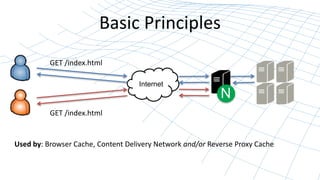
Basic Principles 
Internet 
N 
GET /index.html 
GET /index.html 
Used by: Browser Cache, Content Delivery Network and/or Reverse Proxy Cache
Mechanics of HTTP Caching 
• Origin server declares cacheability of content 
Expires: Tue, 6 May 2014 02:28:12 GMT 
Cache-Control: public, max-age=60 
X-Accel-Expires: 30 
Last-Modified: Tue, 29 April 2014 02:28:12 GMT 
ETag: "3e86-410-3596fbbc“ 
• Requesting client honors cacheability 
– May issue conditional GETs
What does NGINX cache? 
• Cache GET and HEAD with no Set-Cookie response 
• Uniqueness defined by raw URL or: 
proxy_cache_key $scheme$proxy_host$uri$is_args$args; 
• Cache time defined by 
– X-Accel-Expires 
– Cache-Control 
– Expires http://www.w3.org/Protocols/rfc2616/rfc2616-sec13.html
NGINX IN OPERATION…
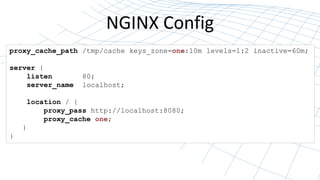
NGINX Config 
proxy_cache_path /tmp/cache keys_zone=one:10m levels=1:2 inactive=60m; 
server { 
listen 80; 
server_name localhost; 
location / { 
proxy_pass http://localhost:8080; 
proxy_cache one; 
} 
}
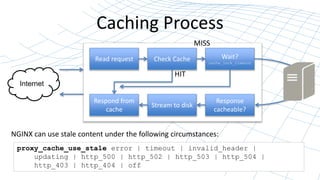
Caching Process 
Internet 
MISS 
Read request Wait? 
Check Cache 
Respond from 
cache 
cache_lock_timeout 
Response 
cacheable? 
HIT 
Stream to disk 
NGINX can use stale content under the following circumstances: 
proxy_cache_use_stale error | timeout | invalid_header | 
updating | http_500 | http_502 | http_503 | http_504 | 
http_403 | http_404 | off
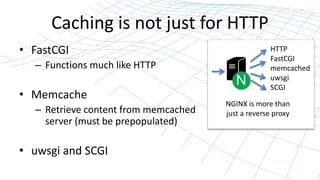
Caching is not just for HTTP 
• FastCGI 
– Functions much like HTTP 
• Memcache 
– Retrieve content from memcached 
server (must be prepopulated) 
• uwsgi and SCGI 
N 
HTTP 
FastCGI 
memcached 
uwsgi 
SCGI 
NGINX is more than 
just a reverse proxy
HOW TO UNDERSTAND WHAT’S GOING ON
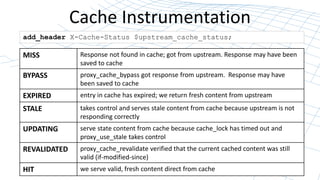
Cache Instrumentation 
add_header X-Cache-Status $upstream_cache_status; 
MISS Response not found in cache; got from upstream. Response may have been 
saved to cache 
BYPASS proxy_cache_bypass got response from upstream. Response may have 
been saved to cache 
EXPIRED entry in cache has expired; we return fresh content from upstream 
STALE takes control and serves stale content from cache because upstream is not 
responding correctly 
UPDATING serve state content from cache because cache_lock has timed out and 
proxy_use_stale takes control 
REVALIDATED proxy_cache_revalidate verified that the current cached content was still 
valid (if-modified-since) 
HIT we serve valid, fresh content direct from cache
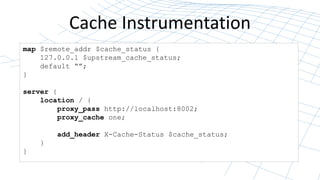
Cache Instrumentation 
map $remote_addr $cache_status { 
127.0.0.1 $upstream_cache_status; 
default “”; 
} 
server { 
location / { 
proxy_pass http://localhost:8002; 
proxy_cache one; 
add_header X-Cache-Status $cache_status; 
} 
}
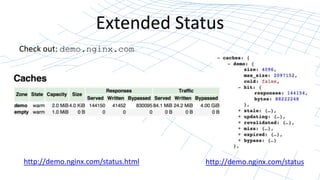
Extended Status 
Check out: demo.nginx.com 
http://demo.nginx.com/status.html http://demo.nginx.com/status
HOW CONTENT CACHING FUNCTIONS 
IN NGINX
How it works... 
• NGINX uses a persistent disk-based cache 
– OS Page Cache keeps content in memory, with hints from 
NGINX processes 
• We’ll look at: 
– How is content stored in the cache? 
– How is the cache loaded at startup? 
– Pruning the cache over time 
– Purging content manually from the cache
How is cached content stored? 
proxy_cache_path /tmp/cache keys_zone=one:10m levels=1:2 
max_size=40m; 
• Define cache key: 
proxy_cache_key $scheme$proxy_host$uri$is_args$args; 
• Get the content into the cache, then check the md5 
$ echo -n "httplocalhost:8002/time.php" | md5sum 
6d91b1ec887b7965d6a926cff19379b4 - 
• Verify it’s there: 
$ cat /tmp/cache/4/9b/6d91b1ec887b7965d6a926cff19379b4
Loading cache from disk 
• Cache metadata stored in shared memory segment 
• Populated at startup from cache by cache loader 
proxy_cache_path path keys_zone=name:size 
[loader_files=number] [loader_threshold=time] [loader_sleep=time]; 
(100) (200ms) (50ms) 
– Loads files in blocks of 100 
– Takes no longer than 200ms 
– Pauses for 50ms, then repeats
Managing the disk cache 
• Cache Manager runs periodically, purging files that 
were inactive irrespective of cache time, deleteing 
files in LRU style if cache is too big 
proxy_cache_path path keys_zone=name:size 
[inactive=time] [max_size=size]; 
(10m) 
– Remove files that have not been used within 10m 
– Remove files if cache size exceeds max_size
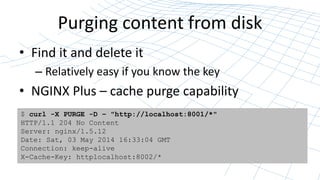
Purging content from disk 
• Find it and delete it 
– Relatively easy if you know the key 
• NGINX Plus – cache purge capability 
$ curl -X PURGE -D – "http://localhost:8001/*" 
HTTP/1.1 204 No Content 
Server: nginx/1.5.12 
Date: Sat, 03 May 2014 16:33:04 GMT 
Connection: keep-alive 
X-Cache-Key: httplocalhost:8002/*
CONTROLLING CACHING
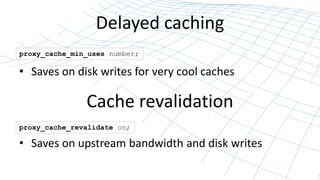
Delayed caching 
proxy_cache_min_uses number; 
• Saves on disk writes for very cool caches 
Cache revalidation 
proxy_cache_revalidate on; 
• Saves on upstream bandwidth and disk writes
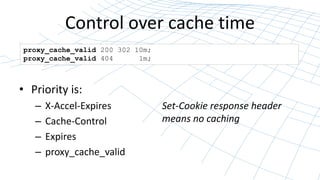
Control over cache time 
proxy_cache_valid 200 302 10m; 
proxy_cache_valid 404 1m; 
• Priority is: 
– X-Accel-Expires 
– Cache-Control 
– Expires 
– proxy_cache_valid 
Set-Cookie response header 
means no caching
Cache / don’t cache 
proxy_cache_bypass string ...; 
proxy_no_cache string ...; 
• Bypass the cache – go to origin; may cache result 
• No_Cache – if we go to origin, don’t cache result 
proxy_no_cache $cookie_nocache $arg_nocache $http_authorization; 
• Typically used with a complex cache key, and only if the 
origin does not sent appropriate cache-control reponses
Multiple Caches 
proxy_cache_path /tmp/cache1 keys_zone=one:10m levels=1:2 inactive=60s; 
proxy_cache_path /tmp/cache2 keys_zone=two:2m levels=1:2 inactive=20s; 
• Different cache policies for different tenants 
• Pin caches to specific disks 
• Temp-file considerations – put on same disk!: 
proxy_temp_path path [level1 [level2 [level3]]];
QUICK REVIEW – WHY CACHE?
Why is page speed important? 
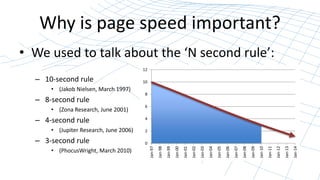
• We used to talk about the ‘N second rule’: 
– 10-second rule 
• (Jakob Nielsen, March 1997) 
– 8-second rule 
• (Zona Research, June 2001) 
– 4-second rule 
• (Jupiter Research, June 2006) 
– 3-second rule 
• (PhocusWright, March 2010) 
12 
10 
8 
6 
4 
2 
0 
Jan-97 
Jan-98 
Jan-99 
Jan-00 
Jan-01 
Jan-02 
Jan-03 
Jan-04 
Jan-05 
Jan-06 
Jan-07 
Jan-08 
Jan-09 
Jan-10 
Jan-11 
Jan-12 
Jan-13 
Jan-14
Google changed the rules 
“We want you to be able to get 
from one page to another as 
quickly as you turn the page on 
a book” 
Urs Hölzle, Google
The costs of poor performance 
• Google: search enhancements cost 0.5s page load 
– Ad CTR dropped 20% 
• Amazon: Artificially increased page load by 100ms 
– Customer revenue dropped 1% 
• Walmart, Yahoo, Shopzilla, Edmunds, Mozilla… 
– All reported similar effects on revenue 
• Google Pagerank – Page Speed affects Page Rank 
– Time to First Byte is what appears to count
NGINX Caching lets you 
Improve end-user performance 
Consolidate and simplify your web infrastructure 
Increase server capacity 
Insulate yourself from server failures
Closing thoughts 
• 38% of the world’s busiest websites use NGINX 
• Check out the blogs on nginx.com 
• Future webinars: nginx.com/webinars 
Try NGINX F/OSS (nginx.org) or NGINX Plus (nginx.com)

NGINX High-performance Caching

  • 1.
    NGINX High-performance Caching Introduced by Andrew Alexeev Presented by Owen Garrett Nginx, Inc.
  • 2.
    About this webinar Content Caching is one of the most effective ways to dramatically improve the performance of a web site. In this webinar, we’ll deep-dive into NGINX’s caching abilities and investigate the architecture used, debugging techniques and advanced configuration. By the end of the webinar, you’ll be well equipped to configure NGINX to cache content exactly as you need.
  • 3.
    BASIC PRINCIPLES OFCONTENT CACHING
  • 4.
    Basic Principles Internet N GET /index.html GET /index.html Used by: Browser Cache, Content Delivery Network and/or Reverse Proxy Cache
  • 5.
    Mechanics of HTTPCaching • Origin server declares cacheability of content Expires: Tue, 6 May 2014 02:28:12 GMT Cache-Control: public, max-age=60 X-Accel-Expires: 30 Last-Modified: Tue, 29 April 2014 02:28:12 GMT ETag: "3e86-410-3596fbbc“ • Requesting client honors cacheability – May issue conditional GETs
  • 6.
    What does NGINXcache? • Cache GET and HEAD with no Set-Cookie response • Uniqueness defined by raw URL or: proxy_cache_key $scheme$proxy_host$uri$is_args$args; • Cache time defined by – X-Accel-Expires – Cache-Control – Expires http://www.w3.org/Protocols/rfc2616/rfc2616-sec13.html
  • 7.
  • 8.
    NGINX Config proxy_cache_path/tmp/cache keys_zone=one:10m levels=1:2 inactive=60m; server { listen 80; server_name localhost; location / { proxy_pass http://localhost:8080; proxy_cache one; } }
  • 9.
    Caching Process Internet MISS Read request Wait? Check Cache Respond from cache cache_lock_timeout Response cacheable? HIT Stream to disk NGINX can use stale content under the following circumstances: proxy_cache_use_stale error | timeout | invalid_header | updating | http_500 | http_502 | http_503 | http_504 | http_403 | http_404 | off
  • 10.
    Caching is notjust for HTTP • FastCGI – Functions much like HTTP • Memcache – Retrieve content from memcached server (must be prepopulated) • uwsgi and SCGI N HTTP FastCGI memcached uwsgi SCGI NGINX is more than just a reverse proxy
  • 11.
    HOW TO UNDERSTANDWHAT’S GOING ON
  • 12.
    Cache Instrumentation add_headerX-Cache-Status $upstream_cache_status; MISS Response not found in cache; got from upstream. Response may have been saved to cache BYPASS proxy_cache_bypass got response from upstream. Response may have been saved to cache EXPIRED entry in cache has expired; we return fresh content from upstream STALE takes control and serves stale content from cache because upstream is not responding correctly UPDATING serve state content from cache because cache_lock has timed out and proxy_use_stale takes control REVALIDATED proxy_cache_revalidate verified that the current cached content was still valid (if-modified-since) HIT we serve valid, fresh content direct from cache
  • 13.
    Cache Instrumentation map$remote_addr $cache_status { 127.0.0.1 $upstream_cache_status; default “”; } server { location / { proxy_pass http://localhost:8002; proxy_cache one; add_header X-Cache-Status $cache_status; } }
  • 14.
    Extended Status Checkout: demo.nginx.com http://demo.nginx.com/status.html http://demo.nginx.com/status
  • 15.
    HOW CONTENT CACHINGFUNCTIONS IN NGINX
  • 16.
    How it works... • NGINX uses a persistent disk-based cache – OS Page Cache keeps content in memory, with hints from NGINX processes • We’ll look at: – How is content stored in the cache? – How is the cache loaded at startup? – Pruning the cache over time – Purging content manually from the cache
  • 17.
    How is cachedcontent stored? proxy_cache_path /tmp/cache keys_zone=one:10m levels=1:2 max_size=40m; • Define cache key: proxy_cache_key $scheme$proxy_host$uri$is_args$args; • Get the content into the cache, then check the md5 $ echo -n "httplocalhost:8002/time.php" | md5sum 6d91b1ec887b7965d6a926cff19379b4 - • Verify it’s there: $ cat /tmp/cache/4/9b/6d91b1ec887b7965d6a926cff19379b4
  • 18.
    Loading cache fromdisk • Cache metadata stored in shared memory segment • Populated at startup from cache by cache loader proxy_cache_path path keys_zone=name:size [loader_files=number] [loader_threshold=time] [loader_sleep=time]; (100) (200ms) (50ms) – Loads files in blocks of 100 – Takes no longer than 200ms – Pauses for 50ms, then repeats
  • 19.
    Managing the diskcache • Cache Manager runs periodically, purging files that were inactive irrespective of cache time, deleteing files in LRU style if cache is too big proxy_cache_path path keys_zone=name:size [inactive=time] [max_size=size]; (10m) – Remove files that have not been used within 10m – Remove files if cache size exceeds max_size
  • 20.
    Purging content fromdisk • Find it and delete it – Relatively easy if you know the key • NGINX Plus – cache purge capability $ curl -X PURGE -D – "http://localhost:8001/*" HTTP/1.1 204 No Content Server: nginx/1.5.12 Date: Sat, 03 May 2014 16:33:04 GMT Connection: keep-alive X-Cache-Key: httplocalhost:8002/*
  • 21.
  • 22.
    Delayed caching proxy_cache_min_usesnumber; • Saves on disk writes for very cool caches Cache revalidation proxy_cache_revalidate on; • Saves on upstream bandwidth and disk writes
  • 23.
    Control over cachetime proxy_cache_valid 200 302 10m; proxy_cache_valid 404 1m; • Priority is: – X-Accel-Expires – Cache-Control – Expires – proxy_cache_valid Set-Cookie response header means no caching
  • 24.
    Cache / don’tcache proxy_cache_bypass string ...; proxy_no_cache string ...; • Bypass the cache – go to origin; may cache result • No_Cache – if we go to origin, don’t cache result proxy_no_cache $cookie_nocache $arg_nocache $http_authorization; • Typically used with a complex cache key, and only if the origin does not sent appropriate cache-control reponses
  • 25.
    Multiple Caches proxy_cache_path/tmp/cache1 keys_zone=one:10m levels=1:2 inactive=60s; proxy_cache_path /tmp/cache2 keys_zone=two:2m levels=1:2 inactive=20s; • Different cache policies for different tenants • Pin caches to specific disks • Temp-file considerations – put on same disk!: proxy_temp_path path [level1 [level2 [level3]]];
  • 26.
    QUICK REVIEW –WHY CACHE?
  • 27.
    Why is pagespeed important? • We used to talk about the ‘N second rule’: – 10-second rule • (Jakob Nielsen, March 1997) – 8-second rule • (Zona Research, June 2001) – 4-second rule • (Jupiter Research, June 2006) – 3-second rule • (PhocusWright, March 2010) 12 10 8 6 4 2 0 Jan-97 Jan-98 Jan-99 Jan-00 Jan-01 Jan-02 Jan-03 Jan-04 Jan-05 Jan-06 Jan-07 Jan-08 Jan-09 Jan-10 Jan-11 Jan-12 Jan-13 Jan-14
  • 28.
    Google changed therules “We want you to be able to get from one page to another as quickly as you turn the page on a book” Urs Hölzle, Google
  • 29.
    The costs ofpoor performance • Google: search enhancements cost 0.5s page load – Ad CTR dropped 20% • Amazon: Artificially increased page load by 100ms – Customer revenue dropped 1% • Walmart, Yahoo, Shopzilla, Edmunds, Mozilla… – All reported similar effects on revenue • Google Pagerank – Page Speed affects Page Rank – Time to First Byte is what appears to count
  • 30.
    NGINX Caching letsyou Improve end-user performance Consolidate and simplify your web infrastructure Increase server capacity Insulate yourself from server failures
  • 31.
    Closing thoughts •38% of the world’s busiest websites use NGINX • Check out the blogs on nginx.com • Future webinars: nginx.com/webinars Try NGINX F/OSS (nginx.org) or NGINX Plus (nginx.com)

Editor's Notes

  • #5 Why cache – three reasons – performance improvements, capacity improvements, and resilience to failures in backends
  • #8 Cool because is trivial to configure
  • #10 Error: an error occurred while establishing a connection with the server, passing a request to it, or reading the response header; Timeout: a timeout has occurred while establishing a connection with the server, passing a request to it, or reading the response header; invalid_header: a server returned an empty or invalid response; Updating – content is being refreshed and a lock is in place http_500: a server returned a response with the code 500; http_502: a server returned a response with the code 502; http_503: a server returned a response with the code 503; http_504: a server returned a response with the code 504; http_403: a server returned a response with the code 403; http_404: a server returned a response with the code 404; Off: disables passing a request to the next server.
  • #12 Complex. We make it really easy
  • #16 It uses same tech as static content that nginx is renowned for
  • #22 Get smart
  • #31 http://www.strangeloopnetworks.com/assets/images/infographic2.jpg http://www.thinkwithgoogle.com/articles/the-google-gospel-of-speed-urs-hoelzle.html http://moz.com/blog/how-website-speed-actually-impacts-search-ranking What does performance really mean to you? Revenue Ad CTR Employee and partner satisfaction What devices do your users use? What network conditions are they under?
  • #32 1. Deliver all content at the speed of nginx 2. Compared to multiple point solutions 3. Cache for one second example 4. proxy_cache_use_stale