


How QBerg scaled to store data
longer, query it faster
Openworks 2019
QBerg: the company
▪ QBerg is a market research institute
▪ QBerg deals with consumer goods’ price intelligence in Italy,
Europe and Latam.
▪ What we do:
- Collect price & presence of products into stores, flyers, e-commerce
sites and newsletters;
- Manage the data collected with automatic and human activity;
- Deliver aggregated data or raw-data format to our customers in many
ways (portal with analysis and research functions, Spredsheets, alert e-
mails, PPTx, csv, etc)
QPoint
▪ QBerg has lanched the new innovative App in early February
2019:
https://vimeo.com/channels/qpointeng/316057717
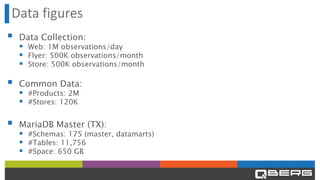
Data figures
▪ Data Collection:
▪ Web: 1M observations/day
▪ Flyer: 500K observations/month
▪ Store: 500K observations/month
▪ Common Data:
▪ #Products: 2M
▪ #Stores: 120K
▪ MariaDB Master (TX):
▪ #Schemas: 175 (master, datamarts)
▪ #Tables: 11,756
▪ #Space: 650 GB
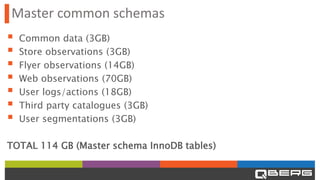
Master common schemas
▪ Common data (3GB)
▪ Store observations (3GB)
▪ Flyer observations (14GB)
▪ Web observations (70GB)
▪ User logs/actions (18GB)
▪ Third party catalogues (3GB)
▪ User segmentations (3GB)
TOTAL 114 GB (Master schema InnoDB tables)
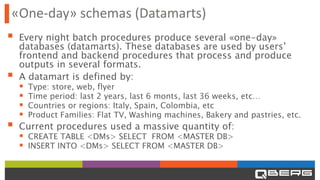
«One-day» schemas (Datamarts)
▪ Every night batch procedures produce several «one-day»
databases (datamarts). These databases are used by users’
frontend and backend procedures that process and produce
outputs in several formats.
▪ A datamart is defined by:
▪ Type: store, web, flyer
▪ Time period: last 2 years, last 6 monts, last 36 weeks, etc…
▪ Countries or regions: Italy, Spain, Colombia, etc
▪ Product Families: Flat TV, Washing machines, Bakery and pastries, etc.
▪ Current procedures used a massive quantity of:
▪ CREATE TABLE <DMs> SELECT FROM <MASTER DB>
▪ INSERT INTO <DMs> SELECT FROM <MASTER DB>
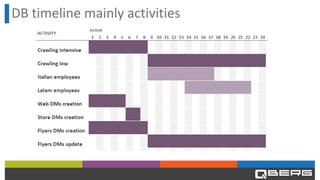
DB timeline mainly activities
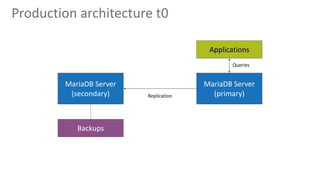
Production architecture t0
MariaDB Server
(secondary)
MariaDB Server
(primary)
Applications
Queries
Replication
Backups
Issues
▪ General issues:
▪ Crawler queue was very heavy (200 concurrencies)
▪ Having OLTP and OLAP operations on the same db machine is not a
good idea…
▪ Web datamarts
▪ The creation with ETL CREATE SELECT was very slow
▪ The customer queries were slow
▪ The amount of periods (historical data time span) were too little
Targets
▪ Make customer queries faster
▪ Uncouple OLTP and OLAP operations
▪ Increase datamarts periods (from 4 to 24 months on web prices)
Solution phase 1
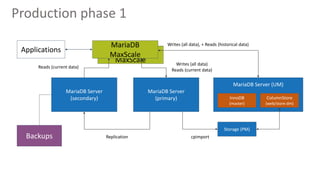
▪ Introduced MariaDB AX using INNODB and COLUMSTORE:
▪ INNODB Engine to manage master schemas
▪ Column Store Engine to manage store and web datamart schemas
▪ Datamart schemas are produced with the current procedure and
copied from TX to AX with cpimport
▪ Introduced MariaDB Maxscale:
▪ Routing query to TX (master / slave) or AX, based on schema used by
query (using regex)
▪ Duplicates DDL (Data Definition Language) statements on MariaDB AX
MariaDB
MaxScale
Production phase 1
Applications
MariaDB Server
(secondary)
MariaDB Server
(primary)
MariaDB Server (UM)
MariaDB
MaxScale
Storage (PM)
ColumnStore
(web/store dm)
InnoDB
(master)
Backups
Reads (current data)
Writes (all data), + Reads (historical data)
Replication cpimport
Writes (all data)
Reads (current data)
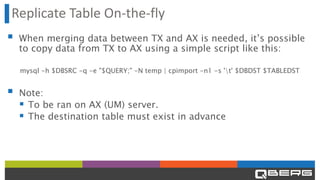
Replicate Table On-the-fly
▪ When merging data between TX and AX is needed, it’s possible
to copy data from TX to AX using a simple script like this:
mysql -h $DBSRC -q -e "$QUERY;" -N temp | cpimport -n1 -s 't' $DBDST $TABLEDST
▪ Note:
▪ To be ran on AX (UM) server.
▪ The destination table must exist in advance
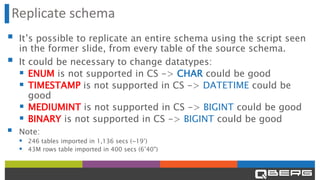
Replicate schema
▪ It’s possible to replicate an entire schema using the script seen
in the former slide, from every table of the source schema.
▪ It could be necessary to change datatypes:
▪ ENUM is not supported in CS -> CHAR could be good
▪ TIMESTAMP is not supported in CS -> DATETIME could be
good
▪ MEDIUMINT is not supported in CS -> BIGINT could be good
▪ BINARY is not supported in CS -> BIGINT could be good
▪ Note:
▪ 246 tables imported in 1,136 secs (~19’)
▪ 43M rows table imported in 400 secs (6’40")
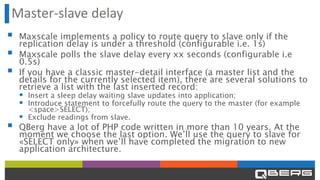
Master-slave delay
▪ Maxscale implements a policy to route query to slave only if the
replication delay is under a threshold (configurable i.e. 1s)
▪ Maxscale polls the slave delay every xx seconds (configurable i.e
0.5s)
▪ If you have a classic master-detail interface (a master list and the
details for the currently selected item), there are several solutions to
retrieve a list with the last inserted record:
▪ Insert a sleep delay waiting slave updates into application;
▪ Introduce statement to forcefully route the query to the master (for example
<space>SELECT);
▪ Exclude readings from slave.
▪ QBerg have a lot of PHP code written in more than 10 years. At the
moment we choose the last option. We’ll use the query to slave for
«SELECT only» when we’ll have completed the migration to new
application architecture.
MariaDB
MaxScale
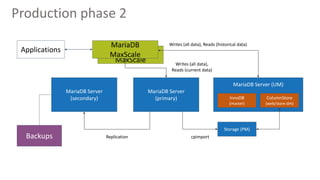
Production phase 2
Applications
MariaDB Server
(secondary)
MariaDB Server
(primary)
MariaDB Server (UM)
MariaDB
MaxScale
Storage (PM)
ColumnStore
(web/store dm)
InnoDB
(master)
Backups
Writes (all data), Reads (historical data)
Replication cpimport
Writes (all data),
Reads (current data)
MariaDB
MaxScale
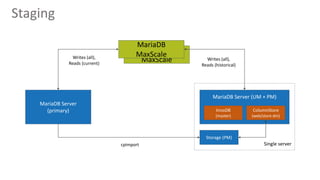
Staging
MariaDB Server
(primary)
MariaDB Server (UM + PM)
MariaDB
MaxScale
Storage (PM)
ColumnStore
(web/store dm)
InnoDB
(master)
Writes (all),
Reads (historical)
cpimport
Writes (all),
Reads (current)
Single server
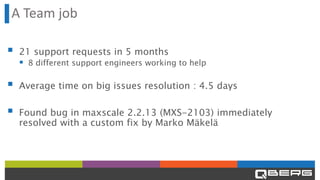
A Team job
▪ 21 support requests in 5 months
▪ 8 different support engineers working to help
▪ Average time on big issues resolution : 4.5 days
▪ Found bug in maxscale 2.2.13 (MXS-2103) immediately
resolved with a custom fix by Marko Mäkelä
THANKS

How QBerg scaled to store data longer, query it faster

  • 1.
    How QBerg scaledto store data longer, query it faster Openworks 2019
  • 2.
    QBerg: the company ▪QBerg is a market research institute ▪ QBerg deals with consumer goods’ price intelligence in Italy, Europe and Latam. ▪ What we do: - Collect price & presence of products into stores, flyers, e-commerce sites and newsletters; - Manage the data collected with automatic and human activity; - Deliver aggregated data or raw-data format to our customers in many ways (portal with analysis and research functions, Spredsheets, alert e- mails, PPTx, csv, etc)
  • 3.
    QPoint ▪ QBerg haslanched the new innovative App in early February 2019: https://vimeo.com/channels/qpointeng/316057717
  • 5.
    Data figures ▪ DataCollection: ▪ Web: 1M observations/day ▪ Flyer: 500K observations/month ▪ Store: 500K observations/month ▪ Common Data: ▪ #Products: 2M ▪ #Stores: 120K ▪ MariaDB Master (TX): ▪ #Schemas: 175 (master, datamarts) ▪ #Tables: 11,756 ▪ #Space: 650 GB
  • 6.
    Master common schemas ▪Common data (3GB) ▪ Store observations (3GB) ▪ Flyer observations (14GB) ▪ Web observations (70GB) ▪ User logs/actions (18GB) ▪ Third party catalogues (3GB) ▪ User segmentations (3GB) TOTAL 114 GB (Master schema InnoDB tables)
  • 7.
    «One-day» schemas (Datamarts) ▪Every night batch procedures produce several «one-day» databases (datamarts). These databases are used by users’ frontend and backend procedures that process and produce outputs in several formats. ▪ A datamart is defined by: ▪ Type: store, web, flyer ▪ Time period: last 2 years, last 6 monts, last 36 weeks, etc… ▪ Countries or regions: Italy, Spain, Colombia, etc ▪ Product Families: Flat TV, Washing machines, Bakery and pastries, etc. ▪ Current procedures used a massive quantity of: ▪ CREATE TABLE <DMs> SELECT FROM <MASTER DB> ▪ INSERT INTO <DMs> SELECT FROM <MASTER DB>
  • 8.
  • 9.
    Production architecture t0 MariaDBServer (secondary) MariaDB Server (primary) Applications Queries Replication Backups
  • 10.
    Issues ▪ General issues: ▪Crawler queue was very heavy (200 concurrencies) ▪ Having OLTP and OLAP operations on the same db machine is not a good idea… ▪ Web datamarts ▪ The creation with ETL CREATE SELECT was very slow ▪ The customer queries were slow ▪ The amount of periods (historical data time span) were too little
  • 11.
    Targets ▪ Make customerqueries faster ▪ Uncouple OLTP and OLAP operations ▪ Increase datamarts periods (from 4 to 24 months on web prices)
  • 12.
    Solution phase 1 ▪Introduced MariaDB AX using INNODB and COLUMSTORE: ▪ INNODB Engine to manage master schemas ▪ Column Store Engine to manage store and web datamart schemas ▪ Datamart schemas are produced with the current procedure and copied from TX to AX with cpimport ▪ Introduced MariaDB Maxscale: ▪ Routing query to TX (master / slave) or AX, based on schema used by query (using regex) ▪ Duplicates DDL (Data Definition Language) statements on MariaDB AX
  • 13.
    MariaDB MaxScale Production phase 1 Applications MariaDBServer (secondary) MariaDB Server (primary) MariaDB Server (UM) MariaDB MaxScale Storage (PM) ColumnStore (web/store dm) InnoDB (master) Backups Reads (current data) Writes (all data), + Reads (historical data) Replication cpimport Writes (all data) Reads (current data)
  • 14.
    Replicate Table On-the-fly ▪When merging data between TX and AX is needed, it’s possible to copy data from TX to AX using a simple script like this: mysql -h $DBSRC -q -e "$QUERY;" -N temp | cpimport -n1 -s 't' $DBDST $TABLEDST ▪ Note: ▪ To be ran on AX (UM) server. ▪ The destination table must exist in advance
  • 15.
    Replicate schema ▪ It’spossible to replicate an entire schema using the script seen in the former slide, from every table of the source schema. ▪ It could be necessary to change datatypes: ▪ ENUM is not supported in CS -> CHAR could be good ▪ TIMESTAMP is not supported in CS -> DATETIME could be good ▪ MEDIUMINT is not supported in CS -> BIGINT could be good ▪ BINARY is not supported in CS -> BIGINT could be good ▪ Note: ▪ 246 tables imported in 1,136 secs (~19’) ▪ 43M rows table imported in 400 secs (6’40")
  • 16.
    Master-slave delay ▪ Maxscaleimplements a policy to route query to slave only if the replication delay is under a threshold (configurable i.e. 1s) ▪ Maxscale polls the slave delay every xx seconds (configurable i.e 0.5s) ▪ If you have a classic master-detail interface (a master list and the details for the currently selected item), there are several solutions to retrieve a list with the last inserted record: ▪ Insert a sleep delay waiting slave updates into application; ▪ Introduce statement to forcefully route the query to the master (for example <space>SELECT); ▪ Exclude readings from slave. ▪ QBerg have a lot of PHP code written in more than 10 years. At the moment we choose the last option. We’ll use the query to slave for «SELECT only» when we’ll have completed the migration to new application architecture.
  • 17.
    MariaDB MaxScale Production phase 2 Applications MariaDBServer (secondary) MariaDB Server (primary) MariaDB Server (UM) MariaDB MaxScale Storage (PM) ColumnStore (web/store dm) InnoDB (master) Backups Writes (all data), Reads (historical data) Replication cpimport Writes (all data), Reads (current data)
  • 18.
    MariaDB MaxScale Staging MariaDB Server (primary) MariaDB Server(UM + PM) MariaDB MaxScale Storage (PM) ColumnStore (web/store dm) InnoDB (master) Writes (all), Reads (historical) cpimport Writes (all), Reads (current) Single server
  • 19.
    A Team job ▪21 support requests in 5 months ▪ 8 different support engineers working to help ▪ Average time on big issues resolution : 4.5 days ▪ Found bug in maxscale 2.2.13 (MXS-2103) immediately resolved with a custom fix by Marko Mäkelä
  • 20.