MariaDB Optimisation de
performances
Sebastien Giraud
Senior Solution Engineer
MariaDB plc
Agenda
● What is MariaDB
● Understanding MariaDB
● A brief overview of MariaDB's
architecture
● Where to find performance
● Identifying slowdowns
● Other options
Understand what is MariaDB
● Database
● Open source
● Multi engine/plugin
● Highly tunable (800 variables)
Understand what is MariaDB
● MariaDB is a modular solution
○ Storage engines
○ Plugins
● Linux like architecture
○ Highly tunable and expandable
○ 800 configuration variables
● Green solution (C source code)
○ Package size is 100 MB
● Inter engine replication
● Complete ecosystem
○ MaxScale
○ MariaBackup
○ MariaDB Shell
○ Connecteurs
○ Monitoring tools
Understand what is MariaDB
● Do NOT use default community edition
configuration in production
environments
● Understand application needs
○ R/W ratio
○ Max connection number
○ Cache hit ratio
Understand what is MariaDB
● Why MariaDB is magical
○ Inter engine replication
○ Transparent federator proxy
So what about
performances ?
Local performances : global memory
● User rights
○ Stored in memory
○ Used for each queries
● swappiness = 1
● Performance schema
● MariaDB Shell
○ Easy diagnostic
● Every storage engine consume
memory
Local performances : global memory
● table _open_cache
● table_definition_cache
● query_cache_size
● thread_cache
● MyIsam
○ key_buffer_size
● InnoDB
○ innodb_buffer_pool_size
○ innodb_additional_mem_pool_size
○ Innodb_log_buffer_size
Local performances : per session memory
● Per client allocation
● Per join and sort allocation
● Freeing memory at session end or
connection end
● Always thinking about OOM
● SWAP (again and again …)
Local performance : hard drive
● Persistence requiert disk access
● Disk redundancy
● Adjust async replication parameters
according your application needs
○ sync_binlog
○ sync_relay_log
And what if the performance
was elsewhere?
Performance elsewhere ?
● Adapting architecture to performance
requirements
● Understanding the use case
● Multiplying engines as needed
● Proxy federator to simplify everything
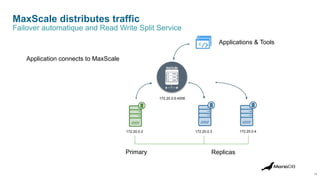
MaxScale distributes traffic
14
Primary Replicas
172.20.0.2 172.20.0.3 172.20.0.4
172.20.0.6:4006
Failover automatique and Read Write Split Service
Applications & Tools
Application connects to MaxScale
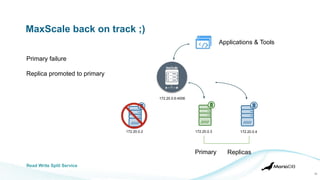
MaxScale back on track ;)
15
Primary Replicas
172.20.0.2 172.20.0.3 172.20.0.4
172.20.0.6:4006
Read Write Split Service
Applications & Tools
Primary failure
Replica promoted to primary
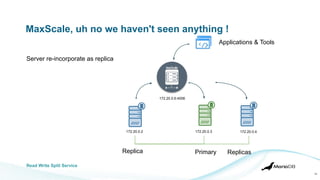
MaxScale, uh no we haven't seen anything !
16
Primary Replicas
172.20.0.2 172.20.0.3 172.20.0.4
172.20.0.6:4006
Read Write Split Service
Replica
Applications & Tools
Server re-incorporate as replica
In detail, the different
needs?
Analytical workloads ?
● Analytical workloads
○ Mainly read requirements
○ Write overhead
○ Very good solution for read requests
on large datasets
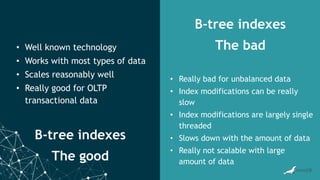
● B-tree model limits ?
B-tree indexes
The good
B-tree indexes
The bad
• Well known technology
• Works with most types of data
• Scales reasonably well
• Really good for OLTP
transactional data
• Really bad for unbalanced data
• Index modifications can be really
slow
• Index modifications are largely single
threaded
• Slows down with the amount of data
• Really not scalable with large
amount of data
In short, analytics ?
● Something that can compress a LOT of data
● Something that can be written to with fast, predictable performance
● Something that does not necessarily support transactions
○ It doesn't hurt, but performance is much more important
● A system capable of handling analytical queries
○ Ad hoc requests
○ Aggregated queries
○ Large datasets
● A system capable of adapting to data growth
● A system capable of ensuring a high level of availability
● Works with analysis tools such as Tableau, R, etc
Nouveauté ColumnStore
https://mariadb.com/docs/server/whats-new/mariadb-enterprise-columnstore-6/
● Agrégation de résultat de requête sur disque
○ Jeu de données de résultat supérieur à la mémoire disponible (>1TB)
● Augmentation de la précision DÉCIMALE de 18 à 38
● Compression LZ4 et Snappy
● Mise à jour des données transactionnelles à partir des données du ColumnStore
en plus de la jointure Cross Engine
UPDATE innodb_tab i
JOIN columnstore_tab c
ON i.col1 = c.col1
SET i.col2 = c.col2;
[Restricted]
Transactionnel ?
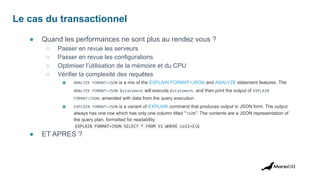
Le cas du transactionnel
● Quand les performances ne sont plus au rendez vous ?
○ Passer en revue les serveurs
○ Passer en revue les configurations
○ Optimiser l’utilisation de la mémoire et du CPU
○ Vérifier la complexité des requêtes
■ ANALYZE FORMAT=JSON is a mix of the EXPLAIN FORMAT=JSON and ANALYZE statement features. The
ANALYZE FORMAT=JSON $statement will execute $statement, and then print the output of EXPLAIN
FORMAT=JSON, amended with data from the query execution.
■ EXPLAIN FORMAT=JSON is a variant of EXPLAIN command that produces output in JSON form. The output
always has one row which has only one column titled "JSON". The contents are a JSON representation of
the query plan, formatted for readability:
EXPLAIN FORMAT=JSON SELECT * FROM t1 WHERE col1=1G
● ET APRES ?
Optimisation des cas transactionnel
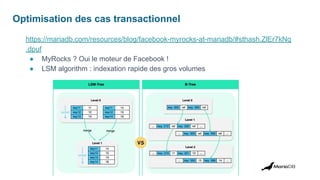
https://mariadb.com/resources/blog/facebook-myrocks-at-mariadb/#sthash.ZlEr7kNq
.dpuf
● MyRocks ? Oui le moteur de Facebook !
● LSM algorithm : indexation rapide des gros volumes
Et pourquoi pas diviser les schémas ?
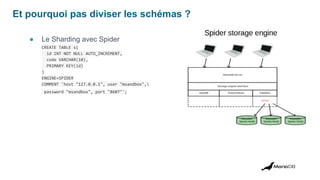
● Le Sharding avec Spider
CREATE TABLE s(
id INT NOT NULL AUTO_INCREMENT,
code VARCHAR(10),
PRIMARY KEY(id)
)
ENGINE=SPIDER
COMMENT 'host "127.0.0.1", user "msandbox",
password "msandbox", port "8607"';
Et pourquoi pas diviser les schémas ?
● Le Sharding avec MaxScale
[accounts_east]
type=server
address=192.168.56.102
port=3306
[accounts_west]
type=server
address=192.168.122.85
port=3306
[Sharded-Service]
type=service
router=schemarouter
servers=accounts_west,accounts_east
user=sharduser
password=YqztlYGDvZ8tVMe3GUm9XCwQi
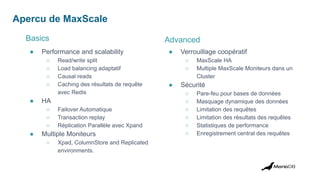
Apercu de MaxScale
Advanced
● Performance and scalability
○ Read/write split
○ Load balancing adaptatif
○ Causal reads
○ Caching des résultats de requête
avec Redis
● HA
○ Failover Automatique
○ Transaction replay
○ Réplication Parallèle avec Xpand
● Multiple Moniteurs
○ Xpad, ColumnStore and Replicated
environments.
● Verrouillage coopératif
○ MaxScale HA
○ Multiple MaxScale Moniteurs dans un
Cluster
● Sécurité
○ Pare-feu pour bases de données
○ Masquage dynamique des données
○ Limitation des requêtes
○ Limitation des résultats des requêtes
○ Statistiques de performance
○ Enregistrement central des requêtes
Basics
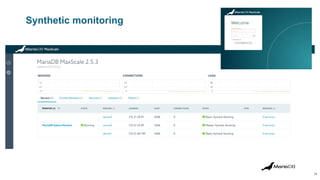
Synthetic monitoring
28
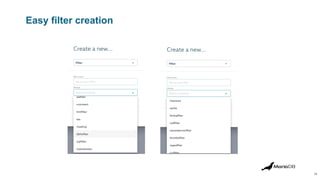
Easy filter creation
29
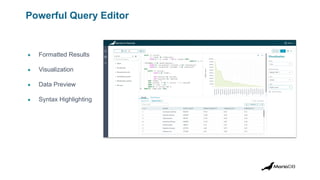
Powerful Query Editor
● Formatted Results
● Visualization
● Data Preview
● Syntax Highlighting
Performance in a nutshell
En résumé
Performances d'un seul noeud
● Thread pool
● Memory
● Thread
Performance d’un requête
● Les outils Explain, Analyze, MariaDB shell
En cluster async / semi sync
● Maxscale
● Réplication parallèle
● Distribution de la charge r/w split
Analytique
● Columnstore
Transactionnel
● MyRocks
● Spider
● MaxScale
Merci
seb@mariadb.com

MariaDB Paris Workshop 2023 - Performance Optimization

  • 1.
    MariaDB Optimisation de performances SebastienGiraud Senior Solution Engineer MariaDB plc
  • 2.
    Agenda ● What isMariaDB ● Understanding MariaDB ● A brief overview of MariaDB's architecture ● Where to find performance ● Identifying slowdowns ● Other options
  • 3.
    Understand what isMariaDB ● Database ● Open source ● Multi engine/plugin ● Highly tunable (800 variables)
  • 4.
    Understand what isMariaDB ● MariaDB is a modular solution ○ Storage engines ○ Plugins ● Linux like architecture ○ Highly tunable and expandable ○ 800 configuration variables ● Green solution (C source code) ○ Package size is 100 MB ● Inter engine replication ● Complete ecosystem ○ MaxScale ○ MariaBackup ○ MariaDB Shell ○ Connecteurs ○ Monitoring tools
  • 5.
    Understand what isMariaDB ● Do NOT use default community edition configuration in production environments ● Understand application needs ○ R/W ratio ○ Max connection number ○ Cache hit ratio
  • 6.
    Understand what isMariaDB ● Why MariaDB is magical ○ Inter engine replication ○ Transparent federator proxy
  • 7.
  • 8.
    Local performances :global memory ● User rights ○ Stored in memory ○ Used for each queries ● swappiness = 1 ● Performance schema ● MariaDB Shell ○ Easy diagnostic ● Every storage engine consume memory
  • 9.
    Local performances :global memory ● table _open_cache ● table_definition_cache ● query_cache_size ● thread_cache ● MyIsam ○ key_buffer_size ● InnoDB ○ innodb_buffer_pool_size ○ innodb_additional_mem_pool_size ○ Innodb_log_buffer_size
  • 10.
    Local performances :per session memory ● Per client allocation ● Per join and sort allocation ● Freeing memory at session end or connection end ● Always thinking about OOM ● SWAP (again and again …)
  • 11.
    Local performance :hard drive ● Persistence requiert disk access ● Disk redundancy ● Adjust async replication parameters according your application needs ○ sync_binlog ○ sync_relay_log
  • 12.
    And what ifthe performance was elsewhere?
  • 13.
    Performance elsewhere ? ●Adapting architecture to performance requirements ● Understanding the use case ● Multiplying engines as needed ● Proxy federator to simplify everything
  • 14.
    MaxScale distributes traffic 14 PrimaryReplicas 172.20.0.2 172.20.0.3 172.20.0.4 172.20.0.6:4006 Failover automatique and Read Write Split Service Applications & Tools Application connects to MaxScale
  • 15.
    MaxScale back ontrack ;) 15 Primary Replicas 172.20.0.2 172.20.0.3 172.20.0.4 172.20.0.6:4006 Read Write Split Service Applications & Tools Primary failure Replica promoted to primary
  • 16.
    MaxScale, uh nowe haven't seen anything ! 16 Primary Replicas 172.20.0.2 172.20.0.3 172.20.0.4 172.20.0.6:4006 Read Write Split Service Replica Applications & Tools Server re-incorporate as replica
  • 17.
    In detail, thedifferent needs?
  • 18.
    Analytical workloads ? ●Analytical workloads ○ Mainly read requirements ○ Write overhead ○ Very good solution for read requests on large datasets ● B-tree model limits ?
  • 19.
    B-tree indexes The good B-treeindexes The bad • Well known technology • Works with most types of data • Scales reasonably well • Really good for OLTP transactional data • Really bad for unbalanced data • Index modifications can be really slow • Index modifications are largely single threaded • Slows down with the amount of data • Really not scalable with large amount of data
  • 20.
    In short, analytics? ● Something that can compress a LOT of data ● Something that can be written to with fast, predictable performance ● Something that does not necessarily support transactions ○ It doesn't hurt, but performance is much more important ● A system capable of handling analytical queries ○ Ad hoc requests ○ Aggregated queries ○ Large datasets ● A system capable of adapting to data growth ● A system capable of ensuring a high level of availability ● Works with analysis tools such as Tableau, R, etc
  • 21.
    Nouveauté ColumnStore https://mariadb.com/docs/server/whats-new/mariadb-enterprise-columnstore-6/ ● Agrégationde résultat de requête sur disque ○ Jeu de données de résultat supérieur à la mémoire disponible (>1TB) ● Augmentation de la précision DÉCIMALE de 18 à 38 ● Compression LZ4 et Snappy ● Mise à jour des données transactionnelles à partir des données du ColumnStore en plus de la jointure Cross Engine UPDATE innodb_tab i JOIN columnstore_tab c ON i.col1 = c.col1 SET i.col2 = c.col2; [Restricted]
  • 22.
  • 23.
    Le cas dutransactionnel ● Quand les performances ne sont plus au rendez vous ? ○ Passer en revue les serveurs ○ Passer en revue les configurations ○ Optimiser l’utilisation de la mémoire et du CPU ○ Vérifier la complexité des requêtes ■ ANALYZE FORMAT=JSON is a mix of the EXPLAIN FORMAT=JSON and ANALYZE statement features. The ANALYZE FORMAT=JSON $statement will execute $statement, and then print the output of EXPLAIN FORMAT=JSON, amended with data from the query execution. ■ EXPLAIN FORMAT=JSON is a variant of EXPLAIN command that produces output in JSON form. The output always has one row which has only one column titled "JSON". The contents are a JSON representation of the query plan, formatted for readability: EXPLAIN FORMAT=JSON SELECT * FROM t1 WHERE col1=1G ● ET APRES ?
  • 24.
    Optimisation des castransactionnel https://mariadb.com/resources/blog/facebook-myrocks-at-mariadb/#sthash.ZlEr7kNq .dpuf ● MyRocks ? Oui le moteur de Facebook ! ● LSM algorithm : indexation rapide des gros volumes
  • 25.
    Et pourquoi pasdiviser les schémas ? ● Le Sharding avec Spider CREATE TABLE s( id INT NOT NULL AUTO_INCREMENT, code VARCHAR(10), PRIMARY KEY(id) ) ENGINE=SPIDER COMMENT 'host "127.0.0.1", user "msandbox", password "msandbox", port "8607"';
  • 26.
    Et pourquoi pasdiviser les schémas ? ● Le Sharding avec MaxScale [accounts_east] type=server address=192.168.56.102 port=3306 [accounts_west] type=server address=192.168.122.85 port=3306 [Sharded-Service] type=service router=schemarouter servers=accounts_west,accounts_east user=sharduser password=YqztlYGDvZ8tVMe3GUm9XCwQi
  • 27.
    Apercu de MaxScale Advanced ●Performance and scalability ○ Read/write split ○ Load balancing adaptatif ○ Causal reads ○ Caching des résultats de requête avec Redis ● HA ○ Failover Automatique ○ Transaction replay ○ Réplication Parallèle avec Xpand ● Multiple Moniteurs ○ Xpad, ColumnStore and Replicated environments. ● Verrouillage coopératif ○ MaxScale HA ○ Multiple MaxScale Moniteurs dans un Cluster ● Sécurité ○ Pare-feu pour bases de données ○ Masquage dynamique des données ○ Limitation des requêtes ○ Limitation des résultats des requêtes ○ Statistiques de performance ○ Enregistrement central des requêtes Basics
  • 28.
  • 29.
  • 30.
    Powerful Query Editor ●Formatted Results ● Visualization ● Data Preview ● Syntax Highlighting
  • 31.
  • 32.
    En résumé Performances d'unseul noeud ● Thread pool ● Memory ● Thread Performance d’un requête ● Les outils Explain, Analyze, MariaDB shell En cluster async / semi sync ● Maxscale ● Réplication parallèle ● Distribution de la charge r/w split Analytique ● Columnstore Transactionnel ● MyRocks ● Spider ● MaxScale
  • 33.