Advanced MariaDB features
that developers love
Federico Razzoli
vettabase.com
Advanced MariaDB features
that developers 💘 💖 💕 😍😍😍
Federico Razzoli
vettabase.com
$ whoami
Hi, I’m Federico Razzoli, founder of Vettabase
Database specialist, open source supporter,
long time MariaDB and MySQL user
Despite my accent, I live in 󰧺
● vettabase.com
● federico.razzoli@vettabase.com
This talk is…
● NOT a MariaDB tutorial
● We’ll see some cool MariaDB features arbitrarily chosen by me:
○ CONNECT storage engine
○ Temporal table
○ JSON columns
● In the process, we’ll also see quickly some other nice features
Querying remote / heterogeneous
data sources… in SQL
Why?
● Because… it’s SQL!
● Because sometimes we import data from other sources
● Because you may have to interact with systems you don’t control
CONNECT storage engine
● MariaDB doesn’t know how to read/write tables, indexes, data caches…
● These actions are delegated to plugins called storage engines
● A cool consequence is that when we run a query they could do anything they
like
○ BLACKHOLE does nothing
○ SEQUENCE returns numerical sequences
○ Run SHOW ENGINES
● CONNECT treats an external data source as if it was a local table
● So you can run your SELECTs, JOINs, INSERTs…
CONNECT storage engine
● Files: CSV, JSON, XML, tables in HTML pages… files in archives… custom files…
● Remote databases: Remote databases: MySQL protocol, MongoDB, ODBC, JDBC
● Data transformation
● More
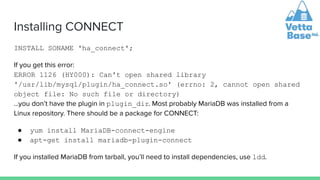
Installing CONNECT
INSTALL SONAME 'ha_connect';
If you get this error:
ERROR 1126 (HY000): Can't open shared library
'/usr/lib/mysql/plugin/ha_connect.so' (errno: 2, cannot open shared
object file: No such file or directory)
…you don’t have the plugin in plugin_dir. Most probably MariaDB was installed from a
Linux repository. There should be a package for CONNECT:
● yum install MariaDB-connect-engine
● apt-get install mariadb-plugin-connect
If you installed MariaDB from tarball, you’ll need to install dependencies, use ldd.
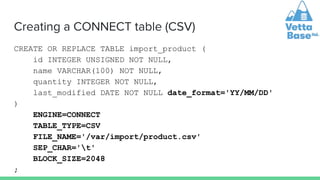
Creating a CONNECT table (CSV)
CREATE OR REPLACE TABLE import_product (
id INTEGER UNSIGNED NOT NULL,
name VARCHAR(100) NOT NULL,
quantity INTEGER NOT NULL,
last_modified DATE NOT NULL date_format='YY/MM/DD'
)
ENGINE=CONNECT
TABLE_TYPE=CSV
FILE_NAME='/var/import/product.csv'
SEP_CHAR='t'
BLOCK_SIZE=2048
;
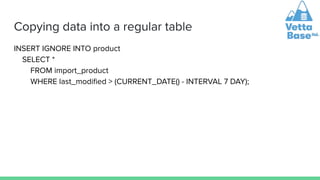
Copying data into a regular table
INSERT IGNORE INTO product
SELECT *
FROM import_product
WHERE last_modified > (CURRENT_DATE() - INTERVAL 7 DAY);
Inserting data into CONNECT
MariaDB [test]> INSERT INTO import_product
(id, name, quantity, last_modified)
VALUES (24, 'Sonic screwdriver', 100,
CURRENT_DATE());
Query OK, 1 row affected (0.067 sec)
MariaDB [test]> ! tail -1 /var/import/product.csv
24 Sonic screwdriver 100 22/06/20
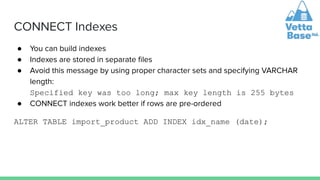
CONNECT Indexes
● You can build indexes
● Indexes are stored in separate files
● Avoid this message by using proper character sets and specifying VARCHAR
length:
Specified key was too long; max key length is 255 bytes
● CONNECT indexes work better if rows are pre-ordered
ALTER TABLE import_product ADD INDEX idx_name (date);
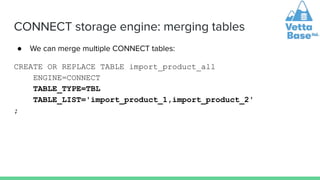
CONNECT storage engine: merging tables
● We can merge multiple CONNECT tables:
CREATE OR REPLACE TABLE import_product_all
ENGINE=CONNECT
TABLE_TYPE=TBL
TABLE_LIST='import_product_1,import_product_2'
;
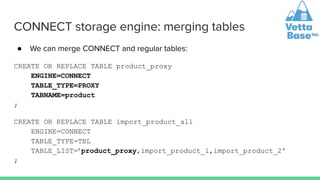
CONNECT storage engine: merging tables
● We can merge CONNECT and regular tables:
CREATE OR REPLACE TABLE product_proxy
ENGINE=CONNECT
TABLE_TYPE=PROXY
TABNAME=product
;
CREATE OR REPLACE TABLE import_product_all
ENGINE=CONNECT
TABLE_TYPE=TBL
TABLE_LIST='product_proxy,import_product_1,import_product_2'
;
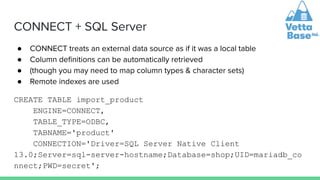
CONNECT + SQL Server
● CONNECT treats an external data source as if it was a local table
● Column definitions can be automatically retrieved
● (though you may need to map column types & character sets)
● Remote indexes are used
CREATE TABLE import_product
ENGINE=CONNECT,
TABLE_TYPE=ODBC,
TABNAME='product'
CONNECTION='Driver=SQL Server Native Client
13.0;Server=sql-server-hostname;Database=shop;UID=mariadb_co
nnect;PWD=secret';
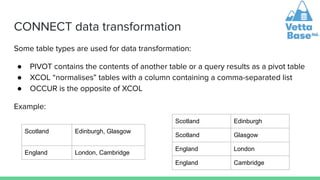
CONNECT data transformation
Some table types are used for data transformation:
● PIVOT contains the contents of another table or a query results as a pivot table
● XCOL “normalises” tables with a column containing a comma-separated list
● OCCUR is the opposite of XCOL
Example:
Scotland Edinburgh, Glasgow
England London, Cambridge
Scotland Edinburgh
Scotland Glasgow
England London
England Cambridge
CONNECT storage engine
● CONNECT treats an external data source as if it was a local table
Temporal tables
Temporal Tables
Temporal tables contain versioned rows.
Types of Temporal Tables:
● System-versioned
○ MariaDB automatically maintains row versions, with start and end timestamps
● Application-time
○ The application can use special SQL syntax to maintain and query row versions
● Bitemporal tables
○ Both system-versioned and application-time
In all cases, regular SQL queries will work and will only return current data
Temporal Tables: System-versioned
● MariaDB automatically maintains row versions, with start and end timestamps
● Or, one can have transaction IDs instead of timestamps
● There is no way to make a change that is not versioned
● You can use them even for proprietary applications that you can’t modify
● It is even possible to make a table system-versioned in a MariaDB replica
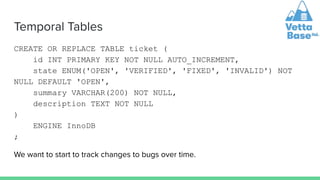
Temporal Tables
CREATE OR REPLACE TABLE ticket (
id INT PRIMARY KEY NOT NULL AUTO_INCREMENT,
state ENUM('OPEN', 'VERIFIED', 'FIXED', 'INVALID') NOT
NULL DEFAULT 'OPEN',
summary VARCHAR(200) NOT NULL,
description TEXT NOT NULL
)
ENGINE InnoDB
;
We want to start to track changes to bugs over time.
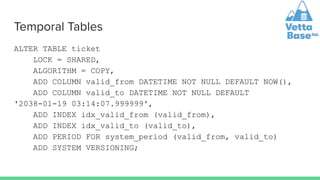
Temporal Tables
ALTER TABLE ticket
LOCK = SHARED,
ALGORITHM = COPY,
ADD COLUMN valid_from DATETIME NOT NULL DEFAULT NOW(),
ADD COLUMN valid_to DATETIME NOT NULL DEFAULT
'2038-01-19 03:14:07.999999',
ADD INDEX idx_valid_from (valid_from),
ADD INDEX idx_valid_to (valid_to),
ADD PERIOD FOR system_period (valid_from, valid_to)
ADD SYSTEM VERSIONING;
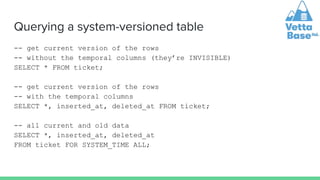
Querying a system-versioned table
-- get current version of the rows
-- without the temporal columns (they’re INVISIBLE)
SELECT * FROM ticket;
-- get current version of the rows
-- with the temporal columns
SELECT *, inserted_at, deleted_at FROM ticket;
-- all current and old data
SELECT *, inserted_at, deleted_at
FROM ticket FOR SYSTEM_TIME ALL;
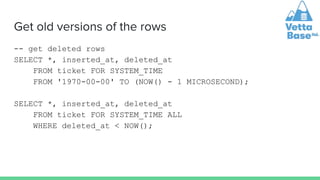
Get old versions of the rows
-- get deleted rows
SELECT *, inserted_at, deleted_at
FROM ticket FOR SYSTEM_TIME
FROM '1970-00-00' TO (NOW() - 1 MICROSECOND);
SELECT *, inserted_at, deleted_at
FROM ticket FOR SYSTEM_TIME ALL
WHERE deleted_at < NOW();
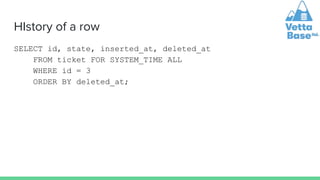
HIstory of a row
SELECT id, state, inserted_at, deleted_at
FROM ticket FOR SYSTEM_TIME ALL
WHERE id = 3
ORDER BY deleted_at;
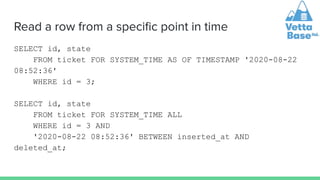
Read a row from a specific point in time
SELECT id, state
FROM ticket FOR SYSTEM_TIME AS OF TIMESTAMP '2020-08-22
08:52:36'
WHERE id = 3;
SELECT id, state
FROM ticket FOR SYSTEM_TIME ALL
WHERE id = 3 AND
'2020-08-22 08:52:36' BETWEEN inserted_at AND
deleted_at;
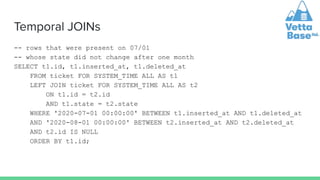
Temporal JOINs
-- rows that were present on 07/01
-- whose state did not change after one month
SELECT t1.id, t1.inserted_at, t1.deleted_at
FROM ticket FOR SYSTEM_TIME ALL AS t1
LEFT JOIN ticket FOR SYSTEM_TIME ALL AS t2
ON t1.id = t2.id
AND t1.state = t2.state
WHERE '2020-07-01 00:00:00' BETWEEN t1.inserted_at AND t1.deleted_at
AND '2020-08-01 00:00:00' BETWEEN t2.inserted_at AND t2.deleted_at
AND t2.id IS NULL
ORDER BY t1.id;
Hints about other things you can do
● Stats on added/deleted rows by year, month, weekday, day, daytime…
● Stats on rows life length
● Get rows that never changed
● Anomaly detection: get rows that change too often, or change at weird times
● Examine history of a row to find problems
JSON in MariaDB
JSON use cases
● Build a prototype
● Store data to import/export in an intermediate form
● Complex, nested data
● Store partially heterogeneous data
● Store documents with inheritance
● Store arrays / lists / sets
● Store key/value pairs (a more standard replacement for SET or ENUM types)
Some of these will be elaborated later
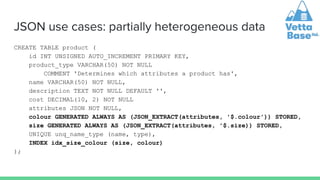
JSON use cases: partially heterogeneous data
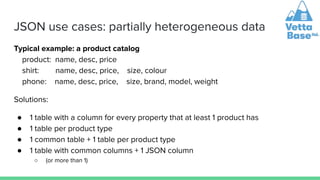
Typical example: a product catalog
product: name, desc, price
shirt: name, desc, price, size, colour
phone: name, desc, price, size, brand, model, weight
Solutions:
● 1 table with a column for every property that at least 1 product has
● 1 table per product type
● 1 common table + 1 table per product type
● 1 table with common columns + 1 JSON column
○ (or more than 1)
JSON use cases: partially heterogeneous data
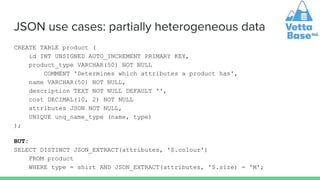
CREATE TABLE product (
id INT UNSIGNED AUTO_INCREMENT PRIMARY KEY,
product_type VARCHAR(50) NOT NULL
COMMENT 'Determines which attributes a product has',
name VARCHAR(50) NOT NULL,
description TEXT NOT NULL DEFAULT '',
cost DECIMAL(10, 2) NOT NULL
attributes JSON NOT NULL,
UNIQUE unq_name_type (name, type)
);
BUT:
SELECT DISTINCT JSON_EXTRACT(attributes, '$.colour')
FROM product
WHERE type = shirt AND JSON_EXTRACT(attributes, '$.size) = 'M';
JSON use cases: partially heterogeneous data
CREATE TABLE product (
id INT UNSIGNED AUTO_INCREMENT PRIMARY KEY,
product_type VARCHAR(50) NOT NULL
COMMENT 'Determines which attributes a product has',
name VARCHAR(50) NOT NULL,
description TEXT NOT NULL DEFAULT '',
cost DECIMAL(10, 2) NOT NULL
attributes JSON NOT NULL,
colour GENERATED ALWAYS AS (JSON_EXTRACT(attributes, '$.colour')) STORED,
size GENERATED ALWAYS AS (JSON_EXTRACT(attributes, '$.size)) STORED,
UNIQUE unq_name_type (name, type),
INDEX idx_size_colour (size, colour)
);
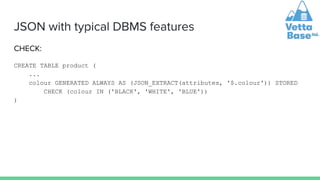
JSON with typical DBMS features
CHECK:
CREATE TABLE product (
...
colour GENERATED ALWAYS AS (JSON_EXTRACT(attributes, '$.colour')) STORED
CHECK (colour IN ('BLACK', 'WHITE', 'BLUE'))
)
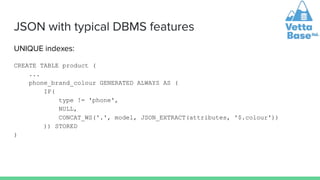
JSON with typical DBMS features
UNIQUE indexes:
CREATE TABLE product (
...
phone_brand_colour GENERATED ALWAYS AS (
IF(
type != 'phone',
NULL,
CONCAT_WS('.', model, JSON_EXTRACT(attributes, '$.colour'))
)) STORED
)
JSON with typical DBMS features
● With the same techniques shown earlier, the colour generated column can be
used in a foreign key
● But I don’t recommend the use of foreign keys
Thanks for attending!
federico.razzoli@vettabase.com

Advanced MariaDB features that developers love.pdf

  • 1.
    Advanced MariaDB features thatdevelopers love Federico Razzoli vettabase.com
  • 2.
    Advanced MariaDB features thatdevelopers 💘 💖 💕 😍😍😍 Federico Razzoli vettabase.com
  • 3.
    $ whoami Hi, I’mFederico Razzoli, founder of Vettabase Database specialist, open source supporter, long time MariaDB and MySQL user Despite my accent, I live in 󰧺 ● vettabase.com ● federico.razzoli@vettabase.com
  • 4.
    This talk is… ●NOT a MariaDB tutorial ● We’ll see some cool MariaDB features arbitrarily chosen by me: ○ CONNECT storage engine ○ Temporal table ○ JSON columns ● In the process, we’ll also see quickly some other nice features
  • 5.
    Querying remote /heterogeneous data sources… in SQL
  • 6.
    Why? ● Because… it’sSQL! ● Because sometimes we import data from other sources ● Because you may have to interact with systems you don’t control
  • 7.
    CONNECT storage engine ●MariaDB doesn’t know how to read/write tables, indexes, data caches… ● These actions are delegated to plugins called storage engines ● A cool consequence is that when we run a query they could do anything they like ○ BLACKHOLE does nothing ○ SEQUENCE returns numerical sequences ○ Run SHOW ENGINES ● CONNECT treats an external data source as if it was a local table ● So you can run your SELECTs, JOINs, INSERTs…
  • 8.
    CONNECT storage engine ●Files: CSV, JSON, XML, tables in HTML pages… files in archives… custom files… ● Remote databases: Remote databases: MySQL protocol, MongoDB, ODBC, JDBC ● Data transformation ● More
  • 9.
    Installing CONNECT INSTALL SONAME'ha_connect'; If you get this error: ERROR 1126 (HY000): Can't open shared library '/usr/lib/mysql/plugin/ha_connect.so' (errno: 2, cannot open shared object file: No such file or directory) …you don’t have the plugin in plugin_dir. Most probably MariaDB was installed from a Linux repository. There should be a package for CONNECT: ● yum install MariaDB-connect-engine ● apt-get install mariadb-plugin-connect If you installed MariaDB from tarball, you’ll need to install dependencies, use ldd.
  • 10.
    Creating a CONNECTtable (CSV) CREATE OR REPLACE TABLE import_product ( id INTEGER UNSIGNED NOT NULL, name VARCHAR(100) NOT NULL, quantity INTEGER NOT NULL, last_modified DATE NOT NULL date_format='YY/MM/DD' ) ENGINE=CONNECT TABLE_TYPE=CSV FILE_NAME='/var/import/product.csv' SEP_CHAR='t' BLOCK_SIZE=2048 ;
  • 11.
    Copying data intoa regular table INSERT IGNORE INTO product SELECT * FROM import_product WHERE last_modified > (CURRENT_DATE() - INTERVAL 7 DAY);
  • 12.
    Inserting data intoCONNECT MariaDB [test]> INSERT INTO import_product (id, name, quantity, last_modified) VALUES (24, 'Sonic screwdriver', 100, CURRENT_DATE()); Query OK, 1 row affected (0.067 sec) MariaDB [test]> ! tail -1 /var/import/product.csv 24 Sonic screwdriver 100 22/06/20
  • 13.
    CONNECT Indexes ● Youcan build indexes ● Indexes are stored in separate files ● Avoid this message by using proper character sets and specifying VARCHAR length: Specified key was too long; max key length is 255 bytes ● CONNECT indexes work better if rows are pre-ordered ALTER TABLE import_product ADD INDEX idx_name (date);
  • 14.
    CONNECT storage engine:merging tables ● We can merge multiple CONNECT tables: CREATE OR REPLACE TABLE import_product_all ENGINE=CONNECT TABLE_TYPE=TBL TABLE_LIST='import_product_1,import_product_2' ;
  • 15.
    CONNECT storage engine:merging tables ● We can merge CONNECT and regular tables: CREATE OR REPLACE TABLE product_proxy ENGINE=CONNECT TABLE_TYPE=PROXY TABNAME=product ; CREATE OR REPLACE TABLE import_product_all ENGINE=CONNECT TABLE_TYPE=TBL TABLE_LIST='product_proxy,import_product_1,import_product_2' ;
  • 16.
    CONNECT + SQLServer ● CONNECT treats an external data source as if it was a local table ● Column definitions can be automatically retrieved ● (though you may need to map column types & character sets) ● Remote indexes are used CREATE TABLE import_product ENGINE=CONNECT, TABLE_TYPE=ODBC, TABNAME='product' CONNECTION='Driver=SQL Server Native Client 13.0;Server=sql-server-hostname;Database=shop;UID=mariadb_co nnect;PWD=secret';
  • 17.
    CONNECT data transformation Sometable types are used for data transformation: ● PIVOT contains the contents of another table or a query results as a pivot table ● XCOL “normalises” tables with a column containing a comma-separated list ● OCCUR is the opposite of XCOL Example: Scotland Edinburgh, Glasgow England London, Cambridge Scotland Edinburgh Scotland Glasgow England London England Cambridge
  • 18.
    CONNECT storage engine ●CONNECT treats an external data source as if it was a local table
  • 19.
  • 20.
    Temporal Tables Temporal tablescontain versioned rows. Types of Temporal Tables: ● System-versioned ○ MariaDB automatically maintains row versions, with start and end timestamps ● Application-time ○ The application can use special SQL syntax to maintain and query row versions ● Bitemporal tables ○ Both system-versioned and application-time In all cases, regular SQL queries will work and will only return current data
  • 21.
    Temporal Tables: System-versioned ●MariaDB automatically maintains row versions, with start and end timestamps ● Or, one can have transaction IDs instead of timestamps ● There is no way to make a change that is not versioned ● You can use them even for proprietary applications that you can’t modify ● It is even possible to make a table system-versioned in a MariaDB replica
  • 22.
    Temporal Tables CREATE ORREPLACE TABLE ticket ( id INT PRIMARY KEY NOT NULL AUTO_INCREMENT, state ENUM('OPEN', 'VERIFIED', 'FIXED', 'INVALID') NOT NULL DEFAULT 'OPEN', summary VARCHAR(200) NOT NULL, description TEXT NOT NULL ) ENGINE InnoDB ; We want to start to track changes to bugs over time.
  • 23.
    Temporal Tables ALTER TABLEticket LOCK = SHARED, ALGORITHM = COPY, ADD COLUMN valid_from DATETIME NOT NULL DEFAULT NOW(), ADD COLUMN valid_to DATETIME NOT NULL DEFAULT '2038-01-19 03:14:07.999999', ADD INDEX idx_valid_from (valid_from), ADD INDEX idx_valid_to (valid_to), ADD PERIOD FOR system_period (valid_from, valid_to) ADD SYSTEM VERSIONING;
  • 24.
    Querying a system-versionedtable -- get current version of the rows -- without the temporal columns (they’re INVISIBLE) SELECT * FROM ticket; -- get current version of the rows -- with the temporal columns SELECT *, inserted_at, deleted_at FROM ticket; -- all current and old data SELECT *, inserted_at, deleted_at FROM ticket FOR SYSTEM_TIME ALL;
  • 25.
    Get old versionsof the rows -- get deleted rows SELECT *, inserted_at, deleted_at FROM ticket FOR SYSTEM_TIME FROM '1970-00-00' TO (NOW() - 1 MICROSECOND); SELECT *, inserted_at, deleted_at FROM ticket FOR SYSTEM_TIME ALL WHERE deleted_at < NOW();
  • 26.
    HIstory of arow SELECT id, state, inserted_at, deleted_at FROM ticket FOR SYSTEM_TIME ALL WHERE id = 3 ORDER BY deleted_at;
  • 27.
    Read a rowfrom a specific point in time SELECT id, state FROM ticket FOR SYSTEM_TIME AS OF TIMESTAMP '2020-08-22 08:52:36' WHERE id = 3; SELECT id, state FROM ticket FOR SYSTEM_TIME ALL WHERE id = 3 AND '2020-08-22 08:52:36' BETWEEN inserted_at AND deleted_at;
  • 28.
    Temporal JOINs -- rowsthat were present on 07/01 -- whose state did not change after one month SELECT t1.id, t1.inserted_at, t1.deleted_at FROM ticket FOR SYSTEM_TIME ALL AS t1 LEFT JOIN ticket FOR SYSTEM_TIME ALL AS t2 ON t1.id = t2.id AND t1.state = t2.state WHERE '2020-07-01 00:00:00' BETWEEN t1.inserted_at AND t1.deleted_at AND '2020-08-01 00:00:00' BETWEEN t2.inserted_at AND t2.deleted_at AND t2.id IS NULL ORDER BY t1.id;
  • 29.
    Hints about otherthings you can do ● Stats on added/deleted rows by year, month, weekday, day, daytime… ● Stats on rows life length ● Get rows that never changed ● Anomaly detection: get rows that change too often, or change at weird times ● Examine history of a row to find problems
  • 30.
  • 31.
    JSON use cases ●Build a prototype ● Store data to import/export in an intermediate form ● Complex, nested data ● Store partially heterogeneous data ● Store documents with inheritance ● Store arrays / lists / sets ● Store key/value pairs (a more standard replacement for SET or ENUM types) Some of these will be elaborated later
  • 32.
    JSON use cases:partially heterogeneous data Typical example: a product catalog product: name, desc, price shirt: name, desc, price, size, colour phone: name, desc, price, size, brand, model, weight Solutions: ● 1 table with a column for every property that at least 1 product has ● 1 table per product type ● 1 common table + 1 table per product type ● 1 table with common columns + 1 JSON column ○ (or more than 1)
  • 33.
    JSON use cases:partially heterogeneous data CREATE TABLE product ( id INT UNSIGNED AUTO_INCREMENT PRIMARY KEY, product_type VARCHAR(50) NOT NULL COMMENT 'Determines which attributes a product has', name VARCHAR(50) NOT NULL, description TEXT NOT NULL DEFAULT '', cost DECIMAL(10, 2) NOT NULL attributes JSON NOT NULL, UNIQUE unq_name_type (name, type) ); BUT: SELECT DISTINCT JSON_EXTRACT(attributes, '$.colour') FROM product WHERE type = shirt AND JSON_EXTRACT(attributes, '$.size) = 'M';
  • 34.
    JSON use cases:partially heterogeneous data CREATE TABLE product ( id INT UNSIGNED AUTO_INCREMENT PRIMARY KEY, product_type VARCHAR(50) NOT NULL COMMENT 'Determines which attributes a product has', name VARCHAR(50) NOT NULL, description TEXT NOT NULL DEFAULT '', cost DECIMAL(10, 2) NOT NULL attributes JSON NOT NULL, colour GENERATED ALWAYS AS (JSON_EXTRACT(attributes, '$.colour')) STORED, size GENERATED ALWAYS AS (JSON_EXTRACT(attributes, '$.size)) STORED, UNIQUE unq_name_type (name, type), INDEX idx_size_colour (size, colour) );
  • 35.
    JSON with typicalDBMS features CHECK: CREATE TABLE product ( ... colour GENERATED ALWAYS AS (JSON_EXTRACT(attributes, '$.colour')) STORED CHECK (colour IN ('BLACK', 'WHITE', 'BLUE')) )
  • 36.
    JSON with typicalDBMS features UNIQUE indexes: CREATE TABLE product ( ... phone_brand_colour GENERATED ALWAYS AS ( IF( type != 'phone', NULL, CONCAT_WS('.', model, JSON_EXTRACT(attributes, '$.colour')) )) STORED )
  • 37.
    JSON with typicalDBMS features ● With the same techniques shown earlier, the colour generated column can be used in a foreign key ● But I don’t recommend the use of foreign keys
  • 38.