





How to Power
Microservices with
MariaDB
Todd Stoffel
Senior Consultant,
MariaDB Corporation
Overview
1. Microservices pros and cons
2. Choosing an architecture
3. Persistent storage
4. Database topology
5. Consolidated view of data
6. Orchestration of microservices
7. Demonstration
Microservices:
PROS AND CONS
Microservices
The New Software Engineering “Buzzword”
In contrast to monolith
architectures, microservices
are a loose coupling of
smaller autonomous
services.
Leveraging cloud-enabled
technology, coupled with increased
usage of microservices and open
source applications, has enabled us
to reduce structural infrastructure
costs, and at the same time improve
resiliency and nimbleness.
— Piyush Gupta, Chief Executive Officer, DBS Bank
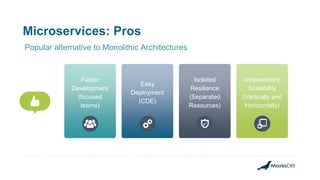
Microservices: Pros
Popular alternative to Monolithic Architectures
Faster
Development
(focused
teams)
Easy
Deployment
(CDE)
Isolated
Resilience
(Separated
Resources)
Independent
Scalability
(Vertically and
Horizontally)
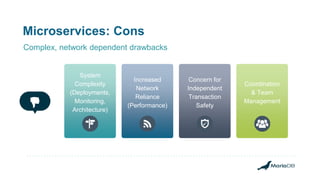
Microservices: Cons
Coordination
& Team
Management
Concern for
Independent
Transaction
Safety
Increased
Network
Reliance
(Performance)
System
Complexity
(Deployments,
Monitoring,
Architecture)
Complex, network dependent drawbacks
Choosing
Microservice
Architecture
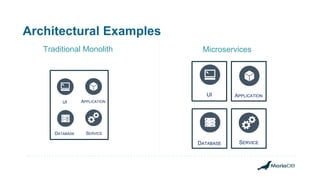
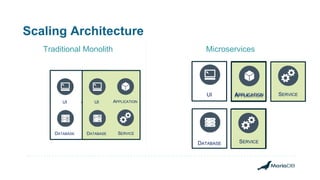
Architectural Examples
MicroservicesTraditional Monolith
APPLICATIONUI
SERVICEDATABASE
SERVICE
UI
DATABASE
APPLICATION
APPLICATION
Scaling Architecture
Traditional Monolith Microservices
APPLICATIONUI
SERVICEDATABASE SERVICE
SERVICE
SERVICE
UI
DATABASE
APPLICATION
SERVICE
UI
DATABASE
APPLICATION
Not only can Microservices
comprise the application
architecture, but MariaDB
Database can be it’s
own Microservice
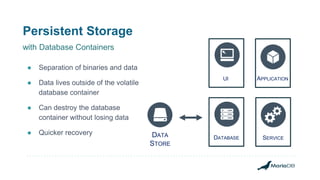
Persistent Storage
● Separation of binaries and data
● Data lives outside of the volatile
database container
● Can destroy the database
container without losing data
● Quicker recovery DATA
STORE
APPLICATIONUI
SERVICEDATABASE
with Database Containers
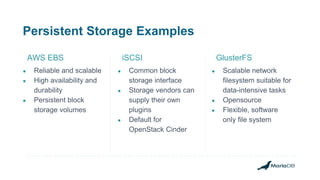
Persistent Storage Examples
● Reliable and scalable
● High availability and
durability
● Persistent block
storage volumes
AWS EBS
● Common block
storage interface
● Storage vendors can
supply their own
plugins
● Default for
OpenStack Cinder
iSCSI
● Scalable network
filesystem suitable for
data-intensive tasks
● Opensource
● Flexible, software
only file system
GlusterFS
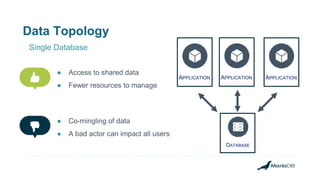
Data Topology
● Access to shared data
● Fewer resources to manage
Single Database
APPLICATIONAPPLICATIONAPPLICATION
DATABASE
● Co-mingling of data
● A bad actor can impact all users
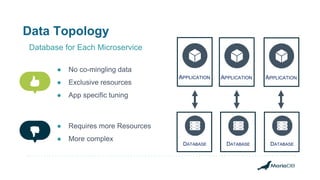
Data Topology
Database for Each Microservice
DATABASE
APPLICATIONAPPLICATIONAPPLICATION
DATABASE DATABASE
● No co-mingling data
● Exclusive resources
● App specific tuning
● Requires more Resources
● More complex
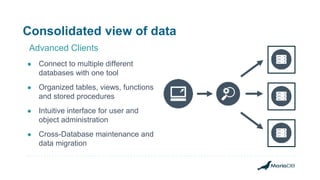
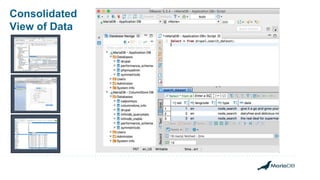
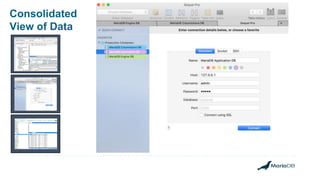
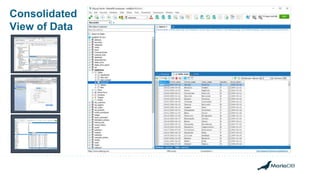
Consolidated view of data
● Connect to multiple different
databases with one tool
● Organized tables, views, functions
and stored procedures
● Intuitive interface for user and
object administration
● Cross-Database maintenance and
data migration
Advanced Clients
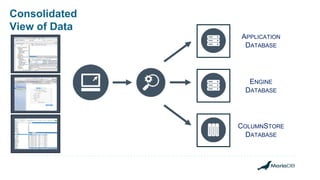
Consolidated
View of Data
APPLICATION
DATABASE
COLUMNSTORE
DATABASE
ENGINE
DATABASE
Consolidated
View of Data
Consolidated
View of Data
Consolidated
View of Data
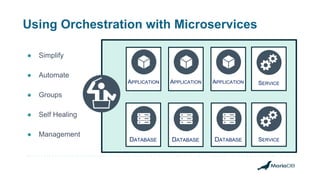
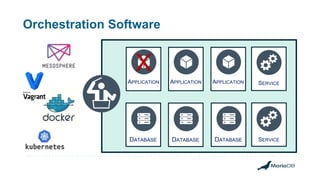
Using Orchestration with Microservices
● Simplify
● Automate
● Groups
● Self Healing
● Management
DATABASE
APPLICATION
DATABASE
APPLICATION APPLICATION
DATABASE
SERVICE
SERVICE
Orchestration Software
DATABASE
APPLICATION
DATABASE
APPLICATION APPLICATION
DATABASE
SERVICE
SERVICE
X
Demonstration
Demo Time
Legend
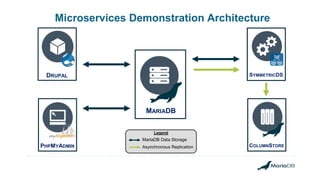
Microservices Demonstration Architecture
DRUPAL
PHPMYADMIN
SYMMETRICDS
MariaDB Data Storage
Asynchronous Replication
MARIADB
COLUMNSTORE
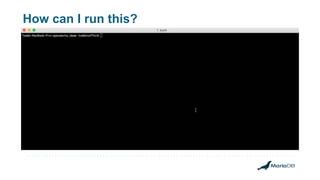
How can I run this?
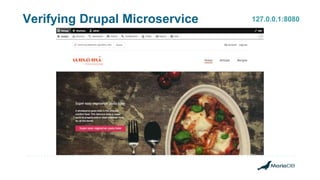
Verifying Drupal Microservice 127.0.0.1:8080
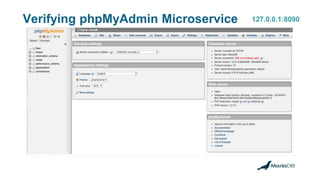
Verifying phpMyAdmin Microservice 127.0.0.1:8090
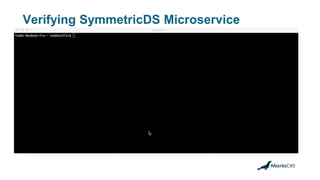
Verifying SymmetricDS Microservice
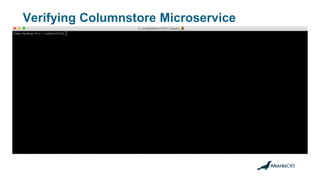
Verifying Columnstore Microservice
MARIADB
COLUMNSTORE
Legend
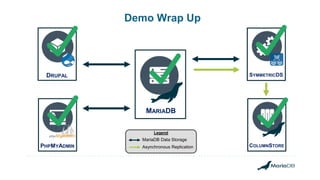
Demo Wrap Up
DRUPAL
PHPMYADMIN
SYMMETRICDS
MariaDB Data Storage
Asynchronous Replication
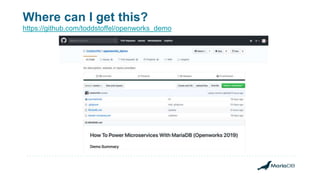
Where can I get this?
https://github.com/toddstoffel/openworks_demo
What you’ll need
Docker
Desktop Git
Q & A
THANK YOU!

How to power microservices with MariaDB

Editor's Notes

  • #2  Adoption of microservices is continuing at a rapid pace, but many deployments struggle when it comes to the database topology and data modeling. This session will cover the pros and cons of different approaches (e.g., giving every microservice its own database or its own schema on a shared database) and various strategies for providing a consolidated view of data when different data is managed by different microservices.
  • #3 Read bullet points
  • #4 DO WE STILL NEED THIS SLIDE?
  • #6 Read Slide.
  • #7 Many of our current MariaDB customers are leveraging microservices architecture with MariaDB backends. For instance, here is a quote from the CEO of DBS Bank of Singapore. Platt, Gordon. “In Control: Q&A With DBS CEO Piyush Gupta”. Global Finanace Magazine. 2018 Oct 1. https://www.gfmag.com/magazine/october-2018/q-dbs-ceo-piyush-gupta
  • #8 Targeted, Focused Development Teams, Fast Testability, Parallel Team Development Easier Implementation of Continuous Delivery - The deployment unit is smaller. This simplifies and speeds up the build and release workflow. In turn, you can deploy more frequently. Due to the increased build speed you get feedback faster from the continuous integration server after a commit of code changes. Moreover, the release of one service is not blocked by unfinished work in another service. Besides, the risk of a deployment becomes less. Robust: Isolation (regarding to resources). The services don’t need to share CPU, memory and the filesystem. They are separated processes and the operation system manages their resources. In case of an application server, the components share the same resources. – Plus Defective services don’t crash the whole application Independently Fine-grained scaling. We can scale the services that are bottlenecks while leaving the uncritical services untouched. Can spin up multiple containers of a single microservice that needs more processing power limited to the specific resource needing that scale. Only use the resources you need.
  • #9 Increased effort for operations, deployment and monitoring. Each service is a separate deployment units, which has to be released, tested and monitored. This means a) that the delivery workflow has be automated (in order to stay efficient) and b) that there is additional infrastructure necessary. Increased configuration management. For each microservice we need to create a dedicated build and delivery pipeline. This includes a Maven build configuration, a Git project, a Jenkins job, a setup for tests, a release mechanism and a deployment approach. Communication between microservices can mean poorer performance, as sending messages back and forth comes with a certain overhead. What we gain on the simplicity of single-responsibility microservices, lose on the complexity of the network. Or, at least a part of it. The resiliency of the microservice is less reliant on the service containers/systems and much much more reliant on the the network they use to communicate between microservices. More load balancing is required. (network latency, message processing,) Transaction safety. It’s difficult to maintain transaction safety when dealing with independent processes. Besides it’s already tricky to implement transactions correctly within a single microservice, when another microservice should be called after a certain action. What happens if the transaction rolls back, but we already notified a downstream microservice? We have to be more careful with transactions and their scopes. The need for increased team management and communication to ensure everyone, not just certain engineers, understand each service and the system as a whole. Not recommended for smaller businesses that don’t have the resources to support distributed systems’ development, deployment, and operational management which the overheads of can be expensive requiring a high initial investment to run
  • #10 In this section, we'll talk about database architecture including both monolithic and microservices.
  • #11 On this slide, we display two different types of architecture all using the same components. A User Interface, an application layer, a service layer (for instance, RabbitMQ or Kafka), and of course, our MariaDB layer. On the left, we have our typical LAMP stack architecture. All the components are contained in one monolithic topology. On the right, we have an example of microservices topology where the different components are compartmentalized.
  • #12 ## MULTICLICK ##
  • #13 Read speech bubble
  • #14 ## MULTICLICK ## MariaDB inside of a Docker container is not persistent. Changes made would be lost when the container is restarted. For this reason, it is not practical to store data inside the container. But this problem can be solved with a "data store" that is outside of the docker system can be detached and reattached to new containers. (Go through bullet points)
  • #15 AWS Elastic Block Store are detachable virtual volumes that are portable and portable volumes that can be easily mounted to different infrastructure, either manually or through automation. iSCSI is a hardware solution that can be implemented in your own datacenter to provide a persistent data store that can be attached to containerized microservices. GlusterFS using these file systems as mount points in our container for the datadir There is some talk in our roadmap about including S3 as a datastore for MariaDB Columnstore instances
  • #16 ## MULTICLICK ## (Read Slide)
  • #17 ## MULTICLICK ## (Read Slide)
  • #18 ## MULTICLICK ## (Read Slide)
  • #19 Examples Sequel
  • #20 DBeaver This app is OS agnostic and works on Linux, Mac, and Windows. They offer both free and enterprise versions.
  • #21 Sequel Pro Mac specific application Free utility
  • #22 SQLyog This is a windows based application. A license for this application is usually included in a MariaDB support subscription
  • #23 Helps simplify the Complexity of Microsystems with Automation Automate deployments, management, and scaling Group containers into logical units for easy management Self Healing Containers Configuration Management
  • #24 ### MULTICLICK ### Mesos Vagrant Docker Kubernetes MariaDB doesn’t support any of these 3rd party utilities directly but your own organizations can use the orchestration utility of your choice to support MariaDB deployment That we will provide a short demo at the end using Docker along with a link to the project that they can demo at home For example, if a container application crashes. (red X) Your Orchestration software can automatically “Heal” your system. By destroying the broken container, and creating a replacement container in it’s place.
  • #25 Now that we've talked about MariaDB as a microservice, let's see it in action.
  • #27 This is a diagram of the demo project that we are going to be discussing. - There are 2 applications, a service, and a ColumnStore replica all with standard MariaDB as the primary component in this topology.
  • #28 We git clone the project to our local machine. cd into that folder run docker-compose After a few minutes (depending on your internet speed), you'll have an output that looks like this. This is a composite of the logging from all the different instances The different colors represent the different system's logs. This means our project is up and running.
  • #29 Now we load up a web browser and point it at 127.0.0.1 port 8080 as shown here in the top right corner in red. One of our microservices was a sample drupal website. When we go to this address, this is the page we should see.
  • #30 Now we are going to point our browser at port 8090. Same address, different port. This is our phpMyAdmin application. This microservice can also be used to view data on MariaDB.
  • #31 Now we will verify that our service called SymmetricDS in this case is running. We do this by entering the docker container using the commands shown and tailing the SymmetricDS log.
  • #32 Now we are going to verify that our ColumnStore replica microservice is in fact receiving data from our standard MariaDB master. We do this by entering the docker container. Logging into the mysql client and selecting data that was scheduled to be replicated.
  • #33 We verified that all the applications were running and that our microservices project was a success.
  • #34 Now as a voluntary homework assignment, go to my github repo and download this project on your own machines and play with it at your own pace. I'll attach this slide show to the github repo so you can go through it again.
  • #35 You'll need Docker Desktop and Git which are free utilities which you can get online. In fact, Git may already be included in your operating system.
  • #36 Any Questions?
  • #37 Bye.