TABLE OF CONTENTS
1. INTRODUCTION TO OCV/OCR
2. APPLICATIONS OF OCV/OCR
3. UNDERSTANDING YOUR TEST ENVIRONMENT
4. VALIDATION APPROACH TOWARDS OCV/OCR SYSTEMS
INTRODUCTION
What is OCV & OCR?
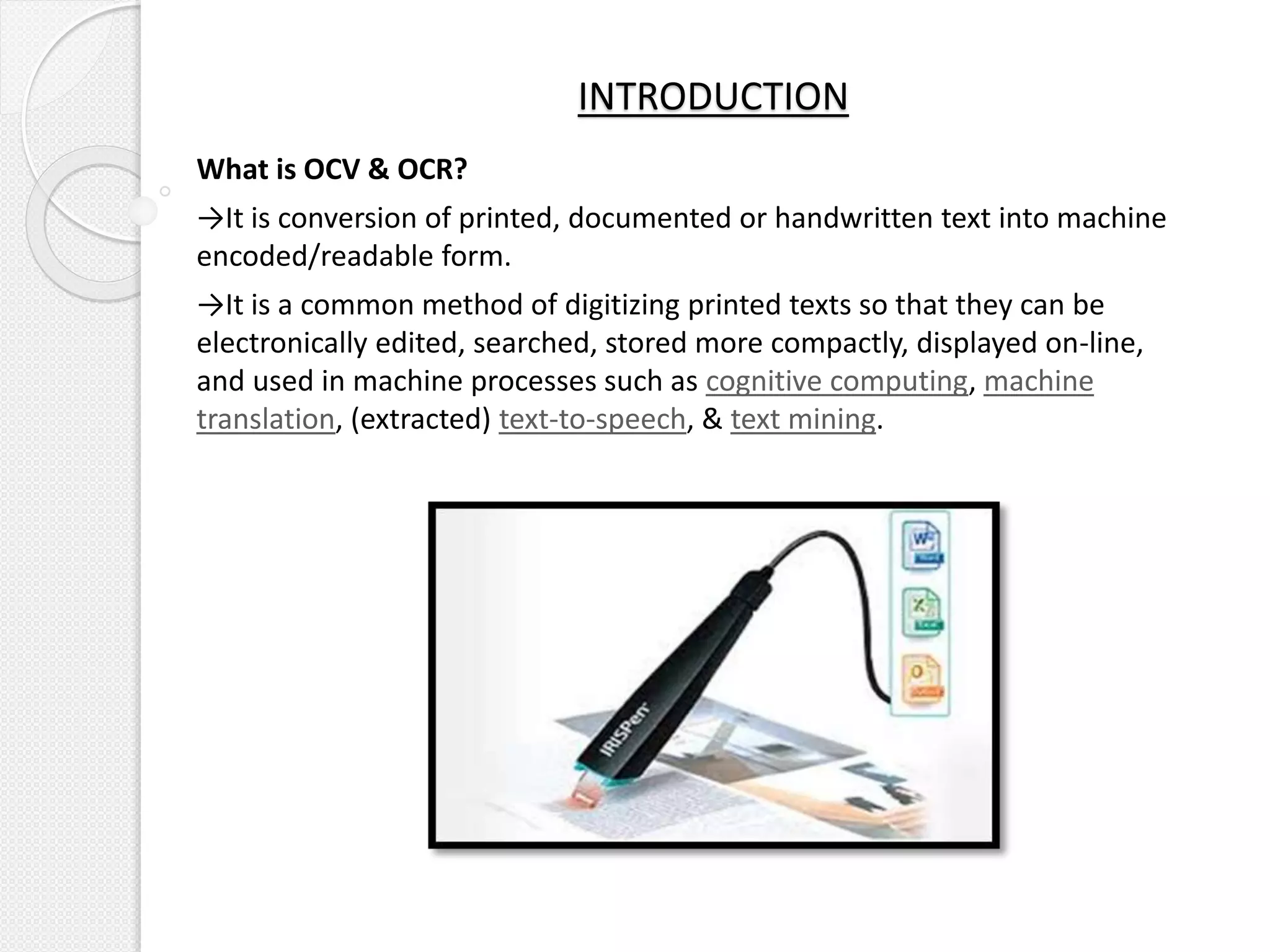
→It is conversion of printed, documented or handwritten text into machine
encoded/readable form.
→It is a common method of digitizing printed texts so that they can be
electronically edited, searched, stored more compactly, displayed on-line,
and used in machine processes such as cognitive computing, machine
translation, (extracted) text-to-speech, & text mining.
COMPARISON OF OCV & OCR
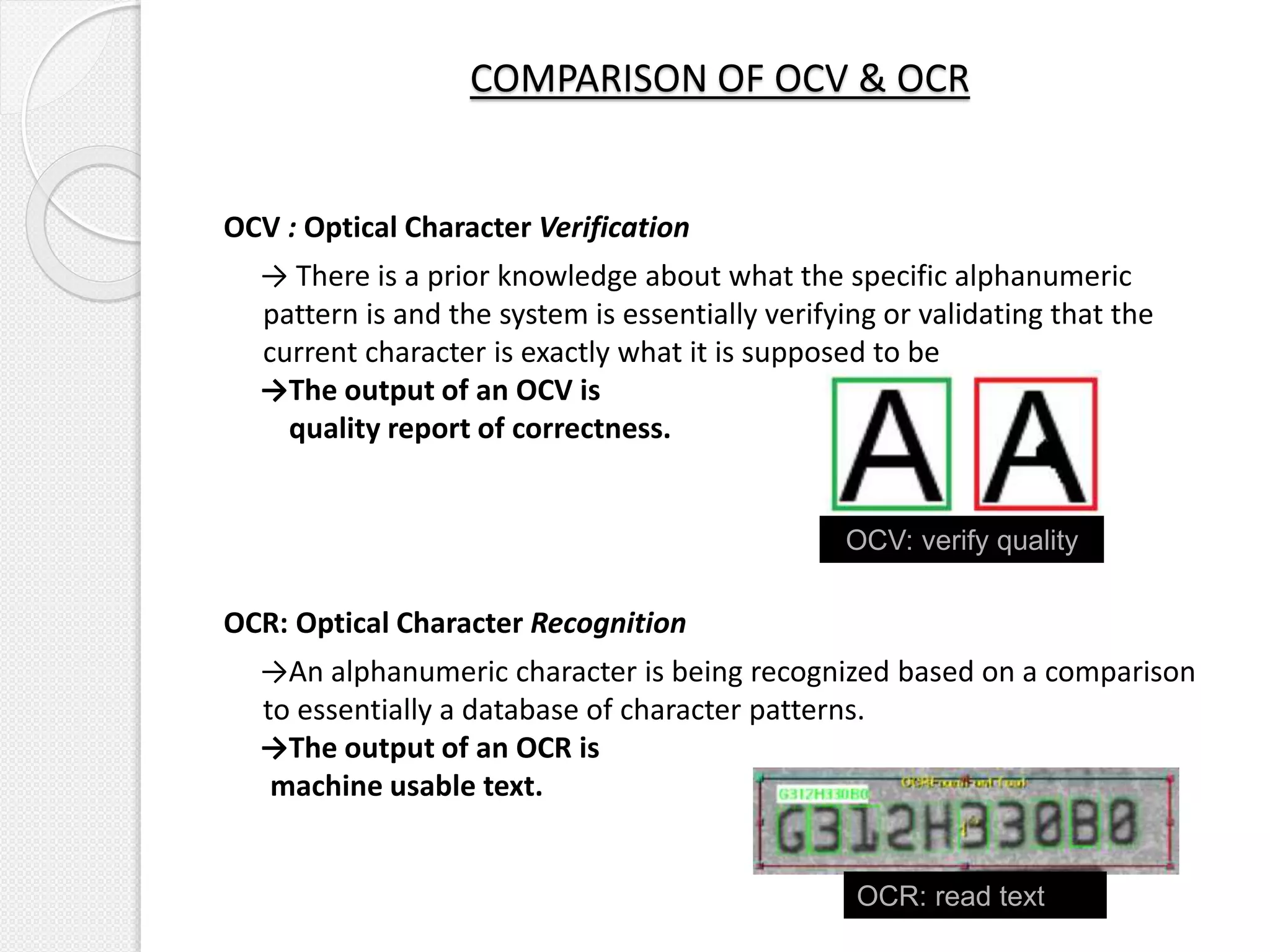
OCV : Optical Character Verification
→ There is a prior knowledge about what the specific alphanumeric
pattern is and the system is essentially verifying or validating that the
current character is exactly what it is supposed to be
→The output of an OCV is
quality report of correctness.
OCR: Optical Character Recognition
→An alphanumeric character is being recognized based on a comparison
to essentially a database of character patterns.
→The output of an OCR is
machine usable text.
OCV: verify quality
OCR: read text
COMPARISON OF OCV & OCR
Verification:
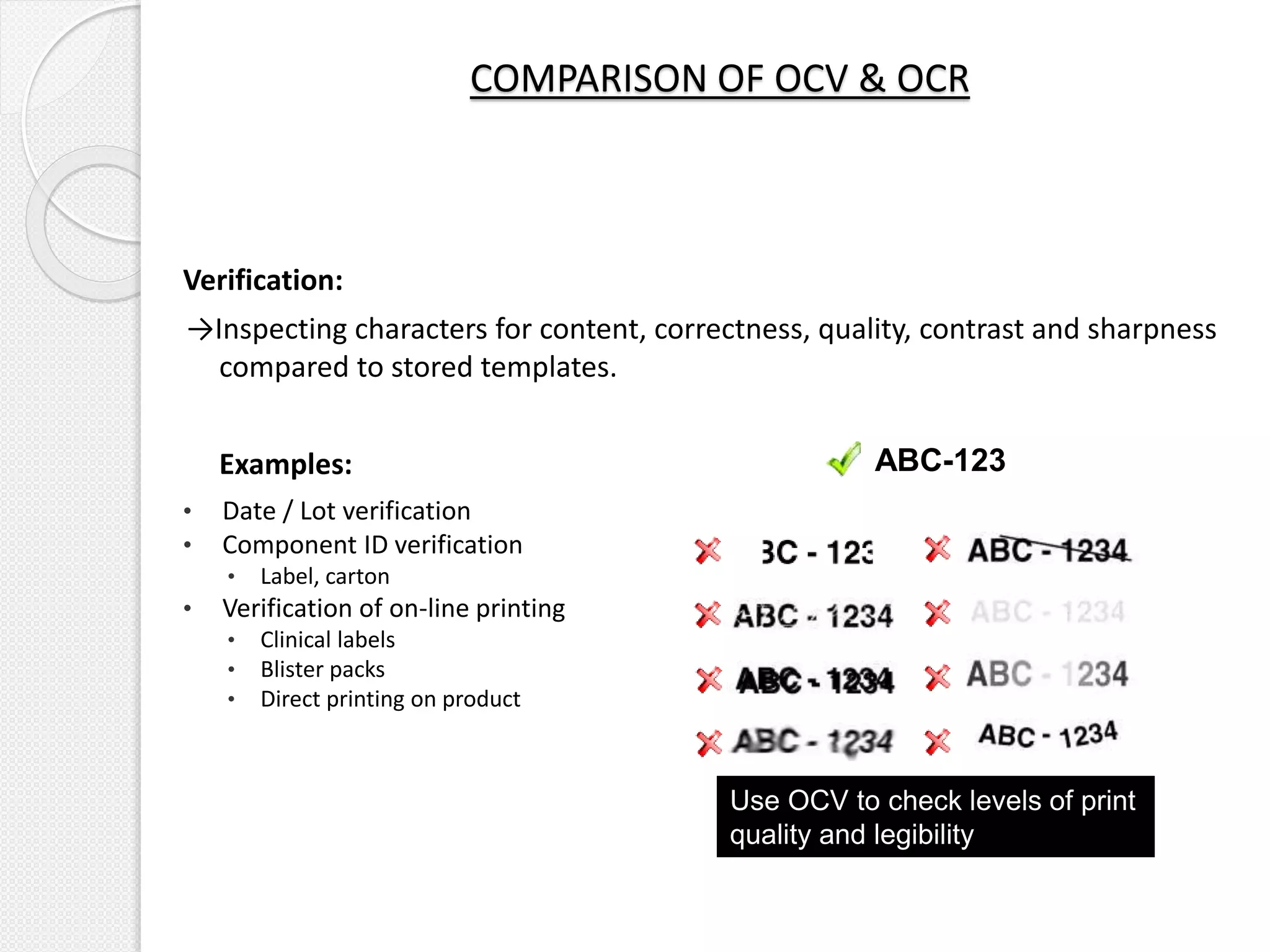
→Inspecting characters for content, correctness, quality, contrast and sharpness
compared to stored templates.
Examples:
• Date / Lot verification
• Component ID verification
• Label, carton
• Verification of on-line printing
• Clinical labels
• Blister packs
• Direct printing on product
ABC-123
Use OCV to check levels of print
quality and legibility
Reading:
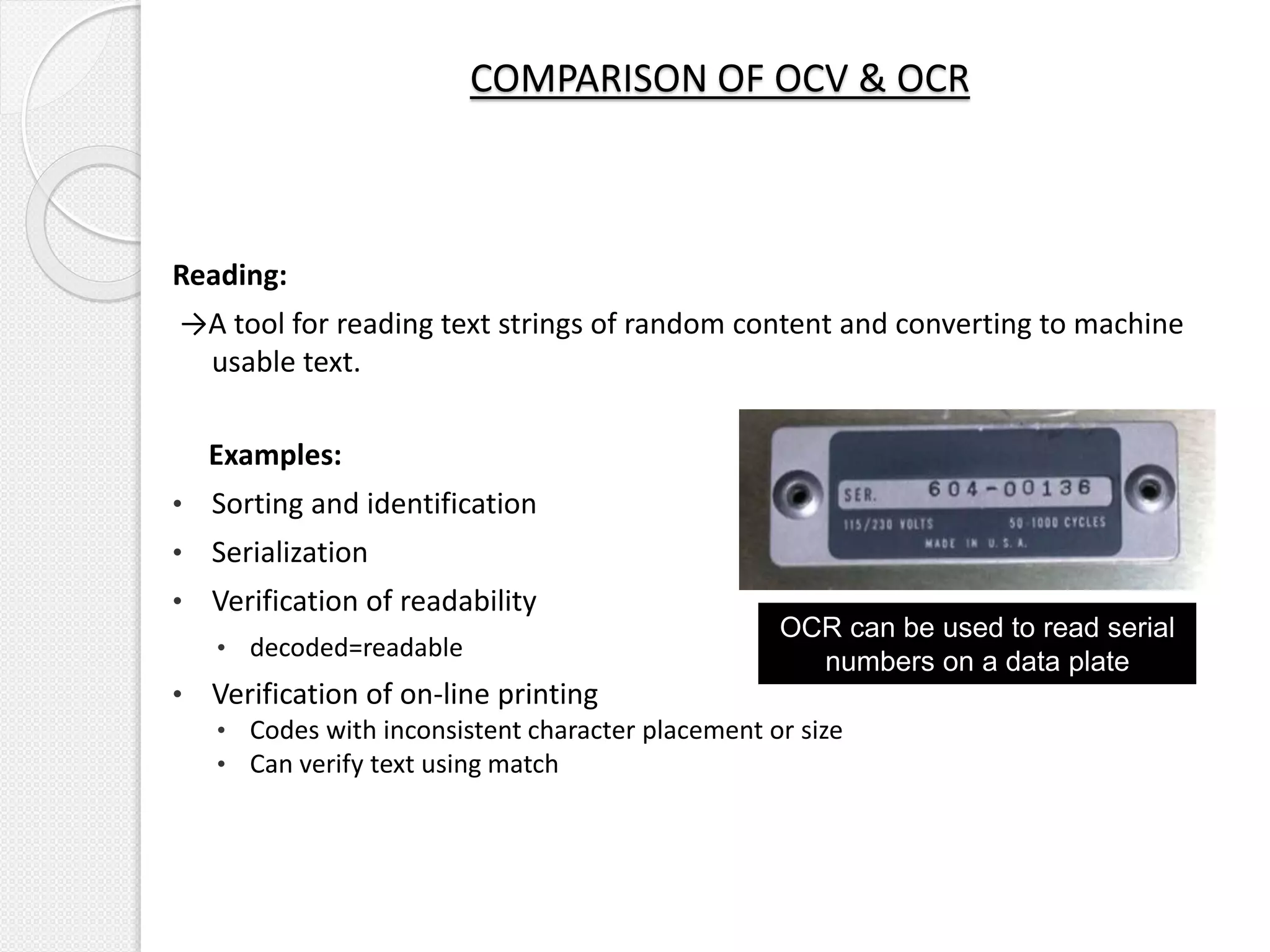
→A tool for reading text strings of random content and converting to machine
usable text.
Examples:
• Sorting and identification
• Serialization
• Verification of readability
• decoded=readable
• Verification of on-line printing
• Codes with inconsistent character placement or size
• Can verify text using match
OCR can be used to read serial
numbers on a data plate
COMPARISON OF OCV & OCR
CLASSIFICATION OF OCV/OCR SYSTEMS
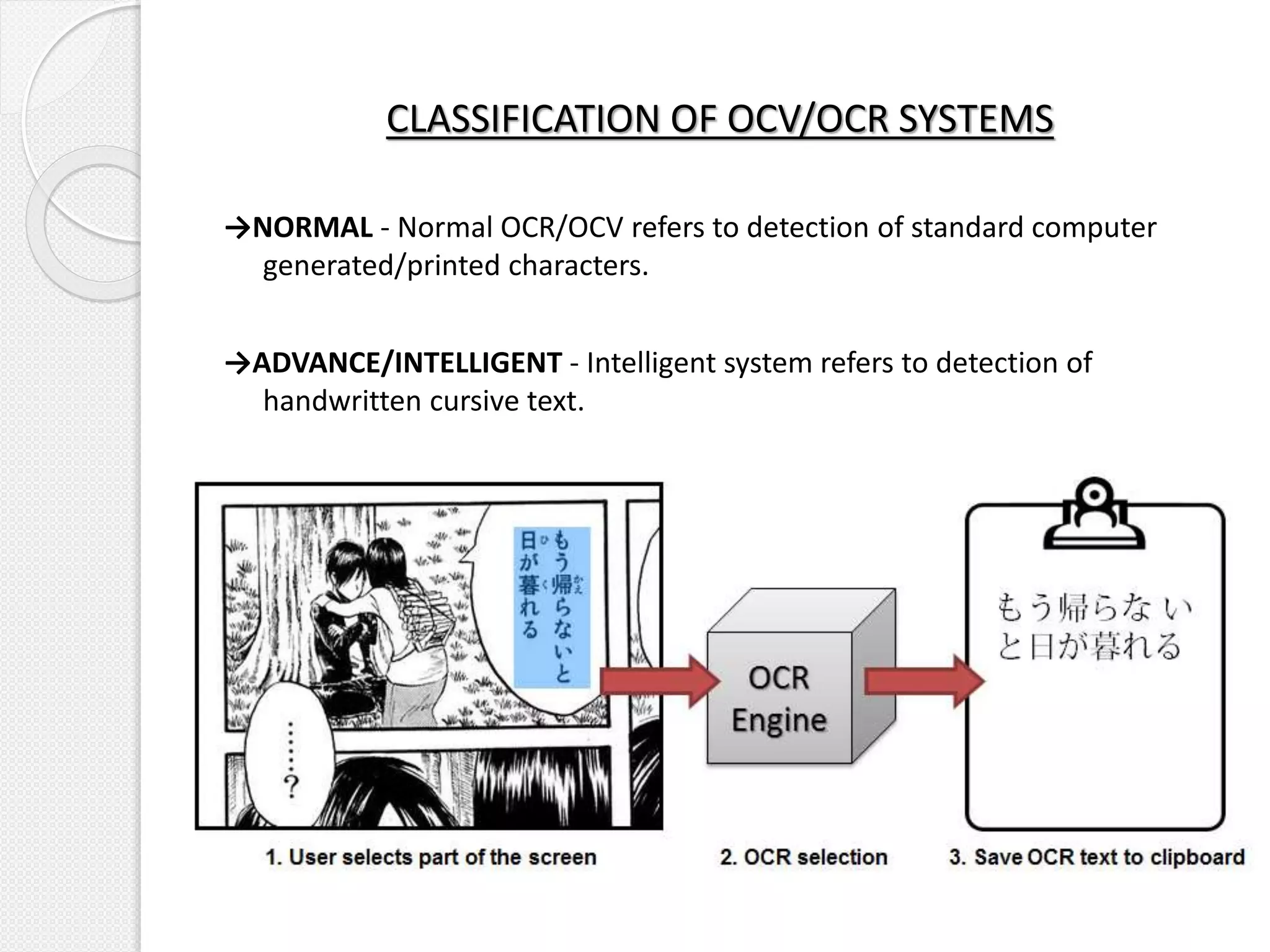
→NORMAL - Normal OCR/OCV refers to detection of standard computer
generated/printed characters.
→ADVANCE/INTELLIGENT - Intelligent system refers to detection of
handwritten cursive text.
APPLICATIONS OF OCV/OCR
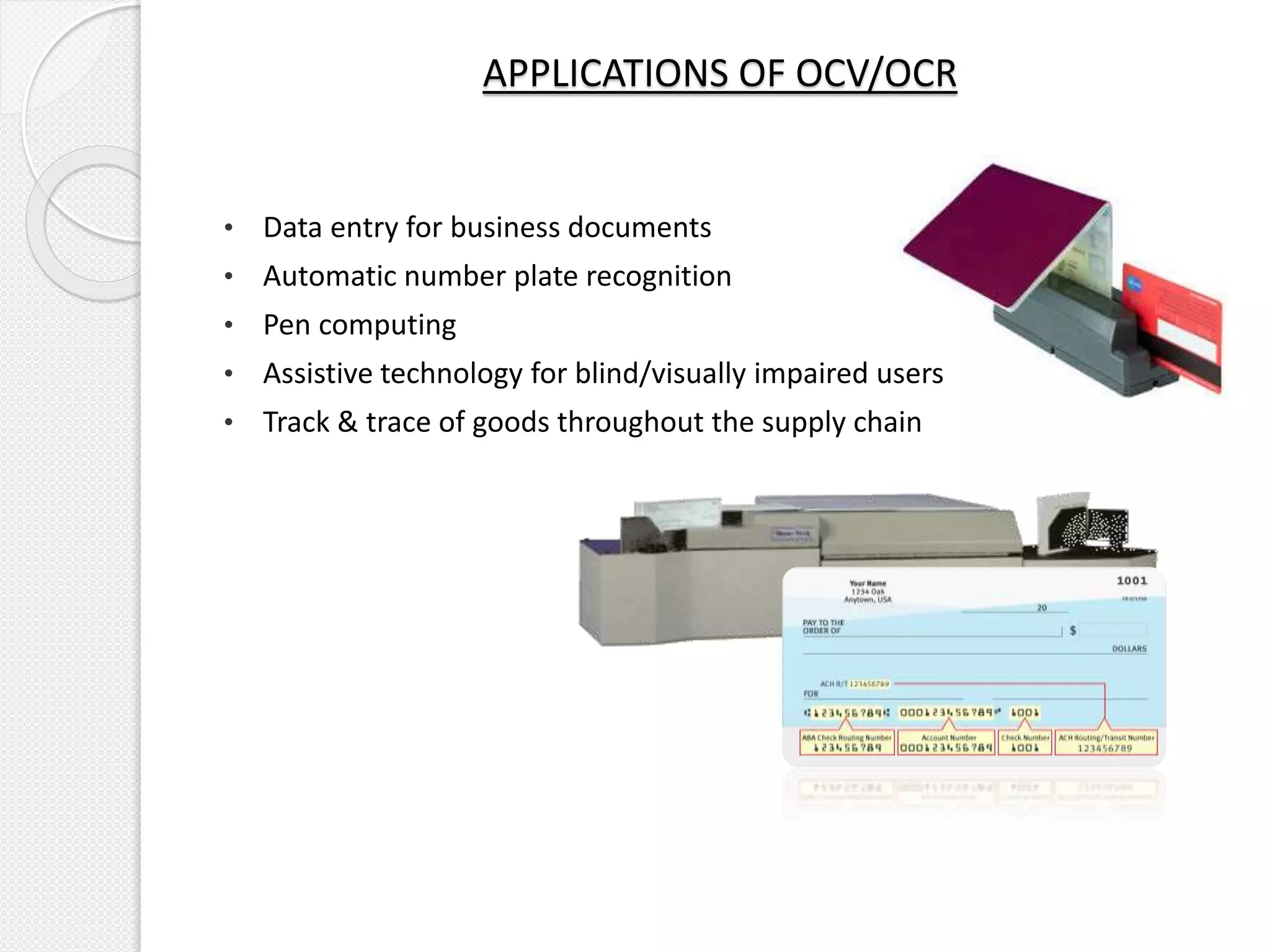
• Data entry for business documents
• Automatic number plate recognition
• Pen computing
• Assistive technology for blind/visually impaired users
• Track & trace of goods throughout the supply chain
UNDERSTANDING TEST ENVIRONMENT
• Font type
• FOV
• Vision sensor(camera)
• Illumination(optics)
• Image Focus
• Aspect ratio
• Line Weight/Stroke Width
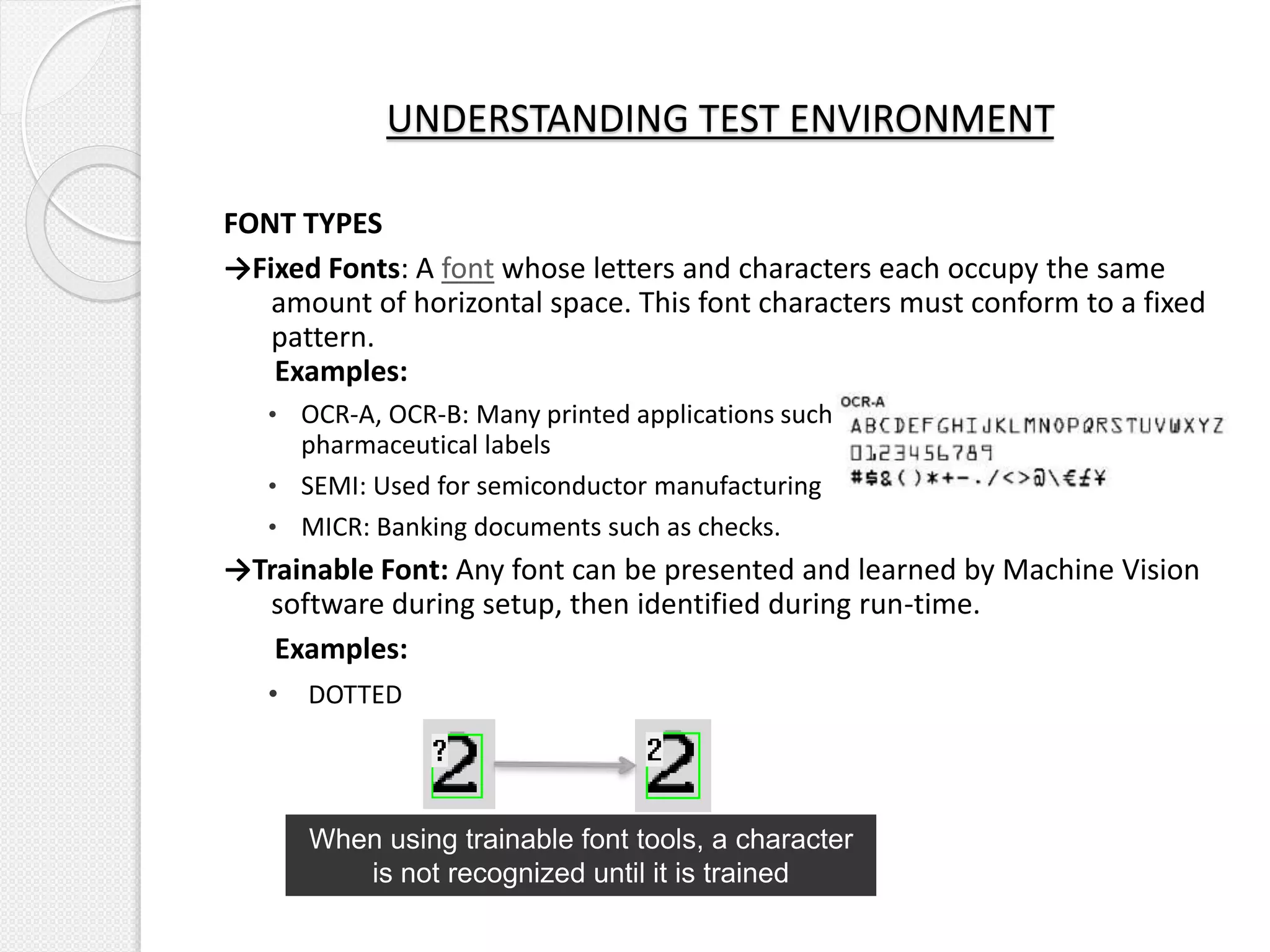
FONT TYPES
→Fixed Fonts: A font whose letters and characters each occupy the same
amount of horizontal space. This font characters must conform to a fixed
pattern.
Examples:
• OCR-A, OCR-B: Many printed applications such as passports, documents, and
pharmaceutical labels
• SEMI: Used for semiconductor manufacturing
• MICR: Banking documents such as checks.
→Trainable Font: Any font can be presented and learned by Machine Vision
software during setup, then identified during run-time.
Examples:
• DOTTED
UNDERSTANDING TEST ENVIRONMENT
When using trainable font tools, a character
is not recognized until it is trained
Why font type matters?
→ Fixed fonts are designed to ensure precisely specified sizing, spacing, and
distinctive character shapes which improves accuracy, reliability &
reduces processing time.
→ Incase of other fonts character width would be varying.
UNDERSTANDING TEST ENVIRONMENT
Fixed Fonts provide
→Uniform character spacing
→Each character designed to be different than all others to maximize
difference in similar characters .
Example: Consider character O which has many similar characters such as
Q,C & G.
OCR-A
ARIAL
UNDERSTANDING TEST ENVIRONMENT
Field of View
→ It is the area in the eyepiece of an optical instrument in which the image is
visible.
→FOV will directly influence maximum no of characters that can be
detected/decoded under the given camera & lens.
Large FOV → Large data
Small FOV → Small data
UNDERSTANDING TEST ENVIRONMENT
Vision Sensor(Camera)
→For a given FOV, camera resolution directly influences resolution i.e.
character width & height in terms of pixels.
→Higher the camera resolution, higher the no of pixels assigned to
characters. Higher no of pixels further increases performance.
UNDERSTANDING TEST ENVIRONMENT
25 Pixels
30 Pixels
Illumination
→Illumination distinguishes foreground from background.
→Illumination should be uniform throughout the FOV & strong enough such
that higher contrast is generated between foreground & background.
UNDERSTANDING TEST ENVIRONMENT
Image Focus
→Before running the system user must ensure that image is focused such
that character edges are sharp.
UNDERSTANDING TEST ENVIRONMENT
Aspect Ratio
→It is a ratio of width to the height of a character.
→It does not influence character decoding. It is a pre-condition i.e. technical
specification of OCV/OCR systems specify minimum character width, height
system can decode.
UNDERSTANDING TEST ENVIRONMENT
Height
Width
Line Weight/Stroke Width
→The weight of a particular font is the thickness of the character outlines
relative to their height.
→As a rule of thumb, stroke width of the smallest character should be at least
three pixels wide.
→Specification of an OCV/OCR system should specify minimum width system
will be able to decode. It is specified in terms of pixels.
UNDERSTANDING TEST ENVIRONMENT
Line
Weight
→Apart from functional, OCV/OCR systems should be validated focusing more
on non-functional points.
→Considering area of application an OCV/OCR system should be validated for
1. Sensitivity and Specificity
2. Usability
3. Accuracy
4. Flexibility(Pattern Matching)
VALIDATION APPROACH
Teach & Inspection
→Once all characters are taught system must apply teach data correctly in
inspection.
→As long as the printing specification remains same as taught characters,
characters should be decoded correctly.
VALIDATION APPROACH - FUNCTIONAL
Decode string & status
→For each image inspected system must reflect the decoded string along
with status.
→If string is decoded correctly it should be reflected in GREEN or else if it is
failed then it should be reflected in RED.
VALIDATION APPROACH - FUNCTIONAL
Verification score
→For each character read or measured by system , a verification score is
assigned to the character.
→In Inspection system compares the measured score of each character to
the reference score set in teach.
→If measured score < reference score character should be Failed & if
measured score > reference score character should be Passed.
→System should allow user to set value of reference score for each character
in Teach as well as Inspection.
VALIDATION APPROACH - FUNCTIONAL
Consistency & Reliability
→ An OCV/OCR system must produce similar results under consistent
environment.
→ Environment comprises of optics(light & polarizer) & vision
sensors(camera & lens).
Test Method: Keeping carton steady at a position under the camera, tester
can generate triggers & observe character decoding for each trigger.
Trigger count can be kept at 100.
VALIDATION APPROACH – NON FUNCTIONAL
Usability
→An OCV/OCR system should be usable enough to gain confidence of the
end user.
→Following points must be considered by a tester from usability perspective.
1. System should be very easily programmable
2. System should be assistive, preventing user from false teach
VALIDATION APPROACH - NON FUNCTIONAL
Accuracy & Precision
→An OCV/OCR system is considered valid if it is both accurate & precise. A
tester must validate the system for accuracy & precision.
→As per the industry standards OCV/OCR systems are considered best when
accuracy of 99.9% is given.
→System should be robust enough to handle confusion pairs irrespective if
any font type such as 'B' with a '3' or '8'; letter 'I' with a '1'; 'G' with '6';
the letter 'O' with the numeral zero; '6' with '9' or '3' with'8‘.
VALIDATION APPROACH – NON FUNCTIONAL
Flexibility (Pattern Matching)
→System should not be restrictive. It should be flexible enough to
accommodate possible variations.
→These variations can be in terms of print orientation & product alignment
along vertical & horizontal direction.
→Print orientation variation can be handled through functionality of image
rotation.
→Product alignment variation can be handled through pattern matching.
VALIDATION APPROACH – NON FUNCTIONAL
VARIATIONS DURING INSPECTION & WAYS TO TACKLE
THEM
• Carton alignment variation
• Print alignment variation
• Print quality variation
Carton alignment variation
→During inspection position of the carton may vary along horizontal or
vertical direction with respect to its original teach position.
→These positional variations can lead to false rejection in inspection.
→System shall be able to tackle such a situation through Pattern Matching
option.
→Pattern matching enables the system to read character string at any
position within FOV.
VARIATIONS DURING INSPECTION & WAYS TO TACKLE
THEM
Print alignment variations
→There may be products with up side down printing. Position of the camera
with respect to printed characters may not be aligned.
→Through Image Rotation functionality such a scenario can be handled.
→Provision should be there within system to teach & inspect images with
rotation of 90,180,270 degrees.
VARIATIONS DURING INSPECTION & WAYS TO TACKLE
THEM
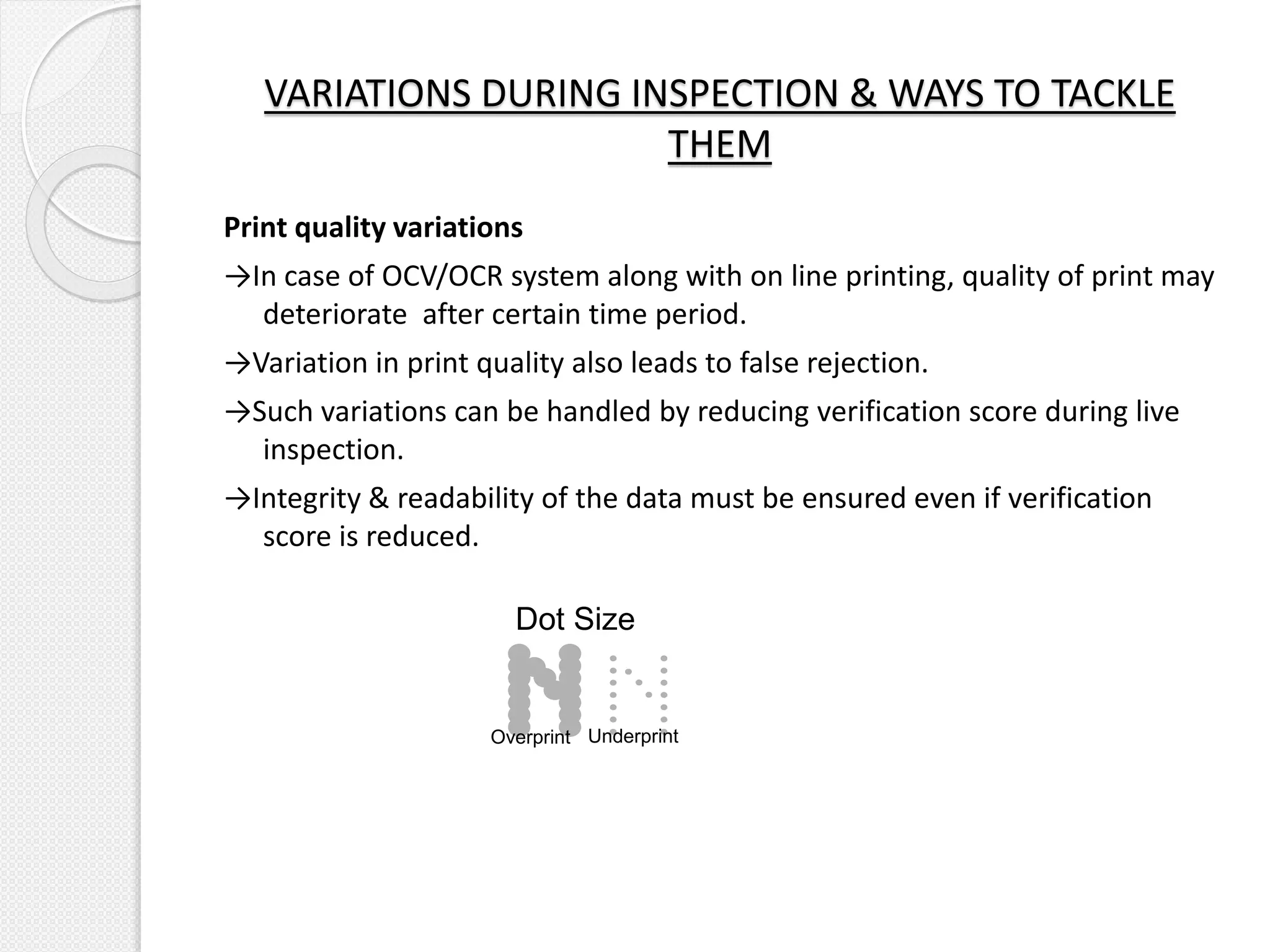
Print quality variations
→In case of OCV/OCR system along with on line printing, quality of print may
deteriorate after certain time period.
→Variation in print quality also leads to false rejection.
→Such variations can be handled by reducing verification score during live
inspection.
→Integrity & readability of the data must be ensured even if verification
score is reduced.
VARIATIONS DURING INSPECTION & WAYS TO TACKLE
THEM
Dot Size
Overprint Underprint
OCV & OCR - A Validation Perspective

OCV & OCR - A Validation Perspective

  • 2.
    TABLE OF CONTENTS 1.INTRODUCTION TO OCV/OCR 2. APPLICATIONS OF OCV/OCR 3. UNDERSTANDING YOUR TEST ENVIRONMENT 4. VALIDATION APPROACH TOWARDS OCV/OCR SYSTEMS
  • 3.
    INTRODUCTION What is OCV& OCR? →It is conversion of printed, documented or handwritten text into machine encoded/readable form. →It is a common method of digitizing printed texts so that they can be electronically edited, searched, stored more compactly, displayed on-line, and used in machine processes such as cognitive computing, machine translation, (extracted) text-to-speech, & text mining.
  • 4.
    COMPARISON OF OCV& OCR OCV : Optical Character Verification → There is a prior knowledge about what the specific alphanumeric pattern is and the system is essentially verifying or validating that the current character is exactly what it is supposed to be →The output of an OCV is quality report of correctness. OCR: Optical Character Recognition →An alphanumeric character is being recognized based on a comparison to essentially a database of character patterns. →The output of an OCR is machine usable text. OCV: verify quality OCR: read text
  • 5.
    COMPARISON OF OCV& OCR Verification: →Inspecting characters for content, correctness, quality, contrast and sharpness compared to stored templates. Examples: • Date / Lot verification • Component ID verification • Label, carton • Verification of on-line printing • Clinical labels • Blister packs • Direct printing on product ABC-123 Use OCV to check levels of print quality and legibility
  • 6.
    Reading: →A tool forreading text strings of random content and converting to machine usable text. Examples: • Sorting and identification • Serialization • Verification of readability • decoded=readable • Verification of on-line printing • Codes with inconsistent character placement or size • Can verify text using match OCR can be used to read serial numbers on a data plate COMPARISON OF OCV & OCR
  • 7.
    CLASSIFICATION OF OCV/OCRSYSTEMS →NORMAL - Normal OCR/OCV refers to detection of standard computer generated/printed characters. →ADVANCE/INTELLIGENT - Intelligent system refers to detection of handwritten cursive text.
  • 8.
    APPLICATIONS OF OCV/OCR •Data entry for business documents • Automatic number plate recognition • Pen computing • Assistive technology for blind/visually impaired users • Track & trace of goods throughout the supply chain
  • 9.
    UNDERSTANDING TEST ENVIRONMENT •Font type • FOV • Vision sensor(camera) • Illumination(optics) • Image Focus • Aspect ratio • Line Weight/Stroke Width
  • 10.
    FONT TYPES →Fixed Fonts:A font whose letters and characters each occupy the same amount of horizontal space. This font characters must conform to a fixed pattern. Examples: • OCR-A, OCR-B: Many printed applications such as passports, documents, and pharmaceutical labels • SEMI: Used for semiconductor manufacturing • MICR: Banking documents such as checks. →Trainable Font: Any font can be presented and learned by Machine Vision software during setup, then identified during run-time. Examples: • DOTTED UNDERSTANDING TEST ENVIRONMENT When using trainable font tools, a character is not recognized until it is trained
  • 11.
    Why font typematters? → Fixed fonts are designed to ensure precisely specified sizing, spacing, and distinctive character shapes which improves accuracy, reliability & reduces processing time. → Incase of other fonts character width would be varying. UNDERSTANDING TEST ENVIRONMENT
  • 12.
    Fixed Fonts provide →Uniformcharacter spacing →Each character designed to be different than all others to maximize difference in similar characters . Example: Consider character O which has many similar characters such as Q,C & G. OCR-A ARIAL UNDERSTANDING TEST ENVIRONMENT
  • 13.
    Field of View →It is the area in the eyepiece of an optical instrument in which the image is visible. →FOV will directly influence maximum no of characters that can be detected/decoded under the given camera & lens. Large FOV → Large data Small FOV → Small data UNDERSTANDING TEST ENVIRONMENT
  • 14.
    Vision Sensor(Camera) →For agiven FOV, camera resolution directly influences resolution i.e. character width & height in terms of pixels. →Higher the camera resolution, higher the no of pixels assigned to characters. Higher no of pixels further increases performance. UNDERSTANDING TEST ENVIRONMENT 25 Pixels 30 Pixels
  • 15.
    Illumination →Illumination distinguishes foregroundfrom background. →Illumination should be uniform throughout the FOV & strong enough such that higher contrast is generated between foreground & background. UNDERSTANDING TEST ENVIRONMENT
  • 16.
    Image Focus →Before runningthe system user must ensure that image is focused such that character edges are sharp. UNDERSTANDING TEST ENVIRONMENT
  • 17.
    Aspect Ratio →It isa ratio of width to the height of a character. →It does not influence character decoding. It is a pre-condition i.e. technical specification of OCV/OCR systems specify minimum character width, height system can decode. UNDERSTANDING TEST ENVIRONMENT Height Width
  • 18.
    Line Weight/Stroke Width →Theweight of a particular font is the thickness of the character outlines relative to their height. →As a rule of thumb, stroke width of the smallest character should be at least three pixels wide. →Specification of an OCV/OCR system should specify minimum width system will be able to decode. It is specified in terms of pixels. UNDERSTANDING TEST ENVIRONMENT Line Weight
  • 19.
    →Apart from functional,OCV/OCR systems should be validated focusing more on non-functional points. →Considering area of application an OCV/OCR system should be validated for 1. Sensitivity and Specificity 2. Usability 3. Accuracy 4. Flexibility(Pattern Matching) VALIDATION APPROACH
  • 20.
    Teach & Inspection →Onceall characters are taught system must apply teach data correctly in inspection. →As long as the printing specification remains same as taught characters, characters should be decoded correctly. VALIDATION APPROACH - FUNCTIONAL
  • 21.
    Decode string &status →For each image inspected system must reflect the decoded string along with status. →If string is decoded correctly it should be reflected in GREEN or else if it is failed then it should be reflected in RED. VALIDATION APPROACH - FUNCTIONAL
  • 22.
    Verification score →For eachcharacter read or measured by system , a verification score is assigned to the character. →In Inspection system compares the measured score of each character to the reference score set in teach. →If measured score < reference score character should be Failed & if measured score > reference score character should be Passed. →System should allow user to set value of reference score for each character in Teach as well as Inspection. VALIDATION APPROACH - FUNCTIONAL
  • 23.
    Consistency & Reliability →An OCV/OCR system must produce similar results under consistent environment. → Environment comprises of optics(light & polarizer) & vision sensors(camera & lens). Test Method: Keeping carton steady at a position under the camera, tester can generate triggers & observe character decoding for each trigger. Trigger count can be kept at 100. VALIDATION APPROACH – NON FUNCTIONAL
  • 24.
    Usability →An OCV/OCR systemshould be usable enough to gain confidence of the end user. →Following points must be considered by a tester from usability perspective. 1. System should be very easily programmable 2. System should be assistive, preventing user from false teach VALIDATION APPROACH - NON FUNCTIONAL
  • 25.
    Accuracy & Precision →AnOCV/OCR system is considered valid if it is both accurate & precise. A tester must validate the system for accuracy & precision. →As per the industry standards OCV/OCR systems are considered best when accuracy of 99.9% is given. →System should be robust enough to handle confusion pairs irrespective if any font type such as 'B' with a '3' or '8'; letter 'I' with a '1'; 'G' with '6'; the letter 'O' with the numeral zero; '6' with '9' or '3' with'8‘. VALIDATION APPROACH – NON FUNCTIONAL
  • 26.
    Flexibility (Pattern Matching) →Systemshould not be restrictive. It should be flexible enough to accommodate possible variations. →These variations can be in terms of print orientation & product alignment along vertical & horizontal direction. →Print orientation variation can be handled through functionality of image rotation. →Product alignment variation can be handled through pattern matching. VALIDATION APPROACH – NON FUNCTIONAL
  • 27.
    VARIATIONS DURING INSPECTION& WAYS TO TACKLE THEM • Carton alignment variation • Print alignment variation • Print quality variation
  • 28.
    Carton alignment variation →Duringinspection position of the carton may vary along horizontal or vertical direction with respect to its original teach position. →These positional variations can lead to false rejection in inspection. →System shall be able to tackle such a situation through Pattern Matching option. →Pattern matching enables the system to read character string at any position within FOV. VARIATIONS DURING INSPECTION & WAYS TO TACKLE THEM
  • 29.
    Print alignment variations →Theremay be products with up side down printing. Position of the camera with respect to printed characters may not be aligned. →Through Image Rotation functionality such a scenario can be handled. →Provision should be there within system to teach & inspect images with rotation of 90,180,270 degrees. VARIATIONS DURING INSPECTION & WAYS TO TACKLE THEM
  • 30.
    Print quality variations →Incase of OCV/OCR system along with on line printing, quality of print may deteriorate after certain time period. →Variation in print quality also leads to false rejection. →Such variations can be handled by reducing verification score during live inspection. →Integrity & readability of the data must be ensured even if verification score is reduced. VARIATIONS DURING INSPECTION & WAYS TO TACKLE THEM Dot Size Overprint Underprint

Editor's Notes

  • #5 OCV-Verification reflects a condition where system knows what the character string is going to be. It is employed to make sure that specific character exists at a specific location. OCR-Implies that system does not know which character is present at a specific location, but that it is one of 26 alphabetic characters or one of nine numerals.
  • #15 While working on Secondary as Code Inspection, each time I teach a model I used to wonder how a user is supposed to calculate width & height of the characters & what is the unit of measurement? Now I realized it is pixels.
  • #16 Lighting In the case of OCR lighting is very critical. In OCR applications the lighting yields a binary image of the character strings. Either the characters appear white on a dark background or vice versa. Ideally the lighting yields a consistent binary image. As a consequence, the algorithms used typically operate on binary images rather than gray scale images, which accelerates processing and reading.