Web accessibility
for beginners
Zinat Wali,
Geir Gulbrandsen,
Tania Nolan &
Elizabeth Fiennes
Web accessibility
for beginners
Web accessibility
for beginners
/whoami
>Elizabeth Fiennes
>Lead test engineer for Scott Logic in London
>Twitter @ElizaFx (sweary, feminist and bolshy)
>LinkedIn https://www.linkedin.com/in/elizaf/
(eye-rolling, feminist and bolshy)
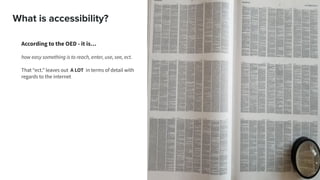
What is accessibility?
According to the OED - it is…
how easy something is to reach, enter, use, see, ect.
That “ect.” leaves out A LOT in terms of detail with
regards to the internet
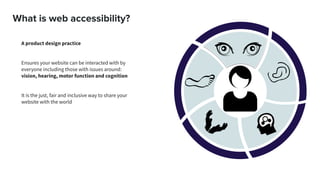
What is web accessibility?
A product design practice
Ensures your website can be interacted with by
everyone including those with issues around:
vision, hearing, motor function and cognition
It is the just, fair and inclusive way to share your
website with the world
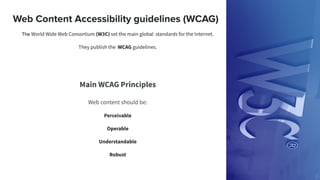
Web Content Accessibility guidelines (WCAG)
The World Wide Web Consortium (W3C) set the main global standards for the Internet.
They publish the WCAG guidelines.
Main WCAG Principles
Web content should be:
Perceivable
Operable
Understandable
Robust
Some myths
It’s all about headings
It’s all about contrast but this can be adjusted in the
browser anyway
It’s expensive, time-consuming and so subjective
We will get sued if someone with vision, hearing,
motor function or cognition issues cannot use our
site in a particular way
We have to be able to prove our site has been tested to
a particular standard or the government will make us
take it down
My user base don’t have accessibility needs
We can just add it in later
The beginning of accessibility is getting someone
else to buy into the idea.
This is also the hardest part.
Persuasion
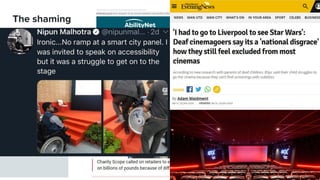
The shaming
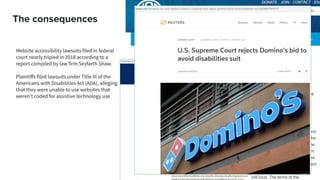
The consequences
Website accessibility lawsuits filed in federal
court nearly tripled in 2018 according to a
report compiled by law firm Seyfarth Shaw.
Plaintiffs filed lawsuits under Title III of the
Americans with Disabilities Act (ADA), alleging
that they were unable to use websites that
weren't coded for assistive technology use
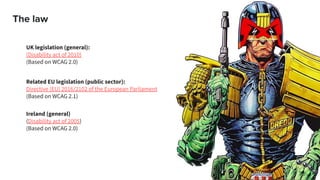
The law
Related EU legislation (public sector):
Directive (EU) 2016/2102 of the European Parliament
(Based on WCAG 2.1)
Ireland (general)
(Disability act of 2005)
(Based on WCAG 2.0)
UK legislation (general):
(Disability act of 2010)
(Based on WCAG 2.0)
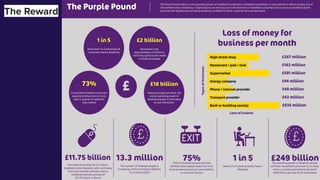
The Reward
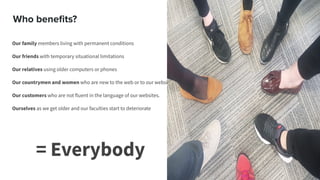
Who benefits?
Our family members living with permanent conditions
Our friends with temporary situational limitations
Our relatives using older computers or phones
Our countrymen and women who are new to the web or to our websites
Our customers who are not fluent in the language of our websites.
Ourselves as we get older and our faculties start to deteriorate
= Everybody
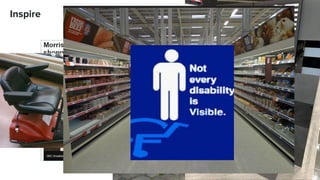
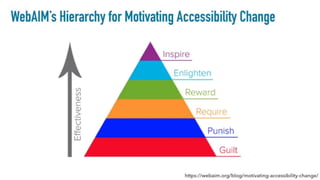
Inspire
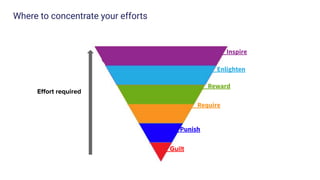
Where to concentrate your efforts
Guilt
Punish
__Require
__Reward
__Enlighten
__Inspire
Effort required
Supporting people with visual challenges:
Globally, estimates say 1.3bn people live with a visual
impairment.
36 million people are completely blind
The majority of people with vision impairment are over the age of
50.
Source: The WHO
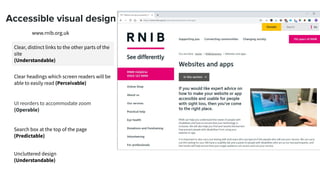
Accessible visual design
Clear, distinct links to the other parts of the
site
(Understandable)
www.rnib.org.uk
Clear headings which screen readers will be
able to easily read (Perceivable)
UI reorders to accommodate zoom
(Operable)
Search box at the top of the page
(Predictable)
Uncluttered design
(Understandable)
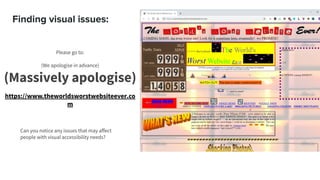
Finding visual issues:
Please go to:
(We apologise in advance)
(Massively apologise)
https://www.theworldsworstwebsiteever.co
m
Can you notice any issues that may affect
people with visual accessibility needs?
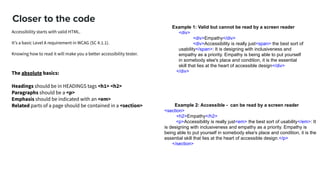
Closer to the code
Example 2: Accessible - can be read by a screen reader
<section>
<h2>Empathy</h2>
<p>Accessibility is really just<em> the best sort of usability</em>: It
is designing with inclusiveness and empathy as a priority. Empathy is
being able to put yourself in somebody else's place and condition, it is the
essential skill that lies at the heart of accessible design.</p>
</section>
Example 1: Valid but cannot be read by a screen reader
<div>
<div>Empathy</div>
<div>Accessibility is really just<span> the best sort of
usability</span>: It is designing with inclusiveness and
empathy as a priority. Empathy is being able to put yourself
in somebody else's place and condition, it is the essential
skill that lies at the heart of accessible design</div>
</div>The absolute basics:
Headings should be in HEADINGS tags <h1> <h2>
Paragraphs should be a <p>
Emphasis should be indicated with an <em>
Related parts of a page should be contained in a <section>
Accessibility starts with valid HTML.
It's a basic Level A requirement in WCAG (SC 4.1.1).  
Knowing how to read it will make you a better accessibility tester.
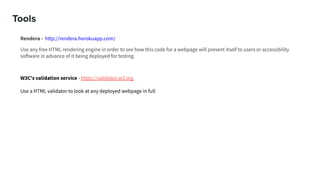
Tools
Rendera - http://rendera.herokuapp.com/
Use any free HTML rendering engine in order to see how this code for a webpage will present itself to users or accessibility
software in advance of it being deployed for testing.
W3C's validation service - https://validator.w3.org
Use a HTML validator to look at any deployed webpage in full
Supporting people with audio challenges:
Around 466 million people worldwide have
a degree of hearing loss
34 million are children
It is estimated that by 2050 over 900 million
people will have a debilitating level of
hearing
Source: The WHO
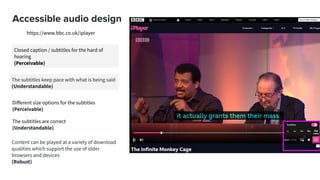
Accessible audio design
Closed caption / subtitles for the hard of
hearing
(Perceivable)
https://www.bbc.co.uk/iplayer
The subtitles keep pace with what is being said
(Understandable)
Different size options for the subtitles
(Perceivable)
The subtitles are correct
(Understandable)
Content can be played at a variety of download
qualities which support the use of older
browsers and devices
(Robust)
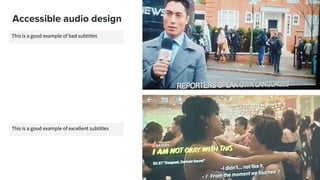
This is a good example of bad subtitles
Accessible audio design
This is a good example of excellent subtitles
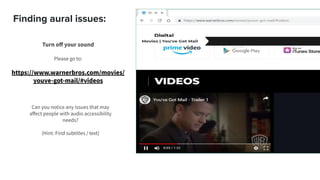
Finding aural issues:
Turn off your sound
Please go to:
https://www.warnerbros.com/movies/
youve-got-mail/#videos
Can you notice any issues that may
affect people with audio accessibility
needs?
(Hint: Find subtitles / text)
Closer to the code
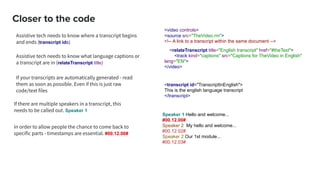
Assistive tech needs to know where a transcript begins
and ends (transcript ids)
<video controls>
<source src="TheVideo.rm">
<!-- A link to a transcript within the same document -->
<relateTranscript title="English transcript" href="#theText">
<track kind="captions" src="Captions for TheVideo in English"
lang="EN">
</video>
<transcript id="TranscriptInEnglish">
This is the english language transcript
</transcript>
Speaker 1 Hello and welcome...
#00.12.00#
Speaker 2 My hello and welcome...
#00.12.02#
Speaker 2 Our 1st module...
#00.12.03#
If your transcripts are automatically generated - read
them as soon as possible. Even if this is just raw
code/text files
In order to allow people the chance to come back to
specific parts - timestamps are essential. #00.12.00#
If there are multiple speakers in a transcript, this
needs to be called out. Speaker 1
Assistive tech needs to know what language captions or
a transcript are in (relateTranscript title)
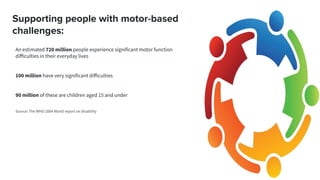
Supporting people with motor-based
challenges:
An estimated 720 million people experience significant motor function
difficulties in their everyday lives
100 million have very significant difficulties
90 million of these are children aged 15 and under
Source: The WHO 2004 World report on disability
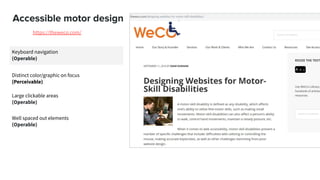
Accessible motor design
Keyboard navigation
(Operable)
https://theweco.com/
Distinct color/graphic on focus
(Perceivable)
Large clickable areas
(Operable)
Well spaced out elements
(Operable)
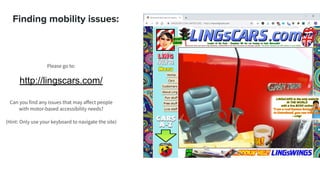
Finding mobility issues:
Please go to:
http://lingscars.com/
Can you find any issues that may affect people
with motor-based accessibility needs?
(Hint: Only use your keyboard to navigate the site)
Supporting people with cognitive issues:
A person with cognitive issues may have challenges
around:
➔ Retaining information
➔ Problem-Solving
➔ Attention span
➔ Reading comprehension (Elizabeth!)
➔ Linguistic ambiguity
➔ Verbal Comprehension
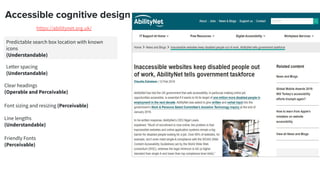
Accessible cognitive design
Predictable search box location with known
icons
(Understandable)
https://abilitynet.org.uk/
Letter spacing
(Understandable)
Clear headings
(Operable and Perceivable)
Font sizing and resizing (Perceivable)
Line lengths
(Understandable)
Friendly Fonts
(Perceivable)
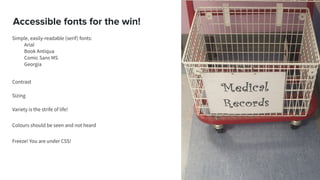
Accessible fonts for the win!
Simple, easily-readable (serif) fonts:
Arial
Book Antiqua
Comic Sans MS
Georgia
Contrast
Sizing
Variety is the strife of life!
Colours should be seen and not heard
Freeze! You are under CSS!
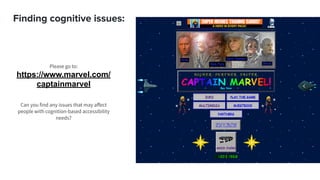
Finding cognitive issues:
Please go to:
https://www.marvel.com/
captainmarvel
Can you find any issues that may affect
people with cognition-based accessibility
needs?
What if my website is already live?
It’s never too late to start!
● Use available tools and services
● Perform your own testing/audit/evaluation manually
● Discuss your findings with your team
● Bake effective tools into your pipeline if you have the time and
support
Some helpful tools
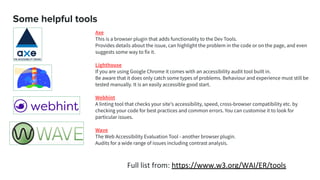
Axe
This is a browser plugin that adds functionality to the Dev Tools.
Provides details about the issue, can highlight the problem in the code or on the page, and even
suggests some way to fix it.
Lighthouse
If you are using Google Chrome it comes with an accessibility audit tool built in.
Be aware that it does only catch some types of problems. Behaviour and experience must still be
tested manually. It is an easily accessible good start.
Webhint
A linting tool that checks your site's accessibility, speed, cross-browser compatibility etc. by
checking your code for best practices and common errors. You can customise it to look for
particular issues.
Wave
The Web Accessibility Evaluation Tool - another browser plugin.
Audits for a wide range of issues including contrast analysis.
Full list from: https://www.w3.org/WAI/ER/tools
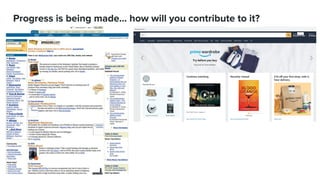
Progress is being made… how will you contribute to it?
Accessibility for beginners

Accessibility for beginners

  • 1.
    Web accessibility for beginners ZinatWali, Geir Gulbrandsen, Tania Nolan & Elizabeth Fiennes Web accessibility for beginners Web accessibility for beginners
  • 2.
    /whoami >Elizabeth Fiennes >Lead testengineer for Scott Logic in London >Twitter @ElizaFx (sweary, feminist and bolshy) >LinkedIn https://www.linkedin.com/in/elizaf/ (eye-rolling, feminist and bolshy)
  • 3.
    What is accessibility? Accordingto the OED - it is… how easy something is to reach, enter, use, see, ect. That “ect.” leaves out A LOT in terms of detail with regards to the internet
  • 4.
    What is webaccessibility? A product design practice Ensures your website can be interacted with by everyone including those with issues around: vision, hearing, motor function and cognition It is the just, fair and inclusive way to share your website with the world
  • 5.
    Web Content Accessibilityguidelines (WCAG) The World Wide Web Consortium (W3C) set the main global standards for the Internet. They publish the WCAG guidelines. Main WCAG Principles Web content should be: Perceivable Operable Understandable Robust
  • 6.
    Some myths It’s allabout headings It’s all about contrast but this can be adjusted in the browser anyway It’s expensive, time-consuming and so subjective We will get sued if someone with vision, hearing, motor function or cognition issues cannot use our site in a particular way We have to be able to prove our site has been tested to a particular standard or the government will make us take it down My user base don’t have accessibility needs We can just add it in later
  • 7.
    The beginning ofaccessibility is getting someone else to buy into the idea. This is also the hardest part. Persuasion
  • 8.
  • 9.
    The consequences Website accessibilitylawsuits filed in federal court nearly tripled in 2018 according to a report compiled by law firm Seyfarth Shaw. Plaintiffs filed lawsuits under Title III of the Americans with Disabilities Act (ADA), alleging that they were unable to use websites that weren't coded for assistive technology use
  • 10.
    The law Related EUlegislation (public sector): Directive (EU) 2016/2102 of the European Parliament (Based on WCAG 2.1) Ireland (general) (Disability act of 2005) (Based on WCAG 2.0) UK legislation (general): (Disability act of 2010) (Based on WCAG 2.0)
  • 11.
  • 12.
    Who benefits? Our familymembers living with permanent conditions Our friends with temporary situational limitations Our relatives using older computers or phones Our countrymen and women who are new to the web or to our websites Our customers who are not fluent in the language of our websites. Ourselves as we get older and our faculties start to deteriorate = Everybody
  • 13.
  • 15.
    Where to concentrateyour efforts Guilt Punish __Require __Reward __Enlighten __Inspire Effort required
  • 16.
    Supporting people withvisual challenges: Globally, estimates say 1.3bn people live with a visual impairment. 36 million people are completely blind The majority of people with vision impairment are over the age of 50. Source: The WHO
  • 17.
    Accessible visual design Clear,distinct links to the other parts of the site (Understandable) www.rnib.org.uk Clear headings which screen readers will be able to easily read (Perceivable) UI reorders to accommodate zoom (Operable) Search box at the top of the page (Predictable) Uncluttered design (Understandable)
  • 18.
    Finding visual issues: Pleasego to: (We apologise in advance) (Massively apologise) https://www.theworldsworstwebsiteever.co m Can you notice any issues that may affect people with visual accessibility needs?
  • 19.
    Closer to thecode Example 2: Accessible - can be read by a screen reader <section> <h2>Empathy</h2> <p>Accessibility is really just<em> the best sort of usability</em>: It is designing with inclusiveness and empathy as a priority. Empathy is being able to put yourself in somebody else's place and condition, it is the essential skill that lies at the heart of accessible design.</p> </section> Example 1: Valid but cannot be read by a screen reader <div> <div>Empathy</div> <div>Accessibility is really just<span> the best sort of usability</span>: It is designing with inclusiveness and empathy as a priority. Empathy is being able to put yourself in somebody else's place and condition, it is the essential skill that lies at the heart of accessible design</div> </div>The absolute basics: Headings should be in HEADINGS tags <h1> <h2> Paragraphs should be a <p> Emphasis should be indicated with an <em> Related parts of a page should be contained in a <section> Accessibility starts with valid HTML. It's a basic Level A requirement in WCAG (SC 4.1.1).   Knowing how to read it will make you a better accessibility tester.
  • 20.
    Tools Rendera - http://rendera.herokuapp.com/ Useany free HTML rendering engine in order to see how this code for a webpage will present itself to users or accessibility software in advance of it being deployed for testing. W3C's validation service - https://validator.w3.org Use a HTML validator to look at any deployed webpage in full
  • 21.
    Supporting people withaudio challenges: Around 466 million people worldwide have a degree of hearing loss 34 million are children It is estimated that by 2050 over 900 million people will have a debilitating level of hearing Source: The WHO
  • 22.
    Accessible audio design Closedcaption / subtitles for the hard of hearing (Perceivable) https://www.bbc.co.uk/iplayer The subtitles keep pace with what is being said (Understandable) Different size options for the subtitles (Perceivable) The subtitles are correct (Understandable) Content can be played at a variety of download qualities which support the use of older browsers and devices (Robust)
  • 23.
    This is agood example of bad subtitles Accessible audio design This is a good example of excellent subtitles
  • 24.
    Finding aural issues: Turnoff your sound Please go to: https://www.warnerbros.com/movies/ youve-got-mail/#videos Can you notice any issues that may affect people with audio accessibility needs? (Hint: Find subtitles / text)
  • 25.
    Closer to thecode Assistive tech needs to know where a transcript begins and ends (transcript ids) <video controls> <source src="TheVideo.rm"> <!-- A link to a transcript within the same document --> <relateTranscript title="English transcript" href="#theText"> <track kind="captions" src="Captions for TheVideo in English" lang="EN"> </video> <transcript id="TranscriptInEnglish"> This is the english language transcript </transcript> Speaker 1 Hello and welcome... #00.12.00# Speaker 2 My hello and welcome... #00.12.02# Speaker 2 Our 1st module... #00.12.03# If your transcripts are automatically generated - read them as soon as possible. Even if this is just raw code/text files In order to allow people the chance to come back to specific parts - timestamps are essential. #00.12.00# If there are multiple speakers in a transcript, this needs to be called out. Speaker 1 Assistive tech needs to know what language captions or a transcript are in (relateTranscript title)
  • 26.
    Supporting people withmotor-based challenges: An estimated 720 million people experience significant motor function difficulties in their everyday lives 100 million have very significant difficulties 90 million of these are children aged 15 and under Source: The WHO 2004 World report on disability
  • 27.
    Accessible motor design Keyboardnavigation (Operable) https://theweco.com/ Distinct color/graphic on focus (Perceivable) Large clickable areas (Operable) Well spaced out elements (Operable)
  • 28.
    Finding mobility issues: Pleasego to: http://lingscars.com/ Can you find any issues that may affect people with motor-based accessibility needs? (Hint: Only use your keyboard to navigate the site)
  • 29.
    Supporting people withcognitive issues: A person with cognitive issues may have challenges around: ➔ Retaining information ➔ Problem-Solving ➔ Attention span ➔ Reading comprehension (Elizabeth!) ➔ Linguistic ambiguity ➔ Verbal Comprehension
  • 30.
    Accessible cognitive design Predictablesearch box location with known icons (Understandable) https://abilitynet.org.uk/ Letter spacing (Understandable) Clear headings (Operable and Perceivable) Font sizing and resizing (Perceivable) Line lengths (Understandable) Friendly Fonts (Perceivable)
  • 31.
    Accessible fonts forthe win! Simple, easily-readable (serif) fonts: Arial Book Antiqua Comic Sans MS Georgia Contrast Sizing Variety is the strife of life! Colours should be seen and not heard Freeze! You are under CSS!
  • 32.
    Finding cognitive issues: Pleasego to: https://www.marvel.com/ captainmarvel Can you find any issues that may affect people with cognition-based accessibility needs?
  • 33.
    What if mywebsite is already live? It’s never too late to start! ● Use available tools and services ● Perform your own testing/audit/evaluation manually ● Discuss your findings with your team ● Bake effective tools into your pipeline if you have the time and support
  • 34.
    Some helpful tools Axe Thisis a browser plugin that adds functionality to the Dev Tools. Provides details about the issue, can highlight the problem in the code or on the page, and even suggests some way to fix it. Lighthouse If you are using Google Chrome it comes with an accessibility audit tool built in. Be aware that it does only catch some types of problems. Behaviour and experience must still be tested manually. It is an easily accessible good start. Webhint A linting tool that checks your site's accessibility, speed, cross-browser compatibility etc. by checking your code for best practices and common errors. You can customise it to look for particular issues. Wave The Web Accessibility Evaluation Tool - another browser plugin. Audits for a wide range of issues including contrast analysis. Full list from: https://www.w3.org/WAI/ER/tools
  • 35.
    Progress is beingmade… how will you contribute to it?