NAGPUR INSTITUTE OF TECHNOLOGY,NAGPUR 
DEPARTMENT OF COMPUTER SCI.& 
ENGINEERING 
MASTERS OF ENGINEERING 
In 
Embedded system & Computing 
SESSION 2013-2014 
M.E.- II SEMESTER 
A 
Presentation On 
“PSPICE” 
By: 
Ms. Ayushi S. Jaiswal 
Guided By: 
Prof. Shubhangi Borkar 
(Computer Sci.& Engineering)
Introduction to PSPICE 
 Simulation Program with Integrated Circuit 
Emphasis 
◦ Developed in 1970’s at Berkeley 
◦ Many commercial versions are available 
◦ HSPICE is a robust industry standard 
 SPICE is a general purpose analog circuit simulator 
that is used to verify circuit designs and to predict 
the circuit behaviour. 
 PSpice is a PC version of SPICE that runs on 
workstations and larger computers.
PSPICE Overview 
 OrCAD PSpice simulates analog-only circuits. 
 After we prepare a design for simulation, 
OrCAD Capture generates a circuit file set. 
 The circuit file set, containing the circuit 
netlist and analysis commands, is read by 
PSpice for simulation. 
 PSpice formulates these into meaningful 
graphical plots, which you can mark for 
display directly from your schematic page 
using markers.
Circuit Components available 
 Independent and dependent voltage and current sources 
 Resistors 
 Inductors 
 Mutual inductors 
 Transmission lines 
 Operational amplifiers 
 Switches 
 Diodes 
 Bipolar transistors 
 MOS transistors 
 JFET 
 MOSFET 
 Digital gates
PSPICE Elements 
Elements & their denoted letter. 
Letter Element 
R Resistor 
C Capacitor 
L Inductor 
K Mutual Inductor 
V Independent voltage source 
I Independent current source 
M MOSFET 
D Diode 
Q Bipolar transistor 
W Lossy transmission line 
X Subcircuit 
E Voltage-controlled voltage source 
G Voltage-controlled current source 
H Current-controlled voltage source 
F Current-controlled current source
PSPICE Units 
Letter Unit Magnitude 
a atto 10-18 
f fempto 10-15 
p pico 10-12 
n nano 10-9 
u micro 10-6 
m milli 10-3 
k kilo 103 
x mega 106 
g giga 109
Types of Analysis run with 
PSpice 
DC sweep & other DC calculations. 
AC sweep and noise. 
Transient and Fourier. 
 Parametric and temperature. 
Sensitivity/worst-case. 
 Non-linear DC analysis. 
 Non-linear transient analysis. 
 Linear AC Analysis. 
 Noise analysis . 
 Sensitivity analysis. 
 Distortion analysis. 
 Fourier analysis. 
 Monte Carlo Analysis.
Things to remember before 
starting 
PSPICE is not case sensitive. 
 All element names must be unique. 
 There must be a node designated "0" (Zero). 
This is the reference node against which all 
voltages are calculated. 
 If any change is made in circuit make sure you 
create netlist again before simulating it.
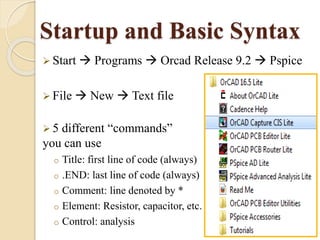
Startup and Basic Syntax 
 Start  Programs  Orcad Release 9.2  Pspice 
 File  New  Text file 
 5 different “commands” 
you can use 
o Title: first line of code (always) 
o .END: last line of code (always) 
o Comment: line denoted by * 
o Element: Resistor, capacitor, etc. 
o Control: analysis
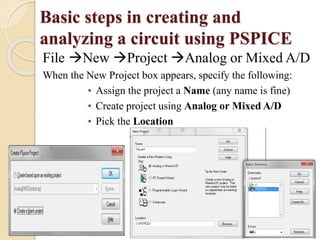
Basic steps in creating and 
analyzing a circuit using PSPICE 
File New Project Analog or Mixed A/D 
When the New Project box appears, specify the following: 
• Assign the project a Name (any name is fine) 
• Create project using Analog or Mixed A/D 
• Pick the Location
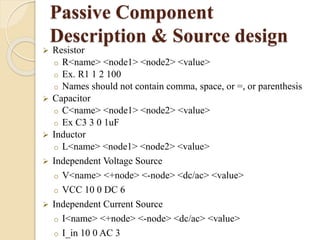
Passive Component 
Description & Source design 
 Resistor 
o R<name> <node1> <node2> <value> 
o Ex. R1 1 2 100 
o Names should not contain comma, space, or =, or parenthesis 
 Capacitor 
o C<name> <node1> <node2> <value> 
o Ex C3 3 0 1uF 
 Inductor 
o L<name> <node1> <node2> <value> 
 Independent Voltage Source 
o V<name> <+node> <-node> <dc/ac> <value> 
o VCC 10 0 DC 6 
 Independent Current Source 
o I<name> <+node> <-node> <dc/ac> <value> 
o I_in 10 0 AC 3
Analysis Types 
DC Analysis 
DC transfer curve source and sweep 
.dc <source> <vstart> <vstop> <vincr> [src2 start2 stop2 incr2] 
.DC VIN 0.25 5.0 0.25 
AC Analysis 
.AC DEC ND FSTART FSTOP 
Dec = decade variation, ND = pts. / decade 
.AC LIN NP FSTART FSTOP 
Lin = linear variation, NP = # pts 
.NOISE OUTV INSRC NUMS 
OUTV = output voltage which defines summing point 
INSRC = name of independent source which is the noise input 
reference 
NUMS = summary interval 
Transient 
(.tran <step> <stop> <start>) 
Transient analysis computes the transient output variables as a function 
of time over a user specified time interval 
The initial conditions are automatically determined by a dc analysis 
.tran 1ns 1000ns 500ns
Including our own model files 
 .model <name> <type> <parameters….> 
 .model QPNP PNP(Is=650.6E-18 Xti=3 
Eg=1.11 Vaf=100 Bf=150 Ne=1.829 + Ise=54.81f 
Ikf=1.079 Xtb=1.5 Br=3.563 Nc=2 Isc=0 Irk=0 
Rc=.715 + Cjc=14.76p Mjc=.5383 Vjc=.75 
Fc=.5 Cje=19.82p Mje=.3357 Vje=.75 + 
Tr=111.3n Tf=603.7p Itf=.65 Vtf=5 Xtf=1.7 Rb=10) 
 .model QNPN NPN(Is=14.34f Xti=3 Eg=1.11 
Vaf=100 Bf=150 Ne=1.307 + Ise=14.34f Ikf=.2847 
Xtb=1.5 Br=6.092 Nc=2 Isc=0 Ikr=0 Rc=1 + 
Cjc=7.306p Mjc=.3416 Vjc=.75 Fc=.5 Cje=22.01p 
Mje=.377 Vje=.75 + Tr=46.91n Tf=411.1p Itf=.6 
Vtf=1.7 Xtf=3 Rb=10)
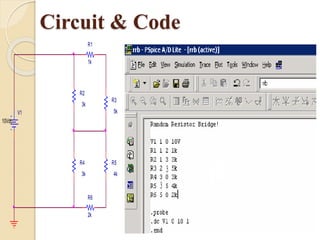
Circuit & Code 
R3 
V1 5k 
10Vdc 
R5 
4k 
R4 
3k 
R6 
2k 
R2 
3k 
R1 
1k
Result
Advantages 
New PSpice interface with integrated waveform analysis 
functionality 
 PSpice includes all of Probe’s features and adds to them. 
 Included in one screen are tabbed windows for viewing 
plots, text windows for viewing output files or other text 
files, and a simulation status and message window. 
 Also included is a new, self-documenting analysis setup 
dialog for creating simulation profiles . 
 PSpice now provides an editable simulation queue which 
shows you how many files are currently in line to be 
simulated. You can edit or re-order the list as needed.
THANK YOU

PSPICE seminar

  • 1.
    NAGPUR INSTITUTE OFTECHNOLOGY,NAGPUR DEPARTMENT OF COMPUTER SCI.& ENGINEERING MASTERS OF ENGINEERING In Embedded system & Computing SESSION 2013-2014 M.E.- II SEMESTER A Presentation On “PSPICE” By: Ms. Ayushi S. Jaiswal Guided By: Prof. Shubhangi Borkar (Computer Sci.& Engineering)
  • 2.
    Introduction to PSPICE  Simulation Program with Integrated Circuit Emphasis ◦ Developed in 1970’s at Berkeley ◦ Many commercial versions are available ◦ HSPICE is a robust industry standard  SPICE is a general purpose analog circuit simulator that is used to verify circuit designs and to predict the circuit behaviour.  PSpice is a PC version of SPICE that runs on workstations and larger computers.
  • 3.
    PSPICE Overview OrCAD PSpice simulates analog-only circuits.  After we prepare a design for simulation, OrCAD Capture generates a circuit file set.  The circuit file set, containing the circuit netlist and analysis commands, is read by PSpice for simulation.  PSpice formulates these into meaningful graphical plots, which you can mark for display directly from your schematic page using markers.
  • 4.
    Circuit Components available  Independent and dependent voltage and current sources  Resistors  Inductors  Mutual inductors  Transmission lines  Operational amplifiers  Switches  Diodes  Bipolar transistors  MOS transistors  JFET  MOSFET  Digital gates
  • 5.
    PSPICE Elements Elements& their denoted letter. Letter Element R Resistor C Capacitor L Inductor K Mutual Inductor V Independent voltage source I Independent current source M MOSFET D Diode Q Bipolar transistor W Lossy transmission line X Subcircuit E Voltage-controlled voltage source G Voltage-controlled current source H Current-controlled voltage source F Current-controlled current source
  • 6.
    PSPICE Units LetterUnit Magnitude a atto 10-18 f fempto 10-15 p pico 10-12 n nano 10-9 u micro 10-6 m milli 10-3 k kilo 103 x mega 106 g giga 109
  • 7.
    Types of Analysisrun with PSpice DC sweep & other DC calculations. AC sweep and noise. Transient and Fourier.  Parametric and temperature. Sensitivity/worst-case.  Non-linear DC analysis.  Non-linear transient analysis.  Linear AC Analysis.  Noise analysis .  Sensitivity analysis.  Distortion analysis.  Fourier analysis.  Monte Carlo Analysis.
  • 8.
    Things to rememberbefore starting PSPICE is not case sensitive.  All element names must be unique.  There must be a node designated "0" (Zero). This is the reference node against which all voltages are calculated.  If any change is made in circuit make sure you create netlist again before simulating it.
  • 9.
    Startup and BasicSyntax  Start  Programs  Orcad Release 9.2  Pspice  File  New  Text file  5 different “commands” you can use o Title: first line of code (always) o .END: last line of code (always) o Comment: line denoted by * o Element: Resistor, capacitor, etc. o Control: analysis
  • 10.
    Basic steps increating and analyzing a circuit using PSPICE File New Project Analog or Mixed A/D When the New Project box appears, specify the following: • Assign the project a Name (any name is fine) • Create project using Analog or Mixed A/D • Pick the Location
  • 11.
    Passive Component Description& Source design  Resistor o R<name> <node1> <node2> <value> o Ex. R1 1 2 100 o Names should not contain comma, space, or =, or parenthesis  Capacitor o C<name> <node1> <node2> <value> o Ex C3 3 0 1uF  Inductor o L<name> <node1> <node2> <value>  Independent Voltage Source o V<name> <+node> <-node> <dc/ac> <value> o VCC 10 0 DC 6  Independent Current Source o I<name> <+node> <-node> <dc/ac> <value> o I_in 10 0 AC 3
  • 12.
    Analysis Types DCAnalysis DC transfer curve source and sweep .dc <source> <vstart> <vstop> <vincr> [src2 start2 stop2 incr2] .DC VIN 0.25 5.0 0.25 AC Analysis .AC DEC ND FSTART FSTOP Dec = decade variation, ND = pts. / decade .AC LIN NP FSTART FSTOP Lin = linear variation, NP = # pts .NOISE OUTV INSRC NUMS OUTV = output voltage which defines summing point INSRC = name of independent source which is the noise input reference NUMS = summary interval Transient (.tran <step> <stop> <start>) Transient analysis computes the transient output variables as a function of time over a user specified time interval The initial conditions are automatically determined by a dc analysis .tran 1ns 1000ns 500ns
  • 13.
    Including our ownmodel files  .model <name> <type> <parameters….>  .model QPNP PNP(Is=650.6E-18 Xti=3 Eg=1.11 Vaf=100 Bf=150 Ne=1.829 + Ise=54.81f Ikf=1.079 Xtb=1.5 Br=3.563 Nc=2 Isc=0 Irk=0 Rc=.715 + Cjc=14.76p Mjc=.5383 Vjc=.75 Fc=.5 Cje=19.82p Mje=.3357 Vje=.75 + Tr=111.3n Tf=603.7p Itf=.65 Vtf=5 Xtf=1.7 Rb=10)  .model QNPN NPN(Is=14.34f Xti=3 Eg=1.11 Vaf=100 Bf=150 Ne=1.307 + Ise=14.34f Ikf=.2847 Xtb=1.5 Br=6.092 Nc=2 Isc=0 Ikr=0 Rc=1 + Cjc=7.306p Mjc=.3416 Vjc=.75 Fc=.5 Cje=22.01p Mje=.377 Vje=.75 + Tr=46.91n Tf=411.1p Itf=.6 Vtf=1.7 Xtf=3 Rb=10)
  • 14.
    Circuit & Code R3 V1 5k 10Vdc R5 4k R4 3k R6 2k R2 3k R1 1k
  • 15.
  • 16.
    Advantages New PSpiceinterface with integrated waveform analysis functionality  PSpice includes all of Probe’s features and adds to them.  Included in one screen are tabbed windows for viewing plots, text windows for viewing output files or other text files, and a simulation status and message window.  Also included is a new, self-documenting analysis setup dialog for creating simulation profiles .  PSpice now provides an editable simulation queue which shows you how many files are currently in line to be simulated. You can edit or re-order the list as needed.
  • 17.