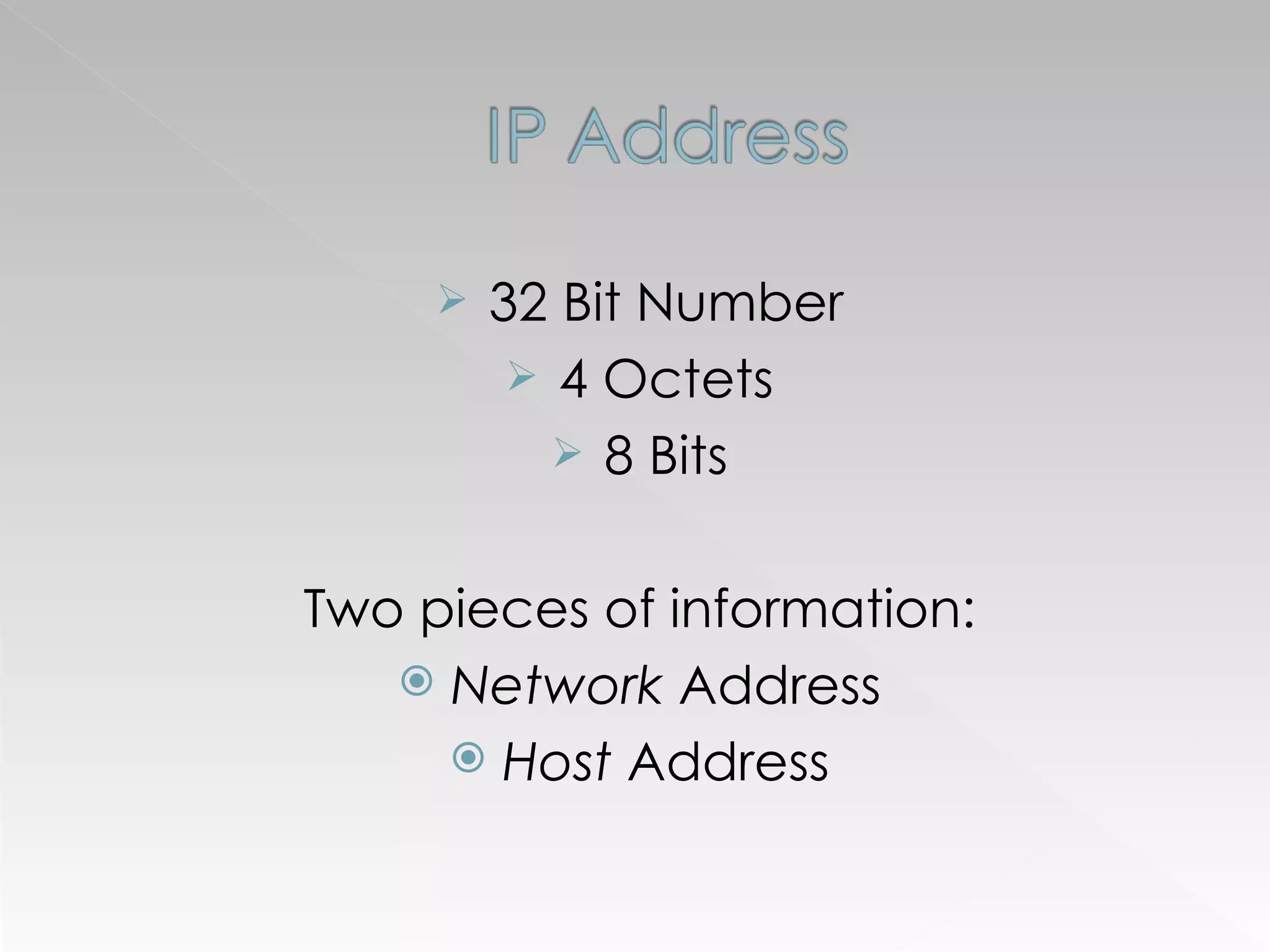
32 Bit Number 4 Octets 8 Bits Two pieces of information: Network  Address Host  Address
IP Class First Octet Networks Hosts A 1-126 126 16,777,214 B 128-191 16,384 65,534 C 192-223 2,097,152 254
255 . 0.0.0 8 network bits 24 host bits 255.255 . 0.0 16 network bits 16 host bits 255.255.255 . 0 24 network bits 8 host bits Class A Class B Class C
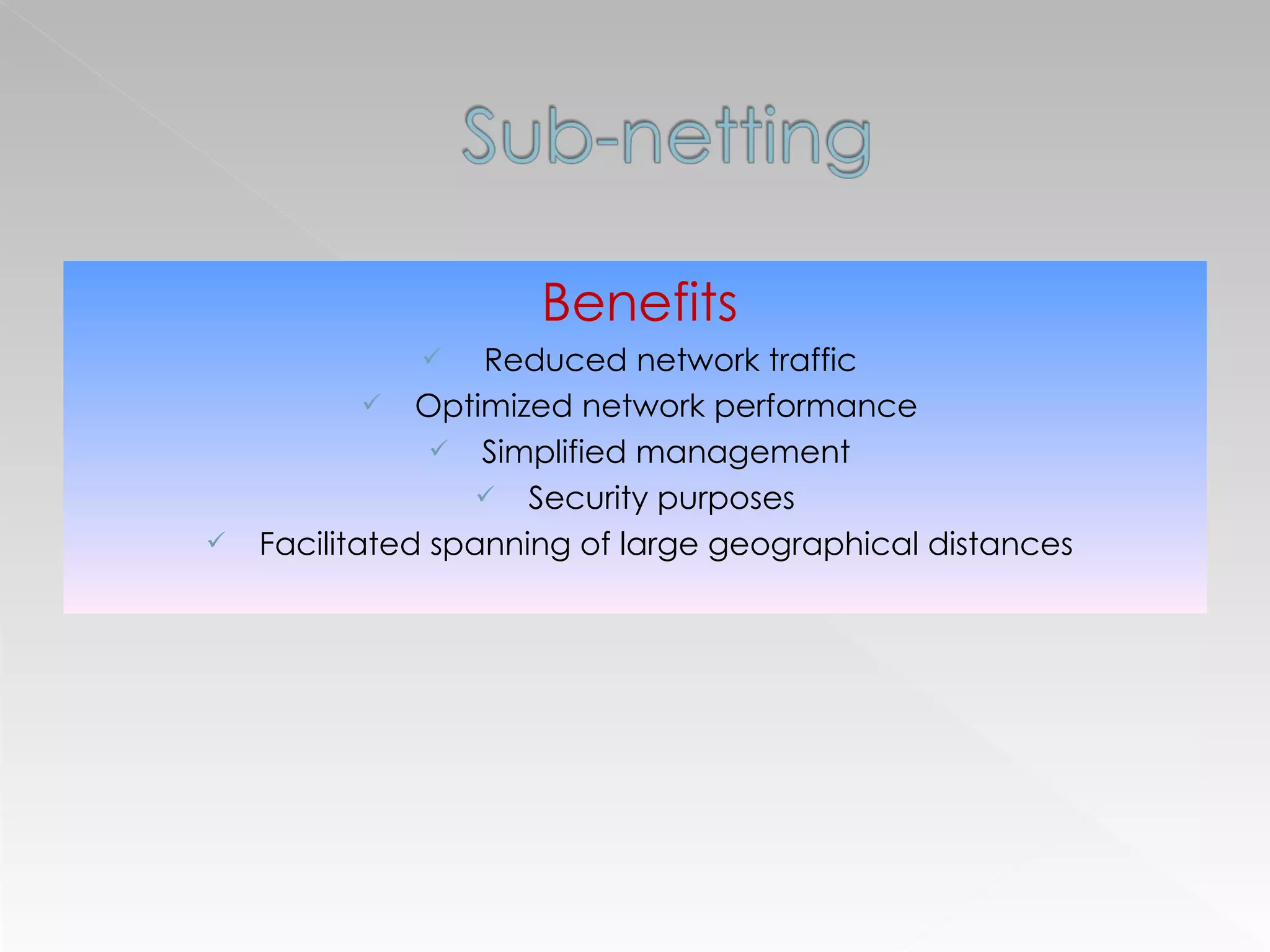
Benefits Reduced network traffic Optimized network performance Simplified management Security purposes  Facilitated spanning of large geographical distances
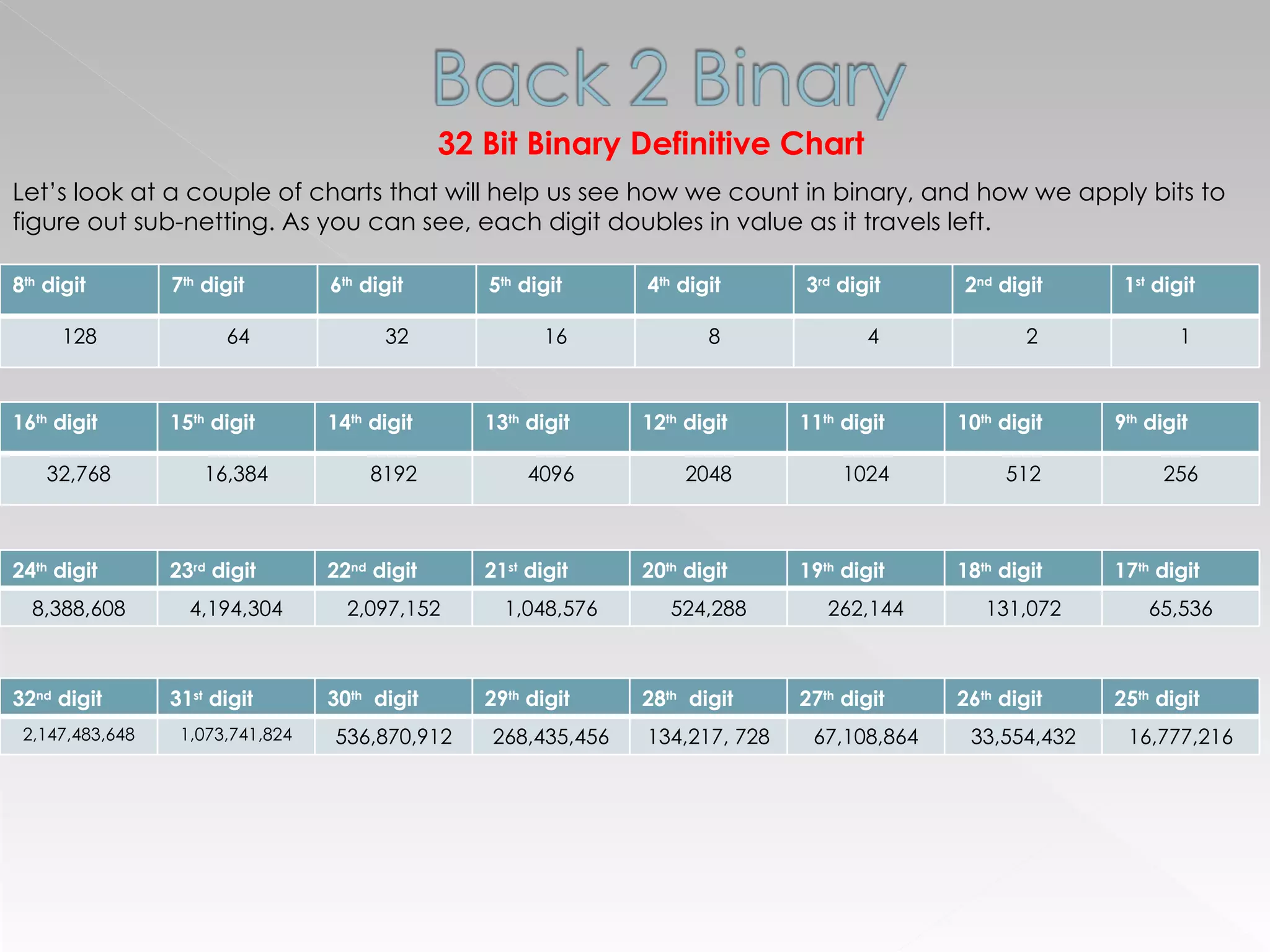
32 Bit Binary Definitive Chart Let’s look at a couple of charts that will help us see how we count in binary, and how we apply bits to figure out sub-netting. As you can see, each digit doubles in value as it travels left.  8 th  digit 7 th  digit 6 th  digit 5 th  digit 4 th  digit 3 rd  digit 2 nd  digit 1 st  digit 128 64 32 16 8 4 2 1 16 th  digit 15 th  digit 14 th  digit 13 th  digit 12 th  digit 11 th  digit 10 th  digit 9 th  digit 32,768 16,384 8192 4096 2048 1024 512 256 32 nd  digit 31 st  digit 30 th   digit 29 th  digit 28 th   digit 27 th  digit 26 th  digit 25 th  digit 2,147,483,648 1,073,741,824 536,870,912 268,435,456 134,217, 728 67,108,864 33,554,432 16,777,216 24 th  digit 23 rd  digit 22 nd  digit 21 st  digit 20 th  digit 19 th  digit 18 th  digit 17 th  digit 8,388,608 4,194,304 2,097,152 1,048,576 524,288 262,144 131,072 65,536
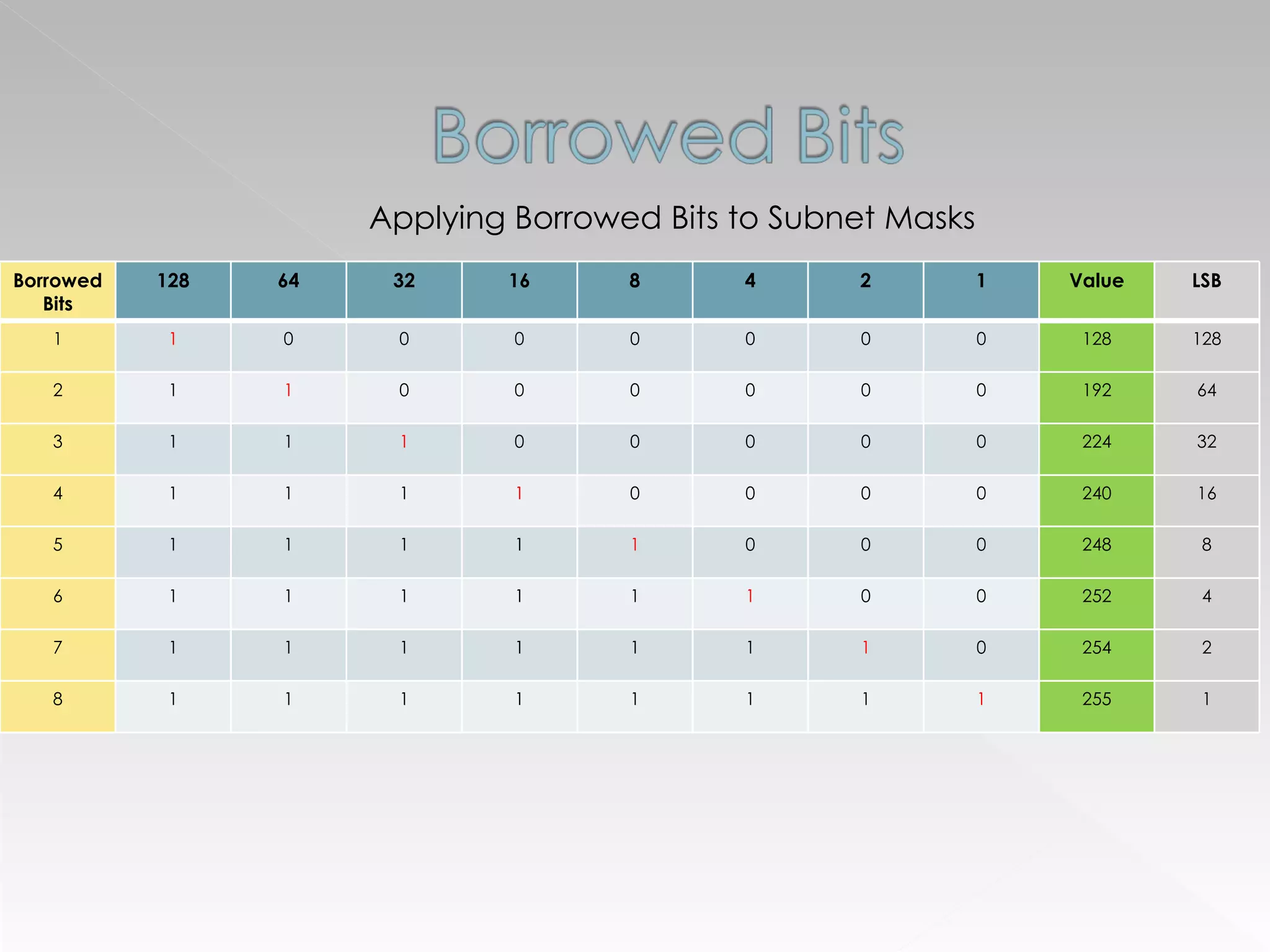
Applying Borrowed Bits to Subnet Masks Borrowed Bits 128 64 32 16 8 4 2 1 Value LSB 1 1 0 0 0 0 0 0 0 128 128 2 1 1 0 0 0 0 0 0 192 64 3 1 1 1 0 0 0 0 0 224 32 4 1 1 1 1 0 0 0 0 240 16 5 1 1 1 1 1 0 0 0 248 8 6 1 1 1 1 1 1 0 0 252 4 7 1 1 1 1 1 1 1 0 254 2 8 1 1 1 1 1 1 1 1 255 1
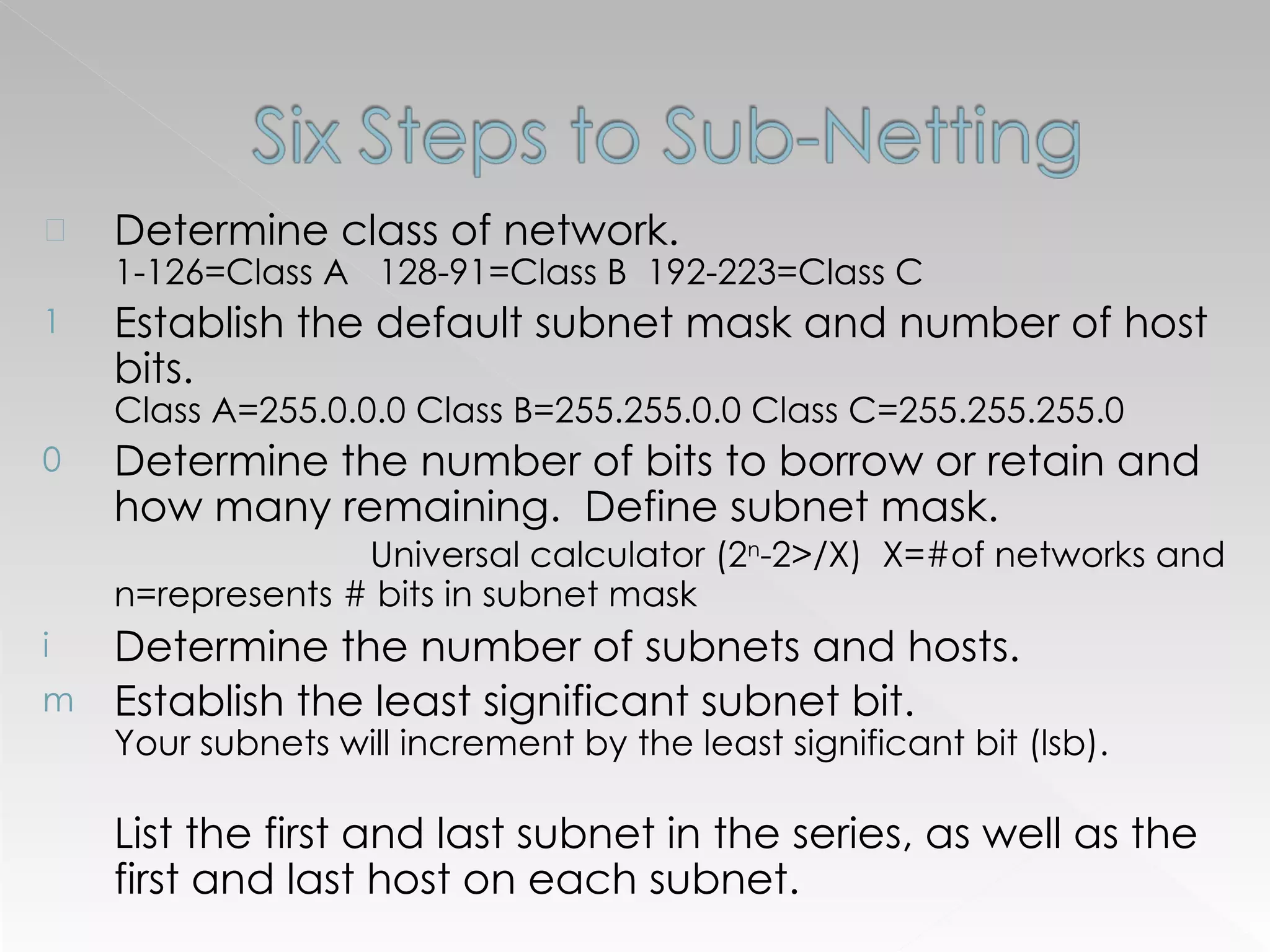
Determine class of network.  1-126=Class A  128-91=Class B  192-223=Class C Establish the default subnet mask and number of host bits.  Class A=255.0.0.0 Class B=255.255.0.0 Class C=255.255.255.0 Determine the number of bits to borrow or retain and how many remaining.  Define subnet mask.  Universal calculator (2 n -2>/X)  X=#of networks and n=represents # bits in subnet mask Determine the number of subnets and hosts. Establish the least significant subnet bit.  Your subnets will increment by the least significant bit (lsb).  List the first and last subnet in the series, as well as the first and last host on each subnet.
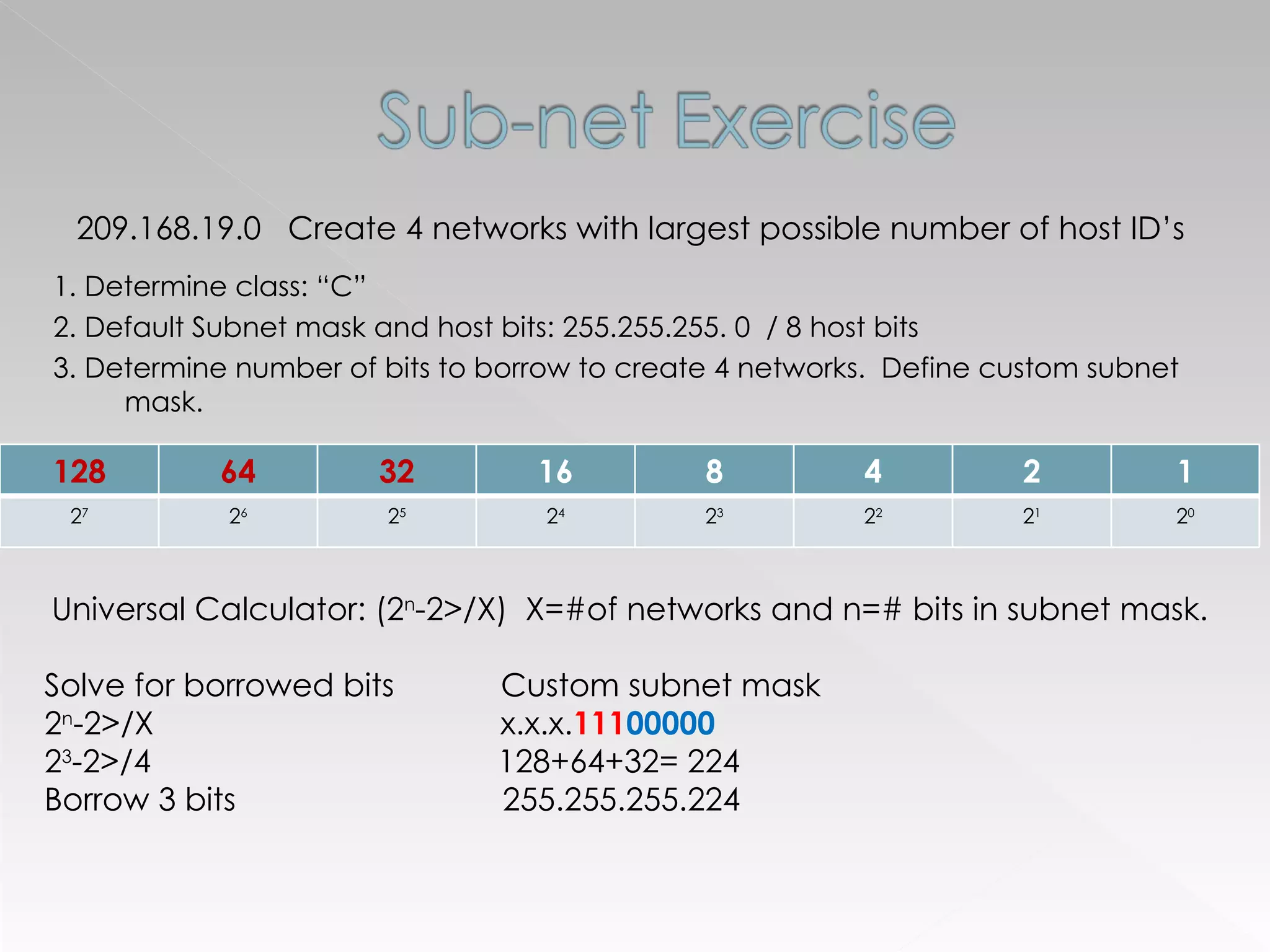
1. Determine class: “C” 2. Default Subnet mask and host bits: 255.255.255. 0  / 8 host bits 3. Determine number of bits to borrow to create 4 networks.  Define custom subnet mask. 209.168.19.0  Create 4 networks with largest possible number of host ID’s  Universal Calculator: (2 n -2>/X)  X=#of networks and n=# bits in subnet mask. Solve for borrowed bits  Custom subnet mask  2 n -2>/X  x.x.x. 111 00000   2 3 -2>/4  128+64+32= 224 Borrow 3 bits  255.255.255.224 128 64 32 16 8 4 2 1 2 7 2 6 2 5 2 4 2 3 2 2 2 1 2 0
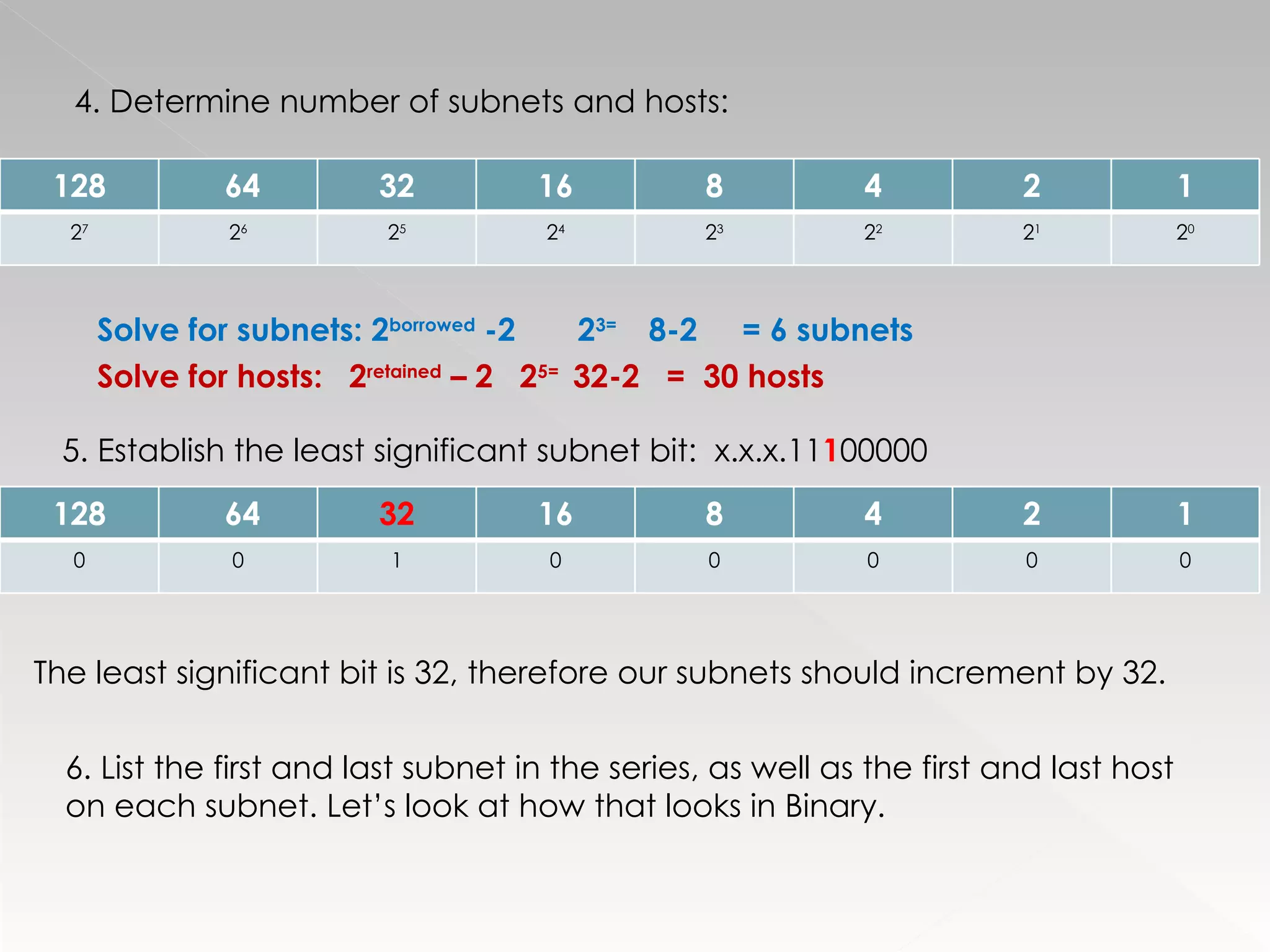
4. Determine number of subnets and hosts: Solve for subnets: 2 borrowed  -2  2 3=  8-2  = 6 subnets   Solve for hosts:  2 retained  – 2  2 5=  32-2  =  30 hosts 5. Establish the least significant subnet bit:  x.x.x.11 1 00000 The least significant bit is 32, therefore our subnets should increment by 32. 6. List the first and last subnet in the series, as well as the first and last host on each subnet. Let’s look at how that looks in Binary. 128 64 32 16 8 4 2 1 2 7 2 6 2 5 2 4 2 3 2 2 2 1 2 0 128 64 32 16 8 4 2 1 0 0 1 0 0 0 0 0
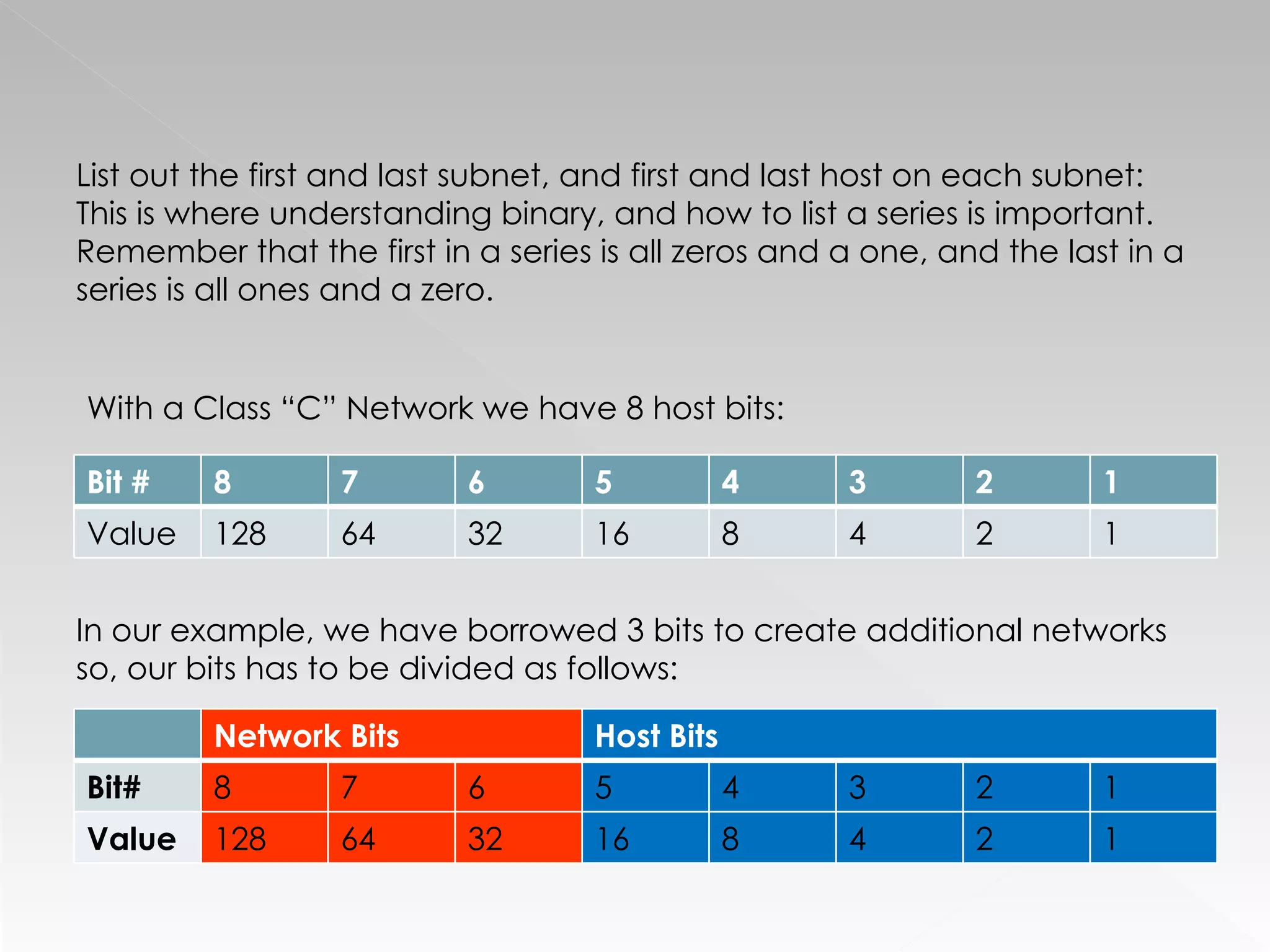
With a Class “C” Network we have 8 host bits: In our example, we have borrowed 3 bits to create additional networks so, our bits has to be divided as follows: List out the first and last subnet, and first and last host on each subnet:  This is where understanding binary, and how to list a series is important. Remember that the first in a series is all zeros and a one, and the last in a series is all ones and a zero. Bit # 8 7 6 5 4 3 2 1 Value 128 64 32 16 8 4 2 1 Network Bits Host Bits Bit# 8 7 6 5 4 3 2 1 Value 128 64 32 16 8 4 2 1
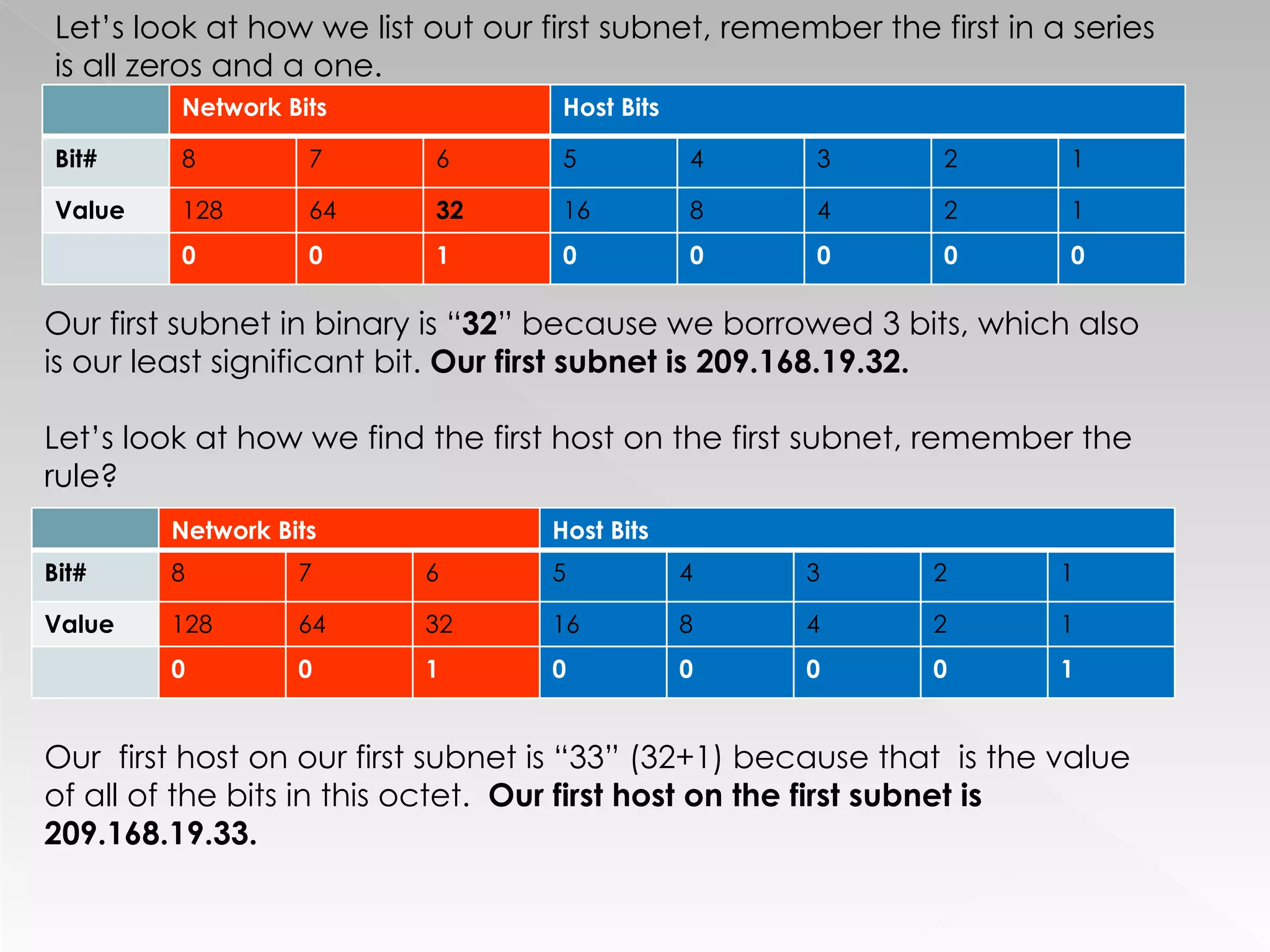
Let’s look at how we list out our first subnet, remember the first in a series is all zeros and a one. Our first subnet in binary is “ 32 ” because we borrowed 3 bits, which also is our least significant bit.  Our first subnet is 209.168.19.32. Let’s look at how we find the first host on the first subnet, remember the rule? Our  first host on our first subnet is “33” (32+1) because that  is the value of all of the bits in this octet.  Our first host on the first subnet is 209.168.19.33. Network Bits Host Bits Bit# 8 7 6 5 4 3 2 1 Value 128 64 32 16 8 4 2 1 0 0 1 0 0 0 0 0 Network Bits Host Bits Bit# 8 7 6 5 4 3 2 1 Value 128 64 32 16 8 4 2 1 0 0 1 0 0 0 0 1
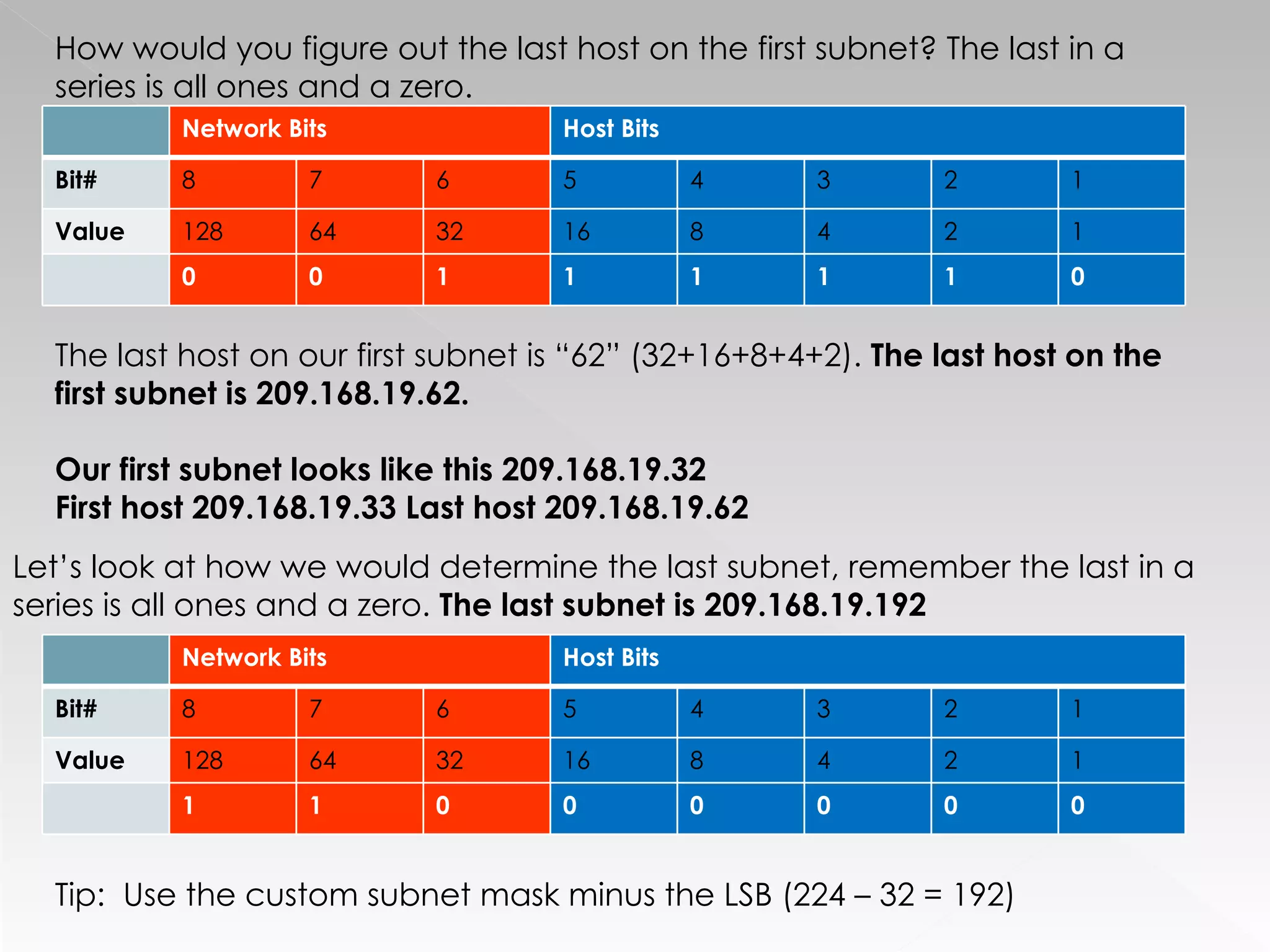
The last host on our first subnet is “62” (32+16+8+4+2).  The last host on the first subnet is 209.168.19.62. Our first subnet looks like this 209.168.19.32 First host 209.168.19.33 Last host 209.168.19.62 How would you figure out the last host on the first subnet? The last in a series is all ones and a zero. Let’s look at how we would determine the last subnet, remember the last in a series is all ones and a zero.  The last subnet is 209.168.19.192 Tip:  Use the custom subnet mask minus the LSB (224 – 32 = 192) Network Bits Host Bits Bit# 8 7 6 5 4 3 2 1 Value 128 64 32 16 8 4 2 1 0 0 1 1 1 1 1 0 Network Bits Host Bits Bit# 8 7 6 5 4 3 2 1 Value 128 64 32 16 8 4 2 1 1 1 0 0 0 0 0 0
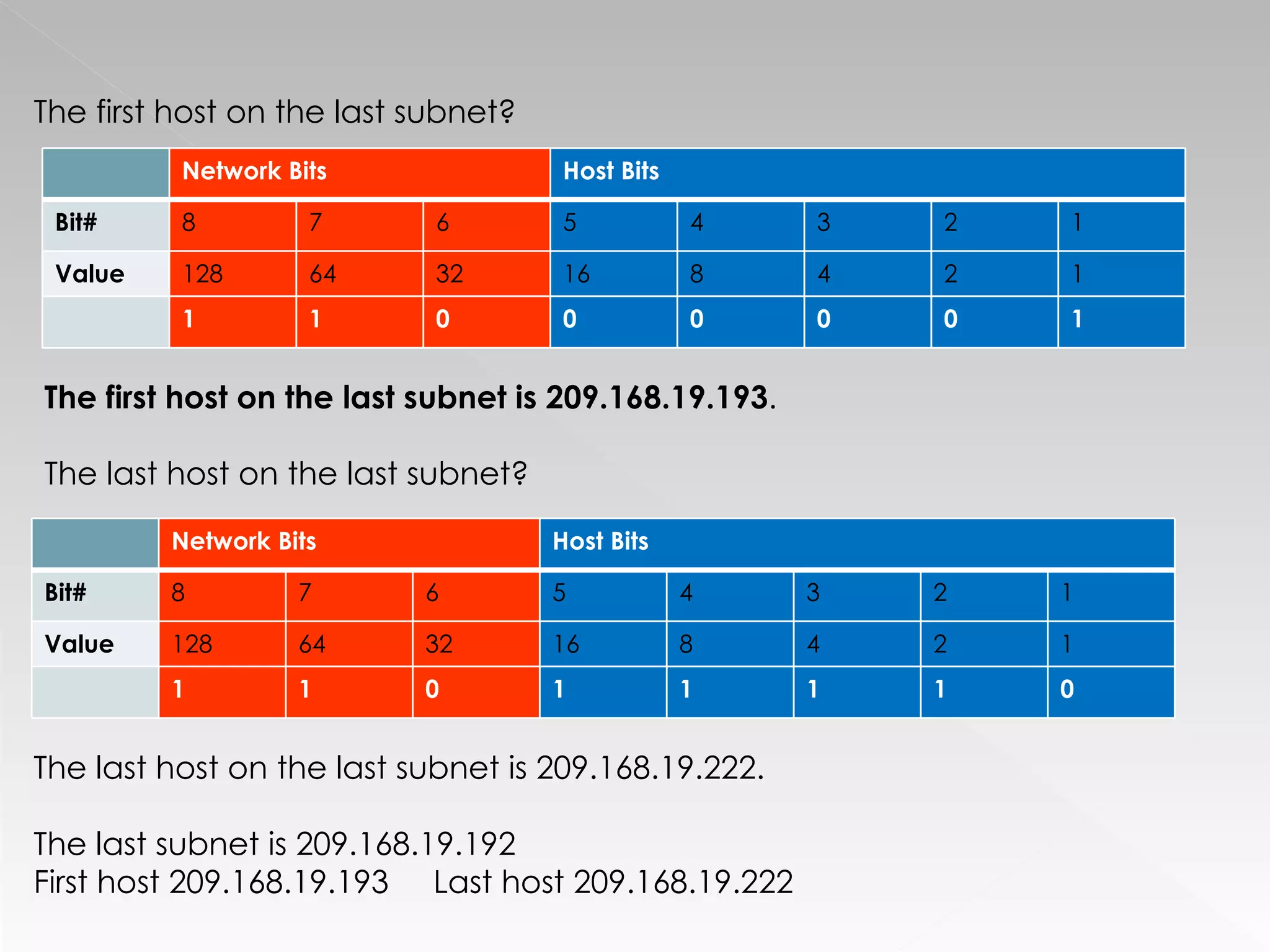
The first host on the last subnet?  The first host on the last subnet is 209.168.19.193 . The last host on the last subnet? The last host on the last subnet is 209.168.19.222. The last subnet is 209.168.19.192  First host 209.168.19.193  Last host 209.168.19.222 Network Bits Host Bits Bit# 8 7 6 5 4 3 2 1 Value 128 64 32 16 8 4 2 1 1 1 0 0 0 0 0 1 Network Bits Host Bits Bit# 8 7 6 5 4 3 2 1 Value 128 64 32 16 8 4 2 1 1 1 0 1 1 1 1 0
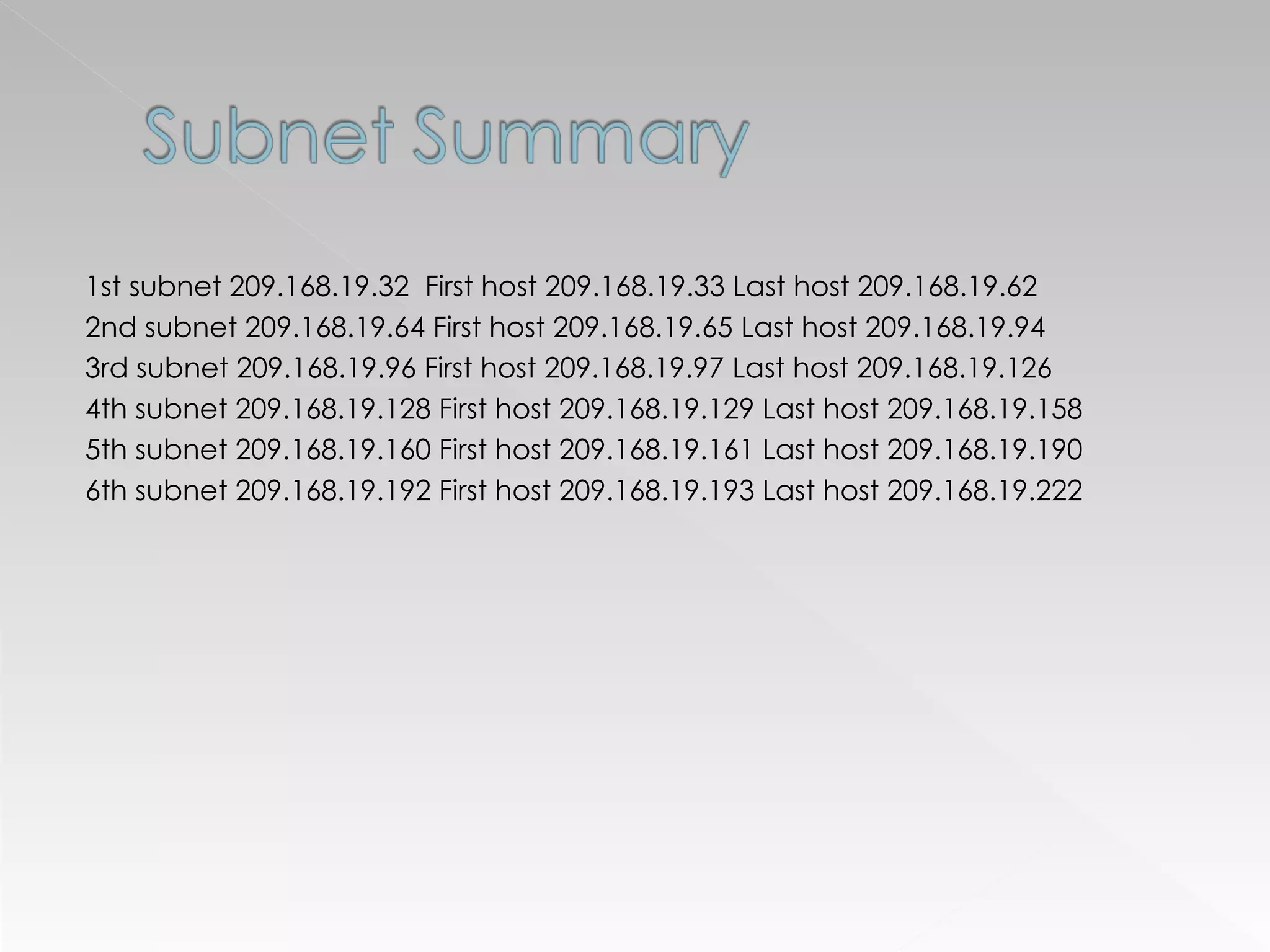
1st subnet 209.168.19.32  First host 209.168.19.33 Last host 209.168.19.62 2nd subnet 209.168.19.64 First host 209.168.19.65 Last host 209.168.19.94 3rd subnet 209.168.19.96 First host 209.168.19.97 Last host 209.168.19.126 4th subnet 209.168.19.128 First host 209.168.19.129 Last host 209.168.19.158 5th subnet 209.168.19.160 First host 209.168.19.161 Last host 209.168.19.190 6th subnet 209.168.19.192 First host 209.168.19.193 Last host 209.168.19.222

Subnetting Made Easy

  • 1.
  • 2.
    32 Bit Number4 Octets 8 Bits Two pieces of information: Network Address Host Address
  • 3.
    IP Class FirstOctet Networks Hosts A 1-126 126 16,777,214 B 128-191 16,384 65,534 C 192-223 2,097,152 254
  • 4.
    255 . 0.0.08 network bits 24 host bits 255.255 . 0.0 16 network bits 16 host bits 255.255.255 . 0 24 network bits 8 host bits Class A Class B Class C
  • 5.
    Benefits Reduced networktraffic Optimized network performance Simplified management Security purposes Facilitated spanning of large geographical distances
  • 6.
    32 Bit BinaryDefinitive Chart Let’s look at a couple of charts that will help us see how we count in binary, and how we apply bits to figure out sub-netting. As you can see, each digit doubles in value as it travels left. 8 th digit 7 th digit 6 th digit 5 th digit 4 th digit 3 rd digit 2 nd digit 1 st digit 128 64 32 16 8 4 2 1 16 th digit 15 th digit 14 th digit 13 th digit 12 th digit 11 th digit 10 th digit 9 th digit 32,768 16,384 8192 4096 2048 1024 512 256 32 nd digit 31 st digit 30 th digit 29 th digit 28 th digit 27 th digit 26 th digit 25 th digit 2,147,483,648 1,073,741,824 536,870,912 268,435,456 134,217, 728 67,108,864 33,554,432 16,777,216 24 th digit 23 rd digit 22 nd digit 21 st digit 20 th digit 19 th digit 18 th digit 17 th digit 8,388,608 4,194,304 2,097,152 1,048,576 524,288 262,144 131,072 65,536
  • 7.
    Applying Borrowed Bitsto Subnet Masks Borrowed Bits 128 64 32 16 8 4 2 1 Value LSB 1 1 0 0 0 0 0 0 0 128 128 2 1 1 0 0 0 0 0 0 192 64 3 1 1 1 0 0 0 0 0 224 32 4 1 1 1 1 0 0 0 0 240 16 5 1 1 1 1 1 0 0 0 248 8 6 1 1 1 1 1 1 0 0 252 4 7 1 1 1 1 1 1 1 0 254 2 8 1 1 1 1 1 1 1 1 255 1
  • 8.
    Determine class ofnetwork. 1-126=Class A 128-91=Class B 192-223=Class C Establish the default subnet mask and number of host bits. Class A=255.0.0.0 Class B=255.255.0.0 Class C=255.255.255.0 Determine the number of bits to borrow or retain and how many remaining. Define subnet mask. Universal calculator (2 n -2>/X) X=#of networks and n=represents # bits in subnet mask Determine the number of subnets and hosts. Establish the least significant subnet bit. Your subnets will increment by the least significant bit (lsb). List the first and last subnet in the series, as well as the first and last host on each subnet.
  • 9.
    1. Determine class:“C” 2. Default Subnet mask and host bits: 255.255.255. 0 / 8 host bits 3. Determine number of bits to borrow to create 4 networks. Define custom subnet mask. 209.168.19.0 Create 4 networks with largest possible number of host ID’s Universal Calculator: (2 n -2>/X) X=#of networks and n=# bits in subnet mask. Solve for borrowed bits Custom subnet mask 2 n -2>/X x.x.x. 111 00000 2 3 -2>/4 128+64+32= 224 Borrow 3 bits 255.255.255.224 128 64 32 16 8 4 2 1 2 7 2 6 2 5 2 4 2 3 2 2 2 1 2 0
  • 10.
    4. Determine numberof subnets and hosts: Solve for subnets: 2 borrowed -2 2 3= 8-2 = 6 subnets Solve for hosts: 2 retained – 2 2 5= 32-2 = 30 hosts 5. Establish the least significant subnet bit: x.x.x.11 1 00000 The least significant bit is 32, therefore our subnets should increment by 32. 6. List the first and last subnet in the series, as well as the first and last host on each subnet. Let’s look at how that looks in Binary. 128 64 32 16 8 4 2 1 2 7 2 6 2 5 2 4 2 3 2 2 2 1 2 0 128 64 32 16 8 4 2 1 0 0 1 0 0 0 0 0
  • 11.
    With a Class“C” Network we have 8 host bits: In our example, we have borrowed 3 bits to create additional networks so, our bits has to be divided as follows: List out the first and last subnet, and first and last host on each subnet: This is where understanding binary, and how to list a series is important. Remember that the first in a series is all zeros and a one, and the last in a series is all ones and a zero. Bit # 8 7 6 5 4 3 2 1 Value 128 64 32 16 8 4 2 1 Network Bits Host Bits Bit# 8 7 6 5 4 3 2 1 Value 128 64 32 16 8 4 2 1
  • 12.
    Let’s look athow we list out our first subnet, remember the first in a series is all zeros and a one. Our first subnet in binary is “ 32 ” because we borrowed 3 bits, which also is our least significant bit. Our first subnet is 209.168.19.32. Let’s look at how we find the first host on the first subnet, remember the rule? Our first host on our first subnet is “33” (32+1) because that is the value of all of the bits in this octet. Our first host on the first subnet is 209.168.19.33. Network Bits Host Bits Bit# 8 7 6 5 4 3 2 1 Value 128 64 32 16 8 4 2 1 0 0 1 0 0 0 0 0 Network Bits Host Bits Bit# 8 7 6 5 4 3 2 1 Value 128 64 32 16 8 4 2 1 0 0 1 0 0 0 0 1
  • 13.
    The last hoston our first subnet is “62” (32+16+8+4+2). The last host on the first subnet is 209.168.19.62. Our first subnet looks like this 209.168.19.32 First host 209.168.19.33 Last host 209.168.19.62 How would you figure out the last host on the first subnet? The last in a series is all ones and a zero. Let’s look at how we would determine the last subnet, remember the last in a series is all ones and a zero. The last subnet is 209.168.19.192 Tip: Use the custom subnet mask minus the LSB (224 – 32 = 192) Network Bits Host Bits Bit# 8 7 6 5 4 3 2 1 Value 128 64 32 16 8 4 2 1 0 0 1 1 1 1 1 0 Network Bits Host Bits Bit# 8 7 6 5 4 3 2 1 Value 128 64 32 16 8 4 2 1 1 1 0 0 0 0 0 0
  • 14.
    The first hoston the last subnet? The first host on the last subnet is 209.168.19.193 . The last host on the last subnet? The last host on the last subnet is 209.168.19.222. The last subnet is 209.168.19.192 First host 209.168.19.193 Last host 209.168.19.222 Network Bits Host Bits Bit# 8 7 6 5 4 3 2 1 Value 128 64 32 16 8 4 2 1 1 1 0 0 0 0 0 1 Network Bits Host Bits Bit# 8 7 6 5 4 3 2 1 Value 128 64 32 16 8 4 2 1 1 1 0 1 1 1 1 0
  • 15.
    1st subnet 209.168.19.32 First host 209.168.19.33 Last host 209.168.19.62 2nd subnet 209.168.19.64 First host 209.168.19.65 Last host 209.168.19.94 3rd subnet 209.168.19.96 First host 209.168.19.97 Last host 209.168.19.126 4th subnet 209.168.19.128 First host 209.168.19.129 Last host 209.168.19.158 5th subnet 209.168.19.160 First host 209.168.19.161 Last host 209.168.19.190 6th subnet 209.168.19.192 First host 209.168.19.193 Last host 209.168.19.222