vSphere 5 High Availability (HA)
Running Business-Critical Applications with Confidence

 vSphere HA provides the right availability services with
 groundbreaking simplicity for any application
 Allows for:
 • Protection of Tier 1 Applications
   • Restart of VM upon Application Failure
 • VM High Availability
   • Virtual Machine Health Monitoring
 • Host High Availability
   • Host Monitoring
   • Zero downtime VM recovery upon host failure
Release Enhancement Summary

 Enhanced vSphere HA core
 Provides a foundation for increased scale and functionality
 • Eliminates common issues (DNS resolution)
 Multiple Communication Paths
 • Can leverage storage as well as the mgmt network for communications
 • Enhances the ability to detect certain types of failures and provides
   redundancy
 IPv6 Support
 Enhanced Error Reporting
 • One log file per host eases troubleshooting efforts
 Enhanced User Interface
 Enhanced Deployment Mechanism
vSphere HA Primary Components

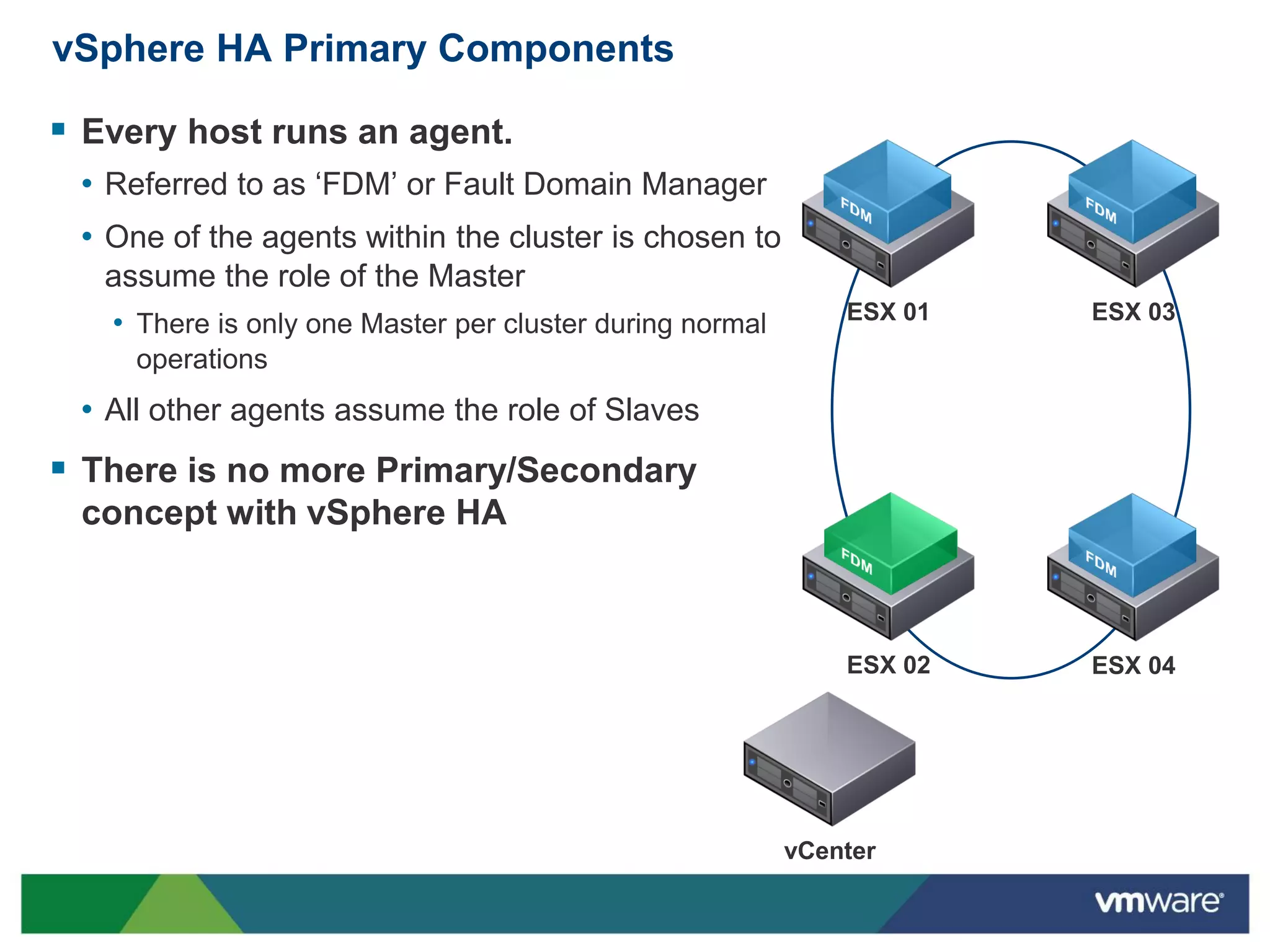
 Every host runs an agent.
 • Referred to as ‘FDM’ or Fault Domain Manager
 • One of the agents within the cluster is chosen to
   assume the role of the Master
                                                              ESX 01   ESX 03
   • There is only one Master per cluster during normal
     operations
 • All other agents assume the role of Slaves
 There is no more Primary/Secondary
 concept with vSphere HA


                                                              ESX 02   ESX 04


                                                          vCenter
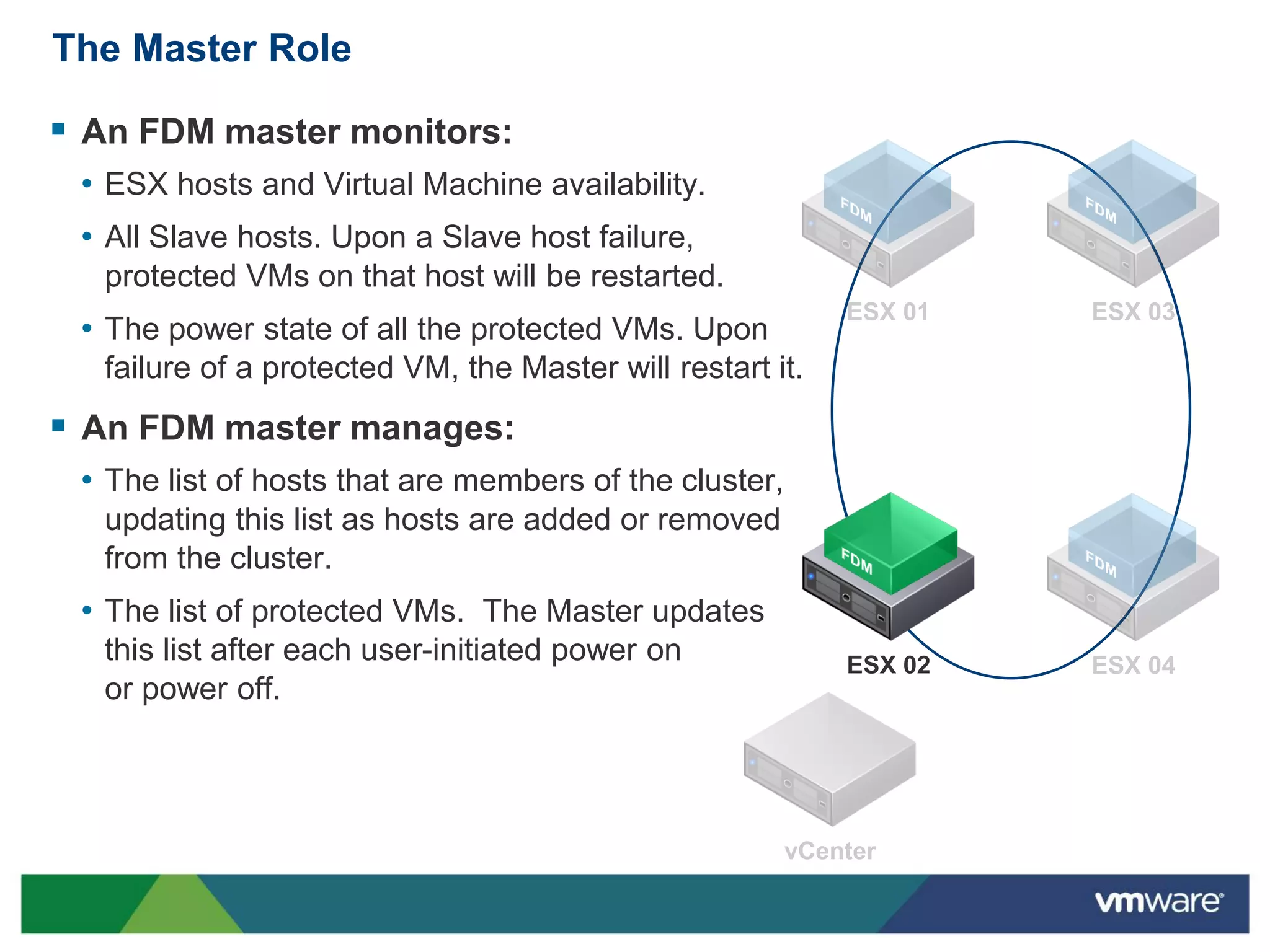
The Master Role

 An FDM master monitors:
 • ESX hosts and Virtual Machine availability.
 • All Slave hosts. Upon a Slave host failure,
   protected VMs on that host will be restarted.
 • The power state of all the protected VMs. Upon
   failure of a protected VM, the Master will restart it.
 An FDM master manages:
 • The list of hosts that are members of the cluster,
   updating this list as hosts are added or removed
   from the cluster.
 • The list of protected VMs. The Master updates
   this list after each user-initiated power on             ESX 02
   or power off.
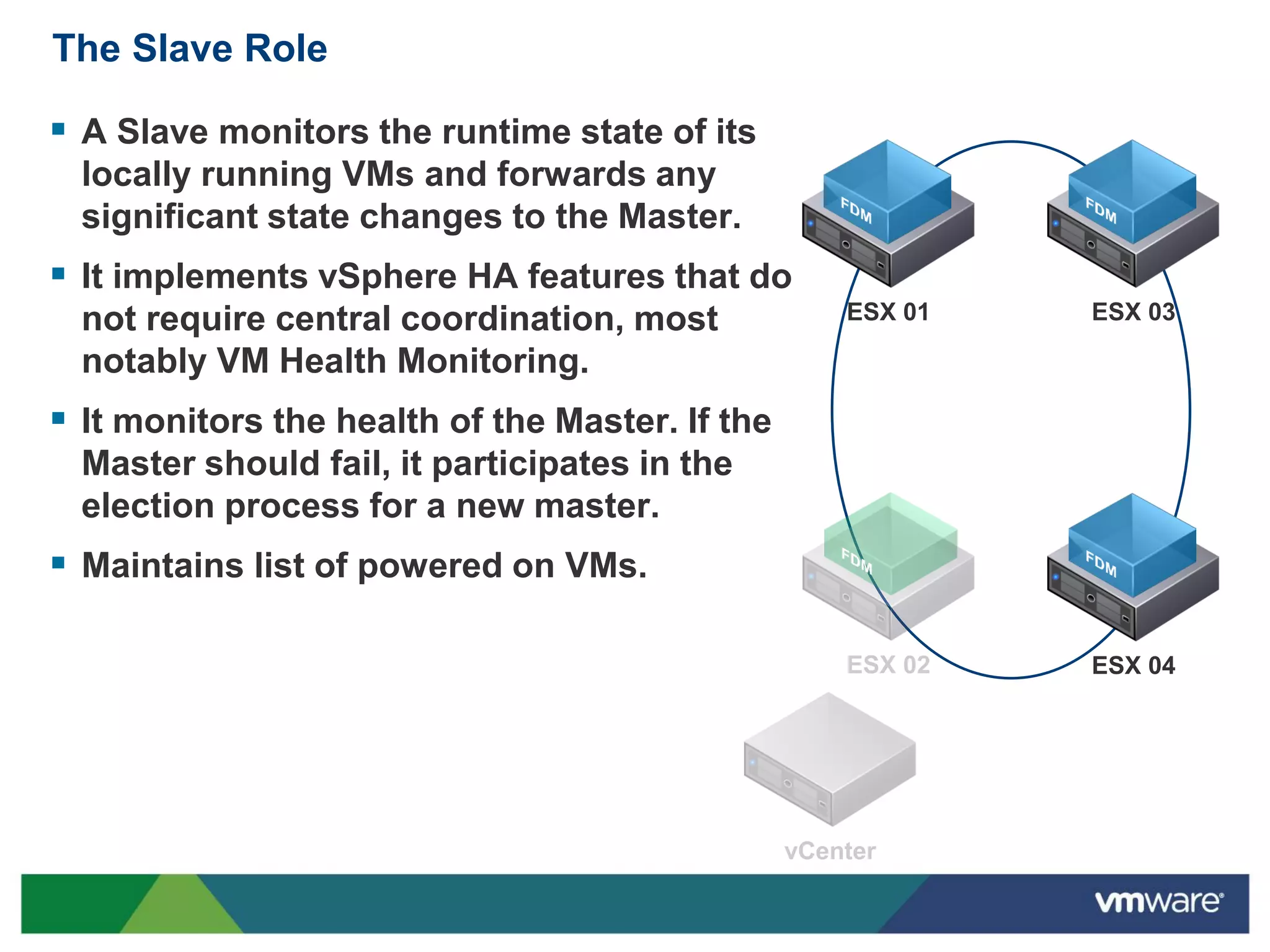
The Slave Role

 A Slave monitors the runtime state of its
  locally running VMs and forwards any
  significant state changes to the Master.
 It implements vSphere HA features that do
  not require central coordination, most         ESX 01   ESX 03

  notably VM Health Monitoring.
 It monitors the health of the Master. If the
  Master should fail, it participates in the
  election process for a new master.
 Maintains list of powered on VMs.

                                                          ESX 04
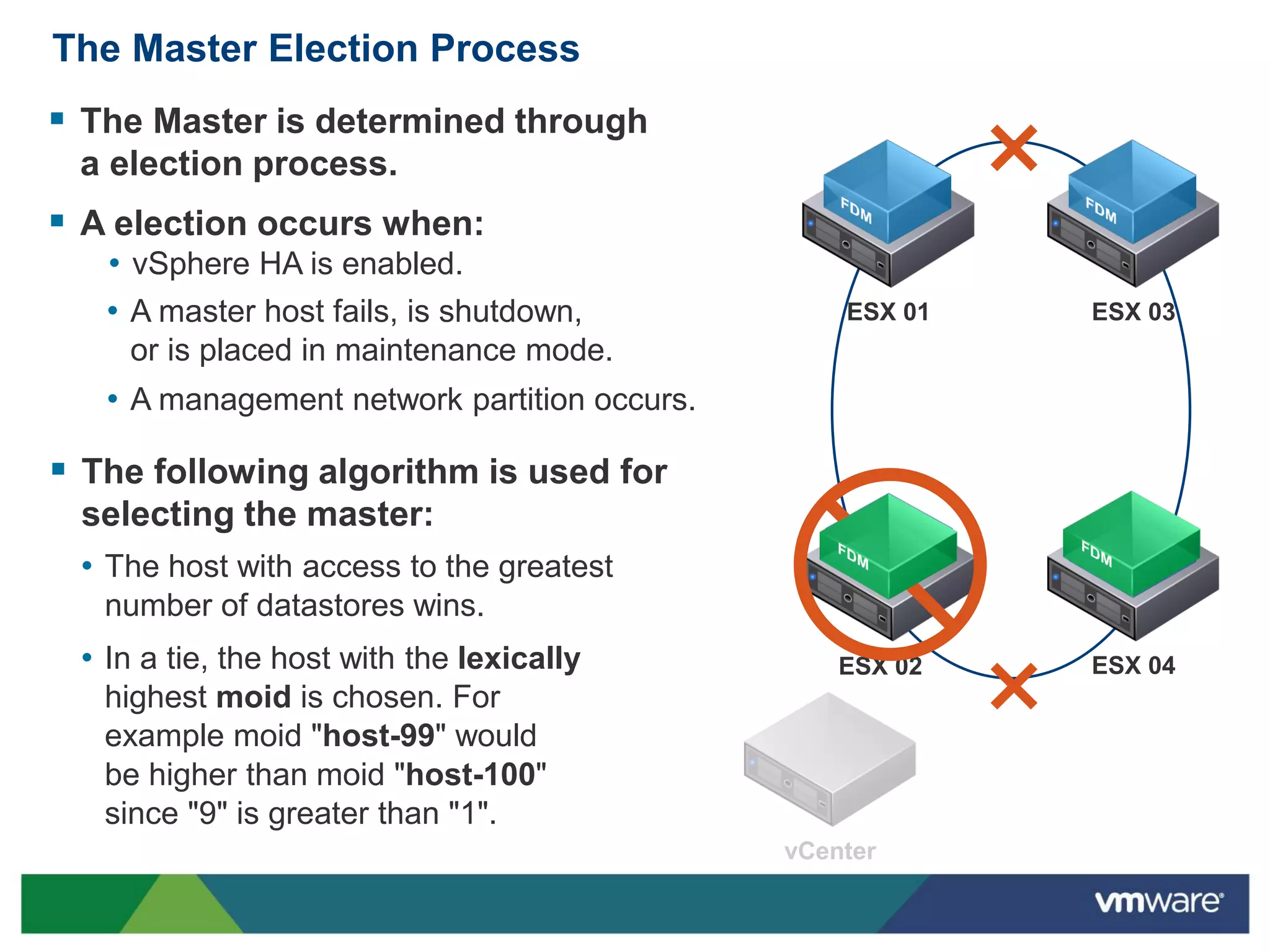
The Master Election Process
 The Master is determined through
 a election process.
 A election occurs when:
   • vSphere HA is enabled.
   • A master host fails, is shutdown,        ESX 01   ESX 03
    or is placed in maintenance mode.
   • A management network partition occurs.

 The following algorithm is used for
 selecting the master:
 • The host with access to the greatest
   number of datastores wins.
 • In a tie, the host with the lexically      ESX 02   ESX 04
   highest moid is chosen. For
   example moid "host-99" would
   be higher than moid "host-100"
   since "9" is greater than "1".
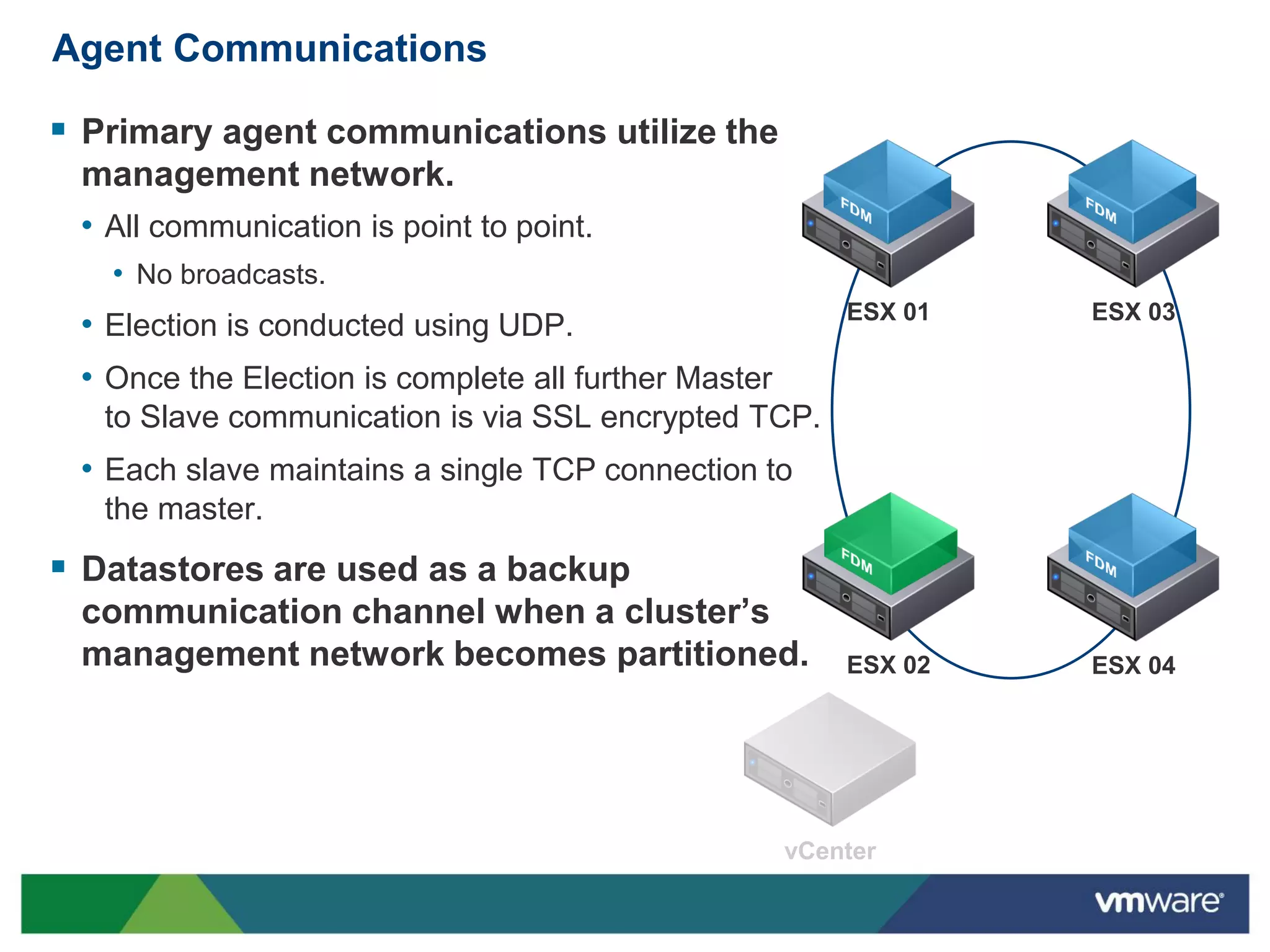
Agent Communications

 Primary agent communications utilize the
 management network.
 • All communication is point to point.
   • No broadcasts.
                                                      ESX 01   ESX 03
 • Election is conducted using UDP.
 • Once the Election is complete all further Master
   to Slave communication is via SSL encrypted TCP.
 • Each slave maintains a single TCP connection to
   the master.
 Datastores are used as a backup
 communication channel when a cluster’s
 management network becomes partitioned.              ESX 02   ESX 04
Storage-Level Communications

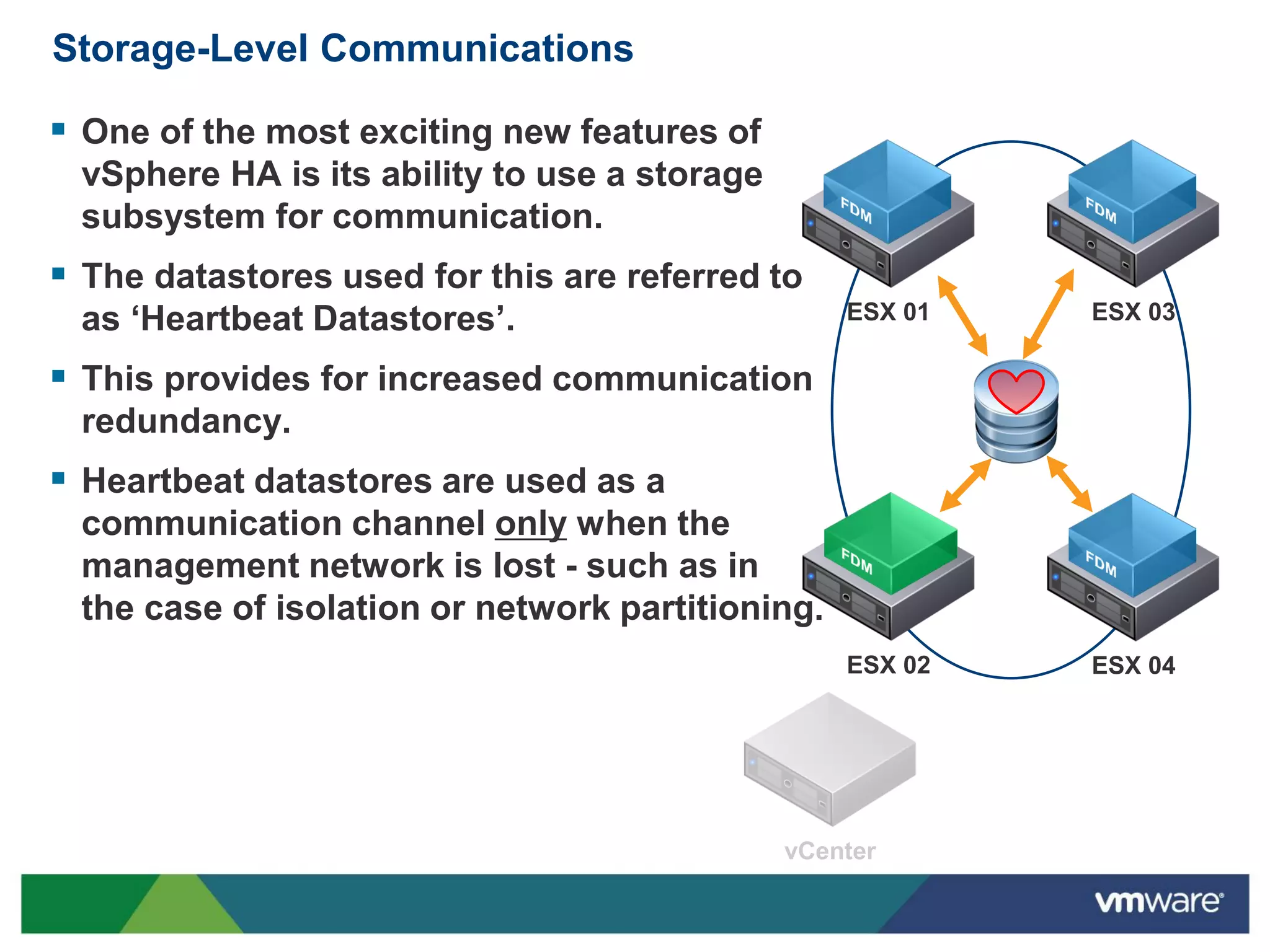
 One of the most exciting new features of
 vSphere HA is its ability to use a storage
 subsystem for communication.
 The datastores used for this are referred to
 as ‘Heartbeat Datastores’.                       ESX 01   ESX 03

 This provides for increased communication
 redundancy.
 Heartbeat datastores are used as a
 communication channel only when the
 management network is lost - such as in
 the case of isolation or network partitioning.
                                                  ESX 02   ESX 04
Storage-Level Communications

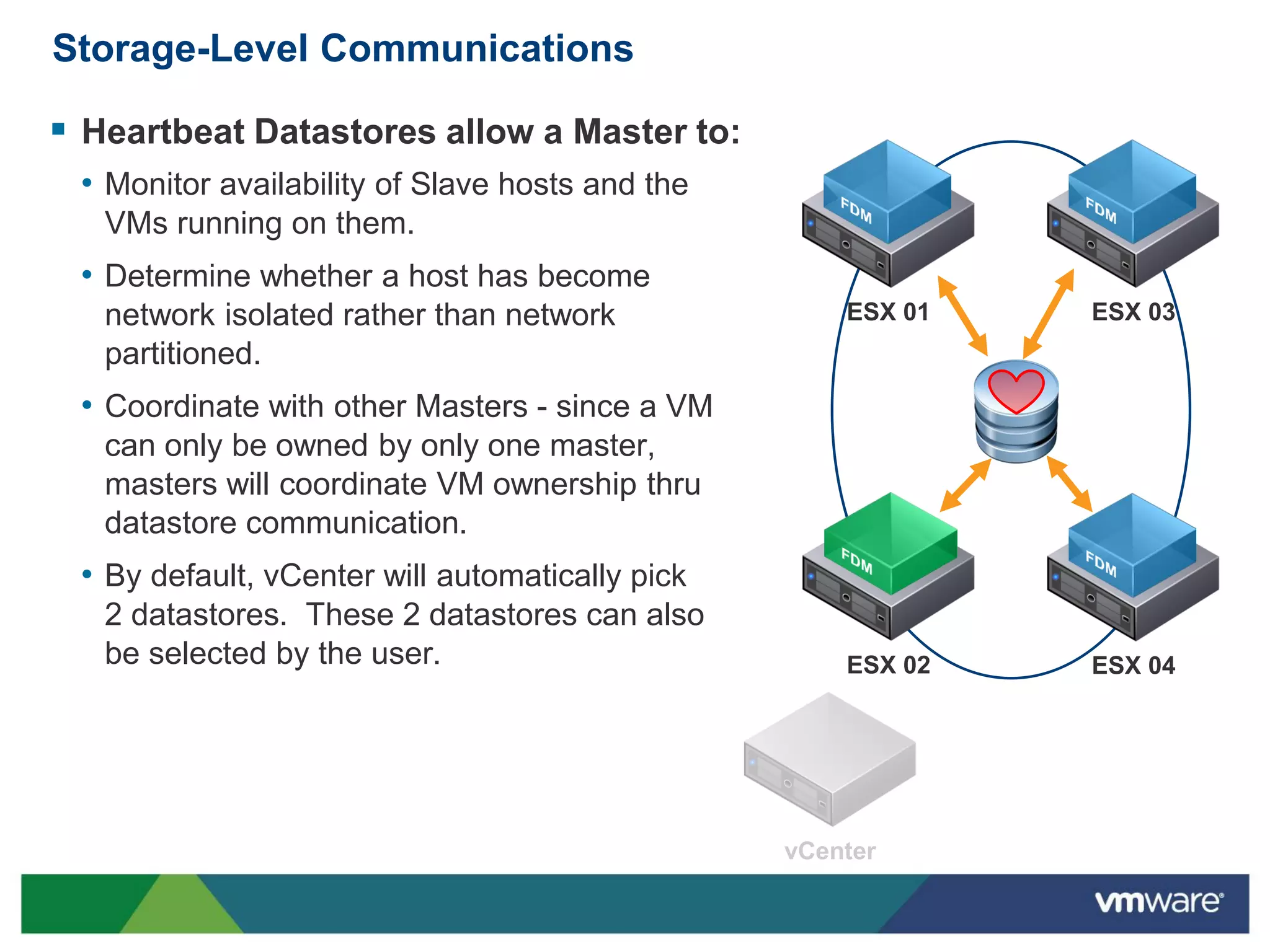
 Heartbeat Datastores allow a Master to:
 • Monitor availability of Slave hosts and the
   VMs running on them.
 • Determine whether a host has become
   network isolated rather than network          ESX 01   ESX 03
   partitioned.
 • Coordinate with other Masters - since a VM
   can only be owned by only one master,
   masters will coordinate VM ownership thru
   datastore communication.
 • By default, vCenter will automatically pick
   2 datastores. These 2 datastores can also
   be selected by the user.                      ESX 02   ESX 04
Storage-Level Communications

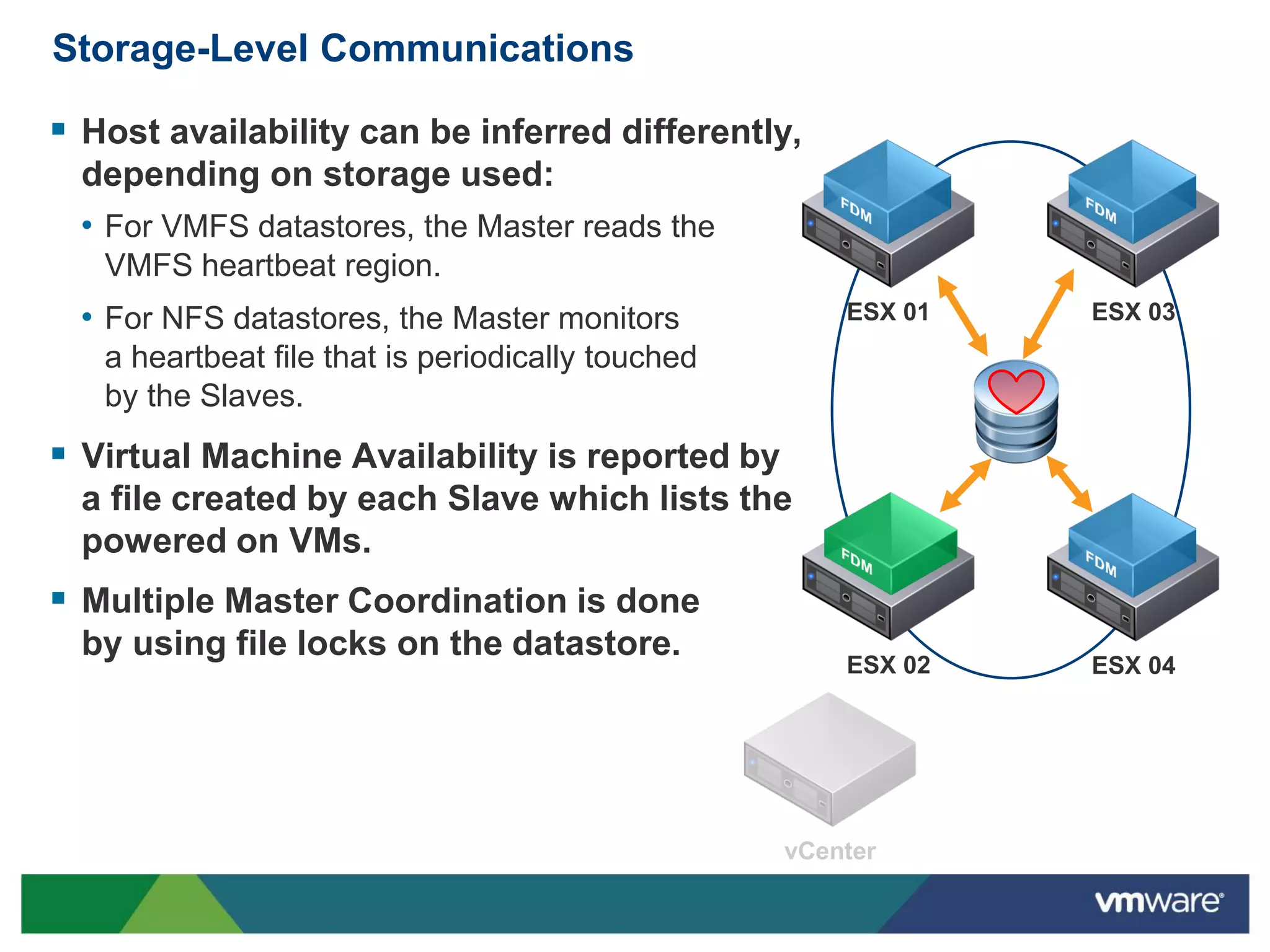
 Host availability can be inferred differently,
  depending on storage used:
  • For VMFS datastores, the Master reads the
   VMFS heartbeat region.
  • For NFS datastores, the Master monitors        ESX 01   ESX 03
   a heartbeat file that is periodically touched
   by the Slaves.
 Virtual Machine Availability is reported by
  a file created by each Slave which lists the
  powered on VMs.
 Multiple Master Coordination is done
  by using file locks on the datastore.
                                                   ESX 02   ESX 04
VM Protection States

 A protected VM is a VM that vSphere HA guarantees that a attempt
 to restart it will be made in the event of a failure.
 A VM becomes protected when vCenter is informed by the Master
 that the VM is protected.
 • When vCenter detects that the VM is powered on, it informs the Master about
   it. The Master then updates it’s list of protected VMs. After which, the Master
   informs vCenter that the VM is protected.
 • When VMs are powered off, the process is repeated and the VM is considered
   to be not protected.
 This is a change from previous versions of vSphere HA, where the
 power-on task for a VM would not complete until HA became aware
 that this was a protected VM.
 • This allows the Power On tasks to complete faster, even if the VM has not
   been designated as being protected at the time of the task completing.
VM Protection Flow

 When a VM is first powered on, it goes into unprotected state.
 It stays in the unprotected state until the Master tells vCenter that it
  has written the information to disk.
 Periodically (e.g., once every 5 minutes), VC will compare the list it
  has to the protected VM list last reported by the Master. If any
  deltas exist, VC update the Master.
 A VM becomes unprotected when:
  • It is powered off.
  • It is vMotion’ed out of the cluster.
  • Its host is disconnected from vCenter.
  • Its host is put into Maintenance Mode.
    • When a host is placed into Maintenance Mode, the summary screen of the host
      displays the fact that the HA agent has been disabled.
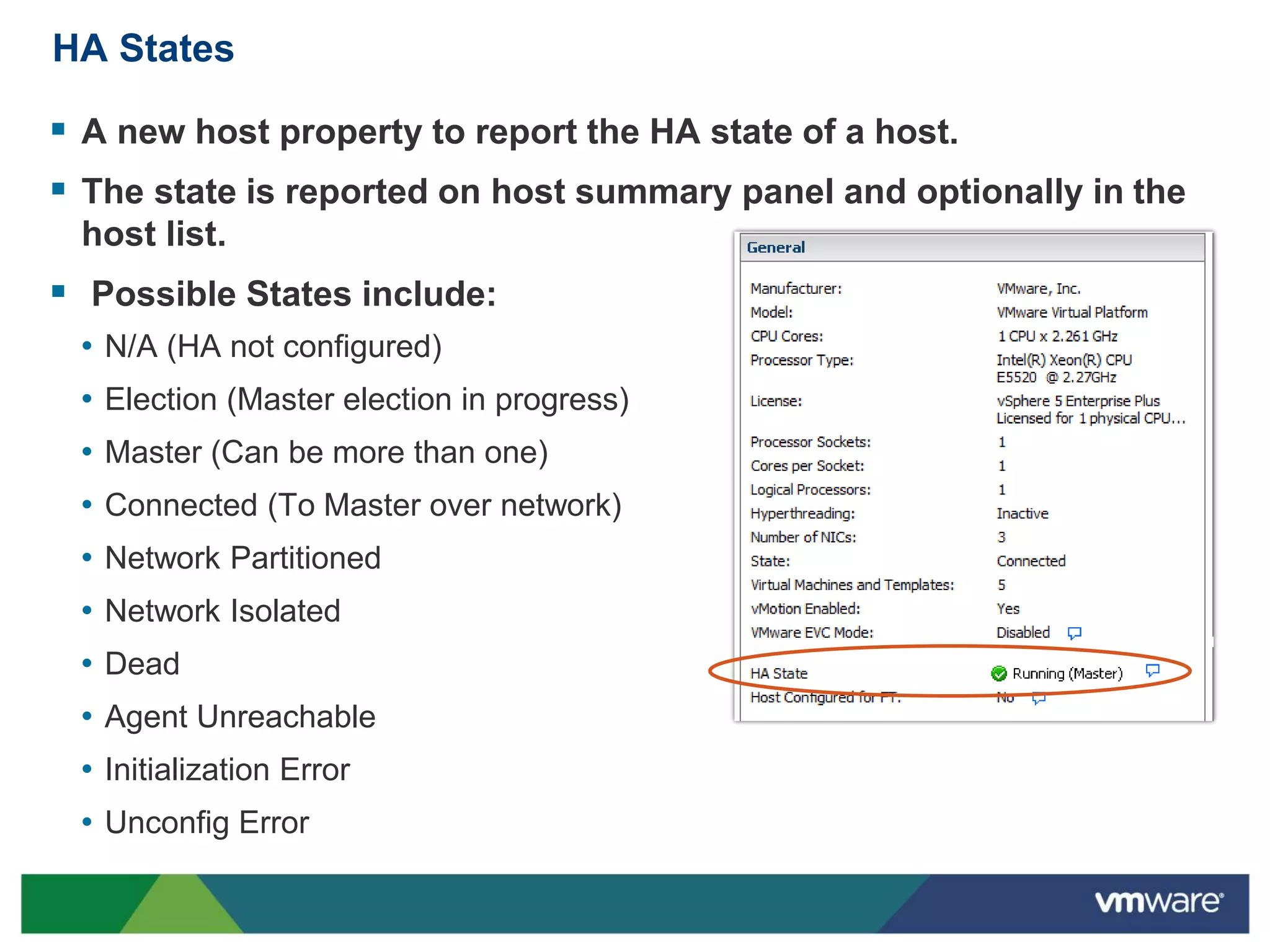
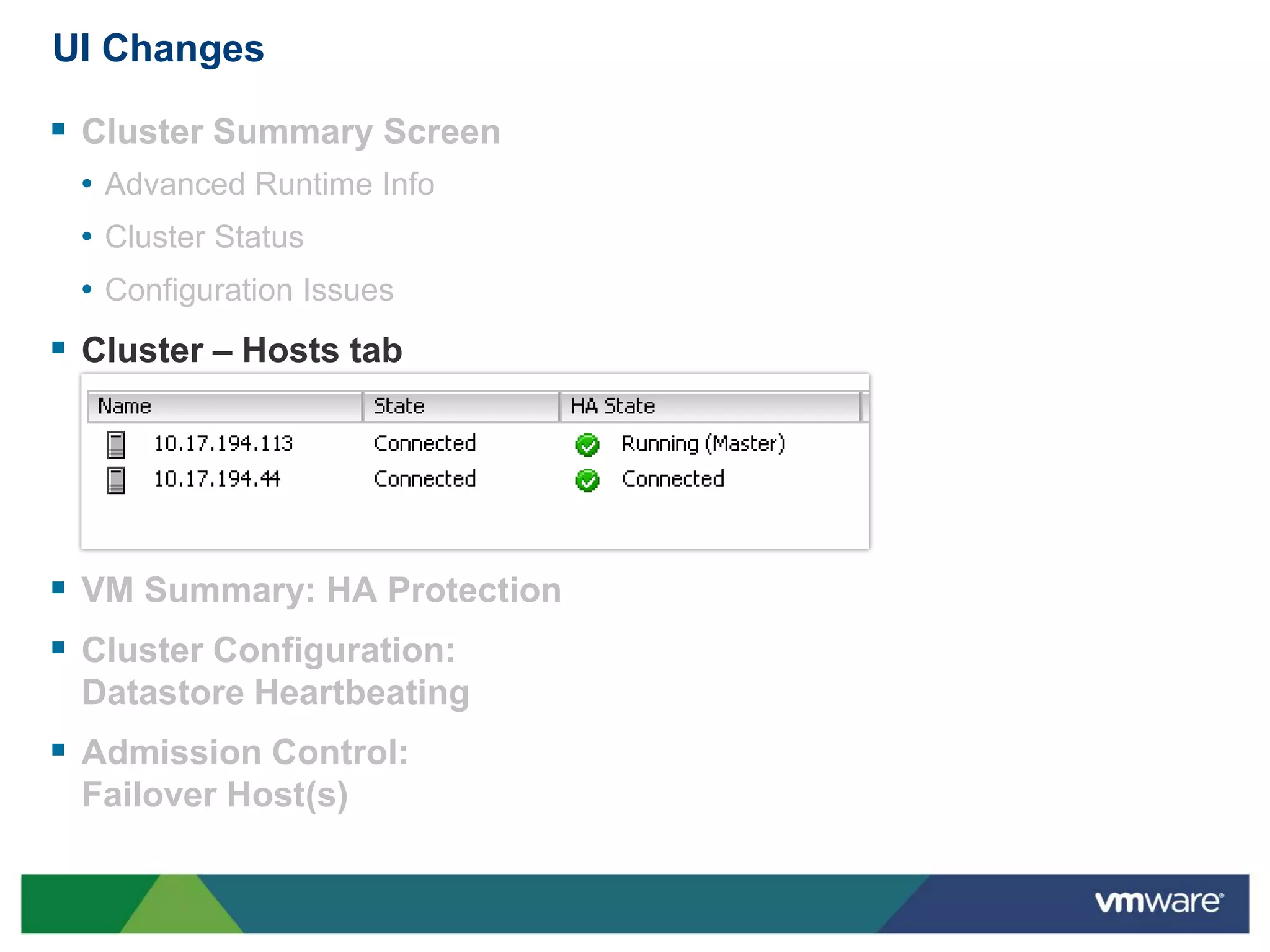
HA States

 A new host property to report the HA state of a host.
 The state is reported on host summary panel and optionally in the
 host list.
 Possible States include:
 • N/A (HA not configured)
 • Election (Master election in progress)
 • Master (Can be more than one)
 • Connected (To Master over network)
 • Network Partitioned
 • Network Isolated
 • Dead
 • Agent Unreachable
 • Initialization Error
 • Unconfig Error
Log Files

 Each host has only one log file : /var/log/fdm.log.
 This is much easier to troubleshoot than previous versions of
  vSphere HA.
 This should be the first place to look at for all:
  • Partitioning Issues
  • Isolation Issues
  • VM Protection Issues
  • Election Issues
  • Failure to failover issues.
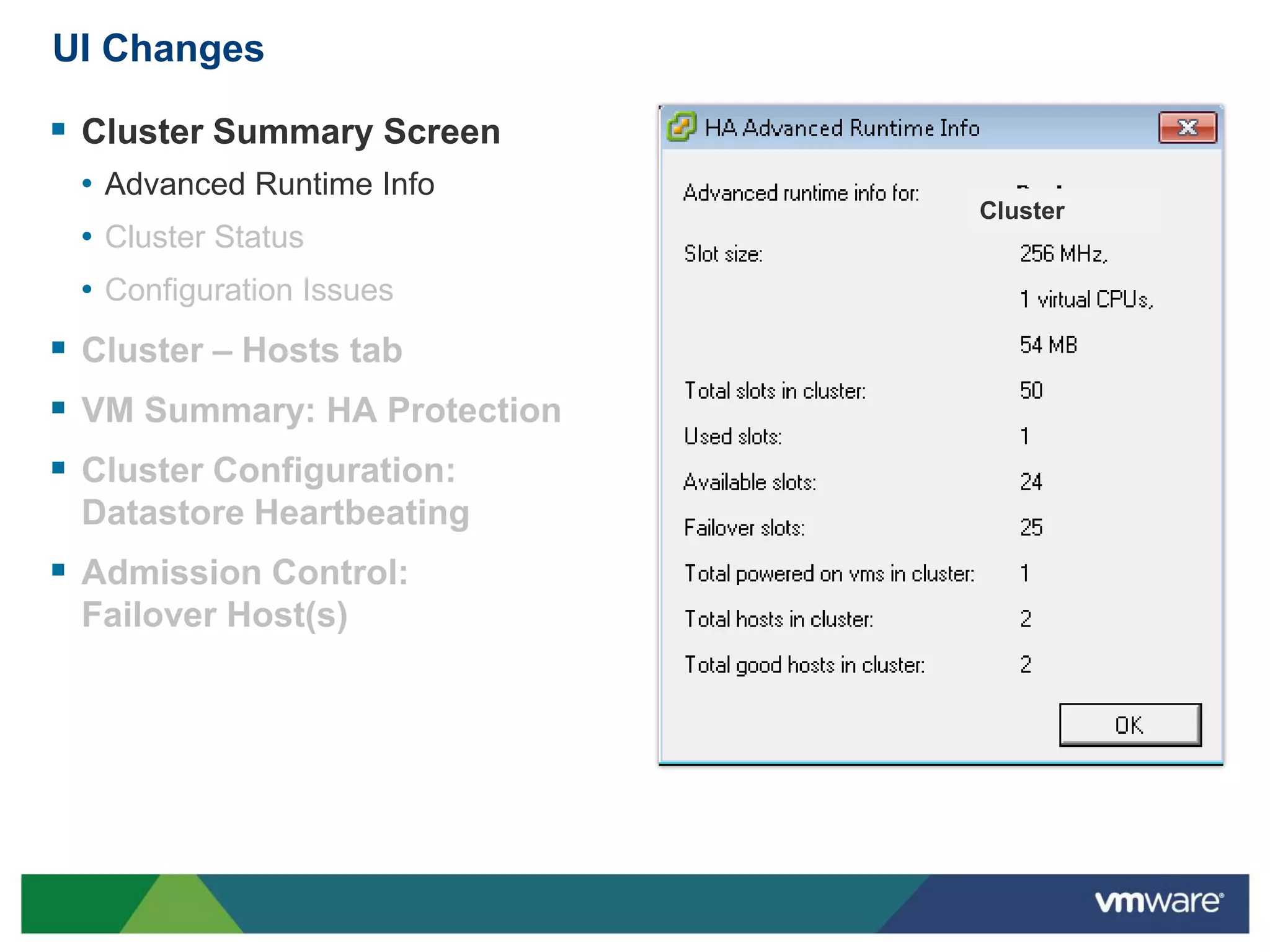
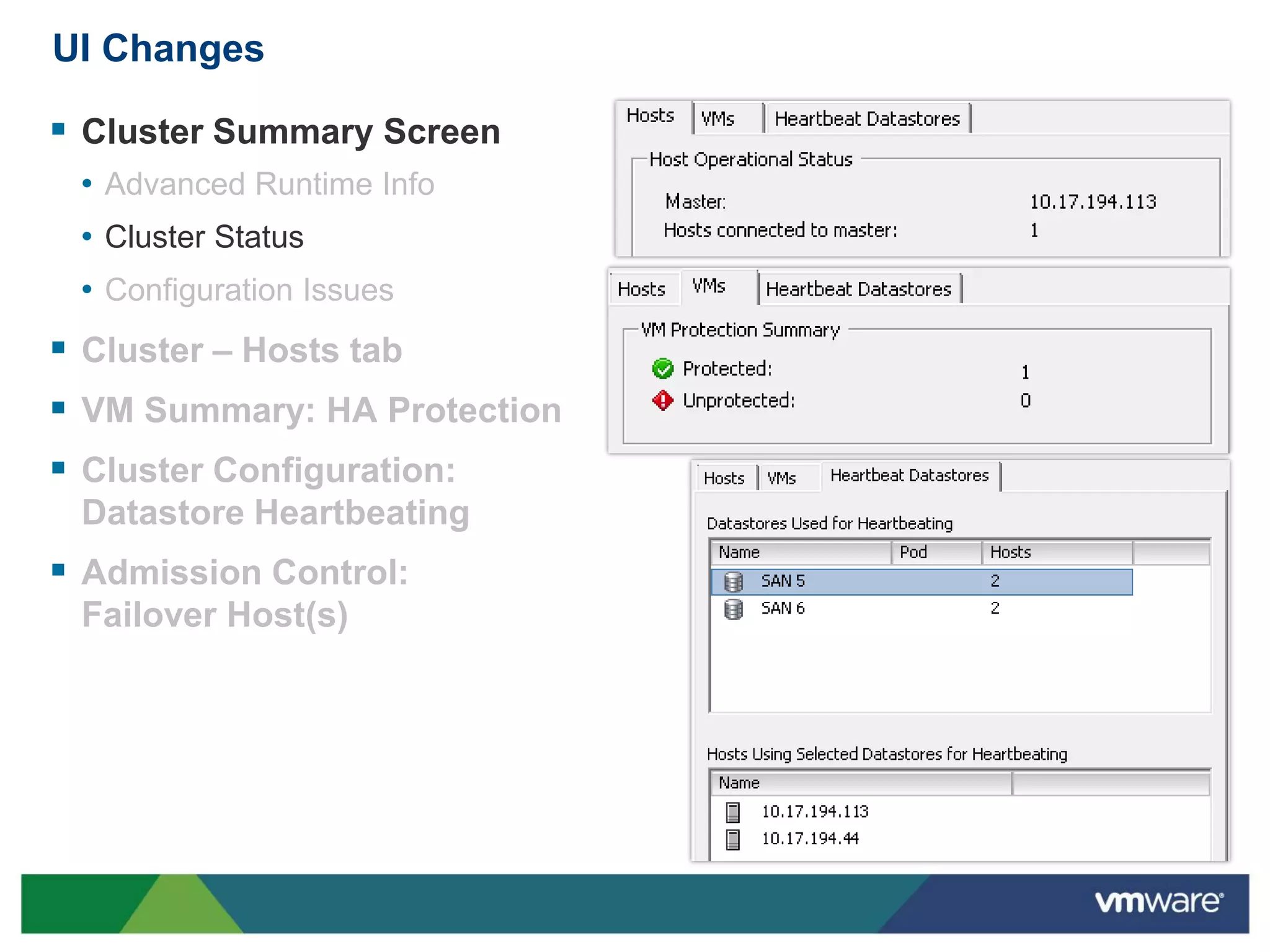
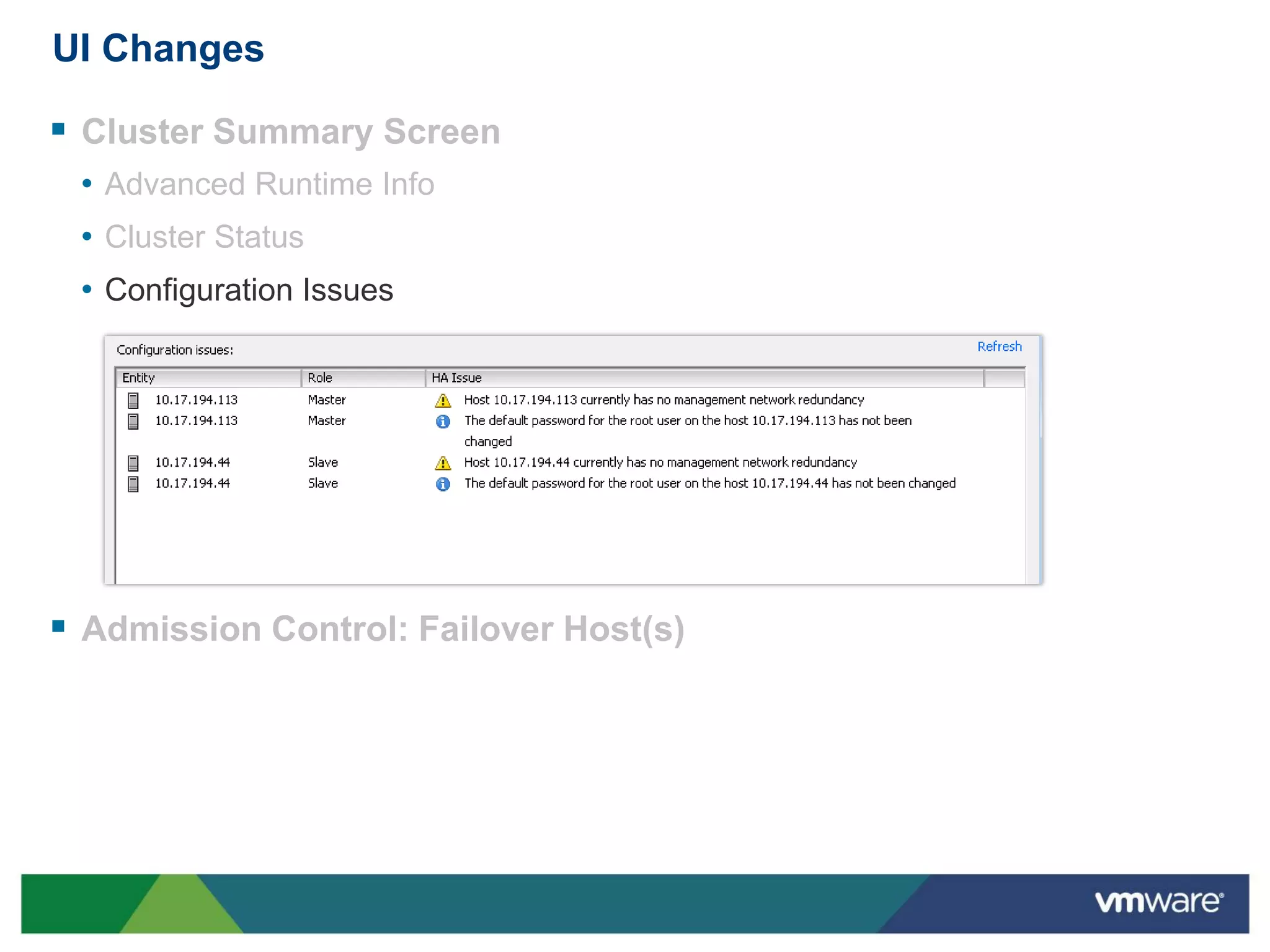
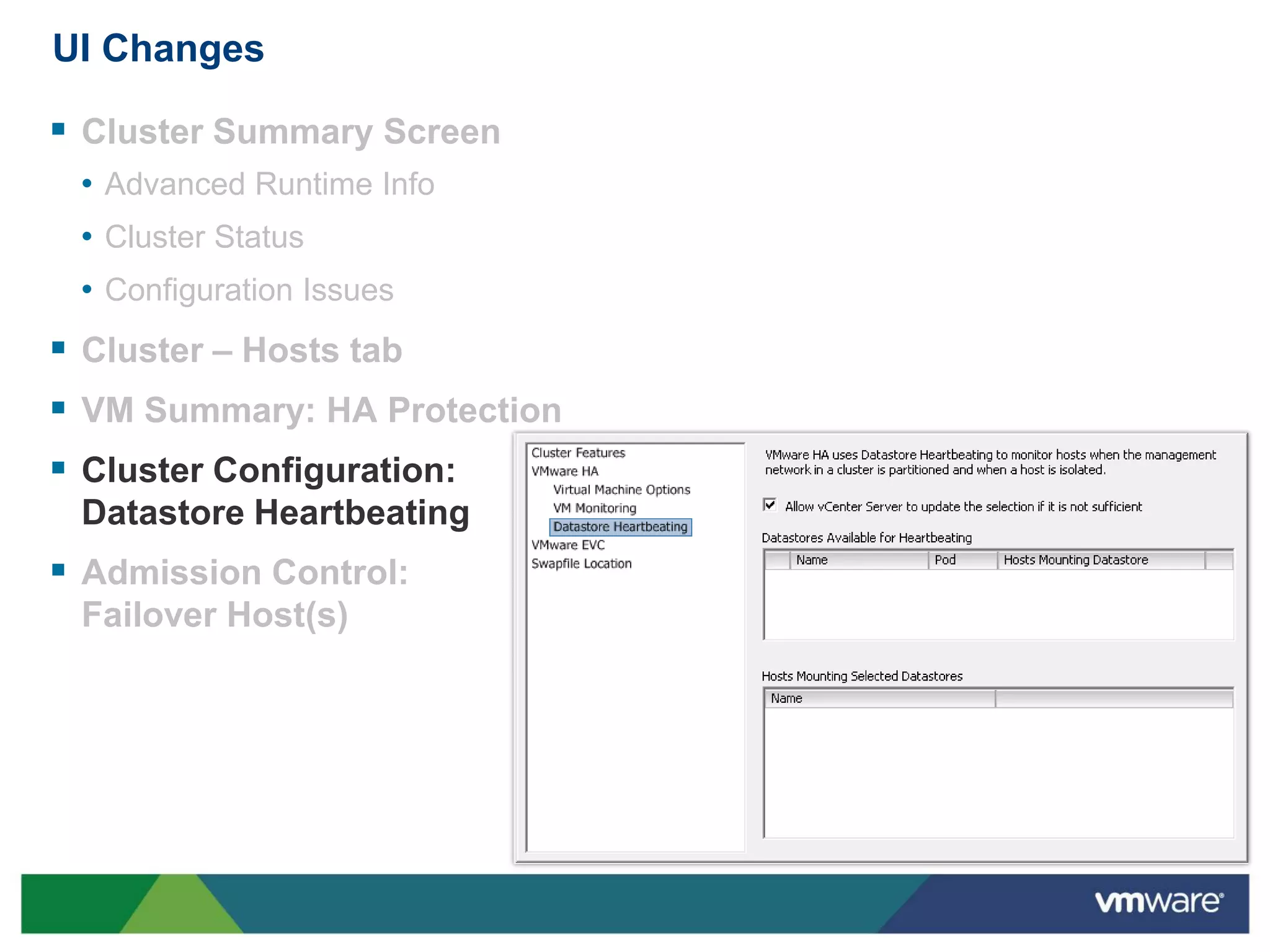
UI Changes

 Cluster Summary Screen
 • Advanced Runtime Info
                              Cluster
 • Cluster Status
 • Configuration Issues
 Cluster – Hosts tab
 VM Summary: HA Protection
 Cluster Configuration:
 Datastore Heartbeating
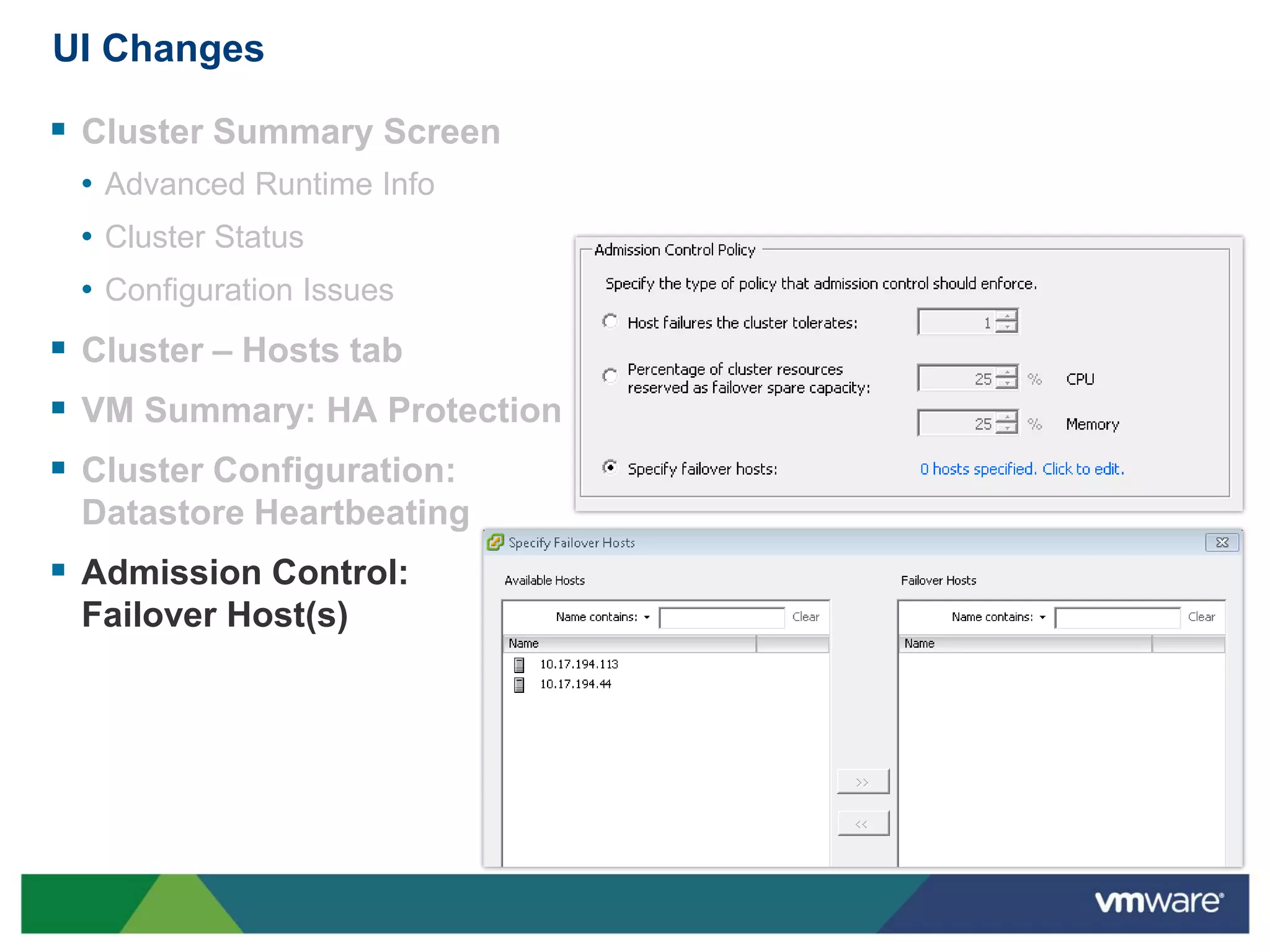
 Admission Control:
 Failover Host(s)
UI Changes

 Cluster Summary Screen
 • Advanced Runtime Info
 • Cluster Status
 • Configuration Issues
 Cluster – Hosts tab
 VM Summary: HA Protection
 Cluster Configuration:
 Datastore Heartbeating
 Admission Control:
 Failover Host(s)
UI Changes

 Cluster Summary Screen
 • Advanced Runtime Info
 • Cluster Status
 • Configuration Issues


 Admission Control: Failover Host(s)
UI Changes

 Cluster Summary Screen
 • Advanced Runtime Info
 • Cluster Status
 • Configuration Issues
 Cluster – Hosts tab


 VM Summary: HA Protection
 Cluster Configuration:
 Datastore Heartbeating
 Admission Control:
 Failover Host(s)
UI Changes

 Cluster Summary Screen
 • Advanced Runtime Info
 • Cluster Status
 • Configuration Issues
 Cluster – Hosts tab
 VM Summary: HA Protection
 Cluster Configuration:
 Datastore Heartbeating
 Admission Control:
 Failover Host(s)
UI Changes

 Cluster Summary Screen
 • Advanced Runtime Info
 • Cluster Status
 • Configuration Issues
 Cluster – Hosts tab
 VM Summary: HA Protection
 Cluster Configuration:
 Datastore Heartbeating
 Admission Control:
 Failover Host(s)
Summary

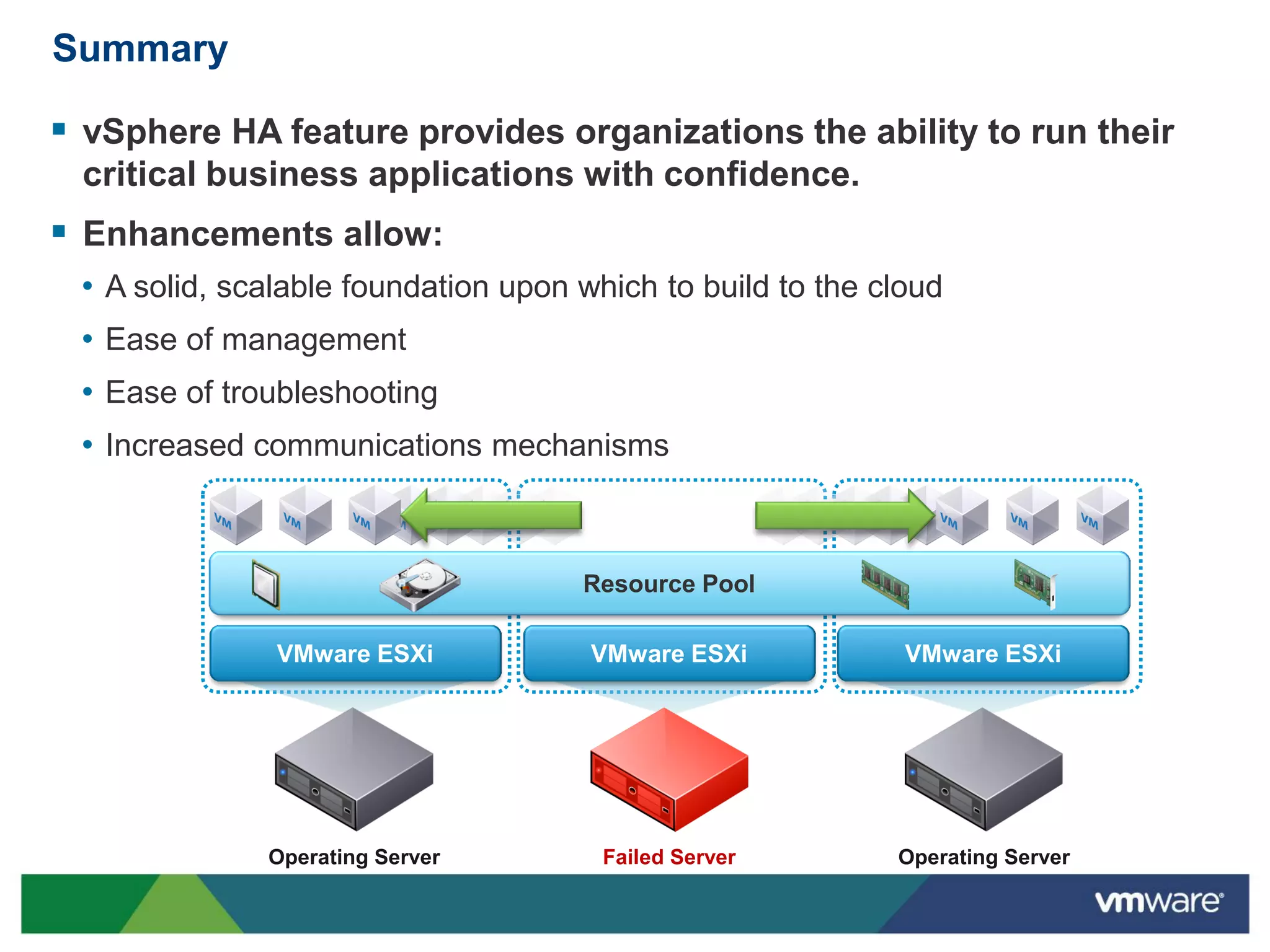
 vSphere HA feature provides organizations the ability to run their
 critical business applications with confidence.
 Enhancements allow:
 • A solid, scalable foundation upon which to build to the cloud
 • Ease of management
 • Ease of troubleshooting
 • Increased communications mechanisms


                                     Resource Pool

               VMware ESXi            VMware ESXi            VMware ESXi


              Operating Server         Failed Server        Operating Server

Introduction - vSphere 5 High Availability (HA)

  • 1.
    vSphere 5 HighAvailability (HA)
  • 2.
    Running Business-Critical Applicationswith Confidence  vSphere HA provides the right availability services with groundbreaking simplicity for any application  Allows for: • Protection of Tier 1 Applications • Restart of VM upon Application Failure • VM High Availability • Virtual Machine Health Monitoring • Host High Availability • Host Monitoring • Zero downtime VM recovery upon host failure
  • 3.
    Release Enhancement Summary Enhanced vSphere HA core  Provides a foundation for increased scale and functionality • Eliminates common issues (DNS resolution)  Multiple Communication Paths • Can leverage storage as well as the mgmt network for communications • Enhances the ability to detect certain types of failures and provides redundancy  IPv6 Support  Enhanced Error Reporting • One log file per host eases troubleshooting efforts  Enhanced User Interface  Enhanced Deployment Mechanism
  • 4.
    vSphere HA PrimaryComponents  Every host runs an agent. • Referred to as ‘FDM’ or Fault Domain Manager • One of the agents within the cluster is chosen to assume the role of the Master ESX 01 ESX 03 • There is only one Master per cluster during normal operations • All other agents assume the role of Slaves  There is no more Primary/Secondary concept with vSphere HA ESX 02 ESX 04 vCenter
  • 5.
    The Master Role An FDM master monitors: • ESX hosts and Virtual Machine availability. • All Slave hosts. Upon a Slave host failure, protected VMs on that host will be restarted. • The power state of all the protected VMs. Upon failure of a protected VM, the Master will restart it.  An FDM master manages: • The list of hosts that are members of the cluster, updating this list as hosts are added or removed from the cluster. • The list of protected VMs. The Master updates this list after each user-initiated power on ESX 02 or power off.
  • 6.
    The Slave Role A Slave monitors the runtime state of its locally running VMs and forwards any significant state changes to the Master.  It implements vSphere HA features that do not require central coordination, most ESX 01 ESX 03 notably VM Health Monitoring.  It monitors the health of the Master. If the Master should fail, it participates in the election process for a new master.  Maintains list of powered on VMs. ESX 04
  • 7.
    The Master ElectionProcess  The Master is determined through a election process.  A election occurs when: • vSphere HA is enabled. • A master host fails, is shutdown, ESX 01 ESX 03 or is placed in maintenance mode. • A management network partition occurs.  The following algorithm is used for selecting the master: • The host with access to the greatest number of datastores wins. • In a tie, the host with the lexically ESX 02 ESX 04 highest moid is chosen. For example moid "host-99" would be higher than moid "host-100" since "9" is greater than "1".
  • 8.
    Agent Communications  Primaryagent communications utilize the management network. • All communication is point to point. • No broadcasts. ESX 01 ESX 03 • Election is conducted using UDP. • Once the Election is complete all further Master to Slave communication is via SSL encrypted TCP. • Each slave maintains a single TCP connection to the master.  Datastores are used as a backup communication channel when a cluster’s management network becomes partitioned. ESX 02 ESX 04
  • 9.
    Storage-Level Communications  Oneof the most exciting new features of vSphere HA is its ability to use a storage subsystem for communication.  The datastores used for this are referred to as ‘Heartbeat Datastores’. ESX 01 ESX 03  This provides for increased communication redundancy.  Heartbeat datastores are used as a communication channel only when the management network is lost - such as in the case of isolation or network partitioning. ESX 02 ESX 04
  • 10.
    Storage-Level Communications  HeartbeatDatastores allow a Master to: • Monitor availability of Slave hosts and the VMs running on them. • Determine whether a host has become network isolated rather than network ESX 01 ESX 03 partitioned. • Coordinate with other Masters - since a VM can only be owned by only one master, masters will coordinate VM ownership thru datastore communication. • By default, vCenter will automatically pick 2 datastores. These 2 datastores can also be selected by the user. ESX 02 ESX 04
  • 11.
    Storage-Level Communications  Hostavailability can be inferred differently, depending on storage used: • For VMFS datastores, the Master reads the VMFS heartbeat region. • For NFS datastores, the Master monitors ESX 01 ESX 03 a heartbeat file that is periodically touched by the Slaves.  Virtual Machine Availability is reported by a file created by each Slave which lists the powered on VMs.  Multiple Master Coordination is done by using file locks on the datastore. ESX 02 ESX 04
  • 12.
    VM Protection States A protected VM is a VM that vSphere HA guarantees that a attempt to restart it will be made in the event of a failure.  A VM becomes protected when vCenter is informed by the Master that the VM is protected. • When vCenter detects that the VM is powered on, it informs the Master about it. The Master then updates it’s list of protected VMs. After which, the Master informs vCenter that the VM is protected. • When VMs are powered off, the process is repeated and the VM is considered to be not protected.  This is a change from previous versions of vSphere HA, where the power-on task for a VM would not complete until HA became aware that this was a protected VM. • This allows the Power On tasks to complete faster, even if the VM has not been designated as being protected at the time of the task completing.
  • 13.
    VM Protection Flow When a VM is first powered on, it goes into unprotected state.  It stays in the unprotected state until the Master tells vCenter that it has written the information to disk.  Periodically (e.g., once every 5 minutes), VC will compare the list it has to the protected VM list last reported by the Master. If any deltas exist, VC update the Master.  A VM becomes unprotected when: • It is powered off. • It is vMotion’ed out of the cluster. • Its host is disconnected from vCenter. • Its host is put into Maintenance Mode. • When a host is placed into Maintenance Mode, the summary screen of the host displays the fact that the HA agent has been disabled.
  • 14.
    HA States  Anew host property to report the HA state of a host.  The state is reported on host summary panel and optionally in the host list.  Possible States include: • N/A (HA not configured) • Election (Master election in progress) • Master (Can be more than one) • Connected (To Master over network) • Network Partitioned • Network Isolated • Dead • Agent Unreachable • Initialization Error • Unconfig Error
  • 15.
    Log Files  Eachhost has only one log file : /var/log/fdm.log.  This is much easier to troubleshoot than previous versions of vSphere HA.  This should be the first place to look at for all: • Partitioning Issues • Isolation Issues • VM Protection Issues • Election Issues • Failure to failover issues.
  • 16.
    UI Changes  ClusterSummary Screen • Advanced Runtime Info Cluster • Cluster Status • Configuration Issues  Cluster – Hosts tab  VM Summary: HA Protection  Cluster Configuration: Datastore Heartbeating  Admission Control: Failover Host(s)
  • 17.
    UI Changes  ClusterSummary Screen • Advanced Runtime Info • Cluster Status • Configuration Issues  Cluster – Hosts tab  VM Summary: HA Protection  Cluster Configuration: Datastore Heartbeating  Admission Control: Failover Host(s)
  • 18.
    UI Changes  ClusterSummary Screen • Advanced Runtime Info • Cluster Status • Configuration Issues  Admission Control: Failover Host(s)
  • 19.
    UI Changes  ClusterSummary Screen • Advanced Runtime Info • Cluster Status • Configuration Issues  Cluster – Hosts tab  VM Summary: HA Protection  Cluster Configuration: Datastore Heartbeating  Admission Control: Failover Host(s)
  • 20.
    UI Changes  ClusterSummary Screen • Advanced Runtime Info • Cluster Status • Configuration Issues  Cluster – Hosts tab  VM Summary: HA Protection  Cluster Configuration: Datastore Heartbeating  Admission Control: Failover Host(s)
  • 21.
    UI Changes  ClusterSummary Screen • Advanced Runtime Info • Cluster Status • Configuration Issues  Cluster – Hosts tab  VM Summary: HA Protection  Cluster Configuration: Datastore Heartbeating  Admission Control: Failover Host(s)
  • 22.
    Summary  vSphere HAfeature provides organizations the ability to run their critical business applications with confidence.  Enhancements allow: • A solid, scalable foundation upon which to build to the cloud • Ease of management • Ease of troubleshooting • Increased communications mechanisms Resource Pool VMware ESXi VMware ESXi VMware ESXi Operating Server Failed Server Operating Server