Essential Question :  How do you graph linear equations using point plotting, intercepts, the slope-intercept form, and the graphing calculator?
 
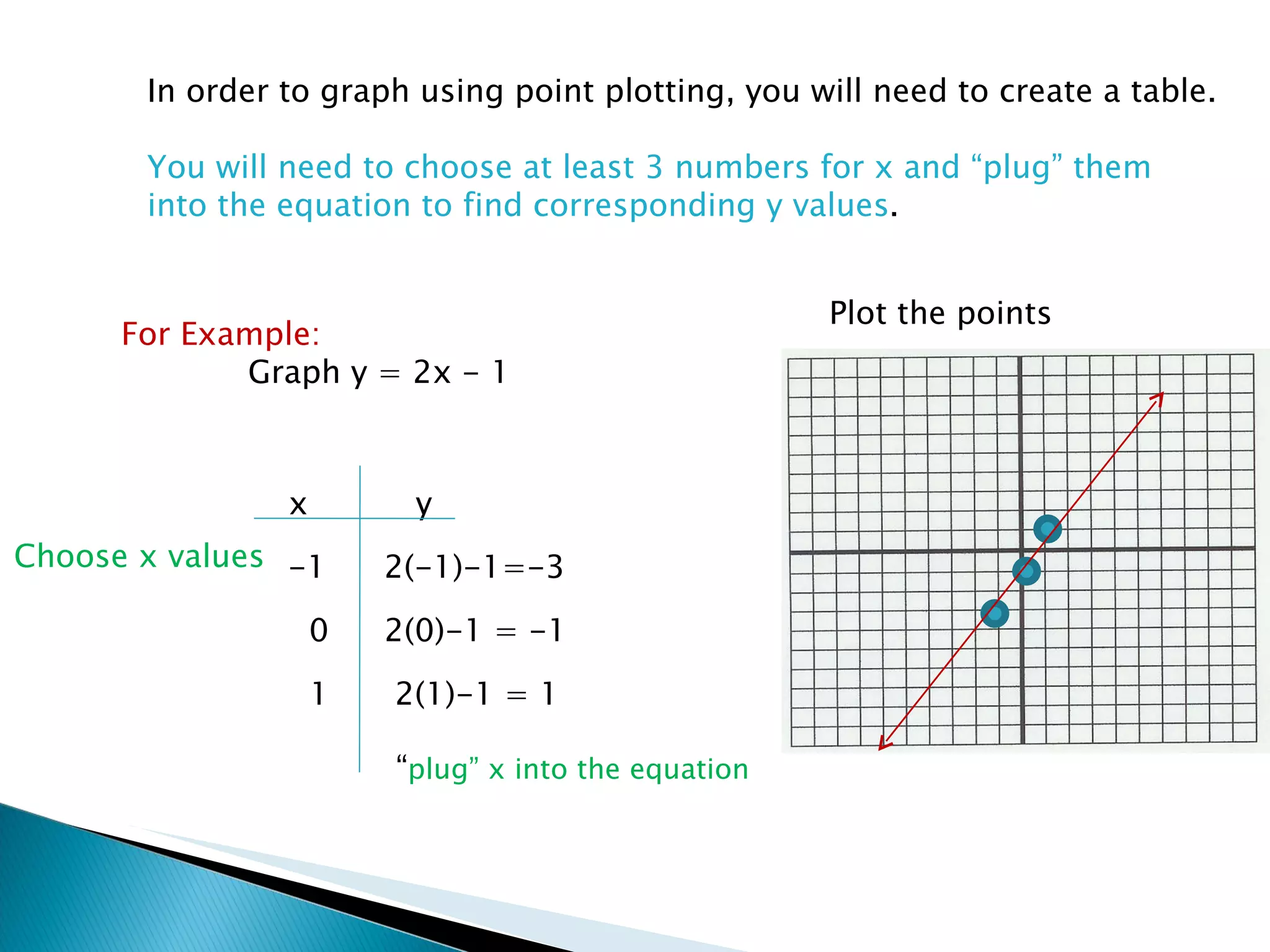
In order to graph using point plotting, you will need to create a table. You will need to choose at least 3 numbers for x and “plug” them  into the equation to find corresponding y values . For Example: Graph y = 2x - 1 x y Choose x values “ plug” x into the equation Plot the points -1 2(-1)-1=-3 0 2(0)-1 = -1 1 2(1)-1 = 1
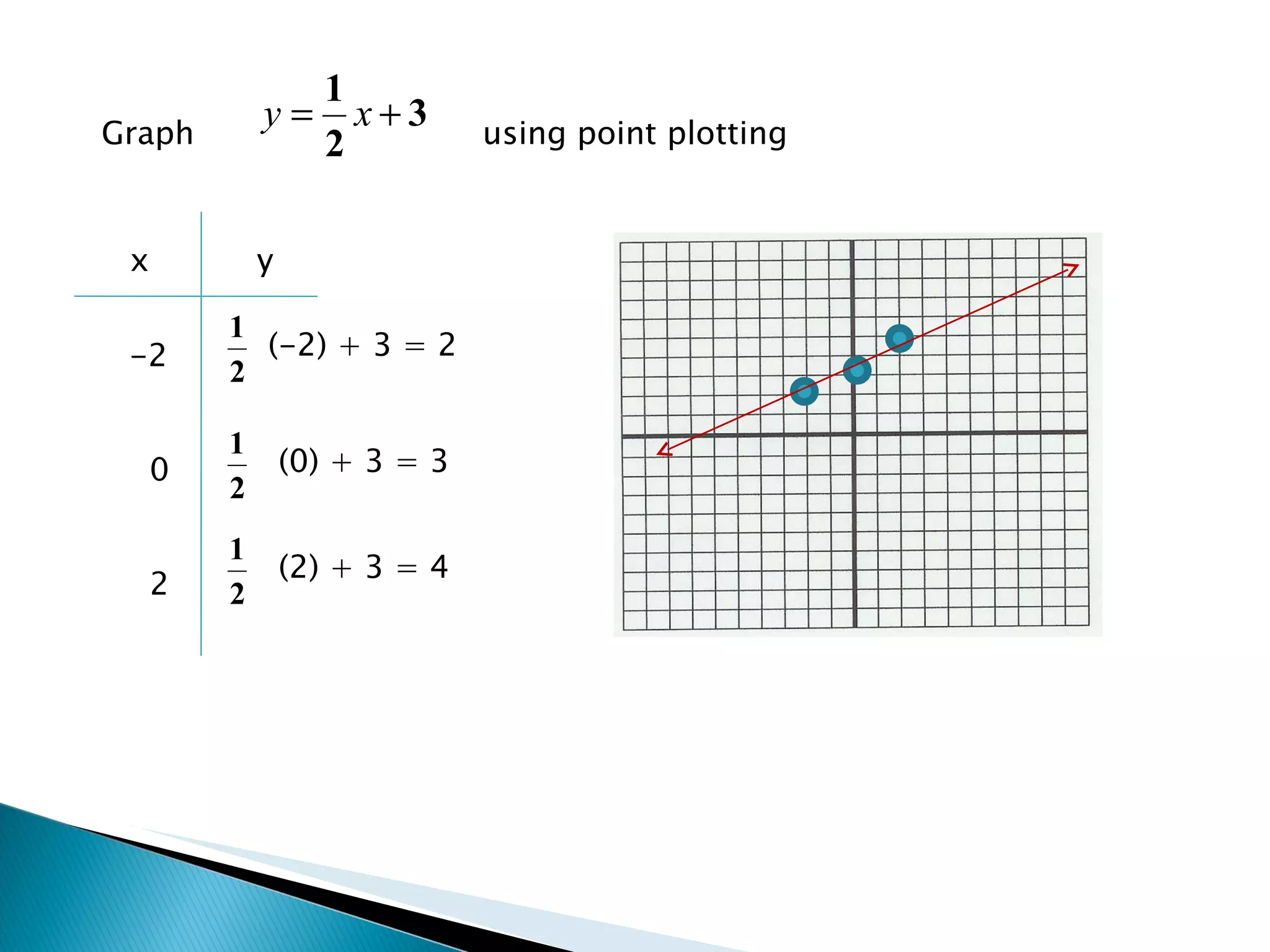
Graph  using point plotting x y -2 0 2 (-2) + 3 = 2 (0) + 3 = 3 (2) + 3 = 4
 
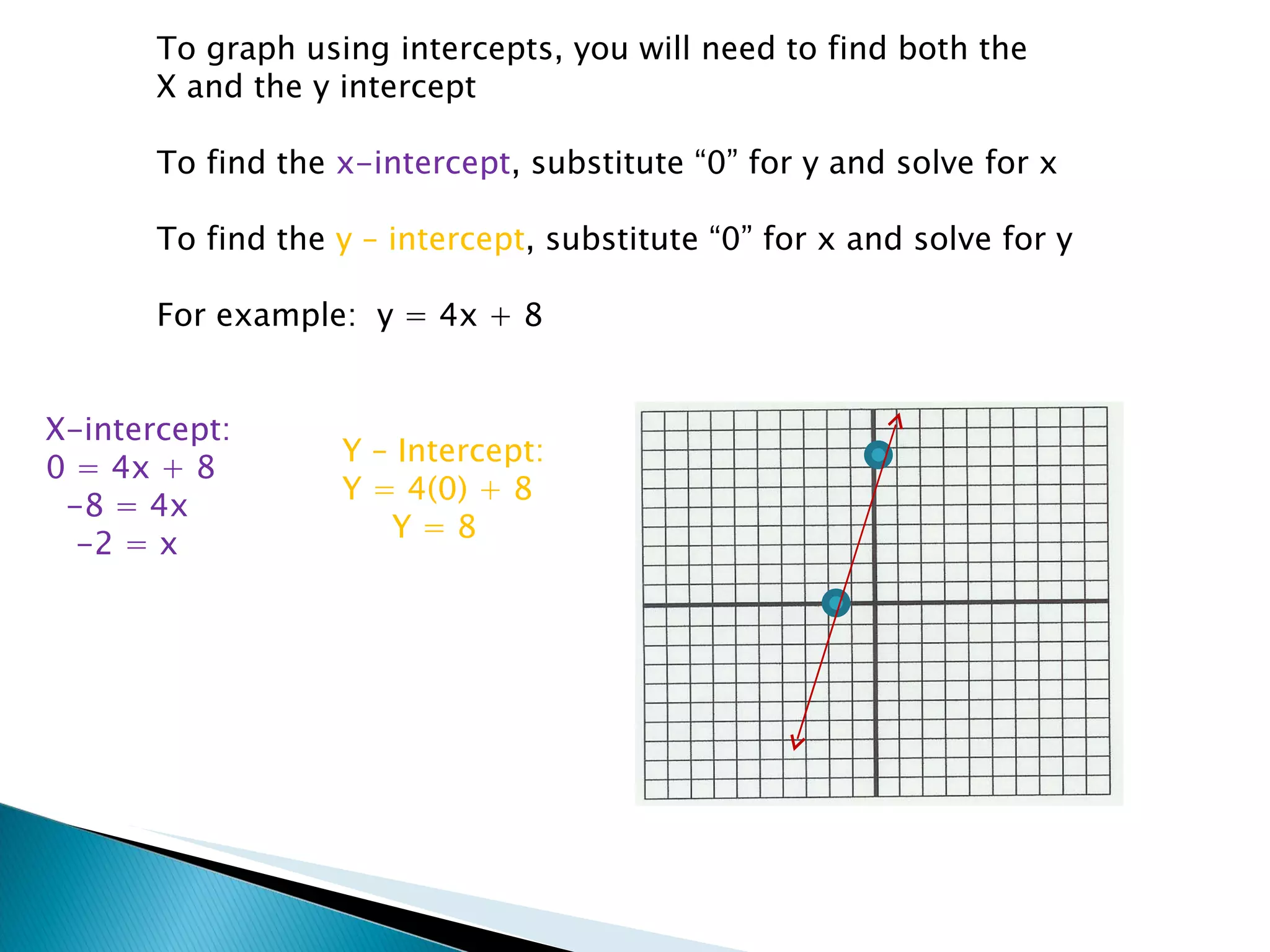
To graph using intercepts, you will need to find both the X and the y intercept To find the  x-intercept , substitute “0” for y and solve for x To find the  y – intercept , substitute “0” for x and solve for y For example:  y = 4x + 8 X-intercept: 0 = 4x + 8 -8 = 4x -2 = x Y – Intercept: Y = 4(0) + 8 Y = 8
Graph 2x + 3y = 6 using intercepts. X-intercept: 2x + 3(0) = 6 2x = 6 X = 3 Y-intercept: 2(0) + 3y = 6 3y = 6 Y = 2
 
To graph a linear equation, you will need to find  the slope and the y-intercept for the equation. Remember:  y =  m x +  b slope Y-intercept (the point where the   graph crosses the   y-axis)
Graph  Slope = Y-intercept  = 1. Plot the y-intercept Use the slope to find  the next point Slope = “rise over run”
Graph 2x + 5y = 10 using the slope-intercept form: (put the equation in slope-intercept form first) 2x + 5y = 10 5y = 10 – 2x y = 2 – 2/5 x slope = -2/5 y – intercept = 2 A negative slope means you will go down  then right from the y-intercept
 
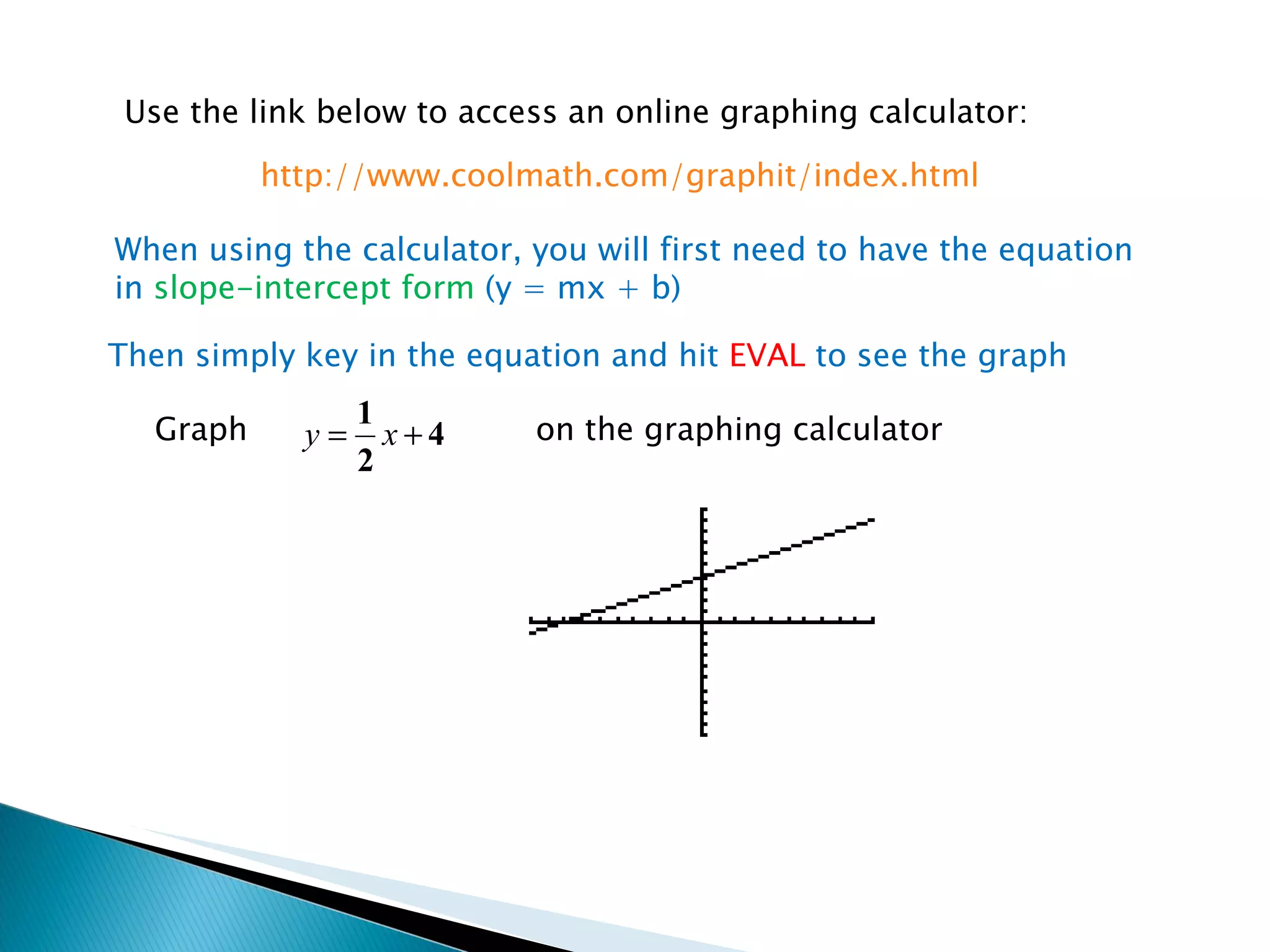
Use the link below to access an online graphing calculator: When using the calculator, you will first need to have the equation in  slope-intercept form  (y = mx + b) http://www.coolmath.com/graphit/index.html Then simply key in the equation and hit  EVAL  to see the graph Graph on the graphing calculator
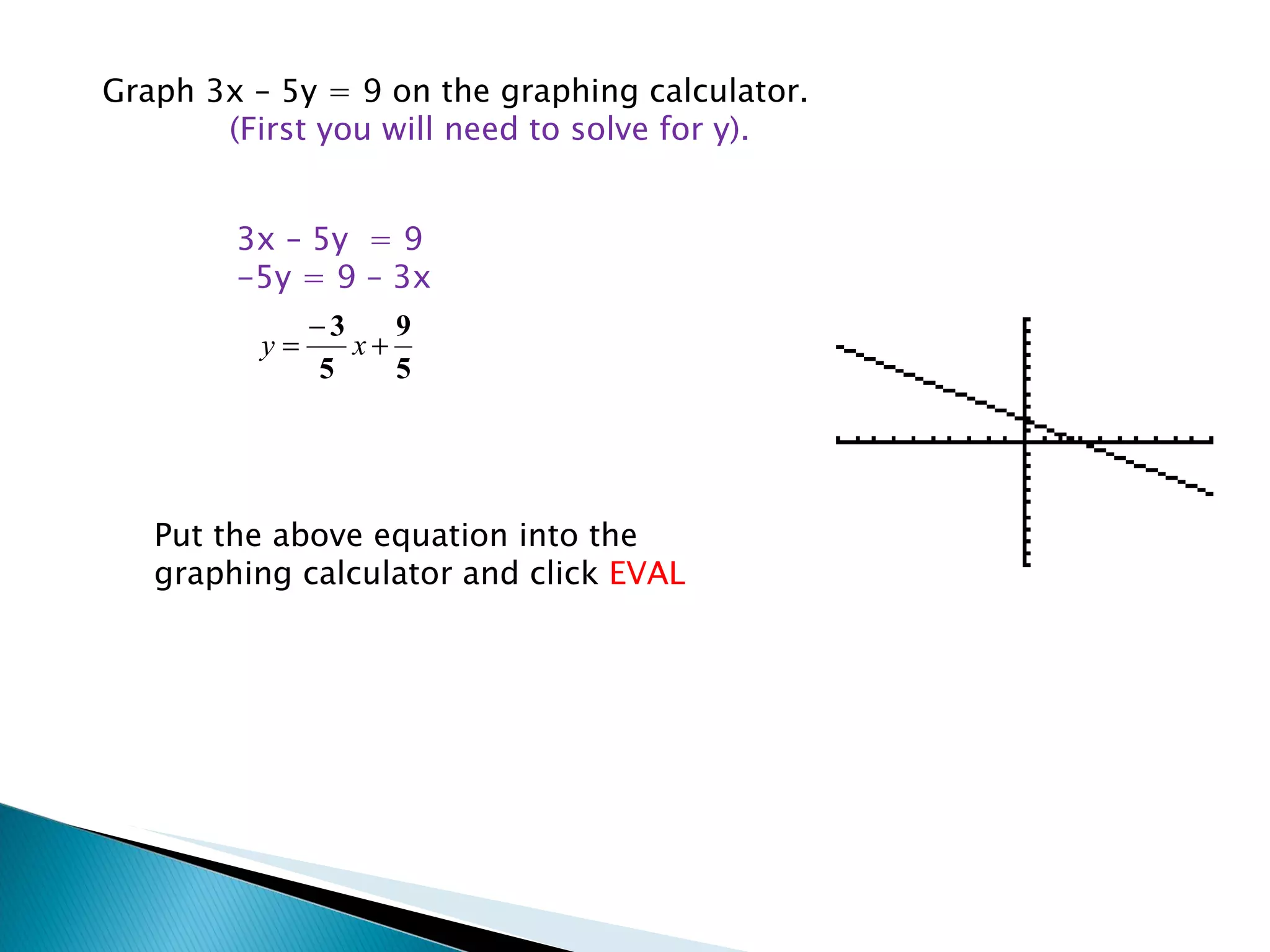
Graph 3x – 5y = 9 on the graphing calculator.  (First you will need to solve for y). 3x – 5y  = 9 -5y = 9 – 3x Put the above equation into the graphing calculator and click  EVAL

Graphing Linear Equations Lesson

  • 1.
    Essential Question : How do you graph linear equations using point plotting, intercepts, the slope-intercept form, and the graphing calculator?
  • 2.
  • 3.
    In order tograph using point plotting, you will need to create a table. You will need to choose at least 3 numbers for x and “plug” them into the equation to find corresponding y values . For Example: Graph y = 2x - 1 x y Choose x values “ plug” x into the equation Plot the points -1 2(-1)-1=-3 0 2(0)-1 = -1 1 2(1)-1 = 1
  • 4.
    Graph usingpoint plotting x y -2 0 2 (-2) + 3 = 2 (0) + 3 = 3 (2) + 3 = 4
  • 5.
  • 6.
    To graph usingintercepts, you will need to find both the X and the y intercept To find the x-intercept , substitute “0” for y and solve for x To find the y – intercept , substitute “0” for x and solve for y For example: y = 4x + 8 X-intercept: 0 = 4x + 8 -8 = 4x -2 = x Y – Intercept: Y = 4(0) + 8 Y = 8
  • 7.
    Graph 2x +3y = 6 using intercepts. X-intercept: 2x + 3(0) = 6 2x = 6 X = 3 Y-intercept: 2(0) + 3y = 6 3y = 6 Y = 2
  • 8.
  • 9.
    To graph alinear equation, you will need to find the slope and the y-intercept for the equation. Remember: y = m x + b slope Y-intercept (the point where the graph crosses the y-axis)
  • 10.
    Graph Slope= Y-intercept = 1. Plot the y-intercept Use the slope to find the next point Slope = “rise over run”
  • 11.
    Graph 2x +5y = 10 using the slope-intercept form: (put the equation in slope-intercept form first) 2x + 5y = 10 5y = 10 – 2x y = 2 – 2/5 x slope = -2/5 y – intercept = 2 A negative slope means you will go down then right from the y-intercept
  • 12.
  • 13.
    Use the linkbelow to access an online graphing calculator: When using the calculator, you will first need to have the equation in slope-intercept form (y = mx + b) http://www.coolmath.com/graphit/index.html Then simply key in the equation and hit EVAL to see the graph Graph on the graphing calculator
  • 14.
    Graph 3x –5y = 9 on the graphing calculator. (First you will need to solve for y). 3x – 5y = 9 -5y = 9 – 3x Put the above equation into the graphing calculator and click EVAL