
CloudStack Silicon Valley Meetup September 2015
XenServer Virtualization in Cloud Environments
#whoami
Name: Tim Mackey
Current roles: XenServer Community Manager and Evangelist; occasional coder
Cool things I’ve done
• Designed laser communication systems
• Early designer of retail self-checkout machines
• Embedded special relativity algorithms into industrial control system
Find me
• Twitter: @XenServerArmy
• SlideShare: slideshare.net/TimMackey
• LinkedIn: www.linkedin.com/in/mackeytim
• Github: github.com/xenserverarmy
What is XenServer?
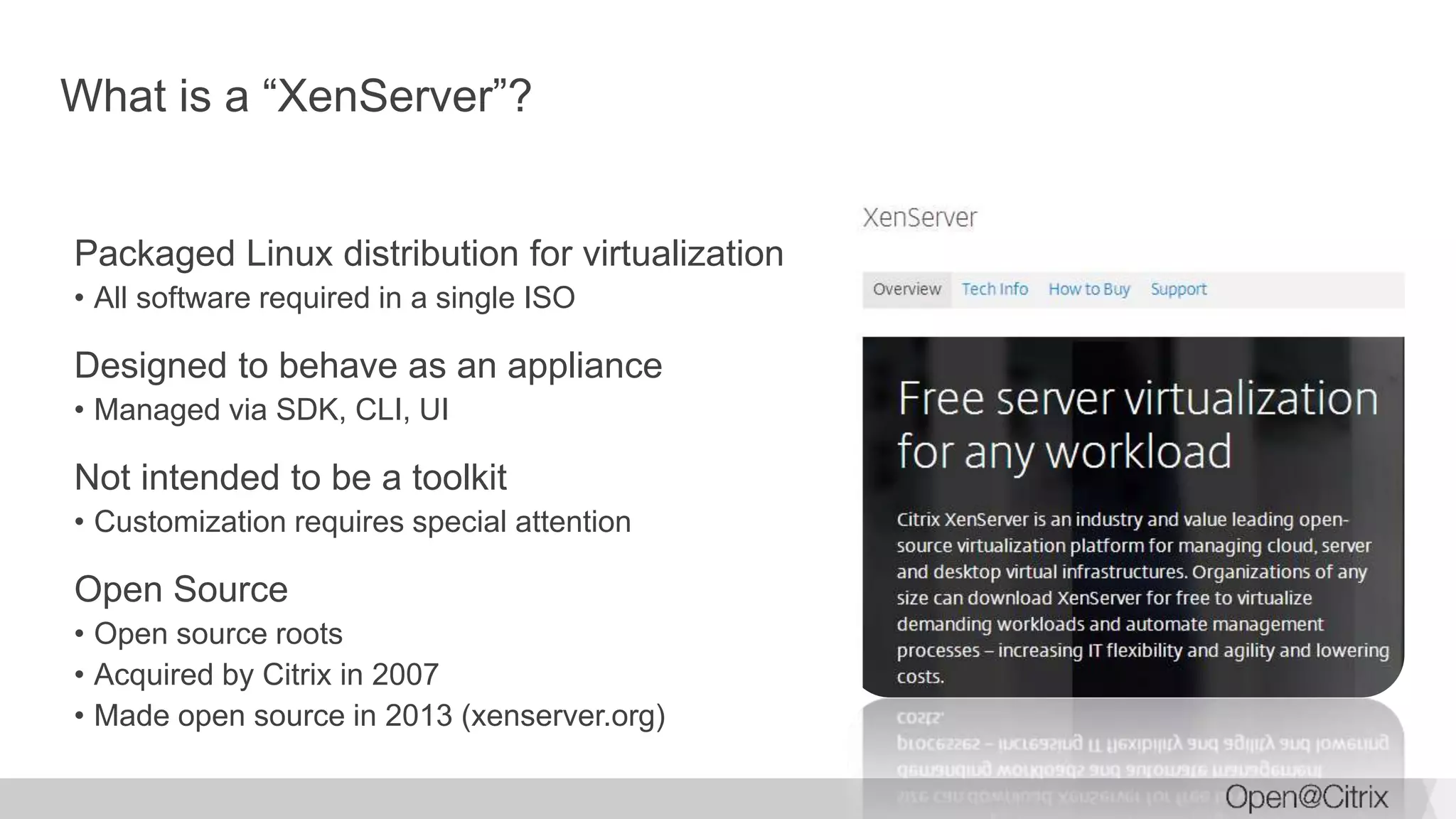
What is a “XenServer”?
Packaged Linux distribution for virtualization
• All software required in a single ISO
Designed to behave as an appliance
• Managed via SDK, CLI, UI
Not intended to be a toolkit
• Customization requires special attention
Open Source
• Open source roots
• Acquired by Citrix in 2007
• Made open source in 2013 (xenserver.org)
XenServer market dynamic
Millions of Downloads
Over 1 million servers deployed
Optimized for XenDesktop
Powering NetScaler SDX
Supporting Hyper-Dense Clouds
Why XenServer?
Broad provisioning support
• Apache CloudStack
• Citrix CloudPlatform and XenDesktop
• OpenStack
• Microsoft System Center
• VMware vCloud
Full type-1 hypervisor
• Strong VM isolation
• Supporting Intel TXT for secure boot
Designed for scale
• 1000 VMs per host
• Over 120 Gbps throughput in NetScaler SDX
• Up to 96 shared hardware GPU instances per host
Understanding the architecture
Strong technical foundation with Xen Project
Core components
Xen Project hypervisor
• XenServer 6.5: version 4.4
Customized and optimized CentOS control domain (dom0)
• XenServer 6.5: 64 bit CentOS 5.10, 3.10+ kernel.org kernel, ovs 2.1.2
Xen Project XAPI toolstack
XenCenter UI
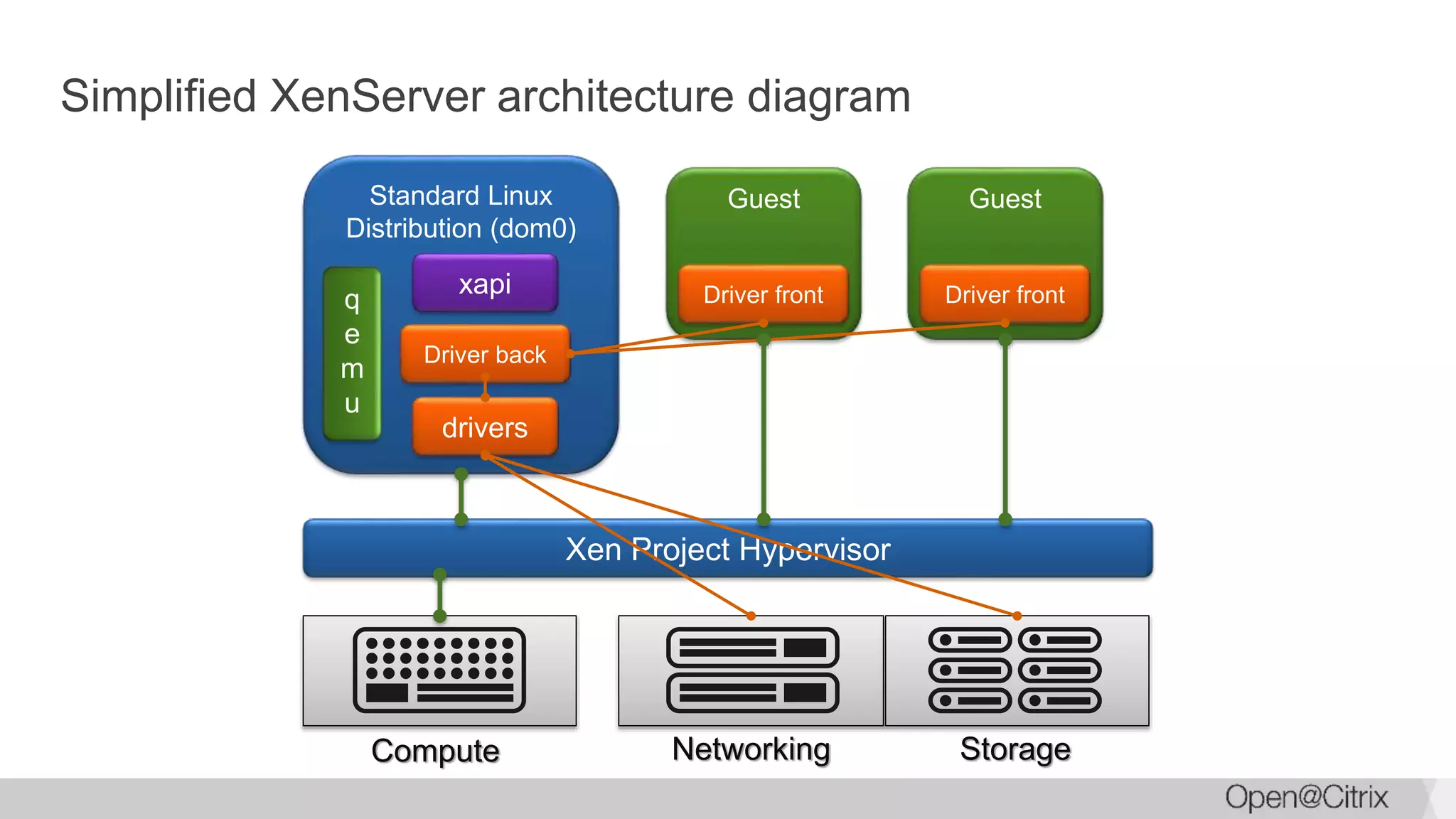
Networking StorageCompute
Simplified XenServer architecture diagram
Xen Project Hypervisor
Standard Linux
Distribution (dom0)
q
e
m
u
drivers
xapi
Guest
Driver front
Driver back
Guest
Driver front
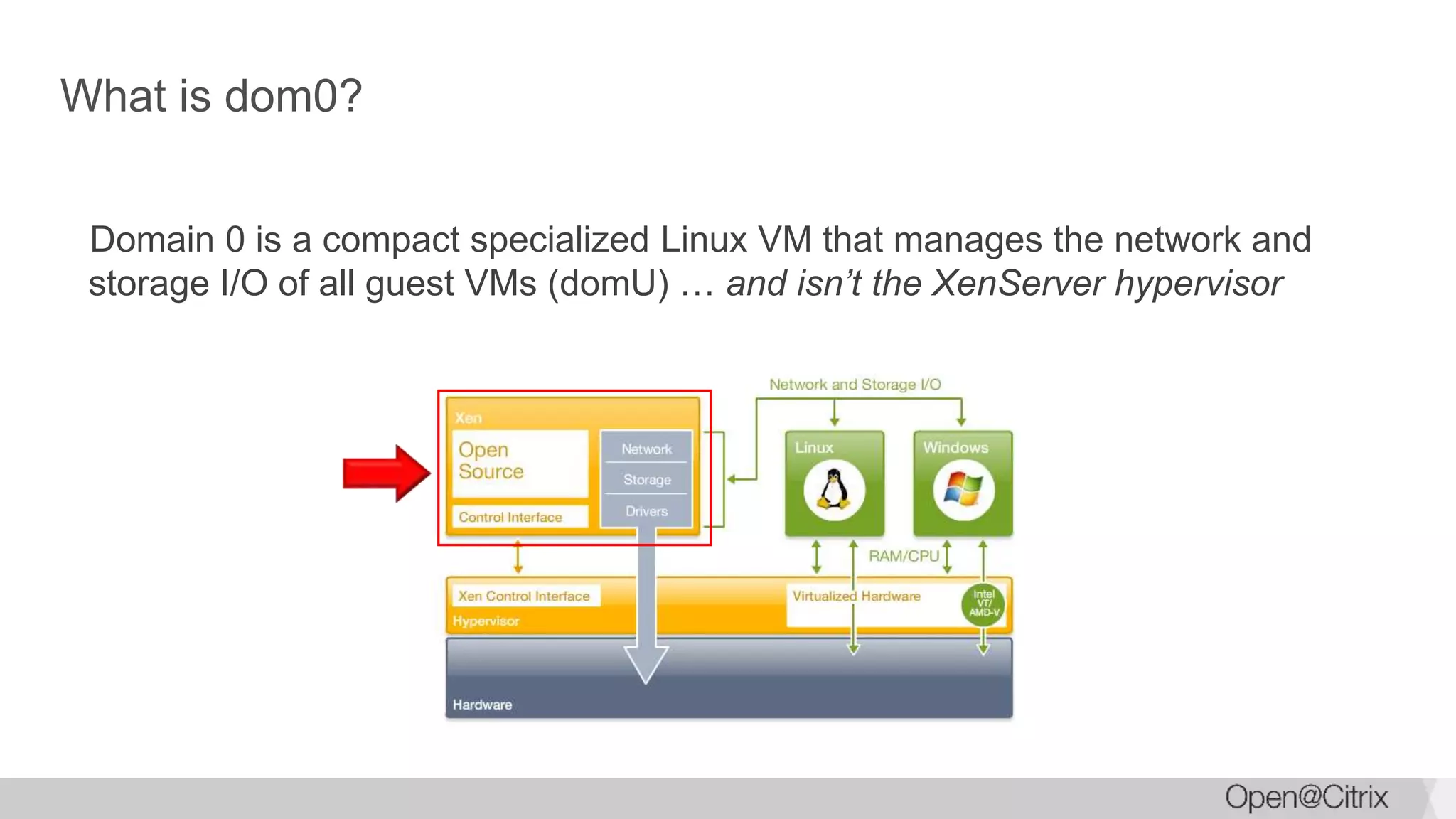
What is dom0?
Domain 0 is a compact specialized Linux VM that manages the network and
storage I/O of all guest VMs (domU) … and isn’t the XenServer hypervisor
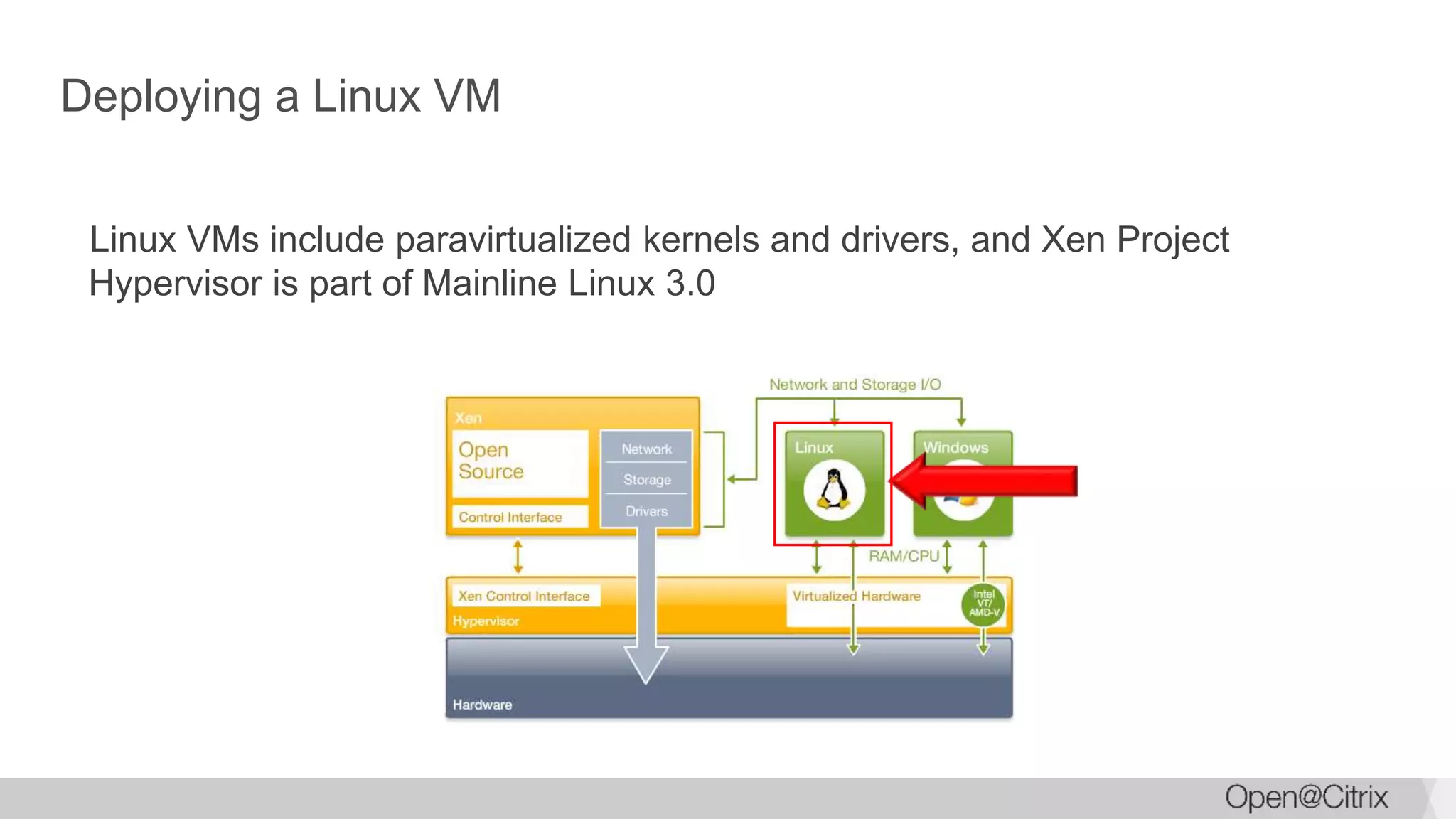
Deploying a Linux VM
Linux VMs include paravirtualized kernels and drivers, and Xen Project
Hypervisor is part of Mainline Linux 3.0
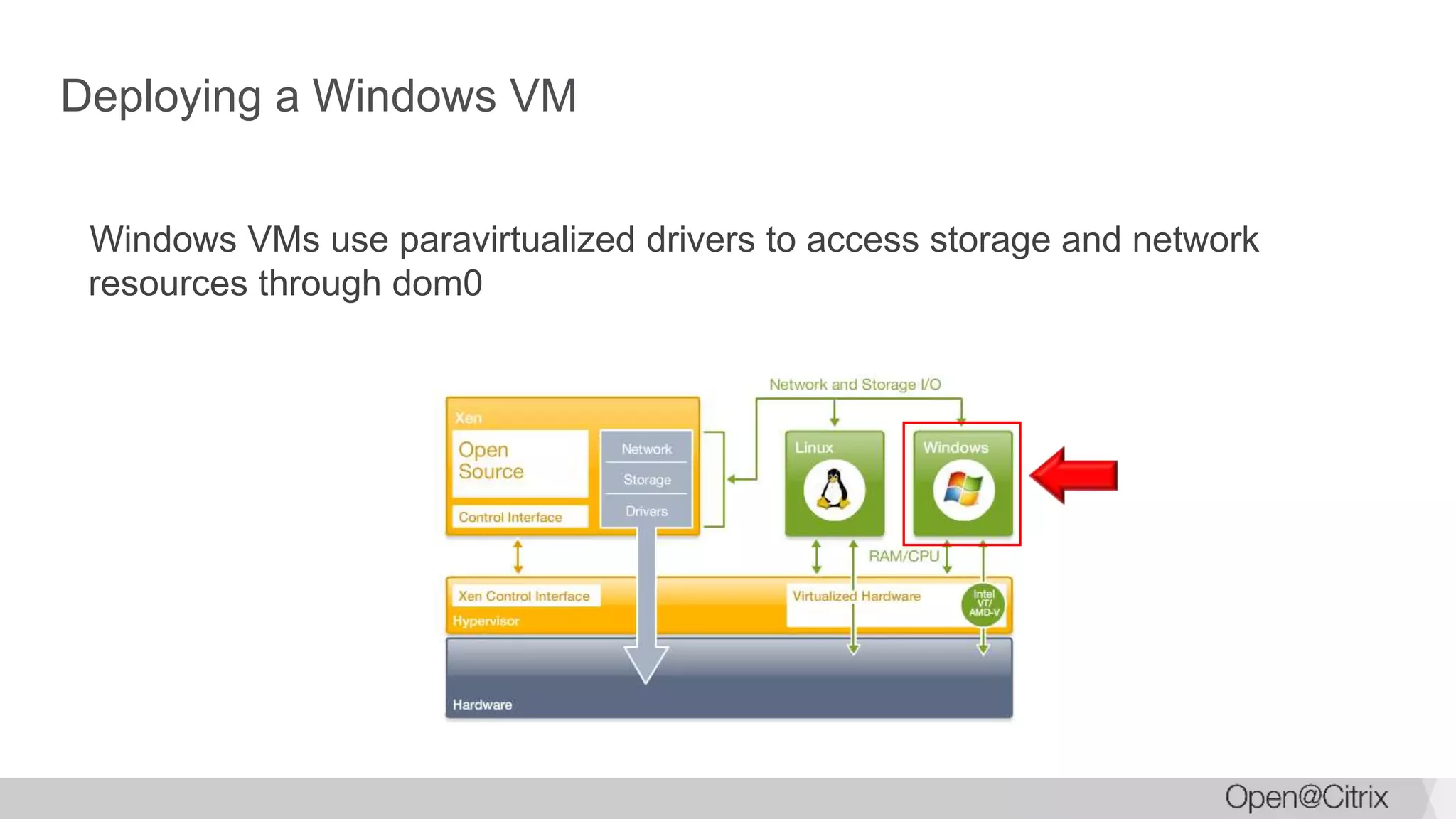
Deploying a Windows VM
Windows VMs use paravirtualized drivers to access storage and network
resources through dom0
Core capabilities
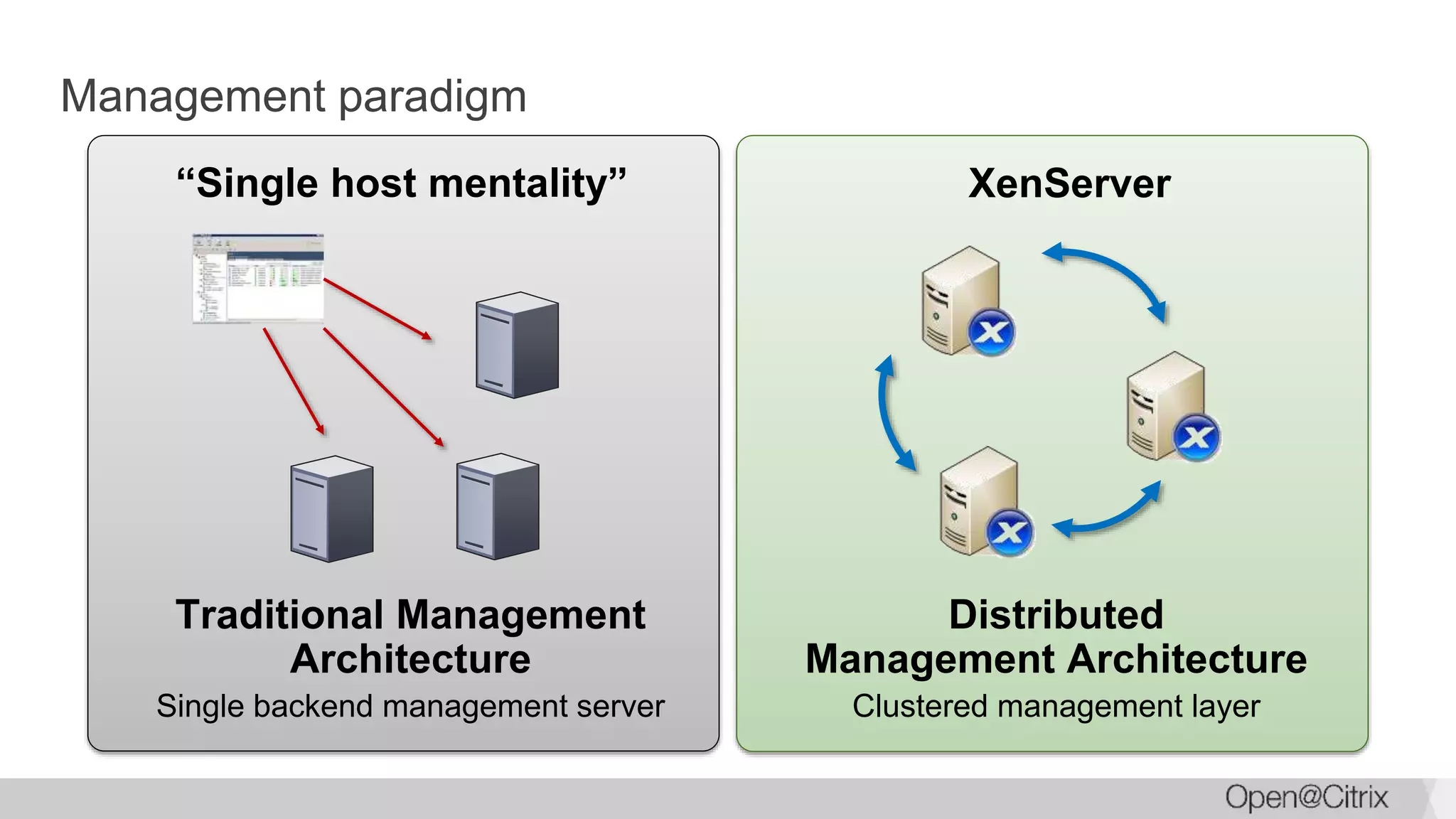
Management paradigm
“Single host mentality”
Traditional Management
Architecture
Single backend management server
XenServer
Distributed
Management Architecture
Clustered management layer
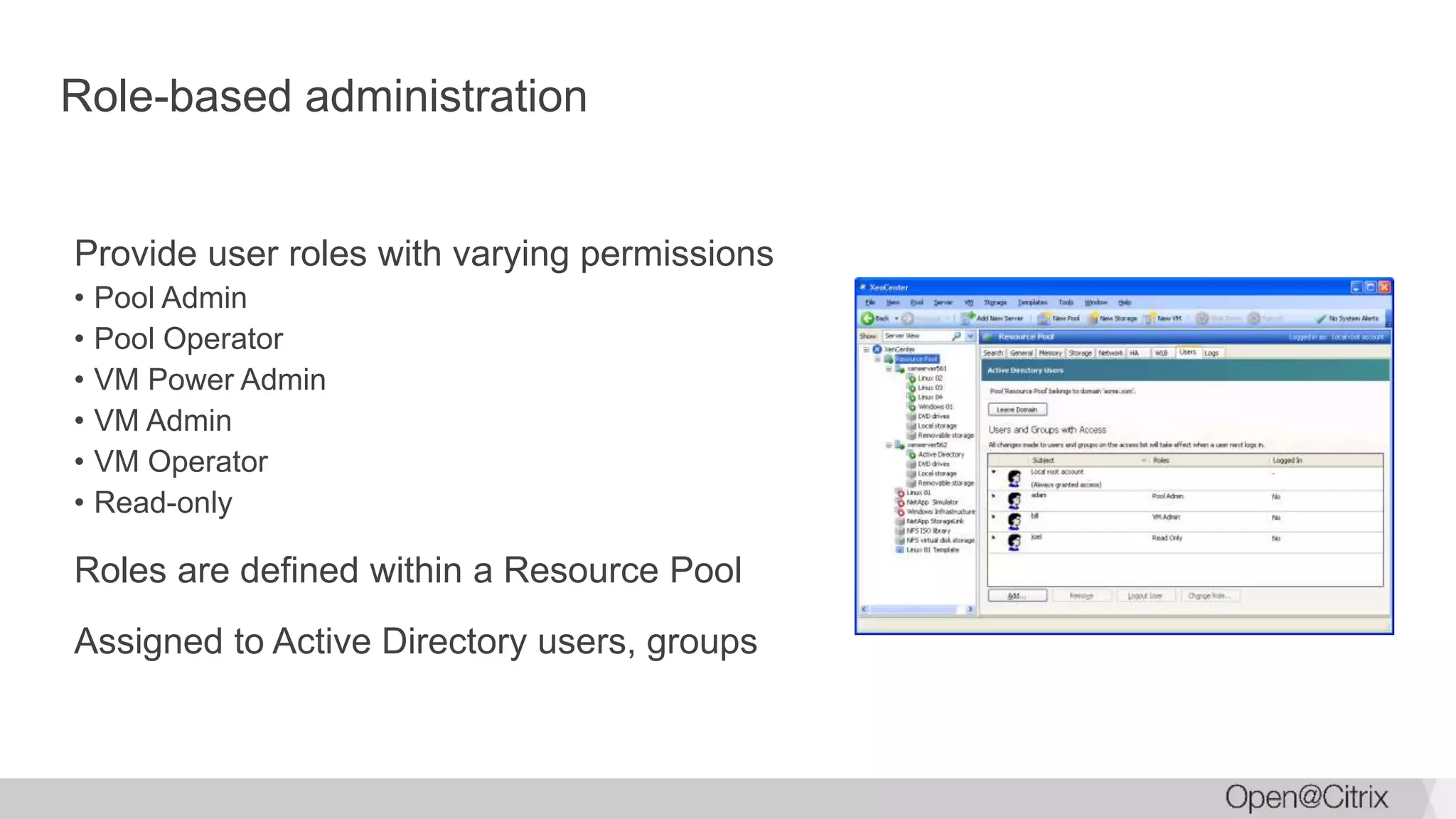
Role-based administration
Provide user roles with varying permissions
• Pool Admin
• Pool Operator
• VM Power Admin
• VM Admin
• VM Operator
• Read-only
Roles are defined within a Resource Pool
Assigned to Active Directory users, groups
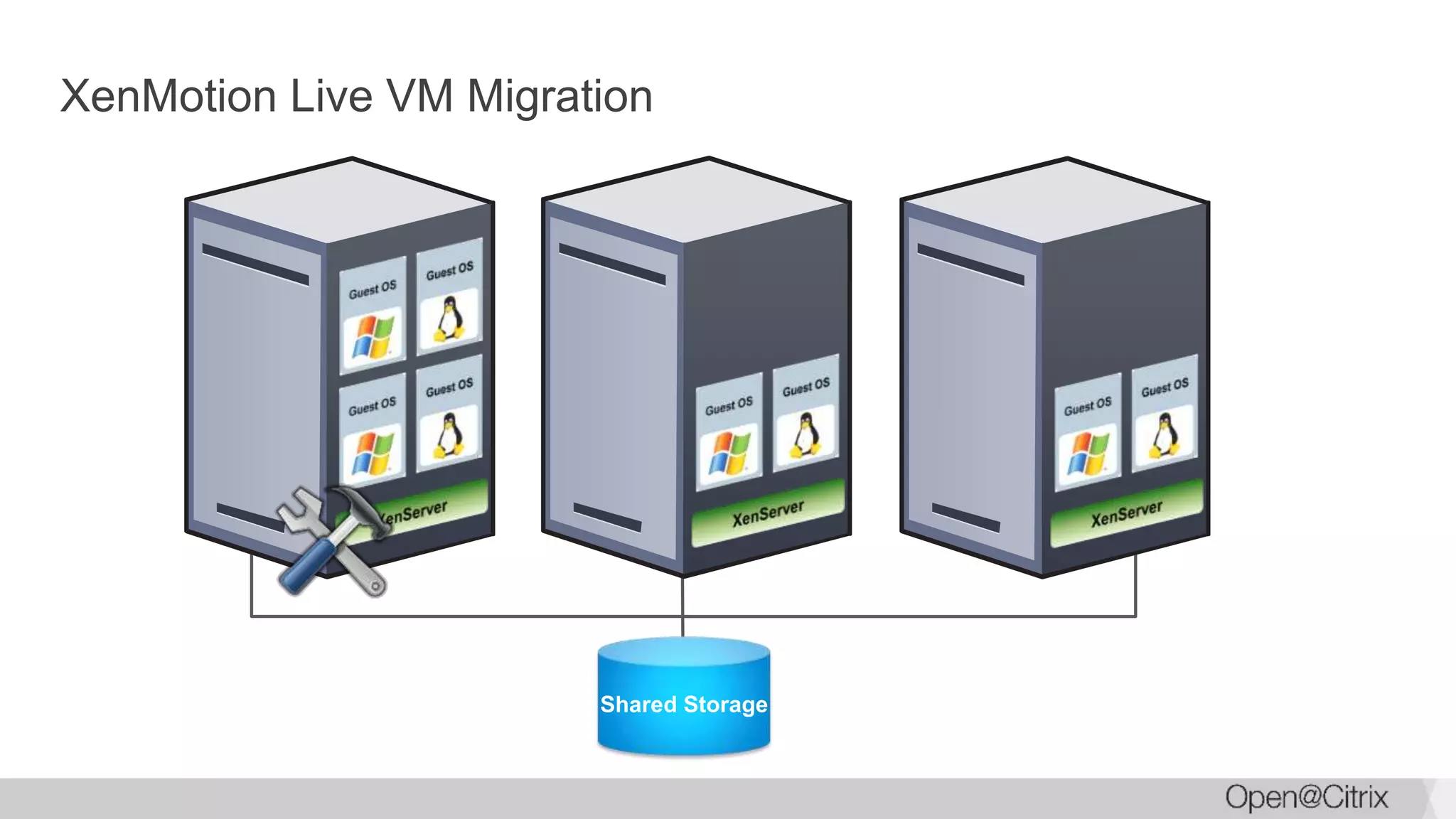
XenMotion Live VM Migration
Shared Storage
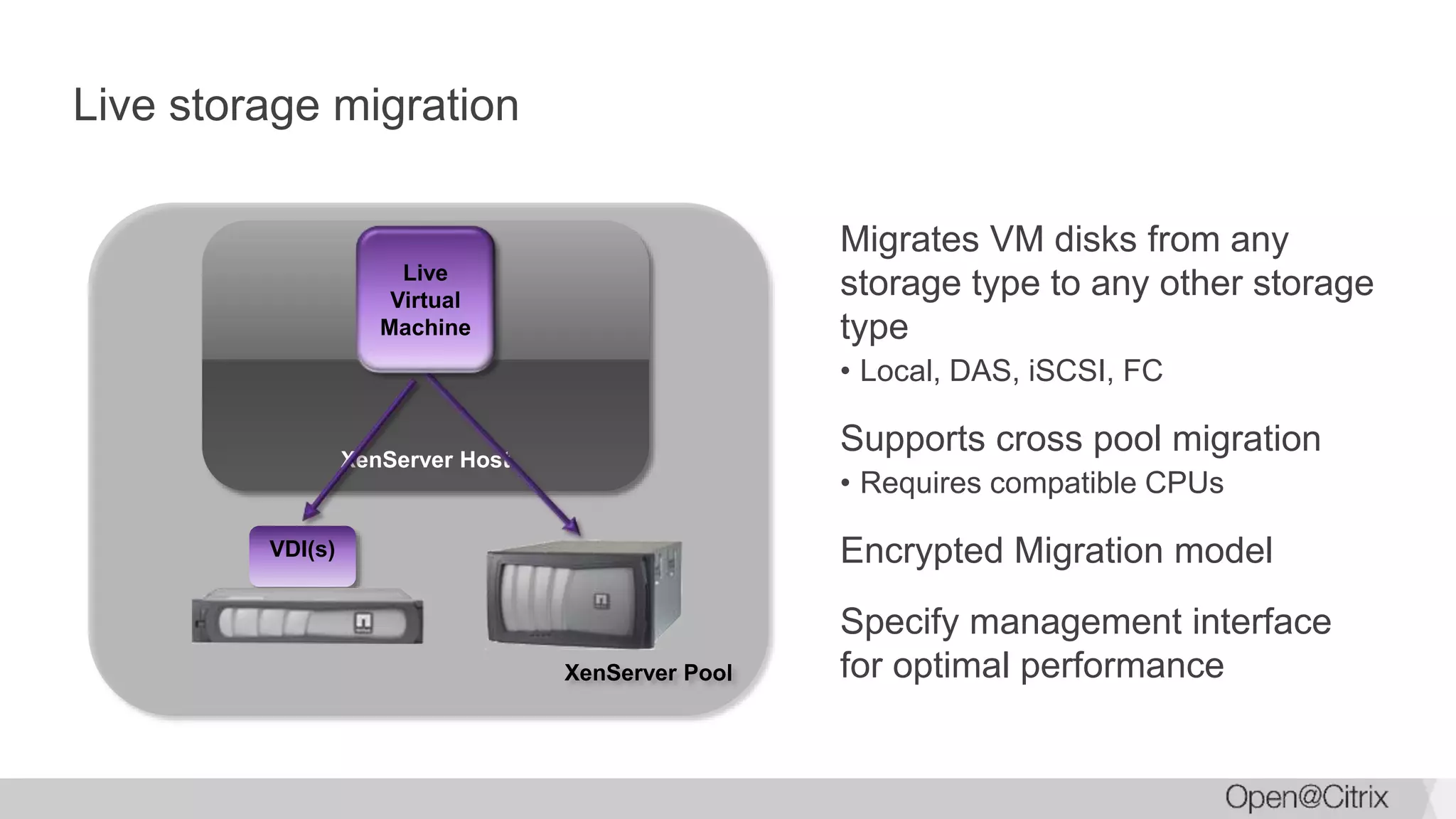
XenServer Pool
Migrates VM disks from any
storage type to any other storage
type
• Local, DAS, iSCSI, FC
Supports cross pool migration
• Requires compatible CPUs
Encrypted Migration model
Specify management interface
for optimal performance
Live storage migration
XenServer Host
VDI(s)
Live
Virtual
Machine
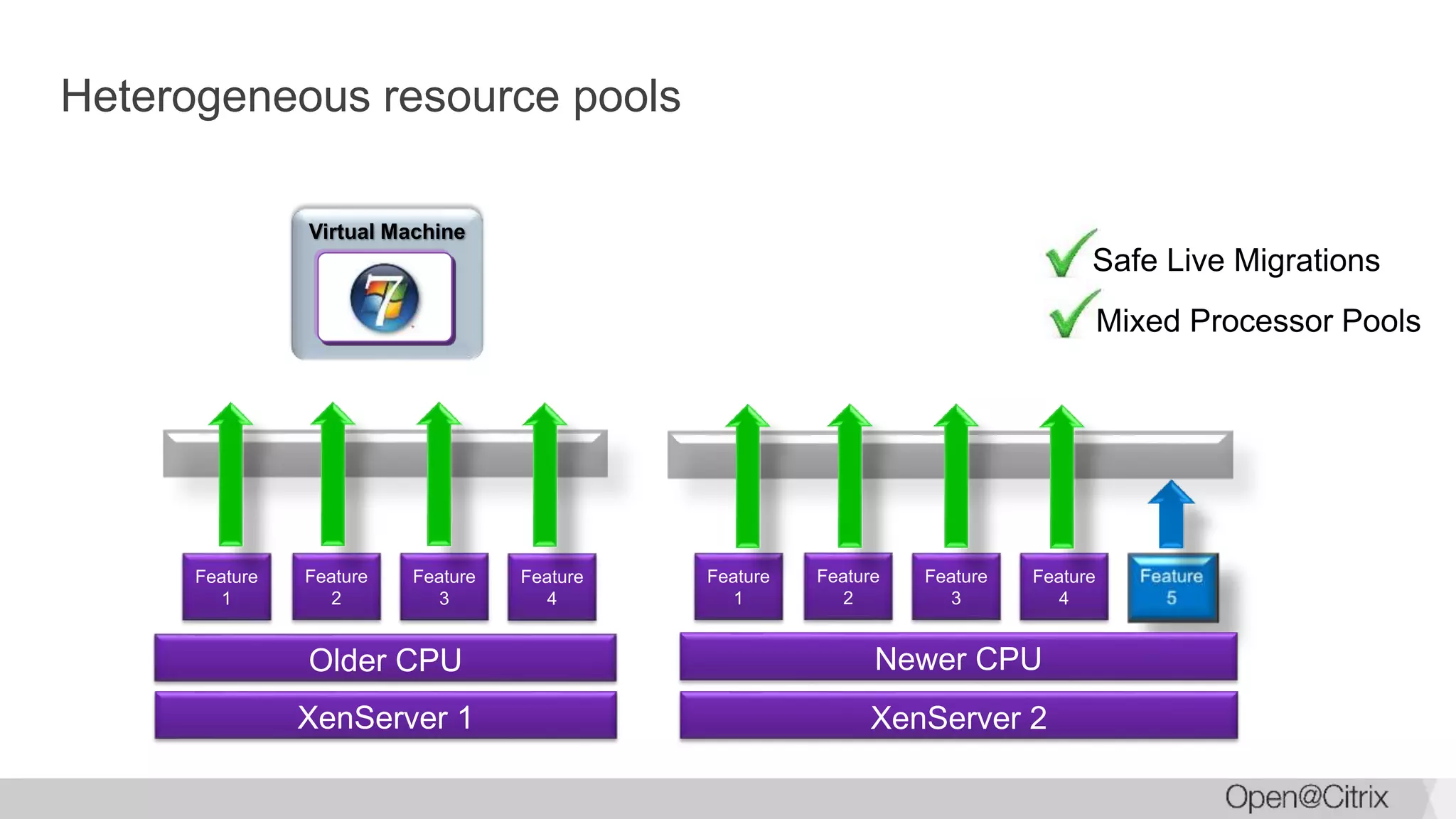
Heterogeneous resource pools
Safe Live Migrations
Virtual Machine
Older CPU
Feature
1
Feature
2
Feature
3
Feature
4
XenServer 1
Newer CPU
Feature
1
Feature
2
Feature
3
Feature
4
XenServer 2
Mixed Processor Pools
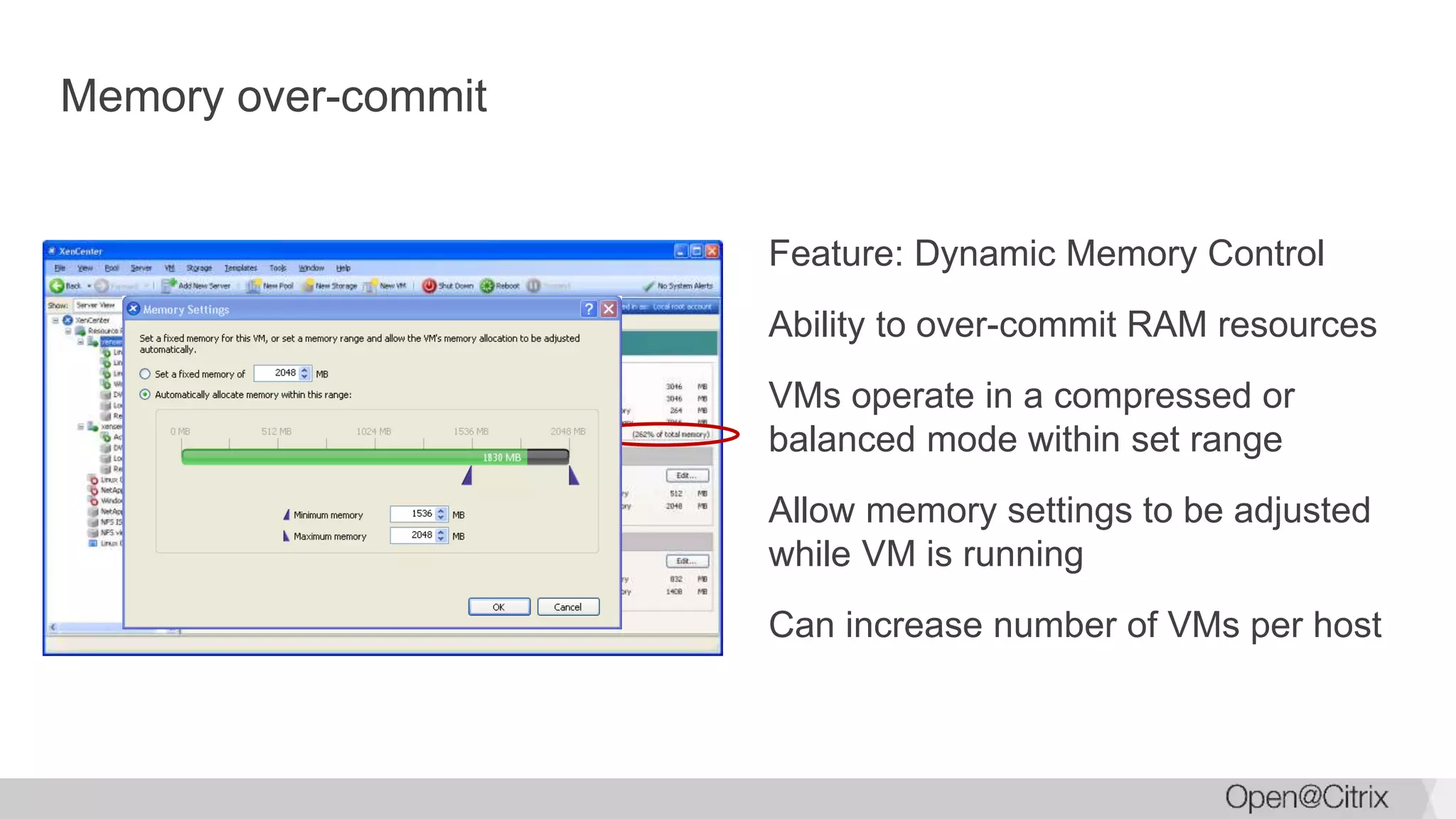
Memory over-commit
Feature: Dynamic Memory Control
Ability to over-commit RAM resources
VMs operate in a compressed or
balanced mode within set range
Allow memory settings to be adjusted
while VM is running
Can increase number of VMs per host
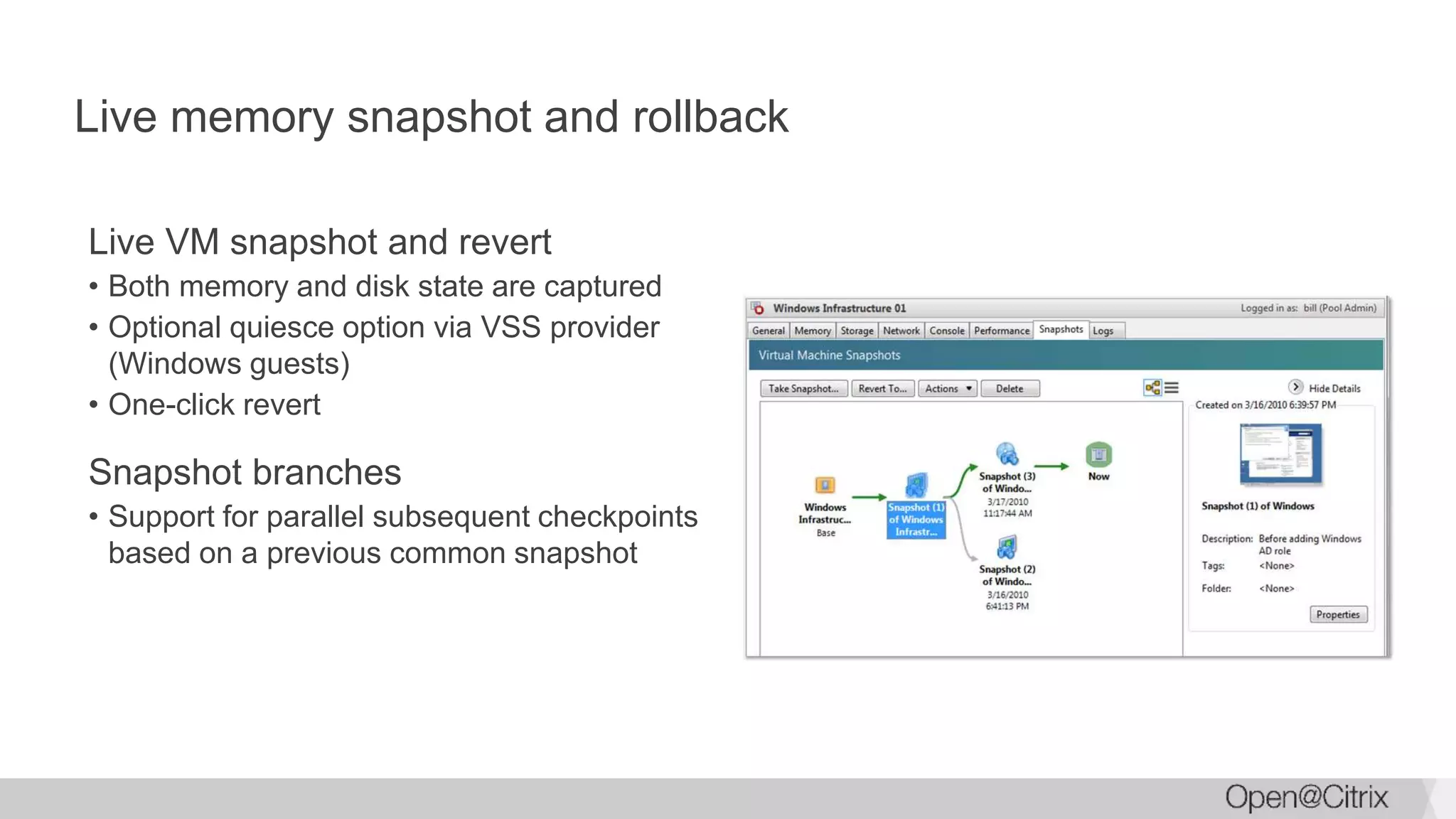
Live memory snapshot and rollback
Live VM snapshot and revert
• Both memory and disk state are captured
• Optional quiesce option via VSS provider
(Windows guests)
• One-click revert
Snapshot branches
• Support for parallel subsequent checkpoints
based on a previous common snapshot
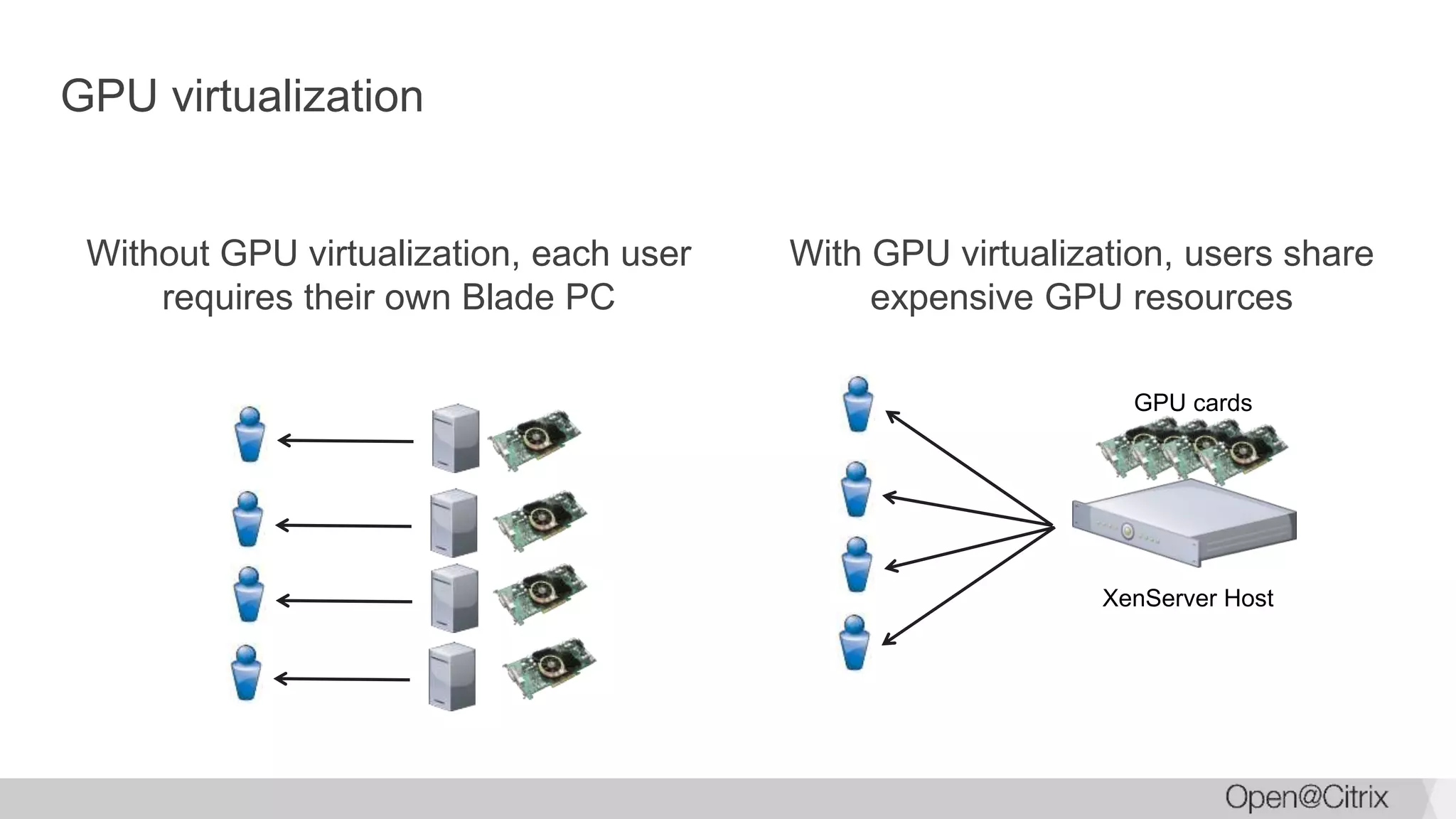
GPU virtualization
Without GPU virtualization, each user
requires their own Blade PC
With GPU virtualization, users share
expensive GPU resources
GPU cards
XenServer Host
Taking advantage of GPUs
NVIDIA
• vGPU with NVIDIA GRID providing 96 GPU instances
• GPU pass-through
• CUDA support on Linux
• Uses NVIDIA drivers for capability
Intel
• GVT-d support with Haswell and newer
• No extra hardware!!
• Uses standard Intel drivers
AMD
• GPU pass-through
Visibility into Docker containers
Containers
• Great for application packaging
• Extensive tools for deployment
Virtualization
• Total process isolation
• Complete control
Docker and XenServer
• View container details
• Manage container life span
• Integrated in XenCenter
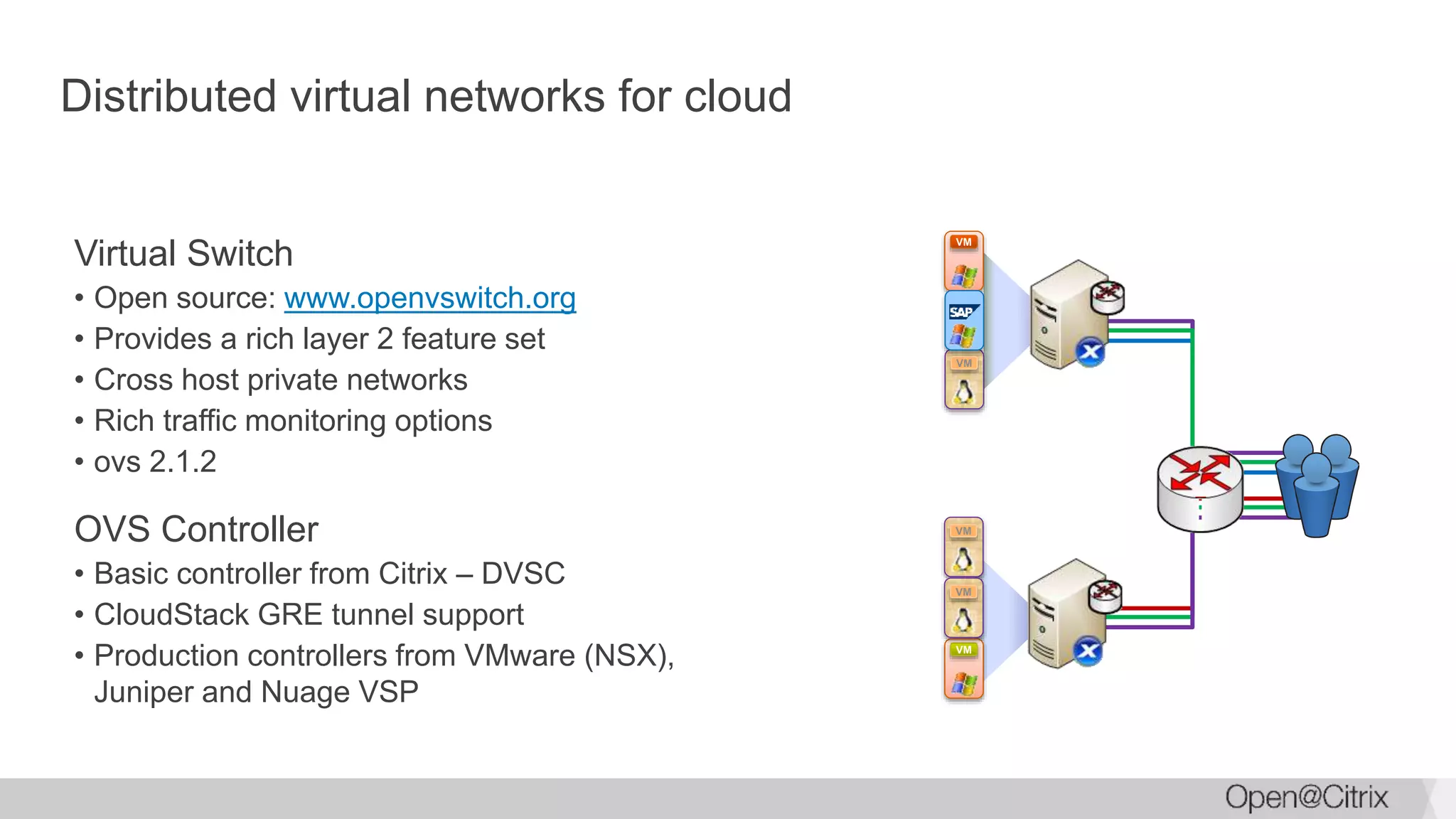
Distributed virtual networks for cloud
Virtual Switch
• Open source: www.openvswitch.org
• Provides a rich layer 2 feature set
• Cross host private networks
• Rich traffic monitoring options
• ovs 2.1.2
OVS Controller
• Basic controller from Citrix – DVSC
• CloudStack GRE tunnel support
• Production controllers from VMware (NSX),
Juniper and Nuage VSP
VM
VM
VM
VM
VM
Deployment Design
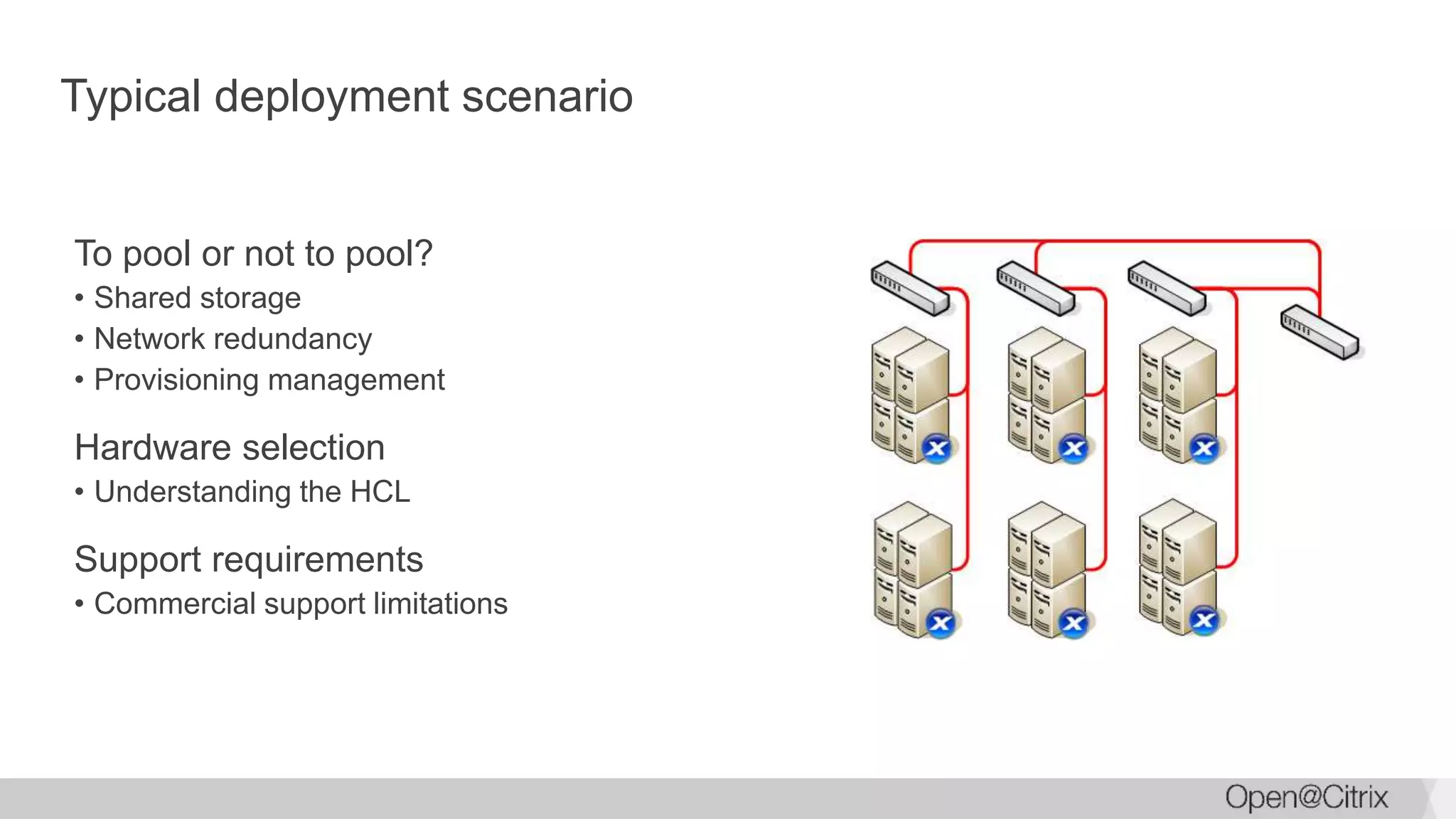
Typical deployment scenario
To pool or not to pool?
• Shared storage
• Network redundancy
• Provisioning management
Hardware selection
• Understanding the HCL
Support requirements
• Commercial support limitations
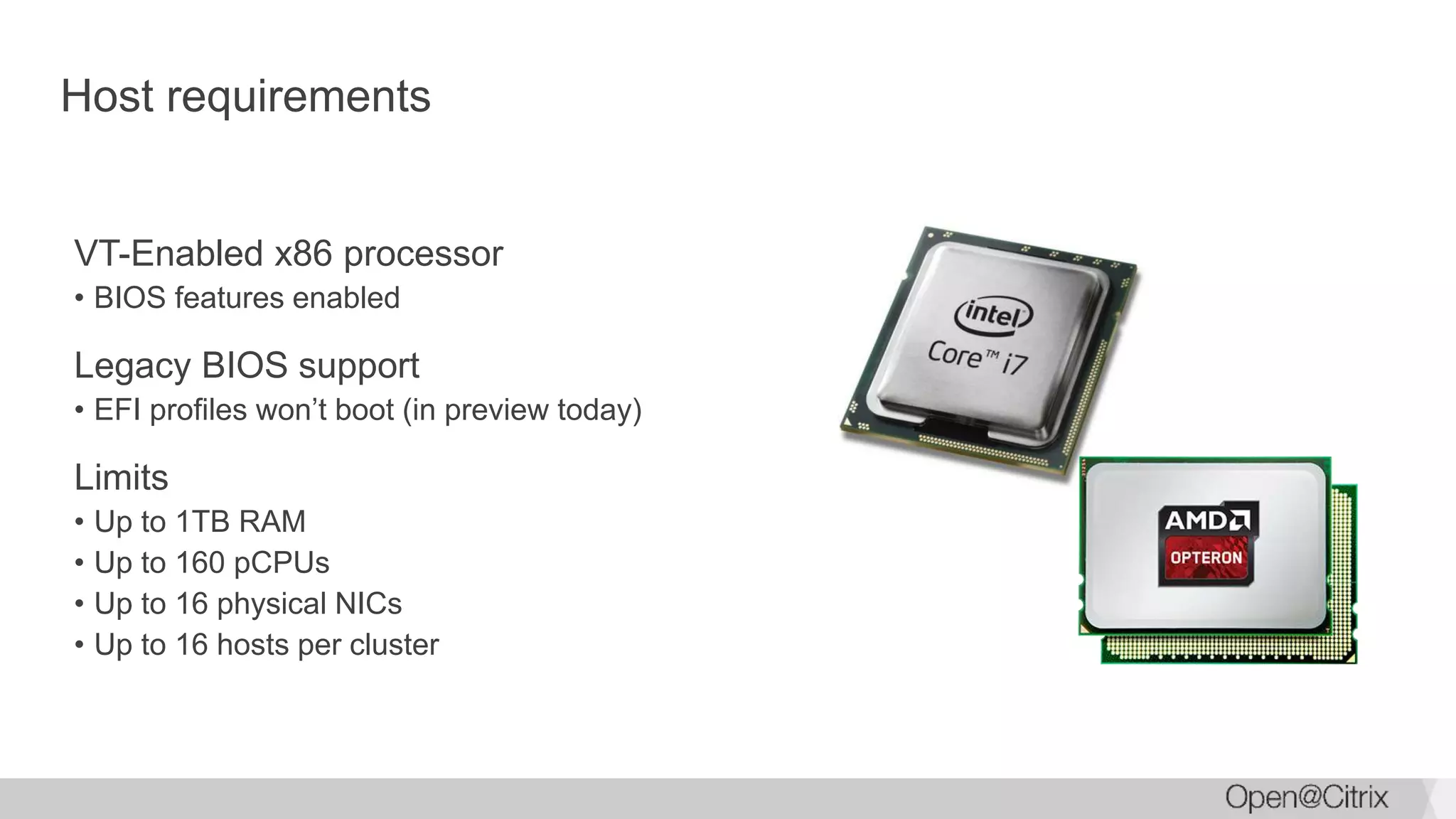
Host requirements
VT-Enabled x86 processor
• BIOS features enabled
Legacy BIOS support
• EFI profiles won’t boot (in preview today)
Limits
• Up to 1TB RAM
• Up to 160 pCPUs
• Up to 16 physical NICs
• Up to 16 hosts per cluster
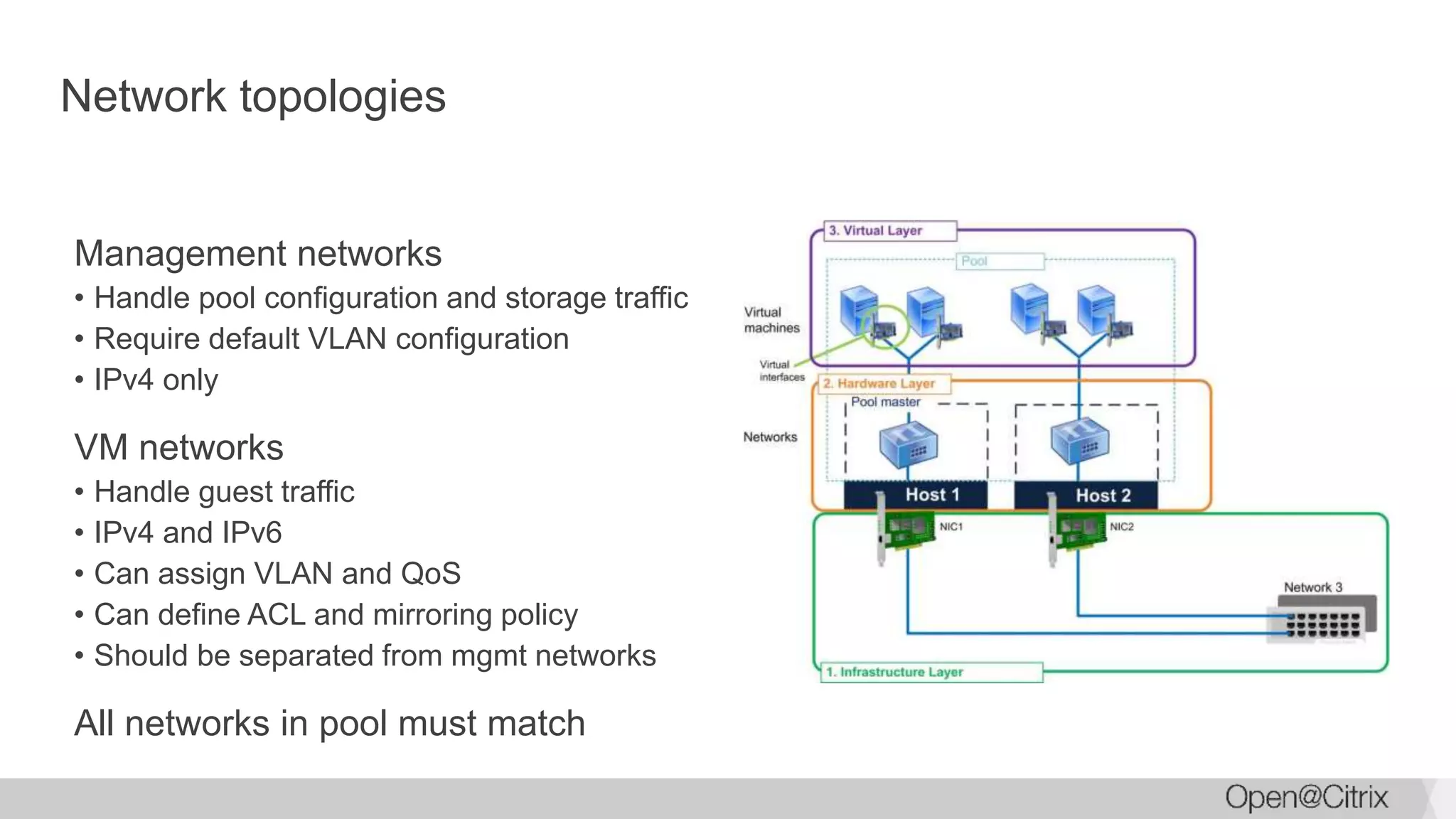
Network topologies
Management networks
• Handle pool configuration and storage traffic
• Require default VLAN configuration
• IPv4 only
VM networks
• Handle guest traffic
• IPv4 and IPv6
• Can assign VLAN and QoS
• Can define ACL and mirroring policy
• Should be separated from mgmt networks
All networks in pool must match
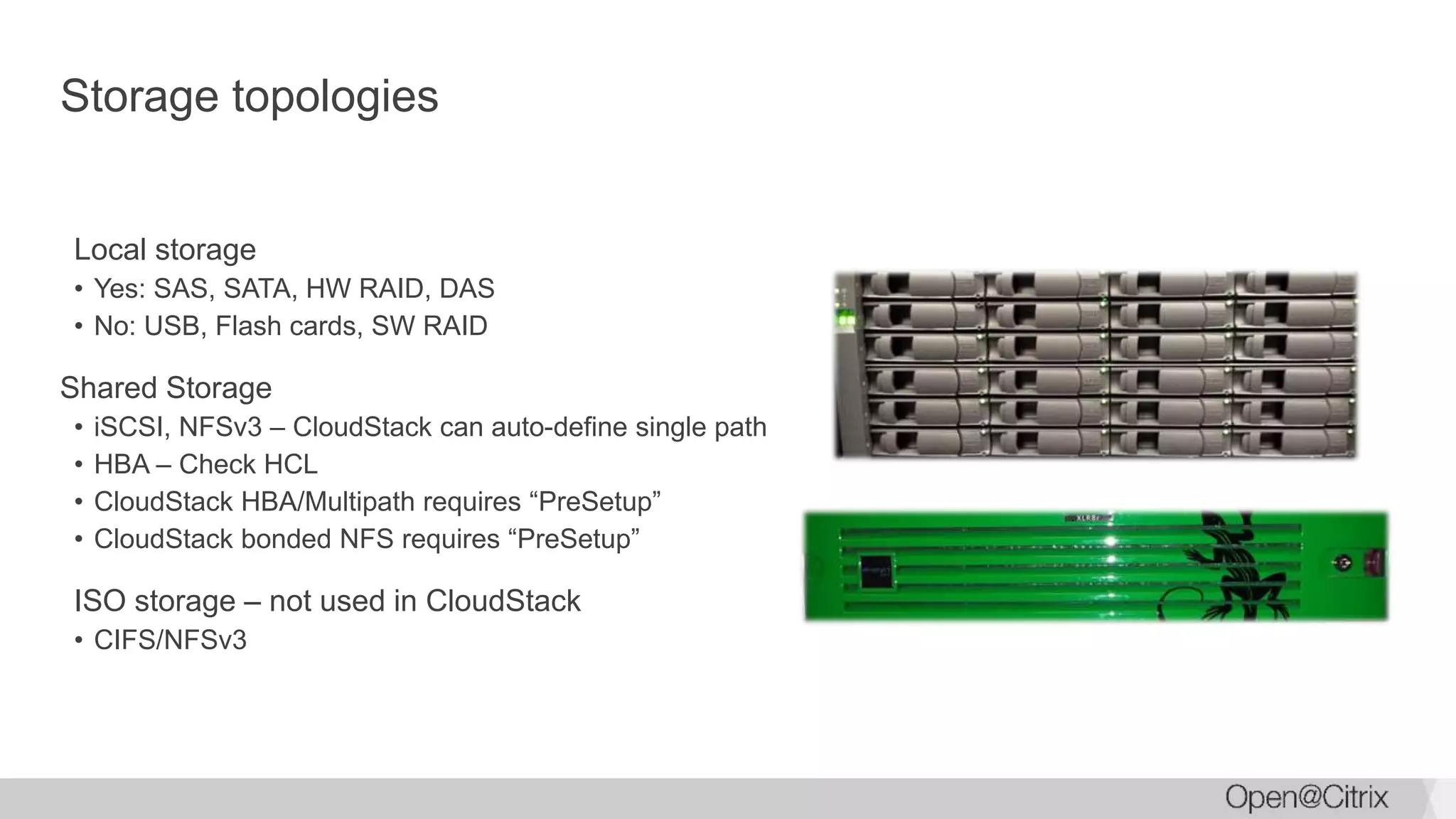
Storage topologies
Local storage
• Yes: SAS, SATA, HW RAID, DAS
• No: USB, Flash cards, SW RAID
Shared Storage
• iSCSI, NFSv3 – CloudStack can auto-define single path
• HBA – Check HCL
• CloudStack HBA/Multipath requires “PreSetup”
• CloudStack bonded NFS requires “PreSetup”
ISO storage – not used in CloudStack
• CIFS/NFSv3
CloudStack view of templates
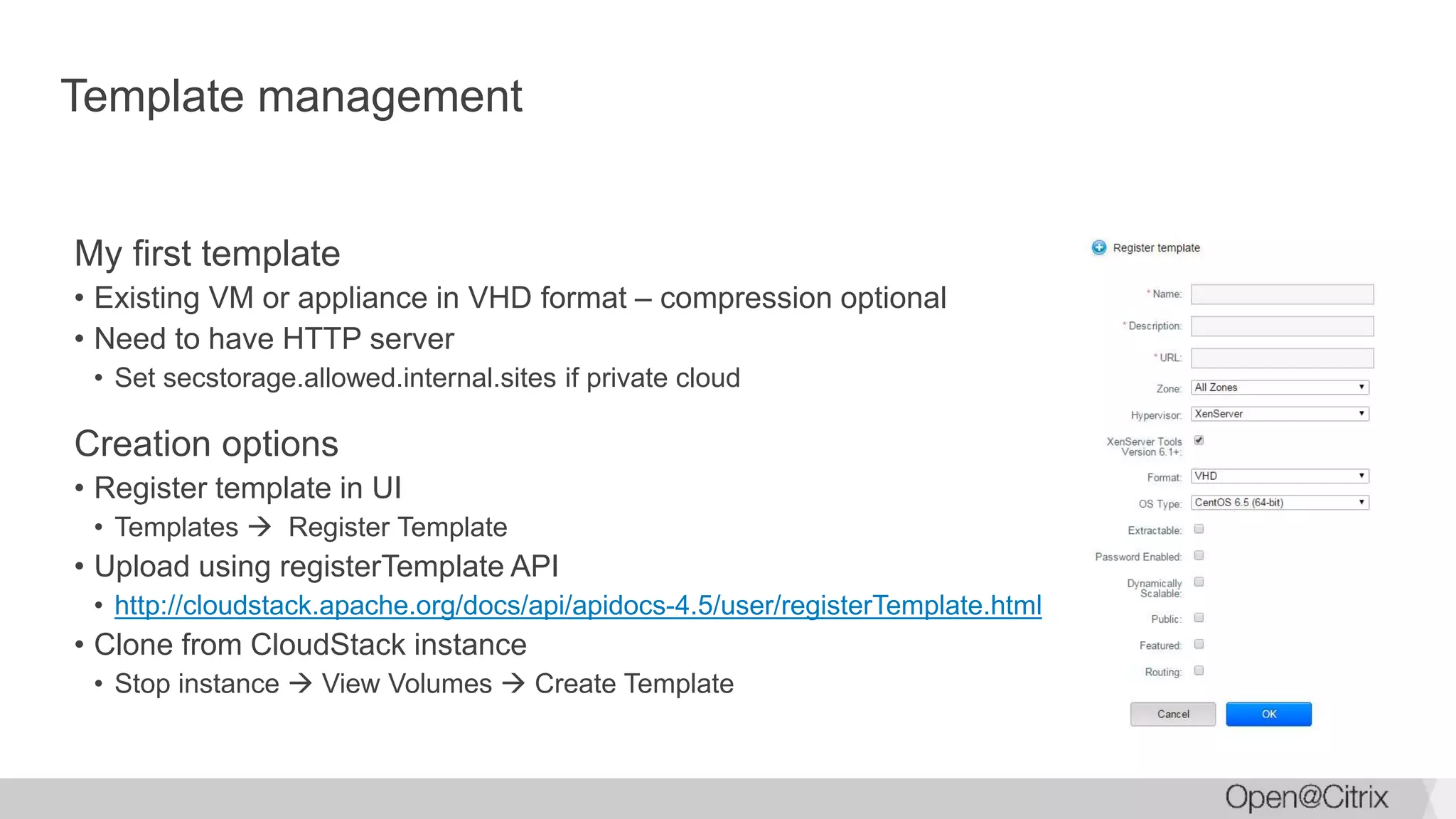
Template management
My first template
• Existing VM or appliance in VHD format – compression optional
• Need to have HTTP server
• Set secstorage.allowed.internal.sites if private cloud
Creation options
• Register template in UI
• Templates  Register Template
• Upload using registerTemplate API
• http://cloudstack.apache.org/docs/api/apidocs-4.5/user/registerTemplate.html
• Clone from CloudStack instance
• Stop instance  View Volumes  Create Template
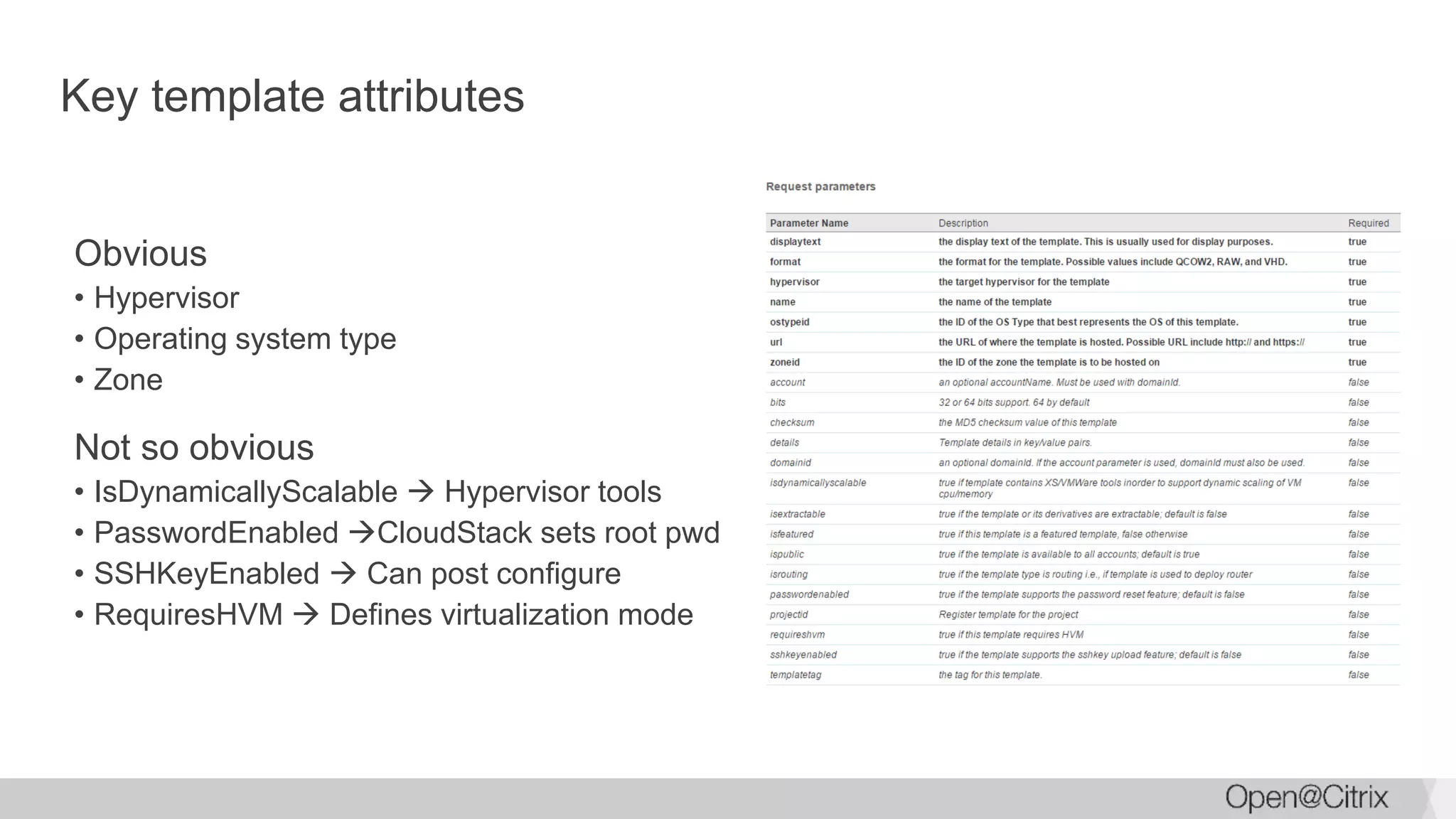
Key template attributes
Obvious
• Hypervisor
• Operating system type
• Zone
Not so obvious
• IsDynamicallyScalable  Hypervisor tools
• PasswordEnabled CloudStack sets root pwd
• SSHKeyEnabled  Can post configure
• RequiresHVM  Defines virtualization mode
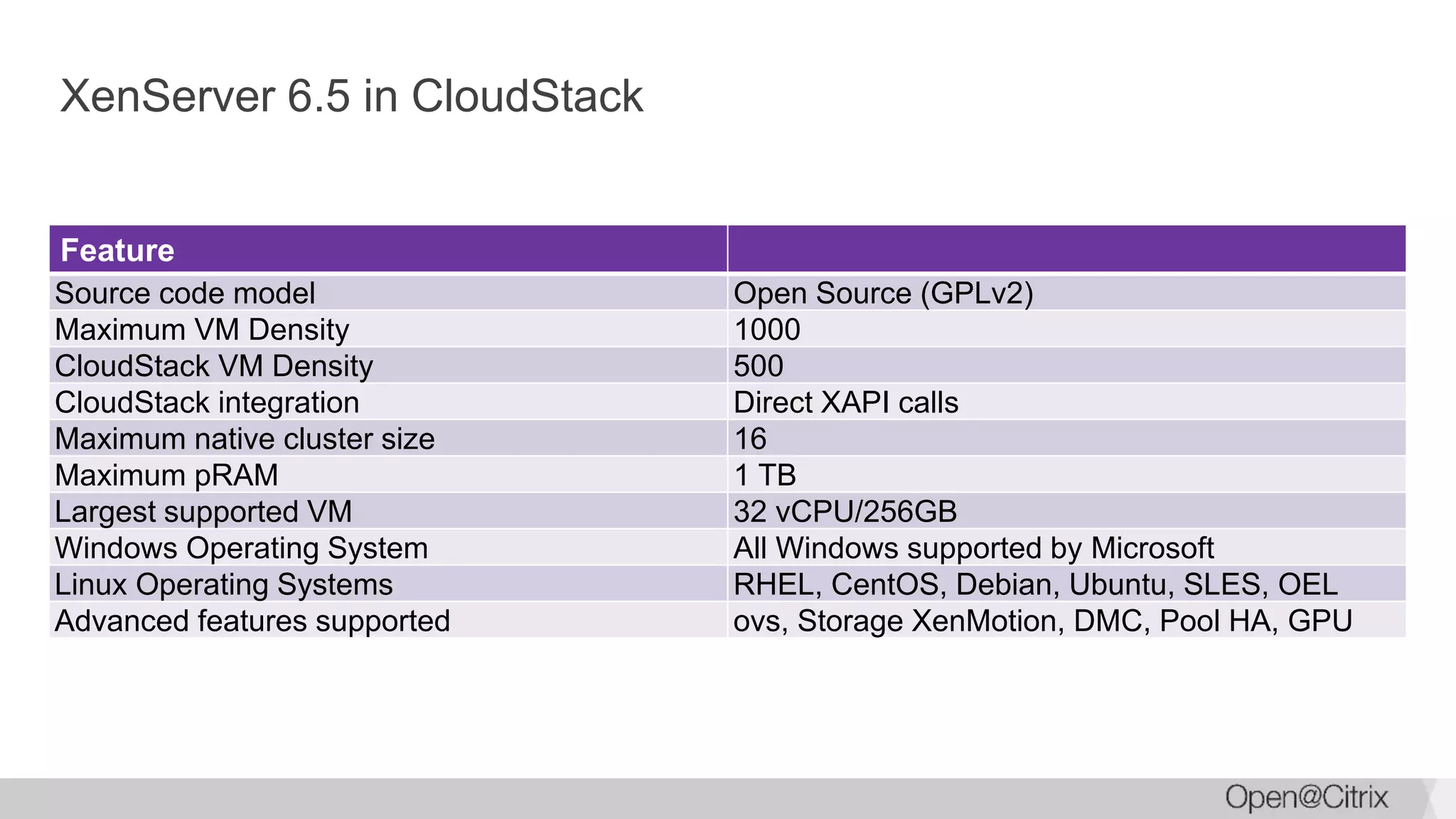
XenServer 6.5 in CloudStack
Feature
Source code model Open Source (GPLv2)
Maximum VM Density 1000
CloudStack VM Density 500
CloudStack integration Direct XAPI calls
Maximum native cluster size 16
Maximum pRAM 1 TB
Largest supported VM 32 vCPU/256GB
Windows Operating System All Windows supported by Microsoft
Linux Operating Systems RHEL, CentOS, Debian, Ubuntu, SLES, OEL
Advanced features supported ovs, Storage XenMotion, DMC, Pool HA, GPU
XenServer Virtualization In Cloud Environments

XenServer Virtualization In Cloud Environments

  • 1.
    CloudStack Silicon ValleyMeetup September 2015 XenServer Virtualization in Cloud Environments
  • 2.
    #whoami Name: Tim Mackey Currentroles: XenServer Community Manager and Evangelist; occasional coder Cool things I’ve done • Designed laser communication systems • Early designer of retail self-checkout machines • Embedded special relativity algorithms into industrial control system Find me • Twitter: @XenServerArmy • SlideShare: slideshare.net/TimMackey • LinkedIn: www.linkedin.com/in/mackeytim • Github: github.com/xenserverarmy
  • 3.
  • 4.
    What is a“XenServer”? Packaged Linux distribution for virtualization • All software required in a single ISO Designed to behave as an appliance • Managed via SDK, CLI, UI Not intended to be a toolkit • Customization requires special attention Open Source • Open source roots • Acquired by Citrix in 2007 • Made open source in 2013 (xenserver.org)
  • 5.
    XenServer market dynamic Millionsof Downloads Over 1 million servers deployed Optimized for XenDesktop Powering NetScaler SDX Supporting Hyper-Dense Clouds
  • 6.
    Why XenServer? Broad provisioningsupport • Apache CloudStack • Citrix CloudPlatform and XenDesktop • OpenStack • Microsoft System Center • VMware vCloud Full type-1 hypervisor • Strong VM isolation • Supporting Intel TXT for secure boot Designed for scale • 1000 VMs per host • Over 120 Gbps throughput in NetScaler SDX • Up to 96 shared hardware GPU instances per host
  • 7.
  • 8.
  • 9.
    Core components Xen Projecthypervisor • XenServer 6.5: version 4.4 Customized and optimized CentOS control domain (dom0) • XenServer 6.5: 64 bit CentOS 5.10, 3.10+ kernel.org kernel, ovs 2.1.2 Xen Project XAPI toolstack XenCenter UI
  • 10.
    Networking StorageCompute Simplified XenServerarchitecture diagram Xen Project Hypervisor Standard Linux Distribution (dom0) q e m u drivers xapi Guest Driver front Driver back Guest Driver front
  • 11.
    What is dom0? Domain0 is a compact specialized Linux VM that manages the network and storage I/O of all guest VMs (domU) … and isn’t the XenServer hypervisor
  • 12.
    Deploying a LinuxVM Linux VMs include paravirtualized kernels and drivers, and Xen Project Hypervisor is part of Mainline Linux 3.0
  • 13.
    Deploying a WindowsVM Windows VMs use paravirtualized drivers to access storage and network resources through dom0
  • 14.
  • 15.
    Management paradigm “Single hostmentality” Traditional Management Architecture Single backend management server XenServer Distributed Management Architecture Clustered management layer
  • 16.
    Role-based administration Provide userroles with varying permissions • Pool Admin • Pool Operator • VM Power Admin • VM Admin • VM Operator • Read-only Roles are defined within a Resource Pool Assigned to Active Directory users, groups
  • 17.
    XenMotion Live VMMigration Shared Storage
  • 18.
    XenServer Pool Migrates VMdisks from any storage type to any other storage type • Local, DAS, iSCSI, FC Supports cross pool migration • Requires compatible CPUs Encrypted Migration model Specify management interface for optimal performance Live storage migration XenServer Host VDI(s) Live Virtual Machine
  • 19.
    Heterogeneous resource pools SafeLive Migrations Virtual Machine Older CPU Feature 1 Feature 2 Feature 3 Feature 4 XenServer 1 Newer CPU Feature 1 Feature 2 Feature 3 Feature 4 XenServer 2 Mixed Processor Pools
  • 20.
    Memory over-commit Feature: DynamicMemory Control Ability to over-commit RAM resources VMs operate in a compressed or balanced mode within set range Allow memory settings to be adjusted while VM is running Can increase number of VMs per host
  • 21.
    Live memory snapshotand rollback Live VM snapshot and revert • Both memory and disk state are captured • Optional quiesce option via VSS provider (Windows guests) • One-click revert Snapshot branches • Support for parallel subsequent checkpoints based on a previous common snapshot
  • 22.
    GPU virtualization Without GPUvirtualization, each user requires their own Blade PC With GPU virtualization, users share expensive GPU resources GPU cards XenServer Host
  • 23.
    Taking advantage ofGPUs NVIDIA • vGPU with NVIDIA GRID providing 96 GPU instances • GPU pass-through • CUDA support on Linux • Uses NVIDIA drivers for capability Intel • GVT-d support with Haswell and newer • No extra hardware!! • Uses standard Intel drivers AMD • GPU pass-through
  • 24.
    Visibility into Dockercontainers Containers • Great for application packaging • Extensive tools for deployment Virtualization • Total process isolation • Complete control Docker and XenServer • View container details • Manage container life span • Integrated in XenCenter
  • 25.
    Distributed virtual networksfor cloud Virtual Switch • Open source: www.openvswitch.org • Provides a rich layer 2 feature set • Cross host private networks • Rich traffic monitoring options • ovs 2.1.2 OVS Controller • Basic controller from Citrix – DVSC • CloudStack GRE tunnel support • Production controllers from VMware (NSX), Juniper and Nuage VSP VM VM VM VM VM
  • 26.
  • 27.
    Typical deployment scenario Topool or not to pool? • Shared storage • Network redundancy • Provisioning management Hardware selection • Understanding the HCL Support requirements • Commercial support limitations
  • 28.
    Host requirements VT-Enabled x86processor • BIOS features enabled Legacy BIOS support • EFI profiles won’t boot (in preview today) Limits • Up to 1TB RAM • Up to 160 pCPUs • Up to 16 physical NICs • Up to 16 hosts per cluster
  • 29.
    Network topologies Management networks •Handle pool configuration and storage traffic • Require default VLAN configuration • IPv4 only VM networks • Handle guest traffic • IPv4 and IPv6 • Can assign VLAN and QoS • Can define ACL and mirroring policy • Should be separated from mgmt networks All networks in pool must match
  • 30.
    Storage topologies Local storage •Yes: SAS, SATA, HW RAID, DAS • No: USB, Flash cards, SW RAID Shared Storage • iSCSI, NFSv3 – CloudStack can auto-define single path • HBA – Check HCL • CloudStack HBA/Multipath requires “PreSetup” • CloudStack bonded NFS requires “PreSetup” ISO storage – not used in CloudStack • CIFS/NFSv3
  • 31.
  • 32.
    Template management My firsttemplate • Existing VM or appliance in VHD format – compression optional • Need to have HTTP server • Set secstorage.allowed.internal.sites if private cloud Creation options • Register template in UI • Templates  Register Template • Upload using registerTemplate API • http://cloudstack.apache.org/docs/api/apidocs-4.5/user/registerTemplate.html • Clone from CloudStack instance • Stop instance  View Volumes  Create Template
  • 33.
    Key template attributes Obvious •Hypervisor • Operating system type • Zone Not so obvious • IsDynamicallyScalable  Hypervisor tools • PasswordEnabled CloudStack sets root pwd • SSHKeyEnabled  Can post configure • RequiresHVM  Defines virtualization mode
  • 35.
    XenServer 6.5 inCloudStack Feature Source code model Open Source (GPLv2) Maximum VM Density 1000 CloudStack VM Density 500 CloudStack integration Direct XAPI calls Maximum native cluster size 16 Maximum pRAM 1 TB Largest supported VM 32 vCPU/256GB Windows Operating System All Windows supported by Microsoft Linux Operating Systems RHEL, CentOS, Debian, Ubuntu, SLES, OEL Advanced features supported ovs, Storage XenMotion, DMC, Pool HA, GPU