Hypervisor Selection in Cloud
Understanding the choices available
CloudStack Collaboration Conference Europe 2013
Tim Mackey – XenServer Community Evangelist
Building a successful cloud
What are we trying to accomplish?
Service Offerings
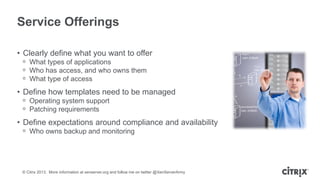
• Clearly define what you want to offer
ᵒ What types of applications
ᵒ Who has access, and who owns them
ᵒ What type of access

• Define how templates need to be managed
ᵒ Operating system support
ᵒ Patching requirements

• Define expectations around compliance and availability
ᵒ Who owns backup and monitoring

© Citrix 2013. More information at xenserver.org and follow me on twitter @XenServerArmy
Define Tenancy Requirements
• Department data local to department
ᵒ Where is the application data stored

• Data and service isolation
ᵒ VM migration and host HA
ᵒ Network services

• Encryption of PII/PCI
ᵒ Where do keys live when data location unknown
ᵒ Need encryption designed for the cloud

• Showback to stakeholders
ᵒ More than just usage, compliance and audits

© Citrix 2013. More information at xenserver.org and follow me on twitter @XenServerArmy
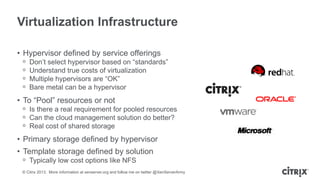
Virtualization Infrastructure
• Hypervisor defined by service offerings
ᵒ
ᵒ
ᵒ
ᵒ

Don’t select hypervisor based on “standards”
Understand true costs of virtualization
Multiple hypervisors are “OK”
Bare metal can be a hypervisor

• To “Pool” resources or not
ᵒ Is there a real requirement for pooled resources
ᵒ Can the cloud management solution do better?
ᵒ Real cost of shared storage

• Primary storage defined by hypervisor
• Template storage defined by solution
ᵒ Typically low cost options like NFS
© Citrix 2013. More information at xenserver.org and follow me on twitter @XenServerArmy
The primary choices ….
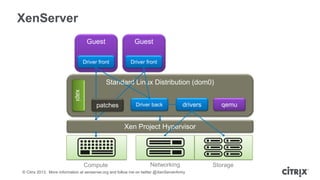
XenServer
Guest

Guest

Driver front

Driver front

Standard Linux Distribution (dom0)
xapi
patches

Driver back

drivers

qemu

Xen Project Hypervisor

Compute

Networking

© Citrix 2013. More information at xenserver.org and follow me on twitter @XenServerArmy

Storage
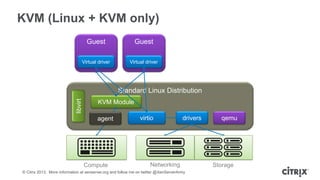
KVM (Linux + KVM only)
Guest

Guest

Virtual driver

Virtual driver

libvirt

Standard Linux Distribution
KVM Module
agent

Compute

virtio

drivers

Networking

© Citrix 2013. More information at xenserver.org and follow me on twitter @XenServerArmy

qemu

Storage
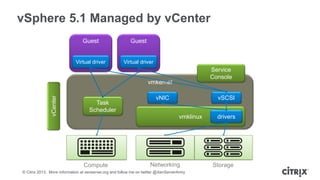
vSphere 5.1 Managed by vCenter
Guest

Guest

Virtual driver

Virtual driver

Service
Console

vCenter

vmkernel
Task
Scheduler

vNIC

vSCSI
vmklinux

Compute

Networking

© Citrix 2013. More information at xenserver.org and follow me on twitter @XenServerArmy

drivers

Storage
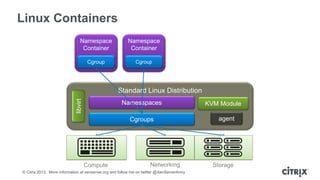
Linux Containers
Namespace
Container

Namespace
Container

Cgroup

Cgroup

libvirt

Standard Linux Distribution
Namesspaces
Cgroups

Compute

Networking

© Citrix 2013. More information at xenserver.org and follow me on twitter @XenServerArmy

KVM Module
agent

Storage
Defining the network
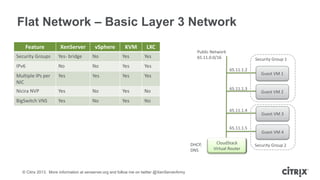
Flat Network – Basic Layer 3 Network
Feature

XenServer

vSphere

KVM

LXC

Security Groups

Yes- bridge

No

Yes

Yes

IPv6

No

No

Yes

Yes

Multiple IPs per
NIC

Yes

Yes

Yes

Yes

Nicira NVP

Yes

No

Yes

No

BigSwitch VNS

Yes

No

Yes

Public Network
65.11.0.0/16

No

Security Group 1

65.11.1.2

65.11.1.3

65.11.1.4

65.11.1.5

DHCP,
DNS

© Citrix 2013. More information at xenserver.org and follow me on twitter @XenServerArmy

CloudStack
Virtual Router

Guest VM 1

Guest VM 2

Guest VM 3

Guest VM 4
Security Group 2
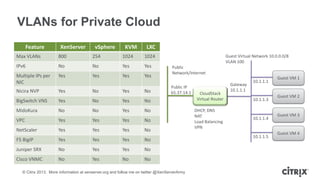
VLANs for Private Cloud
Feature

XenServer

vSphere

KVM

LXC

Max VLANs

800

254

1024

1024

IPv6

No

No

Yes

Yes

Multiple IPs per
NIC

Yes

Yes

Yes

Yes

Nicira NVP

Yes

No

Yes

No

BigSwitch VNS

Yes

No

Yes

No

MidoKura

No

No

Yes

No

VPC

Yes

Yes

Yes

Yes

Yes

Yes

Public
Network/Internet
Public IP
65.37.14.1

No

NetScaler

Guest Virtual Network 10.0.0.0/8
VLAN 100

No

F5 BigIP

Yes

Yes

Yes

No

Juniper SRX

No

Yes

Yes

No

Cisco VNMC

No

Yes

No

No

© Citrix 2013. More information at xenserver.org and follow me on twitter @XenServerArmy

CloudStack
Virtual Router
DHCP, DNS
NAT
Load Balancing
VPN

Gateway
10.1.1.1

10.1.1.1

10.1.1.3

10.1.1.4

10.1.1.5

Guest VM 1

Guest VM 2

Guest VM 3

Guest VM 4
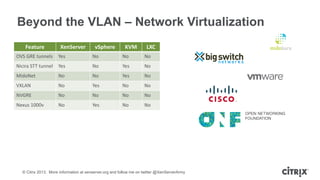
Beyond the VLAN – Network Virtualization
Feature

XenServer

vSphere

KVM

LXC

OVS GRE tunnels

Yes

No

No

No

Nicira STT tunnel

Yes

No

Yes

No

MidoNet

No

No

Yes

No

VXLAN

No

Yes

No

No

NVGRE

No

No

No

No

Nexus 1000v

No

Yes

No

No

© Citrix 2013. More information at xenserver.org and follow me on twitter @XenServerArmy
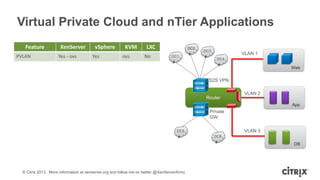
Virtual Private Cloud and nTier Applications
Feature
PVLAN

XenServer
Yes - ovs

vSphere
Yes

KVM
ovs

LXC
No

DC2
DC1

DC3

VLAN 1
DC4

Web

S2S VPN

Router

VLAN 2
App

Private
GW
VLAN 3

DC5
DC6

DB

© Citrix 2013. More information at xenserver.org and follow me on twitter @XenServerArmy
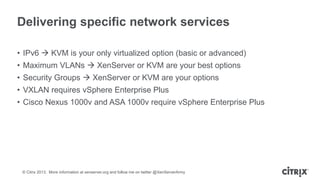
Delivering specific network services
• IPv6  KVM is your only virtualized option (basic or advanced)
• Maximum VLANs  XenServer or KVM are your best options
• Security Groups  XenServer or KVM are your options
• VXLAN requires vSphere Enterprise Plus

• Cisco Nexus 1000v and ASA 1000v require vSphere Enterprise Plus

© Citrix 2013. More information at xenserver.org and follow me on twitter @XenServerArmy
Instances need a home
Storage, Storage and more Storage
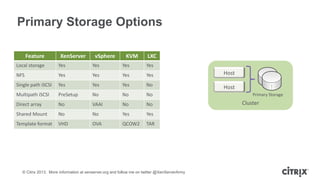
Primary Storage Options
Feature

XenServer

vSphere

KVM

LXC

Local storage

Yes

Yes

Yes

Yes

NFS

Yes

Yes

Yes

Yes

Host

Single path iSCSI

Yes

Yes

Yes

No

Host

Multipath iSCSI

PreSetup

No

No

No

Direct array

No

VAAI

No

No

Shared Mount

No

No

Yes

Yes

Template format

VHD

OVA

QCOW2

TAR

© Citrix 2013. More information at xenserver.org and follow me on twitter @XenServerArmy

Primary Storage

Cluster
Core virtualization capabilities
The limits and features which matter
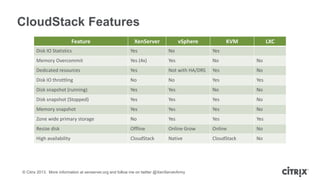
CloudStack Features
Feature

XenServer

vSphere

KVM

LXC

Disk IO Statistics

Yes

No

Yes

Memory Overcommit

Yes (4x)

Yes

No

No

Dedicated resources

Yes

Not with HA/DRS

Yes

No

Disk IO throttling

No

No

Yes

Yes

Disk snapshot (running)

Yes

Yes

No

No

Disk snapshot (Stopped)

Yes

Yes

Yes

No

Memory snapshot

Yes

Yes

Yes

No

Zone wide primary storage

No

Yes

Yes

Yes

Resize disk

Offline

Online Grow

Online

No

High availability

CloudStack

Native

CloudStack

No

© Citrix 2013. More information at xenserver.org and follow me on twitter @XenServerArmy
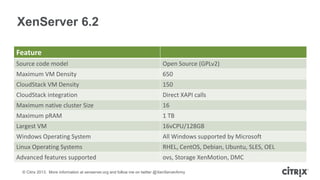
XenServer 6.2
Feature
Source code model

Open Source (GPLv2)

Maximum VM Density

650

CloudStack VM Density

150

CloudStack integration

Direct XAPI calls

Maximum native cluster Size

16

Maximum pRAM

1 TB

Largest VM

16vCPU/128GB

Windows Operating System

All Windows supported by Microsoft

Linux Operating Systems

RHEL, CentOS, Debian, Ubuntu, SLES, OEL

Advanced features supported

ovs, Storage XenMotion, DMC

© Citrix 2013. More information at xenserver.org and follow me on twitter @XenServerArmy
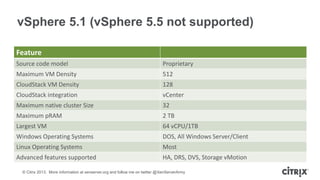
vSphere 5.1 (vSphere 5.5 not supported)
Feature
Source code model

Proprietary

Maximum VM Density

512

CloudStack VM Density

128

CloudStack integration

vCenter

Maximum native cluster Size

32

Maximum pRAM

2 TB

Largest VM

64 vCPU/1TB

Windows Operating Systems

DOS, All Windows Server/Client

Linux Operating Systems

Most

Advanced features supported

HA, DRS, DVS, Storage vMotion

© Citrix 2013. More information at xenserver.org and follow me on twitter @XenServerArmy
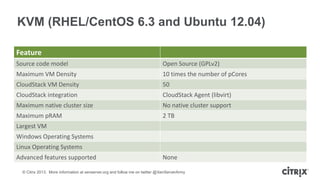
KVM (RHEL/CentOS 6.3 and Ubuntu 12.04)
Feature
Source code model

Open Source (GPLv2)

Maximum VM Density

10 times the number of pCores

CloudStack VM Density

50

CloudStack integration

CloudStack Agent (libvirt)

Maximum native cluster size

No native cluster support

Maximum pRAM

2 TB

Largest VM
Windows Operating Systems
Linux Operating Systems
Advanced features supported

None

© Citrix 2013. More information at xenserver.org and follow me on twitter @XenServerArmy
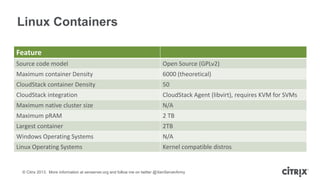
Linux Containers
Feature
Source code model

Open Source (GPLv2)

Maximum container Density

6000 (theoretical)

CloudStack container Density

50

CloudStack integration

CloudStack Agent (libvirt), requires KVM for SVMs

Maximum native cluster size

N/A

Maximum pRAM

2 TB

Largest container

2TB

Windows Operating Systems

N/A

Linux Operating Systems

Kernel compatible distros

© Citrix 2013. More information at xenserver.org and follow me on twitter @XenServerArmy
Picking the “best one”
When to use which hypervisor…
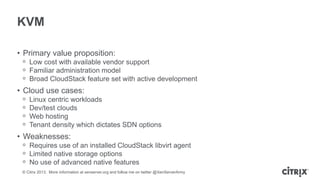
KVM
• Primary value proposition:
ᵒ Low cost with available vendor support
ᵒ Familiar administration model
ᵒ Broad CloudStack feature set with active development

• Cloud use cases:
ᵒ
ᵒ
ᵒ
ᵒ

Linux centric workloads
Dev/test clouds
Web hosting
Tenant density which dictates SDN options

• Weaknesses:
ᵒ Requires use of an installed CloudStack libvirt agent
ᵒ Limited native storage options
ᵒ No use of advanced native features
© Citrix 2013. More information at xenserver.org and follow me on twitter @XenServerArmy
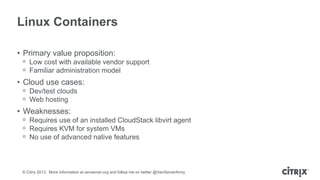
Linux Containers
• Primary value proposition:
ᵒ Low cost with available vendor support
ᵒ Familiar administration model

• Cloud use cases:
ᵒ Dev/test clouds
ᵒ Web hosting

• Weaknesses:
ᵒ Requires use of an installed CloudStack libvirt agent
ᵒ Requires KVM for system VMs
ᵒ No use of advanced native features

© Citrix 2013. More information at xenserver.org and follow me on twitter @XenServerArmy
vSphere
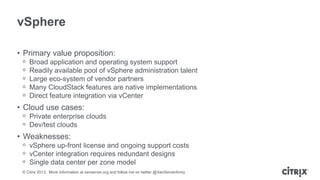
• Primary value proposition:
ᵒ
ᵒ
ᵒ
ᵒ
ᵒ

Broad application and operating system support
Readily available pool of vSphere administration talent
Large eco-system of vendor partners
Many CloudStack features are native implementations
Direct feature integration via vCenter

• Cloud use cases:
ᵒ Private enterprise clouds
ᵒ Dev/test clouds

• Weaknesses:
ᵒ vSphere up-front license and ongoing support costs
ᵒ vCenter integration requires redundant designs
ᵒ Single data center per zone model
© Citrix 2013. More information at xenserver.org and follow me on twitter @XenServerArmy
XenServer
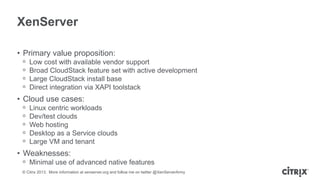
• Primary value proposition:
ᵒ
ᵒ
ᵒ
ᵒ

Low cost with available vendor support
Broad CloudStack feature set with active development
Large CloudStack install base
Direct integration via XAPI toolstack

• Cloud use cases:
ᵒ
ᵒ
ᵒ
ᵒ
ᵒ

Linux centric workloads
Dev/test clouds
Web hosting
Desktop as a Service clouds
Large VM and tenant

• Weaknesses:
ᵒ Minimal use of advanced native features
© Citrix 2013. More information at xenserver.org and follow me on twitter @XenServerArmy
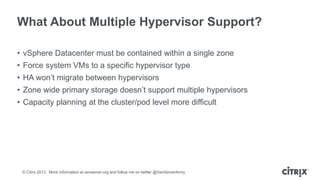
What About Multiple Hypervisor Support?
• vSphere Datacenter must be contained within a single zone
• Force system VMs to a specific hypervisor type
• HA won’t migrate between hypervisors
• Zone wide primary storage doesn’t support multiple hypervisors

• Capacity planning at the cluster/pod level more difficult

© Citrix 2013. More information at xenserver.org and follow me on twitter @XenServerArmy
Work better. Live better.

Hypervisor selection in CloudStack

  • 1.
    Hypervisor Selection inCloud Understanding the choices available CloudStack Collaboration Conference Europe 2013 Tim Mackey – XenServer Community Evangelist
  • 2.
    Building a successfulcloud What are we trying to accomplish?
  • 3.
    Service Offerings • Clearlydefine what you want to offer ᵒ What types of applications ᵒ Who has access, and who owns them ᵒ What type of access • Define how templates need to be managed ᵒ Operating system support ᵒ Patching requirements • Define expectations around compliance and availability ᵒ Who owns backup and monitoring © Citrix 2013. More information at xenserver.org and follow me on twitter @XenServerArmy
  • 4.
    Define Tenancy Requirements •Department data local to department ᵒ Where is the application data stored • Data and service isolation ᵒ VM migration and host HA ᵒ Network services • Encryption of PII/PCI ᵒ Where do keys live when data location unknown ᵒ Need encryption designed for the cloud • Showback to stakeholders ᵒ More than just usage, compliance and audits © Citrix 2013. More information at xenserver.org and follow me on twitter @XenServerArmy
  • 5.
    Virtualization Infrastructure • Hypervisordefined by service offerings ᵒ ᵒ ᵒ ᵒ Don’t select hypervisor based on “standards” Understand true costs of virtualization Multiple hypervisors are “OK” Bare metal can be a hypervisor • To “Pool” resources or not ᵒ Is there a real requirement for pooled resources ᵒ Can the cloud management solution do better? ᵒ Real cost of shared storage • Primary storage defined by hypervisor • Template storage defined by solution ᵒ Typically low cost options like NFS © Citrix 2013. More information at xenserver.org and follow me on twitter @XenServerArmy
  • 6.
  • 7.
    XenServer Guest Guest Driver front Driver front StandardLinux Distribution (dom0) xapi patches Driver back drivers qemu Xen Project Hypervisor Compute Networking © Citrix 2013. More information at xenserver.org and follow me on twitter @XenServerArmy Storage
  • 8.
    KVM (Linux +KVM only) Guest Guest Virtual driver Virtual driver libvirt Standard Linux Distribution KVM Module agent Compute virtio drivers Networking © Citrix 2013. More information at xenserver.org and follow me on twitter @XenServerArmy qemu Storage
  • 9.
    vSphere 5.1 Managedby vCenter Guest Guest Virtual driver Virtual driver Service Console vCenter vmkernel Task Scheduler vNIC vSCSI vmklinux Compute Networking © Citrix 2013. More information at xenserver.org and follow me on twitter @XenServerArmy drivers Storage
  • 10.
    Linux Containers Namespace Container Namespace Container Cgroup Cgroup libvirt Standard LinuxDistribution Namesspaces Cgroups Compute Networking © Citrix 2013. More information at xenserver.org and follow me on twitter @XenServerArmy KVM Module agent Storage
  • 11.
  • 12.
    Flat Network –Basic Layer 3 Network Feature XenServer vSphere KVM LXC Security Groups Yes- bridge No Yes Yes IPv6 No No Yes Yes Multiple IPs per NIC Yes Yes Yes Yes Nicira NVP Yes No Yes No BigSwitch VNS Yes No Yes Public Network 65.11.0.0/16 No Security Group 1 65.11.1.2 65.11.1.3 65.11.1.4 65.11.1.5 DHCP, DNS © Citrix 2013. More information at xenserver.org and follow me on twitter @XenServerArmy CloudStack Virtual Router Guest VM 1 Guest VM 2 Guest VM 3 Guest VM 4 Security Group 2
  • 13.
    VLANs for PrivateCloud Feature XenServer vSphere KVM LXC Max VLANs 800 254 1024 1024 IPv6 No No Yes Yes Multiple IPs per NIC Yes Yes Yes Yes Nicira NVP Yes No Yes No BigSwitch VNS Yes No Yes No MidoKura No No Yes No VPC Yes Yes Yes Yes Yes Yes Public Network/Internet Public IP 65.37.14.1 No NetScaler Guest Virtual Network 10.0.0.0/8 VLAN 100 No F5 BigIP Yes Yes Yes No Juniper SRX No Yes Yes No Cisco VNMC No Yes No No © Citrix 2013. More information at xenserver.org and follow me on twitter @XenServerArmy CloudStack Virtual Router DHCP, DNS NAT Load Balancing VPN Gateway 10.1.1.1 10.1.1.1 10.1.1.3 10.1.1.4 10.1.1.5 Guest VM 1 Guest VM 2 Guest VM 3 Guest VM 4
  • 14.
    Beyond the VLAN– Network Virtualization Feature XenServer vSphere KVM LXC OVS GRE tunnels Yes No No No Nicira STT tunnel Yes No Yes No MidoNet No No Yes No VXLAN No Yes No No NVGRE No No No No Nexus 1000v No Yes No No © Citrix 2013. More information at xenserver.org and follow me on twitter @XenServerArmy
  • 15.
    Virtual Private Cloudand nTier Applications Feature PVLAN XenServer Yes - ovs vSphere Yes KVM ovs LXC No DC2 DC1 DC3 VLAN 1 DC4 Web S2S VPN Router VLAN 2 App Private GW VLAN 3 DC5 DC6 DB © Citrix 2013. More information at xenserver.org and follow me on twitter @XenServerArmy
  • 16.
    Delivering specific networkservices • IPv6  KVM is your only virtualized option (basic or advanced) • Maximum VLANs  XenServer or KVM are your best options • Security Groups  XenServer or KVM are your options • VXLAN requires vSphere Enterprise Plus • Cisco Nexus 1000v and ASA 1000v require vSphere Enterprise Plus © Citrix 2013. More information at xenserver.org and follow me on twitter @XenServerArmy
  • 17.
    Instances need ahome Storage, Storage and more Storage
  • 18.
    Primary Storage Options Feature XenServer vSphere KVM LXC Localstorage Yes Yes Yes Yes NFS Yes Yes Yes Yes Host Single path iSCSI Yes Yes Yes No Host Multipath iSCSI PreSetup No No No Direct array No VAAI No No Shared Mount No No Yes Yes Template format VHD OVA QCOW2 TAR © Citrix 2013. More information at xenserver.org and follow me on twitter @XenServerArmy Primary Storage Cluster
  • 19.
    Core virtualization capabilities Thelimits and features which matter
  • 20.
    CloudStack Features Feature XenServer vSphere KVM LXC Disk IOStatistics Yes No Yes Memory Overcommit Yes (4x) Yes No No Dedicated resources Yes Not with HA/DRS Yes No Disk IO throttling No No Yes Yes Disk snapshot (running) Yes Yes No No Disk snapshot (Stopped) Yes Yes Yes No Memory snapshot Yes Yes Yes No Zone wide primary storage No Yes Yes Yes Resize disk Offline Online Grow Online No High availability CloudStack Native CloudStack No © Citrix 2013. More information at xenserver.org and follow me on twitter @XenServerArmy
  • 21.
    XenServer 6.2 Feature Source codemodel Open Source (GPLv2) Maximum VM Density 650 CloudStack VM Density 150 CloudStack integration Direct XAPI calls Maximum native cluster Size 16 Maximum pRAM 1 TB Largest VM 16vCPU/128GB Windows Operating System All Windows supported by Microsoft Linux Operating Systems RHEL, CentOS, Debian, Ubuntu, SLES, OEL Advanced features supported ovs, Storage XenMotion, DMC © Citrix 2013. More information at xenserver.org and follow me on twitter @XenServerArmy
  • 22.
    vSphere 5.1 (vSphere5.5 not supported) Feature Source code model Proprietary Maximum VM Density 512 CloudStack VM Density 128 CloudStack integration vCenter Maximum native cluster Size 32 Maximum pRAM 2 TB Largest VM 64 vCPU/1TB Windows Operating Systems DOS, All Windows Server/Client Linux Operating Systems Most Advanced features supported HA, DRS, DVS, Storage vMotion © Citrix 2013. More information at xenserver.org and follow me on twitter @XenServerArmy
  • 23.
    KVM (RHEL/CentOS 6.3and Ubuntu 12.04) Feature Source code model Open Source (GPLv2) Maximum VM Density 10 times the number of pCores CloudStack VM Density 50 CloudStack integration CloudStack Agent (libvirt) Maximum native cluster size No native cluster support Maximum pRAM 2 TB Largest VM Windows Operating Systems Linux Operating Systems Advanced features supported None © Citrix 2013. More information at xenserver.org and follow me on twitter @XenServerArmy
  • 24.
    Linux Containers Feature Source codemodel Open Source (GPLv2) Maximum container Density 6000 (theoretical) CloudStack container Density 50 CloudStack integration CloudStack Agent (libvirt), requires KVM for SVMs Maximum native cluster size N/A Maximum pRAM 2 TB Largest container 2TB Windows Operating Systems N/A Linux Operating Systems Kernel compatible distros © Citrix 2013. More information at xenserver.org and follow me on twitter @XenServerArmy
  • 25.
    Picking the “bestone” When to use which hypervisor…
  • 26.
    KVM • Primary valueproposition: ᵒ Low cost with available vendor support ᵒ Familiar administration model ᵒ Broad CloudStack feature set with active development • Cloud use cases: ᵒ ᵒ ᵒ ᵒ Linux centric workloads Dev/test clouds Web hosting Tenant density which dictates SDN options • Weaknesses: ᵒ Requires use of an installed CloudStack libvirt agent ᵒ Limited native storage options ᵒ No use of advanced native features © Citrix 2013. More information at xenserver.org and follow me on twitter @XenServerArmy
  • 27.
    Linux Containers • Primaryvalue proposition: ᵒ Low cost with available vendor support ᵒ Familiar administration model • Cloud use cases: ᵒ Dev/test clouds ᵒ Web hosting • Weaknesses: ᵒ Requires use of an installed CloudStack libvirt agent ᵒ Requires KVM for system VMs ᵒ No use of advanced native features © Citrix 2013. More information at xenserver.org and follow me on twitter @XenServerArmy
  • 28.
    vSphere • Primary valueproposition: ᵒ ᵒ ᵒ ᵒ ᵒ Broad application and operating system support Readily available pool of vSphere administration talent Large eco-system of vendor partners Many CloudStack features are native implementations Direct feature integration via vCenter • Cloud use cases: ᵒ Private enterprise clouds ᵒ Dev/test clouds • Weaknesses: ᵒ vSphere up-front license and ongoing support costs ᵒ vCenter integration requires redundant designs ᵒ Single data center per zone model © Citrix 2013. More information at xenserver.org and follow me on twitter @XenServerArmy
  • 29.
    XenServer • Primary valueproposition: ᵒ ᵒ ᵒ ᵒ Low cost with available vendor support Broad CloudStack feature set with active development Large CloudStack install base Direct integration via XAPI toolstack • Cloud use cases: ᵒ ᵒ ᵒ ᵒ ᵒ Linux centric workloads Dev/test clouds Web hosting Desktop as a Service clouds Large VM and tenant • Weaknesses: ᵒ Minimal use of advanced native features © Citrix 2013. More information at xenserver.org and follow me on twitter @XenServerArmy
  • 30.
    What About MultipleHypervisor Support? • vSphere Datacenter must be contained within a single zone • Force system VMs to a specific hypervisor type • HA won’t migrate between hypervisors • Zone wide primary storage doesn’t support multiple hypervisors • Capacity planning at the cluster/pod level more difficult © Citrix 2013. More information at xenserver.org and follow me on twitter @XenServerArmy
  • 31.