Make Your First CloudStack
Cloud Successful
whoami
• Name: Tim Mackey
• Current roles: XenServer Community Manager and Evangelist; occasional coder
• Cool things I’ve done
– Designed laser communication systems
– Early designer of retail self-checkout machines
– Embedded special relativity algorithms into industrial control system
• Find me
– Twitter: @XenServerArmy
– SlideShare: slideshare.net/TimMackey
Best Practices Aren’t
Who owns what?
• Organizational structure matters
– Team buy-in (no “mine, mine, mine”)
– Management of key components
– Understanding of “as-a-service”
• Management toolset
– Beware of overlap
– Ensure runbooks reflect tooling
• If you build it, they will come …
– Growth will challenge everything
– Success can be worst case
Understanding VM density
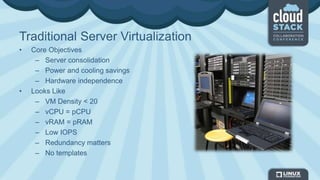
Traditional Server Virtualization
• Core Objectives
– Server consolidation
– Power and cooling savings
– Hardware independence
• Looks Like
– VM Density < 20
– vCPU = pCPU
– vRAM = pRAM
– Low IOPS
– Redundancy matters
– No templates
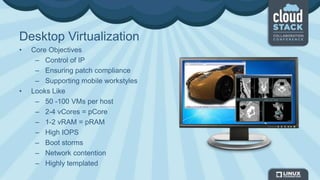
Desktop Virtualization
• Core Objectives
– Control of IP
– Ensuring patch compliance
– Supporting mobile workstyles
• Looks Like
– 50 -100 VMs per host
– 2-4 vCores = pCore
– 1-2 vRAM = pRAM
– High IOPS
– Boot storms
– Network contention
– Highly templated
Cloud Services
• Core Objectives
– Agile provisioning
– High degrees of tenant isolation
– Low operating margins
• Looks Like
– 50-250 VMs per host
– 2-8 vCore = pCore
– vRAM = pRAM
– Moderate IOPS
– Network contention
– Largely templated
Network Operations and
Definition
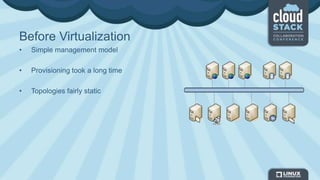
Before Virtualization
• Simple management model
• Provisioning took a long time
• Topologies fairly static
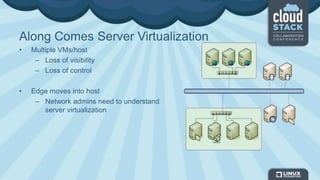
Along Comes Server Virtualization
• Multiple VMs/host
– Loss of visibility
– Loss of control
• Edge moves into host
– Network admins need to understand
server virtualization
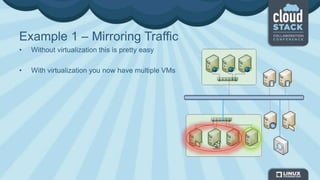
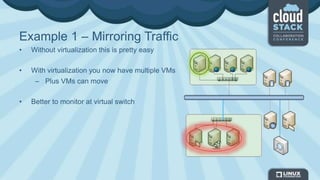
Example 1 – Mirroring Traffic
• Without virtualization this is pretty easy
• With virtualization you now have multiple VMs
Example 1 – Mirroring Traffic
• Without virtualization this is pretty easy
• With virtualization you now have multiple VMs
– Plus VMs can move
• Better to monitor at virtual switch
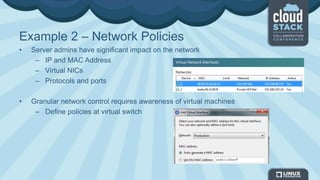
Example 2 – Network Policies
• Server admins have significant impact on the network
– IP and MAC Address
– Virtual NICs
– Protocols and ports
• Granular network control requires awareness of virtual machines
– Define policies at virtual switch
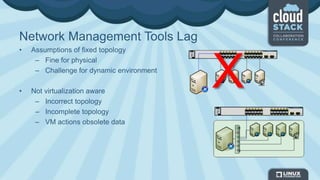
Network Management Tools Lag
• Assumptions of fixed topology
– Fine for physical
– Challenge for dynamic environment
• Not virtualization aware
– Incorrect topology
– Incomplete topology
– VM actions obsolete data
X
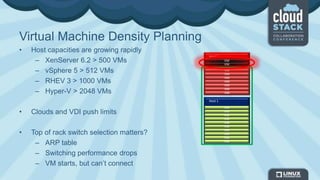
Virtual Machine Density Planning
• Host capacities are growing rapidly
– XenServer 6.2 > 500 VMs
– vSphere 5 > 512 VMs
– RHEV 3 > 1000 VMs
– Hyper-V > 2048 VMs
• Clouds and VDI push limits
• Top of rack switch selection matters?
– ARP table
– Switching performance drops
– VM starts, but can’t connect
VM
VM
VM
VM
VM
VM
VM
VM
VM
VM
Host 1
Host 2
VM
VM
VM
VM
VM
VM
VM
VM
VM
Storage Choices
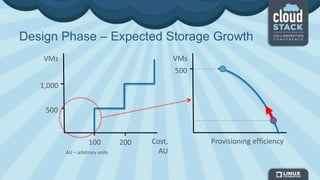
Design Phase – Expected Storage Growth
1,000
500
VMs
Cost,
AU
100 200
500
VMs
Provisioning efficiency
AU – arbitrary units
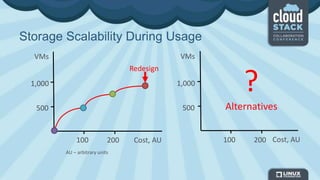
Storage Scalability During Usage
Redesign
1,000
500
VMs
100 200 Cost, AU
VMs
1,000
500
Cost, AU100 200
?
Alternatives
AU – arbitrary units
Redesign
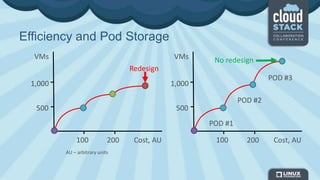
Efficiency and Pod Storage
1,000
500
VMs
100 200 Cost, AU
POD #1
POD #2
POD #3
1,000
500
VMs
100 200 Cost, AU
AU – arbitrary units
No redesign
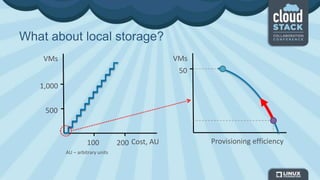
What about local storage?
1,000
500
VMs
Cost, AU100 200
50
VMs
Provisioning efficiency
AU – arbitrary units
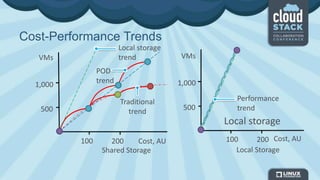
POD
trend
Traditional
trend
Cost-Performance Trends
Shared Storage Local Storage
1,000
500
VMs
Cost, AU100 200
1,000
500
VMs
100 200 Cost, AU
Local storage
Performance
trend
Local storage
trend
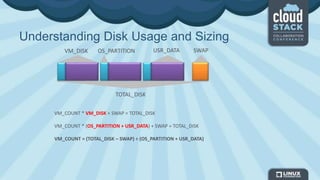
Understanding Disk Usage and Sizing
VM_COUNT * VM_DISK + SWAP = TOTAL_DISK
VM_COUNT * (OS_PARTITION + USR_DATA) + SWAP = TOTAL_DISK
VM_COUNT = (TOTAL_DISK – SWAP) ÷ (OS_PARTITION + USR_DATA)
VM_DISK SWAPUSR_DATAOS_PARTITION
TOTAL_DISK
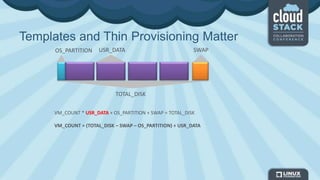
Templates and Thin Provisioning Matter
VM_COUNT * USR_DATA + OS_PARTITION + SWAP = TOTAL_DISK
VM_COUNT = (TOTAL_DISK – SWAP – OS_PARTITION) ÷ USR_DATA
SWAP
TOTAL_DISK
OS_PARTITION USR_DATA
Storage Performance
RAID PENALTY
0 1
1 2
5 4
6 6
10 2
50 4
IO per Disk Write Penalties
RPM IOPS
SSD 5,000+
SAS 15,000 175
SAS 10,000 125
SAS 7,200 75
VM Utilization
ITEM ~VALUE
IOPS per VM 20
Size, KB 4-8
Writes, % 80
Reads, % 20
IOPS = [IOPS per DISK]*[Disk Count]*([% of Reads]+[% of Writes] ÷ [RAID Write Penalty])
VM_COUNT = IOPS ÷ [IOPS per VM]
Blueprints for Success
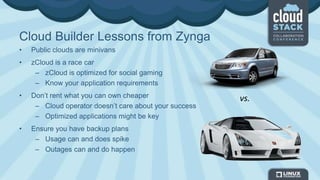
Cloud Builder Lessons from Zynga
• Public clouds are minivans
• zCloud is a race car
– zCloud is optimized for social gaming
– Know your application requirements
• Don’t rent what you can own cheaper
– Cloud operator doesn’t care about your success
– Optimized applications might be key
• Ensure you have backup plans
– Usage can and does spike
– Outages can and do happen
vs.
Cloud Builder Lessons From Telcos
• Utility computing fits business model
– Traditionally operate a low margin business model
– Understand tiered service offerings
– Have a history with instant provisioning
• Tiered service demands infrastructure flexibility
– “Cost per instance” is paramount
– Charge extra for premium features
– Instance doesn’t imply virtualization
– Be prepared to change vendors if better model appears
• Provisioning agility expected
– Customers expect instant self service access and detailed billing
Service Offerings
• Clearly define what you want to offer
– What types of applications
– Who has access, and who owns them
– What type of access
• Define how templates need to be managed
– Operating system support
– Patching requirements
• Define expectations around compliance and availability
– Who owns backup and monitoring
Define Tenancy Requirements
• Department data local to department
– Where is the application data stored
• Data and service isolation
– VM migration and host HA
– Network services
• Encryption of PII/PCI
– Where do keys live when data location unknown
– Need encryption designed for the cloud
• Showback to stakeholders
– More than just usage, compliance and audits
Virtualization Infrastructure
• Hypervisor defined by service offerings
– Don’t select hypervisor based on “standards”
– Understand true costs of virtualization
– Multiple hypervisors are “OK”
– Bare metal can be a hypervisor
• To “Pool” resources or not
– Is there a real requirement for pooled resources
– Can the cloud management solution do better?
• Primary storage defined by hypervisor
• Template storage defined by solution
– Typically low cost options like NFS
Cloud Operations
• Design for maintainability
• Monitor critical components
– Management servers and system support VMs
– Hypervisor hosts, and critical infrastructure
– End user deployment environments
If your cloud has maintenance windows, you’re doing it wrong.
- Allan Leinwand Former CTO Zynga

Make your first CloudStack Cloud successful

  • 1.
    Make Your FirstCloudStack Cloud Successful
  • 2.
    whoami • Name: TimMackey • Current roles: XenServer Community Manager and Evangelist; occasional coder • Cool things I’ve done – Designed laser communication systems – Early designer of retail self-checkout machines – Embedded special relativity algorithms into industrial control system • Find me – Twitter: @XenServerArmy – SlideShare: slideshare.net/TimMackey
  • 3.
  • 4.
    Who owns what? •Organizational structure matters – Team buy-in (no “mine, mine, mine”) – Management of key components – Understanding of “as-a-service” • Management toolset – Beware of overlap – Ensure runbooks reflect tooling • If you build it, they will come … – Growth will challenge everything – Success can be worst case
  • 5.
  • 6.
    Traditional Server Virtualization •Core Objectives – Server consolidation – Power and cooling savings – Hardware independence • Looks Like – VM Density < 20 – vCPU = pCPU – vRAM = pRAM – Low IOPS – Redundancy matters – No templates
  • 7.
    Desktop Virtualization • CoreObjectives – Control of IP – Ensuring patch compliance – Supporting mobile workstyles • Looks Like – 50 -100 VMs per host – 2-4 vCores = pCore – 1-2 vRAM = pRAM – High IOPS – Boot storms – Network contention – Highly templated
  • 8.
    Cloud Services • CoreObjectives – Agile provisioning – High degrees of tenant isolation – Low operating margins • Looks Like – 50-250 VMs per host – 2-8 vCore = pCore – vRAM = pRAM – Moderate IOPS – Network contention – Largely templated
  • 9.
  • 10.
    Before Virtualization • Simplemanagement model • Provisioning took a long time • Topologies fairly static
  • 11.
    Along Comes ServerVirtualization • Multiple VMs/host – Loss of visibility – Loss of control • Edge moves into host – Network admins need to understand server virtualization
  • 12.
    Example 1 –Mirroring Traffic • Without virtualization this is pretty easy • With virtualization you now have multiple VMs
  • 13.
    Example 1 –Mirroring Traffic • Without virtualization this is pretty easy • With virtualization you now have multiple VMs – Plus VMs can move • Better to monitor at virtual switch
  • 14.
    Example 2 –Network Policies • Server admins have significant impact on the network – IP and MAC Address – Virtual NICs – Protocols and ports • Granular network control requires awareness of virtual machines – Define policies at virtual switch
  • 15.
    Network Management ToolsLag • Assumptions of fixed topology – Fine for physical – Challenge for dynamic environment • Not virtualization aware – Incorrect topology – Incomplete topology – VM actions obsolete data X
  • 16.
    Virtual Machine DensityPlanning • Host capacities are growing rapidly – XenServer 6.2 > 500 VMs – vSphere 5 > 512 VMs – RHEV 3 > 1000 VMs – Hyper-V > 2048 VMs • Clouds and VDI push limits • Top of rack switch selection matters? – ARP table – Switching performance drops – VM starts, but can’t connect VM VM VM VM VM VM VM VM VM VM Host 1 Host 2 VM VM VM VM VM VM VM VM VM
  • 17.
  • 18.
    Design Phase –Expected Storage Growth 1,000 500 VMs Cost, AU 100 200 500 VMs Provisioning efficiency AU – arbitrary units
  • 19.
    Storage Scalability DuringUsage Redesign 1,000 500 VMs 100 200 Cost, AU VMs 1,000 500 Cost, AU100 200 ? Alternatives AU – arbitrary units
  • 20.
    Redesign Efficiency and PodStorage 1,000 500 VMs 100 200 Cost, AU POD #1 POD #2 POD #3 1,000 500 VMs 100 200 Cost, AU AU – arbitrary units No redesign
  • 21.
    What about localstorage? 1,000 500 VMs Cost, AU100 200 50 VMs Provisioning efficiency AU – arbitrary units
  • 22.
    POD trend Traditional trend Cost-Performance Trends Shared StorageLocal Storage 1,000 500 VMs Cost, AU100 200 1,000 500 VMs 100 200 Cost, AU Local storage Performance trend Local storage trend
  • 23.
    Understanding Disk Usageand Sizing VM_COUNT * VM_DISK + SWAP = TOTAL_DISK VM_COUNT * (OS_PARTITION + USR_DATA) + SWAP = TOTAL_DISK VM_COUNT = (TOTAL_DISK – SWAP) ÷ (OS_PARTITION + USR_DATA) VM_DISK SWAPUSR_DATAOS_PARTITION TOTAL_DISK
  • 24.
    Templates and ThinProvisioning Matter VM_COUNT * USR_DATA + OS_PARTITION + SWAP = TOTAL_DISK VM_COUNT = (TOTAL_DISK – SWAP – OS_PARTITION) ÷ USR_DATA SWAP TOTAL_DISK OS_PARTITION USR_DATA
  • 25.
    Storage Performance RAID PENALTY 01 1 2 5 4 6 6 10 2 50 4 IO per Disk Write Penalties RPM IOPS SSD 5,000+ SAS 15,000 175 SAS 10,000 125 SAS 7,200 75 VM Utilization ITEM ~VALUE IOPS per VM 20 Size, KB 4-8 Writes, % 80 Reads, % 20 IOPS = [IOPS per DISK]*[Disk Count]*([% of Reads]+[% of Writes] ÷ [RAID Write Penalty]) VM_COUNT = IOPS ÷ [IOPS per VM]
  • 26.
  • 27.
    Cloud Builder Lessonsfrom Zynga • Public clouds are minivans • zCloud is a race car – zCloud is optimized for social gaming – Know your application requirements • Don’t rent what you can own cheaper – Cloud operator doesn’t care about your success – Optimized applications might be key • Ensure you have backup plans – Usage can and does spike – Outages can and do happen vs.
  • 28.
    Cloud Builder LessonsFrom Telcos • Utility computing fits business model – Traditionally operate a low margin business model – Understand tiered service offerings – Have a history with instant provisioning • Tiered service demands infrastructure flexibility – “Cost per instance” is paramount – Charge extra for premium features – Instance doesn’t imply virtualization – Be prepared to change vendors if better model appears • Provisioning agility expected – Customers expect instant self service access and detailed billing
  • 29.
    Service Offerings • Clearlydefine what you want to offer – What types of applications – Who has access, and who owns them – What type of access • Define how templates need to be managed – Operating system support – Patching requirements • Define expectations around compliance and availability – Who owns backup and monitoring
  • 30.
    Define Tenancy Requirements •Department data local to department – Where is the application data stored • Data and service isolation – VM migration and host HA – Network services • Encryption of PII/PCI – Where do keys live when data location unknown – Need encryption designed for the cloud • Showback to stakeholders – More than just usage, compliance and audits
  • 31.
    Virtualization Infrastructure • Hypervisordefined by service offerings – Don’t select hypervisor based on “standards” – Understand true costs of virtualization – Multiple hypervisors are “OK” – Bare metal can be a hypervisor • To “Pool” resources or not – Is there a real requirement for pooled resources – Can the cloud management solution do better? • Primary storage defined by hypervisor • Template storage defined by solution – Typically low cost options like NFS
  • 32.
    Cloud Operations • Designfor maintainability • Monitor critical components – Management servers and system support VMs – Hypervisor hosts, and critical infrastructure – End user deployment environments If your cloud has maintenance windows, you’re doing it wrong. - Allan Leinwand Former CTO Zynga