
~ the next wave in computing
  By:
   Shaba Parveen Assadi
    III MCA
   Mangalore University
• Green computing is the term used to denote
  efficient use of resources in computing.
• It Is also known as Green IT       .
• Green Computing is “ Where organizations adopt a
  policy of ensuring that the setup and operations of
  Information Technology produces the minimal carbon
  footprint” .
• Key issues are e ne rg y e fficie ncy in computing and
  promoting e nviro nme ntally frie ndly co mpute r
  te chno lo g ie s.
• It is ” the study and practice of designing,
  manufacturing, using, and disposing of computers,
  servers, and associated subsystems.
Core objectives of Green Computing
Strategies:

 •   Minimizing energy consumption
 •   Purchasing green energy
 •   Reducing the paper and other consumables used
 •   Minimizing equipment disposal requirements
 •   Reducing travel requirements for employees/customers
Overview of Green Computing:
• “ Greening” your computing equipment is a low-risk way for
  your business to not only help the environment but also
  reduce costs. It’ s also one of the largest growing trends in
  business today. “ Making a proper decision to go green in
  the workplace such as offices, not only improves the net
  profit of your business, but also reduces your carbon
  footprint. Reducing energy usage, which also reduces
  carbon dioxide emissions and your energy bill, is the most
  effective thing you can do.
History:
• The term “ Green Computing" was probably
  coined shortly after the ‘ Energy Star’ program
  began way back in 1992. One of the first
  results of green computing was the “ Sleep
  mode” function of computer monitors. As the
  concept developed, green computing began to
  encompass thin client solutions, energy cost,
  accounting, virtualization practices, e-Waste,
  etc.
W Go Green ?
 hy
•   Climate Change
•   Savings
•   Reliability of Power
•   Computing
W Go Green? (Cont)
  hy
• Climate Change :
  First and foremost, conclusive research shows that CO2 and
  other emissions are causing global climate and environmental
  damage. Preserving the planet is a valid goal because it aims
  to preserve life. Planets like ours, that supports life, are very
  rare. None of the planets in our solar system, or in nearby star
  systems have m-class planets as we know them.
• Savings :
  Green computing can lead to serious cost savings overtime.
  Reductions in energy costs from servers, cooling, and lighting
  are generating serious savings for many corporations.
W Go Green? (Cont)
 hy
• Reliability of P  ower :
  As energy demands in the world go up, energy supply is
  declining or flat. Energy efficient systems help sensure
  healthy power systems. Also, more companies are
  generating more of their own electricity, which further
  motivates them to keep power consumption low.
 
• Computing :
  Computing Power Consumption has Reached a Critical
  Point: Data centers have run out of usable power and
  cooling due to high densities.
Approaches to Green Computing:
1. Virtualization :
   Computer virtualization is the process of running two or more
   logical computer systems on one set of physical hardware.  
2.      Power Management :
      ACPI allows an operating system to directly control the
      power saving aspects of its underlying hardware.
      Power management for computer systems are
      desired for many reasons, particularly:

•          Prolong battery life for portable and embedded
           systems.
•          Reduce cooling requirements.
•          Reduce noise.
•          Reduce operating costs for energy and cooling

    3. Power Supply :
             Climate savers computing initiative promotes
    energy saving and reduction of greenhouse gas emissions
    by encouraging development and use of more efficient
    power supplies.
Approaches to Green Computing:
 (cont)

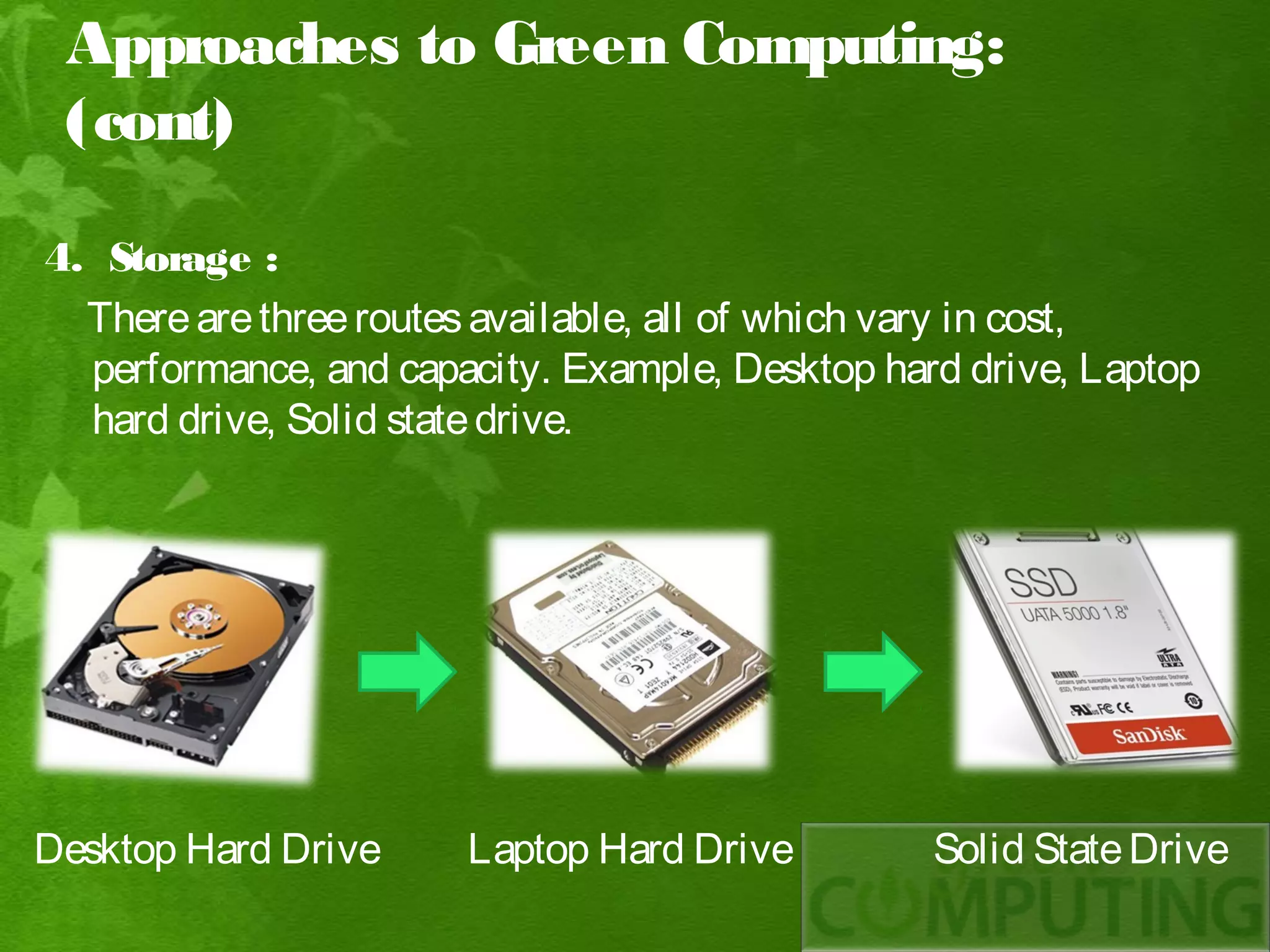
4. Storage :
  There are three routes available, all of which vary in cost,
  performance, and capacity. Example, Desktop hard drive, Laptop
  hard drive, Solid state drive.


Desktop Hard Drive     Laptop Hard Drive         Solid State Drive
Approaches to Green Computing: (cont)
5. Video Card :
  A fast GPU may be the largest power consumer
  in a computer.
   Energy efficient display option include : 
• No video card – use a shared terminal, shared
  thin client, or desktop sharing software if display
  required.
• Use motherboard video output – typically low 3D
  performance and low power.
• Reuse an older video card that uses little power,
  many do not require heatsinks or fans.
• Select a GPU based on average wattage or
  performance per watt.
Approaches to Green Computing: (cont)
 6. Displays :
   LCD monitors typically use a cold-cathode fluorescent bulb to
   provide light for the display. Some newer displays use an array
   of light emitting diodes (LEDs) in place of the fluorescent bulb,
   which reduces the amount of electricity used by the display.
   LCD monitors uses three times less when active, and ten times
   less energy when in sleep mode.


CRT Display                LCD Display               LED Display
Approaches to Green Computing: (cont)
7. M aterials R ecycling :
  Parts from outdated systems may be salvaged and recycled
  through certain retail outlets and municipal or private recycling.
Approaches to Green Computing: (cont)
8. Telecommuting :
    Telecommuting technologies implemented in green
   computing initiatives have advantages like increased worker
   satisfaction, reduction of greenhouse gas emissions related to
   travel and increased profit margins.
T goals of Green Computing:
 he

• The goal of green computing reduce the use of hazardous
  materials, maximize energy efficiency during the product’ s
  lifetime, and promote the recyclability or biodegradability of
  defunct products and factory waste.
 
• Research continues into key areas such as making the use of
  computers as energy- efficient as possible, and designing
  algorithms and systems for efficiency- related computer
  technologies.
Pathways to Green Computing:

        To comprehensively and effectively address the environmental impacts of
    computing/IT, we must adopt a holistic approach and make the entire IT
    lifecycle greener by addressing environmental sustainability along the
    following four complementary paths: 
•   Green Use :
          Intelligent use of energy and information systems. Reducing the energy
    consumption of computers and other information systems as well as using
    them in an environmentally sound manner. 
•   Green Disposal :
          Reduction of waste, reuse and refurbishment of hardware and recycling
    of out of use peripherals and other items. Refurbishing and reusing old
    computers and properly recycling unwanted computers and other electronic
    equipment.
Pathways to Green
Computing:
• Green Design :
      Efficient design of data centres and workstations. Designing
  energy – efficient and environmentally sound components,
  computers, servers, cooling equipment, and data centers.
• Green M  anufacturing :
      Informed purchasing of components, peripherals and
  equipments manufactured with the environment in mind.
  Manufacturing electronic components, computers, and other
  associated subsystems with minimal impact on the environment.
Recent Implementation of
“Green Computing”:
1. B lackle :
• Blackle is a search-engine site powered by Google Custom
   Search.
• Blackle came into being based on the concept that when a
   computer screen is white, presenting an empty word page or
   the Google home page, your computer consumes 74W.
• When the screen is black it consumes only 59W.
Recent Implementation of “Green
Computing”: (cont)
2. Zonbu Computer :
• The Zonbu is a new, very energy
   efficient PC.
• The Zonbu consumes just one third
   of the power of a typical light bulb.
• The device runs the Linux operating
   system using a1.2 GHz processor
   and 512 MB of RAM.
Recent Implementation of “Green
Computing”: (cont)
3. F P :
     it C
• Fit-PC is the size of a paperback
   and absolutely silent, yet fit
   enough to run Windows XP or
   Linux.
• Fit-PC is designed to fit where a
   standard PC is too bulky, noisy
   and power hungry .
• Fit-PC draws only 5 Watts,
   consuming in a day less power
   than a traditional PC consumes in
   1 hour.
Recent Implementation of
“Green Computing”: (cont)
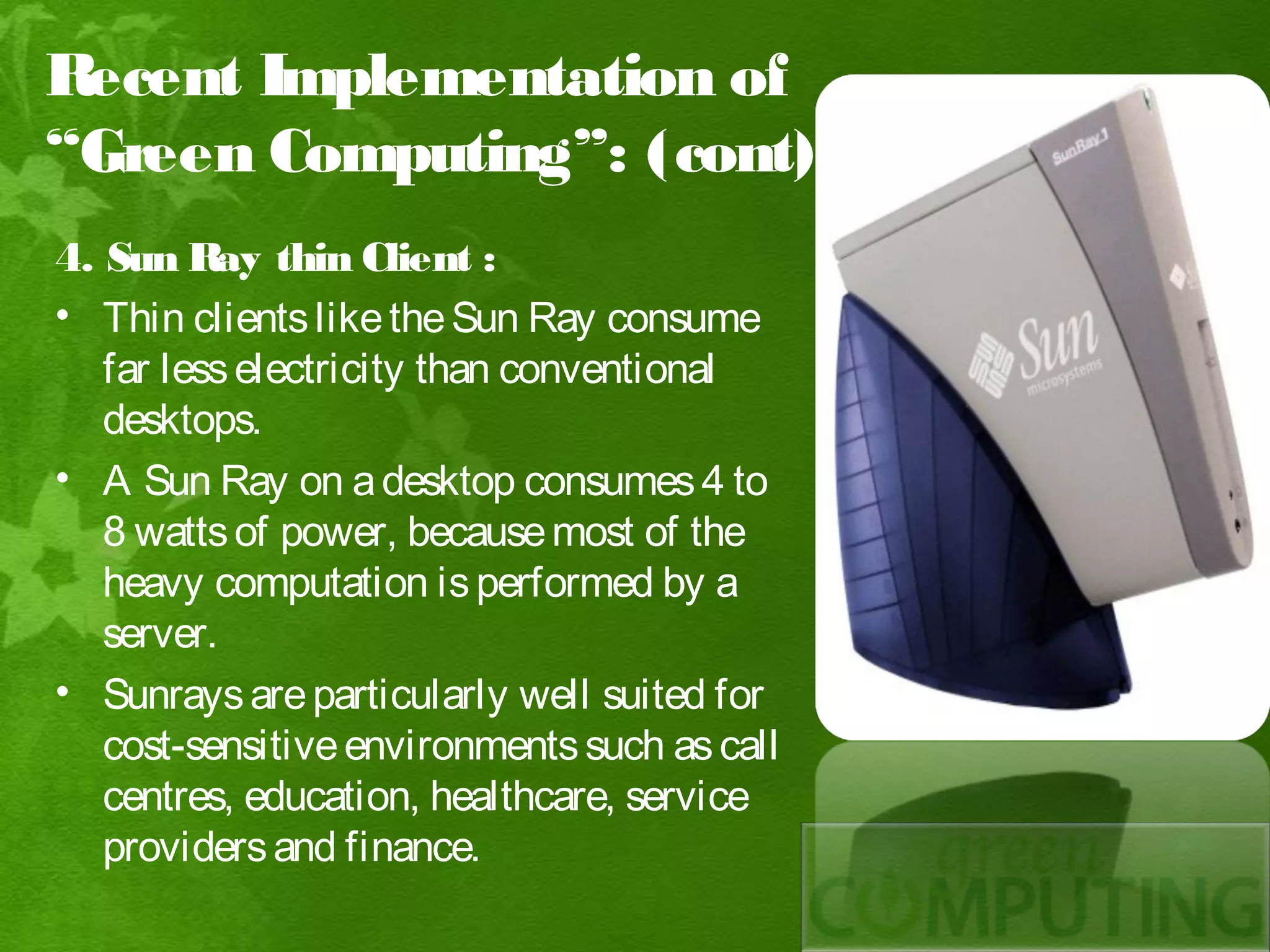
4. Sun Ray thin Client :
• Thin clients like the Sun Ray consume
   far less electricity than conventional
   desktops.
• A Sun Ray on a desktop consumes 4 to
   8 watts of power, because most of the
   heavy computation is performed by a
   server.
• Sunrays are particularly well suited for
   cost-sensitive environments such as call
   centres, education, healthcare, service
   providers and finance.
Recent Implementation of “Green
Computing”: (cont)
5. Asus E P & ultra
          ee C
   portables :
• Small Size.
• Fairly low – power CPU.
• Compact screen.
• Low cost.
• Uses flash memory for storage.
Advantages:
   Energy saving
   Environmentally Friendly
   Cost-effective ( pays over time )
   Save more money per year
   Can give you a tax right off
Disadvantages:

 High start up cost
 Not readily available
 Still in experimental stages
 Sacrifies performance for
  battery life
 Not for everyone
 So far, consumers haven’ t cared about ecological impact when
buying computers, they’ ve cared only about speed and price .

 New green materials are developed every year, and many toxic ones
are already being replaced by them.

 The greenest computer will not miraculously fall from the sky one
day; it will be the product of years of improvements.

 The features of a green computer of tomorrow would be like:
efficiency, manufacturing and materials, recyclability, server model,
self-powering and other trends.
Future of Green Computing :

 The plan towards green IT should include new electronic
  products and services with optimum efficiency and all possible
  options towards energy savings. That is enterprise wise
  companies are laying emphasis on moving towards Eco
  Friendly Components in Computers, the use of eco-friendly
  sustainable components will become the norm rather than the
  exception in future.
Green Computing

Green Computing

  • 1.
    ~ the nextwave in computing By: Shaba Parveen Assadi III MCA Mangalore University
  • 3.
    • Green computingis the term used to denote efficient use of resources in computing. • It Is also known as Green IT . • Green Computing is “ Where organizations adopt a policy of ensuring that the setup and operations of Information Technology produces the minimal carbon footprint” . • Key issues are e ne rg y e fficie ncy in computing and promoting e nviro nme ntally frie ndly co mpute r te chno lo g ie s. • It is ” the study and practice of designing, manufacturing, using, and disposing of computers, servers, and associated subsystems.
  • 4.
    Core objectives ofGreen Computing Strategies: • Minimizing energy consumption • Purchasing green energy • Reducing the paper and other consumables used • Minimizing equipment disposal requirements • Reducing travel requirements for employees/customers
  • 5.
    Overview of GreenComputing: • “ Greening” your computing equipment is a low-risk way for your business to not only help the environment but also reduce costs. It’ s also one of the largest growing trends in business today. “ Making a proper decision to go green in the workplace such as offices, not only improves the net profit of your business, but also reduces your carbon footprint. Reducing energy usage, which also reduces carbon dioxide emissions and your energy bill, is the most effective thing you can do.
  • 6.
    History: • The term“ Green Computing" was probably coined shortly after the ‘ Energy Star’ program began way back in 1992. One of the first results of green computing was the “ Sleep mode” function of computer monitors. As the concept developed, green computing began to encompass thin client solutions, energy cost, accounting, virtualization practices, e-Waste, etc.
  • 8.
    W Go Green? hy • Climate Change • Savings • Reliability of Power • Computing
  • 9.
    W Go Green?(Cont) hy • Climate Change : First and foremost, conclusive research shows that CO2 and other emissions are causing global climate and environmental damage. Preserving the planet is a valid goal because it aims to preserve life. Planets like ours, that supports life, are very rare. None of the planets in our solar system, or in nearby star systems have m-class planets as we know them. • Savings : Green computing can lead to serious cost savings overtime. Reductions in energy costs from servers, cooling, and lighting are generating serious savings for many corporations.
  • 10.
    W Go Green?(Cont) hy • Reliability of P ower : As energy demands in the world go up, energy supply is declining or flat. Energy efficient systems help sensure healthy power systems. Also, more companies are generating more of their own electricity, which further motivates them to keep power consumption low.   • Computing : Computing Power Consumption has Reached a Critical Point: Data centers have run out of usable power and cooling due to high densities.
  • 11.
    Approaches to GreenComputing: 1. Virtualization : Computer virtualization is the process of running two or more logical computer systems on one set of physical hardware.  
  • 12.
    2. Power Management : ACPI allows an operating system to directly control the power saving aspects of its underlying hardware. Power management for computer systems are desired for many reasons, particularly: • Prolong battery life for portable and embedded systems. • Reduce cooling requirements. • Reduce noise. • Reduce operating costs for energy and cooling 3. Power Supply : Climate savers computing initiative promotes energy saving and reduction of greenhouse gas emissions by encouraging development and use of more efficient power supplies.
  • 13.
    Approaches to GreenComputing: (cont) 4. Storage : There are three routes available, all of which vary in cost, performance, and capacity. Example, Desktop hard drive, Laptop hard drive, Solid state drive. Desktop Hard Drive Laptop Hard Drive Solid State Drive
  • 14.
    Approaches to GreenComputing: (cont) 5. Video Card : A fast GPU may be the largest power consumer in a computer. Energy efficient display option include :  • No video card – use a shared terminal, shared thin client, or desktop sharing software if display required. • Use motherboard video output – typically low 3D performance and low power. • Reuse an older video card that uses little power, many do not require heatsinks or fans. • Select a GPU based on average wattage or performance per watt.
  • 15.
    Approaches to GreenComputing: (cont) 6. Displays : LCD monitors typically use a cold-cathode fluorescent bulb to provide light for the display. Some newer displays use an array of light emitting diodes (LEDs) in place of the fluorescent bulb, which reduces the amount of electricity used by the display. LCD monitors uses three times less when active, and ten times less energy when in sleep mode. CRT Display LCD Display LED Display
  • 16.
    Approaches to GreenComputing: (cont) 7. M aterials R ecycling : Parts from outdated systems may be salvaged and recycled through certain retail outlets and municipal or private recycling.
  • 17.
    Approaches to GreenComputing: (cont) 8. Telecommuting : Telecommuting technologies implemented in green computing initiatives have advantages like increased worker satisfaction, reduction of greenhouse gas emissions related to travel and increased profit margins.
  • 18.
    T goals ofGreen Computing: he • The goal of green computing reduce the use of hazardous materials, maximize energy efficiency during the product’ s lifetime, and promote the recyclability or biodegradability of defunct products and factory waste.   • Research continues into key areas such as making the use of computers as energy- efficient as possible, and designing algorithms and systems for efficiency- related computer technologies.
  • 19.
    Pathways to GreenComputing: To comprehensively and effectively address the environmental impacts of computing/IT, we must adopt a holistic approach and make the entire IT lifecycle greener by addressing environmental sustainability along the following four complementary paths:  • Green Use : Intelligent use of energy and information systems. Reducing the energy consumption of computers and other information systems as well as using them in an environmentally sound manner.  • Green Disposal : Reduction of waste, reuse and refurbishment of hardware and recycling of out of use peripherals and other items. Refurbishing and reusing old computers and properly recycling unwanted computers and other electronic equipment.
  • 20.
    Pathways to Green Computing: •Green Design : Efficient design of data centres and workstations. Designing energy – efficient and environmentally sound components, computers, servers, cooling equipment, and data centers. • Green M anufacturing : Informed purchasing of components, peripherals and equipments manufactured with the environment in mind. Manufacturing electronic components, computers, and other associated subsystems with minimal impact on the environment.
  • 21.
    Recent Implementation of “GreenComputing”: 1. B lackle : • Blackle is a search-engine site powered by Google Custom Search. • Blackle came into being based on the concept that when a computer screen is white, presenting an empty word page or the Google home page, your computer consumes 74W. • When the screen is black it consumes only 59W.
  • 23.
    Recent Implementation of“Green Computing”: (cont) 2. Zonbu Computer : • The Zonbu is a new, very energy efficient PC. • The Zonbu consumes just one third of the power of a typical light bulb. • The device runs the Linux operating system using a1.2 GHz processor and 512 MB of RAM.
  • 24.
    Recent Implementation of“Green Computing”: (cont) 3. F P : it C • Fit-PC is the size of a paperback and absolutely silent, yet fit enough to run Windows XP or Linux. • Fit-PC is designed to fit where a standard PC is too bulky, noisy and power hungry . • Fit-PC draws only 5 Watts, consuming in a day less power than a traditional PC consumes in 1 hour.
  • 25.
    Recent Implementation of “GreenComputing”: (cont) 4. Sun Ray thin Client : • Thin clients like the Sun Ray consume far less electricity than conventional desktops. • A Sun Ray on a desktop consumes 4 to 8 watts of power, because most of the heavy computation is performed by a server. • Sunrays are particularly well suited for cost-sensitive environments such as call centres, education, healthcare, service providers and finance.
  • 26.
    Recent Implementation of“Green Computing”: (cont) 5. Asus E P & ultra ee C portables : • Small Size. • Fairly low – power CPU. • Compact screen. • Low cost. • Uses flash memory for storage.
  • 27.
    Advantages:  Energy saving  Environmentally Friendly  Cost-effective ( pays over time )  Save more money per year  Can give you a tax right off
  • 28.
    Disadvantages:  High startup cost  Not readily available  Still in experimental stages  Sacrifies performance for battery life  Not for everyone
  • 29.
     So far,consumers haven’ t cared about ecological impact when buying computers, they’ ve cared only about speed and price .  New green materials are developed every year, and many toxic ones are already being replaced by them.  The greenest computer will not miraculously fall from the sky one day; it will be the product of years of improvements.  The features of a green computer of tomorrow would be like: efficiency, manufacturing and materials, recyclability, server model, self-powering and other trends.
  • 30.
    Future of GreenComputing :  The plan towards green IT should include new electronic products and services with optimum efficiency and all possible options towards energy savings. That is enterprise wise companies are laying emphasis on moving towards Eco Friendly Components in Computers, the use of eco-friendly sustainable components will become the norm rather than the exception in future.