Green 
Computing 
Presented by 
Sangeetha.I 
Madhusudhanan.A
What is GREEN COMPUTING? 
 Green Computing is the practice of using computer resources 
efficiently. 
 Designing, manufacturing, disposing computers, servers with no 
impact on the environment. 
 To reduce the use of hazardous materials, thus maximizing energy 
efficiency during product’s lifetime. 
 Also known as Green IT.
Why GREEN COMPUTING? 
 Computer Energy is often wasteful. 
Eg: Leaving the Computer ON when not in use. 
 Printing is wasteful. 
Eg: Email / Meeting agenda’s print-outs is a waste. 
 Pollution. 
Eg: Due to manufacturing, packaging, disposal techniques. 
 Toxicity. 
Eg: Due to toxic chemicals involved in manufacturing.
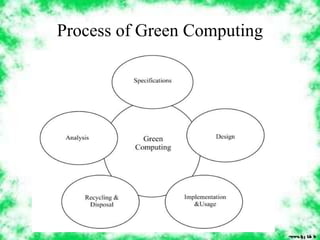
Process of Green Computing
Green Manufacturing 
 Bamboo: is becoming increasingly popular for making casings for 
computers & peripherals. 
 Recyclable plastics: Computers are constructed from recyclable 
polycarbonate resin. 
 Eco-friendly flame retardant: There are flame retardant silicone 
compounds available that are flame retardant and completely non-toxic. 
 Inventory Management: reducing the quantity of both hazardous 
materials used in the process and the amount of excess raw 
materials. 
 Volume reduction: removes hazardous portion of waste from 
non-hazardous portion.
Reducing Energy Consumption 
 Turn off the computer when not in use, even if just for an hour. 
 Turn off the monitor when not in use. 
 Use power saver mode. 
 Use hardware/software with the Energy Star label. 
 Don’t print unless necessary and you are ready. 
 Use LCDs instead of CRTs as they are more power efficient.
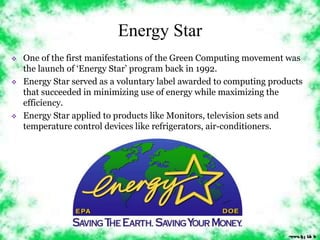
Energy Star 
 One of the first manifestations of the Green Computing movement was 
the launch of ‘Energy Star’ program back in 1992. 
 Energy Star served as a voluntary label awarded to computing products 
that succeeded in minimizing use of energy while maximizing the 
efficiency. 
 Energy Star applied to products like Monitors, television sets and 
temperature control devices like refrigerators, air-conditioners.
Saving Energy while working in 
Computer: 
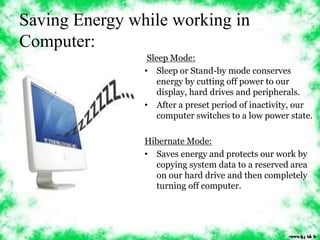
Sleep Mode: 
• Sleep or Stand-by mode conserves 
energy by cutting off power to our 
display, hard drives and peripherals. 
• After a preset period of inactivity, our 
computer switches to a low power state. 
Hibernate Mode: 
• Saves energy and protects our work by 
copying system data to a reserved area 
on our hard drive and then completely 
turning off computer.
Saving Energy while working in 
Internet: 
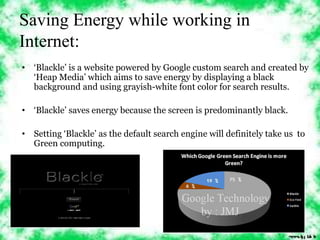
• ‘Blackle’ is a website powered by Google custom search and created by 
‘Heap Media’ which aims to save energy by displaying a black 
background and using grayish-white font color for search results. 
• ‘Blackle’ saves energy because the screen is predominantly black. 
• Setting ‘Blackle’ as the default search engine will definitely take us to 
Green computing.
Thin Client: 
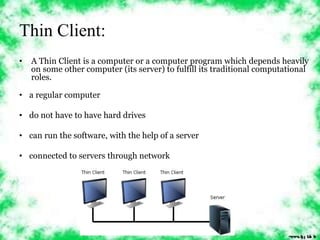
• A Thin Client is a computer or a computer program which depends heavily 
on some other computer (its server) to fulfill its traditional computational 
roles. 
• a regular computer 
• do not have to have hard drives 
• can run the software, with the help of a server 
• connected to servers through network
Disposal of components 
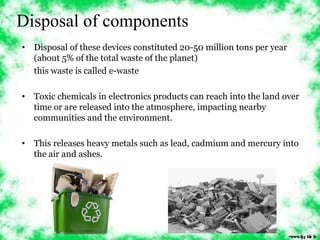
• Disposal of these devices constituted 20-50 million tons per year 
(about 5% of the total waste of the planet) 
this waste is called e-waste 
• Toxic chemicals in electronics products can reach into the land over 
time or are released into the atmosphere, impacting nearby 
communities and the environment. 
• This releases heavy metals such as lead, cadmium and mercury into 
the air and ashes.
Green Disposal: 
• Reuse: donate your computer 
components to people who don’t have or 
have lesser quality computers. 
• Refurbish: rather than discarding your 
computer upgrade it. Change its parts to 
make it new. 
• Recycle: One of the major challenges is 
recycling the printed circuit boards from 
electronic wastes. The circuit board 
contains such precious metals as gold, 
silver, platinum etc.
Conclusion 
 While the performance and the breadth of application is increasing, 
so awareness of the cost & scarcity of the energy required to power 
them, as well as the materials needed to make them is necessary. 
 Through more environmentally aware usage(such as more effective 
power management & shut-down during periods of inactivity) and 
by adopting current lower power technologies, computers can be 
made significantly more energy efficient. 
 Green Computing = Green Earth.
Green computing

Green computing

  • 1.
    Green Computing Presentedby Sangeetha.I Madhusudhanan.A
  • 2.
    What is GREENCOMPUTING?  Green Computing is the practice of using computer resources efficiently.  Designing, manufacturing, disposing computers, servers with no impact on the environment.  To reduce the use of hazardous materials, thus maximizing energy efficiency during product’s lifetime.  Also known as Green IT.
  • 3.
    Why GREEN COMPUTING?  Computer Energy is often wasteful. Eg: Leaving the Computer ON when not in use.  Printing is wasteful. Eg: Email / Meeting agenda’s print-outs is a waste.  Pollution. Eg: Due to manufacturing, packaging, disposal techniques.  Toxicity. Eg: Due to toxic chemicals involved in manufacturing.
  • 4.
  • 5.
    Green Manufacturing Bamboo: is becoming increasingly popular for making casings for computers & peripherals.  Recyclable plastics: Computers are constructed from recyclable polycarbonate resin.  Eco-friendly flame retardant: There are flame retardant silicone compounds available that are flame retardant and completely non-toxic.  Inventory Management: reducing the quantity of both hazardous materials used in the process and the amount of excess raw materials.  Volume reduction: removes hazardous portion of waste from non-hazardous portion.
  • 6.
    Reducing Energy Consumption  Turn off the computer when not in use, even if just for an hour.  Turn off the monitor when not in use.  Use power saver mode.  Use hardware/software with the Energy Star label.  Don’t print unless necessary and you are ready.  Use LCDs instead of CRTs as they are more power efficient.
  • 7.
    Energy Star One of the first manifestations of the Green Computing movement was the launch of ‘Energy Star’ program back in 1992.  Energy Star served as a voluntary label awarded to computing products that succeeded in minimizing use of energy while maximizing the efficiency.  Energy Star applied to products like Monitors, television sets and temperature control devices like refrigerators, air-conditioners.
  • 8.
    Saving Energy whileworking in Computer: Sleep Mode: • Sleep or Stand-by mode conserves energy by cutting off power to our display, hard drives and peripherals. • After a preset period of inactivity, our computer switches to a low power state. Hibernate Mode: • Saves energy and protects our work by copying system data to a reserved area on our hard drive and then completely turning off computer.
  • 9.
    Saving Energy whileworking in Internet: • ‘Blackle’ is a website powered by Google custom search and created by ‘Heap Media’ which aims to save energy by displaying a black background and using grayish-white font color for search results. • ‘Blackle’ saves energy because the screen is predominantly black. • Setting ‘Blackle’ as the default search engine will definitely take us to Green computing.
  • 10.
    Thin Client: •A Thin Client is a computer or a computer program which depends heavily on some other computer (its server) to fulfill its traditional computational roles. • a regular computer • do not have to have hard drives • can run the software, with the help of a server • connected to servers through network
  • 11.
    Disposal of components • Disposal of these devices constituted 20-50 million tons per year (about 5% of the total waste of the planet) this waste is called e-waste • Toxic chemicals in electronics products can reach into the land over time or are released into the atmosphere, impacting nearby communities and the environment. • This releases heavy metals such as lead, cadmium and mercury into the air and ashes.
  • 12.
    Green Disposal: •Reuse: donate your computer components to people who don’t have or have lesser quality computers. • Refurbish: rather than discarding your computer upgrade it. Change its parts to make it new. • Recycle: One of the major challenges is recycling the printed circuit boards from electronic wastes. The circuit board contains such precious metals as gold, silver, platinum etc.
  • 13.
    Conclusion  Whilethe performance and the breadth of application is increasing, so awareness of the cost & scarcity of the energy required to power them, as well as the materials needed to make them is necessary.  Through more environmentally aware usage(such as more effective power management & shut-down during periods of inactivity) and by adopting current lower power technologies, computers can be made significantly more energy efficient.  Green Computing = Green Earth.