E-content development
using Multimedia
PRESENTED BY:
Tanvi Vahora
Introduction
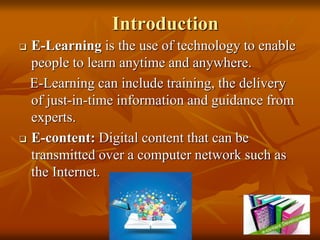
 E-Learning is the use of technology to enable
people to learn anytime and anywhere.
E-Learning can include training, the delivery
of just-in-time information and guidance from
experts.
 E-content: Digital content that can be
transmitted over a computer network such as
the Internet.
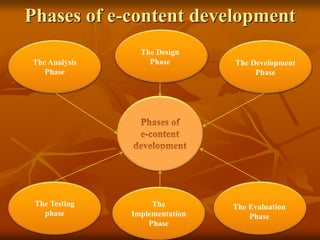
Phases of e-content development
The Analysis
Phase
The Design
Phase
The
Implementation
Phase
The Testing
phase
The Evaluation
Phase
The Development
Phase
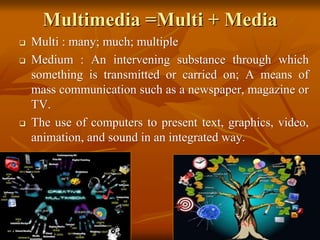
Multimedia =Multi + Media
 Multi : many; much; multiple
 Medium : An intervening substance through which
something is transmitted or carried on; A means of
mass communication such as a newspaper, magazine or
TV.
 The use of computers to present text, graphics, video,
animation, and sound in an integrated way.
 Characteristics of a Multimedia System
 It must be computer controlled.
 Multimedia systems are integrated.
 The information they handle must be
represented digitally.
 The interface to the final presentation of
media is usually interactive
 Components of a Multimedia System
 Capture devices
 Video Camera, Video Recorder, Keyboards, mice, 3D input
devices etc.
 Storage Devices
 Hard disks, CD-ROMs, Jaz/Zip drives, DVD, etc
 Communication Networks
 Ethernet, FDDI(Fiber Distributed Data Interface),
Intranets, Internets.
 Computer Systems
 Multimedia Desktop machines, Workstations,
 Display Devices
 CD-quality speakers, monitors, Colour printers, mobiles,
etc
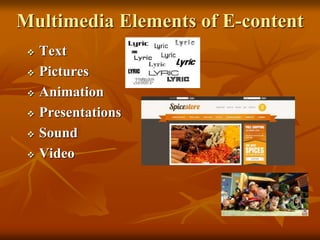
Multimedia Elements of E-content
 Text
 Pictures
 Animation
 Presentations
 Sound
 Video
Adobe Photoshop
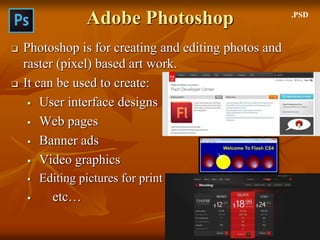
 Photoshop is for creating and editing photos and
raster (pixel) based art work.
 It can be used to create:
 User interface designs
 Web pages
 Banner ads
 Video graphics
 Editing pictures for print
 etc…
.PSD
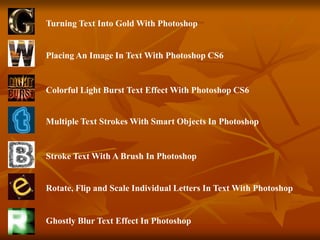
Placing An Image In Text With Photoshop CS6
Colorful Light Burst Text Effect With Photoshop CS6
Multiple Text Strokes With Smart Objects In Photoshop
Turning Text Into Gold With Photoshop
Stroke Text With A Brush In Photoshop
Rotate, Flip and Scale Individual Letters In Text With Photoshop
Ghostly Blur Text Effect In Photoshop
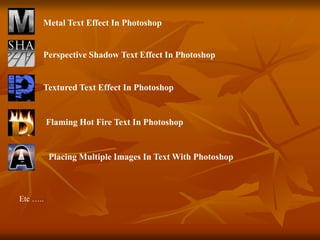
Metal Text Effect In Photoshop
Perspective Shadow Text Effect In Photoshop
Textured Text Effect In Photoshop
Flaming Hot Fire Text In Photoshop
Placing Multiple Images In Text With Photoshop
Etc …..
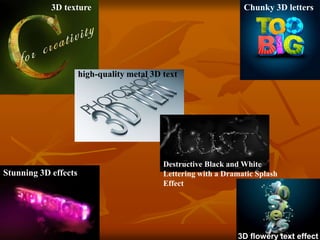
3D texture
high-quality metal 3D text
Destructive Black and White
Lettering with a Dramatic Splash
Effect
Chunky 3D letters
Stunning 3D effects
3D flowery text effect
Adobe Flash
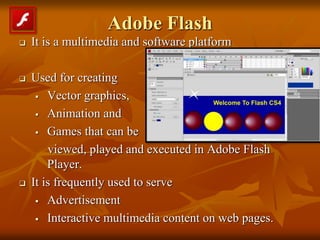
 It is a multimedia and software platform
 Used for creating
 Vector graphics,
 Animation and
 Games that can be
viewed, played and executed in Adobe Flash
Player.
 It is frequently used to serve
 Advertisement
 Interactive multimedia content on web pages.
Conn..
 Interactive Flash animations are created using
ActionScript.
 Flash is vector based and hence a lightweight option
for animation with smaller file size as opposed to
real movie files that are raster based with much
larger file size. With Flash, you can express
something to a visitor in a more efficient and
attractive way.
Adobe InDesign
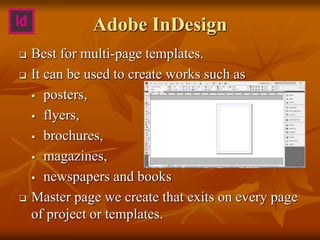
 Best for multi-page templates.
 It can be used to create works such as
 posters,
 flyers,
 brochures,
 magazines,
 newspapers and books
 Master page we create that exits on every page
of project or templates.
Adobe Illustrator
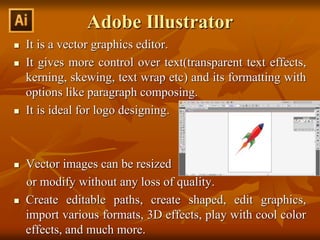
 It is a vector graphics editor.
 It gives more control over text(transparent text effects,
kerning, skewing, text wrap etc) and its formatting with
options like paragraph composing.
 It is ideal for logo designing.
 Vector images can be resized
or modify without any loss of quality.
 Create editable paths, create shaped, edit graphics,
import various formats, 3D effects, play with cool color
effects, and much more.
Adobe Audition
 It is a digital audio workstation
 Multi-track,
 Audio file editing and
creation.
 Designed to accelerate
audio and video
production workflows
Adobe Premiere Pro
 It is a timeline-based video editing software
application.
 It includes video editing,
graphic design, and web
development programs.
powerful editing tool,
capable of producing broadcast-quality and high-
definition video.
 Premiere Pro is used by broadcasters such as the BBC
and CNN.
•Avatar
Usage / Application
 Entertainment and fine arts
 Education
 Document imaging
 Wildlife
 Agriculture
 Creative industries
 Commercial uses
 E-magazines
 Video-on-demand
 Games
 Hospital Information System
 Etc…
E-content development using Multimedia

E-content development using Multimedia

  • 1.
  • 2.
    Introduction  E-Learning isthe use of technology to enable people to learn anytime and anywhere. E-Learning can include training, the delivery of just-in-time information and guidance from experts.  E-content: Digital content that can be transmitted over a computer network such as the Internet.
  • 3.
    Phases of e-contentdevelopment The Analysis Phase The Design Phase The Implementation Phase The Testing phase The Evaluation Phase The Development Phase
  • 4.
    Multimedia =Multi +Media  Multi : many; much; multiple  Medium : An intervening substance through which something is transmitted or carried on; A means of mass communication such as a newspaper, magazine or TV.  The use of computers to present text, graphics, video, animation, and sound in an integrated way.
  • 5.
     Characteristics ofa Multimedia System  It must be computer controlled.  Multimedia systems are integrated.  The information they handle must be represented digitally.  The interface to the final presentation of media is usually interactive
  • 6.
     Components ofa Multimedia System  Capture devices  Video Camera, Video Recorder, Keyboards, mice, 3D input devices etc.  Storage Devices  Hard disks, CD-ROMs, Jaz/Zip drives, DVD, etc  Communication Networks  Ethernet, FDDI(Fiber Distributed Data Interface), Intranets, Internets.  Computer Systems  Multimedia Desktop machines, Workstations,  Display Devices  CD-quality speakers, monitors, Colour printers, mobiles, etc
  • 7.
    Multimedia Elements ofE-content  Text  Pictures  Animation  Presentations  Sound  Video
  • 8.
    Adobe Photoshop  Photoshopis for creating and editing photos and raster (pixel) based art work.  It can be used to create:  User interface designs  Web pages  Banner ads  Video graphics  Editing pictures for print  etc… .PSD
  • 9.
    Placing An ImageIn Text With Photoshop CS6 Colorful Light Burst Text Effect With Photoshop CS6 Multiple Text Strokes With Smart Objects In Photoshop Turning Text Into Gold With Photoshop Stroke Text With A Brush In Photoshop Rotate, Flip and Scale Individual Letters In Text With Photoshop Ghostly Blur Text Effect In Photoshop
  • 10.
    Metal Text EffectIn Photoshop Perspective Shadow Text Effect In Photoshop Textured Text Effect In Photoshop Flaming Hot Fire Text In Photoshop Placing Multiple Images In Text With Photoshop Etc …..
  • 11.
    3D texture high-quality metal3D text Destructive Black and White Lettering with a Dramatic Splash Effect Chunky 3D letters Stunning 3D effects 3D flowery text effect
  • 12.
    Adobe Flash  Itis a multimedia and software platform  Used for creating  Vector graphics,  Animation and  Games that can be viewed, played and executed in Adobe Flash Player.  It is frequently used to serve  Advertisement  Interactive multimedia content on web pages.
  • 13.
    Conn..  Interactive Flashanimations are created using ActionScript.  Flash is vector based and hence a lightweight option for animation with smaller file size as opposed to real movie files that are raster based with much larger file size. With Flash, you can express something to a visitor in a more efficient and attractive way.
  • 14.
    Adobe InDesign  Bestfor multi-page templates.  It can be used to create works such as  posters,  flyers,  brochures,  magazines,  newspapers and books  Master page we create that exits on every page of project or templates.
  • 15.
    Adobe Illustrator  Itis a vector graphics editor.  It gives more control over text(transparent text effects, kerning, skewing, text wrap etc) and its formatting with options like paragraph composing.  It is ideal for logo designing.  Vector images can be resized or modify without any loss of quality.  Create editable paths, create shaped, edit graphics, import various formats, 3D effects, play with cool color effects, and much more.
  • 16.
    Adobe Audition  Itis a digital audio workstation  Multi-track,  Audio file editing and creation.  Designed to accelerate audio and video production workflows
  • 17.
    Adobe Premiere Pro It is a timeline-based video editing software application.  It includes video editing, graphic design, and web development programs. powerful editing tool, capable of producing broadcast-quality and high- definition video.  Premiere Pro is used by broadcasters such as the BBC and CNN. •Avatar
  • 18.
    Usage / Application Entertainment and fine arts  Education  Document imaging  Wildlife  Agriculture  Creative industries  Commercial uses  E-magazines  Video-on-demand  Games  Hospital Information System  Etc…

Editor's Notes

  • #7 Ethernet FDDI : it is standard for data transmission in LAN.(optical fiber = Physical medium ) ATM Intranets Internets
  • #13 Raster = pixel ( jpeg) Vector = paths (.eps)
  • #14 It is an enhanced superset of the ECMAScript programming language, with a classical Java-style class model, rather than JavaScript's prototype model.
  • #15 Flyers : a small handbill advertising an event or product. Brochures : small book or magazine contain images and info.