Getting Started with Coded UI Testing:
Building Your First Automated Test
Imaginet Resources Corp.
www.imaginet.com
Agenda
• Coded UI Test Overview
• Recording Coded UI
Tests
• Adding Test Validation
• Writing your own code
• Best Practices
Coded UI Test Tools
• Used to automate testing from the user interface
• Test development/maintenance in Visual Studio
• Tools provided to improve creation and maintenance
of Coded UI tests
• Can author and maintain tests without writing code or
can extend tests using .NET
• Can run within Visual Studio or through automation
(e.g., a build)
Test development and maintenance from within
Visual Studio
Supported Platforms
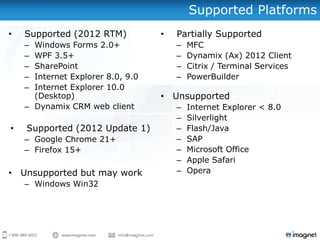
• Supported (2012 RTM)
– Windows Forms 2.0+
– WPF 3.5+
– SharePoint
– Internet Explorer 8.0, 9.0
– Internet Explorer 10.0
(Desktop)
– Dynamix CRM web client
• Supported (2012 Update 1)
– Google Chrome 21+
– Firefox 15+
• Unsupported but may work
– Windows Win32
• Partially Supported
– MFC
– Dynamix (Ax) 2012 Client
– Citrix / Terminal Services
– PowerBuilder
• Unsupported
– Internet Explorer < 8.0
– Silverlight
– Flash/Java
– SAP
– Microsoft Office
– Apple Safari
– Opera
Agenda
• Coded UI Test Overview
• Recording Coded UI
Tests
• Adding Test Validation
• Writing your own code
• Best Practices
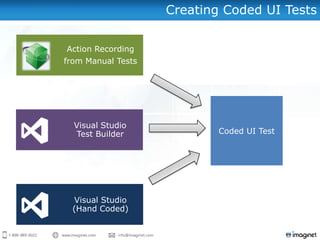
Creating Coded UI Tests
Action Recording
from Manual Tests
Visual Studio
Test Builder
Visual Studio
(Hand Coded)
Coded UI Test
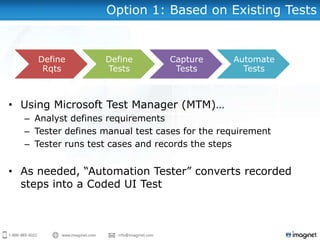
Option 1: Based on Existing Tests
• Using Microsoft Test Manager (MTM)…
– Analyst defines requirements
– Tester defines manual test cases for the requirement
– Tester runs test cases and records the steps
• As needed, “Automation Tester” converts recorded
steps into a Coded UI Test
Define
Rqts
Define
Tests
Capture
Tests
Automate
Tests
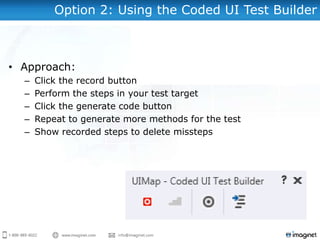
Option 2: Using the Coded UI Test Builder
• Approach:
– Click the record button
– Perform the steps in your test target
– Click the generate code button
– Repeat to generate more methods for the test
– Show recorded steps to delete missteps
DEMONSTRATION
• Converting Test Cases
• Recording tests with the
Coded UI Test Builder
Option 3: Author Tests using .NET
• Hand-code in .NET, without any additional assistance
• Utilize one of the Coded UI-based community frameworks:
– CUITe (Coded UI Test Enhanced)
• Authored by Microsoft employees but not a „product‟
• Uses its own tooling to maintain a separate UI object repository
• Improves code maintainability
• Browser-based only
• Currently only supported on Visual Studio 2010
• Maintained on CodePlex:
http://cuite.codeplex.com/
– Code First Coded UI
• Led by Microsoft employees but not a „product‟
• Pure code – does not use an object repository
• Installable via NuGet
• Uses Scaffolding approach to generate tests
• Browser-based only
• Currently only supported on Visual Studio 2010
• Maintained on CodePlex:
http://codeduicodefirst.codeplex.com/
Agenda
• Coded UI Test
Overview
• Recording Coded UI
Tests
• Adding Test Validation
• Writing your own
code
• Best Practices
Validation
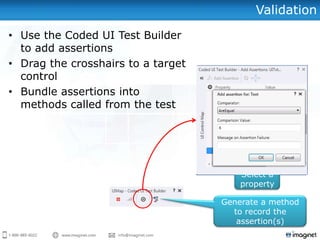
• Use the Coded UI Test Builder
to add assertions
• Drag the crosshairs to a target
control
• Bundle assertions into
methods called from the test
Select a
property
Click to add
assertion
Generate a method
to record the
assertion(s)
DEMONSTRATION
• Adding Assertions
Agenda
• Coded UI Test Overview
• Recording Coded UI Tests
• Adding Test Validation
• Writing your own code
• Best Practices and
References
The Primary Components
• Test Class (e.g., MyTest.cs)
– A .NET Coded UI Test class containing one or more Test
Methods.
• Test Method
– An individual automated test case inside a Test Class.
• Recorded Method
– Code which actually automates the UI and performs
assertions. (Do not change this code!)
• UIMap
– An XML designer file and related generated classes containing
the recorded methods.
Overriding Generated Properties
[TestMethod]
public void CodedUITestMethod1()
{
this.UIMap.OpenCalc();
this.UIMap.AddThreeAndTwo();
this.UIMap.VerifySumExpectedValues.UITxtDisplayEditText = "5";
this.UIMap.VerifySum();
this.UIMap.CloseCalc();
}
“Recorded Methods”
created using the UI Test
Builder.
Hand-coded to change the
expected value for the VerifySum
recorded method. There are many
other overrides made available to
you in the generated code.
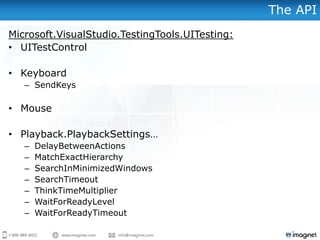
The API
Microsoft.VisualStudio.TestingTools.UITesting:
• UITestControl
• Keyboard
– SendKeys
• Mouse
• Playback.PlaybackSettings…
– DelayBetweenActions
– MatchExactHierarchy
– SearchInMinimizedWindows
– SearchTimeout
– ThinkTimeMultiplier
– WaitForReadyLevel
– WaitForReadyTimeout
DEMONSTRATION
• Digging into the Code
Agenda
• Coded UI Test Overview
• Recording Coded UI Tests
• Adding Test Validation
• Writing your own code
• Best Practices
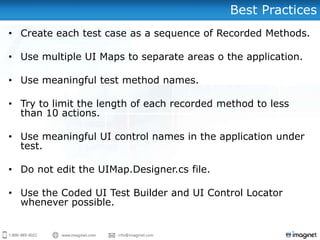
Best Practices
• Create each test case as a sequence of Recorded Methods.
• Use multiple UI Maps to separate areas o the application.
• Use meaningful test method names.
• Try to limit the length of each recorded method to less
than 10 actions.
• Use meaningful UI control names in the application under
test.
• Do not edit the UIMap.Designer.cs file.
• Use the Coded UI Test Builder and UI Control Locator
whenever possible.
Summary
• Coded UI Test Overview
• Recording Coded UI Tests
• Adding Test Validation
• Writing your own code
• Best Practices
Questions?
Want to know more...?
Imaginet‟s New Blog Keeps You In The Know
http://blog.imaginet.com
Stay up to speed on the latest news from
Imaginet, Microsoft, Visual Studio, and the entire software
development world.
More Webcasts on ALM / TFS / Visual Studio 2012
• Quality Coding: What’s New with Visual Studio 2012
• April 18 (1:00-2:30pm CT)
• May 9 (1:00-2:30pm CT)
• May 23 (1:00-2:30pm CT)
• Getting Started With Coded UI testing: Building Your First
Automated Test
• April 11 (1:00-2:30pm CT)
• April 25 (1:00-2:30pm CT)
• June 13 (1:00-2:30pm CT)
• June 27 (1:00-2:30pm CT)
• The How, What, and Why of Performance Testing Your
Applications
• May 2 (1:00-2:30pm CT)
• Top Business Benefits of Application Lifecycle Management
(ALM)
• June 3 (1:00-2:00pm CT)
• Managing Test Labs Without the Headaches
• June 6 (1:00-2:30pm CT)
• June 20 (1:00-2:30pm CT)
Free Services from Imaginet & Microsoft
There are a number of different Microsoft Programs that you
might be able to leverage to get some free services from
Imaginet:
• Deployment Planning Services (DPS) – You can trade in your
Microsoft Software Assurance credits to receive some free
TFS/ALM Deployment Planning Services days with Imaginet
• Partner Services Credit (PSC) – Have you or are you about to
spend money with Microsoft on Visual Studio 2012 products? If
so, Microsoft may kick in some funding to help you successfully
adopt.
• Virtual Technical Specialist (VTS) hours –You may be eligible
to receive some free remote consulting/training hours with
Imaginet through the Microsoft Virtual Technical Specialist
program.
For more information, email bmadison@imaginet.com.
Need Help with YOUR Automated Testing?
• Learn best practices for test selection, extension, data
binding, maintenance, frameworks, community extensions
(such as the CUITe and the UI Map Toolbox), and other
real-world scenarios.
• Includes automated test development & execution for YOUR
application
• Support and training for your team
• Includes a high-level ALM assessment
Imaginet’s Visual Studio 2012
Automated Testing 5-day Quickstart
Interested? Just email us at info@imaginet.com.
Email us at:
ALM Planning & Implementation Services
ALM Planning
• ALM Assessment & Envisioning Workshops
(3 or 5 days)
• VS & TFS Migration Planning Workshop (5
days)
• TFS Deployment Planning* (5 days)
• Visual SourceSafe to TFS Migration
Planning* (3 Days)
• Visual Studio Quality Tools Deployment
Planning* (5 days)
Upgrade
• TFS 2010 Adoption Quick Start (5 or 10
days)
• TFS 2012 Adoption Quick Start (5 or 10
days)
• TFS 2010 Upgrade Quick Start (10 days)
• TFS 2012 Upgrade Quick Start (10 days)
Remote Support
• Remote Support for TFS & Visual Studio
Lab
• Visual Studio Lab Management Quick Start
(10 days)
Testing
• Manual Testing with Test Manager Quick
Start (5 days)
• Visual Studio Testing Tools Quick Start (10
days)
• Visual Studio Automated Testing Quick Start
(5 days)
• Visual Studio Load Testing Quick Start (5 or
10 Days)
Builds
• Automated Build & Release Management
Quick Start (5 days)
• Automated Build Center of Excellence (CoE)
Database
• Visual Studio Database Tools Quick Start
(10 days)
Integrations
• Team Foundation Server (TFS) & Project
Server Integration Quick Start (10 days)
• TFS & Quality Center Integration/Migration
Quick Start (10 days)
For questions or more information,
please contact us at:
info@imaginet.com or (972)607-4830
Remember to add http://blog.imaginet.com to your favorite reader!
http://www.imaginet.com

Getting Started with Visual Studio’s Coded UI Testing: Building Your First Automated Test

  • 1.
    Getting Started withCoded UI Testing: Building Your First Automated Test Imaginet Resources Corp. www.imaginet.com
  • 2.
    Agenda • Coded UITest Overview • Recording Coded UI Tests • Adding Test Validation • Writing your own code • Best Practices
  • 3.
    Coded UI TestTools • Used to automate testing from the user interface • Test development/maintenance in Visual Studio • Tools provided to improve creation and maintenance of Coded UI tests • Can author and maintain tests without writing code or can extend tests using .NET • Can run within Visual Studio or through automation (e.g., a build) Test development and maintenance from within Visual Studio
  • 4.
    Supported Platforms • Supported(2012 RTM) – Windows Forms 2.0+ – WPF 3.5+ – SharePoint – Internet Explorer 8.0, 9.0 – Internet Explorer 10.0 (Desktop) – Dynamix CRM web client • Supported (2012 Update 1) – Google Chrome 21+ – Firefox 15+ • Unsupported but may work – Windows Win32 • Partially Supported – MFC – Dynamix (Ax) 2012 Client – Citrix / Terminal Services – PowerBuilder • Unsupported – Internet Explorer < 8.0 – Silverlight – Flash/Java – SAP – Microsoft Office – Apple Safari – Opera
  • 5.
    Agenda • Coded UITest Overview • Recording Coded UI Tests • Adding Test Validation • Writing your own code • Best Practices
  • 6.
    Creating Coded UITests Action Recording from Manual Tests Visual Studio Test Builder Visual Studio (Hand Coded) Coded UI Test
  • 7.
    Option 1: Basedon Existing Tests • Using Microsoft Test Manager (MTM)… – Analyst defines requirements – Tester defines manual test cases for the requirement – Tester runs test cases and records the steps • As needed, “Automation Tester” converts recorded steps into a Coded UI Test Define Rqts Define Tests Capture Tests Automate Tests
  • 8.
    Option 2: Usingthe Coded UI Test Builder • Approach: – Click the record button – Perform the steps in your test target – Click the generate code button – Repeat to generate more methods for the test – Show recorded steps to delete missteps
  • 9.
    DEMONSTRATION • Converting TestCases • Recording tests with the Coded UI Test Builder
  • 10.
    Option 3: AuthorTests using .NET • Hand-code in .NET, without any additional assistance • Utilize one of the Coded UI-based community frameworks: – CUITe (Coded UI Test Enhanced) • Authored by Microsoft employees but not a „product‟ • Uses its own tooling to maintain a separate UI object repository • Improves code maintainability • Browser-based only • Currently only supported on Visual Studio 2010 • Maintained on CodePlex: http://cuite.codeplex.com/ – Code First Coded UI • Led by Microsoft employees but not a „product‟ • Pure code – does not use an object repository • Installable via NuGet • Uses Scaffolding approach to generate tests • Browser-based only • Currently only supported on Visual Studio 2010 • Maintained on CodePlex: http://codeduicodefirst.codeplex.com/
  • 11.
    Agenda • Coded UITest Overview • Recording Coded UI Tests • Adding Test Validation • Writing your own code • Best Practices
  • 12.
    Validation • Use theCoded UI Test Builder to add assertions • Drag the crosshairs to a target control • Bundle assertions into methods called from the test Select a property Click to add assertion Generate a method to record the assertion(s)
  • 13.
  • 14.
    Agenda • Coded UITest Overview • Recording Coded UI Tests • Adding Test Validation • Writing your own code • Best Practices and References
  • 15.
    The Primary Components •Test Class (e.g., MyTest.cs) – A .NET Coded UI Test class containing one or more Test Methods. • Test Method – An individual automated test case inside a Test Class. • Recorded Method – Code which actually automates the UI and performs assertions. (Do not change this code!) • UIMap – An XML designer file and related generated classes containing the recorded methods.
  • 16.
    Overriding Generated Properties [TestMethod] publicvoid CodedUITestMethod1() { this.UIMap.OpenCalc(); this.UIMap.AddThreeAndTwo(); this.UIMap.VerifySumExpectedValues.UITxtDisplayEditText = "5"; this.UIMap.VerifySum(); this.UIMap.CloseCalc(); } “Recorded Methods” created using the UI Test Builder. Hand-coded to change the expected value for the VerifySum recorded method. There are many other overrides made available to you in the generated code.
  • 17.
    The API Microsoft.VisualStudio.TestingTools.UITesting: • UITestControl •Keyboard – SendKeys • Mouse • Playback.PlaybackSettings… – DelayBetweenActions – MatchExactHierarchy – SearchInMinimizedWindows – SearchTimeout – ThinkTimeMultiplier – WaitForReadyLevel – WaitForReadyTimeout
  • 18.
  • 19.
    Agenda • Coded UITest Overview • Recording Coded UI Tests • Adding Test Validation • Writing your own code • Best Practices
  • 20.
    Best Practices • Createeach test case as a sequence of Recorded Methods. • Use multiple UI Maps to separate areas o the application. • Use meaningful test method names. • Try to limit the length of each recorded method to less than 10 actions. • Use meaningful UI control names in the application under test. • Do not edit the UIMap.Designer.cs file. • Use the Coded UI Test Builder and UI Control Locator whenever possible.
  • 21.
    Summary • Coded UITest Overview • Recording Coded UI Tests • Adding Test Validation • Writing your own code • Best Practices
  • 22.
  • 23.
    Want to knowmore...?
  • 24.
    Imaginet‟s New BlogKeeps You In The Know http://blog.imaginet.com Stay up to speed on the latest news from Imaginet, Microsoft, Visual Studio, and the entire software development world.
  • 25.
    More Webcasts onALM / TFS / Visual Studio 2012 • Quality Coding: What’s New with Visual Studio 2012 • April 18 (1:00-2:30pm CT) • May 9 (1:00-2:30pm CT) • May 23 (1:00-2:30pm CT) • Getting Started With Coded UI testing: Building Your First Automated Test • April 11 (1:00-2:30pm CT) • April 25 (1:00-2:30pm CT) • June 13 (1:00-2:30pm CT) • June 27 (1:00-2:30pm CT) • The How, What, and Why of Performance Testing Your Applications • May 2 (1:00-2:30pm CT) • Top Business Benefits of Application Lifecycle Management (ALM) • June 3 (1:00-2:00pm CT) • Managing Test Labs Without the Headaches • June 6 (1:00-2:30pm CT) • June 20 (1:00-2:30pm CT)
  • 26.
    Free Services fromImaginet & Microsoft There are a number of different Microsoft Programs that you might be able to leverage to get some free services from Imaginet: • Deployment Planning Services (DPS) – You can trade in your Microsoft Software Assurance credits to receive some free TFS/ALM Deployment Planning Services days with Imaginet • Partner Services Credit (PSC) – Have you or are you about to spend money with Microsoft on Visual Studio 2012 products? If so, Microsoft may kick in some funding to help you successfully adopt. • Virtual Technical Specialist (VTS) hours –You may be eligible to receive some free remote consulting/training hours with Imaginet through the Microsoft Virtual Technical Specialist program. For more information, email bmadison@imaginet.com.
  • 27.
    Need Help withYOUR Automated Testing? • Learn best practices for test selection, extension, data binding, maintenance, frameworks, community extensions (such as the CUITe and the UI Map Toolbox), and other real-world scenarios. • Includes automated test development & execution for YOUR application • Support and training for your team • Includes a high-level ALM assessment Imaginet’s Visual Studio 2012 Automated Testing 5-day Quickstart Interested? Just email us at info@imaginet.com.
  • 28.
    Email us at: ALMPlanning & Implementation Services ALM Planning • ALM Assessment & Envisioning Workshops (3 or 5 days) • VS & TFS Migration Planning Workshop (5 days) • TFS Deployment Planning* (5 days) • Visual SourceSafe to TFS Migration Planning* (3 Days) • Visual Studio Quality Tools Deployment Planning* (5 days) Upgrade • TFS 2010 Adoption Quick Start (5 or 10 days) • TFS 2012 Adoption Quick Start (5 or 10 days) • TFS 2010 Upgrade Quick Start (10 days) • TFS 2012 Upgrade Quick Start (10 days) Remote Support • Remote Support for TFS & Visual Studio Lab • Visual Studio Lab Management Quick Start (10 days) Testing • Manual Testing with Test Manager Quick Start (5 days) • Visual Studio Testing Tools Quick Start (10 days) • Visual Studio Automated Testing Quick Start (5 days) • Visual Studio Load Testing Quick Start (5 or 10 Days) Builds • Automated Build & Release Management Quick Start (5 days) • Automated Build Center of Excellence (CoE) Database • Visual Studio Database Tools Quick Start (10 days) Integrations • Team Foundation Server (TFS) & Project Server Integration Quick Start (10 days) • TFS & Quality Center Integration/Migration Quick Start (10 days)
  • 29.
    For questions ormore information, please contact us at: info@imaginet.com or (972)607-4830 Remember to add http://blog.imaginet.com to your favorite reader!
  • 30.

Editor's Notes

  • #3 This training seminar will demonstrate how to record tests run against various types of application user interfaces using Microsoft Visual Studio&apos;s Coded UI Tests and how to replay them at any time. Additionally, we will explore how to embed validations, either simple or elaborate, to ensure your application is producing the correct results. Learn how to improve the quality of your applications by having a repeatable set of Microsoft Coded UI Tests available to ensure defects don’t go unnoticed!
  • #6 Extensible framework. Sample shows testing support for MS ExcelUpdated, source: http://msdn.microsoft.com/en-us/library/dd380742.aspxFirefox dropped: http://msdn.microsoft.com/en-us/library/hh506981.aspx---
  • #19 Source: http://msdn.microsoft.com/en-us/library/microsoft.visualstudio.testtools.uitesting.aspx
  • #22 Source: http://msdn.microsoft.com/en-us/library/dd380782.aspx
  • #25 Want to know more?
  • #33 Want to know more?