
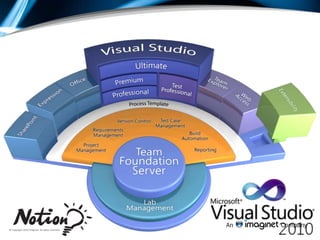





Using Visual Studio 2010 to Improve QualityAnna RussoApplication Lifecycle Management ConsultantNotion Solutionsarusso@notionsolutions.comxxBlog- http://ImprovingSoftwareQuality.blogspot.comwww.notionsolutions.com
The enclosed material is proprietary to Imaginet and is therefore  copyrighted.  This document may not be disclosed in any manner to anyone other than the addressee and the employees or representatives of Notion Solutions who are recipients. This document may not be used in any manner other than for the purpose it was distributed.  Any unauthorized use, reproduction or transmission in any form is strictly prohibited.www.notionsolutions.com
7 Steps to Improving QualityStep 1- Work ManagementStep 2- Defining/Reporting of “Done” Step 3- Automated BuildsStep 4- Manual & Automated Testing ToolsStep 5- Developer Quality ToolsStep 6- Lab ManagementStep 7- Working Smart
Step 1: Work ManagementHow do we manage work?
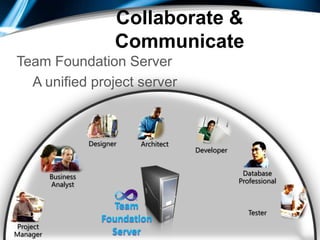
Collaborate & CommunicateTeam Foundation ServerA unified project serverDeveloperDesignerDatabase ProfessionalTesterArchitectProjectManagerBusinessAnalystTeamFoundationServer
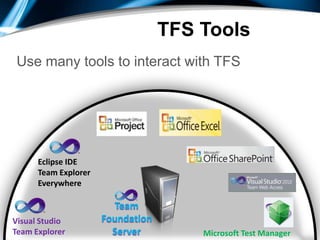
TFS ToolsUse many tools to interact with TFSEclipse IDETeam Explorer EverywhereTeamFoundationServerVisual StudioTeam ExplorerMicrosoft Test Manager
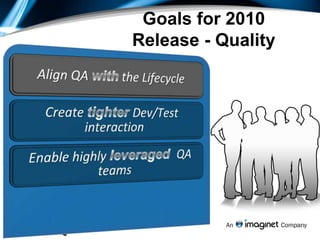
Goals for 2010 Release - QualityAlign QA with the LifecycleCreate tighter Dev/Test interactionEnable highly leveraged  QA teams
Work ManagementNEW!Hierarchical Work Management
Excel Reports
Ad-hoc Reports
Improved Dashboards
Improved Integration with Project and Excel
Agile WorkbooksDemoWork Management
Step 2: Defining/Reporting of “Done”What is the end goal?
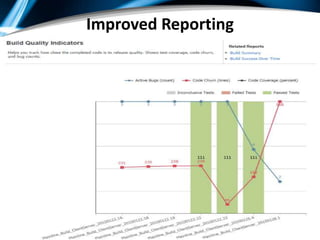
Improved Reporting
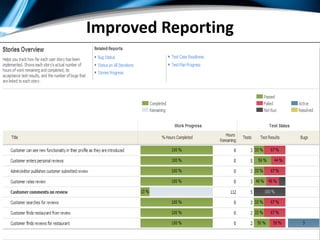
Improved Reporting
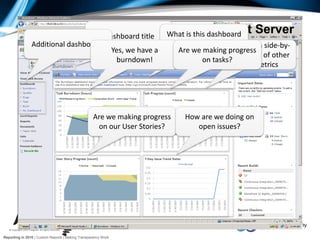
Dashboard: SharePoint ServerDashboard titleWhat is this dashboard about?Additional dashboardsReports shown side-by-side in context of other relevant metricsYes, we have a burndown!Are we making progress on tasks?Are we making progress on our User Stories?How are we doing on open issues?Reporting in 2010 | Custom Reports | Making Transparency Work
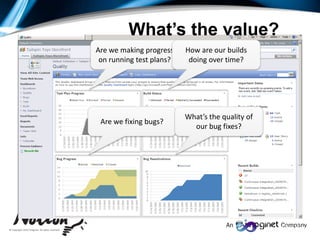
Are we making progress on running test plans?How are our builds doing over time?Are we fixing bugs?What’s the quality of our bug fixes?What’s the value?
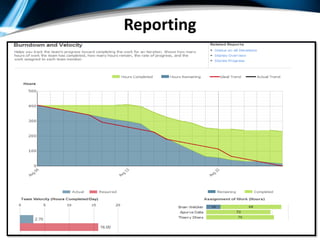
Reporting
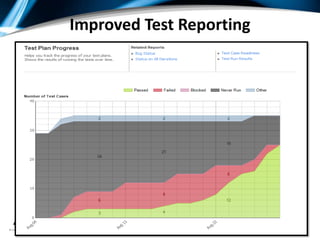
Improved Test Reporting
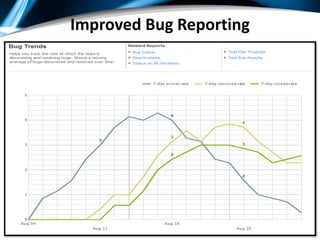
Improved Bug Reporting
Step 3: Automated BuildWhat is our traceability from Dev to QA?
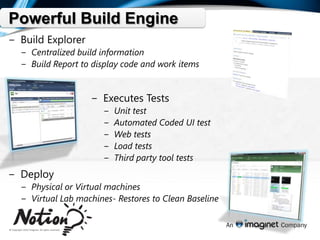
Powerful Build EngineBuild ExplorerCentralized build informationBuild Report to display code and work itemsExecutes TestsUnit testAutomated Coded UI testWeb testsLoad testsThird party tool testsDeployPhysical or Virtual machinesVirtual Lab machines- Restores to Clean Baseline
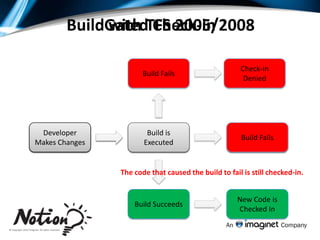
Gated Check-inBuild with TFS 2005/2008Check-In DeniedBuild FailsNew Code is Checked InBuild is ExecutedDeveloper Makes ChangesBuild FailsBuild is ExecutedDeveloper Makes ChangesThe code that caused the build to fail is still checked-in.Build SucceedsNew Code is Checked In
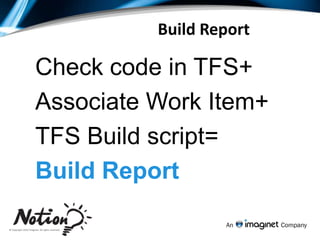
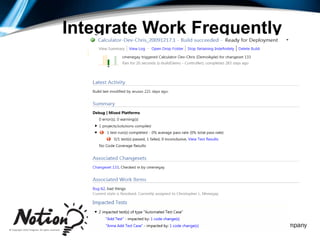
Build ReportCheck code in TFS+ Associate Work Item+ TFS Build script= Build Report
Integrate Work Frequently
Step 4: Manual Testing ToolsHow do we keep track of Testing?
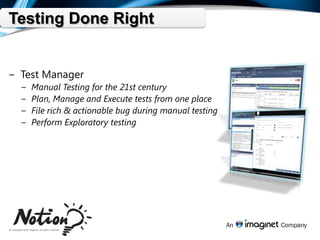
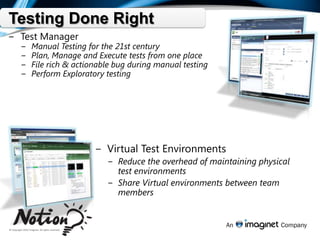
Testing Done RightTest ManagerManual Testing for the 21st centuryPlan, Manage and Execute tests from one placeFile rich & actionable bug during manual testingPerform Exploratory testing
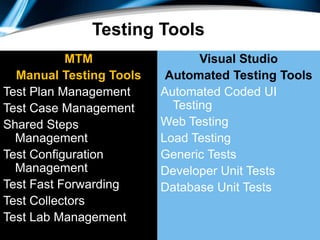
Testing ToolsMTM Manual Testing ToolsTest Plan ManagementTest Case ManagementShared Steps ManagementTest Configuration ManagementTest Fast ForwardingTest CollectorsTest Lab ManagementVisual StudioAutomated Testing ToolsAutomated Coded UI TestingWeb TestingLoad TestingGeneric TestsDeveloper Unit TestsDatabase Unit Tests
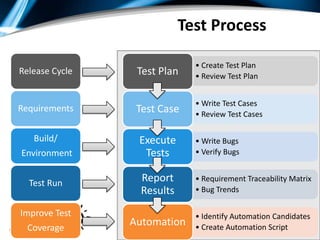
                               Test ProcessRelease CycleRequirementsBuild/ EnvironmentTest RunImprove TestCoverage
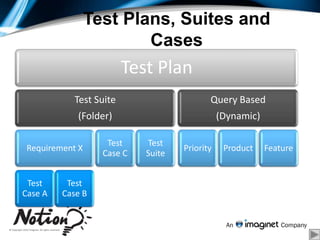
Test Plans, Suites and Cases
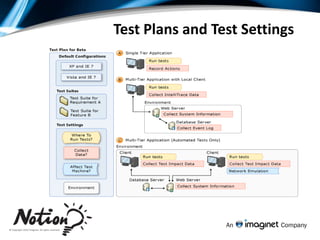
Test Plans and Test Settings
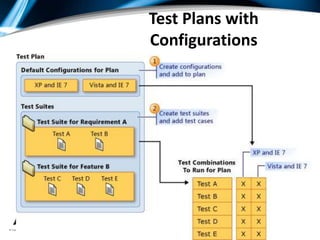
Test Plans with Configurations
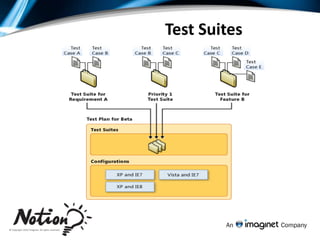
Test Suites
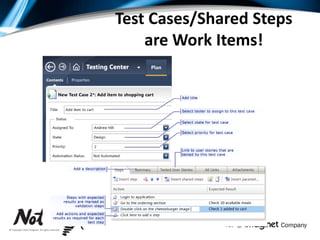
Test Cases/Shared Steps are Work Items!
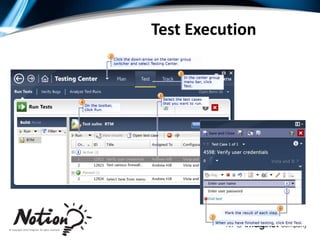
Test Execution
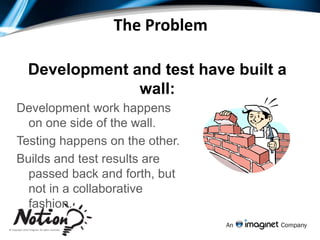
The ProblemDevelopment and test have built a wall:Development work happens on one side of the wall.Testing happens on the other. Builds and test results are passed back and forth, but not in a collaborative fashion.
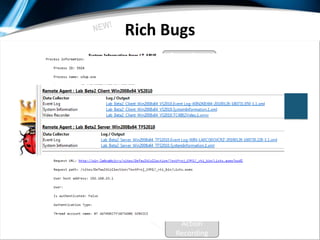
Rich BugsNEW!Repro StepsScreenshotVideo CaptureSystem InfoDebug LogTest EnvironmentEvent LogAction Recording
DemoTest Case Management/Filing Bugs
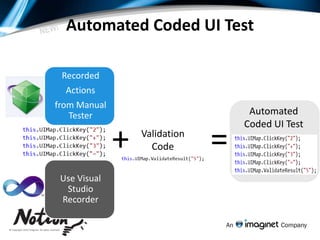
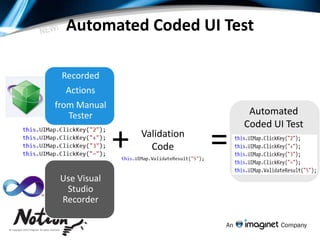
Automated Coded UI TestNEW!RecordedActionsfrom Manual TesterUse Visual Studio RecorderAutomatedCoded UI Test+=ValidationCode
Coded UI TestingEnables verification of UI functionality.Record test actions and VS will generate the resulting code.Assertions can be added to verify functionality.Like all VS tests, results can be stored in TFS.
Best Practices (From MSDN)Create each test case as a sequence of Recorded Methods. Use meaningful method names. Try to limit the length of each recorded method to less than 10 actions.Do not modify the RecordedMethods.cs file.Do not edit the UIMap.Designer.cs file.
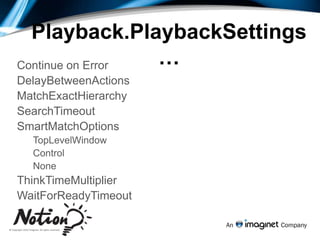
Playback.PlaybackSettings…Continue on ErrorDelayBetweenActionsMatchExactHierarchySearchTimeoutSmartMatchOptionsTopLevelWindowControlNoneThinkTimeMultiplierWaitForReadyTimeout
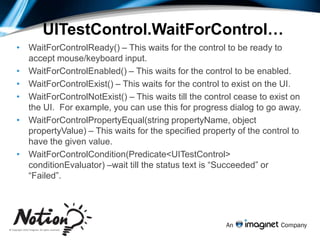
UITestControl.WaitForControl…WaitForControlReady() – This waits for the control to be ready to accept mouse/keyboard input. 
WaitForControlEnabled() – This waits for the control to be enabled. 
WaitForControlExist() – This waits for the control to exist on the UI. 
WaitForControlNotExist() – This waits till the control cease to exist on the UI.  For example, you can use this for progress dialog to go away.
WaitForControlPropertyEqual(string propertyName, object propertyValue) – This waits for the specified property of the control to have the given value.  
WaitForControlCondition(Predicate<UITestControl> conditionEvaluator) –wait till the status text is “Succeeded” or “Failed”. DemoAutomated Coded UI Testing
Step 5: Developer Quality ToolsHow can developers contributeto quality?
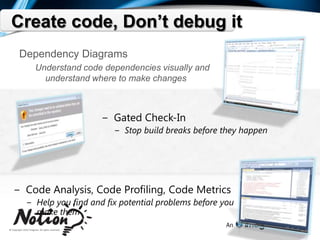
Create code, Don’t debug itDependency DiagramsUnderstand code dependencies visually and understand where to make changesGated Check-InStop build breaks before they happenCode Analysis, Code Profiling, Code MetricsHelp you find and fix potential problems before you make them
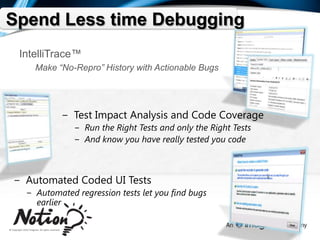
Spend Less time DebuggingIntelliTrace™Make “No-Repro” History with Actionable BugsTest Impact Analysis and Code CoverageRun the Right Tests and only the Right TestsAnd know you have really tested you codeAutomated Coded UI TestsAutomated regression tests let you find bugs earlier
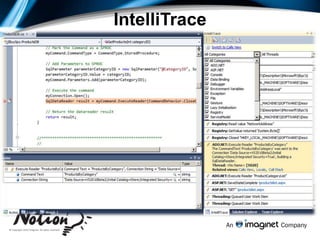
IntelliTrace
Automated Coded UI TestNEW!RecordedActionsfrom Manual TesterUse Visual Studio RecorderAutomatedCoded UI Test+=ValidationCode
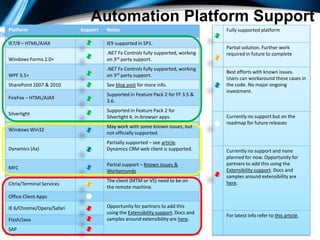
Automation Platform Support
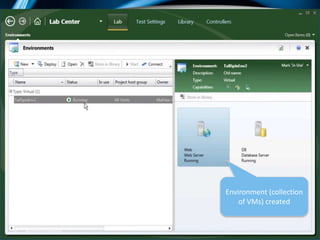
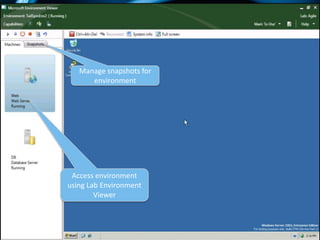
Step 6 : Test Lab ManagmentHow do we integrate VM’s formanual or automated testing?

STARWEST 2010 - 7 Steps To Improving Software Quality using Microsoft Test Manager, Visual Studio 2010, and TFS 2010

Editor's Notes

  • #6 This is the fully animated slide.
  • #9 The 2010 release for Microsoft is a very big release with a lot of rich capabilities. Quality is a key pillars for the release planning efforts and we aspired to achieve the above goals with the test offerings in the 2010 release by taking a fresh look at the problems.We want to align QA with the lifecycle to ensure that testers can add more value to the application lifecycle and are not looked at “necessary evil”. Having test assets co-located with the dev assets &amp; project assets ensures visibility across the entire team.Create tighter integration across development &amp; test teams to ensure that we can eliminate waste across the hand shake (or lack there of) that happens across devs &amp; tests when it comes to bugs, builds, recreation of bugs etc. Enable highly leveraged QA teams ensures that teams are most efficient and are driving up productivity by focusing on key tasks and eliminating a lot of the waste that spans from boring repetitive tasks.
  • #21 Having the right infrastructure and approach to testing is helps ensure high quality deliverables at the end of the development cycle. Visual Studio 2010 Ultimate arms you with tools to ensure that testing is done right the first time and streamlines the testing process to ensure that you can deliver on time and on budget.Test and Lab ManagerVisual Studio 2010 Ultimate delivers a brand new product for manual testing and test case management. The new Test and Lab Manager interface is a thoroughly modern interface that allows testers and anyone else involved in testing to manage test plans, test cases and individual tests. In addition, Test and lab manager acts as the one stop shop for manual testing. When executing manual tests, the Test and Lab Manager interface morphs into the Microsoft Test Runner, a modern integrated manual test interface that allows manual tests to be executed and the results to be filed in a simple and productive way. Additionally, Microsoft Test Runner can take a snapshot of the system data, record a video of the test, take a picture of the bug and record the IntelliTrace log to ensure you can always repro a bug, and there are no more &quot;not reproducible&quot; discussions. Virtual Test EnvironmentsOne of the most costly aspects of testing is the maintenance of the test infrastructure. A traditional test infrastructure consisted of rooms full of physical test machines that required dedicated professionals to provision and maintain. With Visual Studio 2010 Ultimate this test infrastructure has gone virtual. By using the new virtualized test lab management capabilities it is possible to reduce the overhead inherent with maintaining a physical test infrastructure and instead take advantage of the power of virtualized environments. It is also possible to share these environments not only within your testing team but also with other members of the team who need access to specific environments for development tests or dry runs prior to full scale testing begins.Web and Load TestingVisual Studio 2010 Ultimate also gives you access to advanced web and load testing features that help you ensure that whatever application you are building it is ready for the most demanding uses. The Web and Load testing capabilities of Visual Studio 2010 Ultimate help you ensure that whatever application you are building it is ready for whatever scenarios your organization can envisage taking you one step closer to knowing your application is ready for prime time.
  • #22 OverviewWhen you’re building software as a team, there’s a natural cycle that you follow – testers find bugs, developers fix bugs, testers verify fixes. In order for this cycle to be productive, testers need builds that include fixes to the bugs that the developers have fixed. If the build is broken, there is a risk of holding up the entire team until it is fixed.Gated check-in provides a way to prevent build breaks by validating a developer’s changes prior to committing them to the version control repository. Those changes are validated via an automated build. If the build fails, the user’s pending changes are rejected and passed back to them as a shelveset, otherwise the changes are committed to the repository.Shelve-and-build, a related feature, lets the developer validate their changes with a private automated build. Unlike gated check-in, shelve-and-build is something the developer can choose to do. It can help identify breaks in code that the developer may not generally build on their local machine.Value Proposition       If a single developer on your team typically breaks the build just once a year and you have 52 developers working on your project, the build could be broken every week. If you have 260 developers, the build could be broken every day. When the build breaks, the entire team may be stalled resulting in substantial productivity losses. Those losses could be prevented by the gated check-in feature.
  • #26 Having the right infrastructure and approach to testing is helps ensure high quality deliverables at the end of the development cycle. Visual Studio 2010 Ultimate arms you with tools to ensure that testing is done right the first time and streamlines the testing process to ensure that you can deliver on time and on budget.Test and Lab ManagerVisual Studio 2010 Ultimate delivers a brand new product for manual testing and test case management. The new Test and Lab Manager interface is a thoroughly modern interface that allows testers and anyone else involved in testing to manage test plans, test cases and individual tests. In addition, Test and lab manager acts as the one stop shop for manual testing. When executing manual tests, the Test and Lab Manager interface morphs into the Microsoft Test Runner, a modern integrated manual test interface that allows manual tests to be executed and the results to be filed in a simple and productive way. Additionally, Microsoft Test Runner can take a snapshot of the system data, record a video of the test, take a picture of the bug and record the IntelliTrace log to ensure you can always repro a bug, and there are no more &quot;not reproducible&quot; discussions. Virtual Test EnvironmentsOne of the most costly aspects of testing is the maintenance of the test infrastructure. A traditional test infrastructure consisted of rooms full of physical test machines that required dedicated professionals to provision and maintain. With Visual Studio 2010 Ultimate this test infrastructure has gone virtual. By using the new virtualized test lab management capabilities it is possible to reduce the overhead inherent with maintaining a physical test infrastructure and instead take advantage of the power of virtualized environments. It is also possible to share these environments not only within your testing team but also with other members of the team who need access to specific environments for development tests or dry runs prior to full scale testing begins.Web and Load TestingVisual Studio 2010 Ultimate also gives you access to advanced web and load testing features that help you ensure that whatever application you are building it is ready for the most demanding uses. The Web and Load testing capabilities of Visual Studio 2010 Ultimate help you ensure that whatever application you are building it is ready for whatever scenarios your organization can envisage taking you one step closer to knowing your application is ready for prime time.
  • #39 http://blogs.msdn.com/mathew_aniyan
  • #40 Assertions - This inserts assertions into your main coded UI test method. Even if some part of the recording must be changed, you can reuse your assertions.
  • #41 Hints provided by MS product team member: Mathew AniyanContinue on Error (login page recorded and “remember password” prompted during recording)Match Exact - Sometimes application may change so that the hierarchy gets modified. Record and Playback engine attempts to locate the control, in such cases, by skipping the intermediate elements in the hierarchy.
  • #42 Hints provided by MS product team member: Mathew AniyanContinue on Error (login page recorded and “remember password” prompted during recording)Match Exact - Sometimes application may change so that the hierarchy gets modified. Record and Playback engine attempts to locate the control, in such cases, by skipping the intermediate elements in the hierarchy.
  • #45 The more time you spend debugging and fixing code the less time you have to spend creating innovative solutions and bringing value to the outcome. Visual Studio 2010 Ultimate includes features that help you reduce the number of bugs that get into an application thereby freeing you up to spend more of your time being creative around the solutions you deliver. Dependency DiagramsMaking changes to code can be fraught with danger and often leads to many types of new bugs being introduced into a solution that can be difficult to debug and fix. Visual Studio 2010 Ultimate allows you to create dependency diagrams that allow you to visually understand the dependencies between various areas of a solution helping you find where to make changes and what potential ripple effect those changes may have.Gated Check-InOne of the most costly problems that development teams face is when a build gets broken. This can potentially stop all development work for an entire team while the cause of the broken build is investigated and fixes are put in place. Visual Studio 2010 Ultimate includes an innovative new feature called Gated Check-In that looks to stop build breaks before they happen. By utilizing the shelving infrastructure first introduced into TFS in 2005, Gated Check-Ins allow developer to check code into source control but hold that check-in from the build tree until it has passed all the required validation and test required to ensure that there are not potential issues that may break the build. This is all done in the background and allows you to continue working while the checks and validations are performed.Code Analysis and Code MetricsOne easy way to reduce the number of bugs that occur is to simply ensure that the code you right is higher quality. Visual Studio 2010 Ultimate helps you find and fix problems before you make them by delivering advanced tools that analyze code for potential issues and ensure that code that is written is of high quality and maintainable.
  • #46 Debugging code takes up a disproportionate amount of the development lifecycle. With the new features in Visual Studio 2010 Ultimate you can ensure that you reduce the amount of time spent debugging code to a minimum. IntelliTraceThe new IntelliTrace feature makes the “no-repro” discussion a thing of the past. It records the application’s execution history guaranteeing that the developer can always reproduce a reported bug. Step back in time to see the exact application state at the point of time when the bug occurs and use the inline call hierarchy to quickly trace a program’s execution flow without invoking the debugger. Automatically open the code at the place exactly where the code broke, reducing debugging time. Test Impact Analysis and Code CoverageTest impact analysis can tell you exactly what tests are impacted when you change a piece of code allowing you to choose to only run impacted tests. When you change a piece of code, Visual Studio 2010 Ultimate can make an automatic recommendation of tests based on that change leading to reduced testing time. Coupling this functionality with the Code Coverage tools ensure that not only are you running the appropriate tests but that you are testing all of your code so you can be confident that the code you deliver is free of defects.Coded UI TestsOnce you have found bugs in your code and have taken the steps to fix them, automated regression tests ensure that as you progress further through the development process that you catch any bugs that may have been re-introduced earlier in the cycle. This in turn ensures that you find new bugs earlier and can catch them when they are less costly to fix.
  • #51 Having the right infrastructure and approach to testing is helps ensure high quality deliverables at the end of the development cycle. Visual Studio 2010 Ultimate arms you with tools to ensure that testing is done right the first time and streamlines the testing process to ensure that you can deliver on time and on budget.Test and Lab ManagerVisual Studio 2010 Ultimate delivers a brand new product for manual testing and test case management. The new Test and Lab Manager interface is a thoroughly modern interface that allows testers and anyone else involved in testing to manage test plans, test cases and individual tests. In addition, Test and lab manager acts as the one stop shop for manual testing. When executing manual tests, the Test and Lab Manager interface morphs into the Microsoft Test Runner, a modern integrated manual test interface that allows manual tests to be executed and the results to be filed in a simple and productive way. Additionally, Microsoft Test Runner can take a snapshot of the system data, record a video of the test, take a picture of the bug and record the IntelliTrace log to ensure you can always repro a bug, and there are no more &quot;not reproducible&quot; discussions. Virtual Test EnvironmentsOne of the most costly aspects of testing is the maintenance of the test infrastructure. A traditional test infrastructure consisted of rooms full of physical test machines that required dedicated professionals to provision and maintain. With Visual Studio 2010 Ultimate this test infrastructure has gone virtual. By using the new virtualized test lab management capabilities it is possible to reduce the overhead inherent with maintaining a physical test infrastructure and instead take advantage of the power of virtualized environments. It is also possible to share these environments not only within your testing team but also with other members of the team who need access to specific environments for development tests or dry runs prior to full scale testing begins.Web and Load TestingVisual Studio 2010 Ultimate also gives you access to advanced web and load testing features that help you ensure that whatever application you are building it is ready for the most demanding uses. The Web and Load testing capabilities of Visual Studio 2010 Ultimate help you ensure that whatever application you are building it is ready for whatever scenarios your organization can envisage taking you one step closer to knowing your application is ready for prime time.
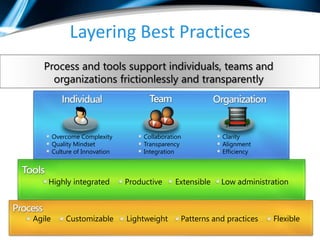
  • #57 The idea is you can take all of your learned best practices and begin to layer them into areas that need the most help. The notion of “best practices” apply at many levels when talking about the Application Lifecycle – from the individual to the organization.
  • #58 Let me drill down into the capabilities in each product. For a more extensive list of capabilities, please go to www.microsoft.com.vstudio.Microsoft Visual Studio 2010 Professional is the essential tool for basic development tasks to allow developers to implement their ideas easily. This includes core capabilities for Windows, Web, and Office development, along with new capabilities for Cloud and SharePoint development. There are also new tools for Silverlight and Multi-core development. With Visual Studio 2010 the IDE and editor were refreshed using Microsoft Windows Presentation Foundation.[CLICK]Microsoft Visual Studio 2010 Premium is a complete toolset for developers to deliver scalable, high quality applications. This includes support for offline database development, unit testing and change management, static code analysis, performance profiling and code coverage and code metrics. New capabilities including UI test automation (aka Coded UI Tests) and Test Impact Analysis are available in premium.[CLICK]Microsoft Visual Studio 2010 Ultimate is the comprehensive suite of application lifecycle management tools for teams to ensure quality results from design to deployment. This includes IntelliTrace – the new historical debugger which enables debugging events that ran previously on your machine, or another machine. Microsoft Test and Lab manager is included in Ultimate enabling complete Test Case Management and test execution. Additionally the new architecture and modeling tools are included in Ultimate, including support for authoring UML diagrams (Activity, Use Case, Sequence, Component and Class diagrams are supported).[CLICK]
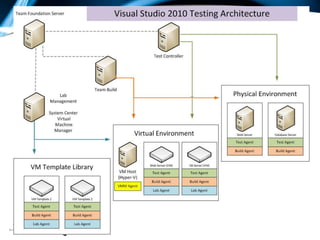
  • #59 There are some additional products in the Visual Studio 2010 family.Team Foundation Server 2010 is the center of gravity – the hub for a development team. Team Foundation Server has a version control repository, a test case management database, a work item tracking and change management system, support of build automation and a comprehensive reporting solution built on SQL Server Reporting Services. Some of the new capabilities of Team Foundation Server include support for gated check-in, branch visualization and drag-n-drop merge, and new Agile Planning tools.[CLICK]Team Lab Management 2010 enables teams to configure and manage virtual lab environment. Team Lab Management works with System Center Virtual Machine Manage enabling teams to create environment templates, provision ring-fenced environments, and checkpoint those environments. Those checkpoints can be attached to bugs filed using the Test and Lab Manager enabling the person fixing the bug to open the environment right to the appropriate point in the application flow.[CLICK]Visual Studio Test Elements 2010 is the essential tool for anyone engaging in test case management or manual test execution in the development lifecycle. This tool is designed for the generalist tester – someone who tests applications, but who is not responsible for writing code. This product includes Microsoft Test and Lab Manager (the Visual Studio IDE is not included). [CLICK]