

Using Microsoft Test Manager,
Visual Studio 2010, and TFS 2010 to
Improve Software Quality
              xx


arusso@imaginet.com


                                                                        www.imaginet.com
                      © Copyright 2011 Imaginet. All rights reserved.
The enclosed material is proprietary to Imaginet and is therefore
copyrighted. This document may not be disclosed in any manner to
anyone other than the addressee and the employees or
representatives of Notion Solutions who are recipients. This
document may not be used in any manner other than for the
purpose it was distributed. Any unauthorized use, reproduction or
transmission in any form is strictly prohibited.


                                                                              www.imaginet.com
                            © Copyright 2011 Imaginet. All rights reserved.
Agenda
• Managing Test
  Resources
• Reporting of “Done”
• Test Automation
• Improving Software
  Quality


              © Copyright 2011 Imaginet. All rights reserved.
Work Management
How do we manage testing resources?


                      © Copyright 2011 Imaginet. All rights reserved.
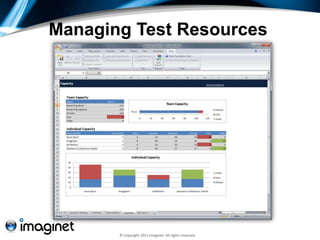
Managing Test Resources


       © Copyright 2011 Imaginet. All rights reserved.
Demo
Using Planning Workbooks


        © Copyright 2011 Imaginet. All rights reserved.
Reporting of “Done”
What is the end goal?


                © Copyright 2011 Imaginet. All rights reserved.
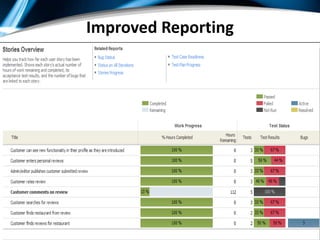
Improved Reporting


© Copyright 2010 Imaginet. All rights reserved.
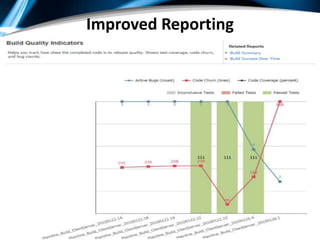
Improved Reporting


© Copyright 2010 Imaginet. All rights reserved.
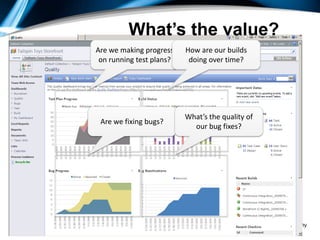
What’s the value?
                                                  Are we making progress    How are our builds
                                                   on running test plans?    doing over time?


                                                                            What’s the quality of
                                                   Are we fixing bugs?
                                                                              our bug fixes?


© Copyright 2010 Imaginet. All rights reserved.
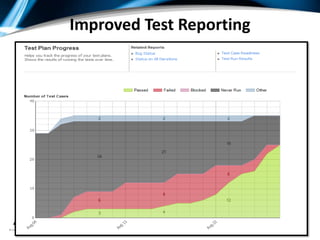
Improved Test Reporting


© Copyright 2010 Imaginet. All rights reserved.
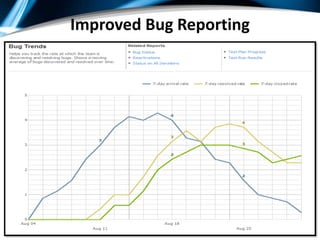
Improved Bug Reporting


© Copyright 2010 Imaginet. All rights reserved.
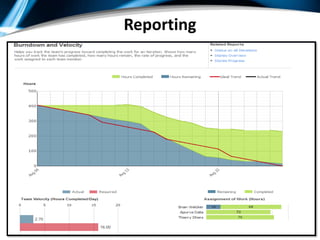
Reporting


© Copyright 2010 Imaginet. All rights reserved.
Automated Testing
How does Automation
 help?


               © Copyright 2011 Imaginet. All rights reserved.
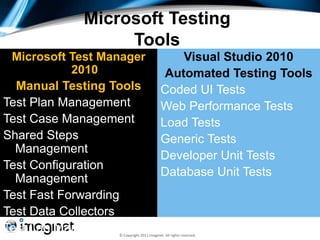
Microsoft Testing
                  Tools
 Microsoft Test Manager                        Visual Studio 2010
            2010                            Automated Testing Tools
  Manual Testing Tools                     Coded UI Tests
Test Plan Management                       Web Performance Tests
Test Case Management                       Load Tests
Shared Steps                               Generic Tests
  Management
                                           Developer Unit Tests
Test Configuration
                                           Database Unit Tests
  Management
Test Fast Forwarding
Test Data Collectors
Test Lab Management
                  © Copyright 2011 Imaginet. All rights reserved.
Anna Bots


© Copyright 2011 Imaginet. All rights reserved.
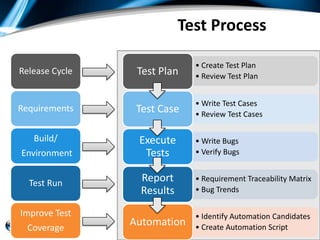
Test Process

                                                              • Create Test Plan
Release Cycle             Test Plan                           • Review Test Plan


                                                              • Write Test Cases
Requirements              Test Case                           • Review Test Cases

   Build/                   Execute                           • Write Bugs
Environment                  Tests                            • Verify Bugs


  Test Run                   Report                           • Requirement Traceability Matrix
                             Results                          • Bug Trends

Improve Test                                                  • Identify Automation Candidates
  Coverage
                      Automation                              • Create Automation Script
                © Copyright 2011 Imaginet. All rights reserved.
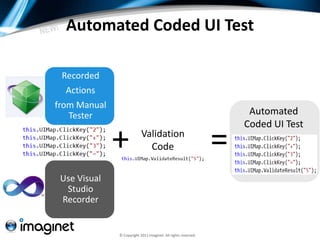
Automated Coded UI Test

 Recorded
  Actions
from Manual
   Tester                                                            Automated
                                                                    Coded UI Test

              +            Validation
                             Code                               =
 Use Visual
  Studio
 Recorder


              © Copyright 2011 Imaginet. All rights reserved.
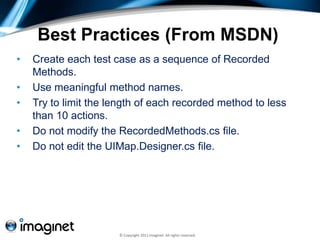
Best Practices (From MSDN)
•   Create each test case as a sequence of Recorded
    Methods.
•   Use meaningful method names.
•   Try to limit the length of each recorded method to less
    than 10 actions.
•   Do not modify the RecordedMethods.cs file.
•   Do not edit the UIMap.Designer.cs file.


                      © Copyright 2011 Imaginet. All rights reserved.
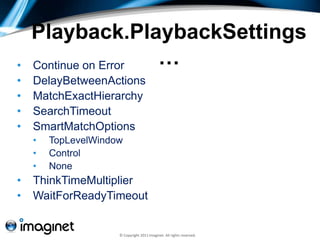
Playback.PlaybackSettings
•   Continue on Error …
•   DelayBetweenActions
•   MatchExactHierarchy
•   SearchTimeout
•   SmartMatchOptions
    •   TopLevelWindow
    •   Control
    •   None
•   ThinkTimeMultiplier
•   WaitForReadyTimeout


                     © Copyright 2011 Imaginet. All rights reserved.
UITestControl.WaitForControl…
•   WaitForControlReady() – This waits for the control to be ready to
    accept mouse/keyboard input.
•   WaitForControlEnabled() – This waits for the control to be enabled.
•   WaitForControlExist() – This waits for the control to exist on the UI.
•   WaitForControlNotExist() – This waits till the control cease to exist
    on the UI. For example, you can use this for progress dialog to go
    away.
•   WaitForControlPropertyEqual(string propertyName, object
    propertyValue) – This waits for the specified property of the control to
    have the given value.


                           © Copyright 2011 Imaginet. All rights reserved.
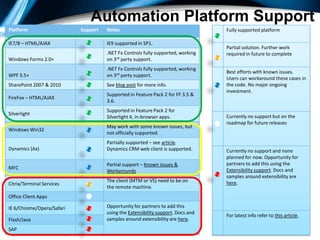
Automation Platform Support
Platform                                  Support   Notes                                       Fully supported platform

IE7/8 – HTML/AJAX                                   IE9 supported in SP1.
                                                                                                Partial solution. Further work
                                                    .NET Fx Controls fully supported, working   required in future to complete
Windows Forms 2.0+                                  on 3rd party support.
                                                    .NET Fx Controls fully supported, working
                                                                                                Best efforts with known issues.
WPF 3.5+                                            on 3rd party support.
                                                                                                Users can workaround these cases in
SharePoint 2007 & 2010                              See blog post for more info.                the code. No major ongoing
                                                                                                investment.
                                                    Supported in Feature Pack 2 for FF 3.5 &
FireFox – HTML/AJAX
                                                    3.6.
                                                    Supported in Feature Pack 2 for
Silverlight
                                                    Silverlight 4, in-browser apps.             Currently no support but on the
                                                                                                roadmap for future releases
                                                    May work with some known issues, but
Windows Win32
                                                    not officially supported.
                                                    Partially supported – see article.
Dynamics (Ax)                                       Dynamics CRM web client is supported.       Currently no support and none
                                                                                                planned for now. Opportunity for
                                                    Partial support – Known issues &            partners to add this using the
MFC                                                                                             Extensibility support. Docs and
                                                    Workarounds
                                                                                                samples around extensibility are
                                                    The client (MTM or VS) need to be on        here.
Citrix/Terminal Services
                                                    the remote machine.
Office Client Apps

IE 6/Chrome/Opera/Safari                            Opportunity for partners to add this
                                                    using the Extensibility support. Docs and
                                                                                                For latest info refer to this article.
Flash/Java                                          samples around extensibility are here.
SAP 2010 Imaginet. All rights reserved.
© Copyright
Demo
Automated Coded UI Testing


      © Copyright 2011 Imaginet. All rights reserved.
Test Lab Managment
How do we integrate VM’s for
 manual or automated
 testing?


                  © Copyright 2011 Imaginet. All rights reserved.
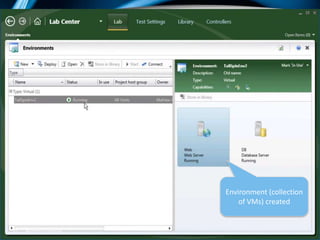
Environment (collection
                                                 of VMs) created


© Copyright 2010 Imaginet. AllConfidential
   25         Microsoft rights reserved.
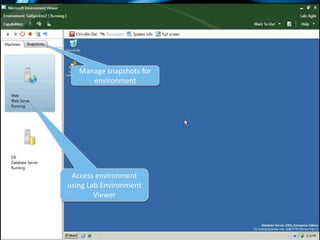
Manage snapshots for
                                                   environment


                                              Access environment
                                             using Lab Environment
                                                     Viewer


© Copyright 2010 Imaginet. AllConfidential
   26         Microsoft rights reserved.
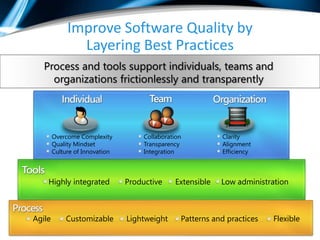
Improve Software Quality by
                                                    Layering Best Practices
                                Process and tools support individuals, teams and
                                  organizations frictionlessly and transparently


                                       Overcome Complexity            Collaboration          Clarity
                                       Quality Mindset                Transparency           Alignment
                                       Culture of Innovation          Integration            Efficiency


                                    Highly integrated            Productive     Extensible   Low administration


                     Agile                        Customizable   Lightweight      Patterns and practices   Flexible
© Copyright 2010 Imaginet. All rights reserved.
© Copyright 2011 Imaginet. All rights reserved.
www.imaginet.com


  © Copyright 2011 Imaginet. All rights reserved.

Application Quality with Visual Studio 2010

  • 1.
    Using Microsoft TestManager, Visual Studio 2010, and TFS 2010 to Improve Software Quality xx arusso@imaginet.com www.imaginet.com © Copyright 2011 Imaginet. All rights reserved.
  • 2.
    The enclosed materialis proprietary to Imaginet and is therefore copyrighted. This document may not be disclosed in any manner to anyone other than the addressee and the employees or representatives of Notion Solutions who are recipients. This document may not be used in any manner other than for the purpose it was distributed. Any unauthorized use, reproduction or transmission in any form is strictly prohibited. www.imaginet.com © Copyright 2011 Imaginet. All rights reserved.
  • 3.
    Agenda • Managing Test Resources • Reporting of “Done” • Test Automation • Improving Software Quality © Copyright 2011 Imaginet. All rights reserved.
  • 4.
    Work Management How dowe manage testing resources? © Copyright 2011 Imaginet. All rights reserved.
  • 5.
    Managing Test Resources © Copyright 2011 Imaginet. All rights reserved.
  • 6.
    Demo Using Planning Workbooks © Copyright 2011 Imaginet. All rights reserved.
  • 7.
    Reporting of “Done” Whatis the end goal? © Copyright 2011 Imaginet. All rights reserved.
  • 8.
    Improved Reporting © Copyright2010 Imaginet. All rights reserved.
  • 9.
    Improved Reporting © Copyright2010 Imaginet. All rights reserved.
  • 10.
    What’s the value? Are we making progress How are our builds on running test plans? doing over time? What’s the quality of Are we fixing bugs? our bug fixes? © Copyright 2010 Imaginet. All rights reserved.
  • 11.
    Improved Test Reporting ©Copyright 2010 Imaginet. All rights reserved.
  • 12.
    Improved Bug Reporting ©Copyright 2010 Imaginet. All rights reserved.
  • 13.
    Reporting © Copyright 2010Imaginet. All rights reserved.
  • 14.
    Automated Testing How doesAutomation help? © Copyright 2011 Imaginet. All rights reserved.
  • 15.
    Microsoft Testing Tools Microsoft Test Manager Visual Studio 2010 2010 Automated Testing Tools Manual Testing Tools Coded UI Tests Test Plan Management Web Performance Tests Test Case Management Load Tests Shared Steps Generic Tests Management Developer Unit Tests Test Configuration Database Unit Tests Management Test Fast Forwarding Test Data Collectors Test Lab Management © Copyright 2011 Imaginet. All rights reserved.
  • 16.
    Anna Bots © Copyright2011 Imaginet. All rights reserved.
  • 17.
    Test Process • Create Test Plan Release Cycle Test Plan • Review Test Plan • Write Test Cases Requirements Test Case • Review Test Cases Build/ Execute • Write Bugs Environment Tests • Verify Bugs Test Run Report • Requirement Traceability Matrix Results • Bug Trends Improve Test • Identify Automation Candidates Coverage Automation • Create Automation Script © Copyright 2011 Imaginet. All rights reserved.
  • 18.
    Automated Coded UITest Recorded Actions from Manual Tester Automated Coded UI Test + Validation Code = Use Visual Studio Recorder © Copyright 2011 Imaginet. All rights reserved.
  • 19.
    Best Practices (FromMSDN) • Create each test case as a sequence of Recorded Methods. • Use meaningful method names. • Try to limit the length of each recorded method to less than 10 actions. • Do not modify the RecordedMethods.cs file. • Do not edit the UIMap.Designer.cs file. © Copyright 2011 Imaginet. All rights reserved.
  • 20.
    Playback.PlaybackSettings • Continue on Error … • DelayBetweenActions • MatchExactHierarchy • SearchTimeout • SmartMatchOptions • TopLevelWindow • Control • None • ThinkTimeMultiplier • WaitForReadyTimeout © Copyright 2011 Imaginet. All rights reserved.
  • 21.
    UITestControl.WaitForControl… • WaitForControlReady() – This waits for the control to be ready to accept mouse/keyboard input. • WaitForControlEnabled() – This waits for the control to be enabled. • WaitForControlExist() – This waits for the control to exist on the UI. • WaitForControlNotExist() – This waits till the control cease to exist on the UI. For example, you can use this for progress dialog to go away. • WaitForControlPropertyEqual(string propertyName, object propertyValue) – This waits for the specified property of the control to have the given value. © Copyright 2011 Imaginet. All rights reserved.
  • 22.
    Automation Platform Support Platform Support Notes Fully supported platform IE7/8 – HTML/AJAX IE9 supported in SP1. Partial solution. Further work .NET Fx Controls fully supported, working required in future to complete Windows Forms 2.0+ on 3rd party support. .NET Fx Controls fully supported, working Best efforts with known issues. WPF 3.5+ on 3rd party support. Users can workaround these cases in SharePoint 2007 & 2010 See blog post for more info. the code. No major ongoing investment. Supported in Feature Pack 2 for FF 3.5 & FireFox – HTML/AJAX 3.6. Supported in Feature Pack 2 for Silverlight Silverlight 4, in-browser apps. Currently no support but on the roadmap for future releases May work with some known issues, but Windows Win32 not officially supported. Partially supported – see article. Dynamics (Ax) Dynamics CRM web client is supported. Currently no support and none planned for now. Opportunity for Partial support – Known issues & partners to add this using the MFC Extensibility support. Docs and Workarounds samples around extensibility are The client (MTM or VS) need to be on here. Citrix/Terminal Services the remote machine. Office Client Apps IE 6/Chrome/Opera/Safari Opportunity for partners to add this using the Extensibility support. Docs and For latest info refer to this article. Flash/Java samples around extensibility are here. SAP 2010 Imaginet. All rights reserved. © Copyright
  • 23.
    Demo Automated Coded UITesting © Copyright 2011 Imaginet. All rights reserved.
  • 24.
    Test Lab Managment Howdo we integrate VM’s for manual or automated testing? © Copyright 2011 Imaginet. All rights reserved.
  • 25.
    Environment (collection of VMs) created © Copyright 2010 Imaginet. AllConfidential 25 Microsoft rights reserved.
  • 26.
    Manage snapshots for environment Access environment using Lab Environment Viewer © Copyright 2010 Imaginet. AllConfidential 26 Microsoft rights reserved.
  • 27.
    Improve Software Qualityby Layering Best Practices Process and tools support individuals, teams and organizations frictionlessly and transparently Overcome Complexity Collaboration Clarity Quality Mindset Transparency Alignment Culture of Innovation Integration Efficiency Highly integrated Productive Extensible Low administration Agile Customizable Lightweight Patterns and practices Flexible © Copyright 2010 Imaginet. All rights reserved.
  • 28.
    © Copyright 2011Imaginet. All rights reserved.
  • 29.
    www.imaginet.com ©Copyright 2011 Imaginet. All rights reserved.