
Getting Started with Coded UI Testing:
Building Your First Automated Test
Imaginet Resources Corp.
http://www.imaginet.com
Speaker Bio
Anna Russo
Sr. ALM Consultant
• TFS/ALM is what I do!
• Work for Imaginet since 2008
• ALM MVP
• Testing Background
• In my free time:
– Cycling in Southern California
– Blogging
– Volunteer Testing Tools on Visual Studio Gallery
Email us at:
ALM Planning & Implementation Services
ALM Planning
• ALM Assessment & Envisioning Workshops
(3 or 5 days)
• VS & TFS Migration Planning Workshop (5
days)
• TFS Deployment Planning* (5 days)
• Visual SourceSafe to TFS Migration
Planning* (3 Days)
• Visual Studio Quality Tools Deployment
Planning* (5 days)
Upgrade
• TFS 2010 Adoption Quick Start (5 or 10
days)
• TFS 2012 Adoption Quick Start (5 or 10
days)
• TFS 2010 Upgrade Quick Start (10 days)
• TFS 2012 Upgrade Quick Start (10 days)
Remote Support
• Remote Support for TFS & Visual Studio
Lab
• Visual Studio Lab Management Quick Start
(10 days)
Testing
• Manual Testing with Test Manager Quick
Start (5 days)
• Visual Studio Testing Tools Quick Start (10
days)
• Visual Studio Automated Testing Quick Start
(5 days)
• Visual Studio Load Testing Quick Start (5 or
10 Days)
Builds
• Automated Build & Release Management
Quick Start (5 days)
• Automated Build Center of Excellence (CoE)
Database
• Visual Studio Database Tools Quick Start
(10 days)
Integrations
• Team Foundation Server (TFS) & Project
Server Integration Quick Start (10 days)
• TFS & Quality Center Integration/Migration
Quick Start (10 days)
Agenda
• Coded UI Test Overview
• Recording Coded UI Tests
• Adding Test Validation
• Writing your own code
• Best Practices
Coded UI Test Tools
• Used to automate testing from the user interface
• Test development/maintenance in Visual Studio
• Tools provided to improve creation and maintenance
of Coded UI tests
• Can author and maintain tests without writing code or
can extend tests using .NET
• Can run within Visual Studio or through automation
(e.g., a build)
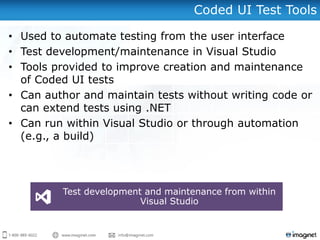
Test development and maintenance from within
Visual Studio
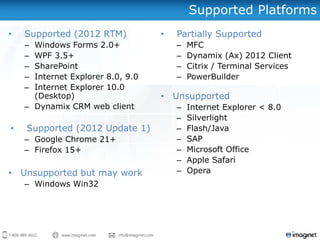
Supported Platforms
• Supported (2012 RTM)
– Windows Forms 2.0+
– WPF 3.5+
– SharePoint
– Internet Explorer 8.0, 9.0
– Internet Explorer 10.0
(Desktop)
– Dynamix CRM web client
• Supported (2012 Update 1)
– Google Chrome 21+
– Firefox 15+
• Unsupported but may work
– Windows Win32
• Partially Supported
– MFC
– Dynamix (Ax) 2012 Client
– Citrix / Terminal Services
– PowerBuilder
• Unsupported
– Internet Explorer < 8.0
– Silverlight
– Flash/Java
– SAP
– Microsoft Office
– Apple Safari
– Opera
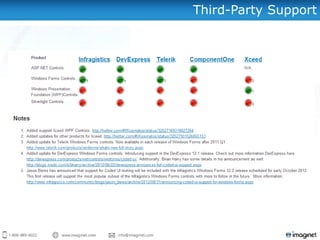
Third-Party Support
Agenda
• Coded UI Test Overview
• Recording Coded UI Tests
• Adding Test Validation
• Writing your own code
• Best Practices
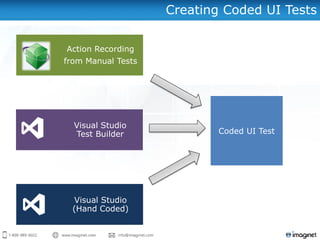
Creating Coded UI Tests
Action Recording
from Manual Tests
Visual Studio
Test Builder
Visual Studio
(Hand Coded)
Coded UI Test
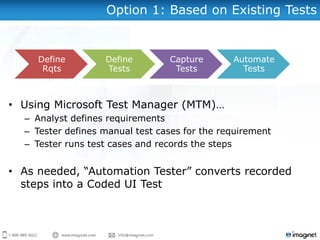
Option 1: Based on Existing Tests
• Using Microsoft Test Manager (MTM)…
– Analyst defines requirements
– Tester defines manual test cases for the requirement
– Tester runs test cases and records the steps
• As needed, “Automation Tester” converts recorded
steps into a Coded UI Test
Define
Rqts
Define
Tests
Capture
Tests
Automate
Tests
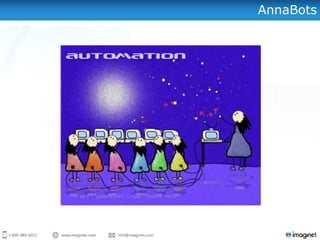
AnnaBots
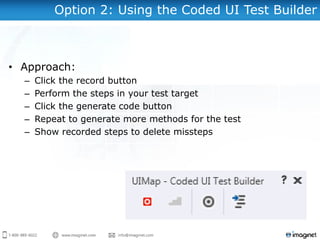
Option 2: Using the Coded UI Test Builder
• Approach:
– Click the record button
– Perform the steps in your test target
– Click the generate code button
– Repeat to generate more methods for the test
– Show recorded steps to delete missteps
DEMONSTRATION
• Converting Test Cases
• Recording tests with the
Coded UI Test Builder
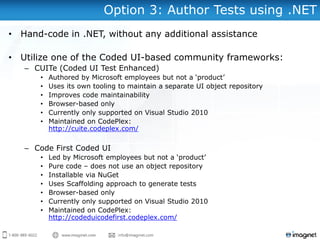
Option 3: Author Tests using .NET
• Hand-code in .NET, without any additional assistance
• Utilize one of the Coded UI-based community frameworks:
– CUITe (Coded UI Test Enhanced)
• Authored by Microsoft employees but not a ‘product’
• Uses its own tooling to maintain a separate UI object repository
• Improves code maintainability
• Browser-based only
• Currently only supported on Visual Studio 2010
• Maintained on CodePlex:
http://cuite.codeplex.com/
– Code First Coded UI
• Led by Microsoft employees but not a ‘product’
• Pure code – does not use an object repository
• Installable via NuGet
• Uses Scaffolding approach to generate tests
• Browser-based only
• Currently only supported on Visual Studio 2010
• Maintained on CodePlex:
http://codeduicodefirst.codeplex.com/
Agenda
• Coded UI Test Overview
• Recording Coded UI Tests
• Adding Test Validation
• Writing your own code
• Best Practices
Validation
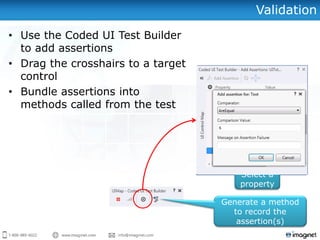
• Use the Coded UI Test Builder
to add assertions
• Drag the crosshairs to a target
control
• Bundle assertions into
methods called from the test
Select a
property
Click to add
assertion
Generate a method
to record the
assertion(s)
DEMONSTRATION
• Adding Assertions
(Verification/Validation)
Agenda
• Coded UI Test Overview
• Recording Coded UI Tests
• Adding Test Validation
• Writing your own code
• Best Practices and
References
The Primary Components
• Test Class (e.g., MyTest.cs)
– A .NET Coded UI Test class containing one or more Test
Methods.
• Test Method
– An individual automated test case inside a Test Class.
• Recorded Method
– Code which actually automates the UI and performs
assertions. (Do not change this code!)
• UIMap
– An XML designer file and related generated classes containing
the recorded methods.
Overriding Generated Properties
[TestMethod]
public void CodedUITestMethod1()
{
this.UIMap.OpenCalc();
this.UIMap.AddThreeAndTwo();
this.UIMap.VerifySumExpectedValues.UITxtDisplayEditText = "5";
this.UIMap.VerifySum();
this.UIMap.CloseCalc();
}
“Recorded Methods” created
using the UI Test Builder.
Hand-coded to change the expected
value for the VerifySum recorded
method. There are many other
overrides made available to you in
the generated code.
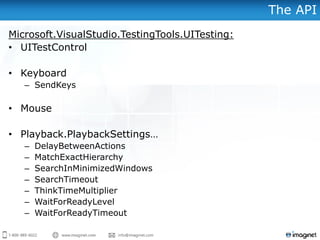
The API
Microsoft.VisualStudio.TestingTools.UITesting:
• UITestControl
• Keyboard
– SendKeys
• Mouse
• Playback.PlaybackSettings…
– DelayBetweenActions
– MatchExactHierarchy
– SearchInMinimizedWindows
– SearchTimeout
– ThinkTimeMultiplier
– WaitForReadyLevel
– WaitForReadyTimeout
DEMONSTRATION
• UIMap Editor
Agenda
• Coded UI Test Overview
• Recording Coded UI Tests
• Adding Test Validation
• Writing your own code
• Best Practices
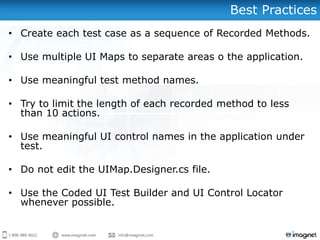
Best Practices
• Create each test case as a sequence of Recorded Methods.
• Use multiple UI Maps to separate areas o the application.
• Use meaningful test method names.
• Try to limit the length of each recorded method to less
than 10 actions.
• Use meaningful UI control names in the application under
test.
• Do not edit the UIMap.Designer.cs file.
• Use the Coded UI Test Builder and UI Control Locator
whenever possible.
Summary
• Coded UI Test Overview
• Recording Coded UI Tests
• Adding Test Validation
• Writing your own code
• Best Practices
Want to know more...?
Need Help?
• Includes installing, configuring, and implementing both
Microsoft Test Manager (for manual testing) and Microsoft
Visual Studio (for automated and performance testing).
• Learn best practices for designing and implementing an
effective testing strategy from an ALM perspective.
• Support and training for your team
• Includes a high-level ALM assessment
Imaginet’s Visual Studio 2012
Testing Tools 5 or 10-day Quickstart
Interested? Just email us at info@imaginet.com.
More Webcasts on ALM / TFS / Visual Studio 2012
• Quality Coding: What’s New with Visual Studio 2012
• August 8 (1:00-2:30pm CT)
• August 22 (1:00-2:30pm CT)
• Getting Started With Coded UI testing: Building
Your First Automated Test
• September 5 (1:00-2:30pm CT)
• September 19 (1:00-2:30pm CT)
• Top Business Benefits of Application Lifecycle
Management (ALM)
• July 17 (1:00-2:00pm CT)
• August 14(1:00-2:00pm CT)
• Upgrading to TFS 2012: What You Need To Know!
• July 11 (1:00-2:30pm CT)
• July 25(1:00-2:30pm CT)
For questions or more information,
please contact us at:
info@imaginet.com or (972)607-4830
Remember to add http://blog.imaginet.com to your favorite reader!
Questions?
http://www.imaginet.com

Getting Started With Coded UI testing: Building Your First Automated Test

  • 1.
    Getting Started withCoded UI Testing: Building Your First Automated Test Imaginet Resources Corp. http://www.imaginet.com
  • 2.
    Speaker Bio Anna Russo Sr.ALM Consultant • TFS/ALM is what I do! • Work for Imaginet since 2008 • ALM MVP • Testing Background • In my free time: – Cycling in Southern California – Blogging – Volunteer Testing Tools on Visual Studio Gallery
  • 3.
    Email us at: ALMPlanning & Implementation Services ALM Planning • ALM Assessment & Envisioning Workshops (3 or 5 days) • VS & TFS Migration Planning Workshop (5 days) • TFS Deployment Planning* (5 days) • Visual SourceSafe to TFS Migration Planning* (3 Days) • Visual Studio Quality Tools Deployment Planning* (5 days) Upgrade • TFS 2010 Adoption Quick Start (5 or 10 days) • TFS 2012 Adoption Quick Start (5 or 10 days) • TFS 2010 Upgrade Quick Start (10 days) • TFS 2012 Upgrade Quick Start (10 days) Remote Support • Remote Support for TFS & Visual Studio Lab • Visual Studio Lab Management Quick Start (10 days) Testing • Manual Testing with Test Manager Quick Start (5 days) • Visual Studio Testing Tools Quick Start (10 days) • Visual Studio Automated Testing Quick Start (5 days) • Visual Studio Load Testing Quick Start (5 or 10 Days) Builds • Automated Build & Release Management Quick Start (5 days) • Automated Build Center of Excellence (CoE) Database • Visual Studio Database Tools Quick Start (10 days) Integrations • Team Foundation Server (TFS) & Project Server Integration Quick Start (10 days) • TFS & Quality Center Integration/Migration Quick Start (10 days)
  • 4.
    Agenda • Coded UITest Overview • Recording Coded UI Tests • Adding Test Validation • Writing your own code • Best Practices
  • 5.
    Coded UI TestTools • Used to automate testing from the user interface • Test development/maintenance in Visual Studio • Tools provided to improve creation and maintenance of Coded UI tests • Can author and maintain tests without writing code or can extend tests using .NET • Can run within Visual Studio or through automation (e.g., a build) Test development and maintenance from within Visual Studio
  • 6.
    Supported Platforms • Supported(2012 RTM) – Windows Forms 2.0+ – WPF 3.5+ – SharePoint – Internet Explorer 8.0, 9.0 – Internet Explorer 10.0 (Desktop) – Dynamix CRM web client • Supported (2012 Update 1) – Google Chrome 21+ – Firefox 15+ • Unsupported but may work – Windows Win32 • Partially Supported – MFC – Dynamix (Ax) 2012 Client – Citrix / Terminal Services – PowerBuilder • Unsupported – Internet Explorer < 8.0 – Silverlight – Flash/Java – SAP – Microsoft Office – Apple Safari – Opera
  • 7.
  • 8.
    Agenda • Coded UITest Overview • Recording Coded UI Tests • Adding Test Validation • Writing your own code • Best Practices
  • 9.
    Creating Coded UITests Action Recording from Manual Tests Visual Studio Test Builder Visual Studio (Hand Coded) Coded UI Test
  • 10.
    Option 1: Basedon Existing Tests • Using Microsoft Test Manager (MTM)… – Analyst defines requirements – Tester defines manual test cases for the requirement – Tester runs test cases and records the steps • As needed, “Automation Tester” converts recorded steps into a Coded UI Test Define Rqts Define Tests Capture Tests Automate Tests
  • 11.
  • 12.
    Option 2: Usingthe Coded UI Test Builder • Approach: – Click the record button – Perform the steps in your test target – Click the generate code button – Repeat to generate more methods for the test – Show recorded steps to delete missteps
  • 13.
    DEMONSTRATION • Converting TestCases • Recording tests with the Coded UI Test Builder
  • 14.
    Option 3: AuthorTests using .NET • Hand-code in .NET, without any additional assistance • Utilize one of the Coded UI-based community frameworks: – CUITe (Coded UI Test Enhanced) • Authored by Microsoft employees but not a ‘product’ • Uses its own tooling to maintain a separate UI object repository • Improves code maintainability • Browser-based only • Currently only supported on Visual Studio 2010 • Maintained on CodePlex: http://cuite.codeplex.com/ – Code First Coded UI • Led by Microsoft employees but not a ‘product’ • Pure code – does not use an object repository • Installable via NuGet • Uses Scaffolding approach to generate tests • Browser-based only • Currently only supported on Visual Studio 2010 • Maintained on CodePlex: http://codeduicodefirst.codeplex.com/
  • 15.
    Agenda • Coded UITest Overview • Recording Coded UI Tests • Adding Test Validation • Writing your own code • Best Practices
  • 16.
    Validation • Use theCoded UI Test Builder to add assertions • Drag the crosshairs to a target control • Bundle assertions into methods called from the test Select a property Click to add assertion Generate a method to record the assertion(s)
  • 17.
  • 18.
    Agenda • Coded UITest Overview • Recording Coded UI Tests • Adding Test Validation • Writing your own code • Best Practices and References
  • 19.
    The Primary Components •Test Class (e.g., MyTest.cs) – A .NET Coded UI Test class containing one or more Test Methods. • Test Method – An individual automated test case inside a Test Class. • Recorded Method – Code which actually automates the UI and performs assertions. (Do not change this code!) • UIMap – An XML designer file and related generated classes containing the recorded methods.
  • 20.
    Overriding Generated Properties [TestMethod] publicvoid CodedUITestMethod1() { this.UIMap.OpenCalc(); this.UIMap.AddThreeAndTwo(); this.UIMap.VerifySumExpectedValues.UITxtDisplayEditText = "5"; this.UIMap.VerifySum(); this.UIMap.CloseCalc(); } “Recorded Methods” created using the UI Test Builder. Hand-coded to change the expected value for the VerifySum recorded method. There are many other overrides made available to you in the generated code.
  • 21.
    The API Microsoft.VisualStudio.TestingTools.UITesting: • UITestControl •Keyboard – SendKeys • Mouse • Playback.PlaybackSettings… – DelayBetweenActions – MatchExactHierarchy – SearchInMinimizedWindows – SearchTimeout – ThinkTimeMultiplier – WaitForReadyLevel – WaitForReadyTimeout
  • 22.
  • 23.
    Agenda • Coded UITest Overview • Recording Coded UI Tests • Adding Test Validation • Writing your own code • Best Practices
  • 24.
    Best Practices • Createeach test case as a sequence of Recorded Methods. • Use multiple UI Maps to separate areas o the application. • Use meaningful test method names. • Try to limit the length of each recorded method to less than 10 actions. • Use meaningful UI control names in the application under test. • Do not edit the UIMap.Designer.cs file. • Use the Coded UI Test Builder and UI Control Locator whenever possible.
  • 25.
    Summary • Coded UITest Overview • Recording Coded UI Tests • Adding Test Validation • Writing your own code • Best Practices
  • 26.
    Want to knowmore...?
  • 27.
    Need Help? • Includesinstalling, configuring, and implementing both Microsoft Test Manager (for manual testing) and Microsoft Visual Studio (for automated and performance testing). • Learn best practices for designing and implementing an effective testing strategy from an ALM perspective. • Support and training for your team • Includes a high-level ALM assessment Imaginet’s Visual Studio 2012 Testing Tools 5 or 10-day Quickstart Interested? Just email us at info@imaginet.com.
  • 28.
    More Webcasts onALM / TFS / Visual Studio 2012 • Quality Coding: What’s New with Visual Studio 2012 • August 8 (1:00-2:30pm CT) • August 22 (1:00-2:30pm CT) • Getting Started With Coded UI testing: Building Your First Automated Test • September 5 (1:00-2:30pm CT) • September 19 (1:00-2:30pm CT) • Top Business Benefits of Application Lifecycle Management (ALM) • July 17 (1:00-2:00pm CT) • August 14(1:00-2:00pm CT) • Upgrading to TFS 2012: What You Need To Know! • July 11 (1:00-2:30pm CT) • July 25(1:00-2:30pm CT)
  • 29.
    For questions ormore information, please contact us at: info@imaginet.com or (972)607-4830 Remember to add http://blog.imaginet.com to your favorite reader!
  • 30.
  • 31.