UI  Automation  :  A  
Primer	
Cocoaheads, Ann Arbor
October, 2013
About  Myself…	
	
Principal  Software  Developer  @  Barracuda  Networks	
Freelance  App  Developer  &  Consultant  
www.priyaontech.com	
www.lunariasoftware.com	
	
TwiIer:@rajagp	
www.priyaontech.com 2
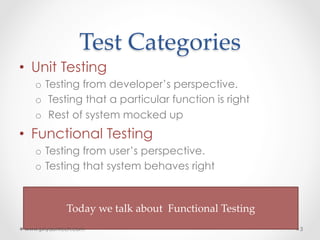
Test  Categories	
•  Unit Testing
o  Testing from developer’s perspective.
o  Testing that a particular function is right
o  Rest of system mocked up
•  Functional Testing
o  Testing from user’s perspective.
o  Testing that system behaves right
	
Today  we  talk  about    Functional  Testing	
	
www.priyaontech.com 3
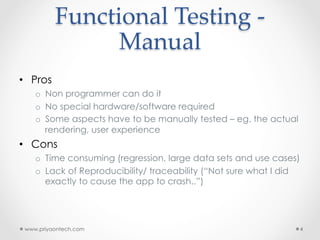
Functional  Testing  -­‐‑  
Manual	
•  Pros
o  Non programmer can do it
o  No special hardware/software required
o  Some aspects have to be manually tested – eg. the actual
rendering, user experience
•  Cons
o  Time consuming (regression, large data sets and use cases)
o  Lack of Reproducibility/ traceability (“Not sure what I did
exactly to cause the app to crash..”)
www.priyaontech.com 4
Functional  Testing  -­‐‑  
Automated	
•  Pros
o  Saves time , effort
•  Will offset the initial cost of writing the test scripts
o  Consistency / Repeatable / Traceable
o  Regression
o  Large numbers of test data sets
o  Continuous Integration
•  Cons
o  Need some programming skills
www.priyaontech.com 5
Options	
www.priyaontech.com 6
Tool	
 Platform	
 Scripting  Language	
 Technical  Details	
Calabash	
 iOS/Andoird  
(Device  &  
Simulator)	
BDD.  Feature  
descriptions  wriIen  in  
Gherkin.  Test  steps  in  
Ruby.	
Uses  Cucumber  for  driving  
tests.  A  HTTP  bounjour  server  
runs  in  your  app  and  accepts  
commands  from  test  driver  
(HTTP/JSON).  Open  Source.	
Uses  Private  APIs	
Frank	
 iOS  (Device  &  
Simulator)	
	
BDD.  Feature  
descriptions  wriIen  in  
Gherkin.  Test  steps  in  
Ruby.	
	
Uses  Cucumber  for  driving  
tests.  A  HTTP  Frank  server  
runs  in  your  app  and  accepts  
commands  from  test  driver  
over  “Franky”  protocol  (HTTP/
JSON).  Open  Source	
Uses  Private  APIs	
	
KIF	
 iOS  
(  Simulator/
device)	
Objective-­‐‑C	
 Framework  integrated  into  
app.  No  HTTP  server  or  
external  driver.  Open  Source.  
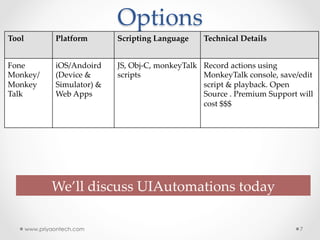
Options	
www.priyaontech.com 7
Tool	
 Platform	
 Scripting  Language	
 Technical  Details	
Fone  
Monkey/  
Monkey  
Talk	
iOS/Andoird  
(Device  &  
Simulator)  &  
Web  Apps	
JS,  Obj-­‐‑C,  monkeyTalk  
scripts	
Record  actions  using  
MonkeyTalk  console,  save/edit  
script  &  playback.  Open  
Source  .  Premium  Support  will  
cost  $$$	
We’ll  discuss  UIAutomations  today
UI  Automation	
•  Automated functional test framework
from Apple
•  UI interactions with app driven using
test scripts
•  Test scripts written in Javascript
•  Test scripts executed using
“Automation” instrument
•  Actively developed & maintained
(well….maybe)
www.priyaontech.com 8
UI  Automation	
•  Good user interaction coverage
•  Can work with no/minimal app
changes (recommend UIAccessibility)
•  Works on simulators and devices
•  Only on apps that are signed with
development profile
•  Simplicity
www.priyaontech.com 9
UI  Accessibility	
•  Informal Protocol
•  Interface to assist people with disabilities
•  Uniquely identify every element in the view
hierarchy
•  Every UIKit element can be specified to be
accessible, using "label" attribute
•  Recommended to use w/ UI Automations
o  In order to interact with an element, you need to identify it
•  Identifying element by position makes script fragile
www.priyaontech.com 10
UI  Accessibility  Rules	
•  Individual View
o  Enable Accessibility
o  Set Accessibility Label on the view
•  Container View
o  Disable Accessibility on container view
o  Enable Accessibility on every contained view
that you want accessible
o  Specify Labels for container and contained views
www.priyaontech.com 11
UI  Element  Hierarchy	
www.priyaontech.com 12
Target	
Application	
Window	
View	
 View	
UIATarget.localTarget()	
.frontMostApp()	
.mainWindow()	
[UIAElement].logElementTree()
Tuneup.js	
•  A set of Javascript utilities to facilitate writing
of UIAutomation scripts
•  Lot of convenience Wrapper functions to
handle repetitive tasks(isDeviceiPad,
isDeviceiPhone ,assertLeftButtonNamed …)
•  Enforce a structure to your test scripts –
Invoke “test” function
•  Alex Vollmer, http://www.tuneupjs.org
www.priyaontech.com 13
Demo  
	
Get  it  at  :    hIp://priyaontech.com/ndownloads	
www.priyaontech.com 14
Thank  you!  
  
Further  Reading  :  Test  iOS  Apps  with  UI  Automation  
Bug  Hunting  Made  Easy  
By  Jonathan  Penn 	
  
	
www.priyaontech.com
@rajagp
www.priyaontech.com 15

Introduction to UI Automation Framework

  • 1.
    UI  Automation  : A   Primer Cocoaheads, Ann Arbor October, 2013
  • 2.
    About  Myself… Principal  Software Developer  @  Barracuda  Networks Freelance  App  Developer  &  Consultant   www.priyaontech.com www.lunariasoftware.com TwiIer:@rajagp www.priyaontech.com 2
  • 3.
    Test  Categories •  UnitTesting o  Testing from developer’s perspective. o  Testing that a particular function is right o  Rest of system mocked up •  Functional Testing o  Testing from user’s perspective. o  Testing that system behaves right Today  we  talk  about    Functional  Testing www.priyaontech.com 3
  • 4.
    Functional  Testing  -­‐‑  Manual •  Pros o  Non programmer can do it o  No special hardware/software required o  Some aspects have to be manually tested – eg. the actual rendering, user experience •  Cons o  Time consuming (regression, large data sets and use cases) o  Lack of Reproducibility/ traceability (“Not sure what I did exactly to cause the app to crash..”) www.priyaontech.com 4
  • 5.
    Functional  Testing  -­‐‑  Automated •  Pros o  Saves time , effort •  Will offset the initial cost of writing the test scripts o  Consistency / Repeatable / Traceable o  Regression o  Large numbers of test data sets o  Continuous Integration •  Cons o  Need some programming skills www.priyaontech.com 5
  • 6.
    Options www.priyaontech.com 6 Tool Platform Scripting  Language Technical  Details Calabash iOS/Andoird   (Device  &   Simulator) BDD.  Feature   descriptions  wriIen  in   Gherkin.  Test  steps  in   Ruby. Uses  Cucumber  for  driving   tests.  A  HTTP  bounjour  server   runs  in  your  app  and  accepts   commands  from  test  driver   (HTTP/JSON).  Open  Source. Uses  Private  APIs Frank iOS  (Device  &   Simulator) BDD.  Feature   descriptions  wriIen  in   Gherkin.  Test  steps  in   Ruby. Uses  Cucumber  for  driving   tests.  A  HTTP  Frank  server   runs  in  your  app  and  accepts   commands  from  test  driver   over  “Franky”  protocol  (HTTP/ JSON).  Open  Source Uses  Private  APIs KIF iOS   (  Simulator/ device) Objective-­‐‑C Framework  integrated  into   app.  No  HTTP  server  or   external  driver.  Open  Source.  
  • 7.
    Options www.priyaontech.com 7 Tool Platform Scripting  Language Technical  Details Fone   Monkey/   Monkey   Talk iOS/Andoird   (Device  &   Simulator)  &   Web  Apps JS,  Obj-­‐‑C,  monkeyTalk   scripts Record  actions  using   MonkeyTalk  console,  save/edit   script  &  playback.  Open   Source  .  Premium  Support  will   cost  $$$ We’ll  discuss  UIAutomations  today
  • 8.
    UI  Automation •  Automatedfunctional test framework from Apple •  UI interactions with app driven using test scripts •  Test scripts written in Javascript •  Test scripts executed using “Automation” instrument •  Actively developed & maintained (well….maybe) www.priyaontech.com 8
  • 9.
    UI  Automation •  Gooduser interaction coverage •  Can work with no/minimal app changes (recommend UIAccessibility) •  Works on simulators and devices •  Only on apps that are signed with development profile •  Simplicity www.priyaontech.com 9
  • 10.
    UI  Accessibility •  InformalProtocol •  Interface to assist people with disabilities •  Uniquely identify every element in the view hierarchy •  Every UIKit element can be specified to be accessible, using "label" attribute •  Recommended to use w/ UI Automations o  In order to interact with an element, you need to identify it •  Identifying element by position makes script fragile www.priyaontech.com 10
  • 11.
    UI  Accessibility  Rules • Individual View o  Enable Accessibility o  Set Accessibility Label on the view •  Container View o  Disable Accessibility on container view o  Enable Accessibility on every contained view that you want accessible o  Specify Labels for container and contained views www.priyaontech.com 11
  • 12.
    UI  Element  Hierarchy www.priyaontech.com12 Target Application Window View View UIATarget.localTarget() .frontMostApp() .mainWindow() [UIAElement].logElementTree()
  • 13.
    Tuneup.js •  A setof Javascript utilities to facilitate writing of UIAutomation scripts •  Lot of convenience Wrapper functions to handle repetitive tasks(isDeviceiPad, isDeviceiPhone ,assertLeftButtonNamed …) •  Enforce a structure to your test scripts – Invoke “test” function •  Alex Vollmer, http://www.tuneupjs.org www.priyaontech.com 13
  • 14.
    Demo   Get  it at  :    hIp://priyaontech.com/ndownloads www.priyaontech.com 14
  • 15.
    Thank  you!     Further  Reading  :  Test  iOS  Apps  with  UI  Automation   Bug  Hunting  Made  Easy   By  Jonathan  Penn   www.priyaontech.com @rajagp www.priyaontech.com 15