XML and co. Findik Dervis
About this presentation XML DTD Introduction to XSL A lot of  examples
Just a little history ...  1986 : SGML Standard Generalised Markup Language System for defining markup languages Allows  structure data Presentation is separated from content Too complex, voluminous and expensive
HTML 1991 : HTML   Hypertext Markup Language HTML is a SGML application Very flexible for the WEB  Tags limited Mixing data and presentation of data 1996 XML was born
What’s XML ?! XML    e X tensible  M arkup  L anguage A syntax for documents A structural and semantic language Not a formatting language A  meta-markup   language New tags can be defined Data are auto-descriptive
The goals of XML XML must be easily usable on the WEB XML is not HTML ! XML must support a wide variety of apps. An XML document must be : Legible and clear Easy to create Just a plain text
Why use XML ? XML separates data from HTML (formatting) XML simplifies data sharing XML simplifies data transport XML makes your data more available ...
XML
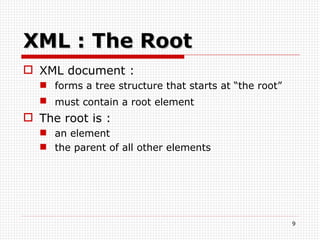
XML : The Root XML document : forms a tree structure that starts at “the root” must contain a root element   The root is : an element the parent of all other elements
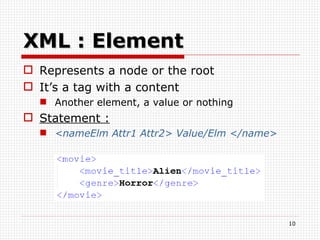
XML : Element Represents a node or the root  It’s a tag with a content Another element, a value or nothing  Statement : <nameElm Attr1 Attr2> Value/Elm </name>
Element naming rules Names can contain :  letters,  numbers and other characters   Names must not start with : A number or punctuation character  with the letters xml (or XML, or Xml, etc)  Names can’t contain :  Spaces keywords
XML : Attributes Attributes provide additional information Many attributes by XML element but just one value by attribute Same naming rules as element Statement : nameAttr=“value”  or  nameAttr=‘value’
Value The value of elements or attributes : Can be empty Can’t contain : & < “ To use these characters, use entities
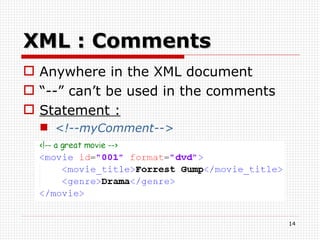
XML : Comments Anywhere in the XML document “ --” can’t be used in the comments Statement : <!--myComment-->
Example
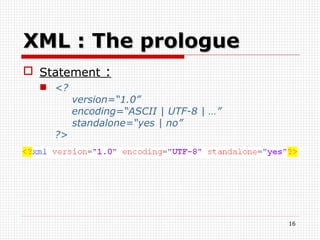
XML : The prologue Statement  : <?   version=“1.0”   encoding=“ASCII | UTF-8 | …”   standalone=“yes | no”  ?>
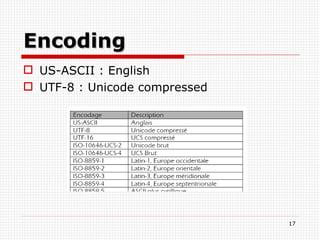
Encoding US-ASCII : English UTF-8 : Unicode compressed
XML : Namespaces
Textual  data A value may be : letter and number Tabulation Carriage return and line feed Space Other characters : <    &lt; &    &amp;
CDATA Section Statement :  <![CDATA[“text”]]>
Example of CDATA
Well formed document The document must respect the syntax and simple rules The document must respect other rules.
Valid document To be valid , the document has: To be well formed To make a reference to DTD To be consistent with a DTD
Example Prologue Extension To display
DTD
DTD Introduction Document Type Definition To validate a document
Internal DTD DTD inside the XML document XML document is standalone DTD must be wrapped in a DOCTYPE definition Statement :   <!DOCTYPE nameRoot  [   … ]>
Example
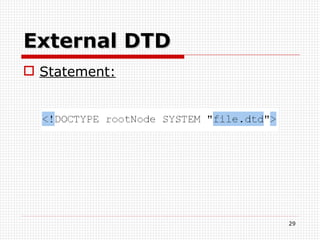
External DTD Statement:
Example Example with an external file
DTD : Element To define an XML element Statement : <!ELEMENT nameElm EMPTY   (#PCDATA)   (child1,child2,…)>
Attribute Statement:
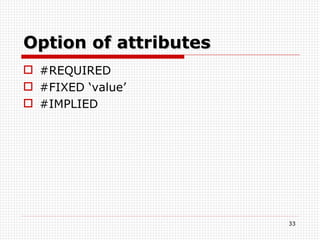
Option of  attributes #REQUIRED #FIXED ‘value’ #IMPLIED
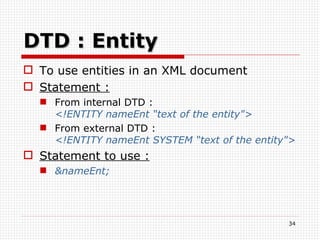
DTD : Entity To use entities in an XML document Statement : From internal DTD : <!ENTITY nameEnt “text of the entity&quot;> From external DTD :  <!ENTITY nameEnt SYSTEM “text of the entity&quot;> Statement to use : &nameEnt;
General example
XML Schema
Introduction With the DTD :  Not any restrictions on text content Very little control over mixed content Little control over ordering of elements … The  XML   S chema  D efinition (XSD) language solves these problems
DTD versus XSD DTD : XSD :
XML Schema … Machine validation of instance document Uses XML syntax Rich set of rules and datatypes User defined datatypes Namespace support
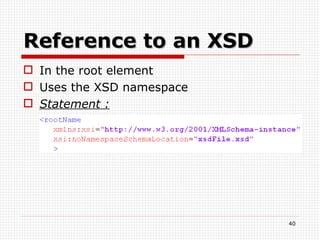
Reference to an XSD In the root element Uses the XSD namespace Statement :
XSD : Simple types To define an  XML element that can contain only text (+attributes)  The text can be of many different types ; string,decimal,integer,boolean,date,… Allows to define restrictions Statement :
XSD : Complex types To define XML element that contains other elements - attributes  No restrictions !
XSD : Restrictions Restriction on simple types To define acceptable values  Various types of restrictions : On values On set\series of values On length …
Example
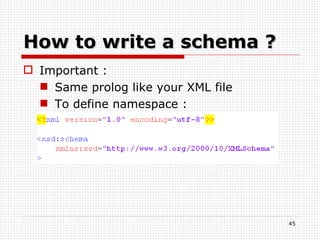
How to write a schema ? Important : Same prolog like your XML file To define namespace :
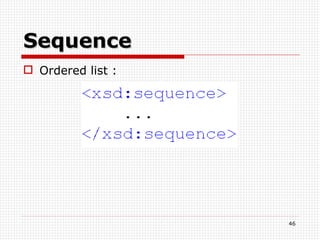
Sequence Ordered list :
Example With sequence and elements
Attribute To define an attribute :
Include Schemas
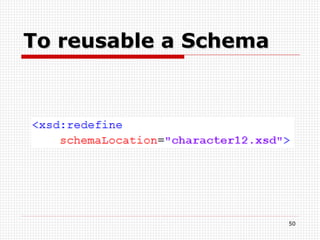
To reusable a Schema
Example
Example
XPath
Hein … XPath ?? Is a language for finding informations Is used to navigate through elements and attributes  XSLT  is built on XPath expressions
How it’s works Uses path expressions to select nodes or node-sets  Uses the standard functions of XPath : Last() Position() Count() String-length(str) Substring(str,str2) Round(nbr) …
Location Path Expression A path expression composed of : An axe A node test Zero or more predicates
Access Path
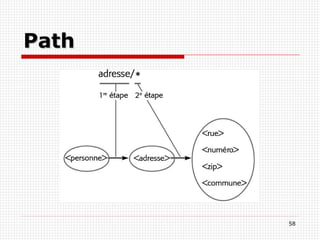
Path
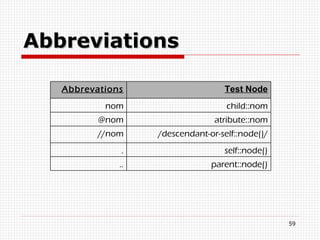
Abbreviations Abbrevations Test Node nom child::nom @nom atribute::nom //nom /descendant-or-self::node()/ . self::node() .. parent::node()
Operators + ; - ; * ; div ; mod | or ; and = ; != ; > ; >= ; < ; <=
Examples
XSL
XSL Language e X tensible  S tyleSheet  L anguage XSL = Style Sheets for XML XSL describes how the XML document should be displayed! XSL = 3 parts : XSLT XPath XSL-FO
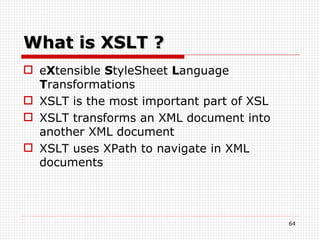
What is XSLT ? e X tensible  S tyleSheet  L anguage  T ransformations XSLT is the most important part of XSL  XSLT transforms an XML document into another XML document  XSLT uses XPath to navigate in XML documents
Namespaces XSL & XSLT  For XSLT : xsl=&quot;http://www.w3.org/1999/XSL/Transform&quot; For XSL : fo=’’http://www.w3.org/1999/XSL/Format/1.0’’
Structure of XSL Document
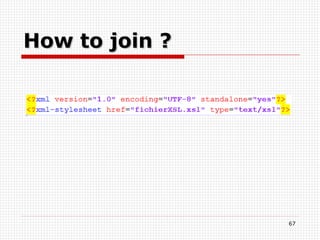
How to join ?
Example Example to join
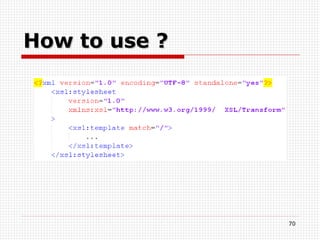
Template Operations on some elements Uses XPath expressions
How to use ?
Example

Xml and Co.

  • 1.
    XML and co.Findik Dervis
  • 2.
    About this presentationXML DTD Introduction to XSL A lot of examples
  • 3.
    Just a littlehistory ... 1986 : SGML Standard Generalised Markup Language System for defining markup languages Allows structure data Presentation is separated from content Too complex, voluminous and expensive
  • 4.
    HTML 1991 :HTML Hypertext Markup Language HTML is a SGML application Very flexible for the WEB Tags limited Mixing data and presentation of data 1996 XML was born
  • 5.
    What’s XML ?!XML  e X tensible M arkup L anguage A syntax for documents A structural and semantic language Not a formatting language A meta-markup language New tags can be defined Data are auto-descriptive
  • 6.
    The goals ofXML XML must be easily usable on the WEB XML is not HTML ! XML must support a wide variety of apps. An XML document must be : Legible and clear Easy to create Just a plain text
  • 7.
    Why use XML? XML separates data from HTML (formatting) XML simplifies data sharing XML simplifies data transport XML makes your data more available ...
  • 8.
  • 9.
    XML : TheRoot XML document : forms a tree structure that starts at “the root” must contain a root element The root is : an element the parent of all other elements
  • 10.
    XML : ElementRepresents a node or the root It’s a tag with a content Another element, a value or nothing Statement : <nameElm Attr1 Attr2> Value/Elm </name>
  • 11.
    Element naming rulesNames can contain : letters, numbers and other characters Names must not start with : A number or punctuation character with the letters xml (or XML, or Xml, etc) Names can’t contain : Spaces keywords
  • 12.
    XML : AttributesAttributes provide additional information Many attributes by XML element but just one value by attribute Same naming rules as element Statement : nameAttr=“value” or nameAttr=‘value’
  • 13.
    Value The valueof elements or attributes : Can be empty Can’t contain : & < “ To use these characters, use entities
  • 14.
    XML : CommentsAnywhere in the XML document “ --” can’t be used in the comments Statement : <!--myComment-->
  • 15.
  • 16.
    XML : Theprologue Statement : <? version=“1.0” encoding=“ASCII | UTF-8 | …” standalone=“yes | no” ?>
  • 17.
    Encoding US-ASCII :English UTF-8 : Unicode compressed
  • 18.
  • 19.
    Textual dataA value may be : letter and number Tabulation Carriage return and line feed Space Other characters : <  &lt; &  &amp;
  • 20.
    CDATA Section Statement: <![CDATA[“text”]]>
  • 21.
  • 22.
    Well formed documentThe document must respect the syntax and simple rules The document must respect other rules.
  • 23.
    Valid document Tobe valid , the document has: To be well formed To make a reference to DTD To be consistent with a DTD
  • 24.
  • 25.
  • 26.
    DTD Introduction DocumentType Definition To validate a document
  • 27.
    Internal DTD DTDinside the XML document XML document is standalone DTD must be wrapped in a DOCTYPE definition Statement : <!DOCTYPE nameRoot [ … ]>
  • 28.
  • 29.
  • 30.
    Example Example withan external file
  • 31.
    DTD : ElementTo define an XML element Statement : <!ELEMENT nameElm EMPTY (#PCDATA) (child1,child2,…)>
  • 32.
  • 33.
    Option of attributes #REQUIRED #FIXED ‘value’ #IMPLIED
  • 34.
    DTD : EntityTo use entities in an XML document Statement : From internal DTD : <!ENTITY nameEnt “text of the entity&quot;> From external DTD : <!ENTITY nameEnt SYSTEM “text of the entity&quot;> Statement to use : &nameEnt;
  • 35.
  • 36.
  • 37.
    Introduction With theDTD : Not any restrictions on text content Very little control over mixed content Little control over ordering of elements … The XML S chema D efinition (XSD) language solves these problems
  • 38.
    DTD versus XSDDTD : XSD :
  • 39.
    XML Schema …Machine validation of instance document Uses XML syntax Rich set of rules and datatypes User defined datatypes Namespace support
  • 40.
    Reference to anXSD In the root element Uses the XSD namespace Statement :
  • 41.
    XSD : Simpletypes To define an XML element that can contain only text (+attributes) The text can be of many different types ; string,decimal,integer,boolean,date,… Allows to define restrictions Statement :
  • 42.
    XSD : Complextypes To define XML element that contains other elements - attributes No restrictions !
  • 43.
    XSD : RestrictionsRestriction on simple types To define acceptable values Various types of restrictions : On values On set\series of values On length …
  • 44.
  • 45.
    How to writea schema ? Important : Same prolog like your XML file To define namespace :
  • 46.
  • 47.
  • 48.
    Attribute To definean attribute :
  • 49.
  • 50.
  • 51.
  • 52.
  • 53.
  • 54.
    Hein … XPath?? Is a language for finding informations Is used to navigate through elements and attributes XSLT is built on XPath expressions
  • 55.
    How it’s worksUses path expressions to select nodes or node-sets Uses the standard functions of XPath : Last() Position() Count() String-length(str) Substring(str,str2) Round(nbr) …
  • 56.
    Location Path ExpressionA path expression composed of : An axe A node test Zero or more predicates
  • 57.
  • 58.
  • 59.
    Abbreviations Abbrevations TestNode nom child::nom @nom atribute::nom //nom /descendant-or-self::node()/ . self::node() .. parent::node()
  • 60.
    Operators + ;- ; * ; div ; mod | or ; and = ; != ; > ; >= ; < ; <=
  • 61.
  • 62.
  • 63.
    XSL Language eX tensible S tyleSheet L anguage XSL = Style Sheets for XML XSL describes how the XML document should be displayed! XSL = 3 parts : XSLT XPath XSL-FO
  • 64.
    What is XSLT? e X tensible S tyleSheet L anguage T ransformations XSLT is the most important part of XSL XSLT transforms an XML document into another XML document XSLT uses XPath to navigate in XML documents
  • 65.
    Namespaces XSL &XSLT For XSLT : xsl=&quot;http://www.w3.org/1999/XSL/Transform&quot; For XSL : fo=’’http://www.w3.org/1999/XSL/Format/1.0’’
  • 66.
  • 67.
  • 68.
  • 69.
    Template Operations onsome elements Uses XPath expressions
  • 70.
  • 71.

Editor's Notes

  • #2 DERVIS
  • #3 DERVIS
  • #4 DERVIS
  • #5 DERVIS
  • #6 DERVIS
  • #7 DERVIS
  • #8 DERVIS
  • #10 DERVIS
  • #11 DERVIS
  • #12 DERVIS
  • #13 DERVIS
  • #14 DERVIS
  • #15 DERVIS
  • #17 The prologue is an instruction which is between brackets and question marks, it describes the version of language XML, and we have two parameters which are optional. The firstly parameter is “encoding” which describes character sets, and the second parameter is “standalone” which describes if this do cument is standalone or no, so if it only works or no, per example when you want to use an external DTD, then you have to put “no” in standalone.
  • #18 Here’s two examples of encoding. It serves to define which character you want to use. Well, you have a lot of encoding type.
  • #19 Here, you have the namespace “fil” which define all elements which has this element belong to www.lesfilms.com, and those which have belong to www.lesdvds.com. As you can see, we can define others namespace in elements, like www.lefilm1.com or www.lefilm2.com.
  • #20 When you want to write a textual, you can only use letter and number, tabulation, carriage return and line feed, and space. If you want to use “smaller than”, you have to write “ampersand l t and semicolon”, or if you want to write ampersand, you have to write “ampersand a m p and semicolon”. I can’t explain all specials characters, because the list is too long.
  • #21 CDATA Section is a section which contains a blocks of characters with all kinds of characters of string. And should not be analyzed by the XML processor. For this, you have to between bracket your text.
  • #23 A document must respect syntax and simples rules, so all we saw how write a XML document, with open tag and close tag, that’s so a document where we respect the syntax. It has a lot of other rules, like “a document must contain a XML declaration”, I don’t explain all rules because it’s too long.
  • #24 To valid a document, firstly it has to be well formed, secondly, to do a reference to DTD, and finally to be consistent with a DTD. We will explain on later DTD.
  • #27 DTD means Document Type Definition, it serves to validate a document, so if each tag is correctly opened and closed, and if the XML document respects some rules. For the record, DTD has been used in SGML, same in HTML. In HTML, DTD is invisible because it’s integrated into the browser.
  • #28 Comme ata a dit, il y a 2 type de document DTD, interne et externe Pour l’interne, le DTD doit etre dans le document XML, et le document XML est standalone Pour déclarer le DTD interne il faut utiliser le mot clé doctype
  • #30 Well, you can use an external file for DTD, for this, you have to add in XML Document between prologue and root node, you have to write between brackets, exclamation marks, then DOCTYPE, then root node, then key word SYSTEM, and between apostrophe the path of the name of your file with DTD like extension. And in external file with DTD like extension, you can directly write your instructions.
  • #31 Here’s an example of a XML document which is validated by a DTD.
  • #32 Les element dans la dtd sont utilisé pour décrire les element du document XML avec leurs valeur Un élémet peut avoir avec une valeur vie, data ou autre élément Si il a d’autre éléments, il faut indiquer combien de fois les sous élément sont créer
  • #33 You can define attributes, for this, you have to write between brackets, exclamation mark, then key word ATTLIST, then the name of your element, then the name of your attribute, and then the type of your attribute, and if want you can add an option to your attribute. Generally, we will use CDATA like type of attribute, because it accepts all characters. And I will explain you, the options of attribute in the next slide.
  • #34 If you want that attribute must contain something, then you have to use the key word ‘REQUIRED’. If you want that attribute must contain an exact value, then have to use the key word ‘FIXED’, and when you write the attribute in XML document, you have to only write this value. And the last option is IMPLIED, it’s optional, if you want you can’t write, because it means that you can use an attribute or no.
  • #35 Les entités sont utilisé pour les caractères spéciaux ou pour eviter de répéter des données C’est une représentation symbolique des données Il y a 2 types d’entités, interne dans le document XML et externe dans le document DTD Pour utiliser il faut prendre le &amp; suviit du nom de l’entité et pour finir le ;
  • #37 DERVIS
  • #38 DERVIS
  • #39 DERVIS
  • #40 DERVIS
  • #41 DERVIS
  • #42 DERVIS
  • #43 DERVIS
  • #44 DERVIS
  • #46 It’s really important, when you begin to write a schema, you have to define the prolog of your XML file and to define namespace. Then you have to declare your namespace of your schema, in this example it’s XSD, which will serve to use later.
  • #47 A sequence, it’s an ordered list, so par examle the list of your tags. And as you can see, when you open a tag, you have to close, it’s important, like in XML, and you can see too that for tag of schema, you have to use your namespac.
  • #48 I will show you an example, and I switch in french.
  • #49 Sure, you can have attributes, for this, it’s really simple, you have to write your namespace, then keyword « attribute », then it name and it type. And you don’t need close this tag like elements.
  • #50 You can include like in PHP a Schema, for this you have to use the keyword include, with its location. That’s all, and you don’t have a close tag.
  • #51 You can reusable a schema too, for this you have to use the keyword « include » by « redefine », and you can redefine without problems your schema.
  • #52 Here’s an example when we want to redefine my schema, we redefine a simple type, and we put a restriction which has a maximum to 40. Sure, don’t forget to close some tags.
  • #54 DERVIS
  • #55 DERVIS
  • #56 DERVIS
  • #57 DERVIS
  • #58 When you explore with XPATH, each step allows a list of child node, in this example, we can see that we begin with « carnet » then personne, and then nom, and if « nom » has a list of Nodes, with this we can have this list. And this expressions is called relative path.
  • #63 DERVIS
  • #64 DERVIS
  • #66 As you know, we can use spacenames, when you use for XSLT, you have to use the spacename in the first example; and when you want to use for XSL, you have to use the spacename in the second example. In this example, the namespace XSL allows to use differents keyword of XSLT, and fo allows to use differents keywords to format.
  • #67 Firstly, you have to write a prolog, then you have to write the first open tag, with version and its namespace, and then you have to close the open tag because XSL it’s like XML.
  • #68 Well, you can join a XSL Document to XML document, for this, you have to use the same prolog that the XSL Document, and then you have to add the second line which is between bracket, and between interrogation mark, and then the keyword xml-stylesheet, then href which defines the path of XSL Document, and then the type which defines a XSL Document.
  • #70 A template allows the differents operation on some elements, and when you want to use a template, you have to use a XPath expression
  • #71 When you want to use a template, you have to type the spacename followed by template, and you have an attribute which defines which elements you want to start. In this example, we begin with the node.