Writing for the Web

Writing for the web is different
      than writing for print.
Writing for the Web


 What do you think
makes it so different?
Writing for the Web
One big difference is the readers.

Web users, unlike print readers:

   • Scan pages looking for key points
   • Look at pages out of sequence
   • Move on if they don’t find the specific content they
     want
   • Get overwhelmed by clutter
   • Are global
Writing for the Web


Good web pages are written for the users, not
 for your boss or a committee

“On the web, value is NOT what the organization thinks is valuable.
Value IS what the impatient customer values.”
                                                       -- Gerry McGovern
Writing for the Web

One Voice for the Website

We strive for one voice on the website. With so many pages
 and authors, that is the only way to ensure a consistent,
 usable, and high-quality site.

Web Services is part of Marketing, and we work with the
 various marketing strategists for consistency across the
 site.
Writing for the Web

Voice: Writing Conversationally

The web is an informal conversation with the user.

Formal “institutional speak” doesn’t work with web readers.

On the web, we’re talking with the user, helping the user,
  educating the user. We aren’t lecturing to the user.

Try writing the way you speak!
Writing for the Web

Voice: Writing Conversationally

“If you’re writing online, forget everything you were tortured by in high
    school English class. You’re not trying to win any award or get an A.
    You’re just trying to be real, to make a point, to write something
    worth reading.

So just say it.”

                                                               -- Seth Godin
                                                 http://sethgodin.typepad.com/
Writing for the Web

Putting a page on the web requires extra effort,
 planning, and thought

You can’t always duplicate a print piece on the web.

You probably will need to do some extra work, with the help
  of Web Services, to make your pages work for the web.
Writing for the Web

Don’t be afraid to try something different

If it doesn’t work, you can change it.

Unlike reprinting a brochure, it’s free and easy to make
  changes on the web!
Writing for the Web
Before you begin working on a page or project,

Clarify these points:
   • Audience: For whom are you writing?
   • Purpose: Why are you writing?
      • To educate/inform? To engage? To sell something?
   • Main point(s): What are you writing about?
      • Why should we care?
   • Medium: How should the information be presented?
      • One or more pages? HTML? PDF? Multimedia (Flash, etc)?
   • Context: Where will this go on the web?
      • Where should it link from? More than one link?
   • Timeline: When will it be online? How long will it stay
     online?
Writing for the Web

             Exercise
Divide into groups of 2-3.
Take a look at your sample text and try to
  answer these points

•   Audience
•   Purpose
•   Main point(s)/Why
•   Medium
•   Context
•   Timeline
Writing for the Web


If you can clarify these points, it will help Web
   Services help you make your pages stronger
   and more effective for the web.

If you can’t answer all of these questions, we can help you.
Writing for the Web


Tips for your web text
Writing for the Web
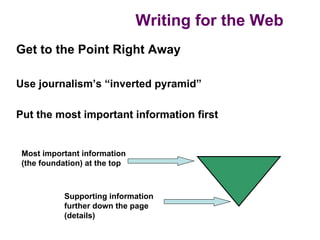
Get to the Point Right Away

Use journalism’s “inverted pyramid”

Put the most important information first


 Most important information
 (the foundation) at the top


            Supporting information
            further down the page
            (details)
Writing for the Web

Word Choice

  • Use clear, simple language
  • Avoid acronyms and abbreviations that aren’t obvious
    to outside users
  • Eliminate jargon and internal terms
     • Users don’t care about our department names or the terms
       “we’ve always used.” They want clear information.
Writing for the Web

         Discussion


Look at your sample text. Is there any
  jargon that could be removed? How
  would this help users?
Writing for the Web

Voice and Style

Use concrete, active language when writing for the web.


What does that mean?
Writing for the Web

Voice and Style

“The FlexPlan gives you options.”

Instead of…

“The FlexPlan is designed to give you the following options.”


           Why is the first option better?
Writing for the Web
      Discussion

See if you can you make these
sentences active:

The candidate preparation toolkit is where
candidates can find out more about study
groups

Registration for this conference is available
by using an online form
Writing for the Web

Voice and Style

What is the second person?


Second person means you’re speaking directly to
  the user:
Writing for the Web

Voice and Style

“Invest in your future with our career resources”


“Update your contact information”


“Take the next step”


“Are you ready?”
Writing for the Web


         Discussion

Find a sentence written in
the third person, and we’ll
rewrite it as a group
Writing for the Web

Voice and Style

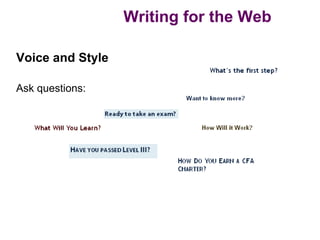
Ask questions:
Writing for the Web

Voice and Style

Use fewer, smaller words

                     “Use” not “utilize”

                   “Build” not “construct”

Remember: “Big” words aren’t necessarily big in size
  (utilize is only seven letters long, but it is a big word)
Writing for the Web


         Discussion
Find an example of a
“big” word that could be
changed to a smaller
word

Or find an example of a
group of words that
could be shortened
Writing for the Web

Context

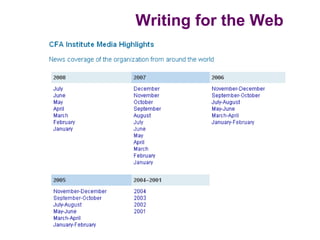
Make each page understandable on its own

  • Don’t assume the user has viewed any other pages on
    the site
Writing for the Web
Writing for the Web

Length


As a rule, cut your text in half (you might be able to cut
  even more)
Writing for the Web

Length

Why is it important to cut your text?

100 words            You lose 25% of your readers

300 words            You lose 40% of your readers
Writing for the Web

          Exercise
Try trimming your
content in half. Feel free
to move sentences and
paragraphs and rewrite
text

Don’t worry about
headings or organization
just yet
Writing for the Web

Chunking

What is chunking?

  • Bulleted lists
     • Easy to scan
     • Slow the reader down
     • Emphasize important information
  • Short, simple phrases
  • Smaller, more manageable pieces of information
     • Multiple short paragraphs instead of one long one
Writing for the Web
Writing for the Web
Writing for the Web


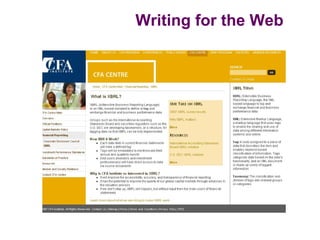
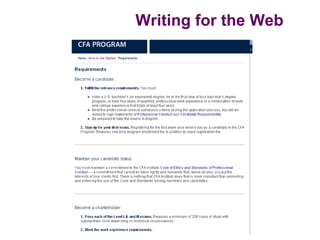
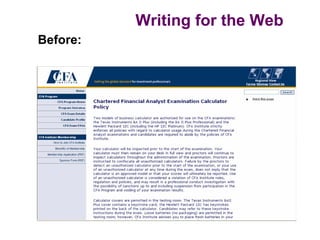
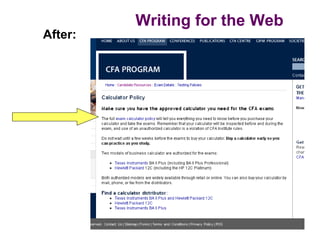
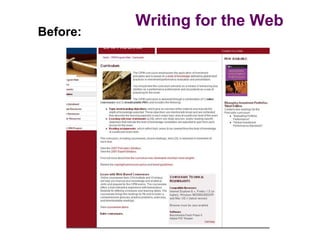
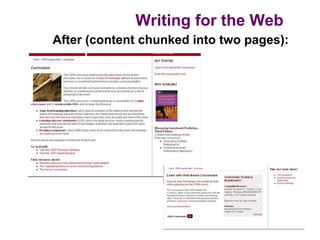
Often, the best way to chunk content is to
  break it up into multiple pages…
Writing for the Web
Before:
Writing for the Web
After:
Writing for the Web
Before:
Writing for the Web
After (content chunked into two pages):
Writing for the Web

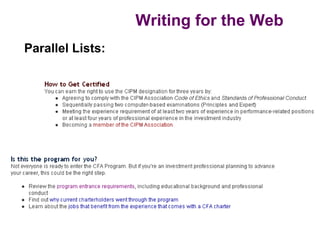
Chunking:

All lists should be parallel. How do you write a
  parallel list?

• Each item in the list begins with the same part of speech.
  If one item is a verb, they should all be verbs. If one item
  is an “ing” word, they should all be “ing” words.

• Each item in the list is the same type of statement. For
  example, if one item is a question, they should all be
  questions.
Writing for the Web
Parallel Lists:
Writing for the Web

         Exercise
“Chunk” your sample text

Divide it into pieces that will be easy for the user to
understand. (Make sure you use the “inverted pyramid”
and put the most important content first)

Use lists or move content onto multiple pages. Do
whatever you think will work

Don’t worry about headings yet
Writing for the Web

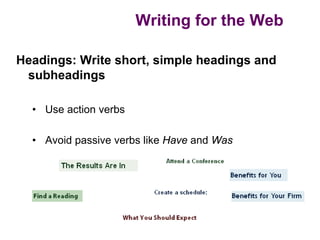
Headings: Write short, simple headings and
 subheadings

  • Use action verbs

  • Avoid passive verbs like Have and Was
Writing for the Web

           Exercise

Write a page heading for your text

Write any other subheadings that are
necessary for your page/s
Writing for the Web

Links: A helpful way to conserve space


Do not use indicators like “click here for more
  information” or spelling out URLs: “visit
  www.website.org for more information.”
Writing for the Web

Links: A helpful way to conserve space

Instead, create links within informative
   sentences and imbed URLS:

  The conference proceedings resulted in a
  report on Malfunctioning Websites.

Or:

       View the conference proceedings for
  further detail.
Writing for the Web
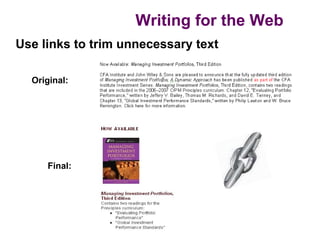
Use links to trim unnecessary text

  Original:


     Final:
Writing for the Web

Links

Warning: Use hypertext where it makes sense to do so,
  but watch overuse.

Too many links can crowd the page and make your text
  hard to read.

Also consider link placement: Links will take your reader
   away from your page, and they might not return.
Writing for the Web


            Exercise

Mark all the links for your page
Writing for the Web

Search Engine Optimization (SEO)

  • Search engines read your text from the upper left to
    the bottom right and consider the first words they see
    more important than the rest
  • Google considers words in tags (heading styles,
    boldface) more important than plain text
  • Your keywords are important, so give some thought to
    writing them
Writing for the Web

Search Engine Optimization (SEO)

But remember: You should focus on having well-written and
  compelling content.

Search engines may refer people to your pages, but users
  will only stay if the content is good.
Writing for the Web

Think Beyond Text

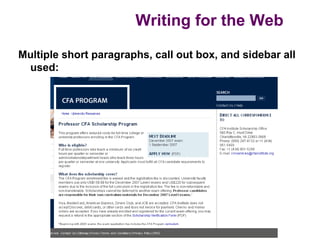
  • Use the sidebar and/or callout boxes to maximize your
    space and clearly communicate multiple pieces of
    information on a page

  • Graphics

  • White space
Writing for the Web

Multiple short paragraphs, call out box, and sidebar all
 used:
Writing for the Web

Group Brainstorming

What other elements could improve
your page?

How would you incorporate
graphics, callout boxes, or white
space?
Writing for the Web

Wrapping It Up

Be sure to:

   • Use spell-check

   • Proofread your pages

   • Verify the accuracy of your information

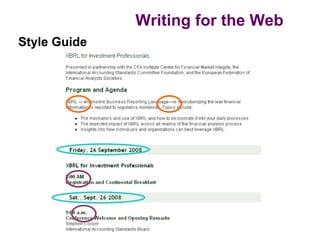
   • Follow the CFA Institute Style Guide for
     Print and Web
Writing for the Web
Style Guide
Writing for the Web

Group Brainstorming

What kinds of things would you
look up in the CFA Institute Style
Guide for Print and Web?
Writing for the Web

What if you have questions when you get back
 to your desk?

E-mail us:
  #WebServices

Check out our intranet pages:
  http://home.aimr.org/homepage/ms/web/index.html
  (includes a list of our favorite writing resources)

Writing for the Web

  • 1.
    Writing for theWeb Writing for the web is different than writing for print.
  • 2.
    Writing for theWeb What do you think makes it so different?
  • 3.
    Writing for theWeb One big difference is the readers. Web users, unlike print readers: • Scan pages looking for key points • Look at pages out of sequence • Move on if they don’t find the specific content they want • Get overwhelmed by clutter • Are global
  • 4.
    Writing for theWeb Good web pages are written for the users, not for your boss or a committee “On the web, value is NOT what the organization thinks is valuable. Value IS what the impatient customer values.” -- Gerry McGovern
  • 5.
    Writing for theWeb One Voice for the Website We strive for one voice on the website. With so many pages and authors, that is the only way to ensure a consistent, usable, and high-quality site. Web Services is part of Marketing, and we work with the various marketing strategists for consistency across the site.
  • 6.
    Writing for theWeb Voice: Writing Conversationally The web is an informal conversation with the user. Formal “institutional speak” doesn’t work with web readers. On the web, we’re talking with the user, helping the user, educating the user. We aren’t lecturing to the user. Try writing the way you speak!
  • 7.
    Writing for theWeb Voice: Writing Conversationally “If you’re writing online, forget everything you were tortured by in high school English class. You’re not trying to win any award or get an A. You’re just trying to be real, to make a point, to write something worth reading. So just say it.” -- Seth Godin http://sethgodin.typepad.com/
  • 8.
    Writing for theWeb Putting a page on the web requires extra effort, planning, and thought You can’t always duplicate a print piece on the web. You probably will need to do some extra work, with the help of Web Services, to make your pages work for the web.
  • 9.
    Writing for theWeb Don’t be afraid to try something different If it doesn’t work, you can change it. Unlike reprinting a brochure, it’s free and easy to make changes on the web!
  • 10.
    Writing for theWeb Before you begin working on a page or project, Clarify these points: • Audience: For whom are you writing? • Purpose: Why are you writing? • To educate/inform? To engage? To sell something? • Main point(s): What are you writing about? • Why should we care? • Medium: How should the information be presented? • One or more pages? HTML? PDF? Multimedia (Flash, etc)? • Context: Where will this go on the web? • Where should it link from? More than one link? • Timeline: When will it be online? How long will it stay online?
  • 11.
    Writing for theWeb Exercise Divide into groups of 2-3. Take a look at your sample text and try to answer these points • Audience • Purpose • Main point(s)/Why • Medium • Context • Timeline
  • 12.
    Writing for theWeb If you can clarify these points, it will help Web Services help you make your pages stronger and more effective for the web. If you can’t answer all of these questions, we can help you.
  • 13.
    Writing for theWeb Tips for your web text
  • 14.
    Writing for theWeb Get to the Point Right Away Use journalism’s “inverted pyramid” Put the most important information first Most important information (the foundation) at the top Supporting information further down the page (details)
  • 15.
    Writing for theWeb Word Choice • Use clear, simple language • Avoid acronyms and abbreviations that aren’t obvious to outside users • Eliminate jargon and internal terms • Users don’t care about our department names or the terms “we’ve always used.” They want clear information.
  • 16.
    Writing for theWeb Discussion Look at your sample text. Is there any jargon that could be removed? How would this help users?
  • 17.
    Writing for theWeb Voice and Style Use concrete, active language when writing for the web. What does that mean?
  • 18.
    Writing for theWeb Voice and Style “The FlexPlan gives you options.” Instead of… “The FlexPlan is designed to give you the following options.” Why is the first option better?
  • 19.
    Writing for theWeb Discussion See if you can you make these sentences active: The candidate preparation toolkit is where candidates can find out more about study groups Registration for this conference is available by using an online form
  • 20.
    Writing for theWeb Voice and Style What is the second person? Second person means you’re speaking directly to the user:
  • 21.
    Writing for theWeb Voice and Style “Invest in your future with our career resources” “Update your contact information” “Take the next step” “Are you ready?”
  • 22.
    Writing for theWeb Discussion Find a sentence written in the third person, and we’ll rewrite it as a group
  • 23.
    Writing for theWeb Voice and Style Ask questions:
  • 24.
    Writing for theWeb Voice and Style Use fewer, smaller words “Use” not “utilize” “Build” not “construct” Remember: “Big” words aren’t necessarily big in size (utilize is only seven letters long, but it is a big word)
  • 25.
    Writing for theWeb Discussion Find an example of a “big” word that could be changed to a smaller word Or find an example of a group of words that could be shortened
  • 26.
    Writing for theWeb Context Make each page understandable on its own • Don’t assume the user has viewed any other pages on the site
  • 27.
  • 28.
    Writing for theWeb Length As a rule, cut your text in half (you might be able to cut even more)
  • 29.
    Writing for theWeb Length Why is it important to cut your text? 100 words You lose 25% of your readers 300 words You lose 40% of your readers
  • 30.
    Writing for theWeb Exercise Try trimming your content in half. Feel free to move sentences and paragraphs and rewrite text Don’t worry about headings or organization just yet
  • 31.
    Writing for theWeb Chunking What is chunking? • Bulleted lists • Easy to scan • Slow the reader down • Emphasize important information • Short, simple phrases • Smaller, more manageable pieces of information • Multiple short paragraphs instead of one long one
  • 32.
  • 33.
  • 34.
    Writing for theWeb Often, the best way to chunk content is to break it up into multiple pages…
  • 35.
    Writing for theWeb Before:
  • 36.
    Writing for theWeb After:
  • 37.
    Writing for theWeb Before:
  • 38.
    Writing for theWeb After (content chunked into two pages):
  • 39.
    Writing for theWeb Chunking: All lists should be parallel. How do you write a parallel list? • Each item in the list begins with the same part of speech. If one item is a verb, they should all be verbs. If one item is an “ing” word, they should all be “ing” words. • Each item in the list is the same type of statement. For example, if one item is a question, they should all be questions.
  • 40.
    Writing for theWeb Parallel Lists:
  • 41.
    Writing for theWeb Exercise “Chunk” your sample text Divide it into pieces that will be easy for the user to understand. (Make sure you use the “inverted pyramid” and put the most important content first) Use lists or move content onto multiple pages. Do whatever you think will work Don’t worry about headings yet
  • 42.
    Writing for theWeb Headings: Write short, simple headings and subheadings • Use action verbs • Avoid passive verbs like Have and Was
  • 43.
    Writing for theWeb Exercise Write a page heading for your text Write any other subheadings that are necessary for your page/s
  • 44.
    Writing for theWeb Links: A helpful way to conserve space Do not use indicators like “click here for more information” or spelling out URLs: “visit www.website.org for more information.”
  • 45.
    Writing for theWeb Links: A helpful way to conserve space Instead, create links within informative sentences and imbed URLS: The conference proceedings resulted in a report on Malfunctioning Websites. Or: View the conference proceedings for further detail.
  • 46.
    Writing for theWeb Use links to trim unnecessary text Original: Final:
  • 47.
    Writing for theWeb Links Warning: Use hypertext where it makes sense to do so, but watch overuse. Too many links can crowd the page and make your text hard to read. Also consider link placement: Links will take your reader away from your page, and they might not return.
  • 48.
    Writing for theWeb Exercise Mark all the links for your page
  • 49.
    Writing for theWeb Search Engine Optimization (SEO) • Search engines read your text from the upper left to the bottom right and consider the first words they see more important than the rest • Google considers words in tags (heading styles, boldface) more important than plain text • Your keywords are important, so give some thought to writing them
  • 50.
    Writing for theWeb Search Engine Optimization (SEO) But remember: You should focus on having well-written and compelling content. Search engines may refer people to your pages, but users will only stay if the content is good.
  • 51.
    Writing for theWeb Think Beyond Text • Use the sidebar and/or callout boxes to maximize your space and clearly communicate multiple pieces of information on a page • Graphics • White space
  • 52.
    Writing for theWeb Multiple short paragraphs, call out box, and sidebar all used:
  • 53.
    Writing for theWeb Group Brainstorming What other elements could improve your page? How would you incorporate graphics, callout boxes, or white space?
  • 54.
    Writing for theWeb Wrapping It Up Be sure to: • Use spell-check • Proofread your pages • Verify the accuracy of your information • Follow the CFA Institute Style Guide for Print and Web
  • 55.
    Writing for theWeb Style Guide
  • 56.
    Writing for theWeb Group Brainstorming What kinds of things would you look up in the CFA Institute Style Guide for Print and Web?
  • 57.
    Writing for theWeb What if you have questions when you get back to your desk? E-mail us: #WebServices Check out our intranet pages: http://home.aimr.org/homepage/ms/web/index.html (includes a list of our favorite writing resources)