Introduction to
Git & GitHub
Komal Sharma
DSC member
NO.
Are Git & GitHub
Same?
Git is one of the most widely used distributed VCS
or Version Control System. It is FREE and Open
Source project and was started in the year 2005 by
Linus Torvalds.
What is Git?
WHAT DOES THAT EVEN
MEAN?
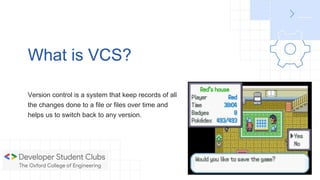
Version control is a system that keep records of all
the changes done to a file or files over time and
helps us to switch back to any version.
What is VCS?
Why use GIT?
-Store revisions in a project history in just one directory
-Rewind to any revision in the project
-Work on new features without interference of main codebase
-Easily collaborate with other programmers
What is GitHub?
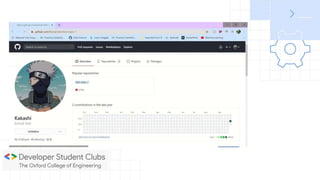
-Online service that hosts our projects
-Share our code with other developers
-Developers can download the projects and work on them
-They can re-upload and merge their edits to the main codebase
Terminology we use
Directory -> Folder
Terminal -> Interface for Text commands
CLI -> Command Line Interface
mkdir -> Creates a new folder
cd -> Change directory
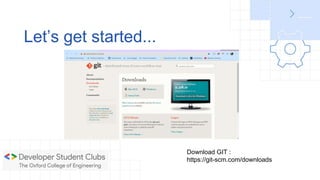
Let’s get started...
Download GIT :
https://git-scm.com/downloads
Git Basic concepts
The Folder where your project is stored is a
repository and if it has a .git folder then its Git
Repository.
Git Repository
The commit command is used to save changes to
Local repository
Commit
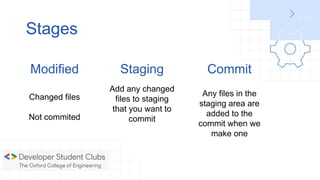
Stages
Modified
Changed files
Not commited
Staging
Add any changed
files to staging
that you want to
commit
Commit
Any files in the
staging area are
added to the
commit when we
make one
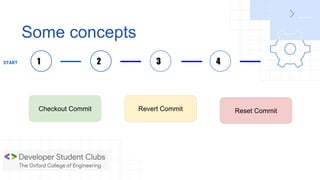
Some concepts
Checkout Commit Revert Commit Reset Commit
1START 2 3 4
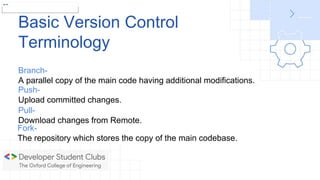
Basic Version Control
Terminology
git init
Branch-
A parallel copy of the main code having additional modifications.
Push-
Upload committed changes.
Pull-
Download changes from Remote.
Fork-
The repository which stores the copy of the main codebase.
Basic Git Commands
git init- to initialize git and make a .git repository
git rm[file]- deletes the file from your working directory
git status- gives you the status on your local branch
git add- adds the file to staging area
git commit- to commit the staged files
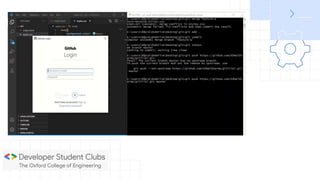
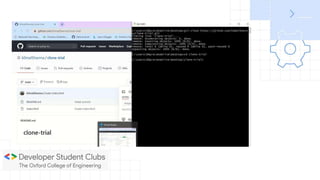
git clone- downloads repository from GitHub to your system
git push- sends local files to remote branch
git branch- lists available local branches and can create a new
branch
git merge- to merge branches together
Introduction to git & GitHub

Introduction to git & GitHub

  • 1.
    Introduction to Git &GitHub Komal Sharma DSC member
  • 2.
    NO. Are Git &GitHub Same?
  • 3.
    Git is oneof the most widely used distributed VCS or Version Control System. It is FREE and Open Source project and was started in the year 2005 by Linus Torvalds. What is Git?
  • 4.
    WHAT DOES THATEVEN MEAN?
  • 5.
    Version control isa system that keep records of all the changes done to a file or files over time and helps us to switch back to any version. What is VCS?
  • 6.
    Why use GIT? -Storerevisions in a project history in just one directory -Rewind to any revision in the project -Work on new features without interference of main codebase -Easily collaborate with other programmers
  • 7.
    What is GitHub? -Onlineservice that hosts our projects -Share our code with other developers -Developers can download the projects and work on them -They can re-upload and merge their edits to the main codebase
  • 8.
    Terminology we use Directory-> Folder Terminal -> Interface for Text commands CLI -> Command Line Interface mkdir -> Creates a new folder cd -> Change directory
  • 9.
    Let’s get started... DownloadGIT : https://git-scm.com/downloads
  • 10.
  • 11.
    The Folder whereyour project is stored is a repository and if it has a .git folder then its Git Repository. Git Repository
  • 12.
    The commit commandis used to save changes to Local repository Commit
  • 13.
    Stages Modified Changed files Not commited Staging Addany changed files to staging that you want to commit Commit Any files in the staging area are added to the commit when we make one
  • 14.
    Some concepts Checkout CommitRevert Commit Reset Commit 1START 2 3 4
  • 15.
    Basic Version Control Terminology gitinit Branch- A parallel copy of the main code having additional modifications. Push- Upload committed changes. Pull- Download changes from Remote. Fork- The repository which stores the copy of the main codebase.
  • 16.
    Basic Git Commands gitinit- to initialize git and make a .git repository git rm[file]- deletes the file from your working directory git status- gives you the status on your local branch git add- adds the file to staging area git commit- to commit the staged files git clone- downloads repository from GitHub to your system git push- sends local files to remote branch git branch- lists available local branches and can create a new branch git merge- to merge branches together

Editor's Notes

  • #3 The first question that comes to our mind...
  • #4 If you google, the result will be something like this...
  • #5 If you are anything like me, that probably went over you head
  • #6 Let’s break it down now… (Video game- safe points example)
  • #7 Ever happened that you saved multiple “finals”
  • #10 Installing Git