Content Management System
WordPress As  Content Management System Setyagus Sucipto iCreativeLabs Studio WordCamp Indonesia 2010
The Idea WordCamp Indonesia 2010
A  content management system  (CMS) is software that makes it easy for non-techies to organize and manage web content.
Simple and easy for manage Hide the complicated code and algorithm  Automated templates Easily editable content Scalable feature sets Web standards upgrades User role Workflow management Content Management System Capabilities
WordPress lets you create pages (stand alone content) and posts . Automated template. Easy for editable content. Easy Plugin for plug and play (scalable) Automatic upgrade Workflow management Framework  WordPress  What WordPress have and provide?
User role for limited access Not hide complicated code  WordPress  What WordPress not have?
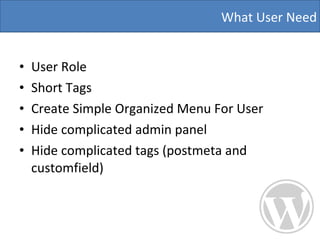
User Role  Short Tags  Create Simple Organized Menu For User Hide complicated admin panel  Hide complicated tags (postmeta and customfield) What User Need
WordCamp Indonesia 2010 Implementation
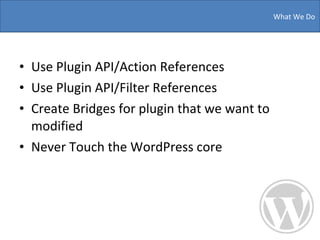
Use Plugin API/Action References Use Plugin API/Filter References Create Bridges for plugin that we want to modified  Never Touch the WordPress core  What We Do
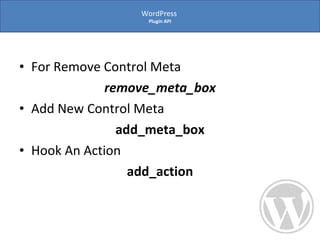
For Remove Control Meta remove_meta_box Add New Control Meta  add_meta_box Hook An Action  add_action WordPress  Plugin API
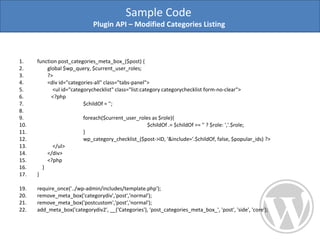
function post_categories_meta_box_($post) { global $wp_query, $current_user_roles;  ?> <div id=&quot;categories-all&quot; class=&quot;tabs-panel&quot;> <ul id=&quot;categorychecklist&quot; class=&quot;list:category categorychecklist form-no-clear&quot;> <?php  $childOf = ''; foreach($current_user_roles as $role){ $childOf .= $childOf == '' ? $role: ','.$role; }  wp_category_checklist_($post->ID, '&include='.$childOf, false, $popular_ids) ?> </ul> </div>  <?php  } } require_once('../wp-admin/includes/template.php'); remove_meta_box('categorydiv','post','normal'); remove_meta_box('postcustom','post','normal'); add_meta_box('categorydiv2', __('Categories'), 'post_categories_meta_box_', 'post', 'side', 'core'); Sample Code  Plugin API – Modified Categories Listing
It’s will simple for modified Simple for upgrade  We just adding what we need Bridges The Plugin  Make the plugin like you need
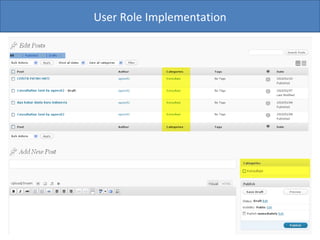
User have limited access to each category User only can post to specific categories Prevent user for make changes the post that not related with his privileges User Role
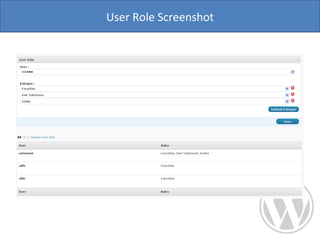
User Role Screenshot
User Role Implementation
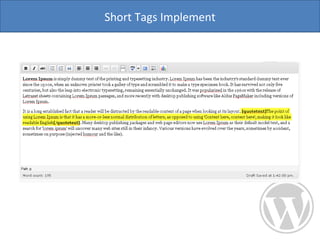
Hide complicated things in simple tags User don’t need to know php code and html Put the complicated tags with 3 steps (open tags – content – close tags)  Short Tags
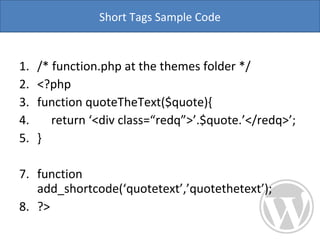
/* function.php at the themes folder */ <?php function quoteTheText($quote){ return ‘<div class=“redq”>’.$quote.’</redq>’; } function add_shortcode(‘quotetext’,’quotethetext’); ?> Short Tags Sample Code
Short Tags Implement
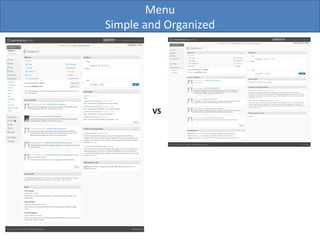
Menu Simple and Organized VS
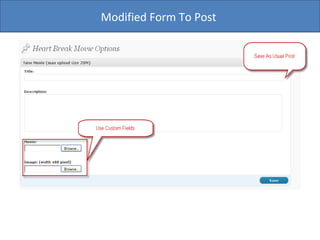
Use adminized plugin for hide the backend panel  Create simple menu and organized  Create specific post form for user Hide the custom field Just show what user need Hide complicated admin panel
Organized what menu that user want Add  new parent menu using  add_menu_page Add new sub menu page using  add_submenu_page Create Simple Menu
/* function.php at the themes folder */ add_menu_page($config['themename'].' Options', $config['themename'], 'level_7', 'icl/index', 'icl_noop'); add_submenu_page('icl/index', 'Configuration Options', 'Configuration', 'administrator', 'icl/configuration', 'icl_noop'); add_submenu_page('icl/index', 'Role Options', 'User Role', 'administrator', 'user_role/index', 'icl_noop'); if (current_user_can('manage_options') || $icl_utility->is_can_access_category($icl_utility->get_option('general', 'category_video_news', array('option_value'), FALSE, TRUE))) { add_submenu_page('icl/index', 'Movie Options', 'Movie', 'level_7', 'movie/index', 'icl_noop'); } if (current_user_can('manage_options') || $icl_utility->is_can_access_category($icl_utility->get_option('general', 'category_kontes', array('option_value'), FALSE, TRUE))) { add_submenu_page('icl/index', 'Daftar User Submit', 'Daftar User Submit', 'level_7', 'submission', 'icl_noop'); } add_submenu_page('icl/index', 'Banner Options', 'Banner', 'administrator', 'banner/index', 'icl_noop'); Sample Code
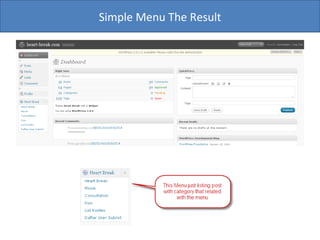
Simple Menu The Result
Modified Form To Post
$wpdb->query($sqlPost); $post_id = $wpdb->insert_id; if (intval($post_id) > 0) { if ($data['movie_source'] == 1) { add_post_meta($post_id, 'movie', WPICL_MOVIE_URL . $data['movie_file'], TRUE); } add_post_meta($post_id, 'movie_image', (($data['image_file'] != '') ? WPICL_IMAGE_URL . $data['image_file'] : get_bloginfo('stylesheet_directory') . '/images/logo-register.png'), TRUE); $sql = 'INSERT INTO '.$wpdb->term_relationships; $sql .= ' (object_id, term_taxonomy_id) VALUES ('.$post_id.', '.$data['movie_category'].')'; $sql = mysql_real_escape_string($sql); $wpdb->query($sql); } Post Sample Code
WordPress it’s be simple for modified  Hide all the complicated thing and just show the end user need In Review
Thank  You

WordPress as a Content Management System

  • 1.
  • 2.
    WordPress As Content Management System Setyagus Sucipto iCreativeLabs Studio WordCamp Indonesia 2010
  • 3.
    The Idea WordCampIndonesia 2010
  • 4.
    A contentmanagement system (CMS) is software that makes it easy for non-techies to organize and manage web content.
  • 5.
    Simple and easyfor manage Hide the complicated code and algorithm Automated templates Easily editable content Scalable feature sets Web standards upgrades User role Workflow management Content Management System Capabilities
  • 6.
    WordPress lets youcreate pages (stand alone content) and posts . Automated template. Easy for editable content. Easy Plugin for plug and play (scalable) Automatic upgrade Workflow management Framework WordPress What WordPress have and provide?
  • 7.
    User role forlimited access Not hide complicated code WordPress What WordPress not have?
  • 8.
    User Role Short Tags Create Simple Organized Menu For User Hide complicated admin panel Hide complicated tags (postmeta and customfield) What User Need
  • 9.
  • 10.
    Use Plugin API/ActionReferences Use Plugin API/Filter References Create Bridges for plugin that we want to modified Never Touch the WordPress core What We Do
  • 11.
    For Remove ControlMeta remove_meta_box Add New Control Meta add_meta_box Hook An Action add_action WordPress Plugin API
  • 12.
    function post_categories_meta_box_($post) {global $wp_query, $current_user_roles; ?> <div id=&quot;categories-all&quot; class=&quot;tabs-panel&quot;> <ul id=&quot;categorychecklist&quot; class=&quot;list:category categorychecklist form-no-clear&quot;> <?php $childOf = ''; foreach($current_user_roles as $role){ $childOf .= $childOf == '' ? $role: ','.$role; } wp_category_checklist_($post->ID, '&include='.$childOf, false, $popular_ids) ?> </ul> </div> <?php } } require_once('../wp-admin/includes/template.php'); remove_meta_box('categorydiv','post','normal'); remove_meta_box('postcustom','post','normal'); add_meta_box('categorydiv2', __('Categories'), 'post_categories_meta_box_', 'post', 'side', 'core'); Sample Code Plugin API – Modified Categories Listing
  • 13.
    It’s will simplefor modified Simple for upgrade We just adding what we need Bridges The Plugin Make the plugin like you need
  • 14.
    User have limitedaccess to each category User only can post to specific categories Prevent user for make changes the post that not related with his privileges User Role
  • 15.
  • 16.
  • 17.
    Hide complicated thingsin simple tags User don’t need to know php code and html Put the complicated tags with 3 steps (open tags – content – close tags) Short Tags
  • 18.
    /* function.php atthe themes folder */ <?php function quoteTheText($quote){ return ‘<div class=“redq”>’.$quote.’</redq>’; } function add_shortcode(‘quotetext’,’quotethetext’); ?> Short Tags Sample Code
  • 19.
  • 20.
    Menu Simple andOrganized VS
  • 21.
    Use adminized pluginfor hide the backend panel Create simple menu and organized Create specific post form for user Hide the custom field Just show what user need Hide complicated admin panel
  • 22.
    Organized what menuthat user want Add new parent menu using add_menu_page Add new sub menu page using add_submenu_page Create Simple Menu
  • 23.
    /* function.php atthe themes folder */ add_menu_page($config['themename'].' Options', $config['themename'], 'level_7', 'icl/index', 'icl_noop'); add_submenu_page('icl/index', 'Configuration Options', 'Configuration', 'administrator', 'icl/configuration', 'icl_noop'); add_submenu_page('icl/index', 'Role Options', 'User Role', 'administrator', 'user_role/index', 'icl_noop'); if (current_user_can('manage_options') || $icl_utility->is_can_access_category($icl_utility->get_option('general', 'category_video_news', array('option_value'), FALSE, TRUE))) { add_submenu_page('icl/index', 'Movie Options', 'Movie', 'level_7', 'movie/index', 'icl_noop'); } if (current_user_can('manage_options') || $icl_utility->is_can_access_category($icl_utility->get_option('general', 'category_kontes', array('option_value'), FALSE, TRUE))) { add_submenu_page('icl/index', 'Daftar User Submit', 'Daftar User Submit', 'level_7', 'submission', 'icl_noop'); } add_submenu_page('icl/index', 'Banner Options', 'Banner', 'administrator', 'banner/index', 'icl_noop'); Sample Code
  • 24.
  • 25.
  • 26.
    $wpdb->query($sqlPost); $post_id =$wpdb->insert_id; if (intval($post_id) > 0) { if ($data['movie_source'] == 1) { add_post_meta($post_id, 'movie', WPICL_MOVIE_URL . $data['movie_file'], TRUE); } add_post_meta($post_id, 'movie_image', (($data['image_file'] != '') ? WPICL_IMAGE_URL . $data['image_file'] : get_bloginfo('stylesheet_directory') . '/images/logo-register.png'), TRUE); $sql = 'INSERT INTO '.$wpdb->term_relationships; $sql .= ' (object_id, term_taxonomy_id) VALUES ('.$post_id.', '.$data['movie_category'].')'; $sql = mysql_real_escape_string($sql); $wpdb->query($sql); } Post Sample Code
  • 27.
    WordPress it’s besimple for modified Hide all the complicated thing and just show the end user need In Review
  • 28.