WordPress (4.9.6)
● Go through the standard setup of WordPress
● Do a basic introduction of the admin dashboard
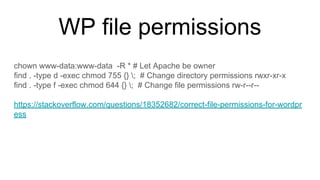
WP file permissions
chown www-data:www-data -R * # Let Apache be owner
find . -type d -exec chmod 755 {} ; # Change directory permissions rwxr-xr-x
find . -type f -exec chmod 644 {} ; # Change file permissions rw-r--r--
https://stackoverflow.com/questions/18352682/correct-file-permissions-for-wordpr
ess
wp-config.php
if ( file_exists( dirname( __FILE__ ) . '/local-config.php' ) ) {
/** Declare Dev-mode for WordPress */
define( 'WP_LOCAL_DEV', true );
/** Include config for dev environment */
include( dirname( __FILE__ ) . '/local-config.php' );
}
else {
/** Load config from env */
define('DB_NAME', $_ENV['DB_NAME']);
}
wp-config.php
● Turn on/off magic using config
● Knowledge of different configs
https://codex.wordpress.org/Editing_wp-config.php
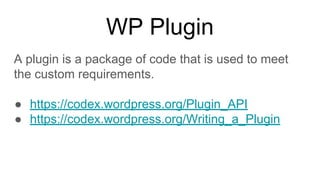
WP Plugin
A plugin is a package of code that is used to meet
the custom requirements.
● https://codex.wordpress.org/Plugin_API
● https://codex.wordpress.org/Writing_a_Plugin
Plugin Boilerplate
● https://github.com/DevinVinson/WordPress-Plugin
-Boilerplate
Start Theme
● WordPress default 2017 theme can be used
● Theme framework can be used if familiar
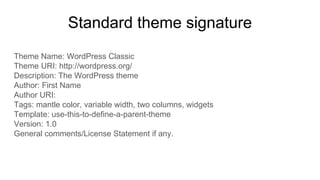
Standard theme signature
Theme Name: WordPress Classic
Theme URI: http://wordpress.org/
Description: The WordPress theme
Author: First Name
Author URI:
Tags: mantle color, variable width, two columns, widgets
Template: use-this-to-define-a-parent-theme
Version: 1.0
General comments/License Statement if any.
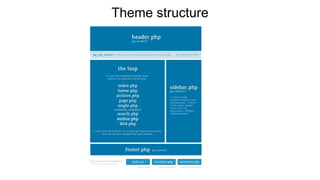
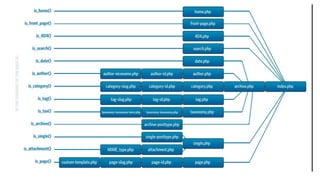
Theme structure
●
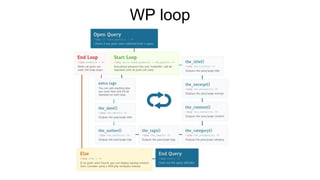
WP loop
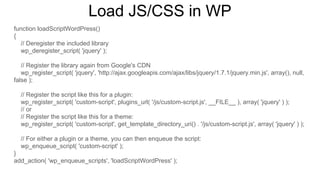
Load JS/CSS in WP
function loadScriptWordPress()
{
// Deregister the included library
wp_deregister_script( 'jquery' );
// Register the library again from Google's CDN
wp_register_script( 'jquery', 'http://ajax.googleapis.com/ajax/libs/jquery/1.7.1/jquery.min.js', array(), null,
false );
// Register the script like this for a plugin:
wp_register_script( 'custom-script', plugins_url( '/js/custom-script.js', __FILE__ ), array( 'jquery' ) );
// or
// Register the script like this for a theme:
wp_register_script( 'custom-script', get_template_directory_uri() . '/js/custom-script.js', array( 'jquery' ) );
// For either a plugin or a theme, you can then enqueue the script:
wp_enqueue_script( 'custom-script' );
}
add_action( 'wp_enqueue_scripts', 'loadScriptWordPress' );
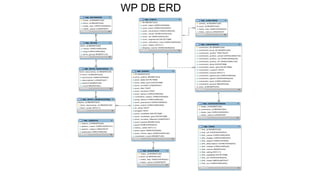
WP DB ERD
When to use WP_query(), query_posts() and
pre_get_posts
● query_posts() don't use query_posts() ever to modify main loop;
● get_posts() returns array of posts, doesn't modify global variables and is safe
to use anywhere;
● WP_Query safe to use anywhere.
https://wordpress.stackexchange.com/questions/1753/when-should-you-use-wp-query-vs-query-posts-vs-get-posts
https://wordpress.stackexchange.com/questions/50761/when-to-use-wp-query-query-posts-and-pre-get-posts
When to use WP_query(), $wpdb
● $wpdb when we need to access our own
custom tables
● WP_Query when dealing with the native
WordPress tables.
WP DB alter
If we ever need to create or update database table using your
plugin we should use dbDelta
$sql = "CREATE TABLE $table_name (
id mediumint(9) NOT NULL AUTO_INCREMENT,
time datetime DEFAULT '0000-00-00 00:00:00' NOT NULL,
url varchar(55) DEFAULT '' NOT NULL,
PRIMARY KEY (id)
) $charset_collate;";
dbDelta( $sql );
https://codex.wordpress.org/Creating_Tables_with_Plugins
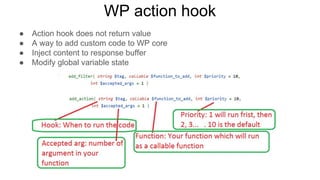
WP action hook
● Action hook does not return value
● A way to add custom code to WP core
● Inject content to response buffer
● Modify global variable state
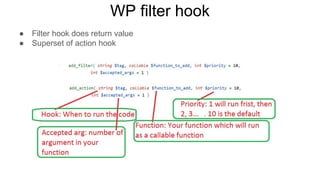
WP filter hook
● Filter hook does return value
● Superset of action hook
WP shortcodes
● Shortcode is a special kind of content that can be
attached to any WP context and reused
function purchase_subscription( $atts, $content = null) {
$a = shortcode_atts( array('class' => 'green-btn'), $atts );
$content = ($content) ? $content : 'Buy';
return '<span class="'.$a['class'].'">' . $content . '</span>';
}
add_shortcode( 'purchasecode', 'purchase_subscription' );
[purchasecode class="gray-btn"]
[purchasecode class="gray-btn"]Purchase[/purchasecode]
WP post type
Default post types
● Post (Post Type: ‘post’)
● Page (Post Type: ‘page’)
● Attachment (Post Type: ‘attachment’)
● Revision (Post Type: ‘revision’)
● Navigation menu (Post Type: ‘nav_menu_item’)
Custom post types
We are allowed to create our own post types if the default post types are not matching with our requirements.
register_post_type( $post_type, $args );
https://codex.wordpress.org/Function_Reference/register_post_type
WP REST API
● Simple way to get data in and out of WordPress over HTTP
● A strong replacement for the admin-ajax API
● No PHP dependency, front-end can be anything
Endpoints:
http://<your-domain>/wp-json/wp/v2/posts
https://developer.wordpress.org/rest-api/reference/
Custom endpoints:
https://developer.wordpress.org/rest-api/extending-the-rest-api/adding-custom-end
points/
WP cache
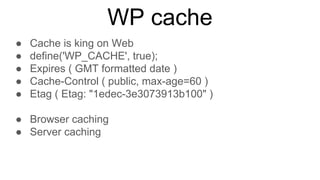
● Cache is king on Web
● define('WP_CACHE', true);
● Expires ( GMT formatted date )
● Cache-Control ( public, max-age=60 )
● Etag ( Etag: "1edec-3e3073913b100" )
● Browser caching
● Server caching
WP cache
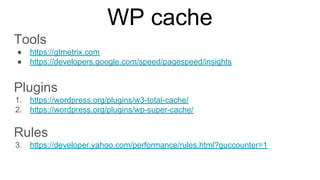
Tools
● https://gtmetrix.com
● https://developers.google.com/speed/pagespeed/insights
Plugins
1. https://wordpress.org/plugins/w3-total-cache/
2. https://wordpress.org/plugins/wp-super-cache/
Rules
3. https://developer.yahoo.com/performance/rules.html?guccounter=1
WP ajax
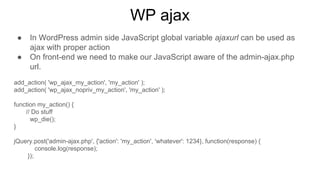
● In WordPress admin side JavaScript global variable ajaxurl can be used as
ajax with proper action
● On front-end we need to make our JavaScript aware of the admin-ajax.php
url.
add_action( 'wp_ajax_my_action', 'my_action' );
add_action( 'wp_ajax_nopriv_my_action', 'my_action' );
function my_action() {
// Do stuff
wp_die();
}
jQuery.post('admin-ajax.php', {'action': 'my_action', 'whatever': 1234}, function(response) {
console.log(response);
});
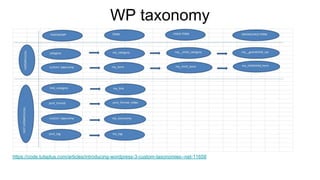
WP taxonomy
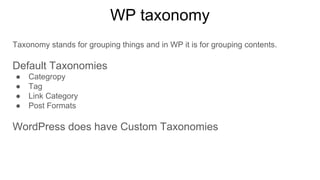
Taxonomy stands for grouping things and in WP it is for grouping contents.
Default Taxonomies
● Categropy
● Tag
● Link Category
● Post Formats
WordPress does have Custom Taxonomies
WP taxonomy
https://code.tutsplus.com/articles/introducing-wordpress-3-custom-taxonomies--net-11658
WP translation
● .pot “portable object template” contains all texts to be translated
● .po “portable object” contains the original text and the translations
● .mo “machine object file for WordPress
● Poedit tools that translates pot file to po and generates mo file
● Text Domain: woocommerce. Show example
● Text domain usage. _e( 'Your Ad here', 'my-text-domain' );
● Talk about translation plugins
https://codex.wordpress.org/I18n_for_WordPress_Developers
https://thethemefoundry.com/blog/translate-a-wordpress-theme/
Standard plugins
1. https://wordpress.org/plugins/w3-total-cache/
2. https://wordpress.org/plugins/akismet/
3. https://wordpress.org/plugins/google-sitemap-generator/
4. https://wordpress.org/plugins/contact-form-7/
5. https://wordpress.org/plugins/advanced-custom-fields/
6. https://wordpress.org/plugins/wordpress-seo/
7. https://wordpress.org/plugins/shareaholic/
8. https://wordpress.org/plugins/polylang/
Thank you

A WordPress workshop at Cefalo

  • 1.
    WordPress (4.9.6) ● Gothrough the standard setup of WordPress ● Do a basic introduction of the admin dashboard
  • 2.
    WP file permissions chownwww-data:www-data -R * # Let Apache be owner find . -type d -exec chmod 755 {} ; # Change directory permissions rwxr-xr-x find . -type f -exec chmod 644 {} ; # Change file permissions rw-r--r-- https://stackoverflow.com/questions/18352682/correct-file-permissions-for-wordpr ess
  • 3.
    wp-config.php if ( file_exists(dirname( __FILE__ ) . '/local-config.php' ) ) { /** Declare Dev-mode for WordPress */ define( 'WP_LOCAL_DEV', true ); /** Include config for dev environment */ include( dirname( __FILE__ ) . '/local-config.php' ); } else { /** Load config from env */ define('DB_NAME', $_ENV['DB_NAME']); }
  • 4.
    wp-config.php ● Turn on/offmagic using config ● Knowledge of different configs https://codex.wordpress.org/Editing_wp-config.php
  • 5.
    WP Plugin A pluginis a package of code that is used to meet the custom requirements. ● https://codex.wordpress.org/Plugin_API ● https://codex.wordpress.org/Writing_a_Plugin
  • 6.
  • 7.
    Start Theme ● WordPressdefault 2017 theme can be used ● Theme framework can be used if familiar
  • 8.
    Standard theme signature ThemeName: WordPress Classic Theme URI: http://wordpress.org/ Description: The WordPress theme Author: First Name Author URI: Tags: mantle color, variable width, two columns, widgets Template: use-this-to-define-a-parent-theme Version: 1.0 General comments/License Statement if any.
  • 9.
  • 10.
  • 11.
  • 12.
    Load JS/CSS inWP function loadScriptWordPress() { // Deregister the included library wp_deregister_script( 'jquery' ); // Register the library again from Google's CDN wp_register_script( 'jquery', 'http://ajax.googleapis.com/ajax/libs/jquery/1.7.1/jquery.min.js', array(), null, false ); // Register the script like this for a plugin: wp_register_script( 'custom-script', plugins_url( '/js/custom-script.js', __FILE__ ), array( 'jquery' ) ); // or // Register the script like this for a theme: wp_register_script( 'custom-script', get_template_directory_uri() . '/js/custom-script.js', array( 'jquery' ) ); // For either a plugin or a theme, you can then enqueue the script: wp_enqueue_script( 'custom-script' ); } add_action( 'wp_enqueue_scripts', 'loadScriptWordPress' );
  • 13.
  • 14.
    When to useWP_query(), query_posts() and pre_get_posts ● query_posts() don't use query_posts() ever to modify main loop; ● get_posts() returns array of posts, doesn't modify global variables and is safe to use anywhere; ● WP_Query safe to use anywhere. https://wordpress.stackexchange.com/questions/1753/when-should-you-use-wp-query-vs-query-posts-vs-get-posts https://wordpress.stackexchange.com/questions/50761/when-to-use-wp-query-query-posts-and-pre-get-posts
  • 15.
    When to useWP_query(), $wpdb ● $wpdb when we need to access our own custom tables ● WP_Query when dealing with the native WordPress tables.
  • 16.
    WP DB alter Ifwe ever need to create or update database table using your plugin we should use dbDelta $sql = "CREATE TABLE $table_name ( id mediumint(9) NOT NULL AUTO_INCREMENT, time datetime DEFAULT '0000-00-00 00:00:00' NOT NULL, url varchar(55) DEFAULT '' NOT NULL, PRIMARY KEY (id) ) $charset_collate;"; dbDelta( $sql ); https://codex.wordpress.org/Creating_Tables_with_Plugins
  • 17.
    WP action hook ●Action hook does not return value ● A way to add custom code to WP core ● Inject content to response buffer ● Modify global variable state
  • 18.
    WP filter hook ●Filter hook does return value ● Superset of action hook
  • 19.
    WP shortcodes ● Shortcodeis a special kind of content that can be attached to any WP context and reused function purchase_subscription( $atts, $content = null) { $a = shortcode_atts( array('class' => 'green-btn'), $atts ); $content = ($content) ? $content : 'Buy'; return '<span class="'.$a['class'].'">' . $content . '</span>'; } add_shortcode( 'purchasecode', 'purchase_subscription' ); [purchasecode class="gray-btn"] [purchasecode class="gray-btn"]Purchase[/purchasecode]
  • 20.
    WP post type Defaultpost types ● Post (Post Type: ‘post’) ● Page (Post Type: ‘page’) ● Attachment (Post Type: ‘attachment’) ● Revision (Post Type: ‘revision’) ● Navigation menu (Post Type: ‘nav_menu_item’) Custom post types We are allowed to create our own post types if the default post types are not matching with our requirements. register_post_type( $post_type, $args ); https://codex.wordpress.org/Function_Reference/register_post_type
  • 21.
    WP REST API ●Simple way to get data in and out of WordPress over HTTP ● A strong replacement for the admin-ajax API ● No PHP dependency, front-end can be anything Endpoints: http://<your-domain>/wp-json/wp/v2/posts https://developer.wordpress.org/rest-api/reference/ Custom endpoints: https://developer.wordpress.org/rest-api/extending-the-rest-api/adding-custom-end points/
  • 22.
    WP cache ● Cacheis king on Web ● define('WP_CACHE', true); ● Expires ( GMT formatted date ) ● Cache-Control ( public, max-age=60 ) ● Etag ( Etag: "1edec-3e3073913b100" ) ● Browser caching ● Server caching
  • 23.
    WP cache Tools ● https://gtmetrix.com ●https://developers.google.com/speed/pagespeed/insights Plugins 1. https://wordpress.org/plugins/w3-total-cache/ 2. https://wordpress.org/plugins/wp-super-cache/ Rules 3. https://developer.yahoo.com/performance/rules.html?guccounter=1
  • 24.
    WP ajax ● InWordPress admin side JavaScript global variable ajaxurl can be used as ajax with proper action ● On front-end we need to make our JavaScript aware of the admin-ajax.php url. add_action( 'wp_ajax_my_action', 'my_action' ); add_action( 'wp_ajax_nopriv_my_action', 'my_action' ); function my_action() { // Do stuff wp_die(); } jQuery.post('admin-ajax.php', {'action': 'my_action', 'whatever': 1234}, function(response) { console.log(response); });
  • 25.
    WP taxonomy Taxonomy standsfor grouping things and in WP it is for grouping contents. Default Taxonomies ● Categropy ● Tag ● Link Category ● Post Formats WordPress does have Custom Taxonomies
  • 26.
  • 27.
    WP translation ● .pot“portable object template” contains all texts to be translated ● .po “portable object” contains the original text and the translations ● .mo “machine object file for WordPress ● Poedit tools that translates pot file to po and generates mo file ● Text Domain: woocommerce. Show example ● Text domain usage. _e( 'Your Ad here', 'my-text-domain' ); ● Talk about translation plugins https://codex.wordpress.org/I18n_for_WordPress_Developers https://thethemefoundry.com/blog/translate-a-wordpress-theme/
  • 28.
    Standard plugins 1. https://wordpress.org/plugins/w3-total-cache/ 2.https://wordpress.org/plugins/akismet/ 3. https://wordpress.org/plugins/google-sitemap-generator/ 4. https://wordpress.org/plugins/contact-form-7/ 5. https://wordpress.org/plugins/advanced-custom-fields/ 6. https://wordpress.org/plugins/wordpress-seo/ 7. https://wordpress.org/plugins/shareaholic/ 8. https://wordpress.org/plugins/polylang/
  • 29.