

Keeping It Simple
      (but not stupid)


   Stephanie Leary, @sleary
        sillybean.net
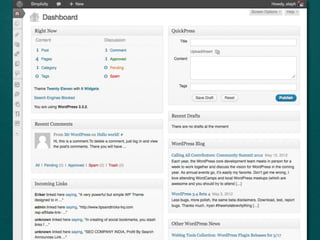
Dashboard & Menus
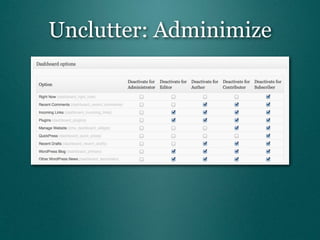
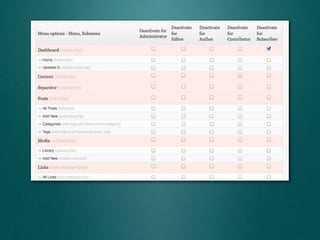
Unclutter: Adminimize
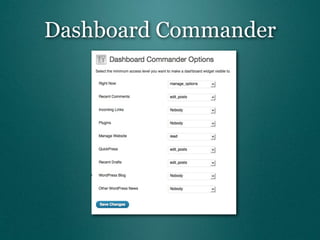
Dashboard Commander
Prefer Code?
function remove_dashboard_widgets() {
    global $wp_meta_boxes;
    unset($wp_meta_boxes['dashboard']['normal']['core']['dashboard_right_now']);
// unset($wp_meta_boxes['dashboard']['normal']['core']['dashboard_recent_comments']);
// unset($wp_meta_boxes['dashboard']['side']['core']['dashboard_quick_press']);
// unset($wp_meta_boxes['dashboard']['normal']['core']['dashboard_recent_drafts']);
    unset($wp_meta_boxes['dashboard']['normal']['core']['dashboard_incoming_links']);
    unset($wp_meta_boxes['dashboard']['normal']['core']['dashboard_plugins']);
    // WordPress Blog
    unset($wp_meta_boxes['dashboard']['side']['core']['dashboard_primary']);
    // Other WordPress News
    unset($wp_meta_boxes['dashboard']['side']['core']['dashboard_secondary']);
}
add_action('wp_dashboard_setup', 'remove_dashboard_widgets' );


                  http://gist.github.com/2722692
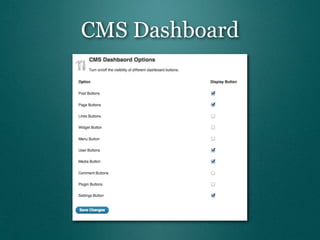
CMS Dashboard
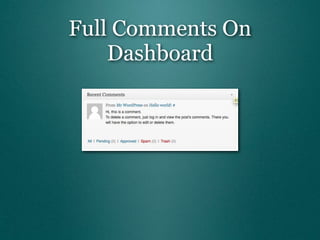
Full Comments On
    Dashboard
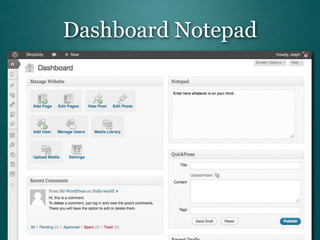
Dashboard Notepad
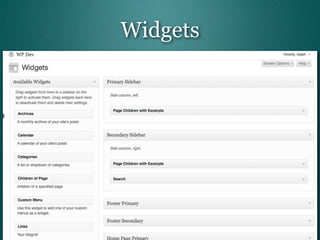
Widgets


http://core.trac.wordpress.org/ticket/18334
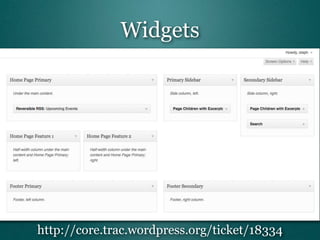
Widgets


http://core.trac.wordpress.org/ticket/18334
Organizing
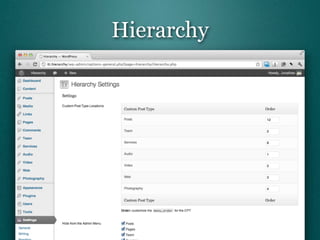
Hierarchy
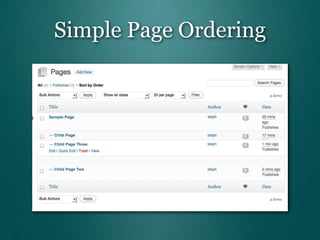
Simple Page Ordering
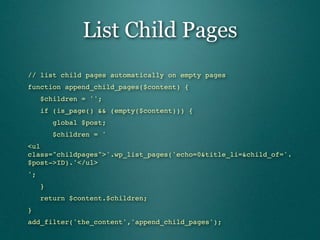
List Child Pages
// list child pages automatically on empty pages
function append_child_pages($content) {
   $children = '';
   if (is_page() && (empty($content))) {
      global $post;
      $children = '
<ul
class="childpages">'.wp_list_pages('echo=0&title_li=&child_of='.
$post->ID).'</ul>
';
   }
   return $content.$children;
}
add_filter('the_content','append_child_pages');
List Child Pages

// child page list shortcode: [children]
function child_pages_shortcode() {
   global $post;
   return '<ul class="childpages">'.
" " wp_list_pages('echo=0&depth=0&title_li=&child_of='.
" " $post->ID).'</ul>';
}
add_shortcode('children', 'child_pages_shortcode');
Writing
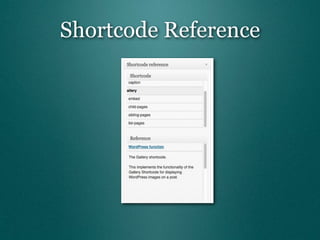
Shortcode Reference
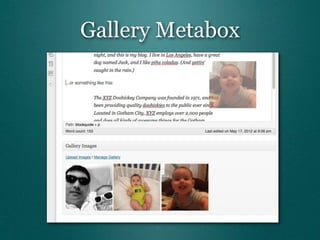
Gallery Metabox
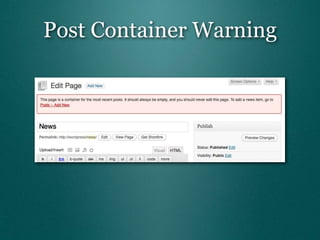
Post Container Warning
// Admin Notice on Posts Page
add_action('admin_head-post.php', 'postspage_error_notice');

function postspage_error_notice() {
    $postspage = get_option('page_for_posts');
    if (!empty($postspage))
        add_action('admin_notices', 'postspage_print_notices');
}

function postspage_print_notices() {
    $postspage = get_option('page_for_posts');

    // show this only if we're editing the posts page
    if (!empty($postspage) && isset($_GET['action']) &&
$_GET['action'] == 'edit' && $_GET['post'] == $postspage)
        echo '<div class="error"><p>This page is a container for
the most recent posts. It should always be empty, and you should
never edit this page. To add a news item, go to <a href="post-
new.php">Posts -- Add New</a>.<p></div>';
}

       http://gist.github.com/2515588
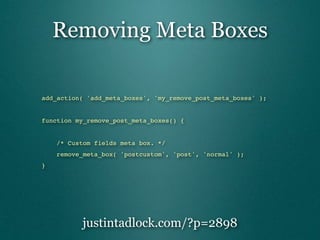
Removing Meta Boxes

add_action( 'add_meta_boxes', 'my_remove_post_meta_boxes' );


function my_remove_post_meta_boxes() {


"   /* Custom fields meta box. */
"   remove_meta_box( 'postcustom', 'post', 'normal' );
}


          justintadlock.com/?p=2898
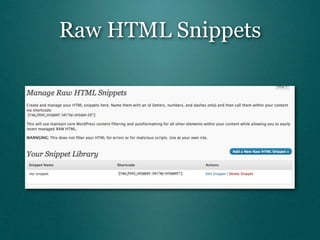
Raw HTML Snippets
Notifications
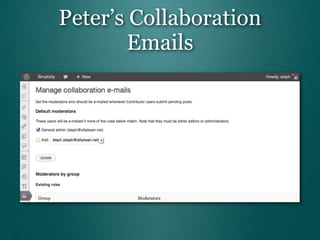
Peter’s Collaboration
       Emails
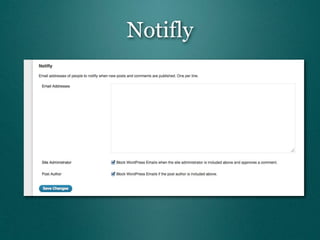
Notifly
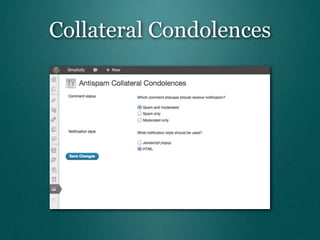
Collateral Condolences
For Visitors
Better 404s


• apologetic, personal language
• search for words in the bad URL
• show search box and sitemap


     http://gist.github.com/2723096
404.php (1)
"   <h2>I'm sorry. I couldn't find the page you requested.</h2>
"   <?php
"   $options = us2011_get_options();
"   if (!empty($options['problem_report']))
"   "   $report = 'If you still can't find it, <a
href="'.get_permalink($options['problem_report']).'">please let us
know what you were looking for,</a> and maybe we can find it for
you!';
"   if (!empty($options['sitemap']))
"   "   $sitemap = ' or looking for it in the <a href="/
sitemap">site map</a>';
"   ?>


"   <p>You can try searching for it<?php echo $sitemap; ?>.
"   <?php echo $report; ?></p>
"   <?php get_template_part( 'searchform' ); ?>
404.php (2)
"   <?php
"   global $wp_query;
"   $wp_query->query_vars['is_search'] = true;
"   $s = str_replace("-"," ",$wp_query->query_vars['name']);
"   $loop = new WP_Query('post_type=any&s='.$s);
"   ?>
"   <?php if ($loop->have_posts()) : ?>
"   "   <p>I'm searching for the name of the page you tried to
visit... was it one of these?</p>
"    "   <ol>
"    "   <?php while ($loop->have_posts()) : $loop->the_post(); ?>
"   "   "   <li><a href="<?php the_permalink(); ?>"><?php
the_title(); ?></a>
"    "   "   "   <?php the_excerpt(); ?>
"    "   "   </li>
"    "   <?php endwhile; ?>
"    "   </ol>
    "<?php endif; ?>
RSS?
“Report a problem”


• More likely to be used than “contact”
• Automatically fill in referring URL
• Link in theme footer
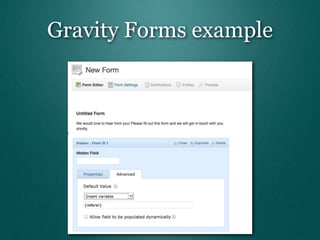
Gravity Forms example
How do you
keep it simple?
Thanks!
   @sleary
sillybean.net

Keeping It Simple

  • 1.
    Keeping It Simple (but not stupid) Stephanie Leary, @sleary sillybean.net
  • 2.
  • 4.
  • 7.
  • 8.
    Prefer Code? function remove_dashboard_widgets(){ global $wp_meta_boxes; unset($wp_meta_boxes['dashboard']['normal']['core']['dashboard_right_now']); // unset($wp_meta_boxes['dashboard']['normal']['core']['dashboard_recent_comments']); // unset($wp_meta_boxes['dashboard']['side']['core']['dashboard_quick_press']); // unset($wp_meta_boxes['dashboard']['normal']['core']['dashboard_recent_drafts']); unset($wp_meta_boxes['dashboard']['normal']['core']['dashboard_incoming_links']); unset($wp_meta_boxes['dashboard']['normal']['core']['dashboard_plugins']); // WordPress Blog unset($wp_meta_boxes['dashboard']['side']['core']['dashboard_primary']); // Other WordPress News unset($wp_meta_boxes['dashboard']['side']['core']['dashboard_secondary']); } add_action('wp_dashboard_setup', 'remove_dashboard_widgets' ); http://gist.github.com/2722692
  • 9.
  • 11.
  • 12.
  • 13.
  • 14.
  • 15.
  • 16.
  • 18.
  • 20.
    List Child Pages //list child pages automatically on empty pages function append_child_pages($content) {    $children = '';    if (is_page() && (empty($content))) {       global $post;       $children = ' <ul class="childpages">'.wp_list_pages('echo=0&title_li=&child_of='. $post->ID).'</ul> ';    }    return $content.$children; } add_filter('the_content','append_child_pages');
  • 21.
    List Child Pages //child page list shortcode: [children] function child_pages_shortcode() {    global $post;    return '<ul class="childpages">'. " " wp_list_pages('echo=0&depth=0&title_li=&child_of='. " " $post->ID).'</ul>'; } add_shortcode('children', 'child_pages_shortcode');
  • 22.
  • 23.
  • 24.
  • 25.
  • 26.
    Post Container Warning //Admin Notice on Posts Page add_action('admin_head-post.php', 'postspage_error_notice'); function postspage_error_notice() {     $postspage = get_option('page_for_posts');     if (!empty($postspage))         add_action('admin_notices', 'postspage_print_notices'); } function postspage_print_notices() {     $postspage = get_option('page_for_posts');     // show this only if we're editing the posts page     if (!empty($postspage) && isset($_GET['action']) && $_GET['action'] == 'edit' && $_GET['post'] == $postspage)         echo '<div class="error"><p>This page is a container for the most recent posts. It should always be empty, and you should never edit this page. To add a news item, go to <a href="post- new.php">Posts -- Add New</a>.<p></div>'; } http://gist.github.com/2515588
  • 27.
    Removing Meta Boxes add_action('add_meta_boxes', 'my_remove_post_meta_boxes' ); function my_remove_post_meta_boxes() { " /* Custom fields meta box. */ " remove_meta_box( 'postcustom', 'post', 'normal' ); } justintadlock.com/?p=2898
  • 28.
  • 29.
  • 30.
  • 31.
  • 32.
  • 34.
  • 35.
    Better 404s • apologetic,personal language • search for words in the bad URL • show search box and sitemap http://gist.github.com/2723096
  • 36.
    404.php (1) " <h2>I'm sorry. I couldn't find the page you requested.</h2> " <?php " $options = us2011_get_options(); " if (!empty($options['problem_report'])) " " $report = 'If you still can't find it, <a href="'.get_permalink($options['problem_report']).'">please let us know what you were looking for,</a> and maybe we can find it for you!'; " if (!empty($options['sitemap'])) " " $sitemap = ' or looking for it in the <a href="/ sitemap">site map</a>'; " ?> " <p>You can try searching for it<?php echo $sitemap; ?>. " <?php echo $report; ?></p> " <?php get_template_part( 'searchform' ); ?>
  • 37.
    404.php (2) " <?php " global $wp_query; " $wp_query->query_vars['is_search'] = true; " $s = str_replace("-"," ",$wp_query->query_vars['name']); " $loop = new WP_Query('post_type=any&s='.$s); " ?> " <?php if ($loop->have_posts()) : ?> " " <p>I'm searching for the name of the page you tried to visit... was it one of these?</p> " " <ol> " " <?php while ($loop->have_posts()) : $loop->the_post(); ?> " " " <li><a href="<?php the_permalink(); ?>"><?php the_title(); ?></a> " " " " <?php the_excerpt(); ?> " " " </li> " " <?php endwhile; ?> " " </ol> "<?php endif; ?>
  • 38.
  • 40.
    “Report a problem” •More likely to be used than “contact” • Automatically fill in referring URL • Link in theme footer
  • 41.
  • 42.
    How do you keepit simple?
  • 43.
    Thanks! @sleary sillybean.net

Editor's Notes

  • #2 First I&amp;#x2019;m going to talk about simplifying the admin screens for your users, and then I&amp;#x2019;ll talk about some things we can do to make life easier for our readers.\n
  • #3 \n
  • #4 The Dashboard: the first thing everyone sees when they log in, and the least useful screen there is. How many of us have gotten into the habit of skipping this -- of bookmarking the post or page edit screen instead? The Dashboard doesn&amp;#x2019;t have to suck, but we&amp;#x2019;re going to have to put a little effort into un-sucking it.\n
  • #5 \n
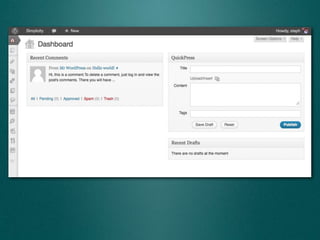
  • #6 Now we&amp;#x2019;re down to the things that are useful for everyone: comments and recent drafts. If you&amp;#x2019;ve disabled comments sitewide, blow that one away. If you&amp;#x2019;re not using Posts, QuickPress is useless, so get rid of that too!\n
  • #7 Adminimize has a TON of other options. Its settings screen is one of the longest I&amp;#x2019;ve ever seen.\n
  • #8 Dashboard Commander is a less intimidating plugin for accomplishing the same thing. Its settings are a little quirky, though: it asks you to set a minimum capability for each Dashboard widget.\n
  • #9 \n
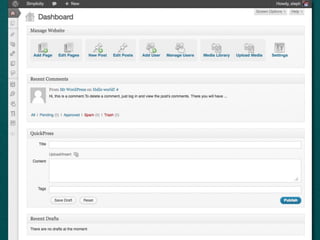
  • #10 Now that we&amp;#x2019;ve gotten rid of the junk, let&amp;#x2019;s ADD something useful. The CMS Dashboard widget provides big, fat buttons to the most important admin screens. These should be easy to click if you&amp;#x2019;re trying to manage your site from a touch screen.\n
  • #11 Now we&amp;#x2019;re getting somewhere! But wait... that comment widget is still pretty useless. Even the starter comment is too long to be displayed in full.\n
  • #12 Scribu&amp;#x2019;s Full Comments on Dashboard plugin does exactly what it says. There are no settings. You just activate it, and the Dashboard plugin shows the full comment text.\n
  • #13 Lastly, I&amp;#x2019;m going to recommend one of my own plugins. Dashboard Notepad is a simple way to leave reminders for yourself or your users.\n
  • #14 The widget screen drives me nuts! Sites do more than just sidebars with widgets, and the stacked boxes on the widget screen don&amp;#x2019;t make sense to users. I started playing around with the admin CSS to see if I could override it and do something better. In 3.2, I couldn&amp;#x2019;t do much more than make them wider...\n
  • #15 But in 3.3, the sidebar boxes have unique IDs, which means you can hook into the admin CSS and move them around. Careful, though -- this requires absolute positioning, and the boxes start to overlap if you have too many widgets in a single sidebar. See the ticket for sample CSS file and hooks in the functions.php.\n
  • #16 \n
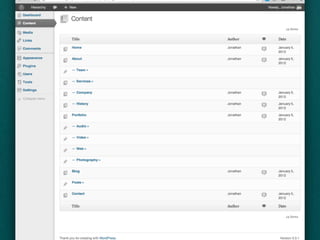
  • #17 Hierarchy is a somewhat new plugin. It gives you a menu item called Content right under the Dashboard, and the Content screen shows you a combined list of all your custom post types. On the settings page for the plugin, you can arrange the post types&amp;#x2019; order in the list and turn off their menu items.\n
  • #18 If they&amp;#x2019;re non-hierarchical, you&amp;#x2019;ll just see a link to the Edit screen for that post type.\n\nThe author of this plugin, Jonathan Christopher, also has a book called Client Oriented WordPress Development. It&amp;#x2019;s fairly good.\n\nWithin the pages, though, it&amp;#x2019;s still a pain to change their order! After all this time!\n
  • #19 Simple Page Ordering is the easiest way I&amp;#x2019;ve found to rearrange pages. The entire table row becomes grabbable, and you can drag the pages around. You can&amp;#x2019;t change their hierarchy, though -- you&amp;#x2019;ll still have to use Quick Edit to set the parent page.\n
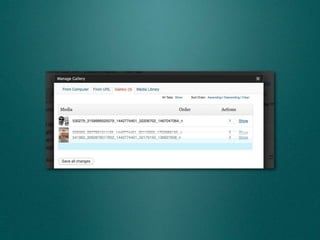
  • #20 It even works in the media uploader!\n
  • #21 A big problem I always have with page-centric sites is that there&amp;#x2019;s usually more than one empty container page -- a page that&amp;#x2019;s just there to build the hierarchy. It doesn&amp;#x2019;t need to contain any content. It just needs to link to its child pages. So I&amp;#x2019;ve built a mini-plugin that I use on almost all my sites. It lists the child pages on any page without content, and it provides a shortcode so we can embed the list on other pages as needed. Here&amp;#x2019;s the filter for the empty pages...\n
  • #22 ... and here&amp;#x2019;s the shortcode.\n\nShortcodes themselves are problematic, though, and that leads me to the problems with the writing screens.\n
  • #23 Really, the writing screens are outstanding. It seems silly to quibble here, when I go around telling everyone that this is the best feature of WordPress. However...\n
  • #24 Once you start adding plugins, it&amp;#x2019;s easy to forget which shortcodes are available, or what they all do. The Shortcode Reference plugin adds a box that reminds you.\n
  • #25 A lot of my users have a hard time with the Gallery. They don&amp;#x2019;t realize that a post sometimes already has attachments, and they upload duplicates. Then they can&amp;#x2019;t remember how to get back to those files and insert them into the post. Bill&amp;#x2019;s Gallery Metabox plugin adds thumbnails of the uploaded images right on the editing screen. You can drag them into the post to insert them.\n
  • #26 Here&amp;#x2019;s another thing some of my users can&amp;#x2019;t ever remember, especially on sites that don&amp;#x2019;t use the posts much. When we&amp;#x2019;ve chosen a page to display the most recent posts, there&amp;#x2019;s this empty page floating around, and users forget that they can&amp;#x2019;t edit this page to add a new post! I&amp;#x2019;ve written a little function to warn them that they&amp;#x2019;re in the wrong place, and give them a link to the new post screen.\n
  • #27 The code isn&amp;#x2019;t complicated; it&amp;#x2019;s just long because there&amp;#x2019;s a whole paragraph of text in there. Grab the Gist if you want to use it.\n
  • #28 Now that we&amp;#x2019;ve added a bunch of stuff, let&amp;#x2019;s take some stuff away! As of 3.1, most of the meta boxes are hidden by default, and you have to go to Screen Options to turn them on. I love this. It&amp;#x2019;s made things so much simpler for my users. But every now and then, there&amp;#x2019;s a box I want to take away from them altogether -- like Custom Fields. I always want users to manage those using a custom meta box. Justin Tadlock has written a nice little tutorial on removing meta boxes. He gives you the names of all the built-in boxes, but here I&amp;#x2019;m just removing custom fields.\n
  • #29 \n
  • #30 A lot of the sites I manage have a need for reusable bits of code, and widgets aren&amp;#x2019;t always the right solution -- what if you need to embed the code in the middle of a post? There are two plugins I like to solve this problem, Post Snippets and Raw HTML Snippets. I think this one is a little easier to use. Enter your HTML, then use the shortcode to place it wherever you need it.\n
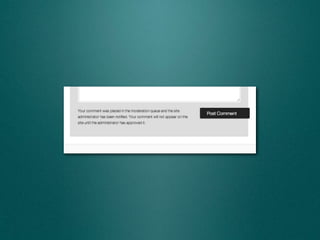
  • #31 Let&amp;#x2019;s talk about email! WordPress sends out a lot of notifications -- comments awaiting moderation, etc. -- but there&amp;#x2019;s one thing it doesn&amp;#x2019;t do, and it drives me bonkers. It doesn&amp;#x2019;t alert editors or administrators when a contributor&amp;#x2019;s post is pending review.\n
  • #32 This plugin lets you choose who should receive notifications about pending posts. There&amp;#x2019;s a companion plugin, Peter&amp;#x2019;s Post Notes, that will let you add remarks to the notifications, so if you&amp;#x2019;re rejecting a contributed post, you can mention why.\n
  • #33 Notifly is a great little plugin when you want a lot of users to subscribe to post AND comment notifications. Notifly sends out a message for everything that gets posted.\n
  • #34 This little plugin lets users know when they&amp;#x2019;ve fallen into your spam trap.\n
  • #35 What else can we do to make life better for visitors?\n
  • #36 \n
  • #37 A 404 error is the most frustrating thing for a visitor, and there&amp;#x2019;s a lot we can do besides showing them a joke or a game.\n
  • #38 \n
  • #39 \n
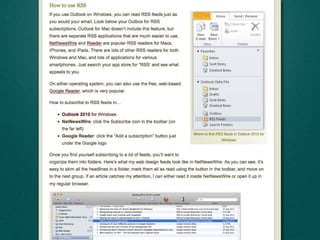
  • #40 How many of us are still putting up RSS icons without explaining what RSS is? And yet it&amp;#x2019;s still not widely adopted outside the tech industry.\n
  • #41 On this site, we linked the question to a long explanation that I wrote, but you could like to Wikipedia or any other site that describes how to subscribe to a feed.\n
  • #42 \n
  • #43 \n
  • #44 \n
  • #45 \n