


Your Custom WordPress
Admin Pages Suck
(and how to make them unsucky)
Anthony Montalbano          @italianst4

       anthony@ambrdetroit.com
Who is Anthony Montalbano?
Passionate for code
  Bachelor's in Computer Science
Passionate for WordPress
  WordCamp Detroit Organizer, Plugin/Theme Developer

Passionate for open source
  WordPress plugin developer

Passionate for words
  Serial blogger

Passionate for possibilities
  Co-founder of flipfrog and AMBR Detroit

                                            source: iamthecoolestpersonever.com
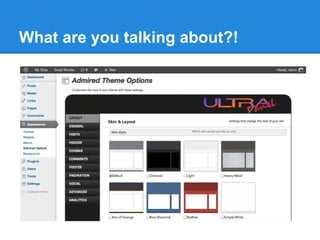
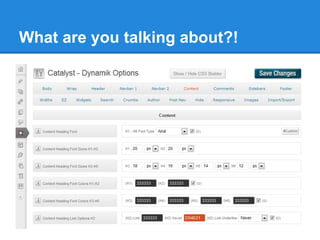
What are you talking about?!


More examples...
               http://themeoptions.wordpress.com/

A need rant...
  http://wpcandy.com/thinks/custom-admin-screens-are-the-worst

Comment rant...
    http://wpcandy.com/thinks/custom-admin-screens-are-the-
                     worst#comment-127921
What are you talking about?!


"This stuff needs
    to stop."
                           ~Ryan Imel
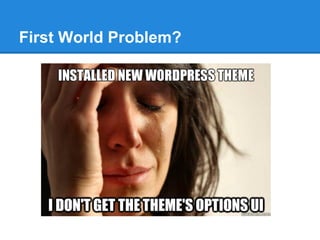
First World Problem?
Be a Good Guy Greg!
The WordPress
Admin
It's in the details...
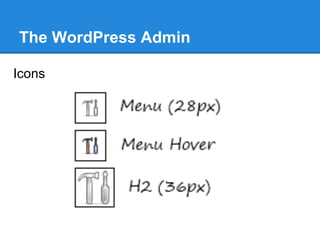
The WordPress Admin

Icons
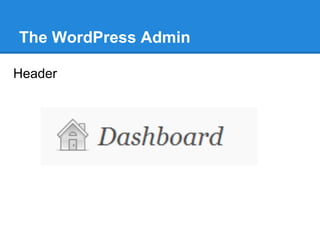
The WordPress Admin

Header
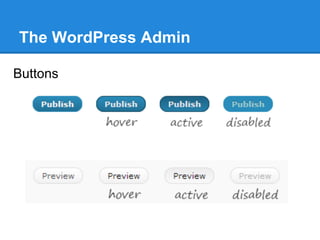
The WordPress Admin

Buttons
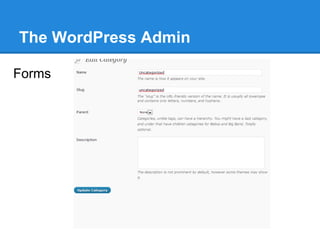
The WordPress Admin

Forms
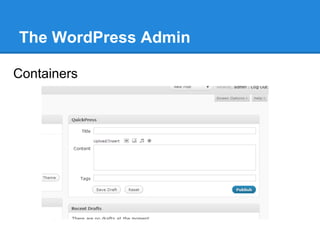
The WordPress Admin

Containers
Locating your admin page


  ●   Navbar
  ●   Toolbar
  ●   Dashboard
  ●   Post Edit
  ●   Widgets
  ●   Default Admin Pages
  ●   Plugins Page
Styling
Let's make things sexy
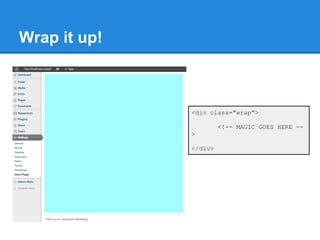
Wrap it up!


              <div class="wrap">

                       <!-- MAGIC GOES HERE --
              >

              </div>
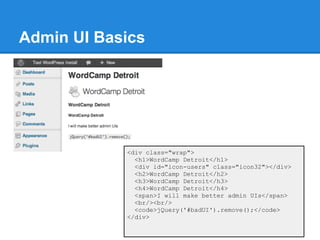
Admin UI Basics


            <div class="wrap">
              <h1>WordCamp Detroit</h1>
              <div id="icon-users" class="icon32"></div>
              <h2>WordCamp Detroit</h2>
              <h3>WordCamp Detroit</h3>
              <h4>WordCamp Detroit</h4>
              <span>I will make better admin UIs</span>
              <br/><br/>
              <code>jQuery('#badUI').remove();</code>
            </div>
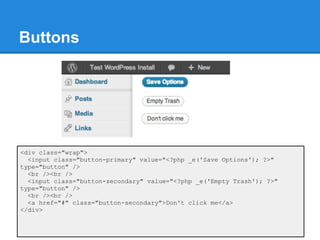
Buttons


<div class="wrap">
  <input class="button-primary" value="<?php _e('Save Options'); ?>"
type="button" />
  <br /><br />
  <input class="button-secondary" value="<?php _e('Empty Trash'); ?>"
type="button" />
  <br /><br />
  <a href="#" class="button-secondary">Don't click me</a>
</div>
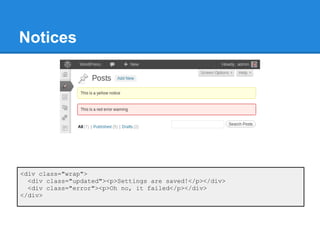
Notices


<div class="wrap">
  <div class="updated"><p>Settings are saved!</p></div>
  <div class="error"><p>Oh no, it failed</p></div>
</div>
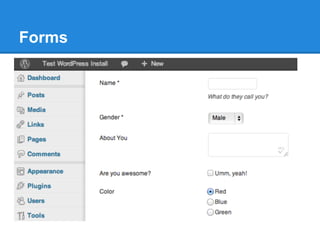
Forms
Forms (continued)
<div class="wrap">
  <form method="POST" action="<?php echo $_SERVER['REQUEST_URI']; ?>">
    <table class="form-table">
      <tr valign="top">
        <th scope="row">
          <label for="name">Name<span> *</span></label>
        </th>
        <td>
          <input id="name" maxlength="45" size="10" name="name" value=""
type="text" />
          <p class="description">What do they call you?</p>
        </td>
      </tr>
      <tr valign="top">
        <th scope="row">
          <label for="gender">Gender<span> *</span></label>
        </th>
        <td>
          <select id="gender" name="gender">
             <option value="male">Male<option>
             <option value="female">Female<option>
          </select>
        </td>
      </tr>
Forms (continued, again)
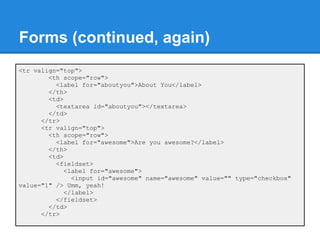
<tr valign="top">
        <th scope="row">
          <label for="aboutyou">About You</label>
        </th>
        <td>
          <textarea id="aboutyou"></textarea>
        </td>
      </tr>
      <tr valign="top">
        <th scope="row">
          <label for="awesome">Are you awesome?</label>
        </th>
        <td>
          <fieldset>
             <label for="awesome">
               <input id="awesome" name="awesome" value="" type="checkbox"
value="1" /> Umm, yeah!
             </label>
          </fieldset>
        </td>
      </tr>
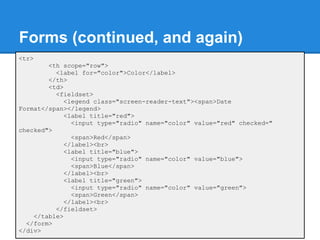
Forms (continued, and again)
<tr>
        <th scope="row">
          <label for="color">Color</label>
        </th>
        <td>
          <fieldset>
             <legend class="screen-reader-text"><span>Date
Format</span></legend>
             <label title="red">
               <input type="radio" name="color" value="red" checked="
checked">
               <span>Red</span>
             </label><br>
             <label title="blue">
               <input type="radio" name="color" value="blue">
               <span>Blue</span>
             </label><br>
             <label title="green">
               <input type="radio" name="color" value="green">
               <span>Green</span>
             </label><br>
          </fieldset>
    </table>
  </form>
</div>
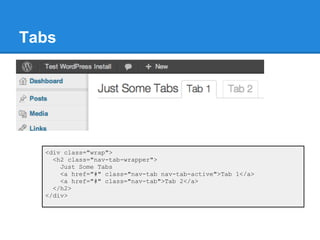
Tabs


  <div class="wrap">
    <h2 class="nav-tab-wrapper">
      Just Some Tabs
      <a href="#" class="nav-tab nav-tab-active">Tab 1</a>
      <a href="#" class="nav-tab">Tab 2</a>
    </h2>
  </div>
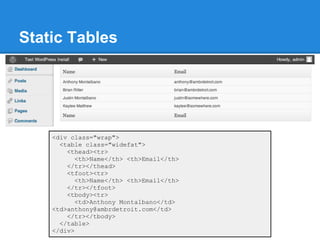
Static Tables


    <div class="wrap">
      <table class="widefat">
        <thead><tr>
           <th>Name</th> <th>Email</th>
        </tr></thead>
        <tfoot><tr>
           <th>Name</th> <th>Email</th>
        </tr></tfoot>
        <tbody><tr>
           <td>Anthony Montalbano</td>
    <td>anthony@ambrdetroit.com</td>
        </tr></tbody>
      </table>
    </div>
Interactive
Elements
Click, click, drag, clickity, click!
Scripts and Styles
There are many cases where you may want to
include a javascript or style sheet with your
plugin. WordPress has this functionality built
in. By default WordPress has many scripts
included, such as jQuery.

       http://codex.wordpress.org/Function_Reference/wp_enqueue_script
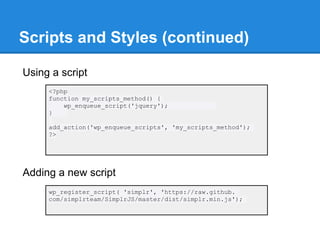
Scripts and Styles (continued)

Using a script
     <?php
     function my_scripts_method() {
         wp_enqueue_script('jquery');
     }

     add_action('wp_enqueue_scripts', 'my_scripts_method');
     ?>


Adding a new script
     wp_register_script( 'simplr', 'https://raw.github.
     com/simplrteam/SimplrJS/master/dist/simplr.min.js');
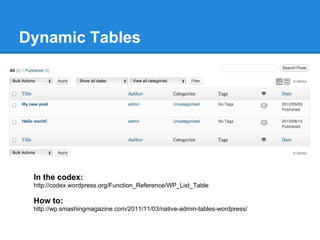
Dynamic Tables


 In the codex:
 http://codex.wordpress.org/Function_Reference/WP_List_Table

 How to:
 http://wp.smashingmagazine.com/2011/11/03/native-admin-tables-wordpress/
Pagination


   <div class="wrap">
     <div class="tablenav">
     <?php
     $posts_per_page = 15;
     $num_of_records = 500;

    $page_links = paginate_links( array(
      'base' => add_query_arg( 'paged', '%#%' ),
      'format' => '',
      'prev_text' => __('&laquo;'),
      'next_text' => __('&raquo;'),
      'total' => ceil($num_of_records/$posts_per_page),
      'current' => $_GET['paged']
    ));
Pagination (continued)
   if ( $page_links ) { ?>
       <div class="tablenav-pages">
          <?php echo sprintf( '<span class="displaying-num"
   >' . __( 'Displaying %s&#8211;%s of %s' ) . '</span>%s',
                number_format_i18n( ( $_GET['paged'] - 1 ) *
   $posts_per_page + 1 ),
                number_format_i18n( min( $_GET['paged'] *
   $posts_per_page, $num_of_records ) ),
                number_format_i18n( $num_of_records ),
                $page_links
             );
          ?>
       </div>
     <?php } ?>
     </div>
   </div>


              http://codex.wordpress.org/Function_Reference/paginate_links
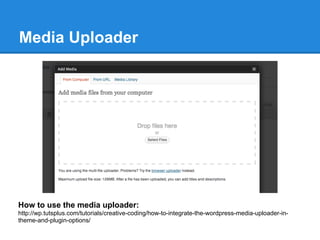
Media Uploader


How to use the media uploader:
http://wp.tutsplus.com/tutorials/creative-coding/how-to-integrate-the-wordpress-media-uploader-in-
theme-and-plugin-options/
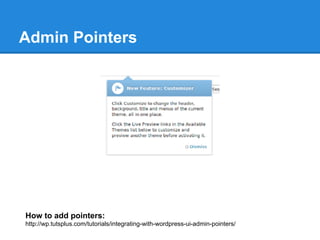
Admin Pointers


How to add pointers:
http://wp.tutsplus.com/tutorials/integrating-with-wordpress-ui-admin-pointers/
Data Retention
Maybe we should save that...
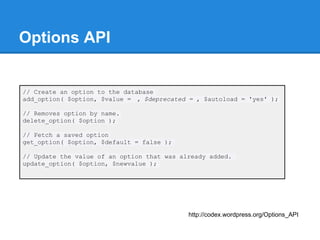
Options API


// Create an option to the database
add_option( $option, $value = , $deprecated = , $autoload = 'yes' );

// Removes option by name.
delete_option( $option );

// Fetch a saved option
get_option( $option, $default = false );

// Update the value of an option that was already added.
update_option( $option, $newvalue );


                                            http://codex.wordpress.org/Options_API
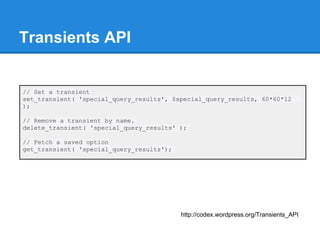
Transients API


// Set a transient
set_transient( 'special_query_results', $special_query_results, 60*60*12
);

// Remove a transient by name.
delete_transient( 'special_query_results' );

// Fetch a saved option
get_transient( 'special_query_results');


                                           http://codex.wordpress.org/Transients_API
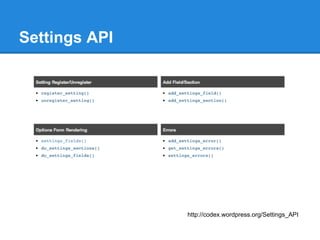
Settings API


               http://codex.wordpress.org/Settings_API
Widget Data

class Example_Widget extends WP_Widget {
    // Displaying widget option value
    public function widget( $args, $instance ) {
         echo $instance['title'];
    }

    // Updating a widget option value
    public function update( $new_instance, $old_instance ) {
        $instance = array();
        $instance['title'] = strip_tags( $new_instance['title'] );

        return $instance;
    }

}


                                           http://codex.wordpress.org/Widgets_API
Explore more
It's only just begun...
Admin UI Reference Plugin


Download the plugin here:
   https://github.com/bueltge/WordPress-Admin-Style
Additional Sources

UI Pattern and Style Guide
http://codex.wordpress.org/User:TECannon/UI_Pattern_and_Style_Guide

Creating Admin Themes
http://codex.wordpress.org/Creating_Admin_Themes

Posts Screen
http://codex.wordpress.org/Posts_Screen

WordPress.org Style Guide
http://dotorgstyleguide.wordpress.com/

Unofficial WordPress Plugin User Interface Guide
http://wpcandy.com/presents/wordpress-plugin-user-interface-guide
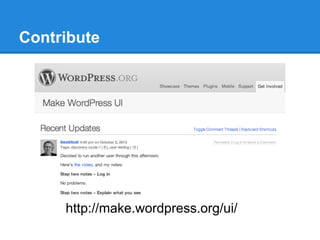
Contribute


     http://make.wordpress.org/ui/
Some final thoughts


      Keep it simple.
Some final thoughts
Thank you!

  Anthony Montalbano

      @italianst4

anthony@ambrdetroit.com

Your Custom WordPress Admin Pages Suck

  • 1.
    Your Custom WordPress AdminPages Suck (and how to make them unsucky) Anthony Montalbano @italianst4 anthony@ambrdetroit.com
  • 2.
    Who is AnthonyMontalbano? Passionate for code Bachelor's in Computer Science Passionate for WordPress WordCamp Detroit Organizer, Plugin/Theme Developer Passionate for open source WordPress plugin developer Passionate for words Serial blogger Passionate for possibilities Co-founder of flipfrog and AMBR Detroit source: iamthecoolestpersonever.com
  • 3.
    What are youtalking about?!
  • 4.
    What are youtalking about?!
  • 5.
    What are youtalking about?!
  • 6.
    What are youtalking about?! More examples... http://themeoptions.wordpress.com/ A need rant... http://wpcandy.com/thinks/custom-admin-screens-are-the-worst Comment rant... http://wpcandy.com/thinks/custom-admin-screens-are-the- worst#comment-127921
  • 7.
    What are youtalking about?! "This stuff needs to stop." ~Ryan Imel
  • 8.
  • 9.
    Be a GoodGuy Greg!
  • 10.
  • 11.
  • 12.
  • 13.
  • 14.
  • 15.
  • 16.
    Locating your adminpage ● Navbar ● Toolbar ● Dashboard ● Post Edit ● Widgets ● Default Admin Pages ● Plugins Page
  • 17.
  • 18.
    Wrap it up! <div class="wrap"> <!-- MAGIC GOES HERE -- > </div>
  • 19.
    Admin UI Basics <div class="wrap"> <h1>WordCamp Detroit</h1> <div id="icon-users" class="icon32"></div> <h2>WordCamp Detroit</h2> <h3>WordCamp Detroit</h3> <h4>WordCamp Detroit</h4> <span>I will make better admin UIs</span> <br/><br/> <code>jQuery('#badUI').remove();</code> </div>
  • 20.
    Buttons <div class="wrap"> <input class="button-primary" value="<?php _e('Save Options'); ?>" type="button" /> <br /><br /> <input class="button-secondary" value="<?php _e('Empty Trash'); ?>" type="button" /> <br /><br /> <a href="#" class="button-secondary">Don't click me</a> </div>
  • 21.
    Notices <div class="wrap"> <div class="updated"><p>Settings are saved!</p></div> <div class="error"><p>Oh no, it failed</p></div> </div>
  • 22.
  • 23.
    Forms (continued) <div class="wrap"> <form method="POST" action="<?php echo $_SERVER['REQUEST_URI']; ?>"> <table class="form-table"> <tr valign="top"> <th scope="row"> <label for="name">Name<span> *</span></label> </th> <td> <input id="name" maxlength="45" size="10" name="name" value="" type="text" /> <p class="description">What do they call you?</p> </td> </tr> <tr valign="top"> <th scope="row"> <label for="gender">Gender<span> *</span></label> </th> <td> <select id="gender" name="gender"> <option value="male">Male<option> <option value="female">Female<option> </select> </td> </tr>
  • 24.
    Forms (continued, again) <trvalign="top"> <th scope="row"> <label for="aboutyou">About You</label> </th> <td> <textarea id="aboutyou"></textarea> </td> </tr> <tr valign="top"> <th scope="row"> <label for="awesome">Are you awesome?</label> </th> <td> <fieldset> <label for="awesome"> <input id="awesome" name="awesome" value="" type="checkbox" value="1" /> Umm, yeah! </label> </fieldset> </td> </tr>
  • 25.
    Forms (continued, andagain) <tr> <th scope="row"> <label for="color">Color</label> </th> <td> <fieldset> <legend class="screen-reader-text"><span>Date Format</span></legend> <label title="red"> <input type="radio" name="color" value="red" checked=" checked"> <span>Red</span> </label><br> <label title="blue"> <input type="radio" name="color" value="blue"> <span>Blue</span> </label><br> <label title="green"> <input type="radio" name="color" value="green"> <span>Green</span> </label><br> </fieldset> </table> </form> </div>
  • 26.
    Tabs <divclass="wrap"> <h2 class="nav-tab-wrapper"> Just Some Tabs <a href="#" class="nav-tab nav-tab-active">Tab 1</a> <a href="#" class="nav-tab">Tab 2</a> </h2> </div>
  • 27.
    Static Tables <div class="wrap"> <table class="widefat"> <thead><tr> <th>Name</th> <th>Email</th> </tr></thead> <tfoot><tr> <th>Name</th> <th>Email</th> </tr></tfoot> <tbody><tr> <td>Anthony Montalbano</td> <td>anthony@ambrdetroit.com</td> </tr></tbody> </table> </div>
  • 28.
  • 29.
    Scripts and Styles Thereare many cases where you may want to include a javascript or style sheet with your plugin. WordPress has this functionality built in. By default WordPress has many scripts included, such as jQuery. http://codex.wordpress.org/Function_Reference/wp_enqueue_script
  • 30.
    Scripts and Styles(continued) Using a script <?php function my_scripts_method() { wp_enqueue_script('jquery'); } add_action('wp_enqueue_scripts', 'my_scripts_method'); ?> Adding a new script wp_register_script( 'simplr', 'https://raw.github. com/simplrteam/SimplrJS/master/dist/simplr.min.js');
  • 31.
    Dynamic Tables Inthe codex: http://codex.wordpress.org/Function_Reference/WP_List_Table How to: http://wp.smashingmagazine.com/2011/11/03/native-admin-tables-wordpress/
  • 32.
    Pagination <div class="wrap"> <div class="tablenav"> <?php $posts_per_page = 15; $num_of_records = 500; $page_links = paginate_links( array( 'base' => add_query_arg( 'paged', '%#%' ), 'format' => '', 'prev_text' => __('&laquo;'), 'next_text' => __('&raquo;'), 'total' => ceil($num_of_records/$posts_per_page), 'current' => $_GET['paged'] ));
  • 33.
    Pagination (continued) if ( $page_links ) { ?> <div class="tablenav-pages"> <?php echo sprintf( '<span class="displaying-num" >' . __( 'Displaying %s&#8211;%s of %s' ) . '</span>%s', number_format_i18n( ( $_GET['paged'] - 1 ) * $posts_per_page + 1 ), number_format_i18n( min( $_GET['paged'] * $posts_per_page, $num_of_records ) ), number_format_i18n( $num_of_records ), $page_links ); ?> </div> <?php } ?> </div> </div> http://codex.wordpress.org/Function_Reference/paginate_links
  • 34.
    Media Uploader How touse the media uploader: http://wp.tutsplus.com/tutorials/creative-coding/how-to-integrate-the-wordpress-media-uploader-in- theme-and-plugin-options/
  • 35.
    Admin Pointers How toadd pointers: http://wp.tutsplus.com/tutorials/integrating-with-wordpress-ui-admin-pointers/
  • 36.
    Data Retention Maybe weshould save that...
  • 37.
    Options API // Createan option to the database add_option( $option, $value = , $deprecated = , $autoload = 'yes' ); // Removes option by name. delete_option( $option ); // Fetch a saved option get_option( $option, $default = false ); // Update the value of an option that was already added. update_option( $option, $newvalue ); http://codex.wordpress.org/Options_API
  • 38.
    Transients API // Seta transient set_transient( 'special_query_results', $special_query_results, 60*60*12 ); // Remove a transient by name. delete_transient( 'special_query_results' ); // Fetch a saved option get_transient( 'special_query_results'); http://codex.wordpress.org/Transients_API
  • 39.
    Settings API http://codex.wordpress.org/Settings_API
  • 40.
    Widget Data class Example_Widgetextends WP_Widget { // Displaying widget option value public function widget( $args, $instance ) { echo $instance['title']; } // Updating a widget option value public function update( $new_instance, $old_instance ) { $instance = array(); $instance['title'] = strip_tags( $new_instance['title'] ); return $instance; } } http://codex.wordpress.org/Widgets_API
  • 41.
  • 42.
    Admin UI ReferencePlugin Download the plugin here: https://github.com/bueltge/WordPress-Admin-Style
  • 43.
    Additional Sources UI Patternand Style Guide http://codex.wordpress.org/User:TECannon/UI_Pattern_and_Style_Guide Creating Admin Themes http://codex.wordpress.org/Creating_Admin_Themes Posts Screen http://codex.wordpress.org/Posts_Screen WordPress.org Style Guide http://dotorgstyleguide.wordpress.com/ Unofficial WordPress Plugin User Interface Guide http://wpcandy.com/presents/wordpress-plugin-user-interface-guide
  • 44.
    Contribute http://make.wordpress.org/ui/
  • 45.
    Some final thoughts Keep it simple.
  • 46.
  • 47.
    Thank you! Anthony Montalbano @italianst4 anthony@ambrdetroit.com