WordPress
Security 101
A guide by Laura Hartwig
Laura Hartwig
I’ve been a WordPress Developer since 2011 and
find it important to keep my clients sites secure.
It’s much easier to prevent your site from getting
hacked rather than try to recover your site after
it’s been hacked.
Am I a Target?
YES
Why?
➔ WordPress
Powers nearly 30% off all websites.
This is good and bad.
➔ Server Space
Hackers want to store files on your
server and connect it into a botnet.
➔ Because they can
Many hackers like to hack sites just to
see if they can. It’s a thrill similar to
hunting or leveling up on a computer
game.
First Law of
Website Security
➔ Nothing is unhackable
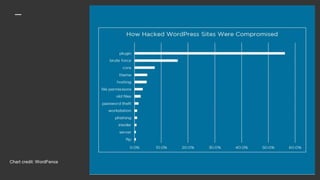
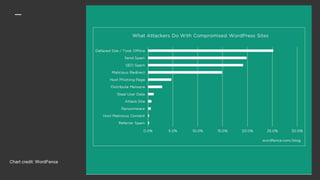
Chart credit: WordFence
Level of Security
➔ Your level of security will
depend on resources vs. value
The reality is that you are not going to
spend a lot of time and money on a
website that you don’t value. Adding
security measures is a pain, like locking
your doors, so you will need to decide
what level of protection is worth it.
What can
you do?
1. Choose a
Good Host
➔ Latest PHP Version
➔ Use HTTPS
➔ SFTP (Not FTP)
➔ Private Server
At least don’t host multiple sites on
your server
➔ Use a CDN
Like Cloudflare (free)
2. Keep Your Site
Updated
➔ Update Core, Plugins & Themes
Be wary of themes plugins that haven’t
been tested. (Esp Free)
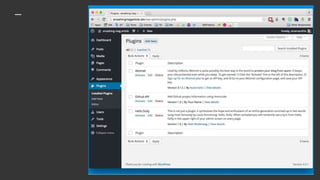
➔ Remove unused themes &
plugins
➔ Use services like ManageWP if
you have a lot of sites.
But be wary of updates breaking your
site.
➔ Don’t leave old files on your site
Esp not old sites
3. Use Strong
Usernames &
Passwords
➔ Don’t use “admin”
➔ At least 14 characters
➔ !@#$%^
➔ That means everyone!
4. Remove
Unwanted Users
➔ Everyone should not be Admin
➔ What is the default user role?
➔ People who no longer work for
you
➔ Use Adminimize to control
access
➔ Use unique usernames
Remember that nicknames can
be different.
5. Use Security
Plugins
➔ Change Login URL
Don’t use /wp-admin
➔ Limit Login Attempts
And notes about if it’s wrong username
or password.
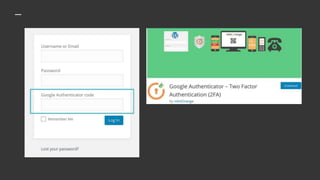
➔ Two Factor Authentication
It’s a pain, but it works
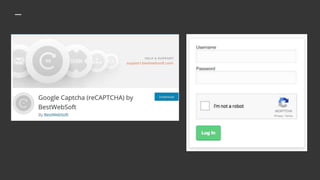
➔ Captcha
Prevents brute force attacks
6. Backups
➔ Hosting Backups
Good hosts will do them automatically
➔ Backup Plugin
Updraft or Backup Buddy
➔ Schedule Backups
Backups are no good if not done. How
often you need to backup depends on
how often you update your site.
➔ Send them somewhere
Download to your computer or file
hosting service.
7. Get Notified
➔ Google Console
Will let you know if your site has been
hacked. This is actually too late, but a
good idea if you rarely check into your
site. Once Google knows, your site will
be blacklisted. This will hurt your
visitors and your ranking.
➔ Use a Malware Scanner
Sucuri or WordFence
8. Your Own Security
➔ Strong password for your email
➔ Don’t email passwords
WordPress will automatically email
passwords or use a service like 1ty.me
➔ Don’t keep passwords on your
computer or in your browser
Except LastPass
➔ Use Virus protection on your
computer and update your
browsers
➔ Turn off your computer at night
9. If You Get
Hacked
➔ Use your backup
But make sure it has not been
compromised.
➔ Sucuri.net
Fixing hacked sites is what they do and
they can get your site up fairly quickly,
but it will cost you.
➔ Read their blog if you are really
interested in security
Good luck!
I hope you will make some changes right
away to make your site more secure.
Presentation:
Slidshare.net/laura-hartwig
Contact me:
LauraHartwigDesign@gmail.com

Word press security 101 2018

  • 1.
  • 2.
    Laura Hartwig I’ve beena WordPress Developer since 2011 and find it important to keep my clients sites secure. It’s much easier to prevent your site from getting hacked rather than try to recover your site after it’s been hacked.
  • 3.
    Am I aTarget?
  • 4.
  • 5.
    Why? ➔ WordPress Powers nearly30% off all websites. This is good and bad. ➔ Server Space Hackers want to store files on your server and connect it into a botnet. ➔ Because they can Many hackers like to hack sites just to see if they can. It’s a thrill similar to hunting or leveling up on a computer game.
  • 6.
    First Law of WebsiteSecurity ➔ Nothing is unhackable
  • 7.
  • 8.
  • 9.
    Level of Security ➔Your level of security will depend on resources vs. value The reality is that you are not going to spend a lot of time and money on a website that you don’t value. Adding security measures is a pain, like locking your doors, so you will need to decide what level of protection is worth it.
  • 10.
  • 11.
    1. Choose a GoodHost ➔ Latest PHP Version ➔ Use HTTPS ➔ SFTP (Not FTP) ➔ Private Server At least don’t host multiple sites on your server ➔ Use a CDN Like Cloudflare (free)
  • 12.
    2. Keep YourSite Updated ➔ Update Core, Plugins & Themes Be wary of themes plugins that haven’t been tested. (Esp Free) ➔ Remove unused themes & plugins ➔ Use services like ManageWP if you have a lot of sites. But be wary of updates breaking your site. ➔ Don’t leave old files on your site Esp not old sites
  • 14.
    3. Use Strong Usernames& Passwords ➔ Don’t use “admin” ➔ At least 14 characters ➔ !@#$%^ ➔ That means everyone!
  • 15.
    4. Remove Unwanted Users ➔Everyone should not be Admin ➔ What is the default user role? ➔ People who no longer work for you ➔ Use Adminimize to control access ➔ Use unique usernames Remember that nicknames can be different.
  • 16.
    5. Use Security Plugins ➔Change Login URL Don’t use /wp-admin ➔ Limit Login Attempts And notes about if it’s wrong username or password. ➔ Two Factor Authentication It’s a pain, but it works ➔ Captcha Prevents brute force attacks
  • 19.
    6. Backups ➔ HostingBackups Good hosts will do them automatically ➔ Backup Plugin Updraft or Backup Buddy ➔ Schedule Backups Backups are no good if not done. How often you need to backup depends on how often you update your site. ➔ Send them somewhere Download to your computer or file hosting service.
  • 20.
    7. Get Notified ➔Google Console Will let you know if your site has been hacked. This is actually too late, but a good idea if you rarely check into your site. Once Google knows, your site will be blacklisted. This will hurt your visitors and your ranking. ➔ Use a Malware Scanner Sucuri or WordFence
  • 21.
    8. Your OwnSecurity ➔ Strong password for your email ➔ Don’t email passwords WordPress will automatically email passwords or use a service like 1ty.me ➔ Don’t keep passwords on your computer or in your browser Except LastPass ➔ Use Virus protection on your computer and update your browsers ➔ Turn off your computer at night
  • 22.
    9. If YouGet Hacked ➔ Use your backup But make sure it has not been compromised. ➔ Sucuri.net Fixing hacked sites is what they do and they can get your site up fairly quickly, but it will cost you. ➔ Read their blog if you are really interested in security
  • 23.
    Good luck! I hopeyou will make some changes right away to make your site more secure. Presentation: Slidshare.net/laura-hartwig Contact me: LauraHartwigDesign@gmail.com