Wireless Networking
Wireless networks are computer networks that are
not connected by cables of any kind.
Advantages of Wireless Networking
• that users can move around freely within the
area of the network with their laptops,
handheld devices etc
• Easy to install (no wires)
• Transmission speed is high
Disadvantages of Wireless Networking
Applications of Wireless Networking
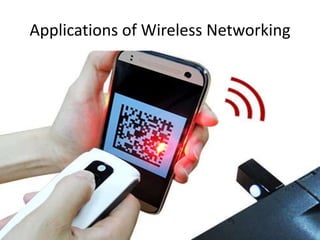
QR code
• a machine-readable code consisting of an
array of black and white squares, typically
used for storing URLs or other information for
reading by the camera on a smartphone.
MICROWAVE
• Microwaves are
a form of
electromagnetic
radiation with
frequencies
between 300
MHz and 300
GHz
• microwaves are used for mobile phones and Wi-Fi.
• Requires line of sight
• Two way communications used in two different antenna
• Distance covered based upon height of antenna.
• uni directional
MICROWAVE
Line of sight (LoS)
• Line of sight (LoS) is a type of propagation that can transmit and receive
data only where transmit and receive stations are in view of each other
without any sort of an obstacle between them. FM radio, microwave and
satellite transmission are examples of line-of-sight communication.
Uni Directional
• moving or operating in a single direction.
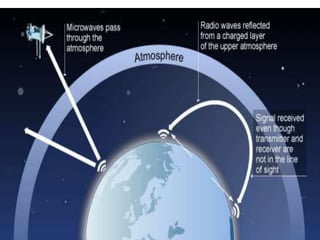
Radiowaves
• In radio communications, a radio receiver (receiver or
simply radio) is an electronic device that receives radio waves
and converts the information carried by them to a usable
form. It is used with an antenna.
• The up arrow symbolises upload of data from
your phone/PC/any system onto the internet.
The down arrow symbolises download of data
from theinternet to your system.
Satellite communication
About 42% area visible from satellites
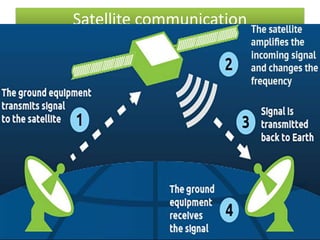
Satellite Communication
• Communications satellites bounce signals from
one side of Earth to the other, a bit like giant
mirrors in space
• it creates a communication channel between a source
transmitter and a receiver at different locations on
Earth
• First active, direct-relay communications satellite-
TELSTAR 1 in 1962
• On June 19, 1981 India launched its
first geostationary satellite called APPLE. It was an
experimental communication satellite launched by the
Indian Space Research Organisation (ISRO)
satellite
• Remote sensing is the science of obtaining
information about objects or areas from a
distance.
• Detection of water pollution ,oil
field,monitoring and reporting of weather
conditions
Infra Red
Infra Red
• A remote control uses light waves just
beyond the visible spectrum of light—
• to change channels on your TV.
• wavelengths longer than those of visible light,
but shorter than those of radio waves.
• range of wavelengths corresponds to a frequency
range of approximately 430 THz down to 300
GHz.
• Below infrared is the microwave portion of the
electromagnetic spectrum.
• Used for short range communication
• Use Line Of Site
• Cannot penetrate solid objects like wall
• Large bandwidth
Infra Red
Bluetooth
#Name borrowed from a king in Denmark
#1000 years ago. Harald Bluetooth
#Bluetooth is a wireless technology .
#exchanging data over short distances from fixed and mobile devices.
# building personal area networks.
#covers short distance up to 10 meters(30 feet)
#Data speed <1 mbps.
#features: robust, low power, low cost
#connecting devices-Mobile ,Laptop,PCs,PDAs,Printers,Digital
cameras,mouses and keyboards.
How does wireless network works
WI - FI
• Home wi fi internet is made possible via a wireless
router, which is basically a box that transmits and
receives wireless signals between an internet
connection and internet-enabled devices.
• To communicate with a router and connect to wifi, a
device must have a wireless adaptor.
• connection is established using a wireless adapter to
create hotspots - areas in the vicinity of a wireless
router that are connected to the network and allow
users to access internet services.
• Most routers supports upto 255 devices
wifi
extender
A hotspot is a physical location where
people may obtain Internet access
How does hotspot works
A mobile hotspot is a feature that lets you share your network connection with other devices so
they can access the internet
Devices connect to your mobile hotspotusing their WiFi feature. While they're connected you'll
be charged for any data theyuse per your monthly data plan
NETWORKING DEVICES
• Modem: ...converts data from digital to analog form
,vice versa.
• A broadband modem - A cable modem
NETWORKING DEVICES
A broadband modem
• A type of modem that allows a personal computer or a
router to receive Internet access via a mobile
broadband connection instead of using telephone or
cable television lines
• Used with high speed DSL or cable internet service.
• DSL-Digital Subscribe Link ,a high speed internet
service.
Cable Modem
• Allows your computer to communicate with
an Internet Service Provider over a landline
connection.
• Connects home pc or home networks.
Functions of MODEM
• an analog signal to digital information
to decode the digital information to
analog signal.
the size of the signal
needed to send the required data.
• While transmission between modems, sometimes
signals be damaged -- meaning that parts of the
data are altered or lost. To get around this, modems
use .
.
Each frame is tagged with a checksum, a small piece
of data derived from the information in the frame.
RJ -11 Connector
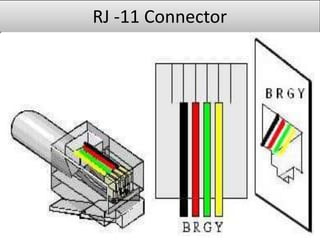
RJ-11. (Registered Jack-11)
• Uses a cable of twisted wire pairs and a
modular jack with two, four or six contacts.
• RJ-11 is the common connector for plugging a
telephone into the wall and the handset into the
telephone.
• It has four or six wire connection.
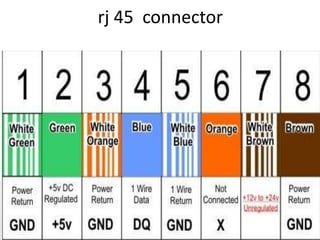
rj 45 connector
RJ-45 connector
RJ45. An 8-pin/8-position plug or jack is
commonly used to connect computers onto
Ethernet-based local area networks (LAN).
It is also used for serial connection (exchange of
data between a microprocessor and peripherals
such as printers, external drives, scanners, or
mice.)
Attached to a hub/switch.
RJ-45 connector
Functions RJ 45 connector
• Commonly used for 10Base-T and 100Base-TX
• A pair of wires twisted together form a twisted
pair. ... 10BaseT translates to 10Mbps, Baseband,
Twisted pair.
• Officially the IEEE 802.3u standard
• 100Base-T is a shared media LAN when used with a
hub (all nodes share the 100 Mbps) and 100 Mbps
between each pair of nodes when used with a
switch.
Ethernet Card or Ethernet adapter or NIC
• Ethernet adapter/network interface card/
(NIC), Ethernet card ----
• Plugs into a slot on the motherboard and enables a
computer to access an Ethernet network (LAN). In the
past, desktop computers always used cards.
• The cable connection on the Ethernet card is called an
RJ-45 connection
To avoid collision of data
• An Ethernet network does not have a centralized
controller that tells each computer how to take turns
using the same shared cable. Each computer sends out
a frame, and when two frames try to occupy the
channel at the same time, there is a collision and both
frames will be garbled(mixed).
• To avoid collision over the Ethernet, all attached
computers participate in a distributed coordination
scheme called Carrier Sense Multiple Access with
Collision Detect (CSMA/CD)
• Build by PARC, a Xerox company, provides custom R&D
services, technology.
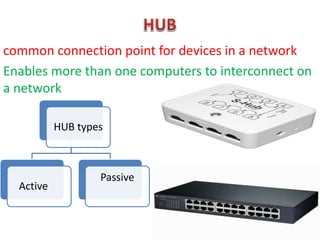
common connection point for devices in a network
Enables more than one computers to interconnect on
a network
HUB types
Active
Passive
Function of HUB
• Share resources-file,printer,scanner,internet access over LAN.
• Connets nodes mostely in small traffic.
• Boadcasts all the packets it receives to the other computers .
Active and Passive HUB
SWITCH-Used to interconnect computers and devices
on a network.
Function of network switch
• Keep a record of MAC address of devices
attached to it.
• Allows faster communication.
• Allows client computer to store files on a file
server.
• Allows monitoring.
• Intelligent than HUB.
REPEATER
REPEATER FUNCTION
ROUTER
Router Function
• Forwards data packets between computer networks.
• When a data packet comes in on one of the lines, the
router reads the network address information in the
packet to determine the ultimate destination. Then,
using information in its routing table or routing
policy, it directs the packet to the next network on its
journey.
• Connects network(wan-lan)
• Act as a junction between two networks
• can also used as a firewall security (Since a router is
the main connection from a home network to the Internet, thefirewall function is
merged into this device)
• Act as a default gateway
• Move data between networks
• Provide loop free paths
Router Function
Bridge
• A bridge is a device that connects and passes packets between two
network segments that use the same communications protocol
• Bridges operate at the data link layer (layer 2) of the OSI reference
model.
• A bridge will filter, forward or flood an incoming frame based on
the MAC address of that frame.
Bridge
Bridge functions
GATEWAY
• A gateway is a node (router) in a
computer network, a key stopping point for
data on its way to or from other networks
• Provides connection between two
networks,two e-mail handling system or two
newsgroups.
• Handles messages,address,and protocol
conversation
• One of the way to connect to www
• Allows to enter different networks on the
internet.
GATEWAY functions
Find your gateway
• Click Start > All Programs > Accessories > Command Prompt.
• When Command Prompt is open, type the following command: ipconfig |
findstr /i "Gateway" (You can copy & paste it in the command prompt; just
right-click anywhere in the command prompt window and select Paste.)
• You should see something like this:
C:Documents and Settingsadministrator>ipconfig | findstr /i "Gateway"
Default Gateway . . . . . . . . . : 192.168.1.1
• In this example, your default gateway (router) IP address is 192.168.1.1.
to know the internal IP address of your default gateway, which is normallyyour router's
LAN IP address.
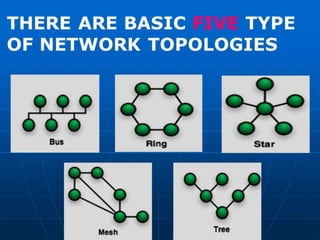
TOPOLOGIES
• Definations
.
Factors of choosing TOPOLOGY
Cost
Flexibility
Reliability
Wireless communications

Wireless communications

  • 1.
    Wireless Networking Wireless networksare computer networks that are not connected by cables of any kind.
  • 2.
    Advantages of WirelessNetworking • that users can move around freely within the area of the network with their laptops, handheld devices etc • Easy to install (no wires) • Transmission speed is high
  • 3.
  • 4.
  • 5.
    QR code • amachine-readable code consisting of an array of black and white squares, typically used for storing URLs or other information for reading by the camera on a smartphone.
  • 6.
    MICROWAVE • Microwaves are aform of electromagnetic radiation with frequencies between 300 MHz and 300 GHz
  • 7.
    • microwaves areused for mobile phones and Wi-Fi. • Requires line of sight • Two way communications used in two different antenna • Distance covered based upon height of antenna. • uni directional MICROWAVE
  • 9.
    Line of sight(LoS) • Line of sight (LoS) is a type of propagation that can transmit and receive data only where transmit and receive stations are in view of each other without any sort of an obstacle between them. FM radio, microwave and satellite transmission are examples of line-of-sight communication.
  • 11.
    Uni Directional • movingor operating in a single direction.
  • 12.
    Radiowaves • In radiocommunications, a radio receiver (receiver or simply radio) is an electronic device that receives radio waves and converts the information carried by them to a usable form. It is used with an antenna.
  • 13.
    • The uparrow symbolises upload of data from your phone/PC/any system onto the internet. The down arrow symbolises download of data from theinternet to your system.
  • 15.
  • 17.
    About 42% areavisible from satellites
  • 18.
    Satellite Communication • Communicationssatellites bounce signals from one side of Earth to the other, a bit like giant mirrors in space • it creates a communication channel between a source transmitter and a receiver at different locations on Earth • First active, direct-relay communications satellite- TELSTAR 1 in 1962 • On June 19, 1981 India launched its first geostationary satellite called APPLE. It was an experimental communication satellite launched by the Indian Space Research Organisation (ISRO)
  • 19.
    satellite • Remote sensingis the science of obtaining information about objects or areas from a distance. • Detection of water pollution ,oil field,monitoring and reporting of weather conditions
  • 20.
  • 21.
    Infra Red • Aremote control uses light waves just beyond the visible spectrum of light— • to change channels on your TV. • wavelengths longer than those of visible light, but shorter than those of radio waves. • range of wavelengths corresponds to a frequency range of approximately 430 THz down to 300 GHz. • Below infrared is the microwave portion of the electromagnetic spectrum.
  • 22.
    • Used forshort range communication • Use Line Of Site • Cannot penetrate solid objects like wall • Large bandwidth Infra Red
  • 23.
    Bluetooth #Name borrowed froma king in Denmark #1000 years ago. Harald Bluetooth #Bluetooth is a wireless technology . #exchanging data over short distances from fixed and mobile devices. # building personal area networks. #covers short distance up to 10 meters(30 feet) #Data speed <1 mbps. #features: robust, low power, low cost #connecting devices-Mobile ,Laptop,PCs,PDAs,Printers,Digital cameras,mouses and keyboards.
  • 25.
    How does wirelessnetwork works
  • 26.
    WI - FI •Home wi fi internet is made possible via a wireless router, which is basically a box that transmits and receives wireless signals between an internet connection and internet-enabled devices. • To communicate with a router and connect to wifi, a device must have a wireless adaptor. • connection is established using a wireless adapter to create hotspots - areas in the vicinity of a wireless router that are connected to the network and allow users to access internet services. • Most routers supports upto 255 devices
  • 27.
  • 28.
    A hotspot isa physical location where people may obtain Internet access
  • 29.
    How does hotspotworks A mobile hotspot is a feature that lets you share your network connection with other devices so they can access the internet Devices connect to your mobile hotspotusing their WiFi feature. While they're connected you'll be charged for any data theyuse per your monthly data plan
  • 30.
  • 31.
    • Modem: ...convertsdata from digital to analog form ,vice versa. • A broadband modem - A cable modem NETWORKING DEVICES
  • 32.
    A broadband modem •A type of modem that allows a personal computer or a router to receive Internet access via a mobile broadband connection instead of using telephone or cable television lines • Used with high speed DSL or cable internet service. • DSL-Digital Subscribe Link ,a high speed internet service.
  • 33.
    Cable Modem • Allowsyour computer to communicate with an Internet Service Provider over a landline connection. • Connects home pc or home networks.
  • 35.
    Functions of MODEM •an analog signal to digital information to decode the digital information to analog signal. the size of the signal needed to send the required data. • While transmission between modems, sometimes signals be damaged -- meaning that parts of the data are altered or lost. To get around this, modems use . . Each frame is tagged with a checksum, a small piece of data derived from the information in the frame.
  • 36.
  • 37.
    RJ-11. (Registered Jack-11) •Uses a cable of twisted wire pairs and a modular jack with two, four or six contacts. • RJ-11 is the common connector for plugging a telephone into the wall and the handset into the telephone. • It has four or six wire connection.
  • 38.
  • 39.
    RJ-45 connector RJ45. An8-pin/8-position plug or jack is commonly used to connect computers onto Ethernet-based local area networks (LAN). It is also used for serial connection (exchange of data between a microprocessor and peripherals such as printers, external drives, scanners, or mice.) Attached to a hub/switch.
  • 40.
  • 41.
    Functions RJ 45connector • Commonly used for 10Base-T and 100Base-TX • A pair of wires twisted together form a twisted pair. ... 10BaseT translates to 10Mbps, Baseband, Twisted pair. • Officially the IEEE 802.3u standard • 100Base-T is a shared media LAN when used with a hub (all nodes share the 100 Mbps) and 100 Mbps between each pair of nodes when used with a switch.
  • 42.
    Ethernet Card orEthernet adapter or NIC • Ethernet adapter/network interface card/ (NIC), Ethernet card ---- • Plugs into a slot on the motherboard and enables a computer to access an Ethernet network (LAN). In the past, desktop computers always used cards. • The cable connection on the Ethernet card is called an RJ-45 connection
  • 43.
    To avoid collisionof data • An Ethernet network does not have a centralized controller that tells each computer how to take turns using the same shared cable. Each computer sends out a frame, and when two frames try to occupy the channel at the same time, there is a collision and both frames will be garbled(mixed). • To avoid collision over the Ethernet, all attached computers participate in a distributed coordination scheme called Carrier Sense Multiple Access with Collision Detect (CSMA/CD) • Build by PARC, a Xerox company, provides custom R&D services, technology.
  • 44.
    common connection pointfor devices in a network Enables more than one computers to interconnect on a network HUB types Active Passive
  • 46.
    Function of HUB •Share resources-file,printer,scanner,internet access over LAN. • Connets nodes mostely in small traffic. • Boadcasts all the packets it receives to the other computers .
  • 47.
  • 48.
    SWITCH-Used to interconnectcomputers and devices on a network.
  • 49.
    Function of networkswitch • Keep a record of MAC address of devices attached to it. • Allows faster communication. • Allows client computer to store files on a file server. • Allows monitoring. • Intelligent than HUB.
  • 50.
  • 51.
  • 52.
  • 53.
    Router Function • Forwardsdata packets between computer networks. • When a data packet comes in on one of the lines, the router reads the network address information in the packet to determine the ultimate destination. Then, using information in its routing table or routing policy, it directs the packet to the next network on its journey.
  • 54.
    • Connects network(wan-lan) •Act as a junction between two networks • can also used as a firewall security (Since a router is the main connection from a home network to the Internet, thefirewall function is merged into this device) • Act as a default gateway • Move data between networks • Provide loop free paths Router Function
  • 55.
  • 56.
    • A bridgeis a device that connects and passes packets between two network segments that use the same communications protocol • Bridges operate at the data link layer (layer 2) of the OSI reference model. • A bridge will filter, forward or flood an incoming frame based on the MAC address of that frame. Bridge Bridge functions
  • 57.
    GATEWAY • A gatewayis a node (router) in a computer network, a key stopping point for data on its way to or from other networks
  • 58.
    • Provides connectionbetween two networks,two e-mail handling system or two newsgroups. • Handles messages,address,and protocol conversation • One of the way to connect to www • Allows to enter different networks on the internet. GATEWAY functions
  • 59.
    Find your gateway •Click Start > All Programs > Accessories > Command Prompt. • When Command Prompt is open, type the following command: ipconfig | findstr /i "Gateway" (You can copy & paste it in the command prompt; just right-click anywhere in the command prompt window and select Paste.) • You should see something like this: C:Documents and Settingsadministrator>ipconfig | findstr /i "Gateway" Default Gateway . . . . . . . . . : 192.168.1.1 • In this example, your default gateway (router) IP address is 192.168.1.1. to know the internal IP address of your default gateway, which is normallyyour router's LAN IP address.
  • 60.
    TOPOLOGIES • Definations . Factors ofchoosing TOPOLOGY Cost Flexibility Reliability