HTML
Class X
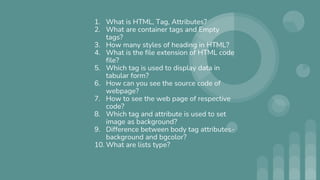
1. What is HTML, Tag, Attributes?
2. What are container tags and Empty
tags?
3. How many styles of heading in HTML?
4. What is the file extension of HTML code
file?
5. Which tag is used to display data in
tabular form?
6. How can you see the source code of
webpage?
7. How to see the web page of respective
code?
8. Which tag and attribute is used to set
image as background?
9. Difference between body tag attributes-
background and bgcolor?
10. What are lists type?
HTML 1
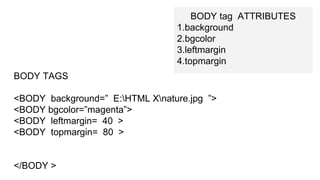
BODY tag ATTRIBUTES
1.background
2.bgcolor
3.leftmargin
4.topmargin
BODY TAGS
<BODY background=” E:HTML Xnature.jpg ”>
<BODY bgcolor=”magenta”>
<BODY leftmargin= 40 >
<BODY topmargin= 80 >
</BODY >
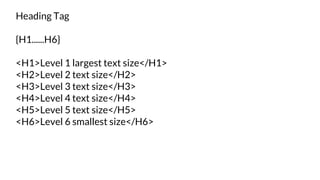
Heading Tag
{H1......H6}
<H1>Level 1 largest text size</H1>
<H2>Level 2 text size</H2>
<H3>Level 3 text size</H3>
<H4>Level 4 text size</H4>
<H5>Level 5 text size</H5>
<H6>Level 6 smallest size</H6>
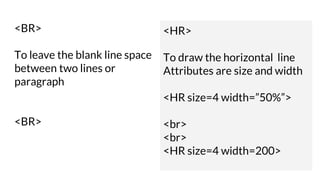
<BR>
To leave the blank line space
between two lines or
paragraph
<BR>
<HR>
To draw the horizontal line
Attributes are size and width
<HR size=4 width=”50%”>
<br>
<br>
<HR size=4 width=200>
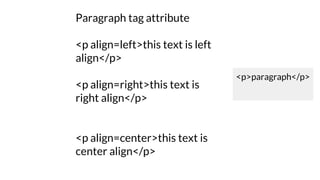
Paragraph tag attribute
<p align=left>this text is left
align</p>
<p align=right>this text is
right align</p>
<p align=center>this text is
center align</p>
<p>paragraph</p>
Basefont
<BASEFONT size=5>
This text has basefont size 5
<BASEFONT size=+2>
This text has basefont size bigger than the previous
font size
<BASEFONT size=-1>
This text has basefont size -1 than the previous font
size
FONT
<FONT size=7>
This text has font size 7
</FONT>
<FONT color=blue>
This text has font color blue
</FONT>
<FONT face=Arial>
This text has font type Arial
</FONT>
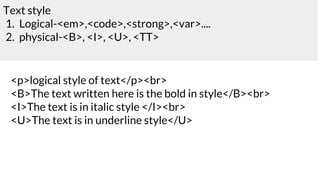
Text style
1. Logical-<em>,<code>,<strong>,<var>....
2. physical-<B>, <I>, <U>, <TT>
<p>logical style of text</p><br>
<B>The text written here is the bold in style</B><br>
<I>The text is in italic style </I><br>
<U>The text is in underline style</U>
Superscript
Sub
script
<P>X<sub>2</sub></p>
<P>X<sup>2</sup></p>
Special Characters
<
>
&
&lt for <
&gt for >
&amp for &
<p> &lt <br>
<p> &gt <br>
<p>&amp <br>
List and numbers
1.Numbered or ordered<OL>
2.Unnumbered or unordered<UL>
<OL>
<LI>apples
<LI>bananas
<LI>grapefruit
</OL>
<UL>
<LI>Star
<LI>Moon
<LI>Planet
</UL>
Ordered list attribute
1.Type
2.Start
<OL start = 6 type=A>
<LI>alphabet A
<LI>alphabet B
<LI>alphabet C
</UL>
<OL type=i>
<LI>One
<LI>Two
<LI>Three
</UL>
<UL type=disc>
<LI>Star
<LI>Moon
<LI>Planet
</UL>
Unordered list
1.Disc
2.Circle
3.Square
<UL type=circle>
<LI>Star
<LI>Moon
<LI>Planet
</UL>
<UL type=square>
<LI>Star
<LI>Moon
<LI>Planet
</UL>
HTML 2
Images
Links
Table
Inserting Images, supports-
Gif
XBM(xbitmap)
Jpeg
<img src=” ”>
<img src=” ” alt=”this is the image”>
<img src=” ” >
<img src="E:HTML Xbook.jpg" alt="click to image">
TABLE ATTRIBUTES
1. Border
2. bordercolor
3. Bgcolor
4. Cellspacing
5. Cellpadding
TABLE TAGS
1. <TABLE>
2. <TH>
3. <TR>
4. <TD>
Draw Table
Item sold price quantity
Shampoo 98
30
Biscuit 45
The bill contains gst
Colspan
rowspan
Introduction to web page designing using HTML: create and save an
HTML document, access a web page using a web browser. • HTML tags:
html, head, title, body, (attributes: text, background, bgcolor, link, vlink,
alink), br (break), hr(horizontal rule), inserting comments, h1..h6
(heading), p (paragraph), b (bold), i (italics), u (underline), ul (unordered
list), ol (ordered list), and li (list item). Description lists: dl, dt and dd.
Attributes of ol (start, type), ul (type). • Font tags (attributes: face, size,
color). • Insert images: img (attributes: src, width, height, alt), sup (super
script), sub (subscript). • HTML Forms: Textbox, radio buttons, checkbox,
password, list, combobox. • Embed audio and video in a HTML page. •
Create a table using the tags: table, tr, th, td, rowspan, colspan • Links:
significance of linking, anchor element (attributes: href, mailto), targets. •
Cascading style sheets: colour, background-colour, border-style, margin,
height, width, outline, font (family, style, size), align, float.
Linking
IInternal Linking
External Linking
<A href="https://www.google.com/"> Google</A>
A saperate tab will open
<A href="jaipuria.docx"> Google</A>
Same browser, file will open
IInternal Linking
Also used as section linking in the same document
Section set-
<A name=”elephant A”> elephent section </A>
Link to this section Section -
<A name=”#elephant A”> elephent link </A>
Link to the section of other document
<A href=”main.docx#elephantlink> elephant link</A>
Sending Email from a Browser
<A href=”mailto:publisher@gmail.com?subject=’to order book’ “> mail to </A>
CSS
HTML----CSS-----Javasxript-----DOM(document object model)
Dynamic web
page
Static VS Dynamic
Html Class X
Html Class X
Html Class X
Html Class X
Html Class X
Html Class X
Html Class X
Html Class X
Html Class X
Html Class X
Html Class X

Html Class X

  • 1.
  • 4.
    1. What isHTML, Tag, Attributes? 2. What are container tags and Empty tags? 3. How many styles of heading in HTML? 4. What is the file extension of HTML code file? 5. Which tag is used to display data in tabular form? 6. How can you see the source code of webpage? 7. How to see the web page of respective code? 8. Which tag and attribute is used to set image as background? 9. Difference between body tag attributes- background and bgcolor? 10. What are lists type?
  • 5.
  • 6.
    BODY tag ATTRIBUTES 1.background 2.bgcolor 3.leftmargin 4.topmargin BODYTAGS <BODY background=” E:HTML Xnature.jpg ”> <BODY bgcolor=”magenta”> <BODY leftmargin= 40 > <BODY topmargin= 80 > </BODY >
  • 7.
    Heading Tag {H1......H6} <H1>Level 1largest text size</H1> <H2>Level 2 text size</H2> <H3>Level 3 text size</H3> <H4>Level 4 text size</H4> <H5>Level 5 text size</H5> <H6>Level 6 smallest size</H6>
  • 8.
    <BR> To leave theblank line space between two lines or paragraph <BR> <HR> To draw the horizontal line Attributes are size and width <HR size=4 width=”50%”> <br> <br> <HR size=4 width=200>
  • 9.
    Paragraph tag attribute <palign=left>this text is left align</p> <p align=right>this text is right align</p> <p align=center>this text is center align</p> <p>paragraph</p>
  • 10.
    Basefont <BASEFONT size=5> This texthas basefont size 5 <BASEFONT size=+2> This text has basefont size bigger than the previous font size <BASEFONT size=-1> This text has basefont size -1 than the previous font size
  • 11.
    FONT <FONT size=7> This texthas font size 7 </FONT> <FONT color=blue> This text has font color blue </FONT> <FONT face=Arial> This text has font type Arial </FONT>
  • 12.
    Text style 1. Logical-<em>,<code>,<strong>,<var>.... 2.physical-<B>, <I>, <U>, <TT> <p>logical style of text</p><br> <B>The text written here is the bold in style</B><br> <I>The text is in italic style </I><br> <U>The text is in underline style</U>
  • 13.
  • 14.
    Special Characters < > & &lt for< &gt for > &amp for & <p> &lt <br> <p> &gt <br> <p>&amp <br>
  • 15.
    List and numbers 1.Numberedor ordered<OL> 2.Unnumbered or unordered<UL> <OL> <LI>apples <LI>bananas <LI>grapefruit </OL> <UL> <LI>Star <LI>Moon <LI>Planet </UL>
  • 16.
    Ordered list attribute 1.Type 2.Start <OLstart = 6 type=A> <LI>alphabet A <LI>alphabet B <LI>alphabet C </UL> <OL type=i> <LI>One <LI>Two <LI>Three </UL>
  • 17.
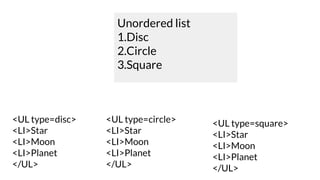
    <UL type=disc> <LI>Star <LI>Moon <LI>Planet </UL> Unordered list 1.Disc 2.Circle 3.Square <ULtype=circle> <LI>Star <LI>Moon <LI>Planet </UL> <UL type=square> <LI>Star <LI>Moon <LI>Planet </UL>
  • 18.
  • 19.
    Inserting Images, supports- Gif XBM(xbitmap) Jpeg <imgsrc=” ”> <img src=” ” alt=”this is the image”> <img src=” ” >
  • 20.
    <img src="E:HTML Xbook.jpg"alt="click to image">
  • 21.
    TABLE ATTRIBUTES 1. Border 2.bordercolor 3. Bgcolor 4. Cellspacing 5. Cellpadding TABLE TAGS 1. <TABLE> 2. <TH> 3. <TR> 4. <TD>
  • 22.
    Draw Table Item soldprice quantity Shampoo 98 30 Biscuit 45 The bill contains gst Colspan rowspan
  • 23.
    Introduction to webpage designing using HTML: create and save an HTML document, access a web page using a web browser. • HTML tags: html, head, title, body, (attributes: text, background, bgcolor, link, vlink, alink), br (break), hr(horizontal rule), inserting comments, h1..h6 (heading), p (paragraph), b (bold), i (italics), u (underline), ul (unordered list), ol (ordered list), and li (list item). Description lists: dl, dt and dd. Attributes of ol (start, type), ul (type). • Font tags (attributes: face, size, color). • Insert images: img (attributes: src, width, height, alt), sup (super script), sub (subscript). • HTML Forms: Textbox, radio buttons, checkbox, password, list, combobox. • Embed audio and video in a HTML page. • Create a table using the tags: table, tr, th, td, rowspan, colspan • Links: significance of linking, anchor element (attributes: href, mailto), targets. • Cascading style sheets: colour, background-colour, border-style, margin, height, width, outline, font (family, style, size), align, float.
  • 25.
    Linking IInternal Linking External Linking <Ahref="https://www.google.com/"> Google</A> A saperate tab will open <A href="jaipuria.docx"> Google</A> Same browser, file will open
  • 26.
    IInternal Linking Also usedas section linking in the same document Section set- <A name=”elephant A”> elephent section </A> Link to this section Section - <A name=”#elephant A”> elephent link </A> Link to the section of other document <A href=”main.docx#elephantlink> elephant link</A>
  • 28.
    Sending Email froma Browser <A href=”mailto:publisher@gmail.com?subject=’to order book’ “> mail to </A>
  • 31.
  • 32.