“Runtime 8”

DAMIR DOBRIC

Lead Architect DAENET GmbH
Ms. VTSP for Windows Azure
Ms. Integration MVP
Ms. Connected Technology Advisor
Blog: http://developers.de
Twitter: https://twitter.com/ddobric
eMail: damir.dobric@daenet.com
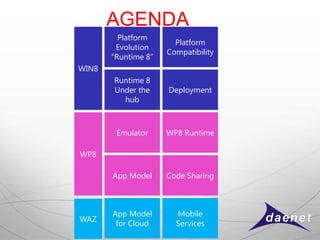
AGENDA
         Platform
                       Platform
        Evolution
                     Compatibility
       “Runtime 8”
WIN8
       Runtime 8
       Under the     Deployment
         hub


        Emulator     WP8 Runtime

WP8

       App Model     Code Sharing


       App Model       Mobile
WAZ
        for Cloud      Services
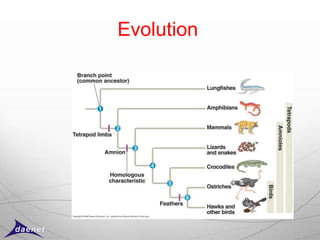
Evolution
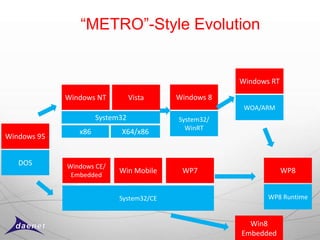
“METRO”-Style Evolution


                                                      Windows RT

             Windows NT          Vista    Windows 8
                                                       WOA/ARM
                      System32            System32/
                                            WinRT
                x86         X64/x86
Windows 95


   DOS       Windows CE/
                            Win Mobile     WP7                     WP8
              Embedded


                            System32/CE                      WP8 Runtime


                                                        Win8
                                                      Embedded
Why new Runtime?
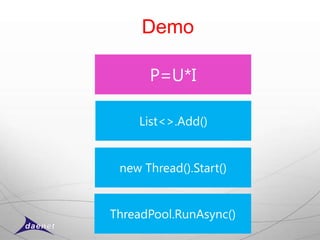
Demo

      P=U*I

    List<>.Add()


 new Thread().Start()


ThreadPool.RunAsync()
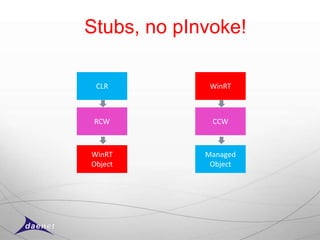
Stubs, no pInvoke!

 CLR          WinRT


 RCW          CCW


WinRT        Managed
Object        Object
Stub Samples
New Type System
o Standard Types
  o Windows.*
o Primitive Types
  o Byte, Int32, ..
  o Marshaling required:
      o String, Object
o Projected Types
  o Windows.Foundation.Uri
  o Windows.Foundation.DateTimeOffset
  o HRESULT
o Projected Interfaces
  o IVector<T>,
  o IMap<T>
o Helpers
  o StorageFolder.OpenStreamForReadAsync(fileName);
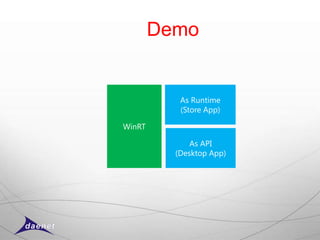
Demo


           As Runtime
           (Store App)

WinRT

              As API
          (Desktop App)
App Deployment

o Two options
 o App Store
 o Sided Loading (for Enterprises)
   oExplicit Installation
   oProvisioning
Sided Loaded Apps
(none appstore deployment)

o By Group Policy
  If in Windows® 8 Enterprise or Windows
  Server® 2012 domain
  http://technet.microsoft.com/en-us/library/hh852635.aspx#SideloadingRequirements


o By Activation Key
  If not in domain the use volume license key.
o If not in domain and no activation key then
  use AppStore. 
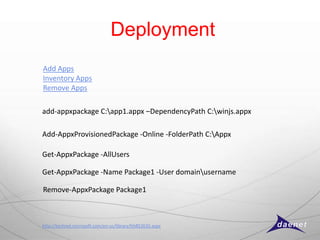
Deployment
Add Apps
Inventory Apps
Remove Apps

add-appxpackage C:app1.appx –DependencyPath C:winjs.appx

Add-AppxProvisionedPackage -Online -FolderPath C:Appx
Get-AppxPackage -AllUsers

Get-AppxPackage -Name Package1 -User domainusername

Remove-AppxPackage Package1


http://technet.microsoft.com/en-us/library/hh852635.aspx
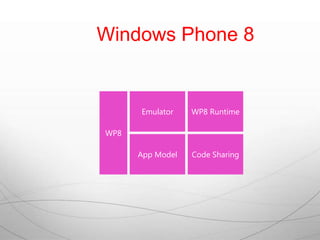
Windows Phone 8


      Emulator    WP8 Runtime

WP8

      App Model   Code Sharing
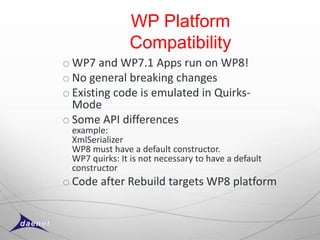
WP Platform
               Compatibility
o WP7 and WP7.1 Apps run on WP8!
o No general breaking changes
o Existing code is emulated in Quirks-
  Mode
o Some API differences
 example:
 XmlSerializer
 WP8 must have a default constructor.
 WP7 quirks: It is not necessary to have a default
 constructor
o Code after Rebuild targets WP8 platform
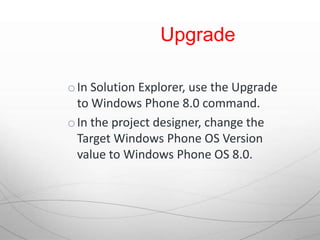
The dream or reality?
Upgrade

o In Solution Explorer, use the Upgrade
  to Windows Phone 8.0 command.
o In the project designer, change the
  Target Windows Phone OS Version
  value to Windows Phone OS 8.0.
Demo


Windows Phone 8
Hello World
Emulator

        • Hardware-assisted virtualization supported and
          enabled in the BIOS

        • Second Level Address Translation (SLAT)
          supported by the BIOS

        • Hardware-based Data Execution Prevention
          (DEP) supported and enabled in the BIOS


http://developers.de/blogs/damir_dobric/archive/2012/10/14/windows8-error-hypervisor-is-not-running.aspx
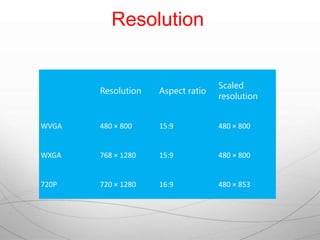
Resolution


                                   Scaled
       Resolution   Aspect ratio
                                   resolution


WVGA   480 × 800    15:9           480 × 800


WXGA   768 × 1280   15:9           480 × 800


720P   720 × 1280   16:9           480 × 853
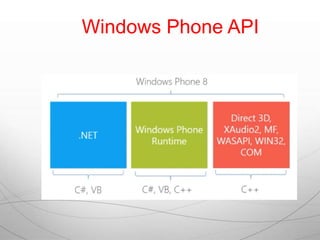
Windows Phone API
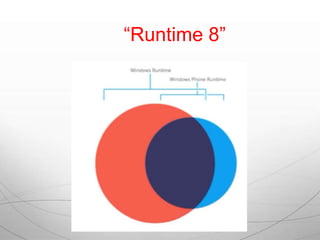
“Runtime 8”
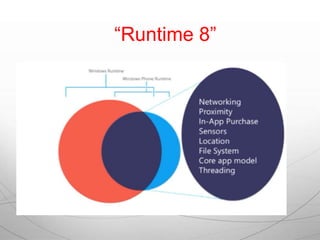
“Runtime 8”
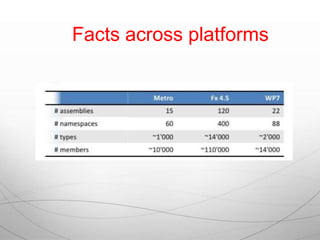
Facts across platforms
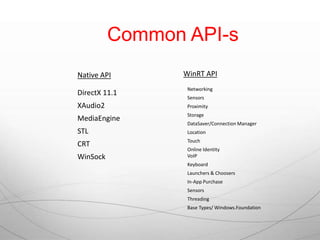
Common API-s
Native API      WinRT API
                 Networking
DirectX 11.1
                 Sensors
XAudio2          Proximity
                 Storage
MediaEngine
                 DataSaver/Connection Manager
STL              Location
                 Touch
CRT
                 Online Identity
WinSock          VoIP
                 Keyboard
                 Launchers & Choosers
                 In-App Purchase
                 Sensors
                 Threading
                 Base Types/ Windows.Foundation
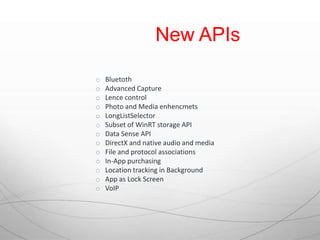
New APIs

o   Bluetoth
o   Advanced Capture
o   Lence control
o   Photo and Media enhencmets
o   LongListSelector
o   Subset of WinRT storage API
o   Data Sense API
o   DirectX and native audio and media
o   File and protocol associations
o   In-App purchasing
o   Location tracking in Background
o   App as Lock Screen
o   VoIP
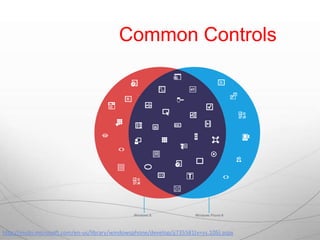
Common Controls


http://msdn.microsoft.com/en-us/library/windowsphone/develop/jj735581(v=vs.105).aspx
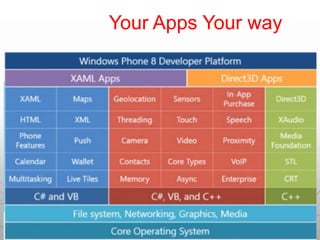
Your Apps Your way
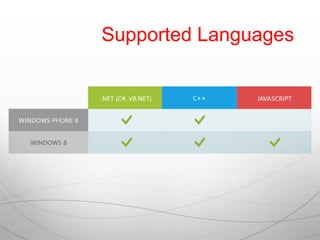
Supported Languages
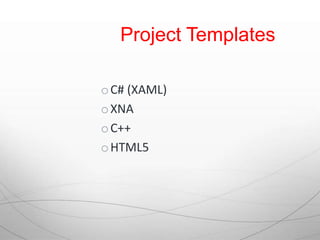
Project Templates

o C# (XAML)
o XNA
o C++
o HTML5
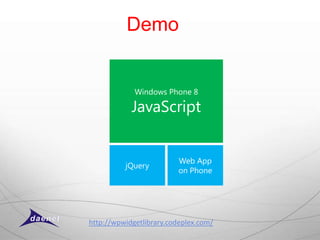
Demo


             Windows Phone 8

            JavaScript


                         Web App
          jQuery
                         on Phone


http://wpwidgetlibrary.codeplex.com/
Threading

o OS 7.1, apps run on a single core, and
  the scheduler is less aggressive in time-
  slicing
o OS 8, apps run on multiple cores and the
  scheduler is more aggressive in time-
  slicing threads.
  Raise conditions and concurrency bugs
  easier to achieve 
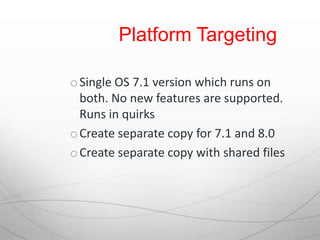
Platform Targeting

o Single OS 7.1 version which runs on
  both. No new features are supported.
  Runs in quirks
o Create separate copy for 7.1 and 8.0
o Create separate copy with shared files
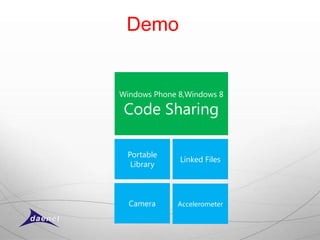
Demo


Windows Phone 8,Windows 8

 Code Sharing

  Portable
              Linked Files
   Library


  Camera      Accelerometer
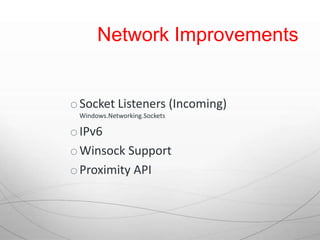
Network Improvements


o Socket Listeners (Incoming)
 Windows.Networking.Sockets

o IPv6
o Winsock Support
o Proximity API
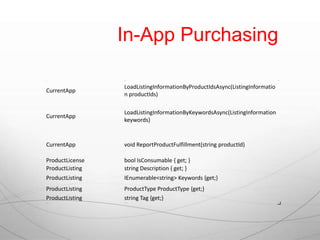
In-App Purchasing

Class            Member                                                      Description


                 LoadListingInformationByProductIdsAsync(ListingInformatio
CurrentApp
                 n productIds)

                 LoadListingInformationByKeywordsAsync(ListingInformation
CurrentApp
                 keywords)


CurrentApp       void ReportProductFulfillment(string productId)

ProductLicense   bool IsConsumable { get; }
ProductListing   string Description { get; }
ProductListing   IEnumerable<string> Keywords {get;}
ProductListing   ProductType ProductType {get;}
ProductListing   string Tag {get;}
ProductListing   Uri ImageUri { get; }
Demo


Custom Protocol
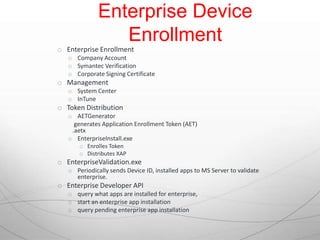
Enterprise Device
                 Enrollment
o Enterprise Enrollment
   o Company Account
   o Symantec Verification
   o Corporate Signing Certificate
o Management
   o System Center
   o InTune
o Token Distribution
   o AETGenerator
     generates Application Enrollment Token (AET)
    .aetx
   o EnterpriseInstall.exe
       o Enrolles Token
       o Distributes XAP
o EnterpriseValidation.exe
   o Periodically sends Device ID, installed apps to MS Server to validate
     enterprise.
o Enterprise Developer API
   o query what apps are installed for enterprise,
   o start an enterprise app installation
   o query pending enterprise app installation
Demo


Background Process
Demo


  Speech
Demo


 Recognition
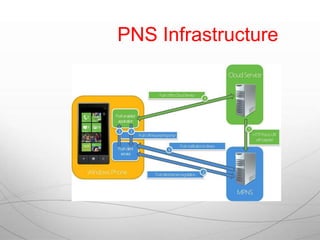
PNS Infrastructure
Demo


     Windows Phone 8
Windows Azure Mobile Services
Where to start?


WP8 MSDN Documentation
http://msdn.microsoft.com/en-
us/library/windowsphone/develop/ff402535(v=vs.105).aspx

WinRT:
http://de.slideshare.net/ITCamp/itcamp-2012-raffaele-rialdi-introduction-to-
winrt
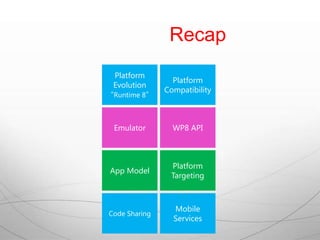
Recap
 Platform
                 Platform
 Evolution
               Compatibility
“Runtime 8”


 Emulator        WP8 API


                Platform
App Model
                Targeting


                 Mobile
Code Sharing
                 Services
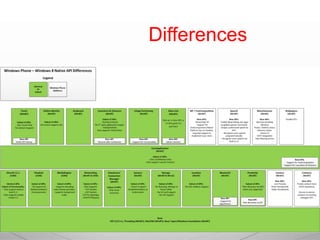
Differences

Runtime 8 and Windows Phone 8

  • 1.
    “Runtime 8” DAMIR DOBRIC LeadArchitect DAENET GmbH Ms. VTSP for Windows Azure Ms. Integration MVP Ms. Connected Technology Advisor Blog: http://developers.de Twitter: https://twitter.com/ddobric eMail: damir.dobric@daenet.com
  • 2.
    AGENDA Platform Platform Evolution Compatibility “Runtime 8” WIN8 Runtime 8 Under the Deployment hub Emulator WP8 Runtime WP8 App Model Code Sharing App Model Mobile WAZ for Cloud Services
  • 3.
  • 4.
    “METRO”-Style Evolution Windows RT Windows NT Vista Windows 8 WOA/ARM System32 System32/ WinRT x86 X64/x86 Windows 95 DOS Windows CE/ Win Mobile WP7 WP8 Embedded System32/CE WP8 Runtime Win8 Embedded
  • 5.
  • 6.
    Demo P=U*I List<>.Add() new Thread().Start() ThreadPool.RunAsync()
  • 7.
    Stubs, no pInvoke! CLR WinRT RCW CCW WinRT Managed Object Object
  • 8.
  • 9.
    New Type System oStandard Types o Windows.* o Primitive Types o Byte, Int32, .. o Marshaling required: o String, Object o Projected Types o Windows.Foundation.Uri o Windows.Foundation.DateTimeOffset o HRESULT o Projected Interfaces o IVector<T>, o IMap<T> o Helpers o StorageFolder.OpenStreamForReadAsync(fileName);
  • 10.
    Demo As Runtime (Store App) WinRT As API (Desktop App)
  • 11.
    App Deployment o Twooptions o App Store o Sided Loading (for Enterprises) oExplicit Installation oProvisioning
  • 12.
    Sided Loaded Apps (noneappstore deployment) o By Group Policy If in Windows® 8 Enterprise or Windows Server® 2012 domain http://technet.microsoft.com/en-us/library/hh852635.aspx#SideloadingRequirements o By Activation Key If not in domain the use volume license key. o If not in domain and no activation key then use AppStore. 
  • 13.
    Deployment Add Apps Inventory Apps RemoveApps add-appxpackage C:app1.appx –DependencyPath C:winjs.appx Add-AppxProvisionedPackage -Online -FolderPath C:Appx Get-AppxPackage -AllUsers Get-AppxPackage -Name Package1 -User domainusername Remove-AppxPackage Package1 http://technet.microsoft.com/en-us/library/hh852635.aspx
  • 14.
    Windows Phone 8 Emulator WP8 Runtime WP8 App Model Code Sharing
  • 15.
    WP Platform Compatibility o WP7 and WP7.1 Apps run on WP8! o No general breaking changes o Existing code is emulated in Quirks- Mode o Some API differences example: XmlSerializer WP8 must have a default constructor. WP7 quirks: It is not necessary to have a default constructor o Code after Rebuild targets WP8 platform
  • 16.
    The dream orreality?
  • 17.
    Upgrade o In SolutionExplorer, use the Upgrade to Windows Phone 8.0 command. o In the project designer, change the Target Windows Phone OS Version value to Windows Phone OS 8.0.
  • 18.
  • 19.
    Emulator • Hardware-assisted virtualization supported and enabled in the BIOS • Second Level Address Translation (SLAT) supported by the BIOS • Hardware-based Data Execution Prevention (DEP) supported and enabled in the BIOS http://developers.de/blogs/damir_dobric/archive/2012/10/14/windows8-error-hypervisor-is-not-running.aspx
  • 20.
    Resolution Scaled Resolution Aspect ratio resolution WVGA 480 × 800 15:9 480 × 800 WXGA 768 × 1280 15:9 480 × 800 720P 720 × 1280 16:9 480 × 853
  • 21.
  • 22.
  • 23.
  • 24.
  • 25.
    Common API-s Native API WinRT API Networking DirectX 11.1 Sensors XAudio2 Proximity Storage MediaEngine DataSaver/Connection Manager STL Location Touch CRT Online Identity WinSock VoIP Keyboard Launchers & Choosers In-App Purchase Sensors Threading Base Types/ Windows.Foundation
  • 26.
    New APIs o Bluetoth o Advanced Capture o Lence control o Photo and Media enhencmets o LongListSelector o Subset of WinRT storage API o Data Sense API o DirectX and native audio and media o File and protocol associations o In-App purchasing o Location tracking in Background o App as Lock Screen o VoIP
  • 27.
  • 28.
  • 29.
  • 30.
    Project Templates o C#(XAML) o XNA o C++ o HTML5
  • 31.
    Demo Windows Phone 8 JavaScript Web App jQuery on Phone http://wpwidgetlibrary.codeplex.com/
  • 32.
    Threading o OS 7.1,apps run on a single core, and the scheduler is less aggressive in time- slicing o OS 8, apps run on multiple cores and the scheduler is more aggressive in time- slicing threads. Raise conditions and concurrency bugs easier to achieve 
  • 33.
    Platform Targeting o SingleOS 7.1 version which runs on both. No new features are supported. Runs in quirks o Create separate copy for 7.1 and 8.0 o Create separate copy with shared files
  • 34.
    Demo Windows Phone 8,Windows8 Code Sharing Portable Linked Files Library Camera Accelerometer
  • 35.
    Network Improvements o SocketListeners (Incoming) Windows.Networking.Sockets o IPv6 o Winsock Support o Proximity API
  • 36.
    In-App Purchasing Class Member Description LoadListingInformationByProductIdsAsync(ListingInformatio CurrentApp n productIds) LoadListingInformationByKeywordsAsync(ListingInformation CurrentApp keywords) CurrentApp void ReportProductFulfillment(string productId) ProductLicense bool IsConsumable { get; } ProductListing string Description { get; } ProductListing IEnumerable<string> Keywords {get;} ProductListing ProductType ProductType {get;} ProductListing string Tag {get;} ProductListing Uri ImageUri { get; }
  • 37.
  • 38.
    Enterprise Device Enrollment o Enterprise Enrollment o Company Account o Symantec Verification o Corporate Signing Certificate o Management o System Center o InTune o Token Distribution o AETGenerator generates Application Enrollment Token (AET) .aetx o EnterpriseInstall.exe o Enrolles Token o Distributes XAP o EnterpriseValidation.exe o Periodically sends Device ID, installed apps to MS Server to validate enterprise. o Enterprise Developer API o query what apps are installed for enterprise, o start an enterprise app installation o query pending enterprise app installation
  • 39.
  • 40.
  • 41.
  • 42.
  • 43.
    Demo Windows Phone 8 Windows Azure Mobile Services
  • 44.
    Where to start? WP8MSDN Documentation http://msdn.microsoft.com/en- us/library/windowsphone/develop/ff402535(v=vs.105).aspx WinRT: http://de.slideshare.net/ITCamp/itcamp-2012-raffaele-rialdi-introduction-to- winrt
  • 45.
    Recap Platform Platform Evolution Compatibility “Runtime 8” Emulator WP8 API Platform App Model Targeting Mobile Code Sharing Services
  • 46.

Editor's Notes

  • #16 Platforn, Clr and App compatibility
  • #39 Ecosystem Overview There are some general steps that enterprises must follow to establish an enterprise account, enroll devices and distribute apps to their enrolled devices. The following list describes these. An enterprise establishes an account on the developer site and is verified by SymantecAn enterprise receives a certificate, which they use to create an enrollment token to enroll devices in their enterprise.The enterprise can use the same certificate to sign apps and deploy them to their app portal.Users within the enterprise install the enrollment token on their phone, either through an OMA DM system or manually.Once a phone is enrolled in the enterprise, the employee can visit an enterprise specific app portal and download and install apps.Enterprises can query a phone for the enterprise-specific apps installed on the device.Enterprise Enrollment Enterprises will be required to establish a company account on Windows Phone Dev Center. As a part of establishing the account the enterprise will undergo a verification process with Symantec. Once an enterprise account has been established, a certificate and tools are provided to enterprises to enable them to sign apps and complete other tasks specific to enterprise app distribution. Enterprise Enrollment Token Distribution An enterprise can either manage Windows Phones using an OMA-DM management system such as System Center or InTune or they can use a set of tools provided by Microsoft to manage their phones manually. Following is a list of some of these tools and their purpose. AETGenerator Generates an Application Enrollment Token (AET) for distribution to a phone.EnterpriseInstall.exe Provides enterprise token enrollment and distribution of one enterprise XAP. This typically application launches when a user clicks a link or attachment that contains the application enrollment token (.AETX) file.EnterpriseValidation.exe Enables enterprise-enrolled phone to periodically send a message to a Microsoft server to report device ID, enterprise apps installed on the phone and the validity of the enterprise.Enterprise Developer APIs