#vssatpn
Visual Studio Saturday 2019
Debugging with VS2019
Tips and Tricks for .NET Developers
Mirco Vanini
#vssatpn
Intro
“Everyone knows that debugging is twice as hard as writing a program in the first
place. So if you're as clever as you can be when you write it, how will you ever debug
it?”
Brian Kernighan, Computer Scientist
“As soon as we started programming, we found to our surprise that it wasn't as easy
to get programs right as we had thought. Debugging had to be discovered. I can
remember the exact instant when I realized that a large part of my life from then on
was going to be spent in finding mistakes in my own programs.”
Sir Maurice Wilkes, Computer Scientist
#vssatpn
Project Properties
Launch Options
Start with Stepping
Return Values
Set Next Statement
Step Into Specific
Run to Cursor
Edit and Continue
Step Out
DEMO
#vssatpn
Debugger.IsAttached
Debugger.Break()
Visualizers (6)
Peek Definition
DebuggerDisplay
DataTips
> Transparency
> Pinning
> Floating
> Comments
Make Object ID
Add Watch From Watch
DEMO
#vssatpn
Conditional Breakpoints
Hit Count Breakpoints
Lambda Debugging
Immediate Window
Debug -> Start New
Instance
Multiple Project Launch
Restart
TracePoints
Edit Variable Value
DEMO
#vssatpn
Exception Settings
Call Stack window
> Async
> Show Parameter
Values
> Show External
Code
Full Screen mode
Tasks window
DEMO
#vssatpn
PerfTips (tooltips with performance information)
Indicating how long the program was running during the previous step or since the last
breakpoint
Quickly measure time between breaks
Excludes major debugger related overhead
• Time stopped under the debugger (e.g. stopped at a breakpoint)
• Symbol loading
Best suited for order of magnitude measurements
Greatest accuracy on CLR 4.6 and Windows 10
#vssatpn
DEMO
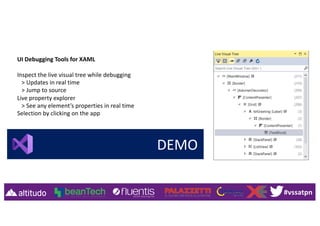
UI Debugging Tools for XAML
Inspect the live visual tree while debugging
> Updates in real time
> Jump to source
Live property explorer
> See any element’s properties in real time
Selection by clicking on the app
#vssatpn
DEMO
Diagnostic Tools window
Memory and CPU graphs
Memory tooling
Debugger break event history
Output window content*
IntelliTrace events*
*Enterprise SKU only
#vssatpn
Who I am
www.proxsoft.it
info@proxsoft.it
@MircoVanini
Mirco Vanini
Microsoft® MVP Windows Development
AllSeen Alliance - AllJoyn® Ambassador
Open Connectivity Foundation - OCF® Ambassador

Debugging with VS2019

  • 1.
    #vssatpn Visual Studio Saturday2019 Debugging with VS2019 Tips and Tricks for .NET Developers Mirco Vanini
  • 2.
    #vssatpn Intro “Everyone knows thatdebugging is twice as hard as writing a program in the first place. So if you're as clever as you can be when you write it, how will you ever debug it?” Brian Kernighan, Computer Scientist “As soon as we started programming, we found to our surprise that it wasn't as easy to get programs right as we had thought. Debugging had to be discovered. I can remember the exact instant when I realized that a large part of my life from then on was going to be spent in finding mistakes in my own programs.” Sir Maurice Wilkes, Computer Scientist
  • 3.
    #vssatpn Project Properties Launch Options Startwith Stepping Return Values Set Next Statement Step Into Specific Run to Cursor Edit and Continue Step Out DEMO
  • 4.
    #vssatpn Debugger.IsAttached Debugger.Break() Visualizers (6) Peek Definition DebuggerDisplay DataTips >Transparency > Pinning > Floating > Comments Make Object ID Add Watch From Watch DEMO
  • 5.
    #vssatpn Conditional Breakpoints Hit CountBreakpoints Lambda Debugging Immediate Window Debug -> Start New Instance Multiple Project Launch Restart TracePoints Edit Variable Value DEMO
  • 6.
    #vssatpn Exception Settings Call Stackwindow > Async > Show Parameter Values > Show External Code Full Screen mode Tasks window DEMO
  • 7.
    #vssatpn PerfTips (tooltips withperformance information) Indicating how long the program was running during the previous step or since the last breakpoint Quickly measure time between breaks Excludes major debugger related overhead • Time stopped under the debugger (e.g. stopped at a breakpoint) • Symbol loading Best suited for order of magnitude measurements Greatest accuracy on CLR 4.6 and Windows 10
  • 8.
    #vssatpn DEMO UI Debugging Toolsfor XAML Inspect the live visual tree while debugging > Updates in real time > Jump to source Live property explorer > See any element’s properties in real time Selection by clicking on the app
  • 9.
    #vssatpn DEMO Diagnostic Tools window Memoryand CPU graphs Memory tooling Debugger break event history Output window content* IntelliTrace events* *Enterprise SKU only
  • 10.
    #vssatpn Who I am www.proxsoft.it info@proxsoft.it @MircoVanini MircoVanini Microsoft® MVP Windows Development AllSeen Alliance - AllJoyn® Ambassador Open Connectivity Foundation - OCF® Ambassador