Windows Azure StorageSQL AzureDeveloping with Windows Azure storage & SQL AzureMaarten Balliauwhttp://blog.maartenballiauw.behttp://twitter.com/maartenballiauwmaarten@maartenballiauw.be
Whoam I?Maarten BalliauwAntwerp, Belgiumwww.realdolmen.comFocus on webASP.NET, ASP.NET MVC, PHP, Azure, VSTS, …Special interest in interopPHPExcel, PHPLinq, PHPMEF, Windows Azure SDK for PHP, ...http://blog.maartenballiauw.behttp://twitter.com/maartenballiauw
AgendaStorage concepts
Windows Azure SDK for PHP
SQL AzureStorage conceptsWhere can I store my stuff?
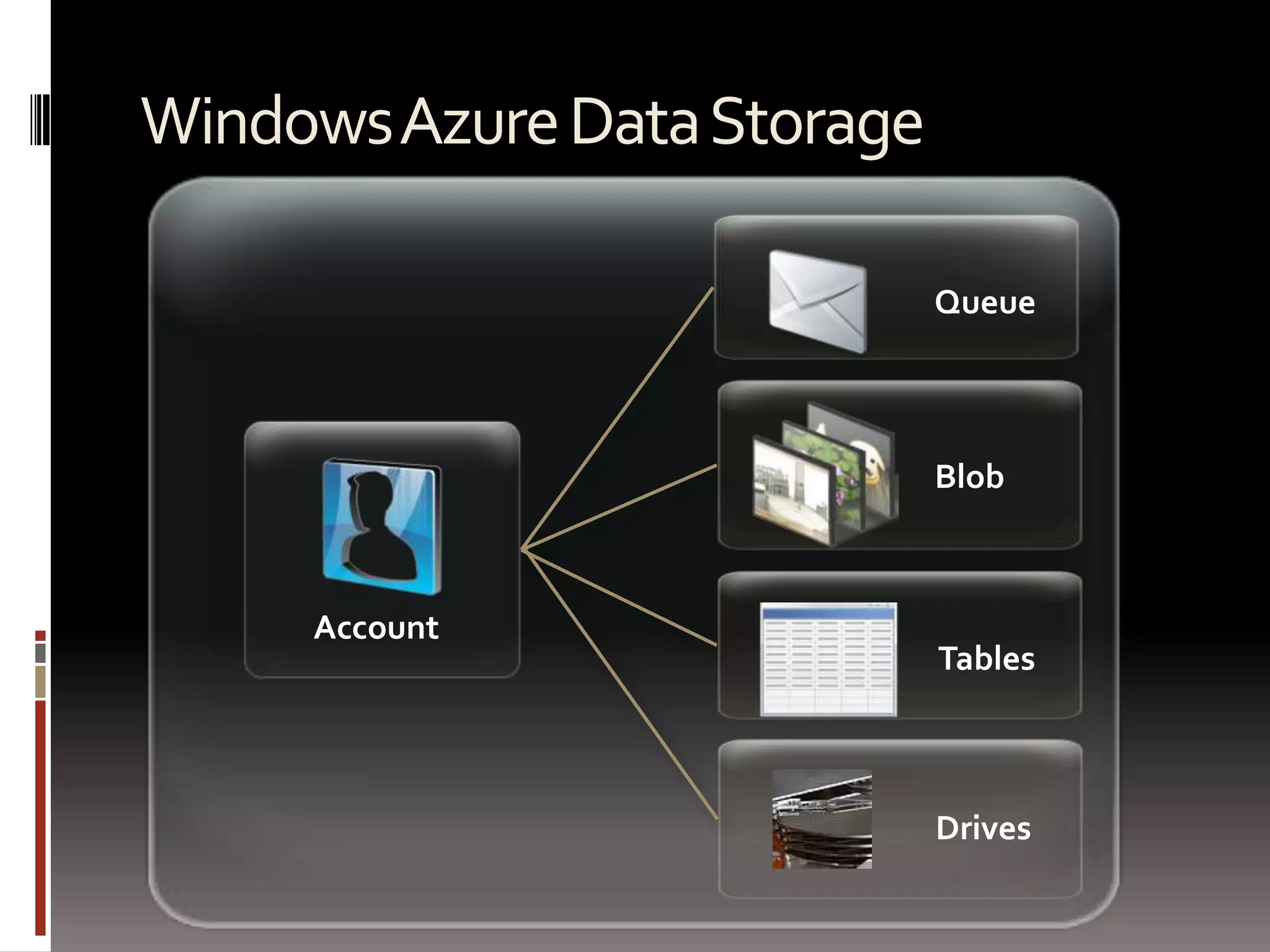
Windows Azure Data StorageQueueBlobAccountTablesDrives
Azure Platform Data Storage OptionsWindows Azure Data StorageBlobsUnstructured data storageTablesSemi-structured or tabular data storageQueuesBuffered delivery data storageDrivesDurable NTFS volumes that Windows Azure applications can use.  See: http://microsoftpdc.com/Sessions/SVC14SQL AzureRelational data storage
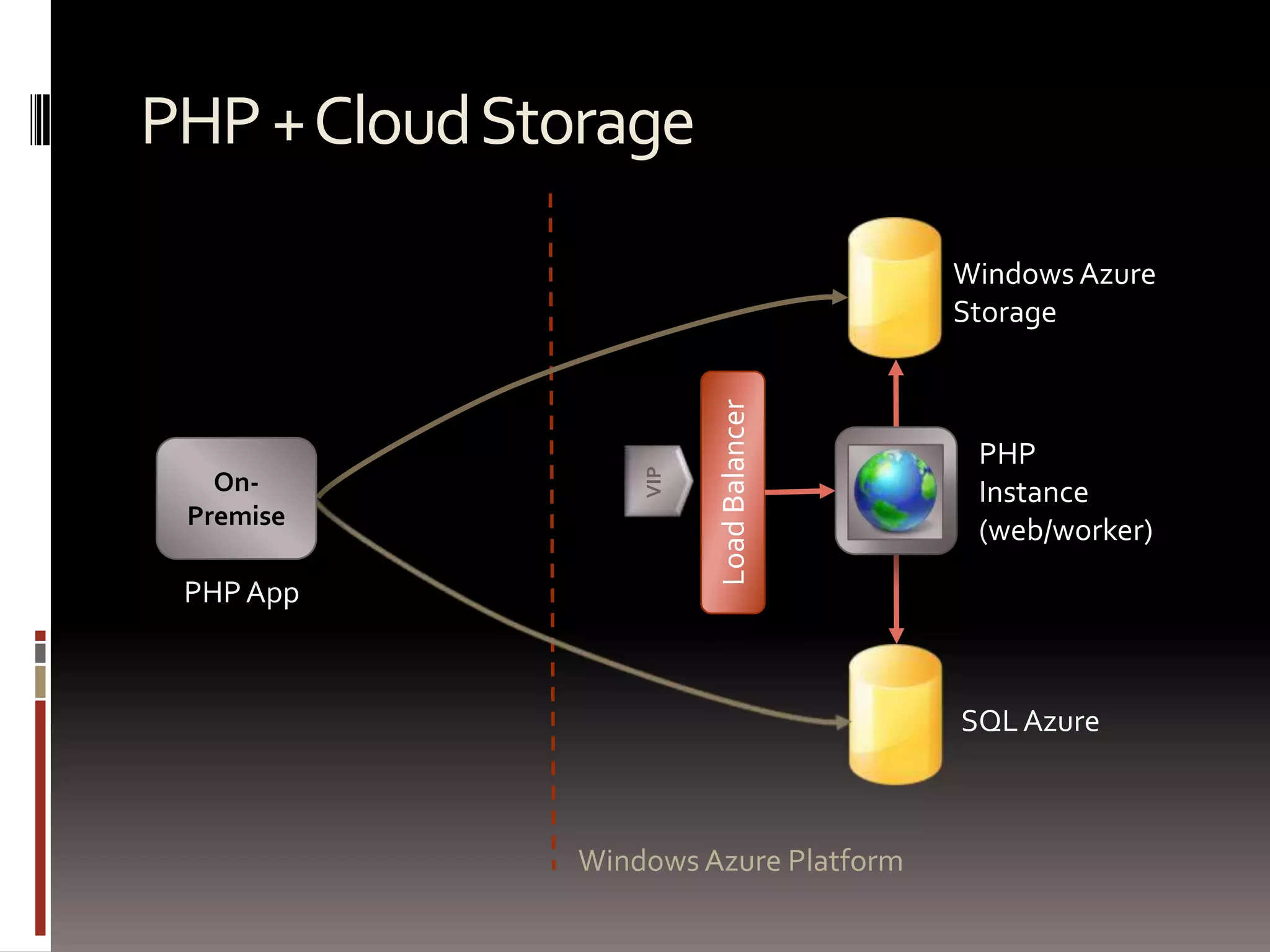
PHP + Cloud StorageWindows Azure StoragePHPInstance (web/worker)On-PremiseVIPLoad BalancerPHP AppSQL AzureWindows Azure Platform
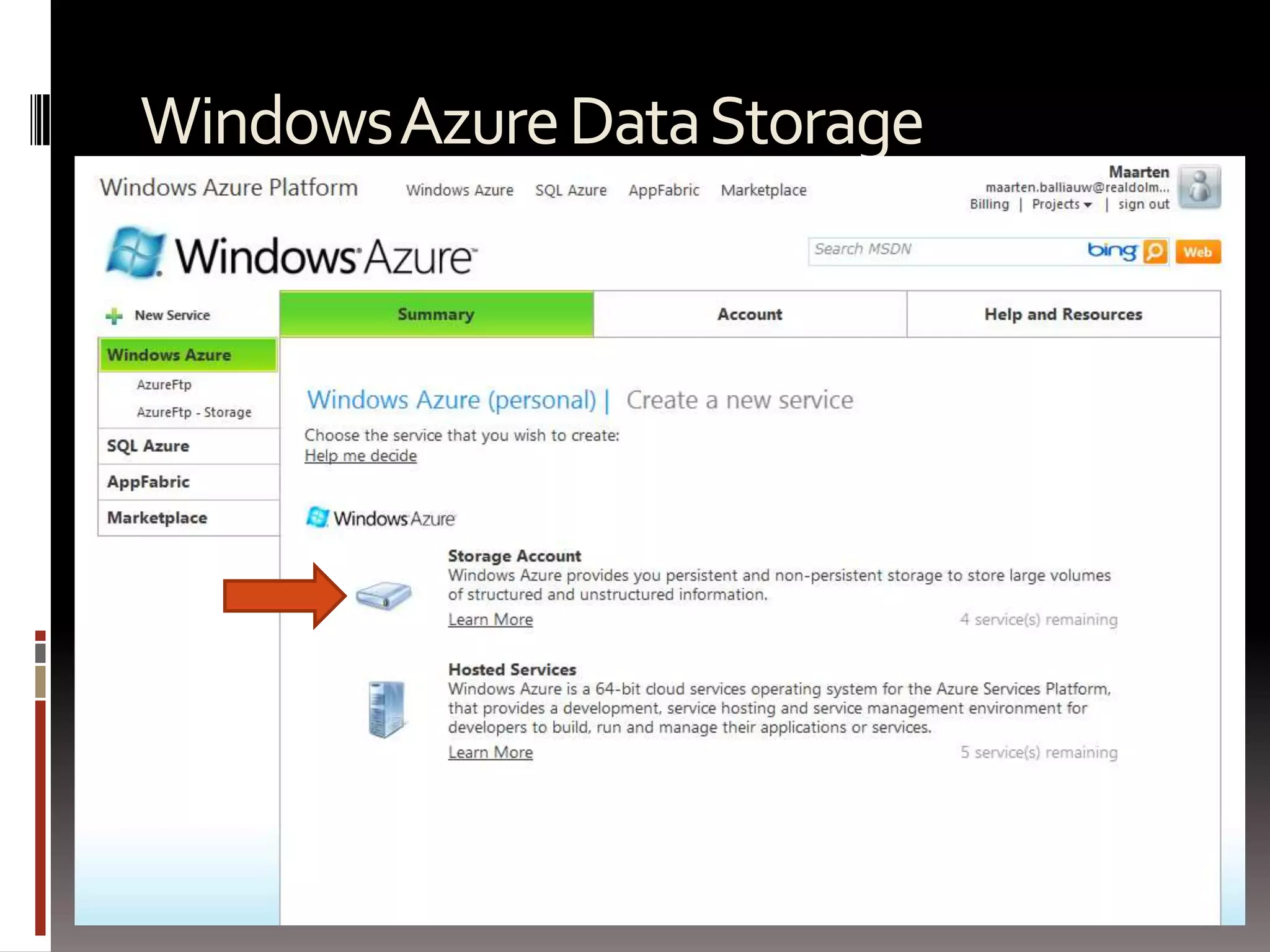
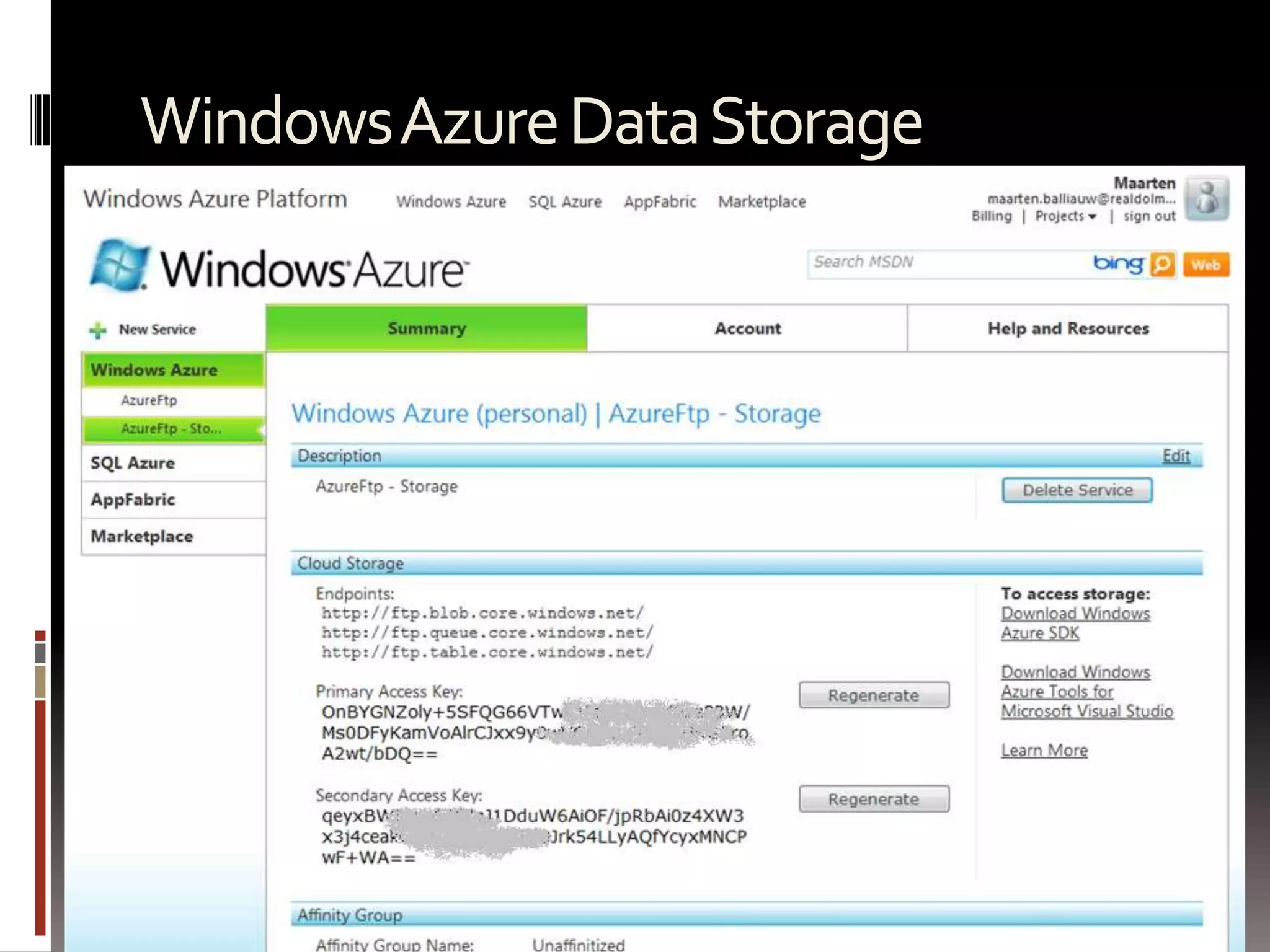
Windows Azure Data Storage
Windows Azure SDK for PHPA PHP porgramming model for Windows Azure Storage
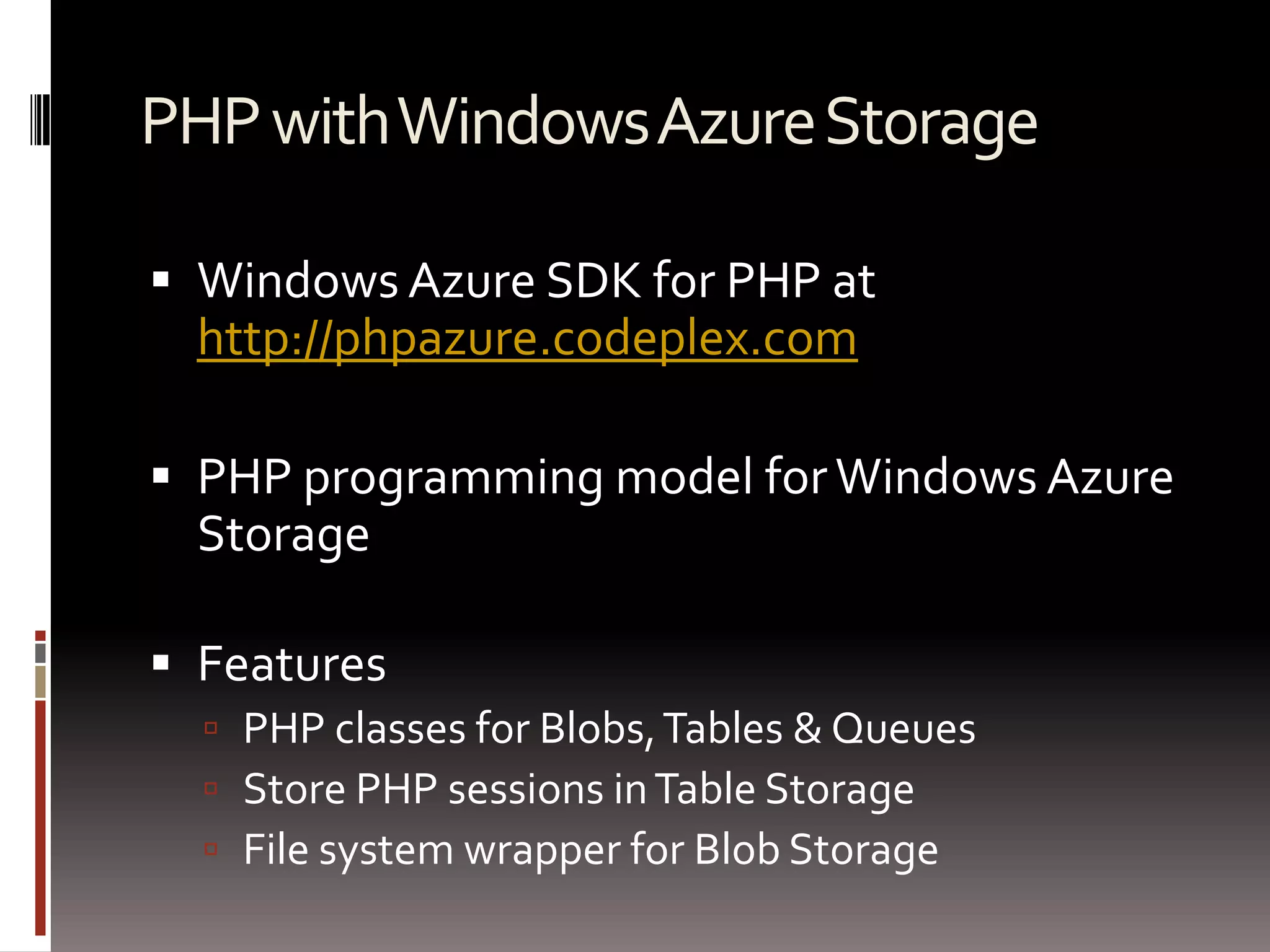
PHP with Windows Azure StorageWindows Azure SDK for PHP at http://phpazure.codeplex.comPHP programming model for Windows Azure StorageFeatures PHP classes for Blobs, Tables & QueuesStore PHP sessions in Table StorageFile system wrapper for Blob Storage
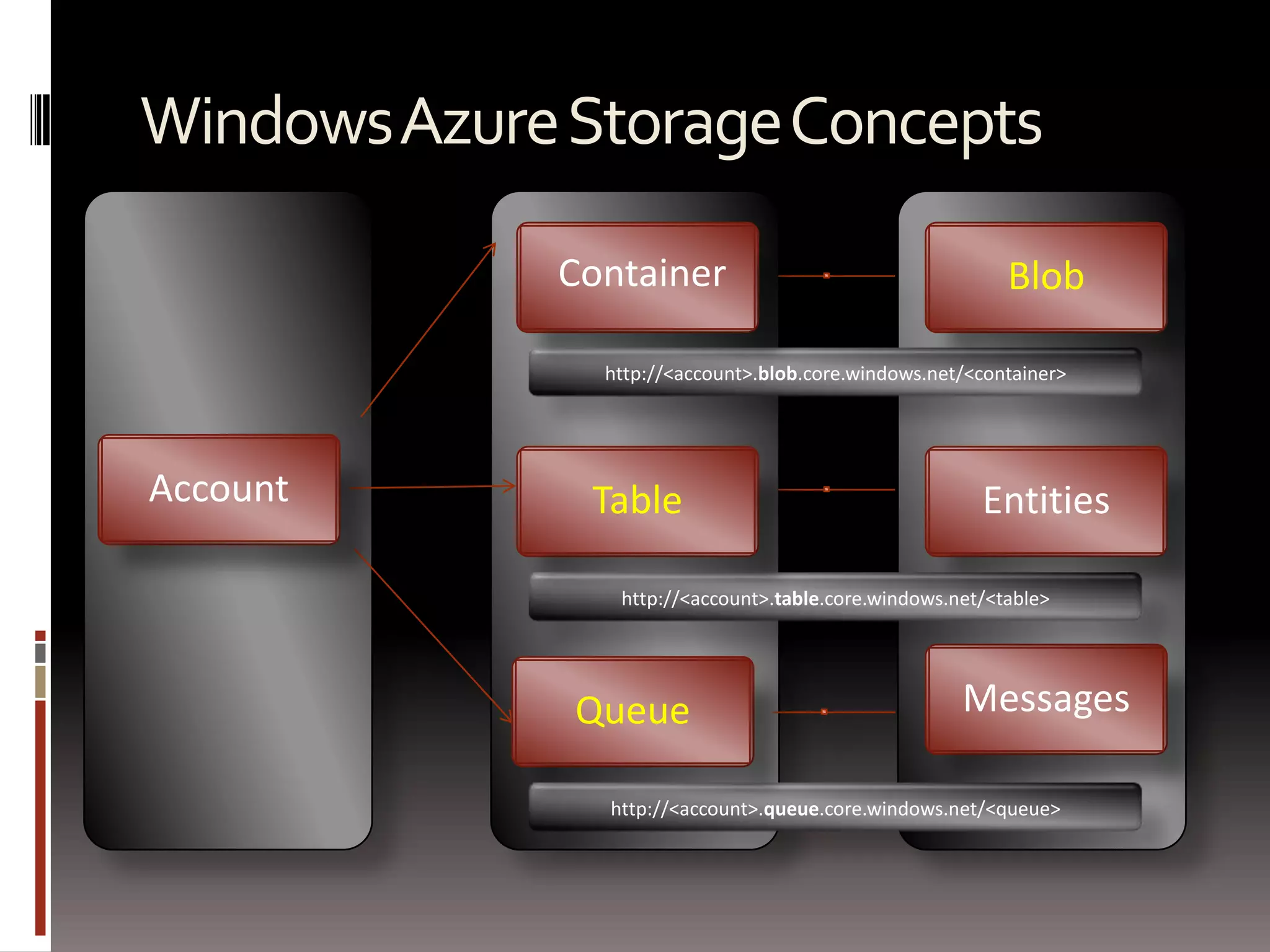
Blob ContainerEntitiesAccountTablehttp://<account>.blob.core.windows.net/<container>MessagesWindows Azure Storage Conceptshttp://<account>.table.core.windows.net/<table>Queuehttp://<account>.queue.core.windows.net/<queue>
Windows Azure BlobsUnstructured dataScale massivelyAt least 3 instances, 5 in optimal situationCan be used as CDNCan be mapped using a custom domain
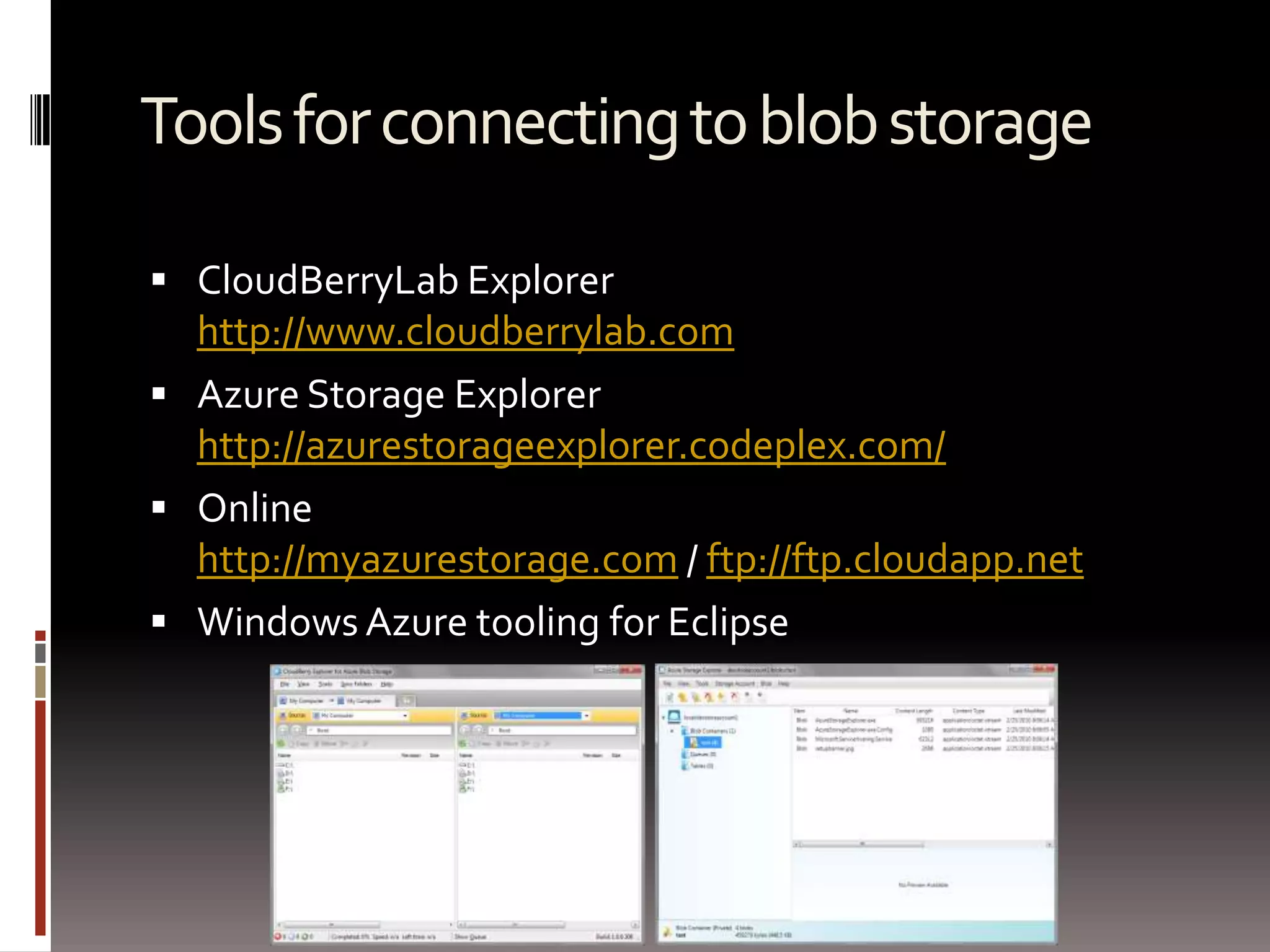
Tools for connecting to blob storageCloudBerryLab Explorerhttp://www.cloudberrylab.comAzure Storage Explorerhttp://azurestorageexplorer.codeplex.com/Onlinehttp://myazurestorage.com / ftp://ftp.cloudapp.netWindows Azure tooling for Eclipse
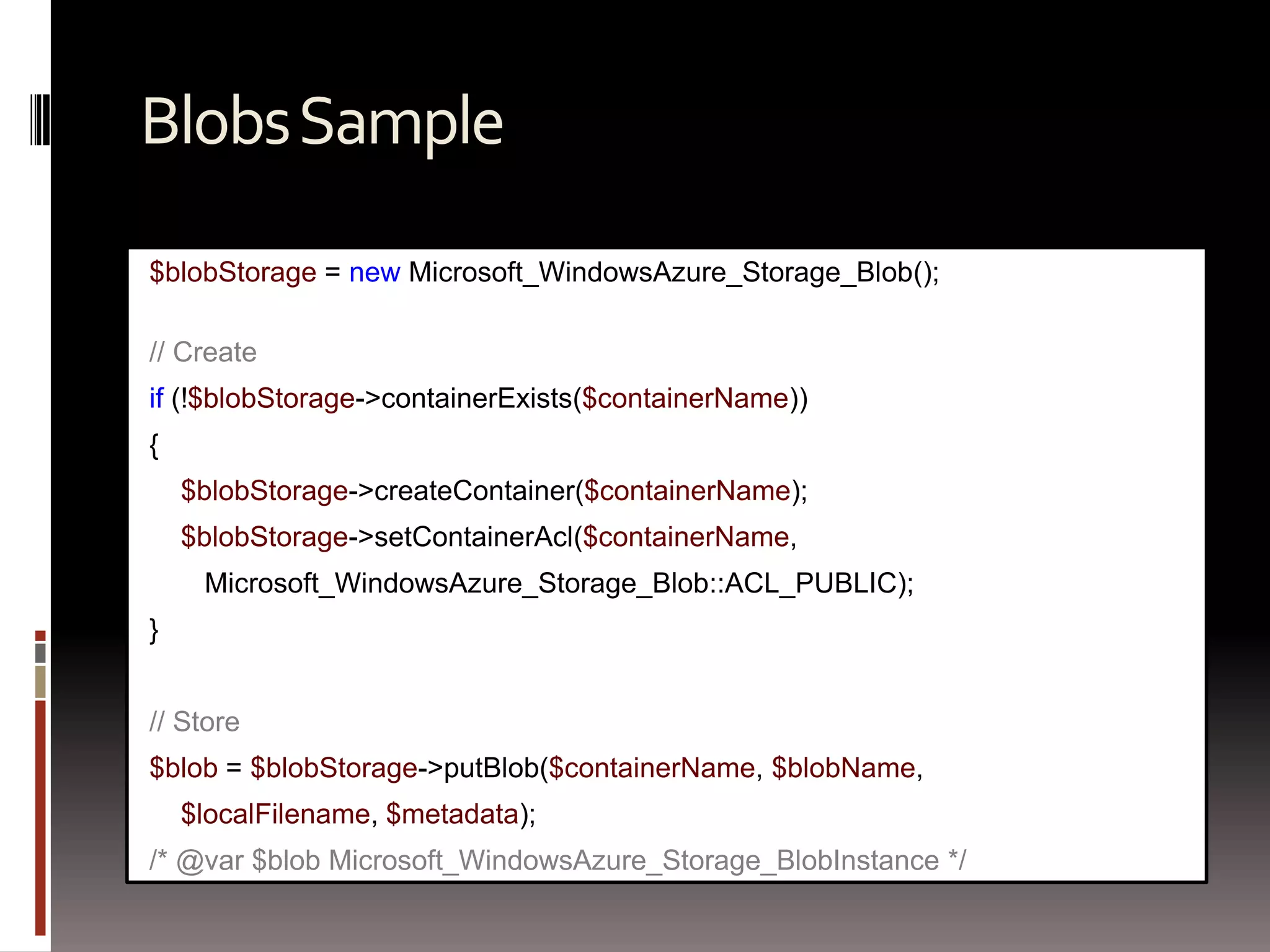
Blobs Sample$blobStorage= new Microsoft_WindowsAzure_Storage_Blob();// Createif (!$blobStorage->containerExists($containerName)){$blobStorage->createContainer($containerName);$blobStorage->setContainerAcl($containerName, Microsoft_WindowsAzure_Storage_Blob::ACL_PUBLIC);}// Store$blob = $blobStorage->putBlob($containerName, $blobName, $localFilename, $metadata);/* @var $blob Microsoft_WindowsAzure_Storage_BlobInstance */
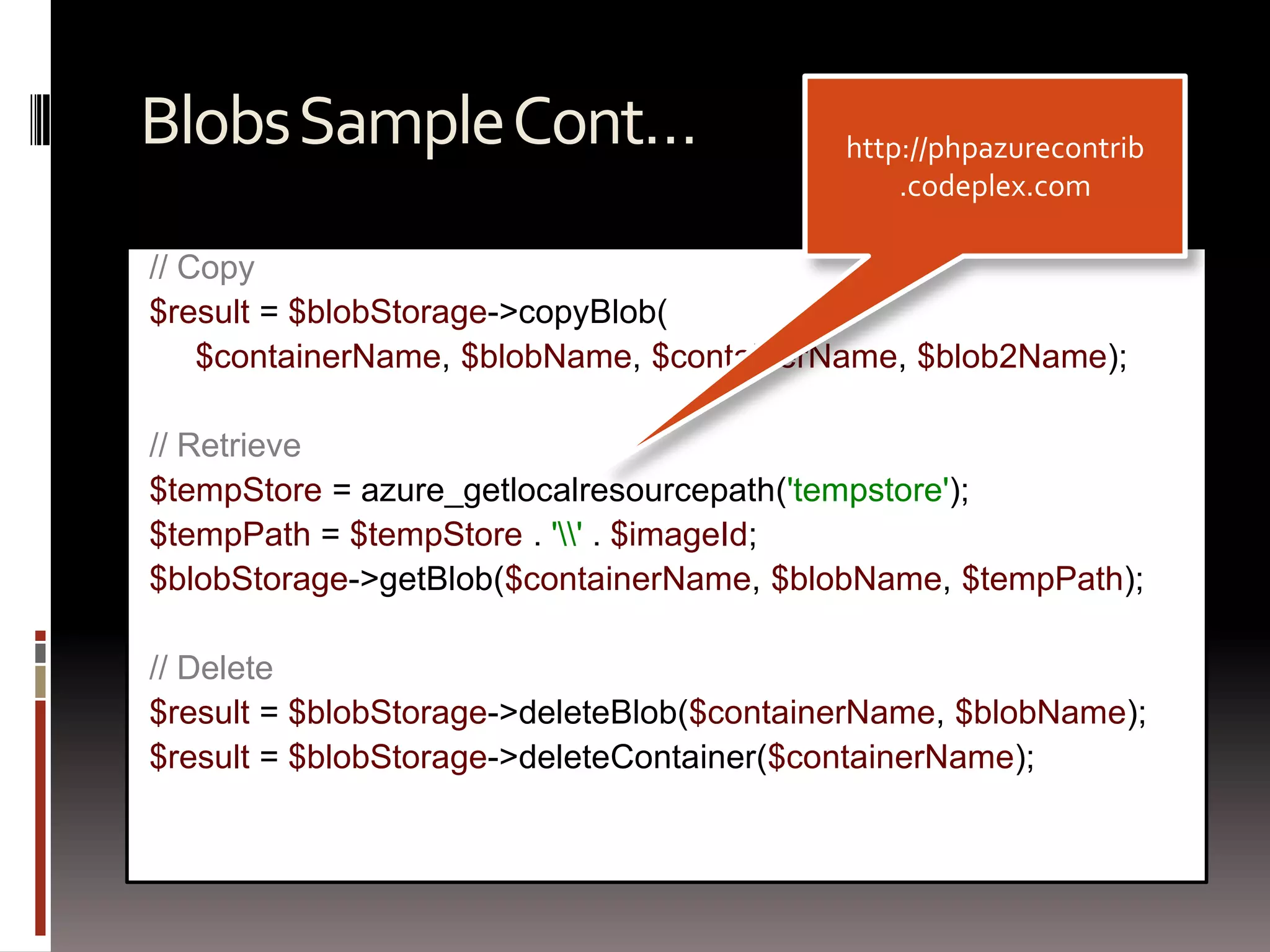
Blobs Sample Cont…// Copy$result = $blobStorage->copyBlob(     $containerName, $blobName, $containerName, $blob2Name);// Retrieve$tempStore= azure_getlocalresourcepath('tempstore');$tempPath= $tempStore. '\\' . $imageId;$blobStorage->getBlob($containerName, $blobName, $tempPath);// Delete$result = $blobStorage->deleteBlob($containerName, $blobName);$result = $blobStorage->deleteContainer($containerName);http://phpazurecontrib.codeplex.com
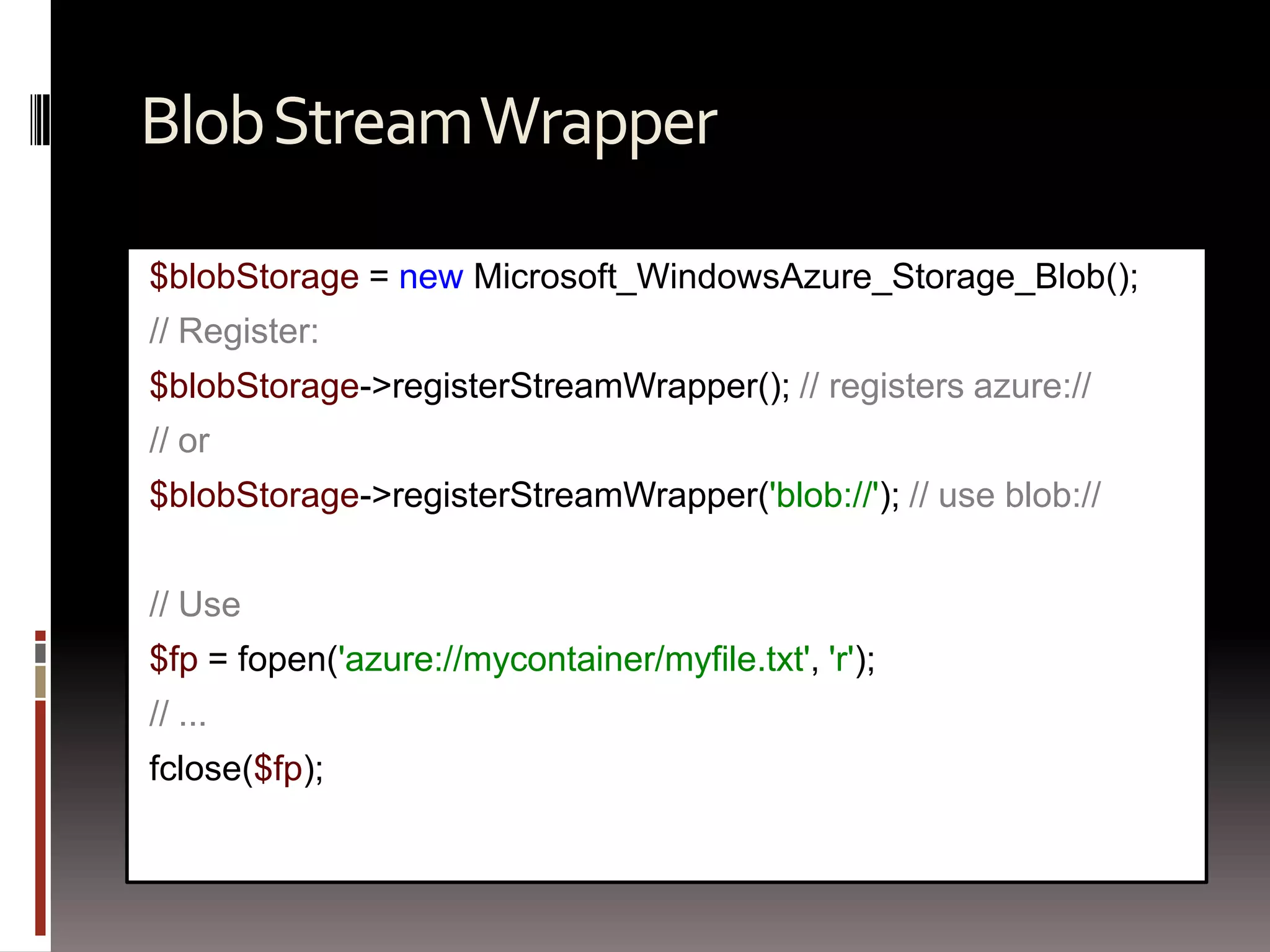
Blob Stream Wrapper$blobStorage= new Microsoft_WindowsAzure_Storage_Blob();// Register:$blobStorage->registerStreamWrapper(); // registers azure://// or$blobStorage->registerStreamWrapper('blob://'); // use blob://// Use$fp= fopen('azure://mycontainer/myfile.txt', 'r');// ...fclose($fp);
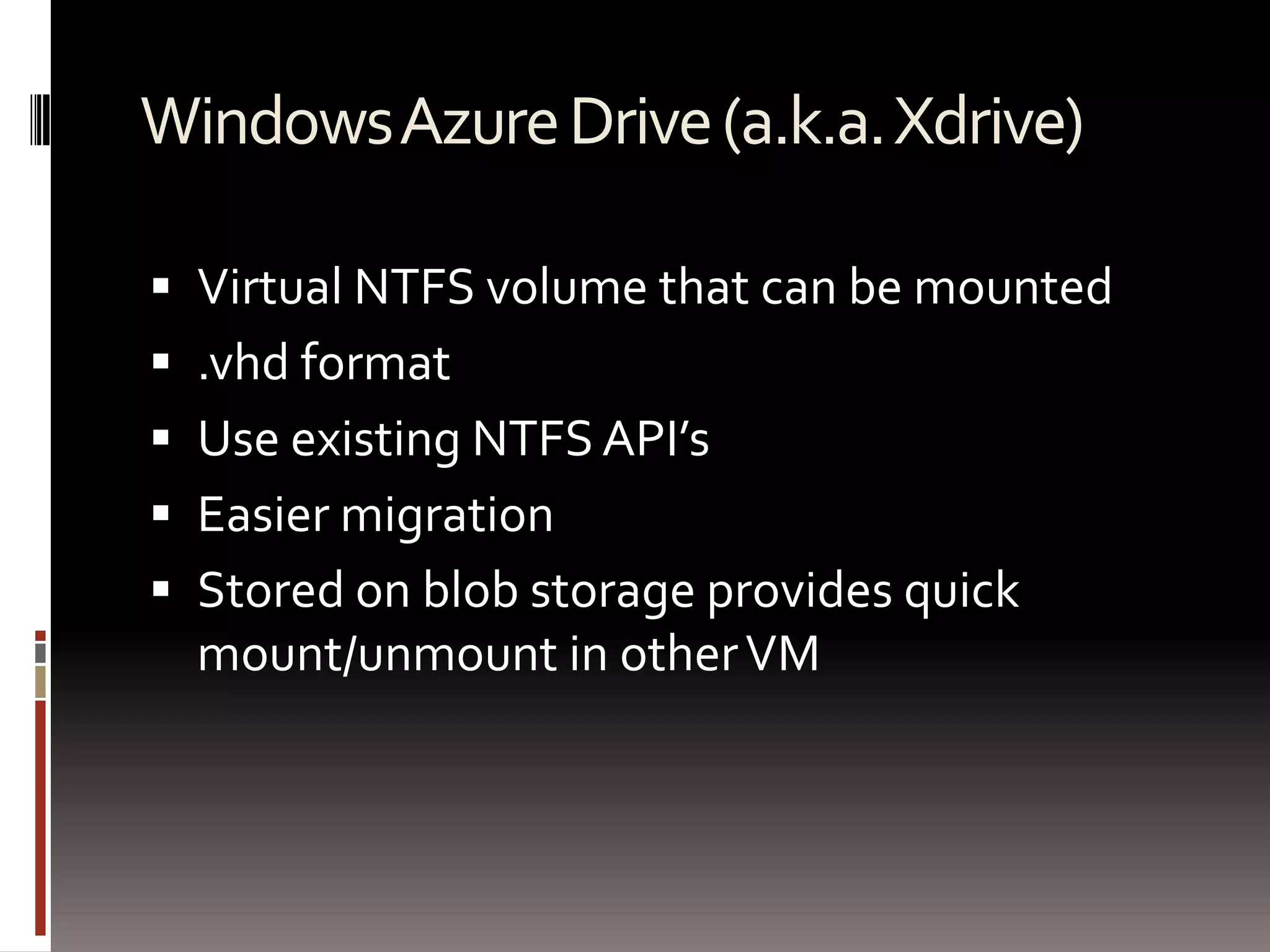
Windows Azure Drive (a.k.a. Xdrive)Virtual NTFS volume that can be mounted.vhd formatUse existing NTFS API’sEasier migrationStored on blob storage provides quick mount/unmount in other VM
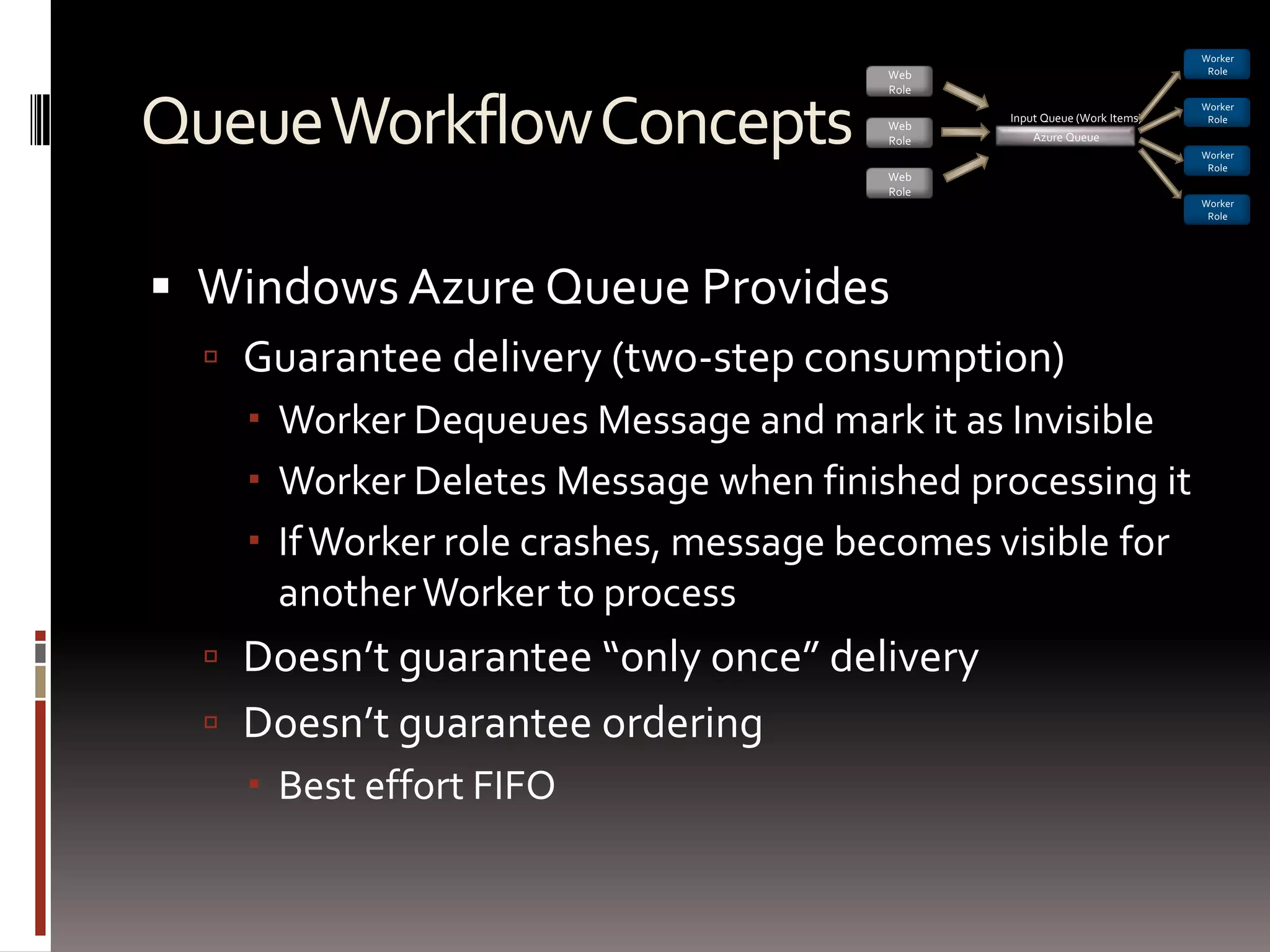
Queue Workflow ConceptsWindows Azure Queue ProvidesGuarantee delivery (two-step consumption)Worker Dequeues Message and mark it as InvisibleWorker Deletes Message when finished processing itIf Worker role crashes, message becomes visible for another Worker to processDoesn’t guarantee “only once” deliveryDoesn’t guarantee orderingBest effort FIFOWorker RoleWeb RoleInput Queue (Work Items)Worker RoleAzure QueueWeb RoleWorker RoleWeb RoleWorker Role
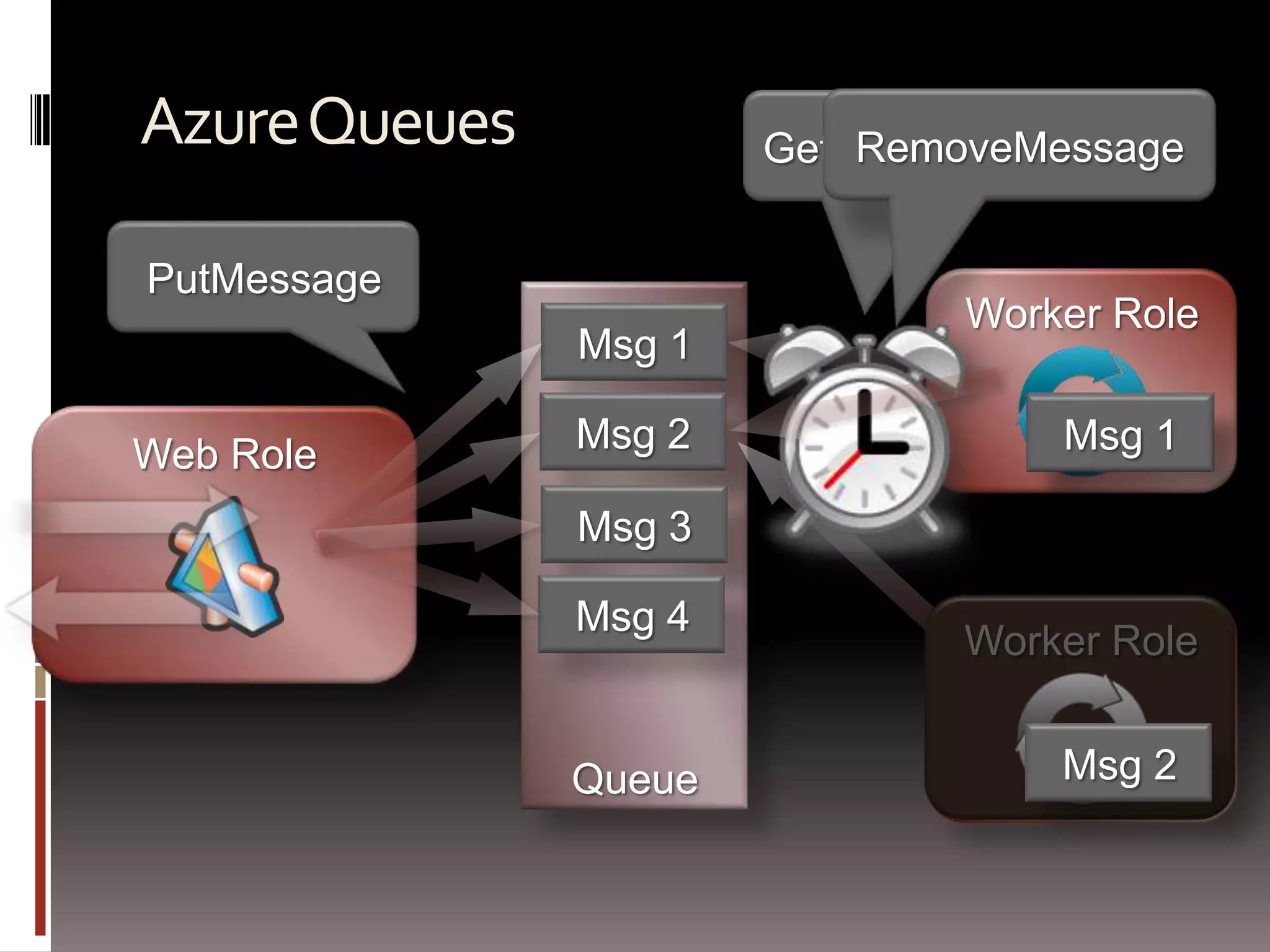
Azure QueuesRemoveMessageGetMessage (Timeout)Worker RolePutMessageQueueMsg 1Msg 2Msg 2Msg 1Web RoleWorker RoleWorker RoleMsg 3Msg 4Msg 2
Loosely Coupled Work with QueuesWorker-Queue ModelLoad work in a queueMany workers consume the queueInput Queue (Work Items)Azure QueueWorker RoleWeb RoleWorker RoleWeb RoleWorker RoleWeb RoleWorker Role
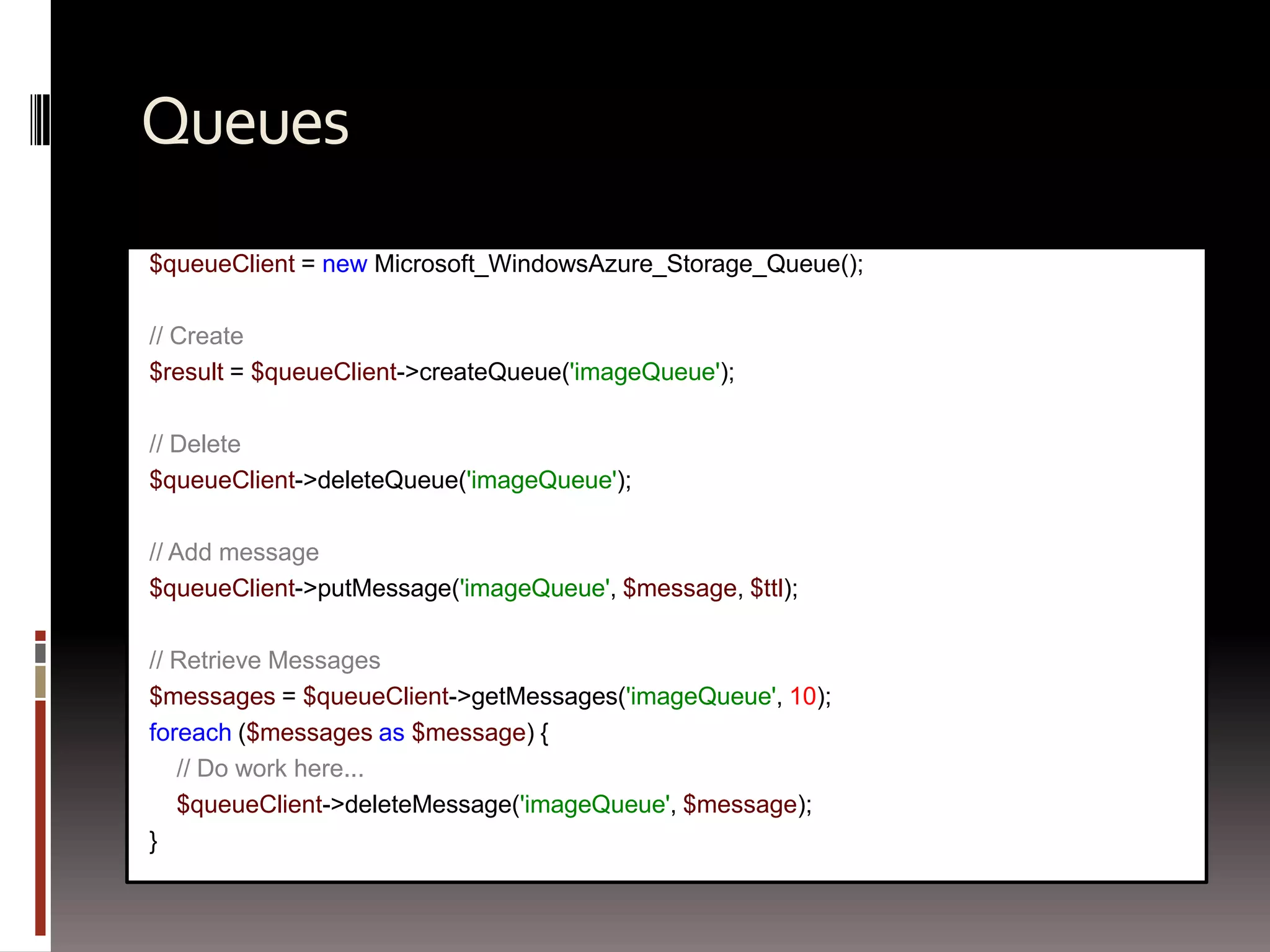
Queues$queueClient= new Microsoft_WindowsAzure_Storage_Queue();// Create$result = $queueClient->createQueue('imageQueue');// Delete$queueClient->deleteQueue('imageQueue');// Add message$queueClient->putMessage('imageQueue', $message, $ttl);// Retrieve Messages$messages = $queueClient->getMessages('imageQueue', 10);foreach($messages as $message) {// Do work here...$queueClient->deleteMessage('imageQueue', $message);}
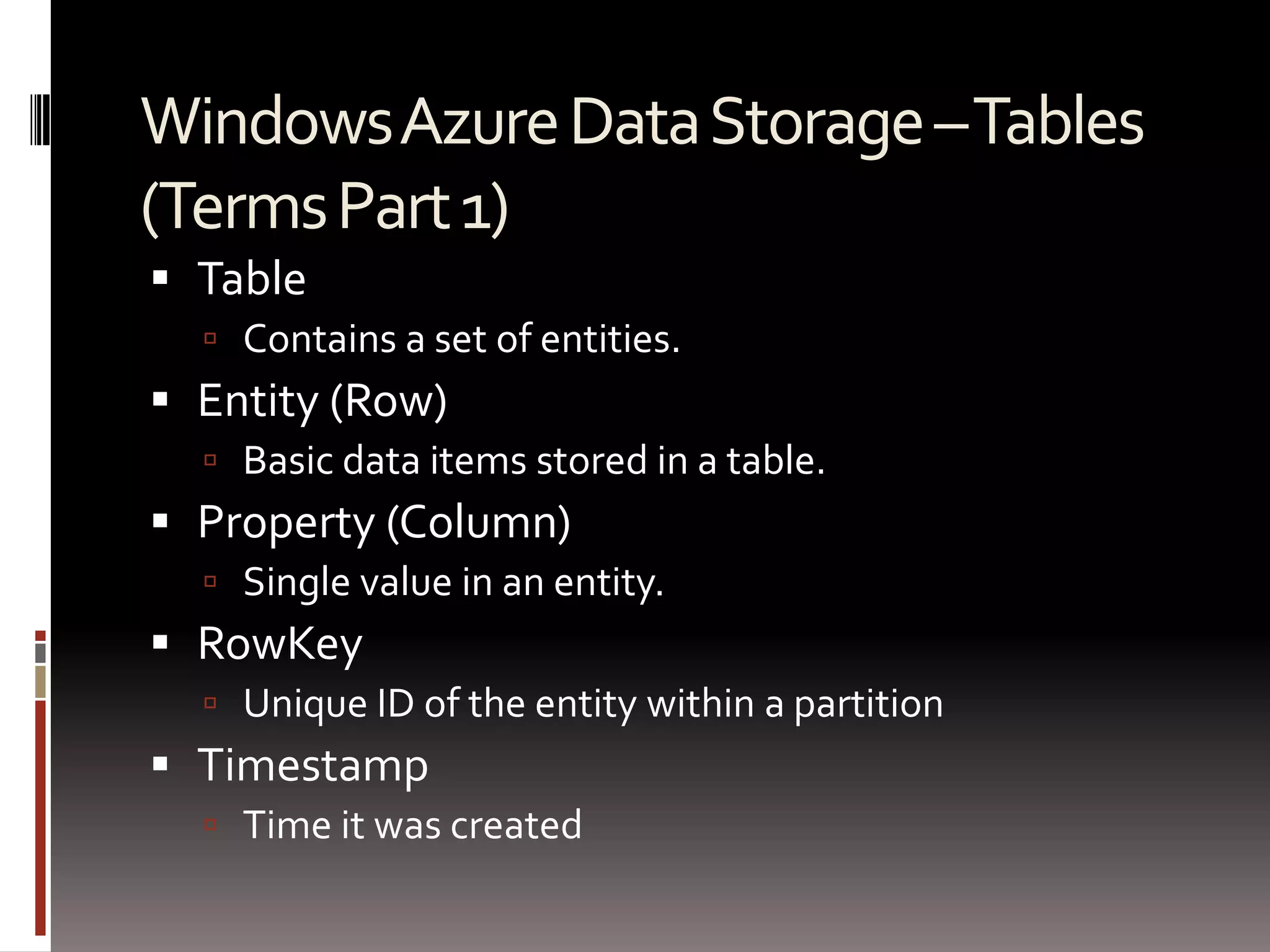
Windows Azure Data Storage – Tables (Terms Part 1)Table Contains a set of entities.  Entity (Row) Basic data items stored in a table.  Property (Column) Single value in an entity.   RowKeyUnique ID of the entity within a partitionTimestampTime it was created
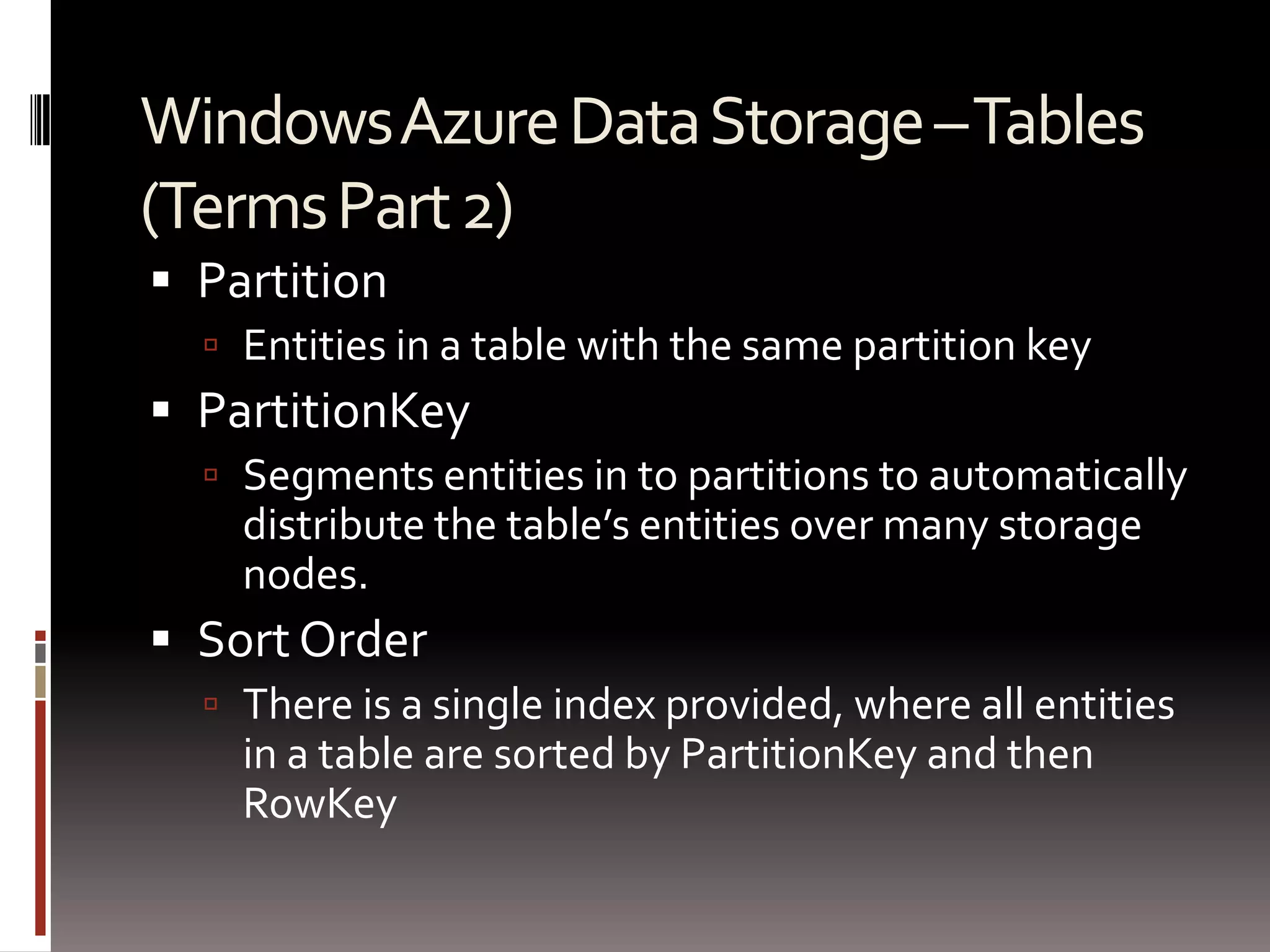
Windows Azure Data Storage – Tables (Terms Part 2)Partition Entities in a table with the same partition keyPartitionKey Segments entities in to partitions to automatically distribute the table’s entities over many storage nodes.Sort OrderThere is a single index provided, where all entities in a table are sorted by PartitionKey and then RowKey
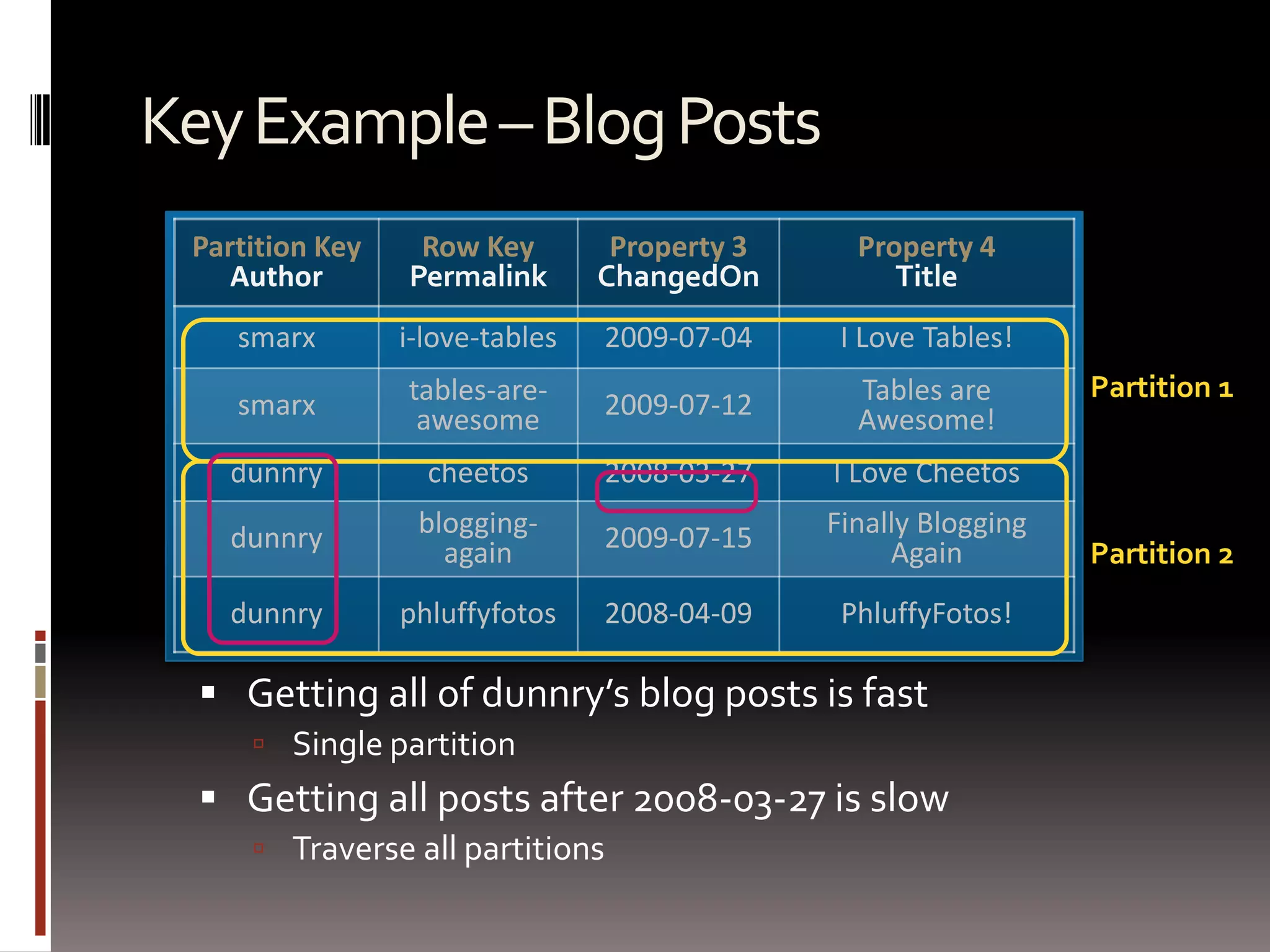
Key Example – Blog PostsPartition 1Partition 2Getting all of dunnry’s blog posts is fastSingle partitionGetting all posts after 2008-03-27 is slowTraverse all partitions
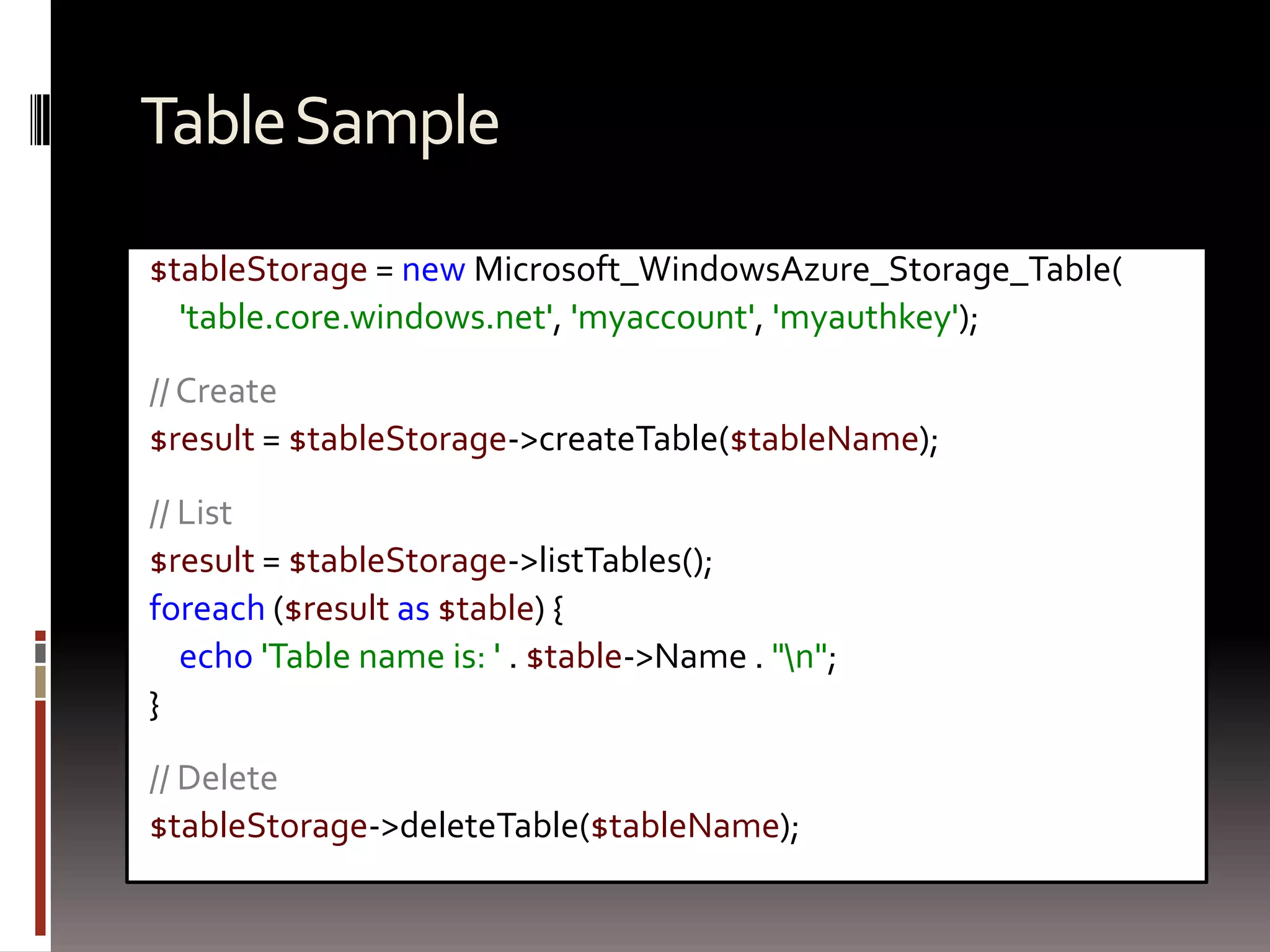
Table Sample$tableStorage= new Microsoft_WindowsAzure_Storage_Table('table.core.windows.net', 'myaccount', 'myauthkey');// Create$result = $tableStorage->createTable($tableName);// List $result = $tableStorage->listTables();foreach($result as $table) {echo 'Table name is: ' . $table->Name . "\n";}// Delete$tableStorage->deleteTable($tableName);
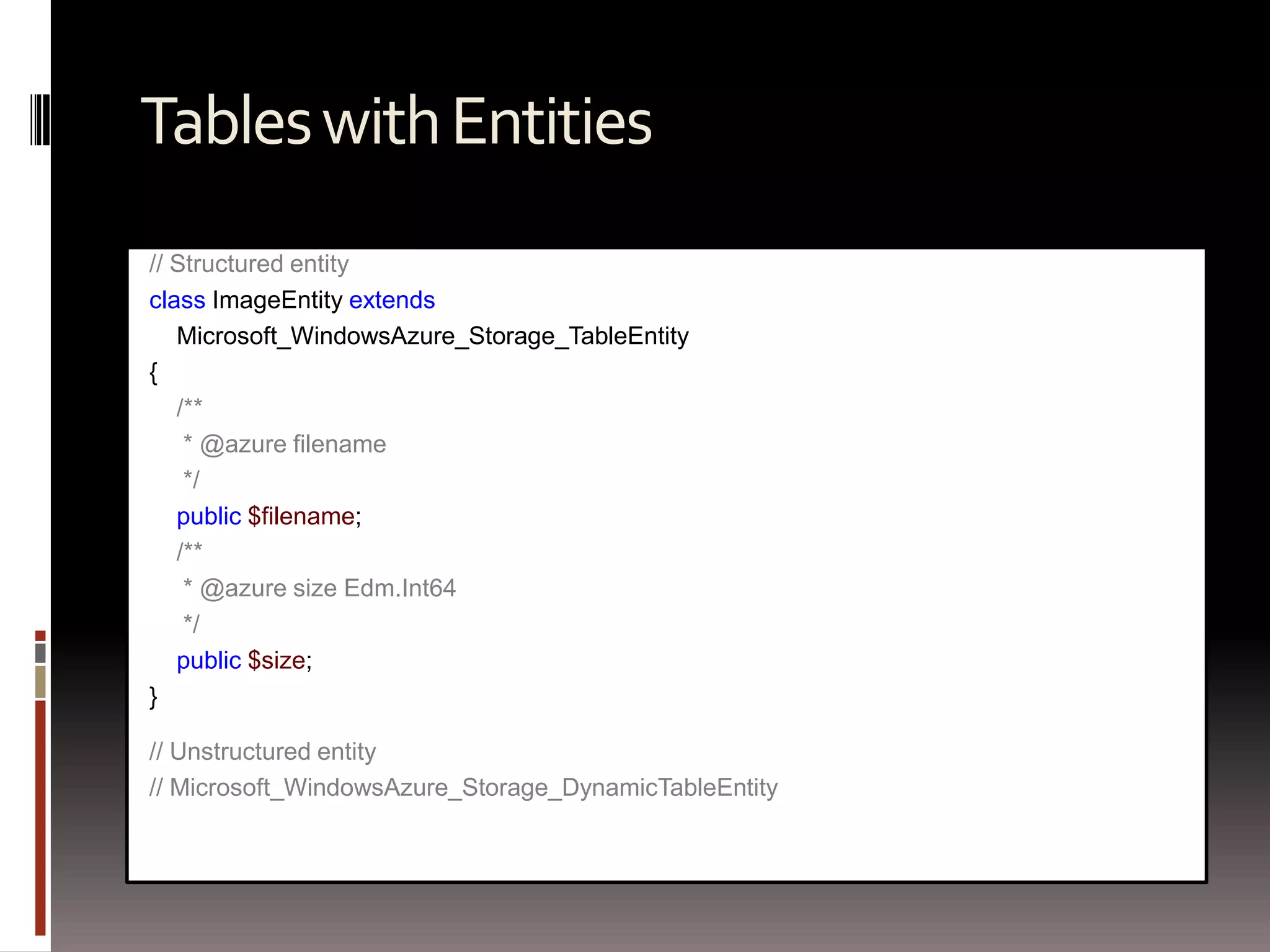
Tables with Entities// Structured entityclass ImageEntityextends Microsoft_WindowsAzure_Storage_TableEntity{/**     * @azure filename     */public $filename;/**     * @azure size Edm.Int64     */public $size;}// Unstructured entity// Microsoft_WindowsAzure_Storage_DynamicTableEntity
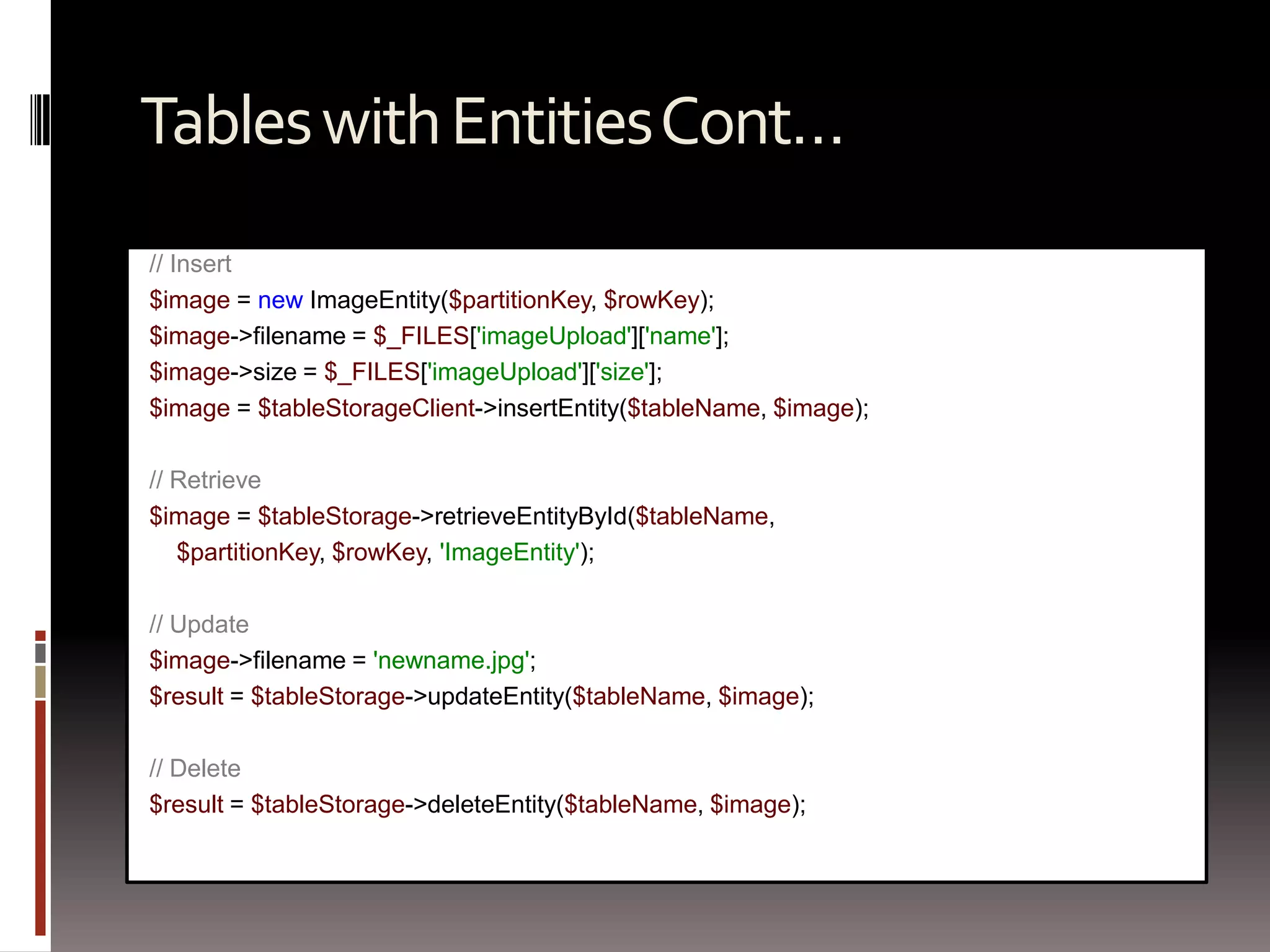
Tables with Entities Cont…// Insert$image = new ImageEntity($partitionKey, $rowKey);$image->filename = $_FILES['imageUpload']['name'];$image->size = $_FILES['imageUpload']['size'];$image = $tableStorageClient->insertEntity($tableName, $image);// Retrieve$image = $tableStorage->retrieveEntityById($tableName, $partitionKey, $rowKey, 'ImageEntity');// Update$image->filename = 'newname.jpg';$result = $tableStorage->updateEntity($tableName, $image);// Delete$result = $tableStorage->deleteEntity($tableName, $image);
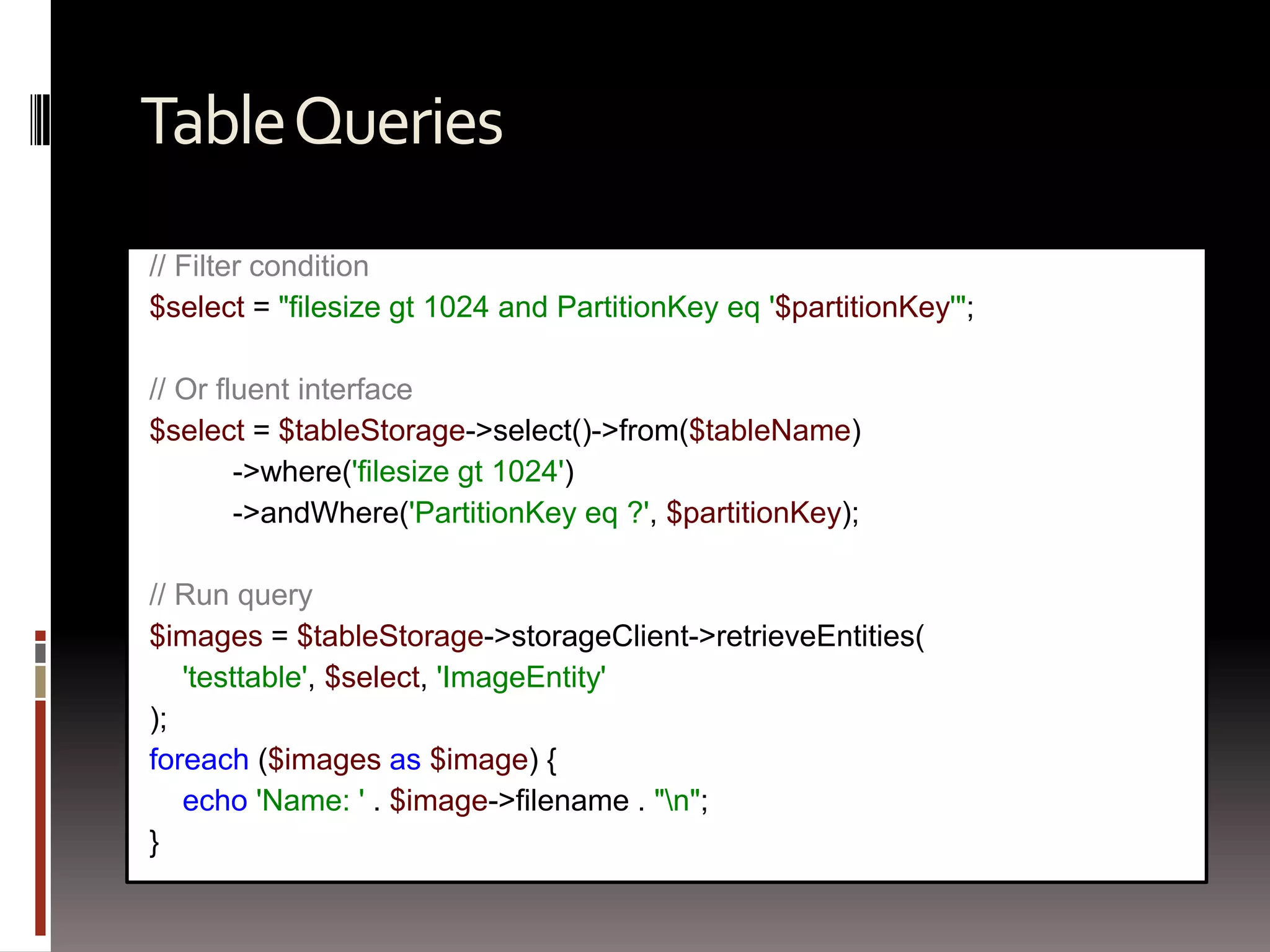
Table Queries// Filter condition$select = "filesizegt 1024 and PartitionKeyeq '$partitionKey'";// Or fluent interface$select = $tableStorage->select()->from($tableName)          ->where('filesizegt 1024')          ->andWhere('PartitionKeyeq ?', $partitionKey);// Run query$images = $tableStorage->storageClient->retrieveEntities('testtable', $select, 'ImageEntity');foreach($images as $image) {echo 'Name: ' . $image->filename . "\n";}
Batching Operations// Start batch$batch = $tableStorage->startBatch();// Insert multiple$images = generateEntities();foreach($images as $image) {$tableStorage->insertEntity($tableName, $image);}// Commit$batch->commit();
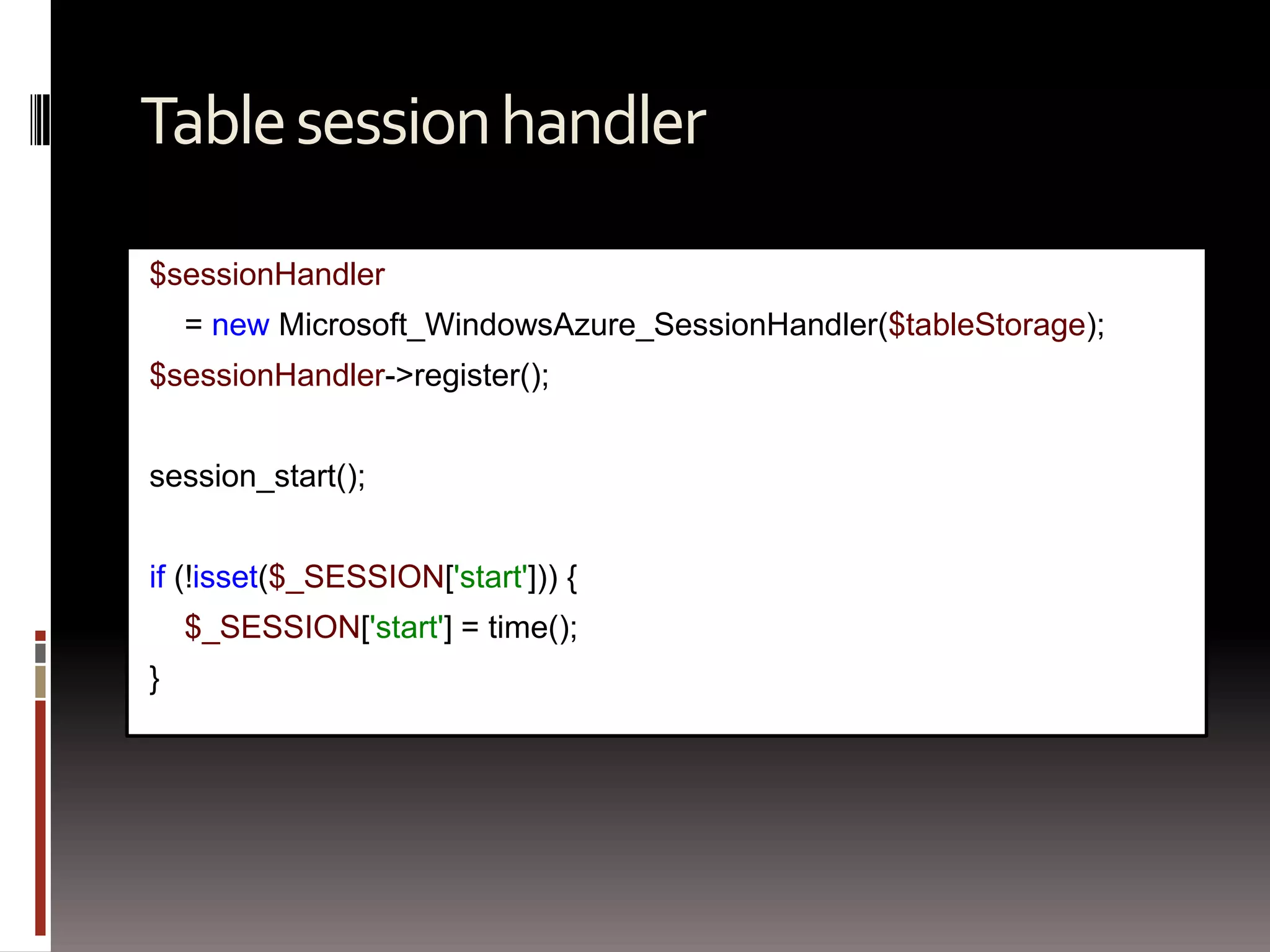
Table session handler$sessionHandler    = new Microsoft_WindowsAzure_SessionHandler($tableStorage);$sessionHandler->register();session_start();if (!isset($_SESSION['start'])) {$_SESSION['start'] = time();}
SQL AzureA relational database for the cloud
SQL Azure and Windows Azure Table ComparisonSQL Azure TablesWindows Azure TablesFully structuredStrongly typedRelational(RDBMS)Highly scalableSemi-structuredLoosely typedNon-Relational(Not RDBMS)Massively scalable
MySQL: Simple ConfigurationVIPLoad BalancerWeb RoleMySQLWorker Role
MySQL in a Windows Azure ApplicationRunning MySQL in a worker roleCopy MySQL to the worker role sub-directoryCopy to read-write local storageConfigure MySQL to listen on the right portMonitor MySQL healthConsuming MySQLDiscover IP address and portNormal access from then onHandle topology changes
Simple ConfigurationVIPLoad BalancerMySQL
ReplicationVIPLoad BalancerMSSMySQLMySQLMySQL
Windows Azure Drive with Hot SpareVIPLoad BalancerMySQLMySQL
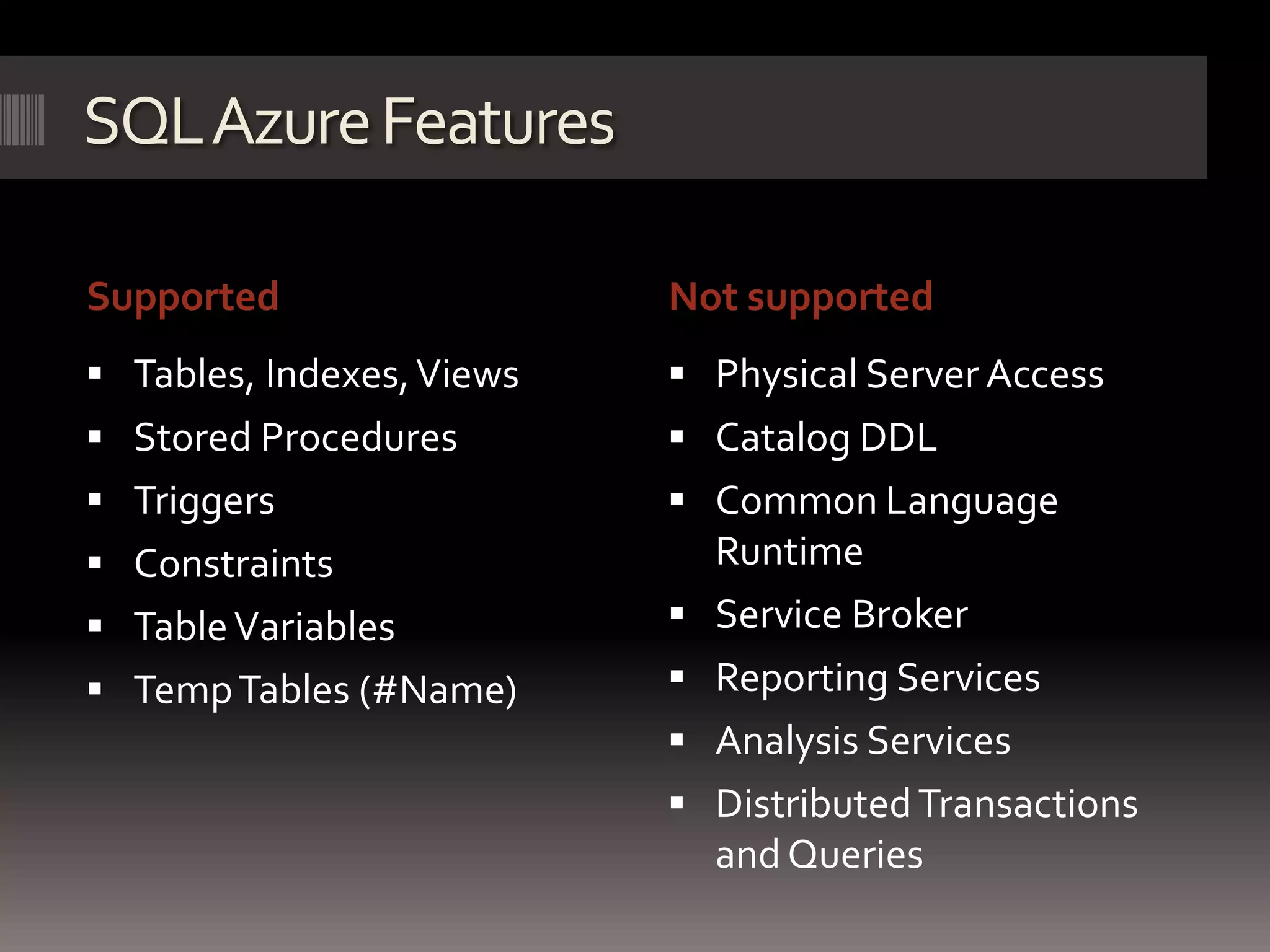
SQL Azure FeaturesSupportedNot supportedTables, Indexes, ViewsStored ProceduresTriggersConstraintsTable VariablesTemp Tables (#Name)Physical Server Access Catalog DDLCommon Language RuntimeService BrokerReporting ServicesAnalysis ServicesDistributed Transactions and Queries
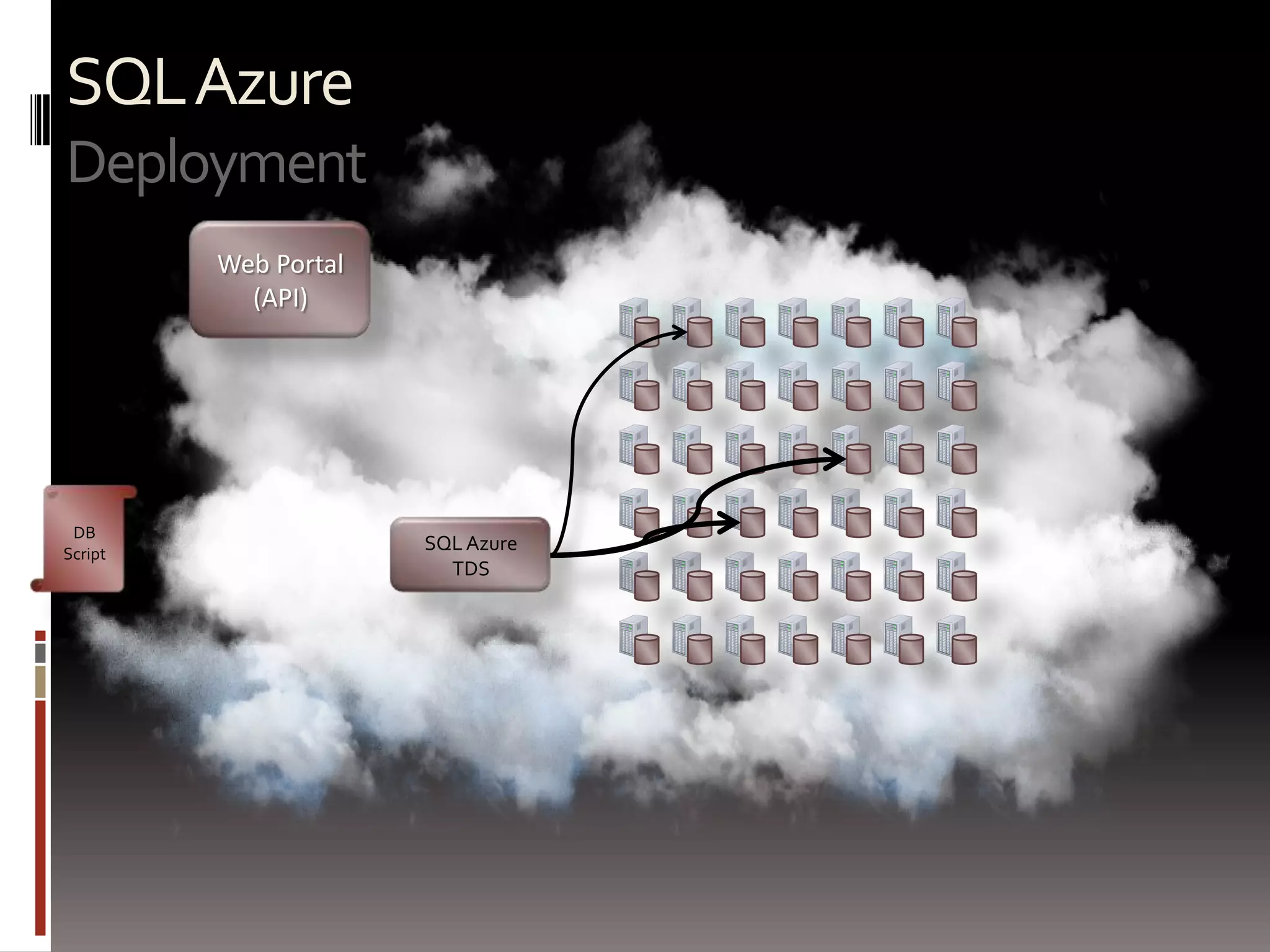
SQL AzureDeploymentWeb Portal(API)DB ScriptSQL AzureTDS
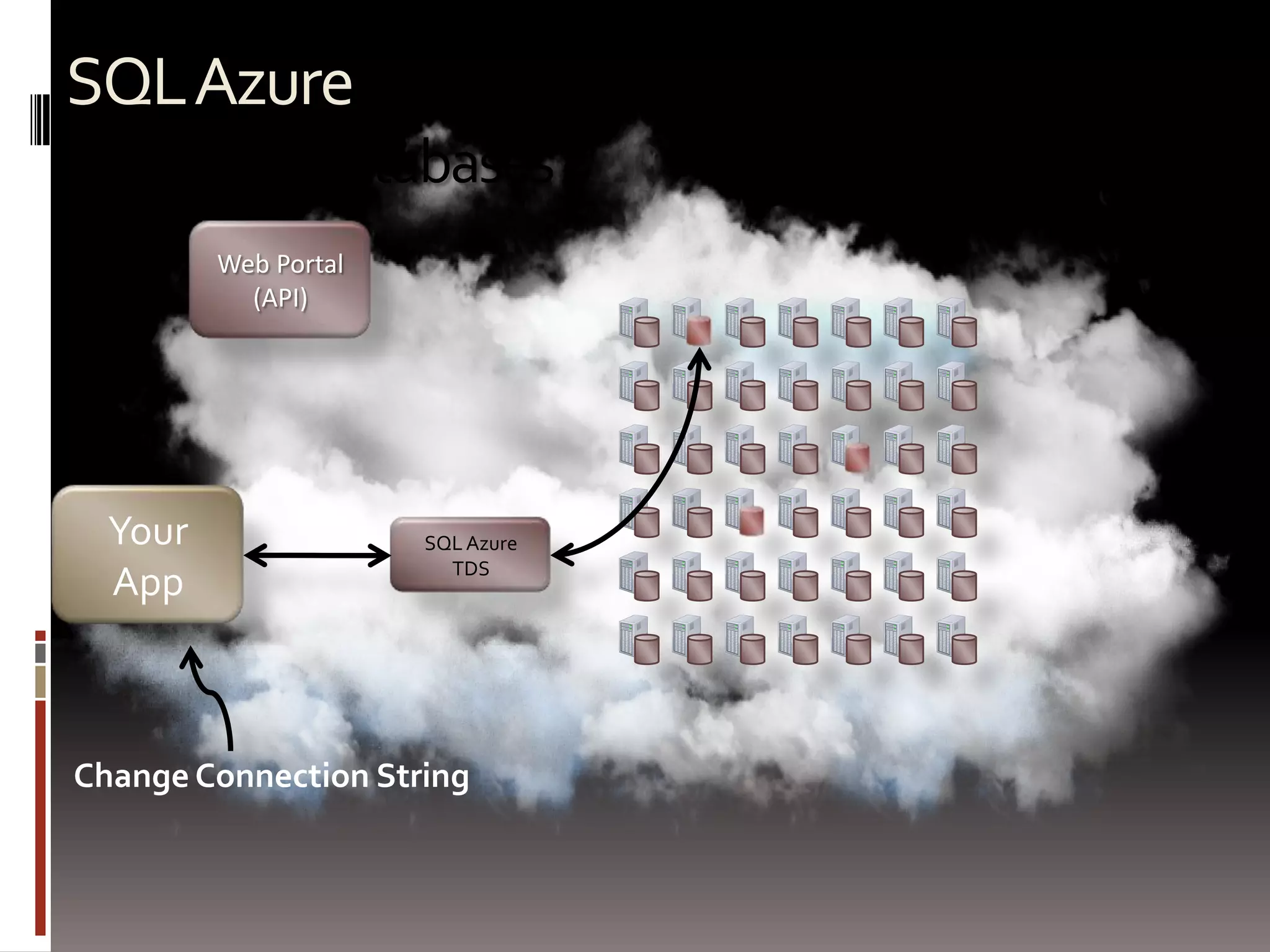
SQL AzureAccessing databasesWeb Portal(API)Your AppSQL AzureTDSChange Connection String
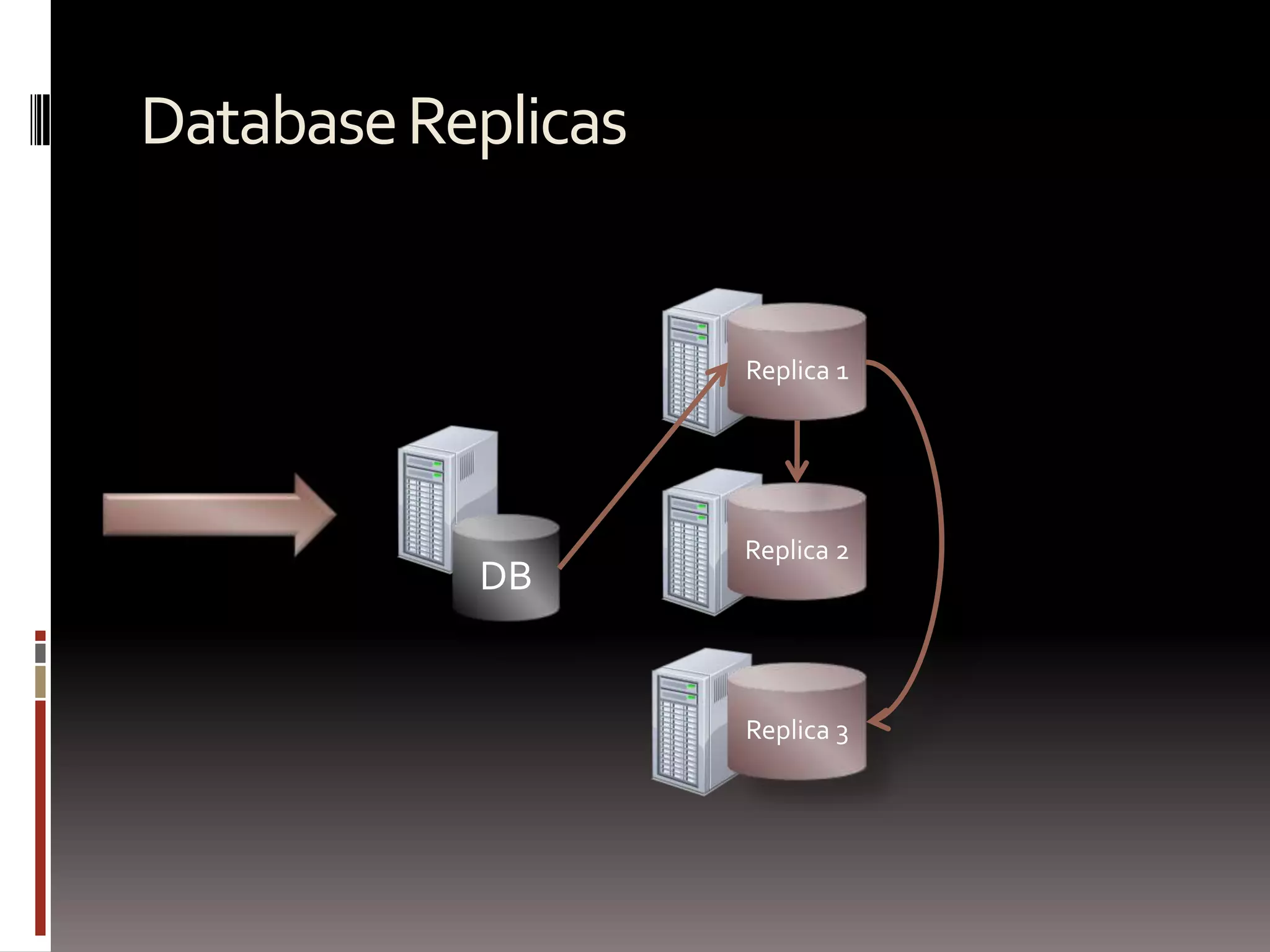
Database ReplicasSingle DatabaseMultiple ReplicasReplica 1Single PrimaryReplica 2DBReplica 3
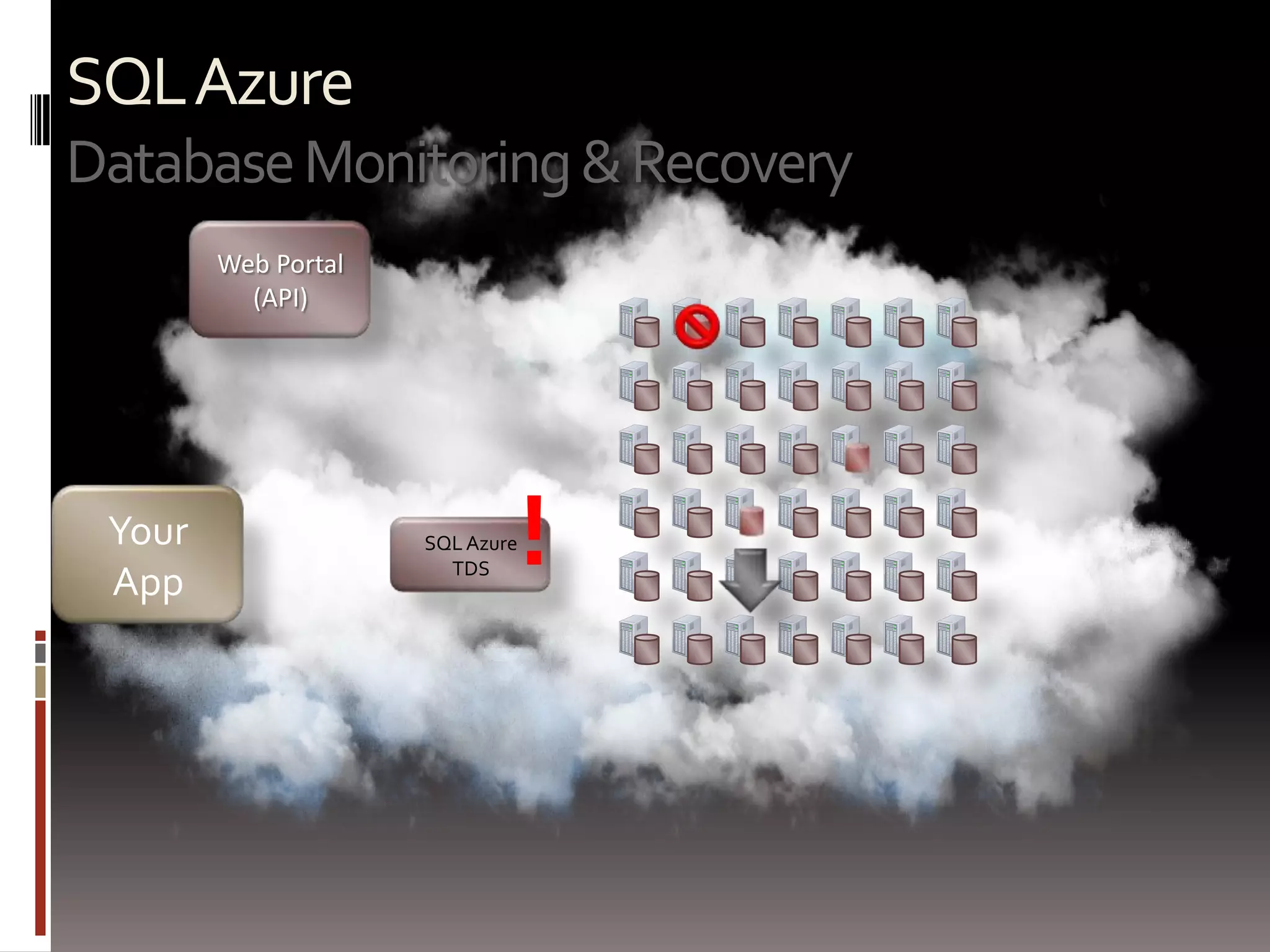
SQL AzureDatabase Monitoring & RecoveryWeb Portal(API)!Your AppSQL AzureTDS
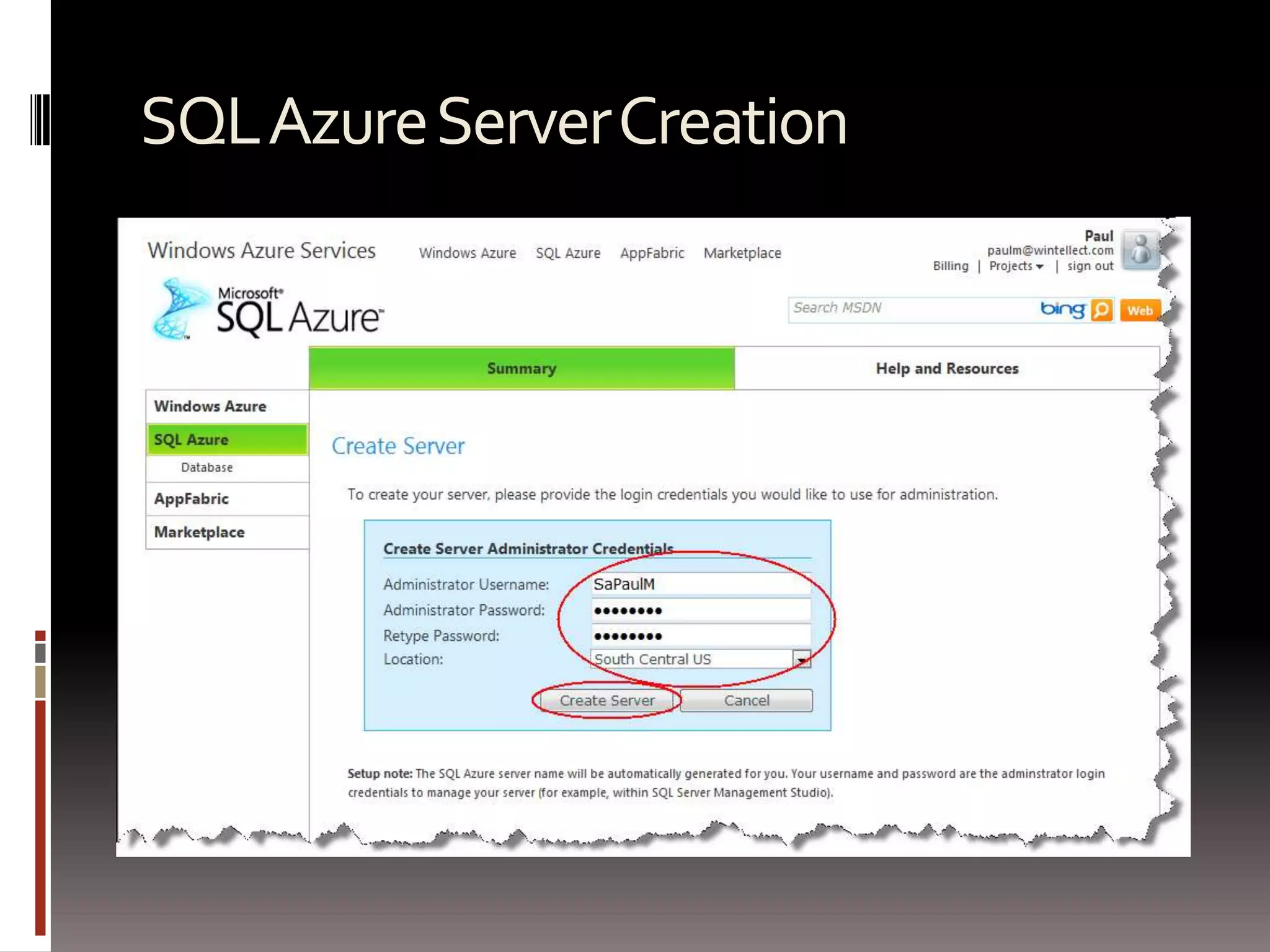
SQL Azure Server Creation

Windows Azure Storage & Sql Azure

  • 1.
    Windows Azure StorageSQLAzureDeveloping with Windows Azure storage & SQL AzureMaarten Balliauwhttp://blog.maartenballiauw.behttp://twitter.com/maartenballiauwmaarten@maartenballiauw.be
  • 2.
    Whoam I?Maarten BalliauwAntwerp,Belgiumwww.realdolmen.comFocus on webASP.NET, ASP.NET MVC, PHP, Azure, VSTS, …Special interest in interopPHPExcel, PHPLinq, PHPMEF, Windows Azure SDK for PHP, ...http://blog.maartenballiauw.behttp://twitter.com/maartenballiauw
  • 3.
  • 4.
  • 5.
    SQL AzureStorage conceptsWherecan I store my stuff?
  • 6.
    Windows Azure DataStorageQueueBlobAccountTablesDrives
  • 7.
    Azure Platform DataStorage OptionsWindows Azure Data StorageBlobsUnstructured data storageTablesSemi-structured or tabular data storageQueuesBuffered delivery data storageDrivesDurable NTFS volumes that Windows Azure applications can use. See: http://microsoftpdc.com/Sessions/SVC14SQL AzureRelational data storage
  • 8.
    PHP + CloudStorageWindows Azure StoragePHPInstance (web/worker)On-PremiseVIPLoad BalancerPHP AppSQL AzureWindows Azure Platform
  • 9.
  • 10.
  • 11.
    Windows Azure SDKfor PHPA PHP porgramming model for Windows Azure Storage
  • 12.
    PHP with WindowsAzure StorageWindows Azure SDK for PHP at http://phpazure.codeplex.comPHP programming model for Windows Azure StorageFeatures PHP classes for Blobs, Tables & QueuesStore PHP sessions in Table StorageFile system wrapper for Blob Storage
  • 13.
    Blob ContainerEntitiesAccountTablehttp://<account>.blob.core.windows.net/<container>MessagesWindows AzureStorage Conceptshttp://<account>.table.core.windows.net/<table>Queuehttp://<account>.queue.core.windows.net/<queue>
  • 14.
    Windows Azure BlobsUnstructureddataScale massivelyAt least 3 instances, 5 in optimal situationCan be used as CDNCan be mapped using a custom domain
  • 15.
    Tools for connectingto blob storageCloudBerryLab Explorerhttp://www.cloudberrylab.comAzure Storage Explorerhttp://azurestorageexplorer.codeplex.com/Onlinehttp://myazurestorage.com / ftp://ftp.cloudapp.netWindows Azure tooling for Eclipse
  • 16.
    Blobs Sample$blobStorage= newMicrosoft_WindowsAzure_Storage_Blob();// Createif (!$blobStorage->containerExists($containerName)){$blobStorage->createContainer($containerName);$blobStorage->setContainerAcl($containerName, Microsoft_WindowsAzure_Storage_Blob::ACL_PUBLIC);}// Store$blob = $blobStorage->putBlob($containerName, $blobName, $localFilename, $metadata);/* @var $blob Microsoft_WindowsAzure_Storage_BlobInstance */
  • 17.
    Blobs Sample Cont…//Copy$result = $blobStorage->copyBlob( $containerName, $blobName, $containerName, $blob2Name);// Retrieve$tempStore= azure_getlocalresourcepath('tempstore');$tempPath= $tempStore. '\\' . $imageId;$blobStorage->getBlob($containerName, $blobName, $tempPath);// Delete$result = $blobStorage->deleteBlob($containerName, $blobName);$result = $blobStorage->deleteContainer($containerName);http://phpazurecontrib.codeplex.com
  • 18.
    Blob Stream Wrapper$blobStorage=new Microsoft_WindowsAzure_Storage_Blob();// Register:$blobStorage->registerStreamWrapper(); // registers azure://// or$blobStorage->registerStreamWrapper('blob://'); // use blob://// Use$fp= fopen('azure://mycontainer/myfile.txt', 'r');// ...fclose($fp);
  • 19.
    Windows Azure Drive(a.k.a. Xdrive)Virtual NTFS volume that can be mounted.vhd formatUse existing NTFS API’sEasier migrationStored on blob storage provides quick mount/unmount in other VM
  • 20.
    Queue Workflow ConceptsWindowsAzure Queue ProvidesGuarantee delivery (two-step consumption)Worker Dequeues Message and mark it as InvisibleWorker Deletes Message when finished processing itIf Worker role crashes, message becomes visible for another Worker to processDoesn’t guarantee “only once” deliveryDoesn’t guarantee orderingBest effort FIFOWorker RoleWeb RoleInput Queue (Work Items)Worker RoleAzure QueueWeb RoleWorker RoleWeb RoleWorker Role
  • 21.
    Azure QueuesRemoveMessageGetMessage (Timeout)WorkerRolePutMessageQueueMsg 1Msg 2Msg 2Msg 1Web RoleWorker RoleWorker RoleMsg 3Msg 4Msg 2
  • 22.
    Loosely Coupled Workwith QueuesWorker-Queue ModelLoad work in a queueMany workers consume the queueInput Queue (Work Items)Azure QueueWorker RoleWeb RoleWorker RoleWeb RoleWorker RoleWeb RoleWorker Role
  • 23.
    Queues$queueClient= new Microsoft_WindowsAzure_Storage_Queue();//Create$result = $queueClient->createQueue('imageQueue');// Delete$queueClient->deleteQueue('imageQueue');// Add message$queueClient->putMessage('imageQueue', $message, $ttl);// Retrieve Messages$messages = $queueClient->getMessages('imageQueue', 10);foreach($messages as $message) {// Do work here...$queueClient->deleteMessage('imageQueue', $message);}
  • 24.
    Windows Azure DataStorage – Tables (Terms Part 1)Table Contains a set of entities. Entity (Row) Basic data items stored in a table. Property (Column) Single value in an entity. RowKeyUnique ID of the entity within a partitionTimestampTime it was created
  • 25.
    Windows Azure DataStorage – Tables (Terms Part 2)Partition Entities in a table with the same partition keyPartitionKey Segments entities in to partitions to automatically distribute the table’s entities over many storage nodes.Sort OrderThere is a single index provided, where all entities in a table are sorted by PartitionKey and then RowKey
  • 26.
    Key Example –Blog PostsPartition 1Partition 2Getting all of dunnry’s blog posts is fastSingle partitionGetting all posts after 2008-03-27 is slowTraverse all partitions
  • 27.
    Table Sample$tableStorage= newMicrosoft_WindowsAzure_Storage_Table('table.core.windows.net', 'myaccount', 'myauthkey');// Create$result = $tableStorage->createTable($tableName);// List $result = $tableStorage->listTables();foreach($result as $table) {echo 'Table name is: ' . $table->Name . "\n";}// Delete$tableStorage->deleteTable($tableName);
  • 28.
    Tables with Entities//Structured entityclass ImageEntityextends Microsoft_WindowsAzure_Storage_TableEntity{/** * @azure filename */public $filename;/** * @azure size Edm.Int64 */public $size;}// Unstructured entity// Microsoft_WindowsAzure_Storage_DynamicTableEntity
  • 29.
    Tables with EntitiesCont…// Insert$image = new ImageEntity($partitionKey, $rowKey);$image->filename = $_FILES['imageUpload']['name'];$image->size = $_FILES['imageUpload']['size'];$image = $tableStorageClient->insertEntity($tableName, $image);// Retrieve$image = $tableStorage->retrieveEntityById($tableName, $partitionKey, $rowKey, 'ImageEntity');// Update$image->filename = 'newname.jpg';$result = $tableStorage->updateEntity($tableName, $image);// Delete$result = $tableStorage->deleteEntity($tableName, $image);
  • 30.
    Table Queries// Filtercondition$select = "filesizegt 1024 and PartitionKeyeq '$partitionKey'";// Or fluent interface$select = $tableStorage->select()->from($tableName) ->where('filesizegt 1024') ->andWhere('PartitionKeyeq ?', $partitionKey);// Run query$images = $tableStorage->storageClient->retrieveEntities('testtable', $select, 'ImageEntity');foreach($images as $image) {echo 'Name: ' . $image->filename . "\n";}
  • 31.
    Batching Operations// Startbatch$batch = $tableStorage->startBatch();// Insert multiple$images = generateEntities();foreach($images as $image) {$tableStorage->insertEntity($tableName, $image);}// Commit$batch->commit();
  • 32.
    Table session handler$sessionHandler = new Microsoft_WindowsAzure_SessionHandler($tableStorage);$sessionHandler->register();session_start();if (!isset($_SESSION['start'])) {$_SESSION['start'] = time();}
  • 33.
    SQL AzureA relationaldatabase for the cloud
  • 34.
    SQL Azure andWindows Azure Table ComparisonSQL Azure TablesWindows Azure TablesFully structuredStrongly typedRelational(RDBMS)Highly scalableSemi-structuredLoosely typedNon-Relational(Not RDBMS)Massively scalable
  • 35.
    MySQL: Simple ConfigurationVIPLoadBalancerWeb RoleMySQLWorker Role
  • 36.
    MySQL in aWindows Azure ApplicationRunning MySQL in a worker roleCopy MySQL to the worker role sub-directoryCopy to read-write local storageConfigure MySQL to listen on the right portMonitor MySQL healthConsuming MySQLDiscover IP address and portNormal access from then onHandle topology changes
  • 37.
  • 38.
  • 39.
    Windows Azure Drivewith Hot SpareVIPLoad BalancerMySQLMySQL
  • 40.
    Windows Azure Drivewith Hot SpareVIPLoad BalancerMySQLMySQL
  • 41.
    SQL Azure FeaturesSupportedNotsupportedTables, Indexes, ViewsStored ProceduresTriggersConstraintsTable VariablesTemp Tables (#Name)Physical Server Access Catalog DDLCommon Language RuntimeService BrokerReporting ServicesAnalysis ServicesDistributed Transactions and Queries
  • 42.
  • 43.
    SQL AzureAccessing databasesWebPortal(API)Your AppSQL AzureTDSChange Connection String
  • 44.
    Database ReplicasSingle DatabaseMultipleReplicasReplica 1Single PrimaryReplica 2DBReplica 3
  • 45.
    SQL AzureDatabase Monitoring& RecoveryWeb Portal(API)!Your AppSQL AzureTDS
  • 46.
  • 47.
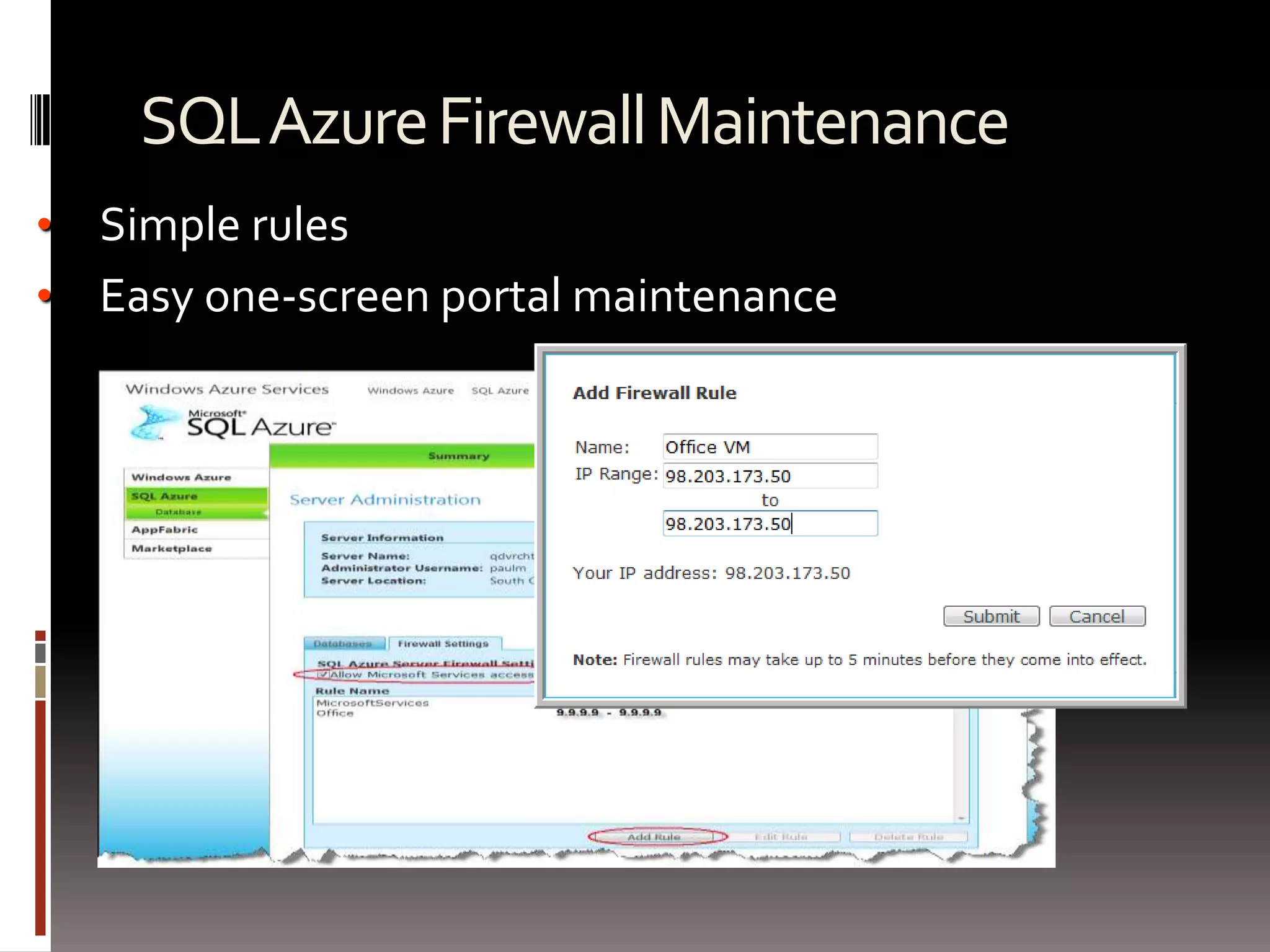
    SQL Azure FirewallMaintenanceSimple rules
  • 48.
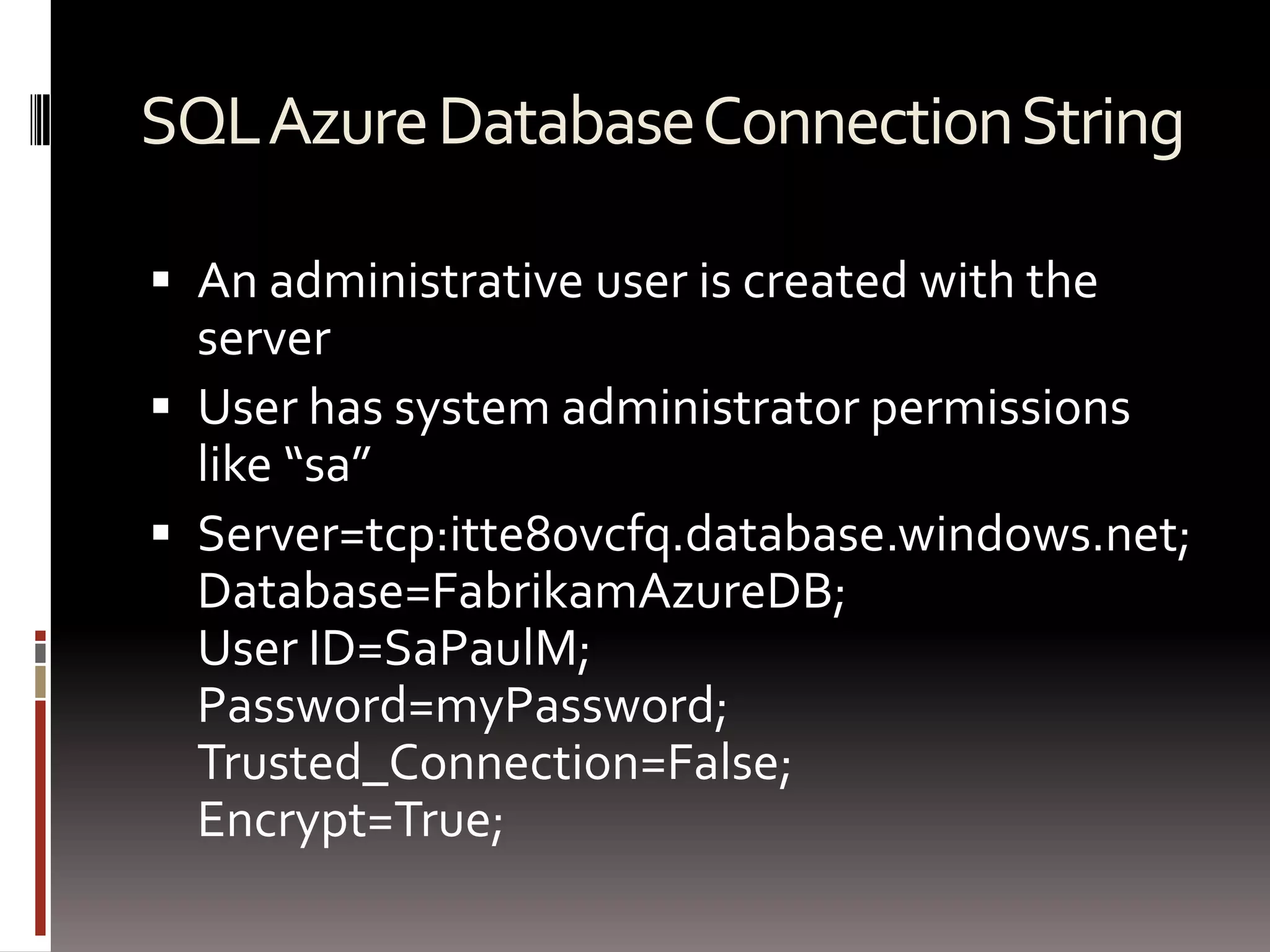
    Easy one-screen portalmaintenanceSQL Azure Database Connection StringAn administrative user is created with the serverUser has system administrator permissions like “sa”Server=tcp:itte80vcfq.database.windows.net; Database=FabrikamAzureDB;User ID=SaPaulM;Password=myPassword;Trusted_Connection=False;Encrypt=True;
  • 49.
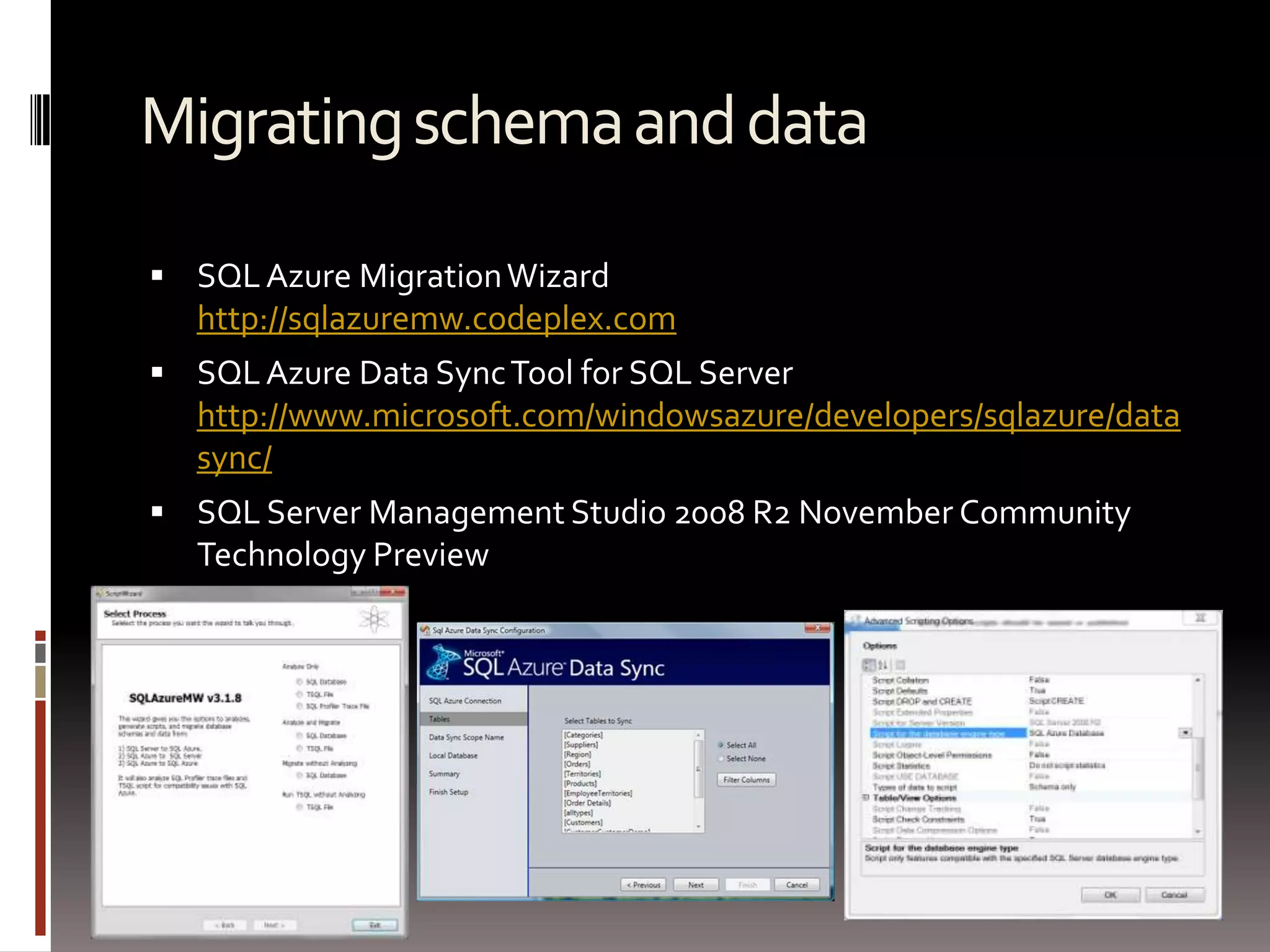
    Migrating schema anddataSQL Azure Migration Wizardhttp://sqlazuremw.codeplex.comSQL Azure Data Sync Tool for SQL Serverhttp://www.microsoft.com/windowsazure/developers/sqlazure/datasync/SQL Server Management Studio 2008 R2 November Community Technology Preview
  • 50.
    PHP with SQLAzureSQL Server Driver for PHP @ http://sqlsrvphp.codeplex.com/Supports PHP access to SQL AzureFeaturesChoose between SQL Server and SQL Azure by changing connection stringUse from on-premises or in Windows Azure
  • 51.
  • 52.
    ResourcesMicrosoft Windows AzureInterophttp://www.microsoft.com/windowsazure/interop/Interop Bridgeshttp://www.interoperabilitybridges.com/
  • 53.
  • 54.

Editor's Notes

  • #13 http://eric.blob.core.windows.net/music/rock/rush/xanadu.mp3Blobs – Provide a simple interface for storing named files along with metadata for the fileTables – Provide structured storage. A Table is a set of entities, which contain a set of propertiesQueues – Provide reliable storage and delivery of messages for an applicationTab
  • #15 Harvesting!
  • #21 Use queues as a way of communicating w/ the backend worker rolesWRs call getmessage and pass timeoutTimeout value is importantExpiration time is important; message is marked in the queue as invisible; for duration of timeout it’s invisibleWhen we’re done processing, we call a message to remove the message through a deleteTh reason we do this is imagine we have a second worker role; if something goes wrong, once the timeout expires, the message becomes visible, and the next person to do a get message will get the message
  • #25 The PartitionKey combined with the RowKey uniquely identifies an entity in a table.
  • #26 11:53Getting the all of dunnry’s post it fast because we’re selecting the entities by a partition keyGetting all of the posts after a certain is slow because we may have to traverse across multiple servers because we’re selecting entities that span partition keysA query without the partition key is really a scan
  • #34 We have included this feature comparison table in anticipation of your likely questions about differences between using a relational database table as you may be currently doing with your SQL Server databases and the new Windows Azure Tables included in Windows Azure.
  • #41 As I stated earlier, SQL Azure is based on SQL Server 2008. At this time it is only a subset of the features of the server product.My intention here is to convey the high level features that are supported and the ones that are not.SQL Azure will support most of the things we need… Tables, Index, Views, Stored Procedures, Triggers, and Constraints… in my book… that’s all the functionality that I need for most of my applications.There are some other adjunct technologies that ship as part of SQL Server 2008 such as SQL Reporting Services and Analysis Services which are not supported. The Service Broker is also not supported.
  • #42 So let’s assume that we have designed our relational database with local developer and data modeling tools.We can begin our story then by assuming that we want to get our database deployed to the cloud.There are some tools that will expedite this process which I will show you later, but for now lets assume that we have scripted our database schema. We apply this script to SQL Azure which speaks native TDS.If you created your database through the SQL Azure Portal, then SQL Azure will have created one master database and three replicas of that database. If you create your database with the script the same will be true.These replicas are stored in different database centers from the master to provide redundancy and protection against geographical catastrophe.
  • #43 Configuring our application to use SQL Azure storage instead of SQL Server is simply a matter of modifying the connection string in our application’s configuration file.When our application requests data, ADO.NET speaks to the TDS which directs our queries to the master database server. The master database server performs our query and returns the results to our application.
  • #44 From our application’s point of view, there is only one SQL Azure database.As we make updates to our database, those updates are replicated to other copies stored in other data centers so that in the event that our database fails for any reason, the other databases will be standing by ready to take its place.
  • #45 But what if that master database server fails for some reason?TDS is receives notification of the database failure and automatically redirects the call to the replica!The Azure Cloud Fabric is self-healing… and the details are outside the scope of this presentation; however, the fabric will get busy repairing itself like drones on a Borg mother ship… essentially with the objective of keeping three replicas online at a time.
  • #46 I will demonstrate creating a SQL Azure account in session 3 where I will walk you through the entire process.For now I simply want to give you some background information to prepare you for our first demonstration.When we create our SQL Azure database server, we’ll be prompted for an Administrator’s name and a password.This username and password will be the granted a system administrator role that is similar to the “sa” account on a local SQL Server 2008 box. The account has permission to create and drop databases and database ownership authority in any databases that you create with this account.
  • #47 After creating your SQL Azure database server, you will want to grant appropriate access through the SQL Azure firewall.SQL Azure provides a very simple and easy to maintain firewall. The firewall is so easy to use that it’s only going to get one slide in my deck!The firewall allows us to expose our database to Windows Azure services via a checkbox and to add ranges of IP addresses such as your home office and your business… or possibly the address of a 3rd party server hosting some application that needs data access.I’ll do a thorough demo of this feature in session 3…
  • #48 When you created your SQL Azure database server, you supplied an administrator’s user name and password. I have named my user accordingly… to remind me of its power.The SQL Portal will offer you the ability to copy these credentials in connection string format to your clip board… tempting you into believing that you should just paste this into your configuration file.This is terrific for demos like mine… BUT you should NEVER, EVER do this…A database server system administrator password placed in a configuration file in clear text format… there has got to be something naive in the extreme going on here… and worse… no way to create non-sa-like users through the UI… you must script your database users and then apply the script to the database. And to anticipate your question… no… you can’t use SQL Server Management Studio to do this either.I will demo this as well in session 3… so hang tight…