






Kolkata – 10th April - 2011Windows Azure Camp
AgendaIntroducing CloudIntroducing windows Azure Different Components of Windows AzureUsing Azure in Development EnvironmentHosting your Application to CloudCloud Storage - Windows Azure storage ServicesIntroducing SQL AzureBuilding Application Using SQL AzureIntroducing Windows Azure App Fabric
Introducing Cloud
Why Cloud Computing ?A Quick Look BackBuy Own ServersMaintenanceOwn Resource
Why Cloud Computing ?Why not take a Hosted Server ?Using Service Provider Reduced Maintenance CostTraffic Increased Own Resource
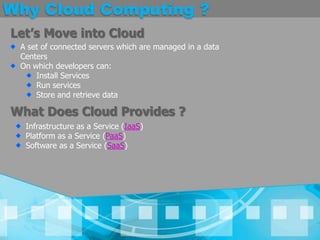
Why Cloud Computing ?Let’s Move into CloudA set of connected servers which are managed in a data CentersOn which developers can:Install ServicesRun servicesStore and retrieve dataWhat Does Cloud Provides ?Infrastructure as a Service (IaaS)Platform as a Service (PaaS)Software as a Service (SaaS)
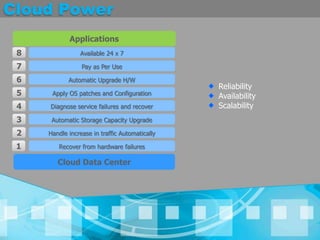
Cloud PowerApplications8Available 24 x 77Pay as Per Use6Automatic Upgrade H/WReliabilityAvailabilityScalability5Apply OS patches and ConfigurationDiagnose service failures and recover43Automatic Storage Capacity Upgrade2Handle increase in traffic Automatically1Recover from hardware failuresCloud Data Center
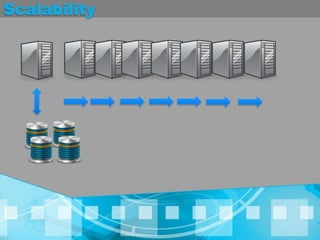
Scalability
Introducing Windows Azure
VideoWhat is Windows Azure ?
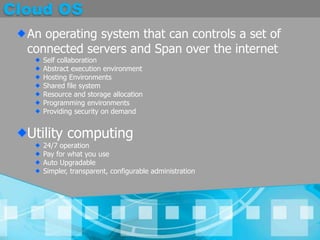
Cloud OSAn operating system that can controls a set of connected servers and Span over the internet Self collaborationAbstract execution environmentHosting EnvironmentsShared file systemResource and storage allocationProgramming environmentsProviding security on demandUtility computing24/7 operationPay for what you useAuto UpgradableSimpler, transparent, configurable administration
What Is Windows Azure ?It is an operating system for the cloudMainly Focusing on utility computingMain ComponentsService management and MonitoringComputeStorageDeveloper experience
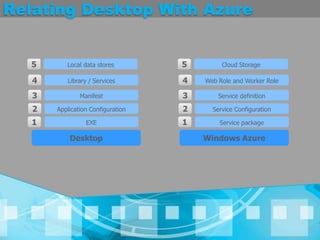
Relating Desktop With Azure5Local data stores5Cloud Storage4Library / Services4Web Role and Worker Role3Manifest3Service definition2Application Configuration2Service Configuration1EXE1Service packageDesktopWindows Azure
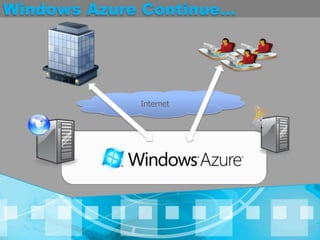
Windows Azure Continue...Internet
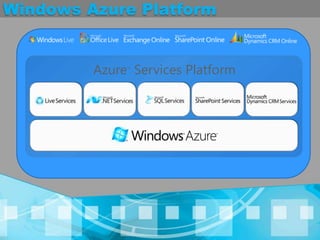
Windows Azure PlatformAzure™ Services Platform
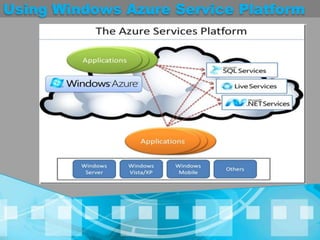
Using Windows Azure Service Platform
Different Components Of Window Azure
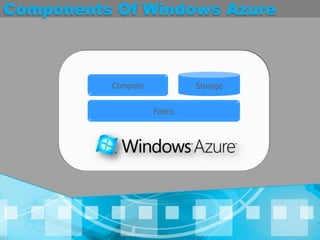
Components Of Windows AzureStorageComputeFabric
Windows Azure Compute
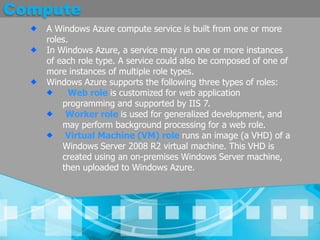
ComputeA Windows Azure compute service is built from one or more roles. In Windows Azure, a service may run one or more instances of each role type. A service could also be composed of one of more instances of multiple role types. Windows Azure supports the following three types of roles:Web role is customized for web application programming and supported by IIS 7.Worker role is used for generalized development, and may perform background processing for a web role.Virtual Machine (VM) role runs an image (a VHD) of a Windows Server 2008 R2 virtual machine. This VHD is created using an on-premises Windows Server machine, then uploaded to Windows Azure.
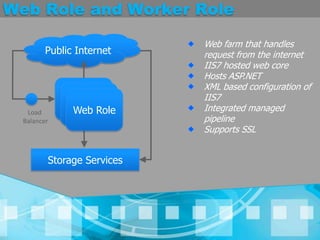
Web Role and Worker RolePublic InternetWeb farm that handles request from the internetIIS7 hosted web coreHosts ASP.NETXML based configuration of IIS7 Integrated managed pipelineSupports SSLWeb RoleWeb RoleWeb RoleLoad BalancerStorage Services
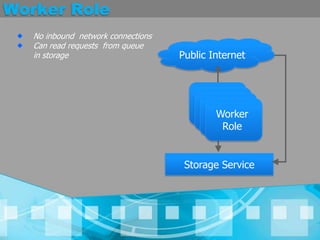
Worker RoleNo inbound  network connectionsCan read requests  from queue in storage Public InternetWorker RoleWorker RoleWorker RoleWorker RoleStorage Service
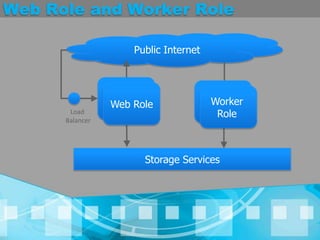
Web Role and Worker RolePublic InternetWeb RoleWorker RoleWeb RoleWorker RoleLoad BalancerStorage Services
VM Role
DemoCloud on DesktopGetting Touch with Web and Worker Roles
DemoHosting your first ASP.NET Application On Windows Azure
Windows Azure Storage
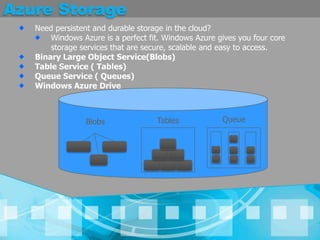
Azure StorageNeed persistent and durable storage in the cloud? Windows Azure is a perfect fit. Windows Azure gives you four core storage services that are secure, scalable and easy to access.Binary Large Object Service(Blobs)  Table Service ( Tables)Queue Service ( Queues)Windows Azure DriveQueueTablesBlobs
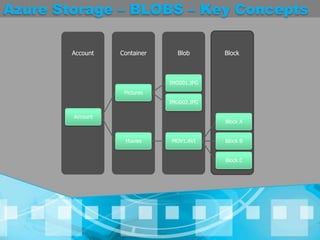
Azure Storage - BLOBSBlobs are one of the most credible feature with AzureProvide a simple interface for storing named files along with metadata for the fileIt’s very much reliable with Large size of fileMain Concept : Account, Container, Blob , Block
Azure Storage – BLOBS – Key ConceptsBlobContainerAccountBlockIMG001.JPGPicturesIMG002.JPGAccountBlock AMoviesMOV1.AVIBlock BBlock C
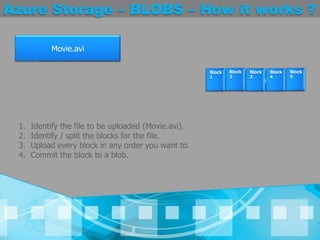
Azure Storage – BLOBS – How it works ?Movie.aviMovie.aviMovie.aviIdentify the file to be uploaded (Movie.avi).Identify / split the blocks for the file.Upload every block in any order you want to.Commit the block to a blob.Block 1Block 2Block 3Block 4Block 5
Azure Storage – BLOBS – Must KnowKey Points Files has to split to have blocks when it crosses 64 MB. Every block can be a maximum of 4 MB size. The maximum size of the blob / file can be 200 GB or 50,000 blocks. The blocks uploaded is not committed unless the final API call "PutBlockList" is called. Block blobs though offer a very good and effective way of working with bigger files, it lacks on certain places.The maximum size of the file can be no larger than 200GB. It needs at least two API calls to write a blob when uploaded as blocks. [PutBlockto upload a block with block id and PutBlockListto commit all the changes]. Any uploading cannot be committed immediately unless the final call "PutBlockList" is made. Reading a byte range other than the block split cannot be done.
Azure Storage – Page BLOBSThe maximum size of a page blob file would be 1 TB. The least page size is 512 bytes and can accommodate any data in multiples of 512 bytes up to 4 MB into a page. As soon as a data is uploaded, it is written into the cloud / disk. All the data / pages inside the page blobs are indexed to allow faster read / write. Windows Azure Drive (TBD) is supported. A page can be considered as a individual file and read / write operation can be performed on it.
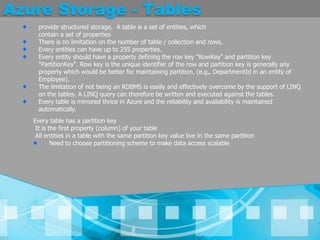
Azure Storage - Tablesprovide structured storage.  A table is a set of entities, which contain a set of propertiesThere is no limitation on the number of table / collection and rows. Every entities can have up to 255 properties. Every entity should have a property defining the row key "RowKey" and partition key "PartitionKey". Row key is the unique identifier of the row and partition key is generally any property which would be better for maintaining partition. (e.g., DepartmentId in an entity of Employee). The limitation of not being an RDBMS is easily and effectively overcome by the support of LINQ on the tables. A LINQ query can therefore be written and executed against the tables. Every table is mirrored thrice in Azure and the reliability and availability is maintained automatically. Every table has a partition keyIt is the first property (column) of your tableAll entities in a table with the same partition key value live in the same partition Need to choose partitioning scheme to make data access scalable
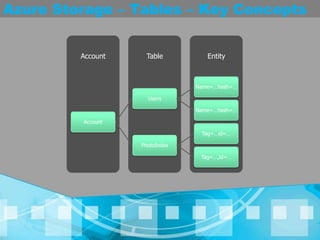
Azure Storage – Tables – Key ConceptsEntityTableAccountName=…hash=…UsersName=…hash=…AccountTag=…id=…PhotoIndexTag=…,id=…
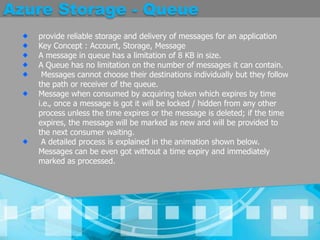
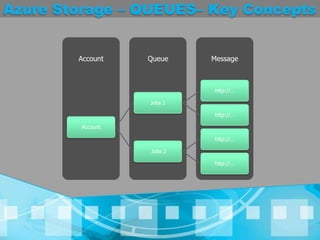
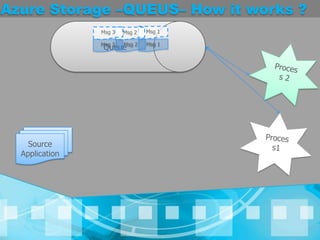
Azure Storage - Queueprovide reliable storage and delivery of messages for an applicationKey Concept : Account, Storage, MessageA message in queue has a limitation of 8 KB in size. A Queue has no limitation on the number of messages it can contain. Messages cannot choose their destinations individually but they follow the path or receiver of the queue. Message when consumed by acquiring token which expires by time i.e., once a message is got it will be locked / hidden from any other process unless the time expires or the message is deleted; if the time expires, the message will be marked as new and will be provided to the next consumer waiting. A detailed process is explained in the animation shown below. Messages can be even got without a time expiry and immediately marked as processed.
Azure Storage – QUEUES– Key ConceptsMessageQueueAccounthttp://…Jobs 1http://…Accounthttp://… Jobs 2http://…
Azure Storage –QUEUS– How it works ?QueueMsg 1Msg 3Msg 2Msg 1Msg 2Msg 3Process 2Process1Source ApplicationMsg 1Msg 2Msg 3
Azure Storage – TBD
DemoAzure Storage with Development Fabric
DemoUsing Azure Storage on Cloud
Windows Azure In a real Business Scenarios
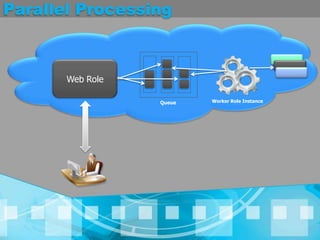
Parallel ProcessingWeb RoleWorker Role InstanceQueue
DemoWindows Azure In a real Business Scenarios
Windows Azure Fabric
Azure Fabric – Manage & Monitor
DemoWindows Azure Fabric
Introducing SQL Azure
VideoWhat is SQL Azure ?
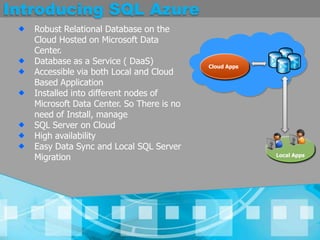
Introducing SQL AzureRobust Relational Database on the  Cloud Hosted on Microsoft Data Center.Database as a Service ( DaaS)Accessible via both Local and Cloud Based ApplicationInstalled into different nodes of Microsoft Data Center. So There is no need of Install, manageSQL Server on CloudHigh availability Easy Data Sync and Local SQL Server MigrationCloud AppsLocal Apps
DemoUsing SQL Azure Portal
DemoSQL Azure and SQL Server Management Studio
DemoSQL Azure – WCF – Windows Phone 7
Reference and Resourcehttp://www.microsoft.com/windowsazure/Introducing Windows Azure By David Chappellhttp://jebarson.info/category/Azure.aspxhttp://blogs.microsoft.co.il/blogs/applisec/archive/tags/Azure/default.aspx
Q / A
Thank You !!Abhijit Janahttp://abhijitjana.net@AbhijitJanaabhijan@microsoft.comAbhishek Surhttp://abhisheksur.com@Abhi2434abhi2434@gmail.com
Windows azure camp

Windows azure camp

  • 1.
    Kolkata – 10thApril - 2011Windows Azure Camp
  • 2.
    AgendaIntroducing CloudIntroducing windowsAzure Different Components of Windows AzureUsing Azure in Development EnvironmentHosting your Application to CloudCloud Storage - Windows Azure storage ServicesIntroducing SQL AzureBuilding Application Using SQL AzureIntroducing Windows Azure App Fabric
  • 3.
  • 4.
    Why Cloud Computing?A Quick Look BackBuy Own ServersMaintenanceOwn Resource
  • 5.
    Why Cloud Computing?Why not take a Hosted Server ?Using Service Provider Reduced Maintenance CostTraffic Increased Own Resource
  • 6.
    Why Cloud Computing?Let’s Move into CloudA set of connected servers which are managed in a data CentersOn which developers can:Install ServicesRun servicesStore and retrieve dataWhat Does Cloud Provides ?Infrastructure as a Service (IaaS)Platform as a Service (PaaS)Software as a Service (SaaS)
  • 7.
    Cloud PowerApplications8Available 24x 77Pay as Per Use6Automatic Upgrade H/WReliabilityAvailabilityScalability5Apply OS patches and ConfigurationDiagnose service failures and recover43Automatic Storage Capacity Upgrade2Handle increase in traffic Automatically1Recover from hardware failuresCloud Data Center
  • 8.
  • 9.
  • 10.
  • 11.
    Cloud OSAn operatingsystem that can controls a set of connected servers and Span over the internet Self collaborationAbstract execution environmentHosting EnvironmentsShared file systemResource and storage allocationProgramming environmentsProviding security on demandUtility computing24/7 operationPay for what you useAuto UpgradableSimpler, transparent, configurable administration
  • 12.
    What Is WindowsAzure ?It is an operating system for the cloudMainly Focusing on utility computingMain ComponentsService management and MonitoringComputeStorageDeveloper experience
  • 13.
    Relating Desktop WithAzure5Local data stores5Cloud Storage4Library / Services4Web Role and Worker Role3Manifest3Service definition2Application Configuration2Service Configuration1EXE1Service packageDesktopWindows Azure
  • 14.
  • 15.
  • 16.
    Using Windows AzureService Platform
  • 17.
  • 18.
    Components Of WindowsAzureStorageComputeFabric
  • 19.
  • 20.
    ComputeA Windows Azurecompute service is built from one or more roles. In Windows Azure, a service may run one or more instances of each role type. A service could also be composed of one of more instances of multiple role types. Windows Azure supports the following three types of roles:Web role is customized for web application programming and supported by IIS 7.Worker role is used for generalized development, and may perform background processing for a web role.Virtual Machine (VM) role runs an image (a VHD) of a Windows Server 2008 R2 virtual machine. This VHD is created using an on-premises Windows Server machine, then uploaded to Windows Azure.
  • 21.
    Web Role andWorker RolePublic InternetWeb farm that handles request from the internetIIS7 hosted web coreHosts ASP.NETXML based configuration of IIS7 Integrated managed pipelineSupports SSLWeb RoleWeb RoleWeb RoleLoad BalancerStorage Services
  • 22.
    Worker RoleNo inbound network connectionsCan read requests from queue in storage Public InternetWorker RoleWorker RoleWorker RoleWorker RoleStorage Service
  • 23.
    Web Role andWorker RolePublic InternetWeb RoleWorker RoleWeb RoleWorker RoleLoad BalancerStorage Services
  • 24.
  • 25.
    DemoCloud on DesktopGettingTouch with Web and Worker Roles
  • 26.
    DemoHosting your firstASP.NET Application On Windows Azure
  • 27.
  • 28.
    Azure StorageNeed persistentand durable storage in the cloud? Windows Azure is a perfect fit. Windows Azure gives you four core storage services that are secure, scalable and easy to access.Binary Large Object Service(Blobs) Table Service ( Tables)Queue Service ( Queues)Windows Azure DriveQueueTablesBlobs
  • 29.
    Azure Storage -BLOBSBlobs are one of the most credible feature with AzureProvide a simple interface for storing named files along with metadata for the fileIt’s very much reliable with Large size of fileMain Concept : Account, Container, Blob , Block
  • 30.
    Azure Storage –BLOBS – Key ConceptsBlobContainerAccountBlockIMG001.JPGPicturesIMG002.JPGAccountBlock AMoviesMOV1.AVIBlock BBlock C
  • 31.
    Azure Storage –BLOBS – How it works ?Movie.aviMovie.aviMovie.aviIdentify the file to be uploaded (Movie.avi).Identify / split the blocks for the file.Upload every block in any order you want to.Commit the block to a blob.Block 1Block 2Block 3Block 4Block 5
  • 32.
    Azure Storage –BLOBS – Must KnowKey Points Files has to split to have blocks when it crosses 64 MB. Every block can be a maximum of 4 MB size. The maximum size of the blob / file can be 200 GB or 50,000 blocks. The blocks uploaded is not committed unless the final API call "PutBlockList" is called. Block blobs though offer a very good and effective way of working with bigger files, it lacks on certain places.The maximum size of the file can be no larger than 200GB. It needs at least two API calls to write a blob when uploaded as blocks. [PutBlockto upload a block with block id and PutBlockListto commit all the changes]. Any uploading cannot be committed immediately unless the final call "PutBlockList" is made. Reading a byte range other than the block split cannot be done.
  • 33.
    Azure Storage –Page BLOBSThe maximum size of a page blob file would be 1 TB. The least page size is 512 bytes and can accommodate any data in multiples of 512 bytes up to 4 MB into a page. As soon as a data is uploaded, it is written into the cloud / disk. All the data / pages inside the page blobs are indexed to allow faster read / write. Windows Azure Drive (TBD) is supported. A page can be considered as a individual file and read / write operation can be performed on it.
  • 34.
    Azure Storage -Tablesprovide structured storage. A table is a set of entities, which contain a set of propertiesThere is no limitation on the number of table / collection and rows. Every entities can have up to 255 properties. Every entity should have a property defining the row key "RowKey" and partition key "PartitionKey". Row key is the unique identifier of the row and partition key is generally any property which would be better for maintaining partition. (e.g., DepartmentId in an entity of Employee). The limitation of not being an RDBMS is easily and effectively overcome by the support of LINQ on the tables. A LINQ query can therefore be written and executed against the tables. Every table is mirrored thrice in Azure and the reliability and availability is maintained automatically. Every table has a partition keyIt is the first property (column) of your tableAll entities in a table with the same partition key value live in the same partition Need to choose partitioning scheme to make data access scalable
  • 35.
    Azure Storage –Tables – Key ConceptsEntityTableAccountName=…hash=…UsersName=…hash=…AccountTag=…id=…PhotoIndexTag=…,id=…
  • 36.
    Azure Storage -Queueprovide reliable storage and delivery of messages for an applicationKey Concept : Account, Storage, MessageA message in queue has a limitation of 8 KB in size. A Queue has no limitation on the number of messages it can contain. Messages cannot choose their destinations individually but they follow the path or receiver of the queue. Message when consumed by acquiring token which expires by time i.e., once a message is got it will be locked / hidden from any other process unless the time expires or the message is deleted; if the time expires, the message will be marked as new and will be provided to the next consumer waiting. A detailed process is explained in the animation shown below. Messages can be even got without a time expiry and immediately marked as processed.
  • 37.
    Azure Storage –QUEUES– Key ConceptsMessageQueueAccounthttp://…Jobs 1http://…Accounthttp://… Jobs 2http://…
  • 38.
    Azure Storage –QUEUS–How it works ?QueueMsg 1Msg 3Msg 2Msg 1Msg 2Msg 3Process 2Process1Source ApplicationMsg 1Msg 2Msg 3
  • 39.
  • 40.
    DemoAzure Storage withDevelopment Fabric
  • 41.
  • 42.
    Windows Azure Ina real Business Scenarios
  • 43.
  • 44.
    DemoWindows Azure Ina real Business Scenarios
  • 45.
  • 46.
    Azure Fabric –Manage & Monitor
  • 47.
  • 48.
  • 49.
  • 50.
    Introducing SQL AzureRobustRelational Database on the Cloud Hosted on Microsoft Data Center.Database as a Service ( DaaS)Accessible via both Local and Cloud Based ApplicationInstalled into different nodes of Microsoft Data Center. So There is no need of Install, manageSQL Server on CloudHigh availability Easy Data Sync and Local SQL Server MigrationCloud AppsLocal Apps
  • 51.
  • 52.
    DemoSQL Azure andSQL Server Management Studio
  • 53.
    DemoSQL Azure –WCF – Windows Phone 7
  • 54.
    Reference and Resourcehttp://www.microsoft.com/windowsazure/IntroducingWindows Azure By David Chappellhttp://jebarson.info/category/Azure.aspxhttp://blogs.microsoft.co.il/blogs/applisec/archive/tags/Azure/default.aspx
  • 55.
  • 56.
    Thank You !!AbhijitJanahttp://abhijitjana.net@AbhijitJanaabhijan@microsoft.comAbhishek Surhttp://abhisheksur.com@Abhi2434abhi2434@gmail.com