




jQueryTips, tricks and hints
   for better development and performance


Jonas De Smet - @glamorous_be - BarcampGhent 2009
Who am I ?!
Jonas De Smet
- 23 years “old” developer
- Fan of PHP, jQuery and JSON
- Barcamp virgin

- Lives in Waregem
- Plays rugby with RC Curtrycke
- In love with Eline, the girl of
  his life
Why are you
 here ?!
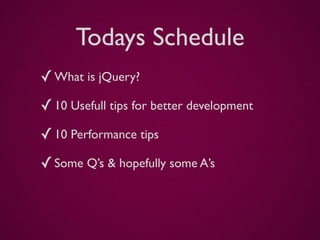
Todays Schedule
✓ What is jQuery?
✓ 10 Usefull tips for better development
✓ 10 Performance tips
✓ Some Q’s & hopefully some A’s
What is jQuery?
-   JavaScript Library
-   Easy document traversing
-   Easy event handling
-   Rapid web development
-   ...

“jQuery is designed to change the way that you write JavaScript”
                       (from jQuery.com)
What is jQuery?
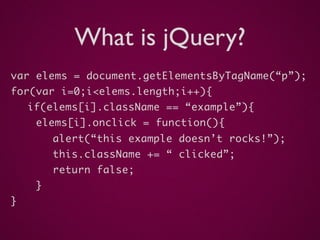
var elems = document.getElementsByTagName(“p”);
for(var i=0;i<elems.length;i++){
    if(elems[i].className == “example”){
     elems[i].onclick = function(){
         alert(“this example doesn’t rocks!”);
         this.className += “ clicked”;
         return false;
     }
}
What is jQuery?
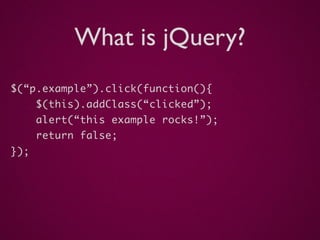
$(“p.example”).click(function(){
      $(this).addClass(“clicked”);
      alert(“this example rocks!”);
      return false;
});
Usefull tips
 for better development
Usefull tips - #1
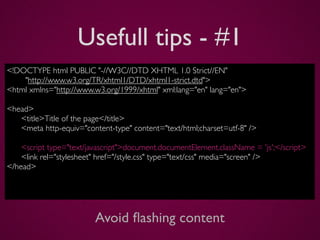
<!DOCTYPE html PUBLIC "-//W3C//DTD XHTML 1.0 Strict//EN"
    "http://www.w3.org/TR/xhtml1/DTD/xhtml1-strict.dtd">
<html xmlns="http://www.w3.org/1999/xhtml" xml:lang="en" lang="en">

<head>

 <title>Title of the page</title>

 <meta http-equiv="content-type" content="text/html;charset=utf-8" />


 <script type="text/javascript">document.documentElement.className = 'js';</script>

 <link rel="stylesheet" href="/style.css" type="text/css" media="screen" />
</head>


                        Avoid flashing content
Usefull tips - #2
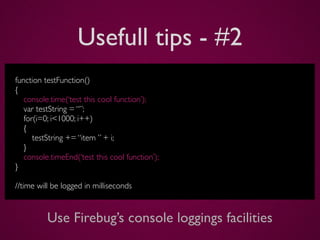
function testFunction()
{
   console.time(‘test this cool function’);
   var testString = “”;
   for(i=0; i<1000; i++)
   {
      testString += “item ” + i;
   }
   console.timeEnd(‘test this cool function’);
}

//time will be logged in milliseconds


          Use Firebug’s console loggings facilities
Usefull tips - #3
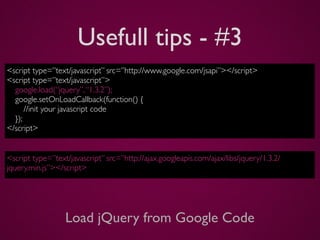
<script type=”text/javascript” src=”http://www.google.com/jsapi”></script>
<script type=”text/javascript”>
  google.load(“jquery”, “1.3.2”);
  google.setOnLoadCallback(function() {
      //init your javascript code
  });
</script>


<script type=”text/javascript” src=”http://ajax.googleapis.com/ajax/libs/jquery/1.3.2/
jquery.min.js”></script>


                  Load jQuery from Google Code
Usefull tips - #4
<div class=”expanded”>                     <div>
  <p>Some lorem ipsum</p>                    <p>Some lorem ipsum</p>
  <span class=”btn”>Close</span>             <span class=”btn”>Close</span>
</div>                                     </div>

  $(“.btn”).click(function() {               $(“.btn”).click(function() {
    var parent = $(this).parent();             var parent = $(this).parent();
    if ( parent.hasClass(“expanded”) ) {       if ( parent.data(“expanded”) ) {
        parent.removeClass(“expanded”);            parent.data(“expanded”, false);
    }                                          }
    else {                                     else {
        parent.addClass(“expanded”);               parent.data(“expanded”, true);
    }                                          }
  }                                          }


   Storing states in classes or even better in .data()
Usefull tips - #5
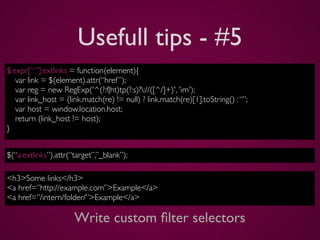
$.expr[“:”]:extlinks = function(element){
   var link = $(element).attr(“href ”);
   var reg = new RegExp('^(?:f|ht)tp(?:s)?://([^/]+)', 'im');
   var link_host = (link.match(re) != null) ? link.match(re)[1].toString() : “”;
   var host = window.location.host;
   return (link_host != host);
}


$(“a:extlinks”).attr(“target”,”_blank”);

<h3>Some links</h3>
<a href=”http://example.com”>Example</a>
<a href=”/intern/folder/”>Example</a>

                      Write custom filter selectors
Usefull tips - #6
function uglyObject()
{
   //some object stuff
}

var example = new uglyObject();

$(example).bind(‘addFancy’, function() {
    // Custom event handling for when the event ‘addFrancy’ is triggered
});

$(example).trigger(‘addFancy’);


             Bind custom events to custom objects
Usefull tips - #7
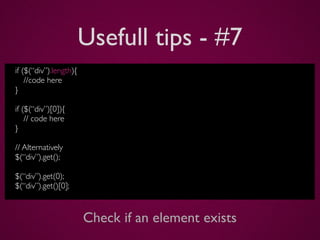
if ($(“div”).length){
    //code here
}

if ($(“div”)[0]){
    // code here
}

// Alternatively
$(“div”).get();

$(“div”).get(0);
$(“div”).get()[0];


                        Check if an element exists
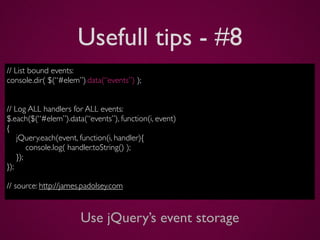
Usefull tips - #8
// List bound events:
console.dir( $(“#elem”).data(“events”) );


// Log ALL handlers for ALL events:
$.each($(“#elem”).data(“events”), function(i, event)
{
    jQuery.each(event, function(i, handler){
        console.log( handler.toString() );
    });
});

// source: http://james.padolsey.com


                      Use jQuery’s event storage
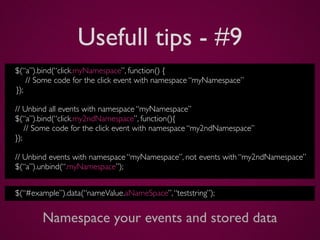
Usefull tips - #9
$(“a”).bind(“click.myNamespace”, function() {
    // Some code for the click event with namespace “myNamespace”
});

// Unbind all events with namespace “myNamespace”
$(“a”).bind(“click.my2ndNamespace”, function(){
    // Some code for the click event with namespace “my2ndNamespace”
});

// Unbind events with namespace “myNamespace”, not events with “my2ndNamespace”
$(“a”).unbind(“.myNamespace”);


$(“#example”).data(“nameValue.aNameSpace”, “teststring”);


       Namespace your events and stored data
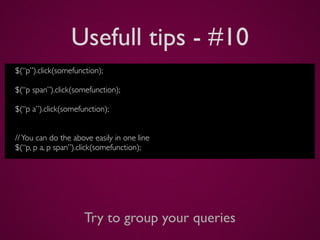
Usefull tips - #10
$(“p”).click(somefunction);

$(“p span”).click(somefunction);

$(“p a”).click(somefunction);


// You can do the above easily in one line
$(“p, p a, p span”).click(somefunction);


                     Try to group your queries
Performance
    Tips
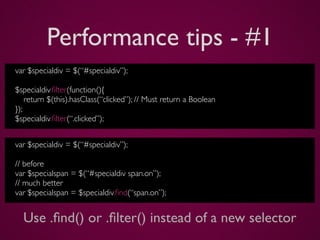
Performance tips - #1
var $specialdiv = $(“#specialdiv”);

$specialdiv.filter(function(){
    return $(this).hasClass(“clicked”); // Must return a Boolean
});
$specialdiv.filter(“.clicked”);


var $specialdiv = $(“#specialdiv”);

// before
var $specialspan = $(“#specialdiv span.on”);
// much better
var $specialspan = $specialdiv.find(“span.on”);


  Use .find() or .filter() instead of a new selector
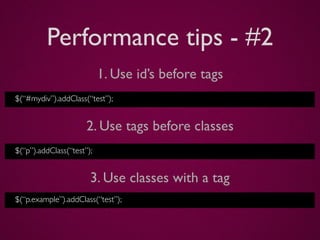
Performance tips - #2
                           1. Use id’s before tags
$(“#mydiv”).addClass(“test”);


                      2. Use tags before classes
$(“p”).addClass(“test”);


                       3. Use classes with a tag
$(“p.example”).addClass(“test”);
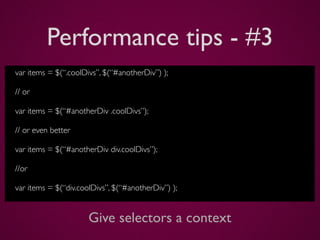
Performance tips - #3
var items = $(“.coolDivs”, $(“#anotherDiv”) );

// or

var items = $(“#anotherDiv .coolDivs”);

// or even better

var items = $(“#anotherDiv div.coolDivs”);

//or

var items = $(“div.coolDivs”, $(“#anotherDiv”) );


                      Give selectors a context
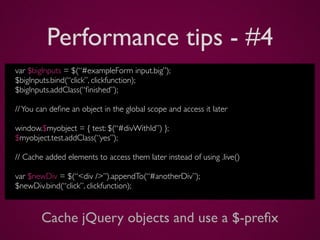
Performance tips - #4
var $bigInputs = $(“#exampleForm input.big”);
$bigInputs.bind(“click”, clickfunction);
$bigInputs.addClass(“finished”);

// You can define an object in the global scope and access it later

window.$myobject = { test: $(“#divWithId”) };
$myobject.test.addClass(“yes”);

// Cache added elements to access them later instead of using .live()

var $newDiv = $(“<div />”).appendTo(“#anotherDiv”);
$newDiv.bind(“click”, clickfunction);


        Cache jQuery objects and use a $-prefix
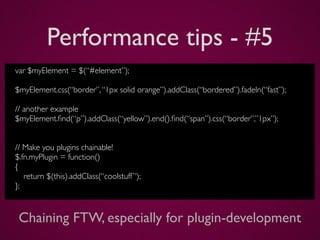
Performance tips - #5
var $myElement = $(“#element”);

$myElement.css(“border”, “1px solid orange”).addClass(“bordered”).fadeIn(“fast”);

// another example
$myElement.find(“p”).addClass(“yellow”).end().find(“span”).css(“border”,”1px”);


// Make you plugins chainable!
$.fn.myPlugin = function()
{
   return $(this).addClass(“coolstuff ”);
};


 Chaining FTW, especially for plugin-development
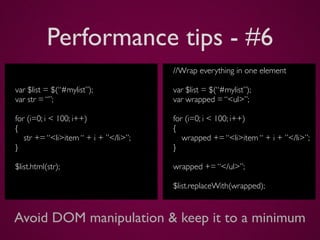
Performance tips - #6
                                       //Wrap everything in one element

var $list = $(“#mylist”);              var $list = $(“#mylist”);
var str = “”;                          var wrapped = “<ul>”;

for (i=0; i < 100; i++)                for (i=0; i < 100; i++)
{                                      {
   str += “<li>item “ + i + ”</li>”;      wrapped += “<li>item “ + i + ”</li>”;
}                                      }

$list.html(str);                       wrapped += “</ul>”;

                                       $list.replaceWith(wrapped);


Avoid DOM manipulation & keep it to a minimum
Performance tips - #7
var $myList = $(“#navigation”);

$myList.click(function(evt){
    $target = $(evt.target);
    if($target.is(“li”) )
    {
           doSomethingWhenListItemIsClicked();
    }
    return false;
});

// more about jQuery events on http://docs.jquery.com/Events/jQuery.Event


                   Event delegation / bubbling
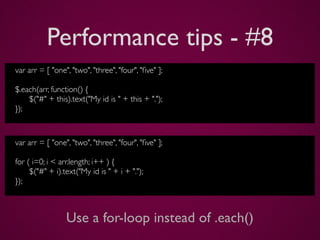
Performance tips - #8
var arr = [ "one", "two", "three", "four", "five" ];

$.each(arr, function() {
    $("#" + this).text("My id is " + this + ".");
});


var arr = [ "one", "two", "three", "four", "five" ];

for ( i=0; i < arr.length; i++ ) {
     $("#" + i).text("My id is " + i + ".");
});


                 Use a for-loop instead of .each()
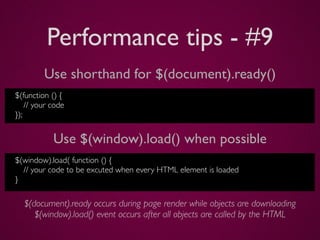
Performance tips - #9
         Use shorthand for $(document).ready()
$(function () {
    // your code
});


            Use $(window).load() when possible
$(window).load( function () {
  // your code to be excuted when every HTML element is loaded
}

   $(document).ready occurs during page render while objects are downloading
      $(window).load() event occurs after all objects are called by the HTML
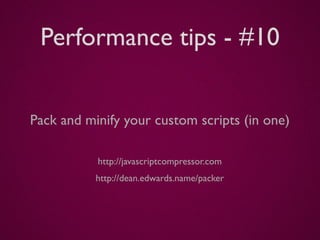
Performance tips - #10


Pack and minify your custom scripts (in one)

           http://javascriptcompressor.com
           http://dean.edwards.name/packer
Q &A
Thank you for listening!
Twitter @glamorous_be


Github http://github.com/glamorous
Slideshare http://www.slideshare.net/glamorous
LinkedIn http://be.linkedin.com/in/glamorous

jQuery: Tips, tricks and hints for better development and Performance

  • 1.
    jQueryTips, tricks andhints for better development and performance Jonas De Smet - @glamorous_be - BarcampGhent 2009
  • 2.
  • 3.
    Jonas De Smet -23 years “old” developer - Fan of PHP, jQuery and JSON - Barcamp virgin - Lives in Waregem - Plays rugby with RC Curtrycke - In love with Eline, the girl of his life
  • 4.
    Why are you here ?!
  • 6.
    Todays Schedule ✓ Whatis jQuery? ✓ 10 Usefull tips for better development ✓ 10 Performance tips ✓ Some Q’s & hopefully some A’s
  • 7.
    What is jQuery? - JavaScript Library - Easy document traversing - Easy event handling - Rapid web development - ... “jQuery is designed to change the way that you write JavaScript” (from jQuery.com)
  • 8.
    What is jQuery? varelems = document.getElementsByTagName(“p”); for(var i=0;i<elems.length;i++){ if(elems[i].className == “example”){ elems[i].onclick = function(){ alert(“this example doesn’t rocks!”); this.className += “ clicked”; return false; } }
  • 9.
    What is jQuery? $(“p.example”).click(function(){ $(this).addClass(“clicked”); alert(“this example rocks!”); return false; });
  • 10.
    Usefull tips forbetter development
  • 11.
    Usefull tips -#1 <!DOCTYPE html PUBLIC "-//W3C//DTD XHTML 1.0 Strict//EN" "http://www.w3.org/TR/xhtml1/DTD/xhtml1-strict.dtd"> <html xmlns="http://www.w3.org/1999/xhtml" xml:lang="en" lang="en"> <head> <title>Title of the page</title> <meta http-equiv="content-type" content="text/html;charset=utf-8" /> <script type="text/javascript">document.documentElement.className = 'js';</script> <link rel="stylesheet" href="/style.css" type="text/css" media="screen" /> </head> Avoid flashing content
  • 12.
    Usefull tips -#2 function testFunction() { console.time(‘test this cool function’); var testString = “”; for(i=0; i<1000; i++) { testString += “item ” + i; } console.timeEnd(‘test this cool function’); } //time will be logged in milliseconds Use Firebug’s console loggings facilities
  • 13.
    Usefull tips -#3 <script type=”text/javascript” src=”http://www.google.com/jsapi”></script> <script type=”text/javascript”> google.load(“jquery”, “1.3.2”); google.setOnLoadCallback(function() { //init your javascript code }); </script> <script type=”text/javascript” src=”http://ajax.googleapis.com/ajax/libs/jquery/1.3.2/ jquery.min.js”></script> Load jQuery from Google Code
  • 14.
    Usefull tips -#4 <div class=”expanded”> <div> <p>Some lorem ipsum</p> <p>Some lorem ipsum</p> <span class=”btn”>Close</span> <span class=”btn”>Close</span> </div> </div> $(“.btn”).click(function() { $(“.btn”).click(function() { var parent = $(this).parent(); var parent = $(this).parent(); if ( parent.hasClass(“expanded”) ) { if ( parent.data(“expanded”) ) { parent.removeClass(“expanded”); parent.data(“expanded”, false); } } else { else { parent.addClass(“expanded”); parent.data(“expanded”, true); } } } } Storing states in classes or even better in .data()
  • 15.
    Usefull tips -#5 $.expr[“:”]:extlinks = function(element){ var link = $(element).attr(“href ”); var reg = new RegExp('^(?:f|ht)tp(?:s)?://([^/]+)', 'im'); var link_host = (link.match(re) != null) ? link.match(re)[1].toString() : “”; var host = window.location.host; return (link_host != host); } $(“a:extlinks”).attr(“target”,”_blank”); <h3>Some links</h3> <a href=”http://example.com”>Example</a> <a href=”/intern/folder/”>Example</a> Write custom filter selectors
  • 16.
    Usefull tips -#6 function uglyObject() { //some object stuff } var example = new uglyObject(); $(example).bind(‘addFancy’, function() { // Custom event handling for when the event ‘addFrancy’ is triggered }); $(example).trigger(‘addFancy’); Bind custom events to custom objects
  • 17.
    Usefull tips -#7 if ($(“div”).length){ //code here } if ($(“div”)[0]){ // code here } // Alternatively $(“div”).get(); $(“div”).get(0); $(“div”).get()[0]; Check if an element exists
  • 18.
    Usefull tips -#8 // List bound events: console.dir( $(“#elem”).data(“events”) ); // Log ALL handlers for ALL events: $.each($(“#elem”).data(“events”), function(i, event) { jQuery.each(event, function(i, handler){ console.log( handler.toString() ); }); }); // source: http://james.padolsey.com Use jQuery’s event storage
  • 19.
    Usefull tips -#9 $(“a”).bind(“click.myNamespace”, function() { // Some code for the click event with namespace “myNamespace” }); // Unbind all events with namespace “myNamespace” $(“a”).bind(“click.my2ndNamespace”, function(){ // Some code for the click event with namespace “my2ndNamespace” }); // Unbind events with namespace “myNamespace”, not events with “my2ndNamespace” $(“a”).unbind(“.myNamespace”); $(“#example”).data(“nameValue.aNameSpace”, “teststring”); Namespace your events and stored data
  • 20.
    Usefull tips -#10 $(“p”).click(somefunction); $(“p span”).click(somefunction); $(“p a”).click(somefunction); // You can do the above easily in one line $(“p, p a, p span”).click(somefunction); Try to group your queries
  • 21.
  • 22.
    Performance tips -#1 var $specialdiv = $(“#specialdiv”); $specialdiv.filter(function(){ return $(this).hasClass(“clicked”); // Must return a Boolean }); $specialdiv.filter(“.clicked”); var $specialdiv = $(“#specialdiv”); // before var $specialspan = $(“#specialdiv span.on”); // much better var $specialspan = $specialdiv.find(“span.on”); Use .find() or .filter() instead of a new selector
  • 23.
    Performance tips -#2 1. Use id’s before tags $(“#mydiv”).addClass(“test”); 2. Use tags before classes $(“p”).addClass(“test”); 3. Use classes with a tag $(“p.example”).addClass(“test”);
  • 24.
    Performance tips -#3 var items = $(“.coolDivs”, $(“#anotherDiv”) ); // or var items = $(“#anotherDiv .coolDivs”); // or even better var items = $(“#anotherDiv div.coolDivs”); //or var items = $(“div.coolDivs”, $(“#anotherDiv”) ); Give selectors a context
  • 25.
    Performance tips -#4 var $bigInputs = $(“#exampleForm input.big”); $bigInputs.bind(“click”, clickfunction); $bigInputs.addClass(“finished”); // You can define an object in the global scope and access it later window.$myobject = { test: $(“#divWithId”) }; $myobject.test.addClass(“yes”); // Cache added elements to access them later instead of using .live() var $newDiv = $(“<div />”).appendTo(“#anotherDiv”); $newDiv.bind(“click”, clickfunction); Cache jQuery objects and use a $-prefix
  • 26.
    Performance tips -#5 var $myElement = $(“#element”); $myElement.css(“border”, “1px solid orange”).addClass(“bordered”).fadeIn(“fast”); // another example $myElement.find(“p”).addClass(“yellow”).end().find(“span”).css(“border”,”1px”); // Make you plugins chainable! $.fn.myPlugin = function() { return $(this).addClass(“coolstuff ”); }; Chaining FTW, especially for plugin-development
  • 27.
    Performance tips -#6 //Wrap everything in one element var $list = $(“#mylist”); var $list = $(“#mylist”); var str = “”; var wrapped = “<ul>”; for (i=0; i < 100; i++) for (i=0; i < 100; i++) { { str += “<li>item “ + i + ”</li>”; wrapped += “<li>item “ + i + ”</li>”; } } $list.html(str); wrapped += “</ul>”; $list.replaceWith(wrapped); Avoid DOM manipulation & keep it to a minimum
  • 28.
    Performance tips -#7 var $myList = $(“#navigation”); $myList.click(function(evt){ $target = $(evt.target); if($target.is(“li”) ) { doSomethingWhenListItemIsClicked(); } return false; }); // more about jQuery events on http://docs.jquery.com/Events/jQuery.Event Event delegation / bubbling
  • 29.
    Performance tips -#8 var arr = [ "one", "two", "three", "four", "five" ]; $.each(arr, function() { $("#" + this).text("My id is " + this + "."); }); var arr = [ "one", "two", "three", "four", "five" ]; for ( i=0; i < arr.length; i++ ) { $("#" + i).text("My id is " + i + "."); }); Use a for-loop instead of .each()
  • 30.
    Performance tips -#9 Use shorthand for $(document).ready() $(function () { // your code }); Use $(window).load() when possible $(window).load( function () { // your code to be excuted when every HTML element is loaded } $(document).ready occurs during page render while objects are downloading $(window).load() event occurs after all objects are called by the HTML
  • 31.
    Performance tips -#10 Pack and minify your custom scripts (in one) http://javascriptcompressor.com http://dean.edwards.name/packer
  • 32.
  • 33.
    Thank you forlistening! Twitter @glamorous_be Github http://github.com/glamorous Slideshare http://www.slideshare.net/glamorous LinkedIn http://be.linkedin.com/in/glamorous

Editor's Notes

  • #18 zo ook meer functies beschikbaar: log, debug, warn, info, error
  • #19 2de methode de voorkeur!
  • #20 jQuery internals =&gt; zo ook removeData() beschikbaar
  • #25 Zeer belangrijk voor plugin development!
  • #26 Zo ook goed te gebruiken bij verschillende events, event samen gaan binden met &amp;#xE9;&amp;#xE9;nzelfde functie als &amp;#x201C;te uit te voeren&amp;#x201D;
  • #29 1. getElementById 2. getElementsByTagName 3. getElementsByClassName
  • #31 bij aanmaak van nieuwe objecten, cachen =&gt; geen .live() nodig nooit een jQuery selectie herhalen, cache uw objecten!
  • #33 avoid DOM Manipulation (geen .append() maar .html()) eventueel parent node erbij en .replaceWith()
  • #34 geen .live() nodig maar &amp;#xE9;&amp;#xE9;n bind, &amp;#xE9;&amp;#xE9;n event noodzakelijk
  • #36 $(document).ready() wordt uitgevoerd tijdens het downloaden van nog enkele elementen en kan uw pagina &amp;#x201C;ophouden&amp;#x201D;/&amp;#x201D;uitstellen&amp;#x201D; van laden $(window).load() wordt aangeroepen wanneer alle HTML opgeroepen is (zo ook iframes)
  • #37 msh ook combineren van je scripts in &amp;#xE9;&amp;#xE9;n file, eventueel via php de verschillende inladen (denk aan updatebaarheid plugins)