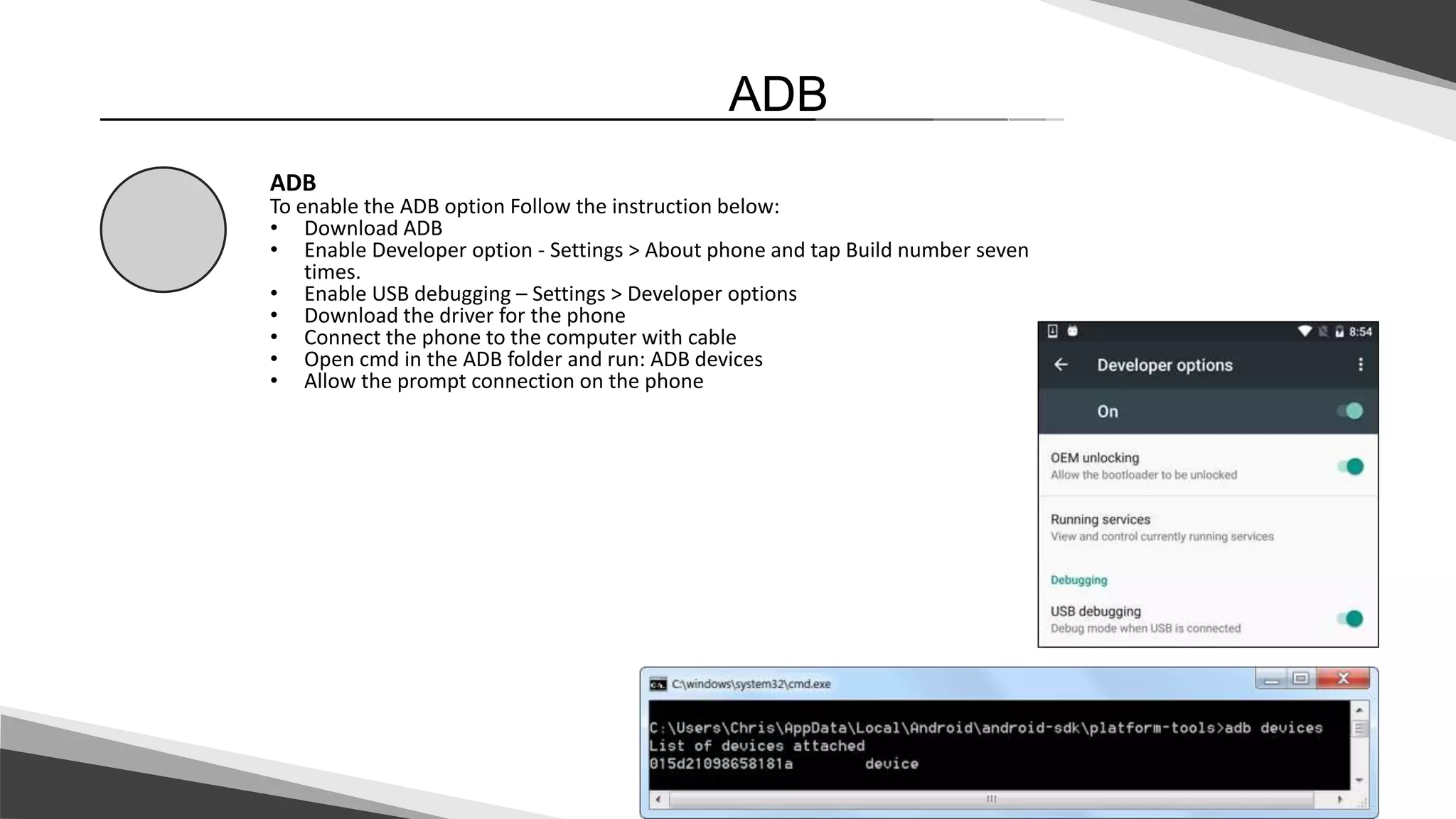
ADB, or Android Debug Bridge, is a command line tool included in the Android SDK that allows users to control Android devices connected to a computer. It can install and uninstall apps, copy files between a computer and device, run shell commands, and more. To enable ADB, users must download the ADB tool and USB drivers, enable developer options and USB debugging on the device, and connect the device to the computer with a USB cable. Common ADB commands include pulling and pushing files between a computer and device, installing and uninstalling apps, and opening a shell to run commands on the Android system.

![4
ADB - Commands
ADB - Commands
Simple ADB commands:
• adb pull - Download a specified file from an emulator/device to your computer.
• adb push <local> <remote> - Upload a specified file from your computer to an
emulator/device.
• adb install [option] <path> - Pushes an Android application (specified as a full
path to an .apk file) to an emulator/device.
• adb uninstall [options] <PACKAGE> - Removes a package from the
emulator/device.
• adb shell – allow to run shell commands on at android.](https://image.slidesharecdn.com/adb-180709125716/75/Adb-4-2048.jpg)


