WELCOM
E
Relevance of Online
Publishing by using
Wiki, Blog and
Forum
Blog, Wiki or Forum – Which
should you use ?
Blogs, wikis and forums were not
designed as educational tools, but they
can be very useful in a teaching and
learning context for supporting dialogue
between students, providing a space for
collaboration and chronicling student
reflections.
BLOG
An online journal (web log), diary or news column with
posts in reverse-chronological order (latest first) and
options for readers to comment.
Updated as regularly as the author desires.
A blog is owned by an individual. It can have a single
author or multiple contributors.
Author posts, reader comments. A blog post is usually
one person's opinion, followed optionally by comments.
Tends towards the sharing of news, knowledge or
expertise. Ongoing recording or reporting.
Reverse-chronological-ordered posts, each followed by
threaded comments.
Attribution of comments is important as they are usually
voicing an opinion or reflection.
Wiki
An easily-edited set of one or more linked web pages
that readers can add to or modify. Facilitates collaborative
content creation.
Anyone can update in real time.
Multiple authors: owned and edited by a group. A wiki is
updated by many people, from a local group or remotely
diverse locations.
Wiki articles represent consensus, but can have an
associated discussion page.
The most up-to-date content displays, but the page's
history can be viewed and reverted to.
Editing can be anonymous as the product is the focus,
not necessarily the contributor.
Forum
A notice board or message board where people can
start new topics or discussions and respond to existing
ones
Asynchronous—users can post at any time.
Owned by administrator/s who may moderate
content. Multiple authors contribute to their own or
others discussion threads.
User-generated content initiated and facilitated by
the instructor; exchange of ideas and views.
Threaded discussion flowing chronologically from the
original topic post.
Attribution is a key feature, as posts often leads to
direct conversations.
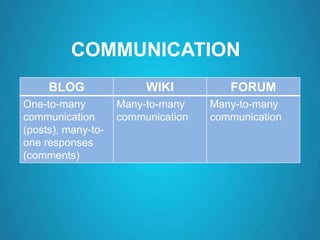
COMMUNICATION
BLOG WIKI FORUM
One-to-many
communication
(posts), many-to-
one responses
(comments)
Many-to-many
communication
Many-to-many
communication
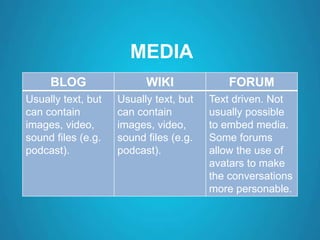
MEDIA
BLOG WIKI FORUM
Usually text, but
can contain
images, video,
sound files (e.g.
podcast).
Usually text, but
can contain
images, video,
sound files (e.g.
podcast).
Text driven. Not
usually possible
to embed media.
Some forums
allow the use of
avatars to make
the conversations
more personable.
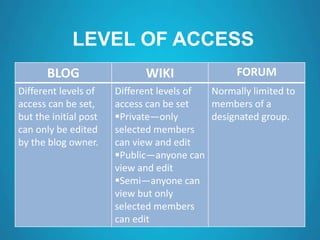
LEVEL OF ACCESS
BLOG WIKI FORUM
Different levels of
access can be set,
but the initial post
can only be edited
by the blog owner.
Different levels of
access can be set
Private—only
selected members
can view and edit
Public—anyone can
view and edit
Semi—anyone can
view but only
selected members
can edit
Normally limited to
members of a
designated group.
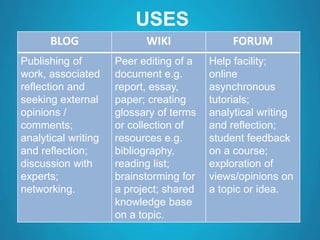
USES
BLOG WIKI FORUM
Publishing of
work, associated
reflection and
seeking external
opinions /
comments;
analytical writing
and reflection;
discussion with
experts;
networking.
Peer editing of a
document e.g.
report, essay,
paper; creating
glossary of terms
or collection of
resources e.g.
bibliography,
reading list;
brainstorming for
a project; shared
knowledge base
on a topic.
Help facility;
online
asynchronous
tutorials;
analytical writing
and reflection;
student feedback
on a course;
exploration of
views/opinions on
a topic or idea.
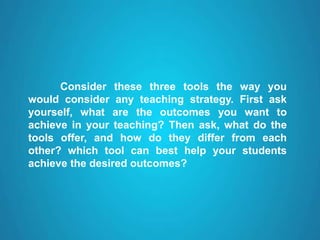
Consider these three tools the way you
would consider any teaching strategy. First ask
yourself, what are the outcomes you want to
achieve in your teaching? Then ask, what do the
tools offer, and how do they differ from each
other? which tool can best help your students
achieve the desired outcomes?
THANK
YOU
-Sarath K C

WIKI, BLOG, FORUM

  • 1.
  • 2.
    Relevance of Online Publishingby using Wiki, Blog and Forum
  • 3.
    Blog, Wiki orForum – Which should you use ? Blogs, wikis and forums were not designed as educational tools, but they can be very useful in a teaching and learning context for supporting dialogue between students, providing a space for collaboration and chronicling student reflections.
  • 4.
    BLOG An online journal(web log), diary or news column with posts in reverse-chronological order (latest first) and options for readers to comment. Updated as regularly as the author desires. A blog is owned by an individual. It can have a single author or multiple contributors. Author posts, reader comments. A blog post is usually one person's opinion, followed optionally by comments. Tends towards the sharing of news, knowledge or expertise. Ongoing recording or reporting. Reverse-chronological-ordered posts, each followed by threaded comments. Attribution of comments is important as they are usually voicing an opinion or reflection.
  • 5.
    Wiki An easily-edited setof one or more linked web pages that readers can add to or modify. Facilitates collaborative content creation. Anyone can update in real time. Multiple authors: owned and edited by a group. A wiki is updated by many people, from a local group or remotely diverse locations. Wiki articles represent consensus, but can have an associated discussion page. The most up-to-date content displays, but the page's history can be viewed and reverted to. Editing can be anonymous as the product is the focus, not necessarily the contributor.
  • 6.
    Forum A notice boardor message board where people can start new topics or discussions and respond to existing ones Asynchronous—users can post at any time. Owned by administrator/s who may moderate content. Multiple authors contribute to their own or others discussion threads. User-generated content initiated and facilitated by the instructor; exchange of ideas and views. Threaded discussion flowing chronologically from the original topic post. Attribution is a key feature, as posts often leads to direct conversations.
  • 7.
    COMMUNICATION BLOG WIKI FORUM One-to-many communication (posts),many-to- one responses (comments) Many-to-many communication Many-to-many communication
  • 8.
    MEDIA BLOG WIKI FORUM Usuallytext, but can contain images, video, sound files (e.g. podcast). Usually text, but can contain images, video, sound files (e.g. podcast). Text driven. Not usually possible to embed media. Some forums allow the use of avatars to make the conversations more personable.
  • 9.
    LEVEL OF ACCESS BLOGWIKI FORUM Different levels of access can be set, but the initial post can only be edited by the blog owner. Different levels of access can be set Private—only selected members can view and edit Public—anyone can view and edit Semi—anyone can view but only selected members can edit Normally limited to members of a designated group.
  • 10.
    USES BLOG WIKI FORUM Publishingof work, associated reflection and seeking external opinions / comments; analytical writing and reflection; discussion with experts; networking. Peer editing of a document e.g. report, essay, paper; creating glossary of terms or collection of resources e.g. bibliography, reading list; brainstorming for a project; shared knowledge base on a topic. Help facility; online asynchronous tutorials; analytical writing and reflection; student feedback on a course; exploration of views/opinions on a topic or idea.
  • 11.
    Consider these threetools the way you would consider any teaching strategy. First ask yourself, what are the outcomes you want to achieve in your teaching? Then ask, what do the tools offer, and how do they differ from each other? which tool can best help your students achieve the desired outcomes?
  • 12.