Huy Nguyen
CTO, Cofounder - Holistics.io
Why PostgreSQL for Analytics
Infrastructure (DW)?
Grokking TechTalk - Database Systems
Ho Chi Minh City - Aug 2016
● Cofounder
○ Data Reporting (BI) and Infrastructure SaaS
● Cofounder of Grokking Vietnam
○ Building community of world-class engineers in Vietnam
● Previous
○ Growth Team at Facebook (US)
○ Built Data Pipeline at Viki (Singapore)
About Me
Background: What is Analytics/DW?
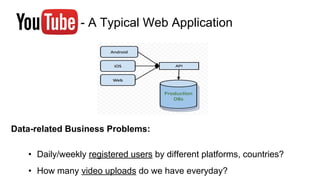
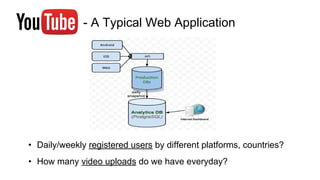
- A Typical Web Application
Data-related Business Problems:
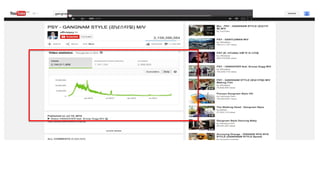
• Daily/weekly registered users by different platforms, countries?
• How many video uploads do we have everyday?
- A Typical Web Application
• Daily/weekly registered users by different platforms, countries?
• How many video uploads do we have everyday?
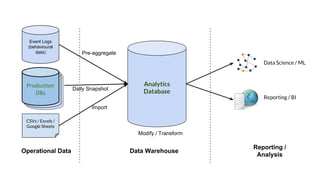
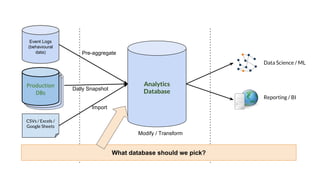
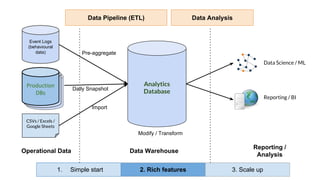
A Typical Data Pipeline
Analytics
Database
CSVs / Excels /
Google Sheets
Operational Data Data Warehouse
Reporting /
Analysis
Data Science / ML
Reporting / BI
Event Logs
(behavioural
data)
Live
Databases
Live
Databases
Production
DBs
Daily Snapshot
Import
Pre-aggregate
Modify / Transform
Analytics
Database
CSVs / Excels /
Google Sheets
Operational Data Data Warehouse
Reporting /
Analysis
Data Science / ML
Reporting / BI
Event Logs
(behavioural
data)
Live
Databases
Live
Databases
Production
DBs
Daily Snapshot
Import
Pre-aggregate
Modify / Transform
What database should we pick?
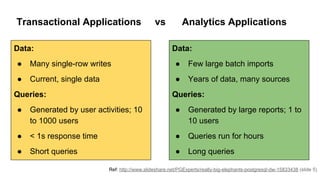
Transactional Applications vs Analytics Applications
Ref: http://www.slideshare.net/PGExperts/really-big-elephants-postgresql-dw-15833438 (slide 5)
Data:
● Many single-row writes
● Current, single data
Queries:
● Generated by user activities; 10
to 1000 users
● < 1s response time
● Short queries
Data:
● Few large batch imports
● Years of data, many sources
Queries:
● Generated by large reports; 1 to
10 users
● Queries run for hours
● Long queries
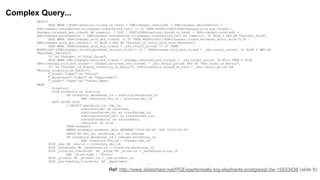
Ref: http://www.slideshare.net/PGExperts/really-big-elephants-postgresql-dw-15833438 (slide 8)
Complex Query...
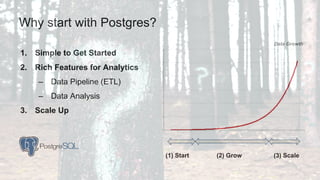
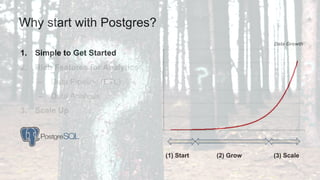
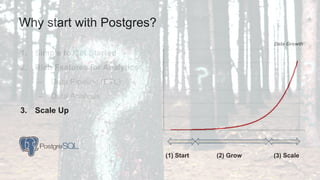
Why start with Postgres?
1. Simple to Get Started
2. Rich Features for Analytics
– Data Pipeline (ETL)
– Data Analysis
3. Scale Up
(3) Scale(1) Start (2) Grow
Data Growth
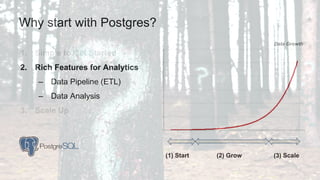
1. Simple to Get Started
2. Rich Features for Analytics
– Data Pipeline (ETL)
– Data Analysis
3. Scale Up
Why start with Postgres?
(3) Scale(1) Start (2) Grow
Data Growth
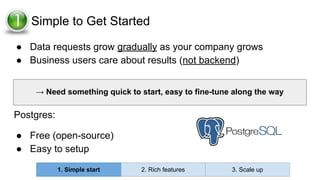
1 Simple to Get Started
● Data requests grow gradually as your company grows
● Business users care about results (not backend)
Postgres:
● Free (open-source)
● Easy to setup
→ Need something quick to start, easy to fine-tune along the way
1. Simple start 2. Rich features 3. Scale up
1. Simple to Get Started
2. Rich Features for Analytics
– Data Pipeline (ETL)
– Data Analysis
3. Scale Up
Why start with Postgres?
(3) Scale(1) Start (2) Grow
Data Growth
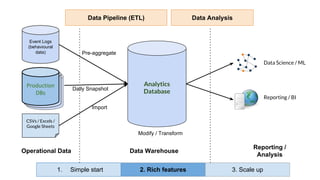
Analytics
Database
CSVs / Excels /
Google Sheets
Operational Data Data Warehouse
Reporting /
Analysis
Data Science / ML
Reporting / BI
Event Logs
(behavioural
data)
Live
Databases
Live
Databases
Production
DBs
Daily Snapshot
Import
Pre-aggregate
Modify / Transform
Data Pipeline (ETL) Data Analysis
1. Simple start 2. Rich features 3. Scale up
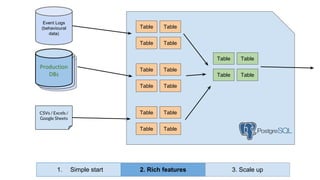
Analytics
Database
CSVs / Excels /
Google Sheets
Data Warehouse
Event Logs
(behavioural
data)
Live
Databases
Live
Databases
Production
DBs
Table
Table
Table
Table
Table
Table
Table
Table
Table
Table
Table
Table
Table
Table
Table
Table
1. Simple start 2. Rich features 3. Scale up
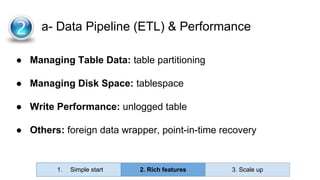
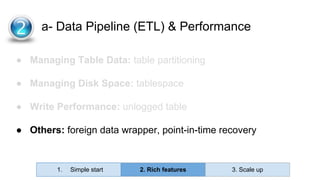
● Managing Table Data: table partitioning
● Managing Disk Space: tablespace
● Write Performance: unlogged table
● Others: foreign data wrapper, point-in-time recovery
2 a- Data Pipeline (ETL) & Performance
1. Simple start 2. Rich features 3. Scale up
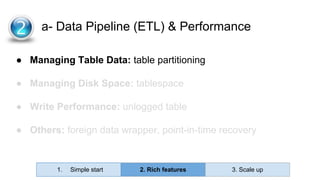
● Managing Table Data: table partitioning
● Managing Disk Space: tablespace
● Write Performance: unlogged table
● Others: foreign data wrapper, point-in-time recovery
2 a- Data Pipeline (ETL) & Performance
1. Simple start 2. Rich features 3. Scale up
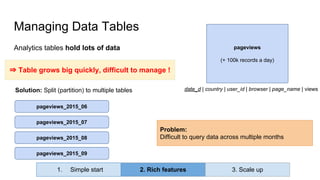
Analytics tables hold lots of data
Managing Data Tables
pageviews_2015_06
pageviews_2015_07
pageviews_2015_08
pageviews_2015_09
Solution: Split (partition) to multiple tables
Problem:
Difficult to query data across multiple months
⇒ Table grows big quickly, difficult to manage !
pageviews
(+ 100k records a day)
date_d | country | user_id | browser | page_name | views
1. Simple start 2. Rich features 3. Scale up
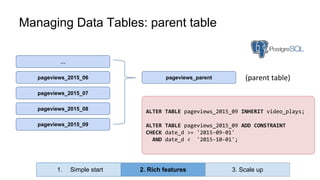
Managing Data Tables: parent table
pageviews_2015_06
pageviews_2015_07
pageviews_2015_08
pageviews_2015_09
…
ALTER TABLE pageviews_2015_09 INHERIT video_plays;
ALTER TABLE pageviews_2015_09 ADD CONSTRAINT
CHECK date_d >= '2015-09-01'
AND date_d < '2015-10-01';
pageviews_parent (parent table)
1. Simple start 2. Rich features 3. Scale up
● Managing Table Data: table partitioning
● Managing Disk Space: tablespace
● Write Performance: unlogged table
● Others: foreign data wrapper, point-in-time recovery
2 a- Data Pipeline (ETL) & Performance
1. Simple start 2. Rich features 3. Scale up
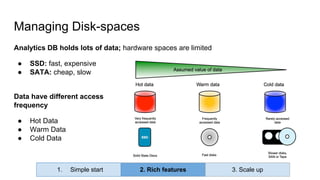
Analytics DB holds lots of data; hardware spaces are limited
● SSD: fast, expensive
● SATA: cheap, slow
Data have different access
frequency
● Hot Data
● Warm Data
● Cold Data
Managing Disk-spaces
1. Simple start 2. Rich features 3. Scale up
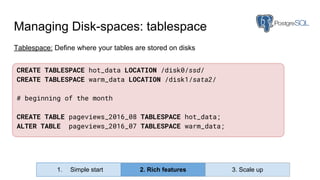
Tablespace: Define where your tables are stored on disks
Managing Disk-spaces: tablespace
CREATE TABLESPACE hot_data LOCATION /disk0/ssd/
CREATE TABLESPACE warm_data LOCATION /disk1/sata2/
# beginning of the month
CREATE TABLE pageviews_2016_08 TABLESPACE hot_data;
ALTER TABLE pageviews_2016_07 TABLESPACE warm_data;
1. Simple start 2. Rich features 3. Scale up
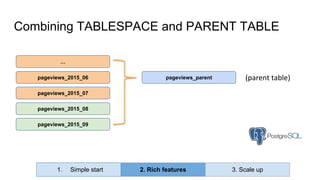
Combining TABLESPACE and PARENT TABLE
pageviews_2015_06
pageviews_2015_07
pageviews_2015_08
pageviews_2015_09
…
pageviews_parent (parent table)
1. Simple start 2. Rich features 3. Scale up
● Managing Table Data: table partitioning
● Managing Disk Space: tablespace
● Write Performance: unlogged table
● Others: foreign data wrapper, point-in-time recovery
2 a- Data Pipeline (ETL) & Performance
1. Simple start 2. Rich features 3. Scale up
Analytics
Database
CSVs / Excels /
Google Sheets
Data Warehouse
Event Logs
(behavioural
data)
Live
Databases
Live
Databases
Production
DBs
Table
Table
Table
Table
Table
Table
Table
Table
Table
Table
Table
Table
Table
Table
Table
Table
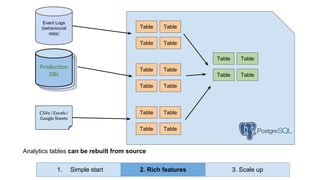
Analytics tables can be rebuilt from source
1. Simple start 2. Rich features 3. Scale up
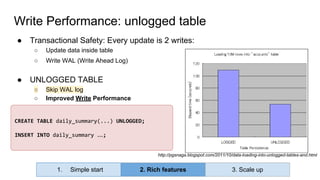
CREATE TABLE daily_summary(...) UNLOGGED;
INSERT INTO daily_summary …;
Write Performance: unlogged table
● Transactional Safety: Every update is 2 writes:
○ Update data inside table
○ Write WAL (Write Ahead Log)
● UNLOGGED TABLE
○ Skip WAL log
○ Improved Write Performance
http://pgsnaga.blogspot.com/2011/10/data-loading-into-unlogged-tables-and.html
1. Simple start 2. Rich features 3. Scale up
● Managing Table Data: table partitioning
● Managing Disk Space: tablespace
● Write Performance: unlogged table
● Others: foreign data wrapper, point-in-time recovery
2 a- Data Pipeline (ETL) & Performance
1. Simple start 2. Rich features 3. Scale up
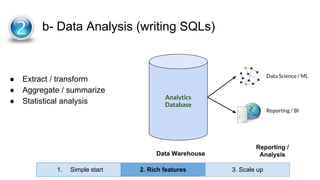
● Extract / transform
● Aggregate / summarize
● Statistical analysis
2- b- Data Analysis (writing SQLs)
Analytics
Database
Data Warehouse
Reporting /
Analysis
Data Science / ML
Reporting / BI
1. Simple start 2. Rich features 3. Scale up
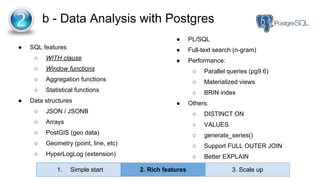
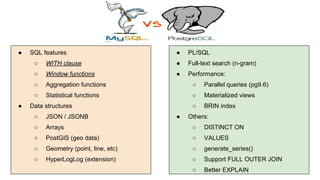
● SQL features
○ WITH clause
○ Window functions
○ Aggregation functions
○ Statistical functions
● Data structures
○ JSON / JSONB
○ Arrays
○ PostGIS (geo data)
○ Geometry (point, line, etc)
○ HyperLogLog (extension)
2- b - Data Analysis with Postgres
● PL/SQL
● Full-text search (n-gram)
● Performance:
○ Parallel queries (pg9.6)
○ Materialized views
○ BRIN index
● Others:
○ DISTINCT ON
○ VALUES
○ generate_series()
○ Support FULL OUTER JOIN
○ Better EXPLAIN
1. Simple start 2. Rich features 3. Scale up
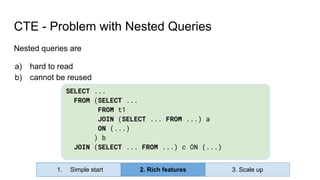
SELECT ...
FROM (SELECT ...
FROM t1
JOIN (SELECT ... FROM ...) a
ON (...)
) b
JOIN (SELECT ... FROM ...) c ON (...)
CTE - Problem with Nested Queries
Nested queries are
a) hard to read
b) cannot be reused
1. Simple start 2. Rich features 3. Scale up
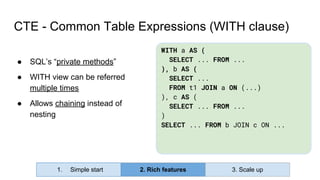
CTE - Common Table Expressions (WITH clause)
WITH a AS (
SELECT ... FROM ...
), b AS (
SELECT ...
FROM t1 JOIN a ON (...)
), c AS (
SELECT ... FROM ...
)
SELECT ... FROM b JOIN c ON ...
● SQL’s “private methods”
● WITH view can be referred
multiple times
● Allows chaining instead of
nesting
1. Simple start 2. Rich features 3. Scale up
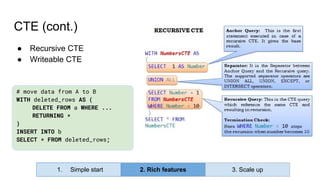
CTE (cont.)
● Recursive CTE
● Writeable CTE
1. Simple start 2. Rich features 3. Scale up
# move data from A to B
WITH deleted_rows AS (
DELETE FROM a WHERE ...
RETURNING *
)
INSERT INTO b
SELECT * FROM deleted_rows;
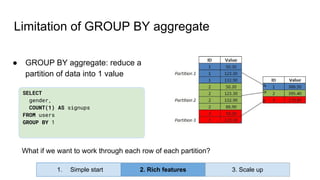
SELECT
gender,
COUNT(1) AS signups
FROM users
GROUP BY 1
● GROUP BY aggregate: reduce a
partition of data into 1 value
Limitation of GROUP BY aggregate
What if we want to work through each row of each partition?
1. Simple start 2. Rich features 3. Scale up
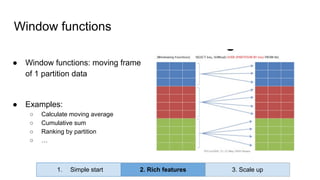
● Window functions: moving frame
of 1 partition data
● Examples:
○ Calculate moving average
○ Cumulative sum
○ Ranking by partition
○ …
Window functions
1. Simple start 2. Rich features 3. Scale up
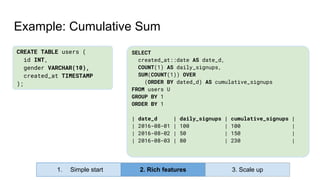
SELECT
created_at::date AS date_d,
COUNT(1) AS daily_signups,
SUM(COUNT(1)) OVER
(ORDER BY dated_d) AS cumulative_signups
FROM users U
GROUP BY 1
ORDER BY 1
| date_d | daily_signups | cumulative_signups |
| 2016-08-01 | 100 | 100 |
| 2016-08-02 | 50 | 150 |
| 2016-08-03 | 80 | 230 |
Example: Cumulative Sum
CREATE TABLE users (
id INT,
gender VARCHAR(10),
created_at TIMESTAMP
);
1. Simple start 2. Rich features 3. Scale up
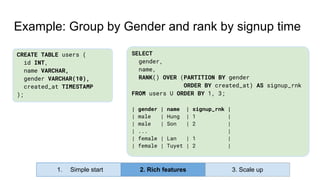
SELECT
gender,
name,
RANK() OVER (PARTITION BY gender
ORDER BY created_at) AS signup_rnk
FROM users U ORDER BY 1, 3;
| gender | name | signup_rnk |
| male | Hung | 1 |
| male | Son | 2 |
| ... |
| female | Lan | 1 |
| female | Tuyet | 2 |
Example: Group by Gender and rank by signup time
CREATE TABLE users (
id INT,
name VARCHAR,
gender VARCHAR(10),
created_at TIMESTAMP
);
1. Simple start 2. Rich features 3. Scale up
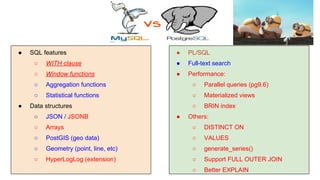
● SQL features
○ WITH clause
○ Window functions
○ Aggregation functions
○ Statistical functions
● Data structures
○ JSON / JSONB
○ Arrays
○ PostGIS (geo data)
○ Geometry (point, line, etc)
○ HyperLogLog (extension)
2 b- Data Analysis with Postgres
● PL/SQL
● Full-text search (n-gram)
● Performance:
○ Parallel queries (pg9.6)
○ Materialized views
○ BRIN index
● Others:
○ DISTINCT ON
○ VALUES
○ generate_series()
○ Support FULL OUTER JOIN
○ Better EXPLAIN
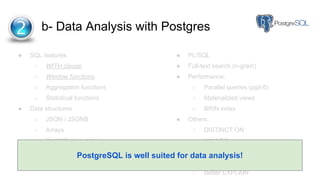
PostgreSQL is well suited for data analysis!
Analytics
Database
CSVs / Excels /
Google Sheets
Operational Data Data Warehouse
Reporting /
Analysis
Data Science / ML
Reporting / BI
Event Logs
(behavioural
data)
Live
Databases
Live
Databases
Production
DBs
Daily Snapshot
Import
Pre-aggregate
Modify / Transform
Data Pipeline (ETL) Data Analysis
1. Simple start 2. Rich features 3. Scale up
Why start with Postgres?
1. Simple to Get Started
2. Rich Features for Analytics
– Data Pipeline (ETL)
– Data Analysis
3. Scale Up
(3) Scale(1) Start (2) Grow
Data Growth
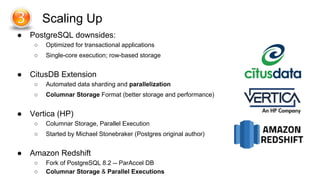
● PostgreSQL downsides:
○ Optimized for transactional applications
○ Single-core execution; row-based storage
● CitusDB Extension
○ Automated data sharding and parallelization
○ Columnar Storage Format (better storage and performance)
● Vertica (HP)
○ Columnar Storage, Parallel Execution
○ Started by Michael Stonebraker (Postgres original author)
● Amazon Redshift
○ Fork of PostgreSQL 8.2 -- ParAccel DB
○ Columnar Storage & Parallel Executions
3- Scaling Up
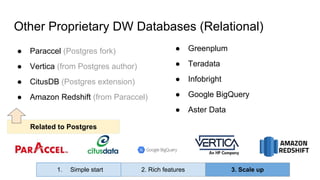
Other Proprietary DW Databases (Relational)
● Greenplum
● Teradata
● Infobright
● Google BigQuery
● Aster Data
● Paraccel (Postgres fork)
● Vertica (from Postgres author)
● CitusDB (Postgres extension)
● Amazon Redshift (from Paraccel)
1. Simple start 2. Rich features 3. Scale up
Related to Postgres
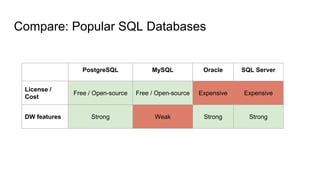
Compare: Popular SQL Databases
PostgreSQL MySQL Oracle SQL Server
License /
Cost
Free / Open-source Free / Open-source Expensive Expensive
DW features Strong Weak Strong Strong
● SQL features
○ WITH clause
○ Window functions
○ Aggregation functions
○ Statistical functions
● Data structures
○ JSON / JSONB
○ Arrays
○ PostGIS (geo data)
○ Geometry (point, line, etc)
○ HyperLogLog (extension)
● PL/SQL
● Full-text search (n-gram)
● Performance:
○ Parallel queries (pg9.6)
○ Materialized views
○ BRIN index
● Others:
○ DISTINCT ON
○ VALUES
○ generate_series()
○ Support FULL OUTER JOIN
○ Better EXPLAIN
● SQL features
○ WITH clause
○ Window functions
○ Aggregation functions
○ Statistical functions
● Data structures
○ JSON / JSONB
○ Arrays
○ PostGIS (geo data)
○ Geometry (point, line, etc)
○ HyperLogLog (extension)
● PL/SQL
● Full-text search
● Performance:
○ Parallel queries (pg9.6)
○ Materialized views
○ BRIN index
● Others:
○ DISTINCT ON
○ VALUES
○ generate_series()
○ Support FULL OUTER JOIN
○ Better EXPLAIN
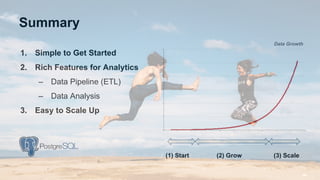
Summary
1. Simple to Get Started
2. Rich Features for Analytics
– Data Pipeline (ETL)
– Data Analysis
3. Easy to Scale Up
(3) Scale(1) Start (2) Grow
Data Growth
Summary (cont)
● Why starting with Postgres
● Scaling up to DW databases
● Comparing with other transactional DBs
● Not Cover:
○ How to setup PostgreSQL for DW
○ Performance Optimizations
○ Behavioural Data: Hadoop, Spark, HDFS
Huy Nguyen
huy@holistics.io

Why PostgreSQL for Analytics Infrastructure (DW)?

  • 1.
    Huy Nguyen CTO, Cofounder- Holistics.io Why PostgreSQL for Analytics Infrastructure (DW)? Grokking TechTalk - Database Systems Ho Chi Minh City - Aug 2016
  • 2.
    ● Cofounder ○ DataReporting (BI) and Infrastructure SaaS ● Cofounder of Grokking Vietnam ○ Building community of world-class engineers in Vietnam ● Previous ○ Growth Team at Facebook (US) ○ Built Data Pipeline at Viki (Singapore) About Me
  • 3.
    Background: What isAnalytics/DW?
  • 4.
    - A TypicalWeb Application Data-related Business Problems: • Daily/weekly registered users by different platforms, countries? • How many video uploads do we have everyday?
  • 5.
    - A TypicalWeb Application • Daily/weekly registered users by different platforms, countries? • How many video uploads do we have everyday?
  • 7.
  • 8.
    Analytics Database CSVs / Excels/ Google Sheets Operational Data Data Warehouse Reporting / Analysis Data Science / ML Reporting / BI Event Logs (behavioural data) Live Databases Live Databases Production DBs Daily Snapshot Import Pre-aggregate Modify / Transform
  • 9.
    Analytics Database CSVs / Excels/ Google Sheets Operational Data Data Warehouse Reporting / Analysis Data Science / ML Reporting / BI Event Logs (behavioural data) Live Databases Live Databases Production DBs Daily Snapshot Import Pre-aggregate Modify / Transform What database should we pick?
  • 10.
    Transactional Applications vsAnalytics Applications Ref: http://www.slideshare.net/PGExperts/really-big-elephants-postgresql-dw-15833438 (slide 5) Data: ● Many single-row writes ● Current, single data Queries: ● Generated by user activities; 10 to 1000 users ● < 1s response time ● Short queries Data: ● Few large batch imports ● Years of data, many sources Queries: ● Generated by large reports; 1 to 10 users ● Queries run for hours ● Long queries
  • 11.
  • 12.
    Why start withPostgres? 1. Simple to Get Started 2. Rich Features for Analytics – Data Pipeline (ETL) – Data Analysis 3. Scale Up (3) Scale(1) Start (2) Grow Data Growth
  • 13.
    1. Simple toGet Started 2. Rich Features for Analytics – Data Pipeline (ETL) – Data Analysis 3. Scale Up Why start with Postgres? (3) Scale(1) Start (2) Grow Data Growth
  • 14.
    1 Simple toGet Started ● Data requests grow gradually as your company grows ● Business users care about results (not backend) Postgres: ● Free (open-source) ● Easy to setup → Need something quick to start, easy to fine-tune along the way 1. Simple start 2. Rich features 3. Scale up
  • 15.
    1. Simple toGet Started 2. Rich Features for Analytics – Data Pipeline (ETL) – Data Analysis 3. Scale Up Why start with Postgres? (3) Scale(1) Start (2) Grow Data Growth
  • 16.
    Analytics Database CSVs / Excels/ Google Sheets Operational Data Data Warehouse Reporting / Analysis Data Science / ML Reporting / BI Event Logs (behavioural data) Live Databases Live Databases Production DBs Daily Snapshot Import Pre-aggregate Modify / Transform Data Pipeline (ETL) Data Analysis 1. Simple start 2. Rich features 3. Scale up
  • 17.
    Analytics Database CSVs / Excels/ Google Sheets Data Warehouse Event Logs (behavioural data) Live Databases Live Databases Production DBs Table Table Table Table Table Table Table Table Table Table Table Table Table Table Table Table 1. Simple start 2. Rich features 3. Scale up
  • 18.
    ● Managing TableData: table partitioning ● Managing Disk Space: tablespace ● Write Performance: unlogged table ● Others: foreign data wrapper, point-in-time recovery 2 a- Data Pipeline (ETL) & Performance 1. Simple start 2. Rich features 3. Scale up
  • 19.
    ● Managing TableData: table partitioning ● Managing Disk Space: tablespace ● Write Performance: unlogged table ● Others: foreign data wrapper, point-in-time recovery 2 a- Data Pipeline (ETL) & Performance 1. Simple start 2. Rich features 3. Scale up
  • 20.
    Analytics tables holdlots of data Managing Data Tables pageviews_2015_06 pageviews_2015_07 pageviews_2015_08 pageviews_2015_09 Solution: Split (partition) to multiple tables Problem: Difficult to query data across multiple months ⇒ Table grows big quickly, difficult to manage ! pageviews (+ 100k records a day) date_d | country | user_id | browser | page_name | views 1. Simple start 2. Rich features 3. Scale up
  • 21.
    Managing Data Tables:parent table pageviews_2015_06 pageviews_2015_07 pageviews_2015_08 pageviews_2015_09 … ALTER TABLE pageviews_2015_09 INHERIT video_plays; ALTER TABLE pageviews_2015_09 ADD CONSTRAINT CHECK date_d >= '2015-09-01' AND date_d < '2015-10-01'; pageviews_parent (parent table) 1. Simple start 2. Rich features 3. Scale up
  • 22.
    ● Managing TableData: table partitioning ● Managing Disk Space: tablespace ● Write Performance: unlogged table ● Others: foreign data wrapper, point-in-time recovery 2 a- Data Pipeline (ETL) & Performance 1. Simple start 2. Rich features 3. Scale up
  • 23.
    Analytics DB holdslots of data; hardware spaces are limited ● SSD: fast, expensive ● SATA: cheap, slow Data have different access frequency ● Hot Data ● Warm Data ● Cold Data Managing Disk-spaces 1. Simple start 2. Rich features 3. Scale up
  • 24.
    Tablespace: Define whereyour tables are stored on disks Managing Disk-spaces: tablespace CREATE TABLESPACE hot_data LOCATION /disk0/ssd/ CREATE TABLESPACE warm_data LOCATION /disk1/sata2/ # beginning of the month CREATE TABLE pageviews_2016_08 TABLESPACE hot_data; ALTER TABLE pageviews_2016_07 TABLESPACE warm_data; 1. Simple start 2. Rich features 3. Scale up
  • 25.
    Combining TABLESPACE andPARENT TABLE pageviews_2015_06 pageviews_2015_07 pageviews_2015_08 pageviews_2015_09 … pageviews_parent (parent table) 1. Simple start 2. Rich features 3. Scale up
  • 26.
    ● Managing TableData: table partitioning ● Managing Disk Space: tablespace ● Write Performance: unlogged table ● Others: foreign data wrapper, point-in-time recovery 2 a- Data Pipeline (ETL) & Performance 1. Simple start 2. Rich features 3. Scale up
  • 27.
    Analytics Database CSVs / Excels/ Google Sheets Data Warehouse Event Logs (behavioural data) Live Databases Live Databases Production DBs Table Table Table Table Table Table Table Table Table Table Table Table Table Table Table Table Analytics tables can be rebuilt from source 1. Simple start 2. Rich features 3. Scale up
  • 28.
    CREATE TABLE daily_summary(...)UNLOGGED; INSERT INTO daily_summary …; Write Performance: unlogged table ● Transactional Safety: Every update is 2 writes: ○ Update data inside table ○ Write WAL (Write Ahead Log) ● UNLOGGED TABLE ○ Skip WAL log ○ Improved Write Performance http://pgsnaga.blogspot.com/2011/10/data-loading-into-unlogged-tables-and.html 1. Simple start 2. Rich features 3. Scale up
  • 29.
    ● Managing TableData: table partitioning ● Managing Disk Space: tablespace ● Write Performance: unlogged table ● Others: foreign data wrapper, point-in-time recovery 2 a- Data Pipeline (ETL) & Performance 1. Simple start 2. Rich features 3. Scale up
  • 30.
    ● Extract /transform ● Aggregate / summarize ● Statistical analysis 2- b- Data Analysis (writing SQLs) Analytics Database Data Warehouse Reporting / Analysis Data Science / ML Reporting / BI 1. Simple start 2. Rich features 3. Scale up
  • 31.
    ● SQL features ○WITH clause ○ Window functions ○ Aggregation functions ○ Statistical functions ● Data structures ○ JSON / JSONB ○ Arrays ○ PostGIS (geo data) ○ Geometry (point, line, etc) ○ HyperLogLog (extension) 2- b - Data Analysis with Postgres ● PL/SQL ● Full-text search (n-gram) ● Performance: ○ Parallel queries (pg9.6) ○ Materialized views ○ BRIN index ● Others: ○ DISTINCT ON ○ VALUES ○ generate_series() ○ Support FULL OUTER JOIN ○ Better EXPLAIN 1. Simple start 2. Rich features 3. Scale up
  • 32.
    SELECT ... FROM (SELECT... FROM t1 JOIN (SELECT ... FROM ...) a ON (...) ) b JOIN (SELECT ... FROM ...) c ON (...) CTE - Problem with Nested Queries Nested queries are a) hard to read b) cannot be reused 1. Simple start 2. Rich features 3. Scale up
  • 33.
    CTE - CommonTable Expressions (WITH clause) WITH a AS ( SELECT ... FROM ... ), b AS ( SELECT ... FROM t1 JOIN a ON (...) ), c AS ( SELECT ... FROM ... ) SELECT ... FROM b JOIN c ON ... ● SQL’s “private methods” ● WITH view can be referred multiple times ● Allows chaining instead of nesting 1. Simple start 2. Rich features 3. Scale up
  • 34.
    CTE (cont.) ● RecursiveCTE ● Writeable CTE 1. Simple start 2. Rich features 3. Scale up # move data from A to B WITH deleted_rows AS ( DELETE FROM a WHERE ... RETURNING * ) INSERT INTO b SELECT * FROM deleted_rows;
  • 35.
    SELECT gender, COUNT(1) AS signups FROMusers GROUP BY 1 ● GROUP BY aggregate: reduce a partition of data into 1 value Limitation of GROUP BY aggregate What if we want to work through each row of each partition? 1. Simple start 2. Rich features 3. Scale up
  • 36.
    ● Window functions:moving frame of 1 partition data ● Examples: ○ Calculate moving average ○ Cumulative sum ○ Ranking by partition ○ … Window functions 1. Simple start 2. Rich features 3. Scale up
  • 37.
    SELECT created_at::date AS date_d, COUNT(1)AS daily_signups, SUM(COUNT(1)) OVER (ORDER BY dated_d) AS cumulative_signups FROM users U GROUP BY 1 ORDER BY 1 | date_d | daily_signups | cumulative_signups | | 2016-08-01 | 100 | 100 | | 2016-08-02 | 50 | 150 | | 2016-08-03 | 80 | 230 | Example: Cumulative Sum CREATE TABLE users ( id INT, gender VARCHAR(10), created_at TIMESTAMP ); 1. Simple start 2. Rich features 3. Scale up
  • 38.
    SELECT gender, name, RANK() OVER (PARTITIONBY gender ORDER BY created_at) AS signup_rnk FROM users U ORDER BY 1, 3; | gender | name | signup_rnk | | male | Hung | 1 | | male | Son | 2 | | ... | | female | Lan | 1 | | female | Tuyet | 2 | Example: Group by Gender and rank by signup time CREATE TABLE users ( id INT, name VARCHAR, gender VARCHAR(10), created_at TIMESTAMP ); 1. Simple start 2. Rich features 3. Scale up
  • 39.
    ● SQL features ○WITH clause ○ Window functions ○ Aggregation functions ○ Statistical functions ● Data structures ○ JSON / JSONB ○ Arrays ○ PostGIS (geo data) ○ Geometry (point, line, etc) ○ HyperLogLog (extension) 2 b- Data Analysis with Postgres ● PL/SQL ● Full-text search (n-gram) ● Performance: ○ Parallel queries (pg9.6) ○ Materialized views ○ BRIN index ● Others: ○ DISTINCT ON ○ VALUES ○ generate_series() ○ Support FULL OUTER JOIN ○ Better EXPLAIN PostgreSQL is well suited for data analysis!
  • 40.
    Analytics Database CSVs / Excels/ Google Sheets Operational Data Data Warehouse Reporting / Analysis Data Science / ML Reporting / BI Event Logs (behavioural data) Live Databases Live Databases Production DBs Daily Snapshot Import Pre-aggregate Modify / Transform Data Pipeline (ETL) Data Analysis 1. Simple start 2. Rich features 3. Scale up
  • 41.
    Why start withPostgres? 1. Simple to Get Started 2. Rich Features for Analytics – Data Pipeline (ETL) – Data Analysis 3. Scale Up (3) Scale(1) Start (2) Grow Data Growth
  • 42.
    ● PostgreSQL downsides: ○Optimized for transactional applications ○ Single-core execution; row-based storage ● CitusDB Extension ○ Automated data sharding and parallelization ○ Columnar Storage Format (better storage and performance) ● Vertica (HP) ○ Columnar Storage, Parallel Execution ○ Started by Michael Stonebraker (Postgres original author) ● Amazon Redshift ○ Fork of PostgreSQL 8.2 -- ParAccel DB ○ Columnar Storage & Parallel Executions 3- Scaling Up
  • 43.
    Other Proprietary DWDatabases (Relational) ● Greenplum ● Teradata ● Infobright ● Google BigQuery ● Aster Data ● Paraccel (Postgres fork) ● Vertica (from Postgres author) ● CitusDB (Postgres extension) ● Amazon Redshift (from Paraccel) 1. Simple start 2. Rich features 3. Scale up Related to Postgres
  • 44.
    Compare: Popular SQLDatabases PostgreSQL MySQL Oracle SQL Server License / Cost Free / Open-source Free / Open-source Expensive Expensive DW features Strong Weak Strong Strong
  • 45.
    ● SQL features ○WITH clause ○ Window functions ○ Aggregation functions ○ Statistical functions ● Data structures ○ JSON / JSONB ○ Arrays ○ PostGIS (geo data) ○ Geometry (point, line, etc) ○ HyperLogLog (extension) ● PL/SQL ● Full-text search (n-gram) ● Performance: ○ Parallel queries (pg9.6) ○ Materialized views ○ BRIN index ● Others: ○ DISTINCT ON ○ VALUES ○ generate_series() ○ Support FULL OUTER JOIN ○ Better EXPLAIN
  • 46.
    ● SQL features ○WITH clause ○ Window functions ○ Aggregation functions ○ Statistical functions ● Data structures ○ JSON / JSONB ○ Arrays ○ PostGIS (geo data) ○ Geometry (point, line, etc) ○ HyperLogLog (extension) ● PL/SQL ● Full-text search ● Performance: ○ Parallel queries (pg9.6) ○ Materialized views ○ BRIN index ● Others: ○ DISTINCT ON ○ VALUES ○ generate_series() ○ Support FULL OUTER JOIN ○ Better EXPLAIN
  • 48.
    Summary 1. Simple toGet Started 2. Rich Features for Analytics – Data Pipeline (ETL) – Data Analysis 3. Easy to Scale Up (3) Scale(1) Start (2) Grow Data Growth
  • 49.
    Summary (cont) ● Whystarting with Postgres ● Scaling up to DW databases ● Comparing with other transactional DBs ● Not Cover: ○ How to setup PostgreSQL for DW ○ Performance Optimizations ○ Behavioural Data: Hadoop, Spark, HDFS
  • 50.