REDSHIFT
PERFORMANCE TUNING
Carlos del Cacho
FACTORS TO CONSIDER
➤ Database design
➤ Execution queues
➤ Query performance tips
➤ Query diagnosis
➤ Loading data into Redshift
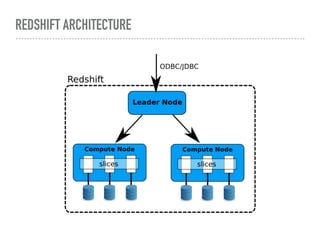
REDSHIFT ARCHITECTURE
STATIC OPTIONS
DATABASE DESIGN
➤ Usage of sort keys
➤ Usage of distribution keys
➤ Constraints
➤ Column compression
➤ Metadata
TRADITIONAL RELATIONAL KEYS ARE INFORMATIONAL
➤ Primary Key
➤ Foreign Key
NOT ENFORCED
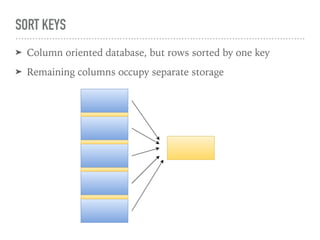
SORT KEYS
➤ Column oriented database, but rows sorted by one key
➤ Remaining columns occupy separate storage
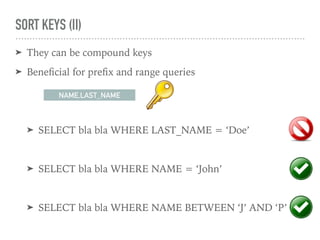
SORT KEYS (II)
➤ They can be compound keys
➤ Beneficial for prefix and range queries
➤ SELECT bla bla WHERE LAST_NAME = ‘Doe’
➤ SELECT bla bla WHERE NAME = ‘John’
➤ SELECT bla bla WHERE NAME BETWEEN ‘J’ AND ‘P’
NAME,LAST_NAME
SORT KEYS: DEFINITION
CREATE TABLE PERSON (
NAME VARCHAR(32),
LAST_NAME VARCHAR(32)
AGE INTEGER,
COMPOUND SORTKEY(NAME,LAST_NAME)
);
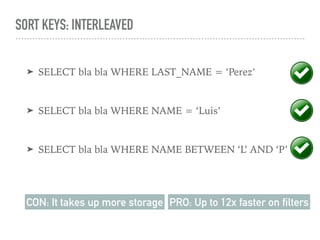
SORT KEYS: INTERLEAVED
➤ SELECT bla bla WHERE LAST_NAME = ‘Perez’
➤ SELECT bla bla WHERE NAME = ‘Luis’
➤ SELECT bla bla WHERE NAME BETWEEN ‘L’ AND ‘P’
CON: It takes up more storage PRO: Up to 12x faster on filters
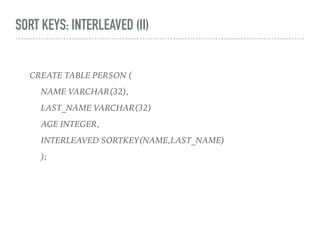
SORT KEYS: INTERLEAVED (II)
CREATE TABLE PERSON (
NAME VARCHAR(32),
LAST_NAME VARCHAR(32)
AGE INTEGER,
INTERLEAVED SORTKEY(NAME,LAST_NAME)
);
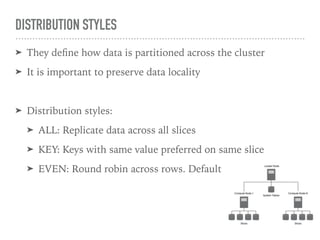
DISTRIBUTION STYLES
➤ They define how data is partitioned across the cluster
➤ It is important to preserve data locality
➤ Distribution styles:
➤ ALL: Replicate data across all slices
➤ KEY: Keys with same value preferred on same slice
➤ EVEN: Round robin across rows. Default
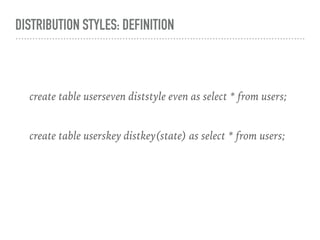
DISTRIBUTION STYLES: DEFINITION
create table userseven diststyle even as select * from users;
create table userskey distkey(state) as select * from users;
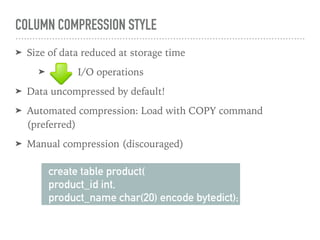
COLUMN COMPRESSION STYLE
➤ Size of data reduced at storage time
➤ I/O operations
➤ Data uncompressed by default!
➤ Automated compression: Load with COPY command
(preferred)
➤ Manual compression (discouraged)
create table product(
product_id int,
product_name char(20) encode bytedict);
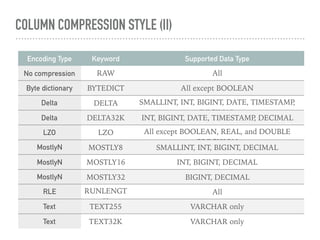
COLUMN COMPRESSION STYLE (II)
Encoding Type Keyword Supported Data Type
No compression RAW All
Byte dictionary BYTEDICT All except BOOLEAN
Delta DELTA SMALLINT, INT, BIGINT, DATE, TIMESTAMP,
DECIMAL
Delta DELTA32K INT, BIGINT, DATE, TIMESTAMP, DECIMAL
LZO LZO All except BOOLEAN, REAL, and DOUBLE
PRECISION
MostlyN MOSTLY8 SMALLINT, INT, BIGINT, DECIMAL
MostlyN MOSTLY16 INT, BIGINT, DECIMAL
MostlyN MOSTLY32 BIGINT, DECIMAL
RLE RUNLENGT
H
All
Text TEXT255 VARCHAR only
Text TEXT32K VARCHAR only
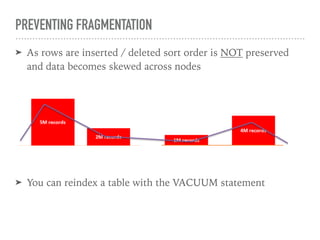
PREVENTING FRAGMENTATION
➤ As rows are inserted / deleted sort order is NOT preserved
and data becomes skewed across nodes
➤ You can reindex a table with the VACUUM statement
PREVENTING FRAGMENTATION (II)
select tbl as tbl_id, stv_tbl_perm.name as table_name,
col, interleaved_skew, last_reindex
from svv_interleaved_columns, stv_tbl_perm
where svv_interleaved_columns.tbl = stv_tbl_perm.id
and interleaved_skew is not null;
tbl_id | table_name | col | interleaved_skew | last_reindex
--------+------------+-----+------------------+--------------------
100048 | customer | 0 | 3.65 | 2015-04-22 22:05:45
100068 | lineorder | 1 | 2.65 | 2015-04-22 22:05:45
100072 | part | 0 | 1.65 | 2015-04-22 22:05:45
100077 | supplier | 1 | 1.00 | 2015-04-22 22:05:45
(4 rows)
VACUUM [ FULL | SORT ONLY | DELETE ONLY | REINDEX ]
[ table_name ]
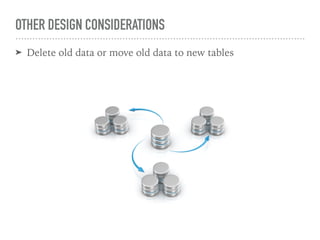
OTHER DESIGN CONSIDERATIONS
➤ Delete old data or move old data to new tables
DYNAMIC OPTIONS
REDSHIFT QUEUES
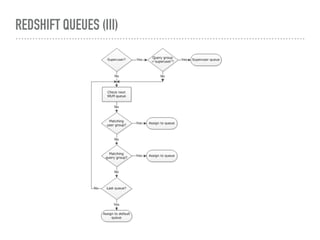
➤ SUPER USER queue: For Admin (1 concurrent query)
➤ USER queue: For mere mortals (5 concurrent queries)
➤ Heavy processing queries could use their own queue
REDSHIFT QUEUES (II)
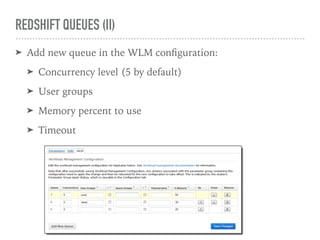
➤ Add new queue in the WLM configuration:
➤ Concurrency level (5 by default)
➤ User groups
➤ Memory percent to use
➤ Timeout
REDSHIFT QUEUES (III)
ANATOMY OF A QUERY SUBMISSION
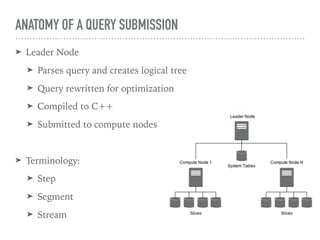
➤ Leader Node
➤ Parses query and creates logical tree
➤ Query rewritten for optimization
➤ Compiled to C++
➤ Submitted to compute nodes
➤ Terminology:
➤ Step
➤ Segment
➤ Stream
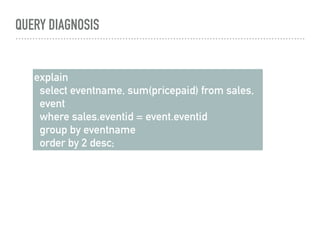
QUERY DIAGNOSIS
explain
select eventname, sum(pricepaid) from sales,
event
where sales.eventid = event.eventid
group by eventname
order by 2 desc;
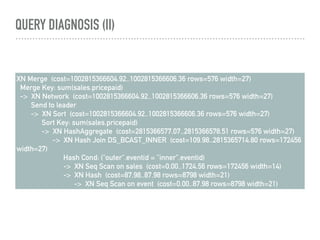
QUERY DIAGNOSIS (II)
XN Merge (cost=1002815366604.92..1002815366606.36 rows=576 width=27)
Merge Key: sum(sales.pricepaid)
-> XN Network (cost=1002815366604.92..1002815366606.36 rows=576 width=27)
Send to leader
-> XN Sort (cost=1002815366604.92..1002815366606.36 rows=576 width=27)
Sort Key: sum(sales.pricepaid)
-> XN HashAggregate (cost=2815366577.07..2815366578.51 rows=576 width=27)
-> XN Hash Join DS_BCAST_INNER (cost=109.98..2815365714.80 rows=172456
width=27)
Hash Cond: ("outer".eventid = "inner".eventid)
-> XN Seq Scan on sales (cost=0.00..1724.56 rows=172456 width=14)
-> XN Hash (cost=87.98..87.98 rows=8798 width=21)
-> XN Seq Scan on event (cost=0.00..87.98 rows=8798 width=21)
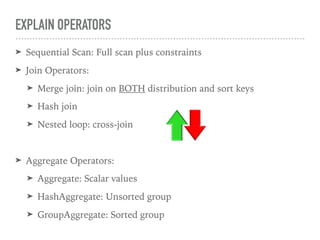
EXPLAIN OPERATORS
➤ Sequential Scan: Full scan plus constraints
➤ Join Operators:
➤ Merge join: join on BOTH distribution and sort keys
➤ Hash join
➤ Nested loop: cross-join
➤ Aggregate Operators:
➤ Aggregate: Scalar values
➤ HashAggregate: Unsorted group
➤ GroupAggregate: Sorted group
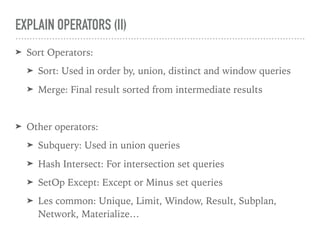
EXPLAIN OPERATORS (II)
➤ Sort Operators:
➤ Sort: Used in order by, union, distinct and window queries
➤ Merge: Final result sorted from intermediate results
➤ Other operators:
➤ Subquery: Used in union queries
➤ Hash Intersect: For intersection set queries
➤ SetOp Except: Except or Minus set queries
➤ Les common: Unique, Limit, Window, Result, Subplan,
Network, Materialize…
MY QUERY IS DAMN SLOW… WHY?
➤ Unoptimised database design (see previous section)
➤ Query is writing to disk (Large result set)
➤ Query waiting for other query (see queues section)
➤ Query optimised (use explain)
➤ Query needs more memory
➤ Database needs reindex (VACUUM)
wlm_query_slot_count
THANK YOU!
delcacho@gmail.com

Redshift performance tuning

  • 1.
  • 2.
    FACTORS TO CONSIDER ➤Database design ➤ Execution queues ➤ Query performance tips ➤ Query diagnosis ➤ Loading data into Redshift
  • 3.
  • 4.
  • 5.
    DATABASE DESIGN ➤ Usageof sort keys ➤ Usage of distribution keys ➤ Constraints ➤ Column compression ➤ Metadata
  • 6.
    TRADITIONAL RELATIONAL KEYSARE INFORMATIONAL ➤ Primary Key ➤ Foreign Key NOT ENFORCED
  • 7.
    SORT KEYS ➤ Columnoriented database, but rows sorted by one key ➤ Remaining columns occupy separate storage
  • 8.
    SORT KEYS (II) ➤They can be compound keys ➤ Beneficial for prefix and range queries ➤ SELECT bla bla WHERE LAST_NAME = ‘Doe’ ➤ SELECT bla bla WHERE NAME = ‘John’ ➤ SELECT bla bla WHERE NAME BETWEEN ‘J’ AND ‘P’ NAME,LAST_NAME
  • 9.
    SORT KEYS: DEFINITION CREATETABLE PERSON ( NAME VARCHAR(32), LAST_NAME VARCHAR(32) AGE INTEGER, COMPOUND SORTKEY(NAME,LAST_NAME) );
  • 10.
    SORT KEYS: INTERLEAVED ➤SELECT bla bla WHERE LAST_NAME = ‘Perez’ ➤ SELECT bla bla WHERE NAME = ‘Luis’ ➤ SELECT bla bla WHERE NAME BETWEEN ‘L’ AND ‘P’ CON: It takes up more storage PRO: Up to 12x faster on filters
  • 11.
    SORT KEYS: INTERLEAVED(II) CREATE TABLE PERSON ( NAME VARCHAR(32), LAST_NAME VARCHAR(32) AGE INTEGER, INTERLEAVED SORTKEY(NAME,LAST_NAME) );
  • 12.
    DISTRIBUTION STYLES ➤ Theydefine how data is partitioned across the cluster ➤ It is important to preserve data locality ➤ Distribution styles: ➤ ALL: Replicate data across all slices ➤ KEY: Keys with same value preferred on same slice ➤ EVEN: Round robin across rows. Default
  • 13.
    DISTRIBUTION STYLES: DEFINITION createtable userseven diststyle even as select * from users; create table userskey distkey(state) as select * from users;
  • 14.
    COLUMN COMPRESSION STYLE ➤Size of data reduced at storage time ➤ I/O operations ➤ Data uncompressed by default! ➤ Automated compression: Load with COPY command (preferred) ➤ Manual compression (discouraged) create table product( product_id int, product_name char(20) encode bytedict);
  • 15.
    COLUMN COMPRESSION STYLE(II) Encoding Type Keyword Supported Data Type No compression RAW All Byte dictionary BYTEDICT All except BOOLEAN Delta DELTA SMALLINT, INT, BIGINT, DATE, TIMESTAMP, DECIMAL Delta DELTA32K INT, BIGINT, DATE, TIMESTAMP, DECIMAL LZO LZO All except BOOLEAN, REAL, and DOUBLE PRECISION MostlyN MOSTLY8 SMALLINT, INT, BIGINT, DECIMAL MostlyN MOSTLY16 INT, BIGINT, DECIMAL MostlyN MOSTLY32 BIGINT, DECIMAL RLE RUNLENGT H All Text TEXT255 VARCHAR only Text TEXT32K VARCHAR only
  • 16.
    PREVENTING FRAGMENTATION ➤ Asrows are inserted / deleted sort order is NOT preserved and data becomes skewed across nodes ➤ You can reindex a table with the VACUUM statement
  • 17.
    PREVENTING FRAGMENTATION (II) selecttbl as tbl_id, stv_tbl_perm.name as table_name, col, interleaved_skew, last_reindex from svv_interleaved_columns, stv_tbl_perm where svv_interleaved_columns.tbl = stv_tbl_perm.id and interleaved_skew is not null; tbl_id | table_name | col | interleaved_skew | last_reindex --------+------------+-----+------------------+-------------------- 100048 | customer | 0 | 3.65 | 2015-04-22 22:05:45 100068 | lineorder | 1 | 2.65 | 2015-04-22 22:05:45 100072 | part | 0 | 1.65 | 2015-04-22 22:05:45 100077 | supplier | 1 | 1.00 | 2015-04-22 22:05:45 (4 rows) VACUUM [ FULL | SORT ONLY | DELETE ONLY | REINDEX ] [ table_name ]
  • 18.
    OTHER DESIGN CONSIDERATIONS ➤Delete old data or move old data to new tables
  • 19.
  • 20.
    REDSHIFT QUEUES ➤ SUPERUSER queue: For Admin (1 concurrent query) ➤ USER queue: For mere mortals (5 concurrent queries) ➤ Heavy processing queries could use their own queue
  • 21.
    REDSHIFT QUEUES (II) ➤Add new queue in the WLM configuration: ➤ Concurrency level (5 by default) ➤ User groups ➤ Memory percent to use ➤ Timeout
  • 22.
  • 23.
    ANATOMY OF AQUERY SUBMISSION ➤ Leader Node ➤ Parses query and creates logical tree ➤ Query rewritten for optimization ➤ Compiled to C++ ➤ Submitted to compute nodes ➤ Terminology: ➤ Step ➤ Segment ➤ Stream
  • 24.
    QUERY DIAGNOSIS explain select eventname,sum(pricepaid) from sales, event where sales.eventid = event.eventid group by eventname order by 2 desc;
  • 25.
    QUERY DIAGNOSIS (II) XNMerge (cost=1002815366604.92..1002815366606.36 rows=576 width=27) Merge Key: sum(sales.pricepaid) -> XN Network (cost=1002815366604.92..1002815366606.36 rows=576 width=27) Send to leader -> XN Sort (cost=1002815366604.92..1002815366606.36 rows=576 width=27) Sort Key: sum(sales.pricepaid) -> XN HashAggregate (cost=2815366577.07..2815366578.51 rows=576 width=27) -> XN Hash Join DS_BCAST_INNER (cost=109.98..2815365714.80 rows=172456 width=27) Hash Cond: ("outer".eventid = "inner".eventid) -> XN Seq Scan on sales (cost=0.00..1724.56 rows=172456 width=14) -> XN Hash (cost=87.98..87.98 rows=8798 width=21) -> XN Seq Scan on event (cost=0.00..87.98 rows=8798 width=21)
  • 26.
    EXPLAIN OPERATORS ➤ SequentialScan: Full scan plus constraints ➤ Join Operators: ➤ Merge join: join on BOTH distribution and sort keys ➤ Hash join ➤ Nested loop: cross-join ➤ Aggregate Operators: ➤ Aggregate: Scalar values ➤ HashAggregate: Unsorted group ➤ GroupAggregate: Sorted group
  • 27.
    EXPLAIN OPERATORS (II) ➤Sort Operators: ➤ Sort: Used in order by, union, distinct and window queries ➤ Merge: Final result sorted from intermediate results ➤ Other operators: ➤ Subquery: Used in union queries ➤ Hash Intersect: For intersection set queries ➤ SetOp Except: Except or Minus set queries ➤ Les common: Unique, Limit, Window, Result, Subplan, Network, Materialize…
  • 28.
    MY QUERY ISDAMN SLOW… WHY? ➤ Unoptimised database design (see previous section) ➤ Query is writing to disk (Large result set) ➤ Query waiting for other query (see queues section) ➤ Query optimised (use explain) ➤ Query needs more memory ➤ Database needs reindex (VACUUM) wlm_query_slot_count
  • 29.