Server
                 Virtualisation
                           And
                      Storage
                 Management


Optimising Storage Management to Obtain
Greater Benefits from Server Virtualisation


Alan McSweeney
ServerVirtualisation and Storage Management


                                                 Contents

Server Virtualisation ........................................................................................3
Server Virtualisation Architecture....................................................................4
  Configuration ...............................................................................................4
  Virtual Server Resilience ..............................................................................4
  Virtual Server Data Backup and Recovery ...................................................5
Storage Management and Server Virtualisation................................................6
  Virtual Server Backup and Recovery............................................................8
  IBM N Series SnapMirror .............................................................................9
  IBM N Series FlexVol and FlexClone............................................................9
  IBM N Series RAID Double Parity ..............................................................9
  Conclusion.................................................................................................. 10


                                                    Page 2
Server Virtualisation and Storage Management


Server Virtualisation

Implementing server virtualisation (using software such as VMware) can deliver
substantial benefits to IT and business by reducing the number of deployed
Intel-based servers by 50% or more while delivering benefits such as:

•   Improved server utilisation rates - 60% to 80% (up from typical rates of less
    than 15%)
•   Server and application provisioning time measured in hours not days
•   Reduction in downtime such as hardware maintenance                                Once confined to server
•   Reduction in operating costs                                                      rooms, virtualization has
•   Increased server and application resilience                                       now made it into the
•   Simplification of server operation and administration                             mainstream of computing.
•   Increased levels of service                                                       And by 2010,
                                                                                      virtualization will be the
Implementing server virtualisation also provides a platform for:                      single most important
                                                                                      technology for IT
•   Facilitating business continuity and disaster recovery                            departments, according to
•   Improved backup and recovery                                                      research firm Gartner.

A little additional planning and investment will deliver significant additional
benefits for a virtualised server environment in terms of:

•   Faster backup and recovery
•   Protection against application corruption
•   Improved business continuity and disaster recovery

Implementing server virtualisation requires some form of shared storage to
enable features such as HA (High Availability) and DRS (Dynamic Resource
Scheduling).

In order to implement an effective, efficient, resilient and performing virtualised
server infrastructure, the storage component needs to be designed correctly.
This can include taking advantage of features in a virtualised server
infrastructure such as snapshotting and virtual backup.

This whitepaper discusses some of the issues regarding the configuration of
storage for server virtualisation to derive a more complete set of benefits.

This whitepaper makes reference to one storage subsystem from NetApp and
also sold by IBM as the N Series.


                                      Page 3
ServerVirtualisation and Storage Management


                           Server Virtualisation Architecture

                           Configuration

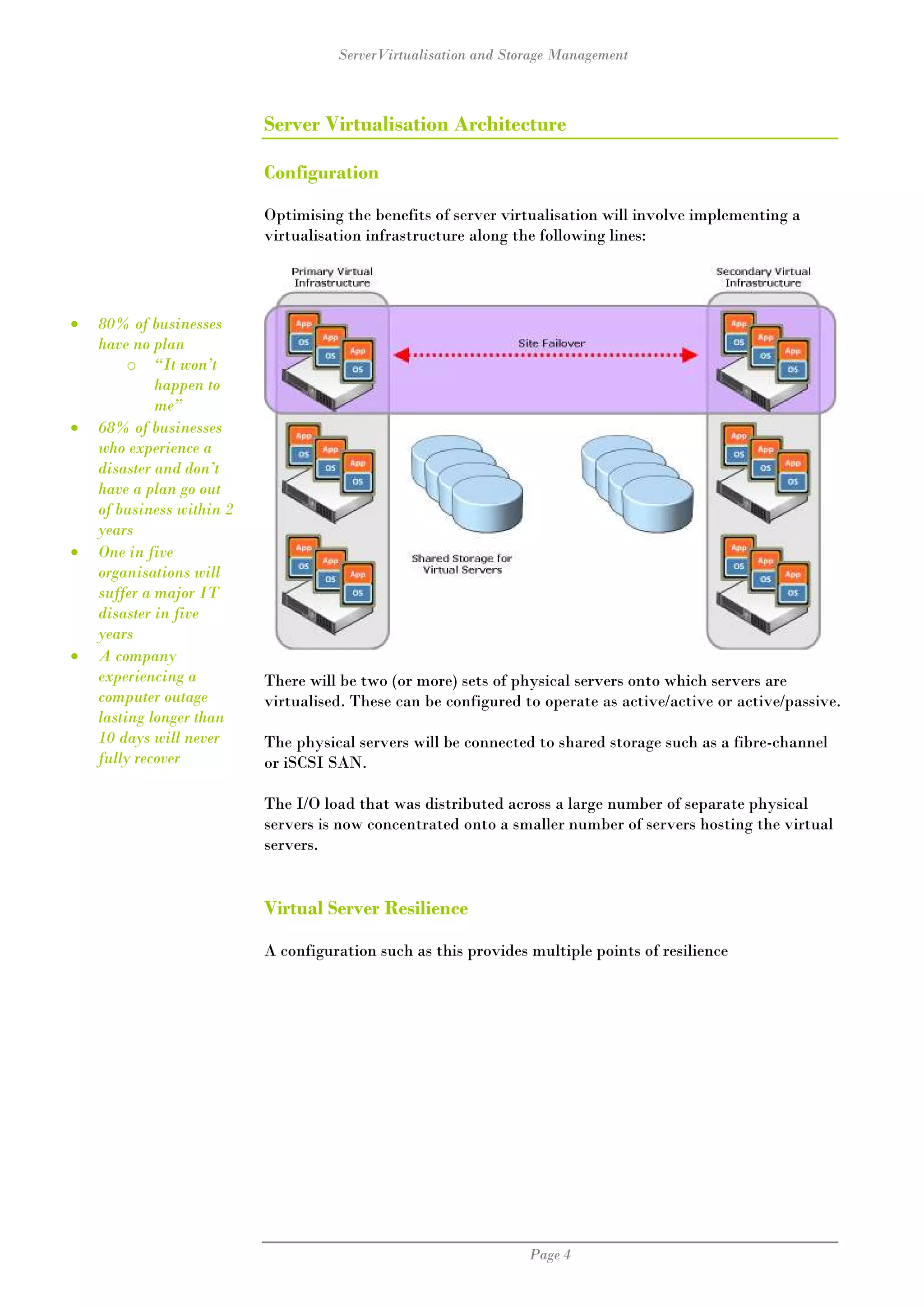
                           Optimising the benefits of server virtualisation will involve implementing a
                           virtualisation infrastructure along the following lines:


•   80% of businesses
    have no plan
         o “It won’t
             happen to
             me”
•   68% of businesses
    who experience a
    disaster and don’t
    have a plan go out
    of business within 2
    years
•   One in five
    organisations will
    suffer a major IT
    disaster in five
    years
•   A company
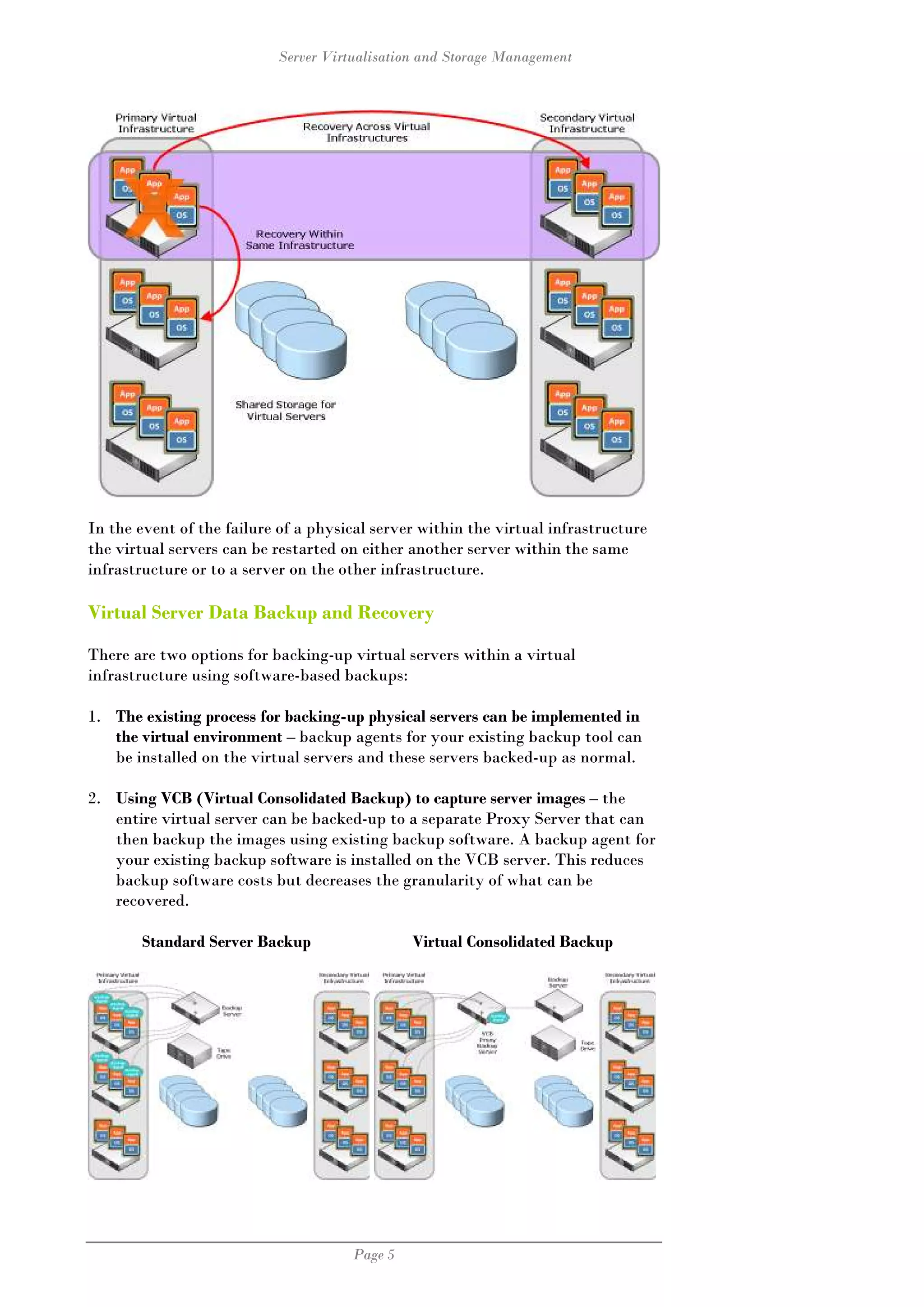
    experiencing a         There will be two (or more) sets of physical servers onto which servers are
    computer outage        virtualised. These can be configured to operate as active/active or active/passive.
    lasting longer than
    10 days will never     The physical servers will be connected to shared storage such as a fibre-channel
    fully recover          or iSCSI SAN.

                           The I/O load that was distributed across a large number of separate physical
                           servers is now concentrated onto a smaller number of servers hosting the virtual
                           servers.


                           Virtual Server Resilience

                           A configuration such as this provides multiple points of resilience


                                                                 Page 4
Server Virtualisation and Storage Management


In the event of the failure of a physical server within the virtual infrastructure
the virtual servers can be restarted on either another server within the same
infrastructure or to a server on the other infrastructure.

Virtual Server Data Backup and Recovery

There are two options for backing-up virtual servers within a virtual
infrastructure using software-based backups:

1. The existing process for backing-up physical servers can be implemented in
   the virtual environment – backup agents for your existing backup tool can
   be installed on the virtual servers and these servers backed-up as normal.

2. Using VCB (Virtual Consolidated Backup) to capture server images – the
   entire virtual server can be backed-up to a separate Proxy Server that can
   then backup the images using existing backup software. A backup agent for
   your existing backup software is installed on the VCB server. This reduces
   backup software costs but decreases the granularity of what can be
   recovered.

       Standard Server Backup                  Virtual Consolidated Backup


                                      Page 5
ServerVirtualisation and Storage Management


Storage Management and Server Virtualisation

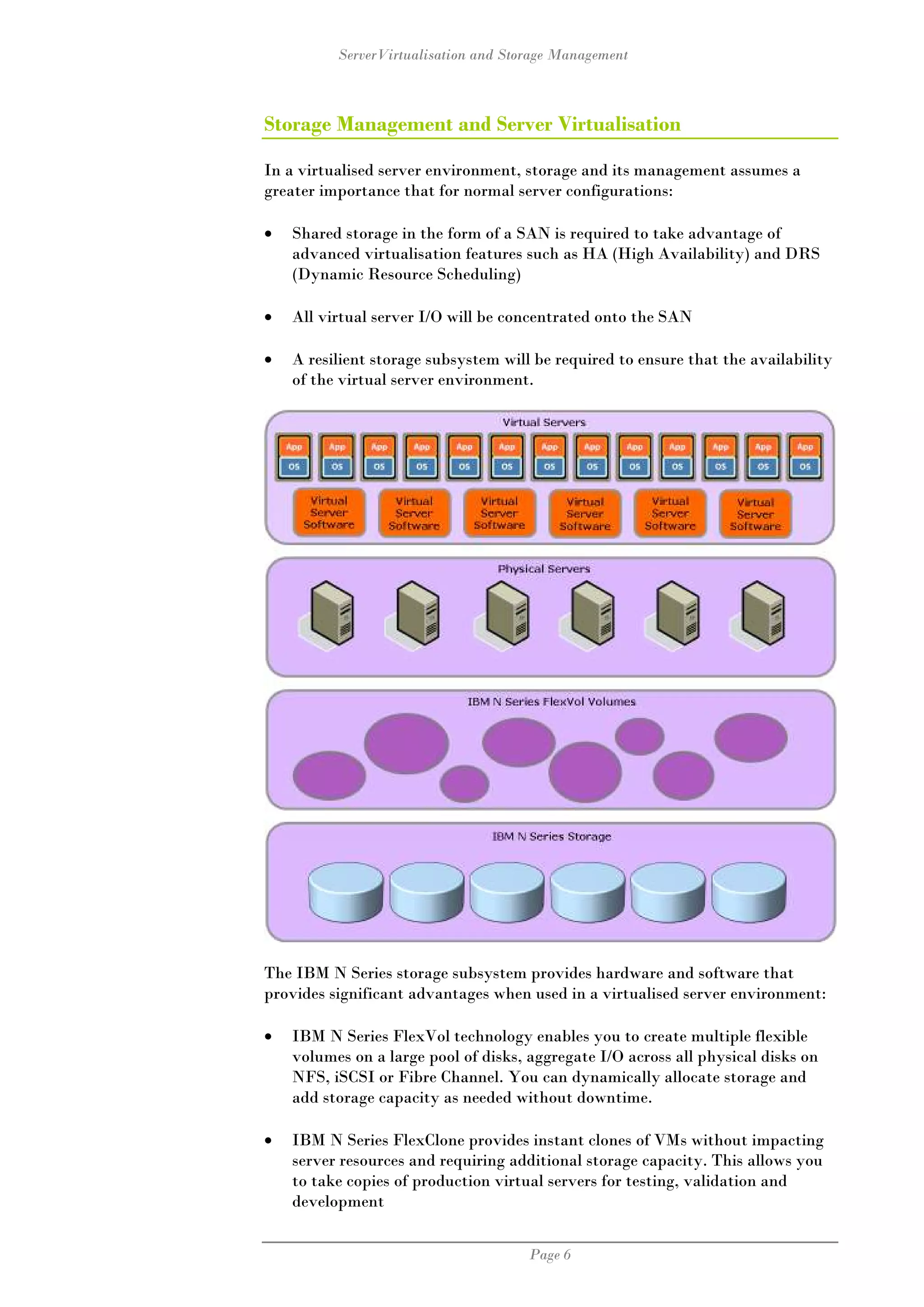
In a virtualised server environment, storage and its management assumes a
greater importance that for normal server configurations:

•   Shared storage in the form of a SAN is required to take advantage of
    advanced virtualisation features such as HA (High Availability) and DRS
    (Dynamic Resource Scheduling)

•   All virtual server I/O will be concentrated onto the SAN

•   A resilient storage subsystem will be required to ensure that the availability
    of the virtual server environment.


The IBM N Series storage subsystem provides hardware and software that
provides significant advantages when used in a virtualised server environment:

•   IBM N Series FlexVol technology enables you to create multiple flexible
    volumes on a large pool of disks, aggregate I/O across all physical disks on
    NFS, iSCSI or Fibre Channel. You can dynamically allocate storage and
    add storage capacity as needed without downtime.

•   IBM N Series FlexClone provides instant clones of VMs without impacting
    server resources and requiring additional storage capacity. This allows you
    to take copies of production virtual servers for testing, validation and
    development


                                      Page 6
Server Virtualisation and Storage Management


•   IBM N Series Snapshot allows VMware users to make fast and space-
    efficient backup copies of active data with negligible performance and
    storage overhead.

•   IBM N Series SnapMirror protects data and accelerates recovery, by
    providing a simple, efficient way to replicate data between systems in
    multiple locations using multi-transport (IP and FC) and frequency choice
    (synchronous, semi-synchronous, and asynchronous) options while only
    transferring changed blocks.

•   IBM N Series Raid-DP (Double Parity) offers significantly more protection
    than single parity schemes (including RAID 5 and RAID 4), with zero to
    minimal cost and performance impact. Compared to RAID 1 (mirroring),
    RAID-DP offers equivalent data protection against double disk failure at a
    fraction of the cost of mirroring. Compared to RAID 6, RAID-DP offers
    better performance and ease of use.

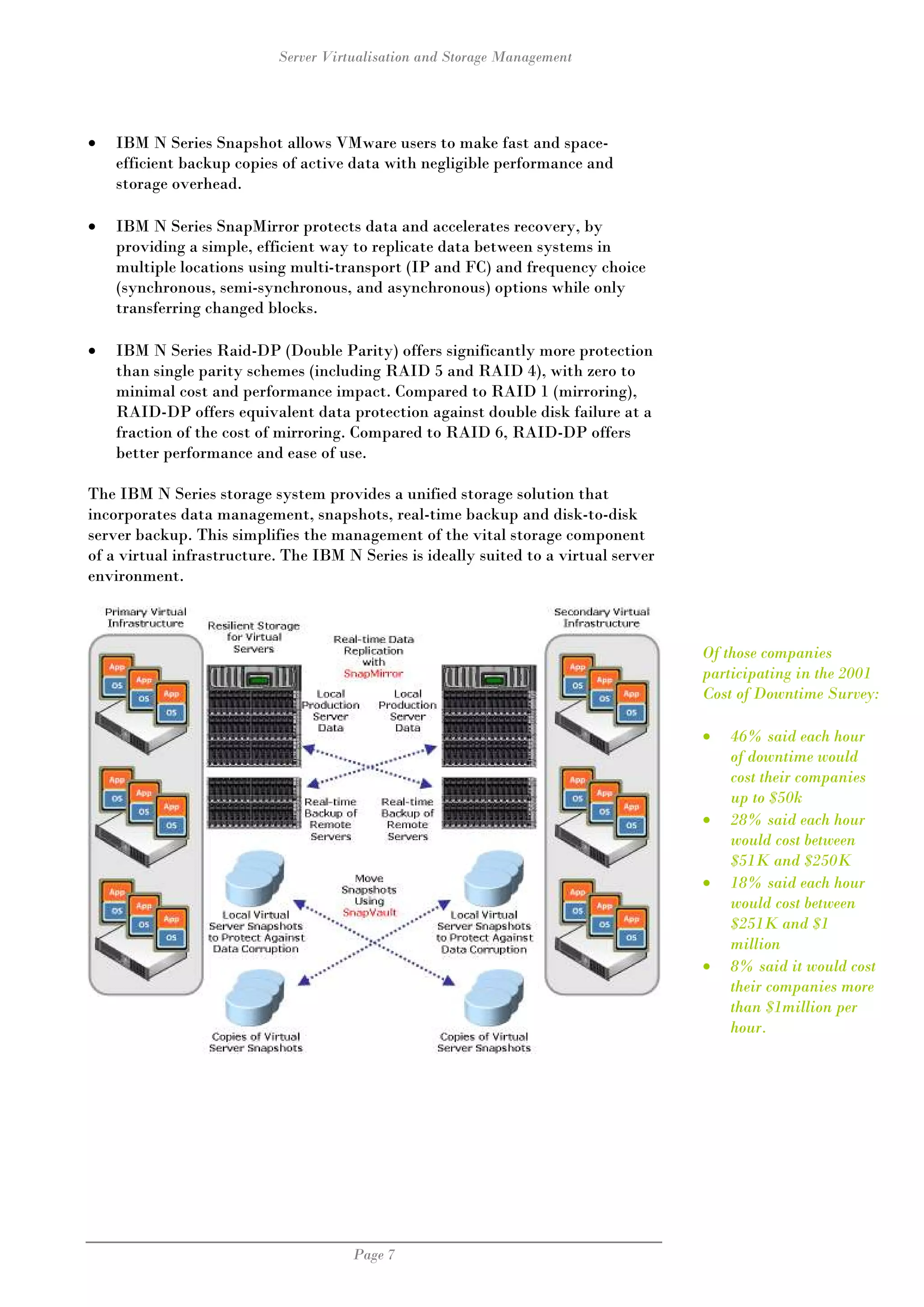
The IBM N Series storage system provides a unified storage solution that
incorporates data management, snapshots, real-time backup and disk-to-disk
server backup. This simplifies the management of the vital storage component
of a virtual infrastructure. The IBM N Series is ideally suited to a virtual server
environment.


                                                                                      Of those companies
                                                                                      participating in the 2001
                                                                                      Cost of Downtime Survey:

                                                                                      •   46% said each hour
                                                                                          of downtime would
                                                                                          cost their companies
                                                                                          up to $50k
                                                                                      •   28% said each hour
                                                                                          would cost between
                                                                                          $51K and $250K
                                                                                      •   18% said each hour
                                                                                          would cost between
                                                                                          $251K and $1
                                                                                          million
                                                                                      •   8% said it would cost
                                                                                          their companies more
                                                                                          than $1million per
                                                                                          hour.


                                      Page 7
ServerVirtualisation and Storage Management


                       Virtual Server Backup and Recovery

                       Backing-up and ensuring that the backups are recoverable for large numbers of
                       virtual servers can be a difficult task. The task can be more difficult because of
                       the need to ensure that backup I/O does not affect production I/O resources.

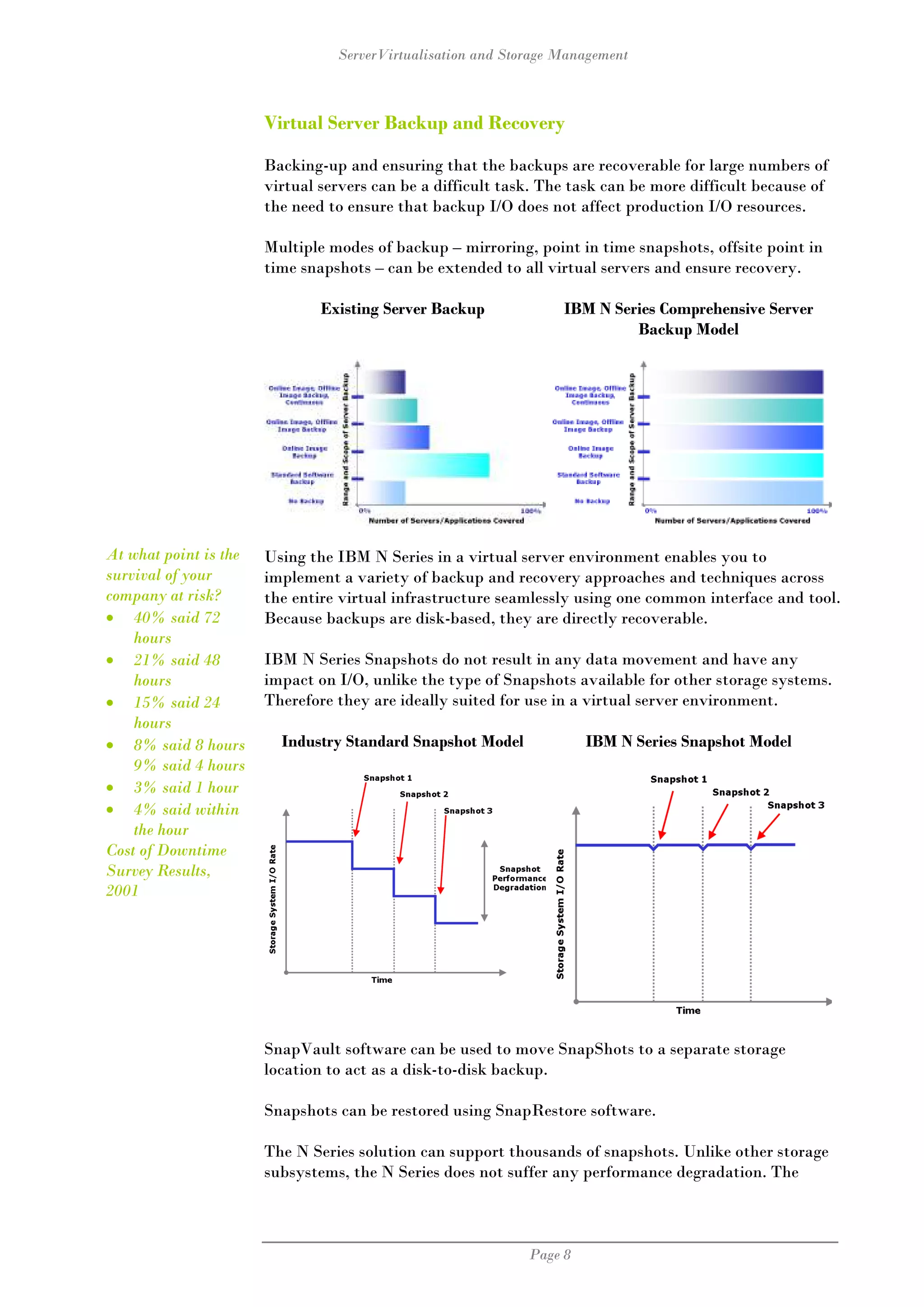
                       Multiple modes of backup – mirroring, point in time snapshots, offsite point in
                       time snapshots – can be extended to all virtual servers and ensure recovery.

                               Existing Server Backup             IBM N Series Comprehensive Server
                                                                           Backup Model


At what point is the   Using the IBM N Series in a virtual server environment enables you to
survival of your       implement a variety of backup and recovery approaches and techniques across
company at risk?       the entire virtual infrastructure seamlessly using one common interface and tool.
• 40% said 72          Because backups are disk-based, they are directly recoverable.
    hours
• 21% said 48          IBM N Series Snapshots do not result in any data movement and have any
    hours              impact on I/O, unlike the type of Snapshots available for other storage systems.
• 15% said 24          Therefore they are ideally suited for use in a virtual server environment.
    hours
• 8% said 8 hours        Industry Standard Snapshot Model             IBM N Series Snapshot Model
    9% said 4 hours
• 3% said 1 hour
• 4% said within
    the hour
Cost of Downtime
Survey Results,
2001


                       SnapVault software can be used to move SnapShots to a separate storage
                       location to act as a disk-to-disk backup.

                       Snapshots can be restored using SnapRestore software.

                       The N Series solution can support thousands of snapshots. Unlike other storage
                       subsystems, the N Series does not suffer any performance degradation. The


                                                             Page 8
Server Virtualisation and Storage Management


performance impact of snapshots using other hardware platforms can involve a
60% or greater reduction in I/O performance.

With the IBM N Series, multiple separate snapshot schedules or policies can be
maintained, such as hourly snapshots retained for several days, daily snapshots
retained for several weeks, weekly snapshots retained for several months and so
on.

IBM N Series SnapMirror

SnapMirror provides simple, flexible, and cost-effective replication software for
disaster recovery and data distribution.

SnapMirror can replicate virtual servers from one virtual infrastructure to
another to facilitate very rapid recovery and business continuity.

Exceptionally powerful, yet easy to implement and manage, IBM N Series
SnapMirror software combines disaster recovery and data distribution in a
streamlined solution that supports today's global enterprises. SnapMirror is a
very cost-effective solution with efficient storage and network bandwidth
utilisation, and provides additional value by enabling you to put the DR site to
active business use.

SnapMirror offers a straightforward set-up that you can easily replicate across
all your IBM N Series storage systems. Once installed, SnapMirror requires
minimal management, and SnapManager software ensures effortless replication
of application-consistent snapshots.

SnapMirror can mirror data from FC storage to ATA storage, reducing storage
costs. To reduce network usage, SnapMirror works with Snapshots to send only
changed data blocks to the disaster recovery storage.

SnapMirror enables space-efficient copies to be created on the disaster recovery
storage for other uses such as testing, development, and quality assurance,
without affecting the production system. SnapMirror also enables centralised
backup of data to tape from multiple data centres, reducing investment in tape
infrastructure as well as offloading the production system from tape backups.

IBM N Series FlexVol and FlexClone

FlexVol volumes are virtual dynamic storage entities that can grow and shrink
without being constrained by the underlying physical storage.

FlexClone uses ShapShot technology to create writable clones of FlexVol
volumes. Clones can be created nearly instantaneously and with little I/O and
storage overhead. FlexClone technology can be used to create copies of
production systems for testing, validation and development.

IBM N Series RAID Double Parity

IBM Storage System N series introduces double-parity RAID, named RAID-
DP. This section provides an overview of RAID-DP and how it dramatically
increases data fault tolerance from various disk failure scenarios. Other key


                                      Page 9
ServerVirtualisation and Storage Management


areas covered include how much RAID-DP costs, special hardware
requirements, and converting from existing RAID4-based volumes to RAID-
DP. This document presents a double-disk failure recovery scenario to show
how RAID-DP both allows the volume to continue serving data and recreates
data lost on the two failed disks.

Traditional single-parity RAID offers adequate protection against a single
event, which could be either a complete disk failure or a bit error during a read.
In either event, data is recreated using both parity and data remaining on
unaffected disks in the array or volume. If the event is a read error, then
recreating data happens almost instantaneously, and the array or volume
remains in an online mode. However, if a disk fails, then all data lost on it has
to be recreated, and the array or volume will remain in a vulnerable degraded
mode until data has been reconstructed onto a spare disk. It is in degraded
mode that traditional single-parity RAID shows its protection capabilities have
not kept up with modern disk architectures. RAID Double Parity significantly
increases the fault tolerance from failed disk drives over traditional RAID.

IBM System Storage N series uses a new type of RAID protection named
RAID-DP. RAID-DP stands for RAID Double Parity, and it significantly
increases the fault tolerance from failed disk drives over traditional RAID.
When all relevant numbers are plugged into the standard mean time to data
loss (MTTDL) formula for RAID-DP versus single-parity RAID, RAID-DP is
more reliable on the same underlying disk drives. With this reliability, RAID-
DP approaches RAID1 mirroring for fault tolerance, but at RAID4 pricing.
RAID-DP offers businesses the most compelling total cost of ownership storage
option without putting their data at an increased risk.

Conclusion

An effective storage platform is essential to the successful implementation and
operation of a virtualised server infrastructure.

Server virtualisation requires high-performing central storage. With virtualised
servers data is moved from local to central storage. The design and operation of
the storage component becomes of critical importance. This is particularly true
for organisations wishing to take advantage of high availability, centralised
backup and business continuity and disaster recovery features of server
virtualisation.

IBM storage is ideally suited for use in a virtualised server environment because

High Performance         IBM storage solutions offer consistent high performance
                         with no performance degradation when taking system
                         snapshot.

Instantaneous Backups With Snapshot technology, you can make instantaneous,
                      consistent backup copies of active data with negligible

Streamline Storage       VMware administrators can supply storage to virtual
Allocation to            machines in seconds while achieving the highest level of
Virtual Machines         storage utilisation.


                                     Page 10
Server Virtualisation and Storage Management


Thin Provisioning      IBM storage systems offer powerful, flexible provisioning
                       capabilities that give IT storage specialists the ability to
                       lower cost while meeting capacity, utilisation, and
                       performance requirements.

Raid-DP                RAID-DP offers significantly more protection than single
                       parity schemes (including RAID 5 and RAID 4), with zero
                       to minimal cost and performance impact. Compared to
                       RAID 1 (mirroring), RAID-DP offers equivalent data
                       protection against double disk failure at a fraction of the
                       cost of mirroring. Compared to RAID 6, RAID-DP offers
                       better performance and ease of use.

Disaster Recovery      You can protect data and speed recovery using SnapMirror.
                       SnapMirror provides a simple, efficient way to replicate
                       data between systems in multiple locations using multi-
                       transport (IP and FC) and frequency choice (sync, semi-
                       sync, and async) options while transferring only changed
                       blocks. In the event of a disaster, a remote site can use the
                       SnapMirror copy of the data to restart critical virtual
                       servers with minimal disruption to ongoing operations.

Flexibility            IBM storage solutions give you the ultimate in flexibility by
                       enabling you to choose iSCSI, FCP, or NFS connectivity
                       within a single storage platform. IBM systems can also mix
                       drive types within a single system so that you can tier your
                       virtual machines (VMs) within a single architecture, giving
                       users flexibility and investment protection.

Efficient Cloning of   Using the FlexClone tool, you can instantly create VMs
VMs                    without consuming any additional physical storage. These
                       clones can be used for production and test and development
                       environments.


                                   Page 11
ServerVirtualisation and Storage Management


 For more information, please contact:

          alan@alanmcsweeney.com


                                        Page 12

Whitepaper Server Virtualisation And Storage Management

  • 1.
    Server Virtualisation And Storage Management Optimising Storage Management to Obtain Greater Benefits from Server Virtualisation Alan McSweeney
  • 2.
    ServerVirtualisation and StorageManagement Contents Server Virtualisation ........................................................................................3 Server Virtualisation Architecture....................................................................4 Configuration ...............................................................................................4 Virtual Server Resilience ..............................................................................4 Virtual Server Data Backup and Recovery ...................................................5 Storage Management and Server Virtualisation................................................6 Virtual Server Backup and Recovery............................................................8 IBM N Series SnapMirror .............................................................................9 IBM N Series FlexVol and FlexClone............................................................9 IBM N Series RAID Double Parity ..............................................................9 Conclusion.................................................................................................. 10 Page 2
  • 3.
    Server Virtualisation andStorage Management Server Virtualisation Implementing server virtualisation (using software such as VMware) can deliver substantial benefits to IT and business by reducing the number of deployed Intel-based servers by 50% or more while delivering benefits such as: • Improved server utilisation rates - 60% to 80% (up from typical rates of less than 15%) • Server and application provisioning time measured in hours not days • Reduction in downtime such as hardware maintenance Once confined to server • Reduction in operating costs rooms, virtualization has • Increased server and application resilience now made it into the • Simplification of server operation and administration mainstream of computing. • Increased levels of service And by 2010, virtualization will be the Implementing server virtualisation also provides a platform for: single most important technology for IT • Facilitating business continuity and disaster recovery departments, according to • Improved backup and recovery research firm Gartner. A little additional planning and investment will deliver significant additional benefits for a virtualised server environment in terms of: • Faster backup and recovery • Protection against application corruption • Improved business continuity and disaster recovery Implementing server virtualisation requires some form of shared storage to enable features such as HA (High Availability) and DRS (Dynamic Resource Scheduling). In order to implement an effective, efficient, resilient and performing virtualised server infrastructure, the storage component needs to be designed correctly. This can include taking advantage of features in a virtualised server infrastructure such as snapshotting and virtual backup. This whitepaper discusses some of the issues regarding the configuration of storage for server virtualisation to derive a more complete set of benefits. This whitepaper makes reference to one storage subsystem from NetApp and also sold by IBM as the N Series. Page 3
  • 4.
    ServerVirtualisation and StorageManagement Server Virtualisation Architecture Configuration Optimising the benefits of server virtualisation will involve implementing a virtualisation infrastructure along the following lines: • 80% of businesses have no plan o “It won’t happen to me” • 68% of businesses who experience a disaster and don’t have a plan go out of business within 2 years • One in five organisations will suffer a major IT disaster in five years • A company experiencing a There will be two (or more) sets of physical servers onto which servers are computer outage virtualised. These can be configured to operate as active/active or active/passive. lasting longer than 10 days will never The physical servers will be connected to shared storage such as a fibre-channel fully recover or iSCSI SAN. The I/O load that was distributed across a large number of separate physical servers is now concentrated onto a smaller number of servers hosting the virtual servers. Virtual Server Resilience A configuration such as this provides multiple points of resilience Page 4
  • 5.
    Server Virtualisation andStorage Management In the event of the failure of a physical server within the virtual infrastructure the virtual servers can be restarted on either another server within the same infrastructure or to a server on the other infrastructure. Virtual Server Data Backup and Recovery There are two options for backing-up virtual servers within a virtual infrastructure using software-based backups: 1. The existing process for backing-up physical servers can be implemented in the virtual environment – backup agents for your existing backup tool can be installed on the virtual servers and these servers backed-up as normal. 2. Using VCB (Virtual Consolidated Backup) to capture server images – the entire virtual server can be backed-up to a separate Proxy Server that can then backup the images using existing backup software. A backup agent for your existing backup software is installed on the VCB server. This reduces backup software costs but decreases the granularity of what can be recovered. Standard Server Backup Virtual Consolidated Backup Page 5
  • 6.
    ServerVirtualisation and StorageManagement Storage Management and Server Virtualisation In a virtualised server environment, storage and its management assumes a greater importance that for normal server configurations: • Shared storage in the form of a SAN is required to take advantage of advanced virtualisation features such as HA (High Availability) and DRS (Dynamic Resource Scheduling) • All virtual server I/O will be concentrated onto the SAN • A resilient storage subsystem will be required to ensure that the availability of the virtual server environment. The IBM N Series storage subsystem provides hardware and software that provides significant advantages when used in a virtualised server environment: • IBM N Series FlexVol technology enables you to create multiple flexible volumes on a large pool of disks, aggregate I/O across all physical disks on NFS, iSCSI or Fibre Channel. You can dynamically allocate storage and add storage capacity as needed without downtime. • IBM N Series FlexClone provides instant clones of VMs without impacting server resources and requiring additional storage capacity. This allows you to take copies of production virtual servers for testing, validation and development Page 6
  • 7.
    Server Virtualisation andStorage Management • IBM N Series Snapshot allows VMware users to make fast and space- efficient backup copies of active data with negligible performance and storage overhead. • IBM N Series SnapMirror protects data and accelerates recovery, by providing a simple, efficient way to replicate data between systems in multiple locations using multi-transport (IP and FC) and frequency choice (synchronous, semi-synchronous, and asynchronous) options while only transferring changed blocks. • IBM N Series Raid-DP (Double Parity) offers significantly more protection than single parity schemes (including RAID 5 and RAID 4), with zero to minimal cost and performance impact. Compared to RAID 1 (mirroring), RAID-DP offers equivalent data protection against double disk failure at a fraction of the cost of mirroring. Compared to RAID 6, RAID-DP offers better performance and ease of use. The IBM N Series storage system provides a unified storage solution that incorporates data management, snapshots, real-time backup and disk-to-disk server backup. This simplifies the management of the vital storage component of a virtual infrastructure. The IBM N Series is ideally suited to a virtual server environment. Of those companies participating in the 2001 Cost of Downtime Survey: • 46% said each hour of downtime would cost their companies up to $50k • 28% said each hour would cost between $51K and $250K • 18% said each hour would cost between $251K and $1 million • 8% said it would cost their companies more than $1million per hour. Page 7
  • 8.
    ServerVirtualisation and StorageManagement Virtual Server Backup and Recovery Backing-up and ensuring that the backups are recoverable for large numbers of virtual servers can be a difficult task. The task can be more difficult because of the need to ensure that backup I/O does not affect production I/O resources. Multiple modes of backup – mirroring, point in time snapshots, offsite point in time snapshots – can be extended to all virtual servers and ensure recovery. Existing Server Backup IBM N Series Comprehensive Server Backup Model At what point is the Using the IBM N Series in a virtual server environment enables you to survival of your implement a variety of backup and recovery approaches and techniques across company at risk? the entire virtual infrastructure seamlessly using one common interface and tool. • 40% said 72 Because backups are disk-based, they are directly recoverable. hours • 21% said 48 IBM N Series Snapshots do not result in any data movement and have any hours impact on I/O, unlike the type of Snapshots available for other storage systems. • 15% said 24 Therefore they are ideally suited for use in a virtual server environment. hours • 8% said 8 hours Industry Standard Snapshot Model IBM N Series Snapshot Model 9% said 4 hours • 3% said 1 hour • 4% said within the hour Cost of Downtime Survey Results, 2001 SnapVault software can be used to move SnapShots to a separate storage location to act as a disk-to-disk backup. Snapshots can be restored using SnapRestore software. The N Series solution can support thousands of snapshots. Unlike other storage subsystems, the N Series does not suffer any performance degradation. The Page 8
  • 9.
    Server Virtualisation andStorage Management performance impact of snapshots using other hardware platforms can involve a 60% or greater reduction in I/O performance. With the IBM N Series, multiple separate snapshot schedules or policies can be maintained, such as hourly snapshots retained for several days, daily snapshots retained for several weeks, weekly snapshots retained for several months and so on. IBM N Series SnapMirror SnapMirror provides simple, flexible, and cost-effective replication software for disaster recovery and data distribution. SnapMirror can replicate virtual servers from one virtual infrastructure to another to facilitate very rapid recovery and business continuity. Exceptionally powerful, yet easy to implement and manage, IBM N Series SnapMirror software combines disaster recovery and data distribution in a streamlined solution that supports today's global enterprises. SnapMirror is a very cost-effective solution with efficient storage and network bandwidth utilisation, and provides additional value by enabling you to put the DR site to active business use. SnapMirror offers a straightforward set-up that you can easily replicate across all your IBM N Series storage systems. Once installed, SnapMirror requires minimal management, and SnapManager software ensures effortless replication of application-consistent snapshots. SnapMirror can mirror data from FC storage to ATA storage, reducing storage costs. To reduce network usage, SnapMirror works with Snapshots to send only changed data blocks to the disaster recovery storage. SnapMirror enables space-efficient copies to be created on the disaster recovery storage for other uses such as testing, development, and quality assurance, without affecting the production system. SnapMirror also enables centralised backup of data to tape from multiple data centres, reducing investment in tape infrastructure as well as offloading the production system from tape backups. IBM N Series FlexVol and FlexClone FlexVol volumes are virtual dynamic storage entities that can grow and shrink without being constrained by the underlying physical storage. FlexClone uses ShapShot technology to create writable clones of FlexVol volumes. Clones can be created nearly instantaneously and with little I/O and storage overhead. FlexClone technology can be used to create copies of production systems for testing, validation and development. IBM N Series RAID Double Parity IBM Storage System N series introduces double-parity RAID, named RAID- DP. This section provides an overview of RAID-DP and how it dramatically increases data fault tolerance from various disk failure scenarios. Other key Page 9
  • 10.
    ServerVirtualisation and StorageManagement areas covered include how much RAID-DP costs, special hardware requirements, and converting from existing RAID4-based volumes to RAID- DP. This document presents a double-disk failure recovery scenario to show how RAID-DP both allows the volume to continue serving data and recreates data lost on the two failed disks. Traditional single-parity RAID offers adequate protection against a single event, which could be either a complete disk failure or a bit error during a read. In either event, data is recreated using both parity and data remaining on unaffected disks in the array or volume. If the event is a read error, then recreating data happens almost instantaneously, and the array or volume remains in an online mode. However, if a disk fails, then all data lost on it has to be recreated, and the array or volume will remain in a vulnerable degraded mode until data has been reconstructed onto a spare disk. It is in degraded mode that traditional single-parity RAID shows its protection capabilities have not kept up with modern disk architectures. RAID Double Parity significantly increases the fault tolerance from failed disk drives over traditional RAID. IBM System Storage N series uses a new type of RAID protection named RAID-DP. RAID-DP stands for RAID Double Parity, and it significantly increases the fault tolerance from failed disk drives over traditional RAID. When all relevant numbers are plugged into the standard mean time to data loss (MTTDL) formula for RAID-DP versus single-parity RAID, RAID-DP is more reliable on the same underlying disk drives. With this reliability, RAID- DP approaches RAID1 mirroring for fault tolerance, but at RAID4 pricing. RAID-DP offers businesses the most compelling total cost of ownership storage option without putting their data at an increased risk. Conclusion An effective storage platform is essential to the successful implementation and operation of a virtualised server infrastructure. Server virtualisation requires high-performing central storage. With virtualised servers data is moved from local to central storage. The design and operation of the storage component becomes of critical importance. This is particularly true for organisations wishing to take advantage of high availability, centralised backup and business continuity and disaster recovery features of server virtualisation. IBM storage is ideally suited for use in a virtualised server environment because High Performance IBM storage solutions offer consistent high performance with no performance degradation when taking system snapshot. Instantaneous Backups With Snapshot technology, you can make instantaneous, consistent backup copies of active data with negligible Streamline Storage VMware administrators can supply storage to virtual Allocation to machines in seconds while achieving the highest level of Virtual Machines storage utilisation. Page 10
  • 11.
    Server Virtualisation andStorage Management Thin Provisioning IBM storage systems offer powerful, flexible provisioning capabilities that give IT storage specialists the ability to lower cost while meeting capacity, utilisation, and performance requirements. Raid-DP RAID-DP offers significantly more protection than single parity schemes (including RAID 5 and RAID 4), with zero to minimal cost and performance impact. Compared to RAID 1 (mirroring), RAID-DP offers equivalent data protection against double disk failure at a fraction of the cost of mirroring. Compared to RAID 6, RAID-DP offers better performance and ease of use. Disaster Recovery You can protect data and speed recovery using SnapMirror. SnapMirror provides a simple, efficient way to replicate data between systems in multiple locations using multi- transport (IP and FC) and frequency choice (sync, semi- sync, and async) options while transferring only changed blocks. In the event of a disaster, a remote site can use the SnapMirror copy of the data to restart critical virtual servers with minimal disruption to ongoing operations. Flexibility IBM storage solutions give you the ultimate in flexibility by enabling you to choose iSCSI, FCP, or NFS connectivity within a single storage platform. IBM systems can also mix drive types within a single system so that you can tier your virtual machines (VMs) within a single architecture, giving users flexibility and investment protection. Efficient Cloning of Using the FlexClone tool, you can instantly create VMs VMs without consuming any additional physical storage. These clones can be used for production and test and development environments. Page 11
  • 12.
    ServerVirtualisation and StorageManagement For more information, please contact: alan@alanmcsweeney.com Page 12