3/13/13	


                        Real World Virtualized
                Storage, Backup and
                     Recovery


                              Today’s Agenda
•    Top 5 Reasons to Obtain Virtualized Storage, Backup and Recovery Solutions
•    Virtualizing Mission Critical Business Applications

•    Virtualization: A Better Way to Manage Storage Resources

•    Business Continuity and Disaster Recovery in a Virtualized Environment

•    Desktop Virtualization

•    The Virtual Infrastructure as a Stepping Stone to the Cloud


                                                                                          1	
  
3/13/13	


 Why Turn to PCS for Virtualized Storage,
    Backup and Recovery Services?
     Deep technical expertise and premier certifications


Why Turn to PCS for Storage Virtualization,
    Backup and Recovery Solutions?
                    Top-tier partnerships


                                                                   2	
  
3/13/13	


Deep Sector-Specific Expertise for Backup, Recovery
         and Virtualized Storage Solutions
      For over two decades, 95% of our clients continue to
            engage PCS to execute on their vision.


      Healthcare	
         Financial	
          Biotech	


       U4li4es	
        Manufacturing	
      Retail/Online	


 Top 5 Reasons to Implement Storage Virtualization

  1.  Get more out of existing resources by pooling
      common infrastructure

  2.  Reduce datacenter costs by reducing physical infrastructure
      and improving the server to administrator ratio

  3.  Increase availability of hardware and applications
      for improved business continuity

  4.  Respond quickly to market changes through
      dynamic resource management

  5.  Improve desktop manageability and security


                                                                            3	
  
3/13/13	


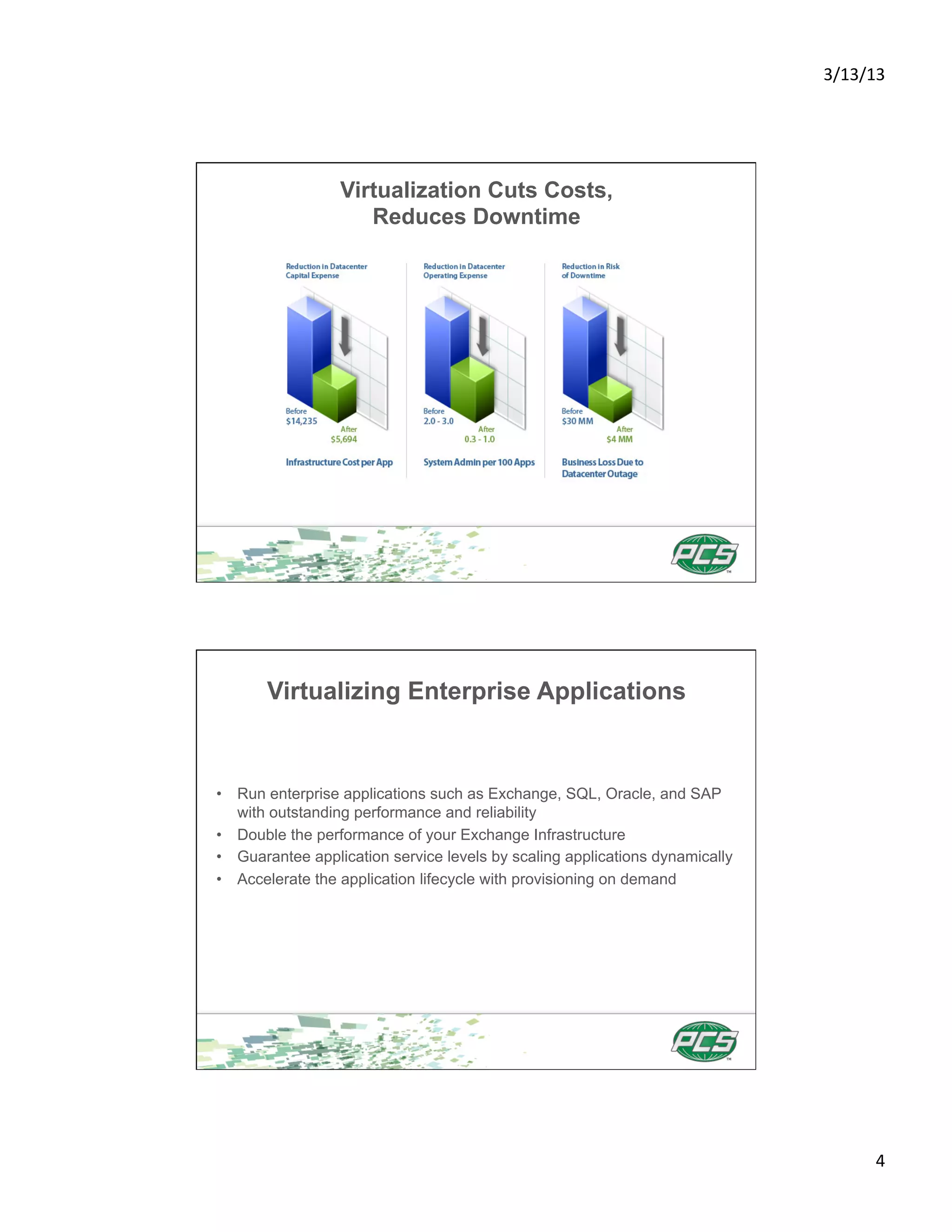
                 Virtualization Cuts Costs,
                    Reduces Downtime


       Virtualizing Enterprise Applications


•  Run enterprise applications such as Exchange, SQL, Oracle, and SAP
   with outstanding performance and reliability
•  Double the performance of your Exchange Infrastructure
•  Guarantee application service levels by scaling applications dynamically
•  Accelerate the application lifecycle with provisioning on demand


                                                                                      4	
  
3/13/13	


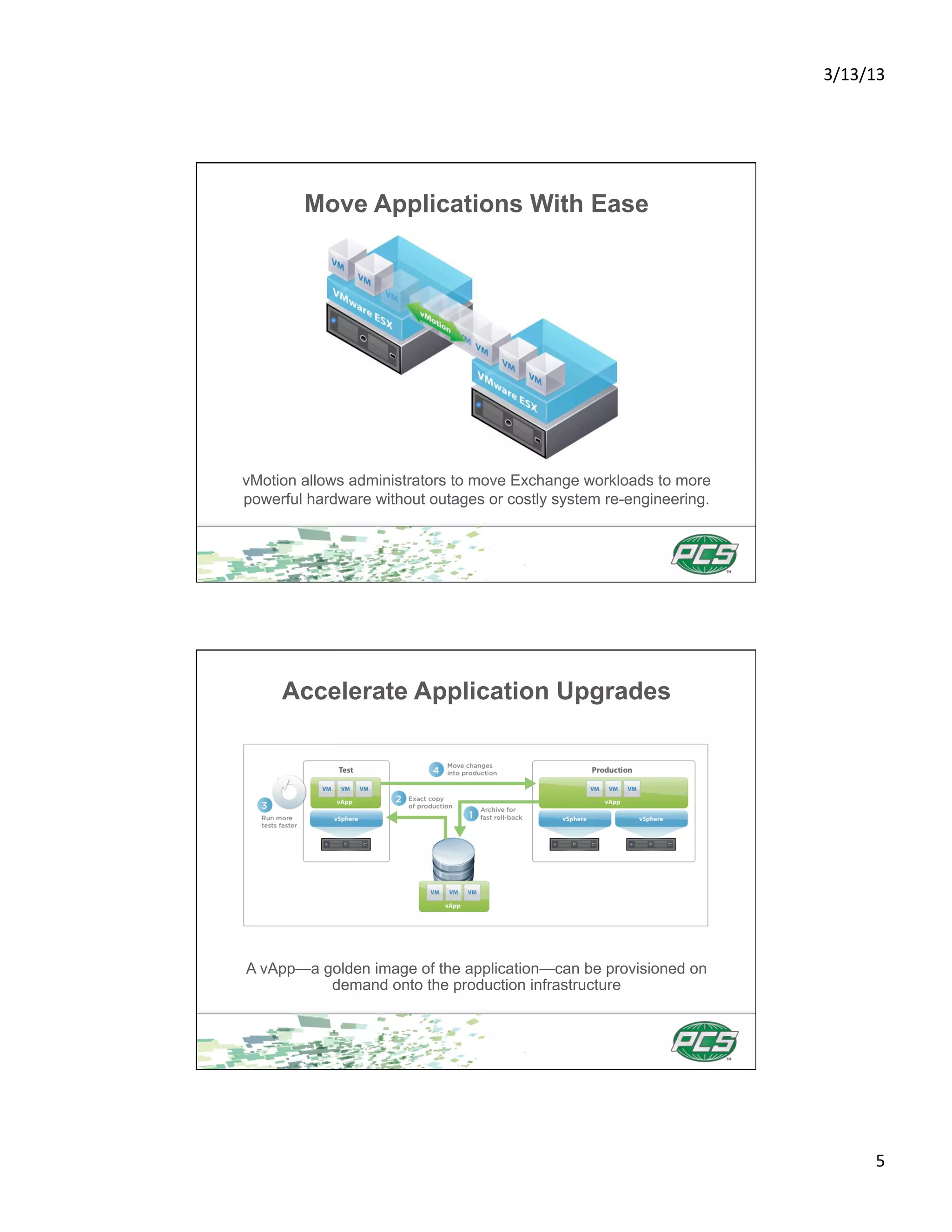
        Move Applications With Ease


vMotion allows administrators to move Exchange workloads to more
powerful hardware without outages or costly system re-engineering.


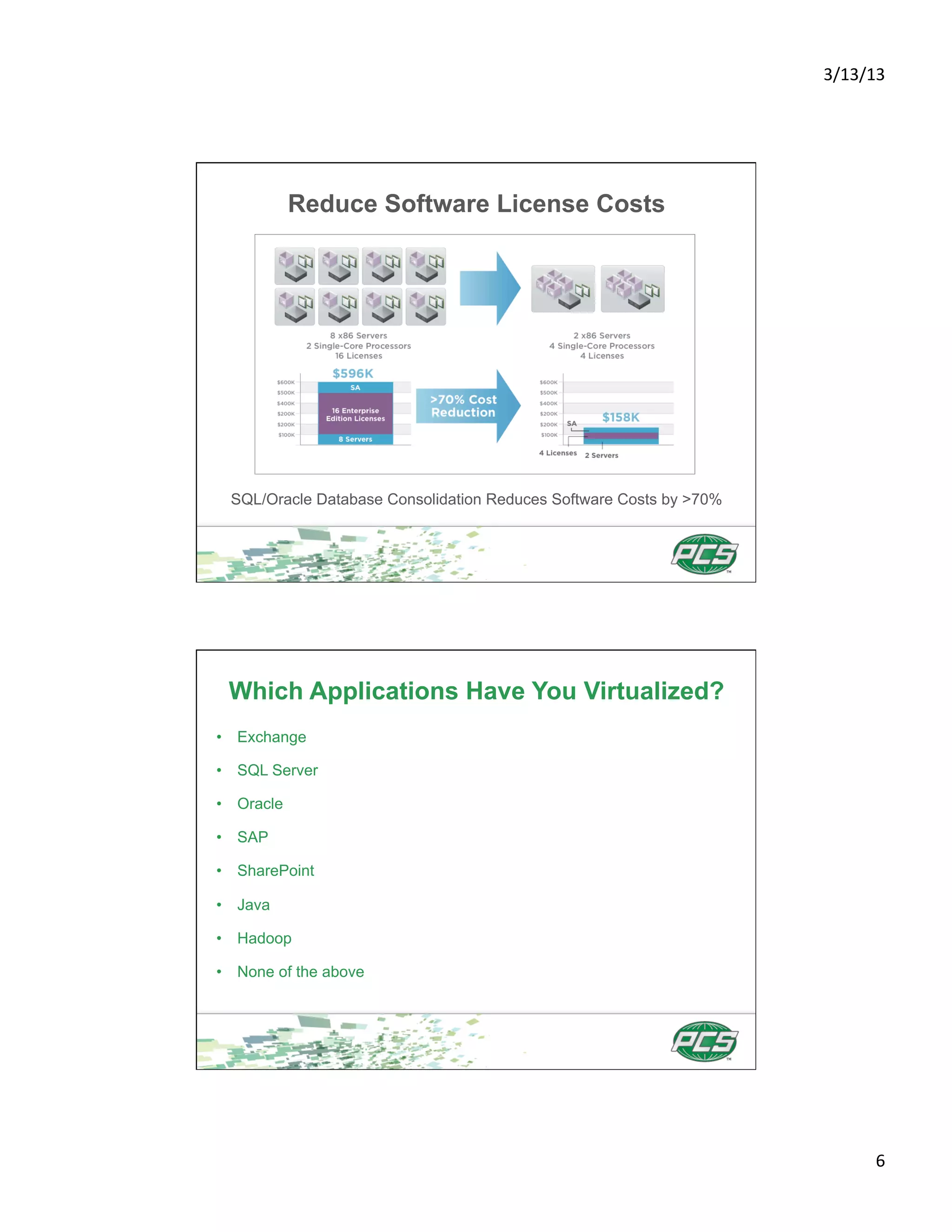
     Accelerate Application Upgrades


A vApp—a golden image of the application—can be provisioned on
          demand onto the production infrastructure


                                                                             5	
  
3/13/13	


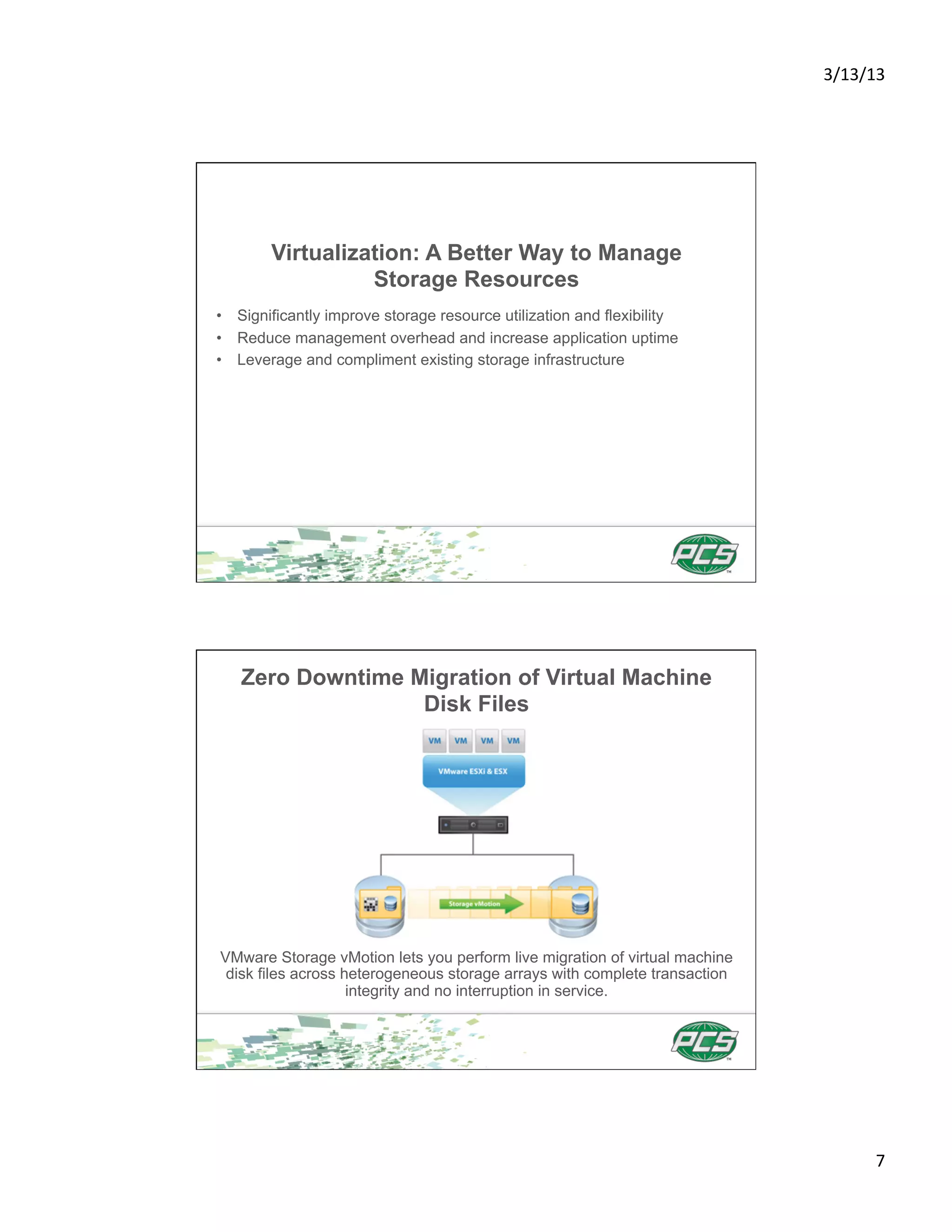
            Reduce Software License Costs


 SQL/Oracle Database Consolidation Reduces Software Costs by >70%


 Which Applications Have You Virtualized?
•  Exchange

•  SQL Server

•  Oracle

•  SAP

•  SharePoint

•  Java

•  Hadoop

•  None of the above


                                                                            6	
  
3/13/13	


        Virtualization: A Better Way to Manage
                  Storage Resources
•  Significantly improve storage resource utilization and flexibility
•  Reduce management overhead and increase application uptime
•  Leverage and compliment existing storage infrastructure


   Zero Downtime Migration of Virtual Machine
                  Disk Files


VMware Storage vMotion lets you perform live migration of virtual machine
 disk files across heterogeneous storage arrays with complete transaction
                    integrity and no interruption in service.


                                                                                    7	
  
3/13/13	


        Scale Storage Across Boundaries
•  Virtualized, shared storage can span multiple servers
•  All machines can dynamically access shared resources
   such as storage pools
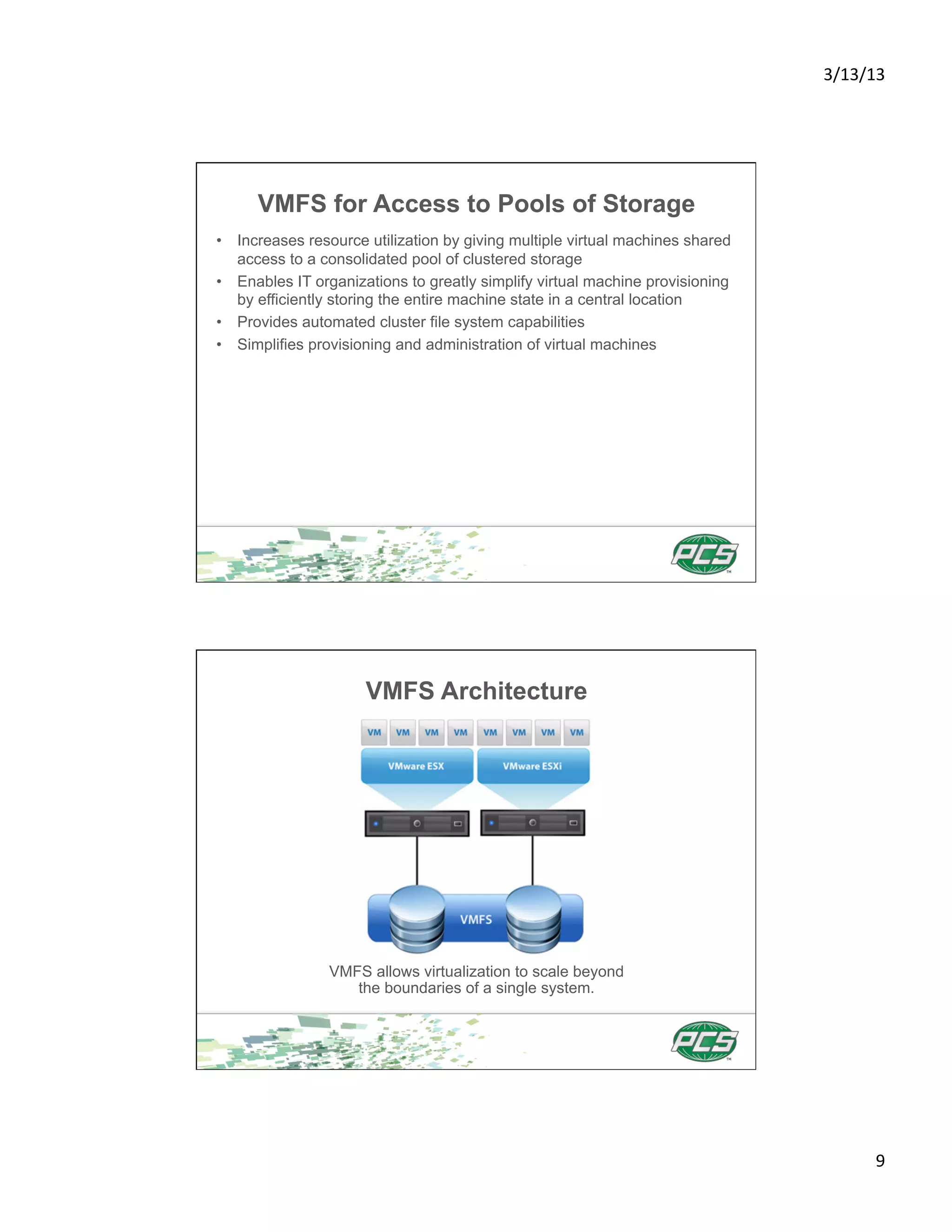
•  VMware VMFS allows virtualization to scale beyond the
   boundaries of a single system


         Enterprise Storage Virtualization


          Virtualized, shared storage can span multiple servers


                                                                          8	
  
3/13/13	


      VMFS for Access to Pools of Storage
•  Increases resource utilization by giving multiple virtual machines shared
   access to a consolidated pool of clustered storage
•  Enables IT organizations to greatly simplify virtual machine provisioning
   by efficiently storing the entire machine state in a central location
•  Provides automated cluster file system capabilities
•  Simplifies provisioning and administration of virtual machines


                      VMFS Architecture


                VMFS allows virtualization to scale beyond
                   the boundaries of a single system.


                                                                                       9	
  
3/13/13	


            Backup and Recovery Strategies
             for the Virtualized Environment

Next generation solutions for backup and recovery:

•  Speed Backup—reduce VMware backup times by up to 90%
•  Simplify Recovery—get one-step VMware recovery at the file, image,
   or site level
•  Save Resources—reduce backup storage by 40-60X


            Backup and Recovery Strategies
             for the Virtualized Environment
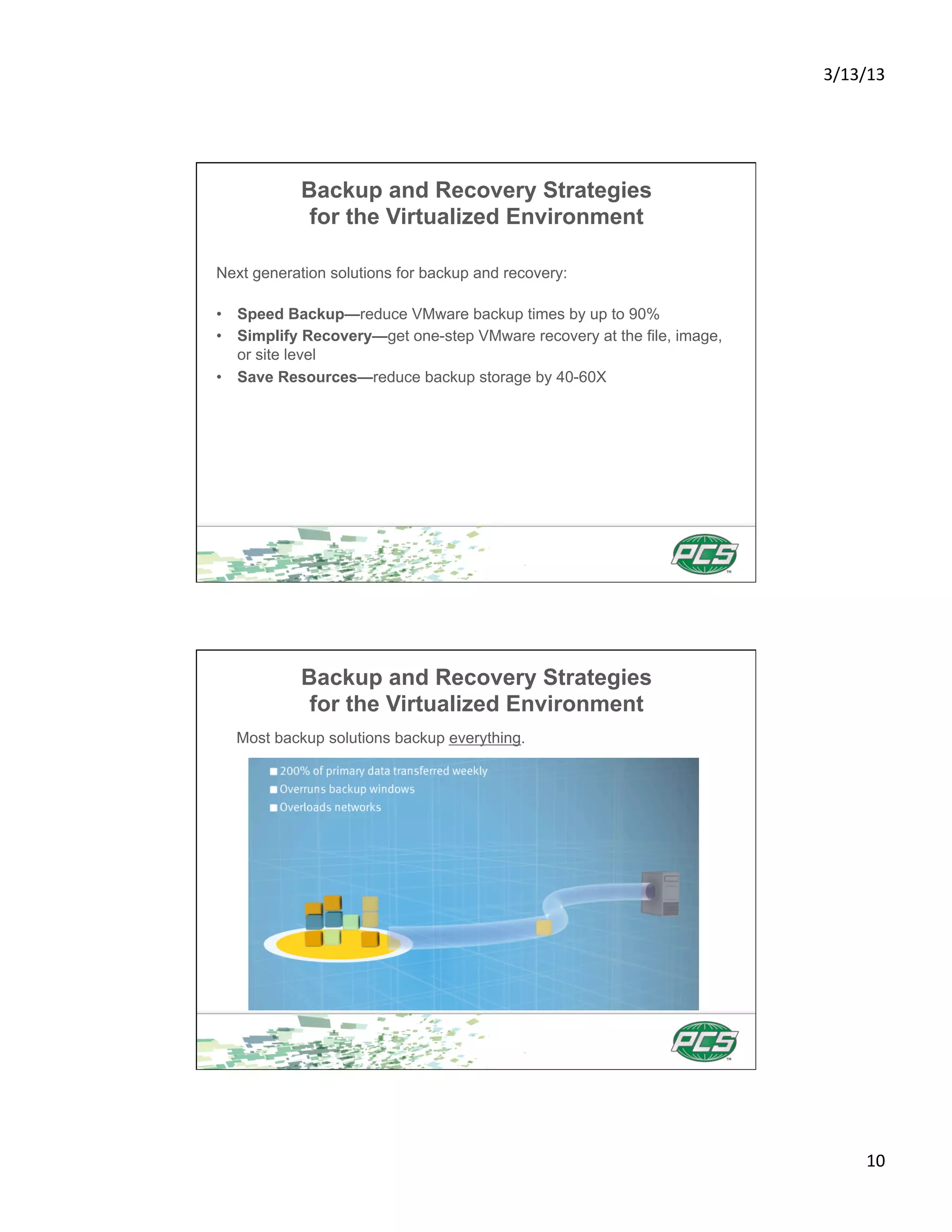
  Most backup solutions backup everything.


                                                                               10	
  
3/13/13	


         Backup and Recovery Strategies
          for the Virtualized Environment
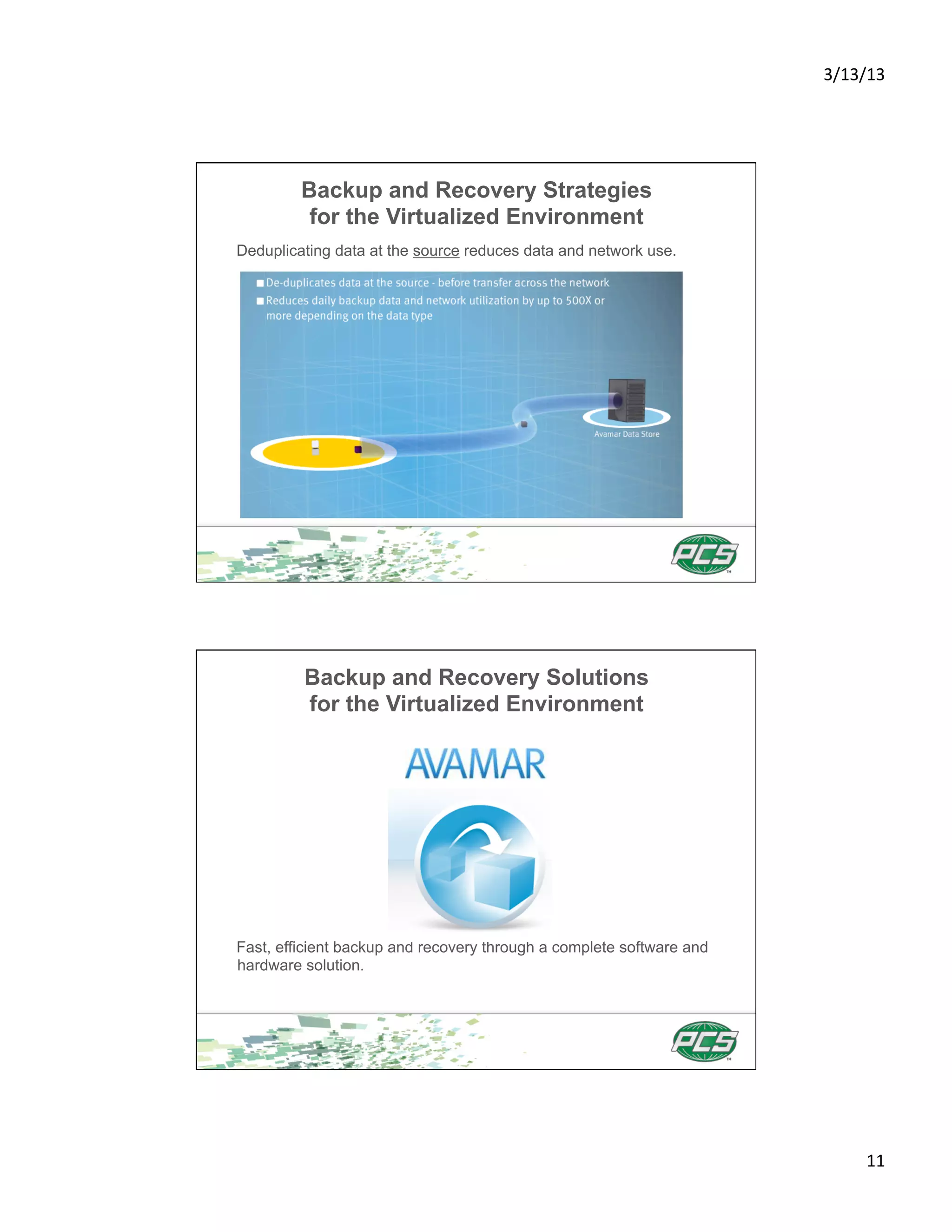
Deduplicating data at the source reduces data and network use.


         Backup and Recovery Solutions
         for the Virtualized Environment


Fast, efficient backup and recovery through a complete software and
hardware solution.


                                                                             11	
  
3/13/13	


         Backup and Recovery Solutions
         for the Virtualized Environment


•  Daily full backups in a fraction of the time
•  Recover data in a single step
•  Reduce backup windows by up to 90%
•  Cuts network bandwidth for backup by up to 99%
•  Global deduplication reduces total backup storage by up to 95%
•  Integrated with EMC Data Domain systems for optimized application-
specific backup


   Backup and Recovery Storage Systems
      for the Virtualized Environment


Reduces storage requirements by 10-30x, making disk cost-effective for
onsite retention and highly efficient for network-based replication to
disaster recovery sites.


                                                                                12	
  
3/13/13	


        Backup and Recovery Storage Systems
           for the Virtualized Environment


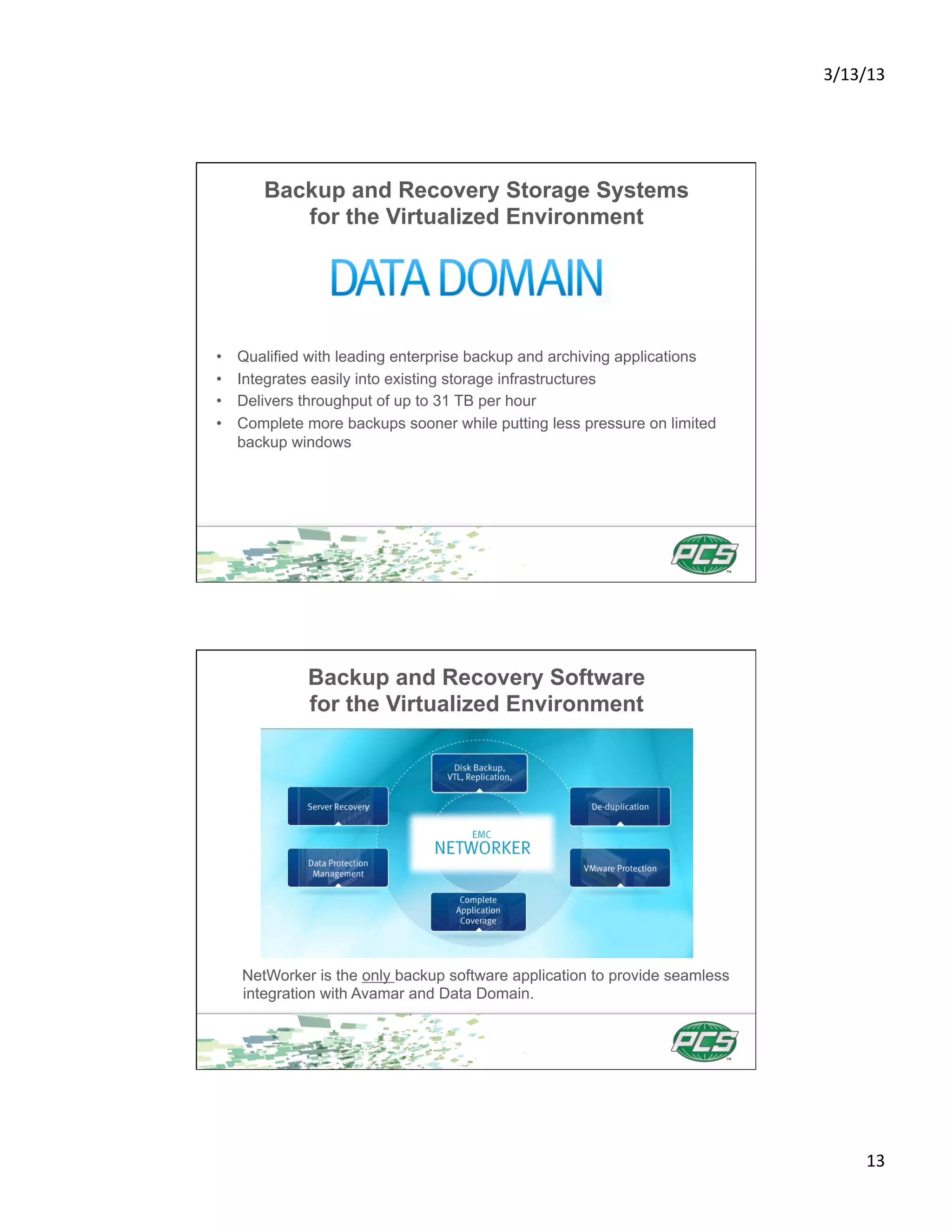
•    Qualified with leading enterprise backup and archiving applications
•    Integrates easily into existing storage infrastructures
•    Delivers throughput of up to 31 TB per hour
•    Complete more backups sooner while putting less pressure on limited
     backup windows


              Backup and Recovery Software
              for the Virtualized Environment


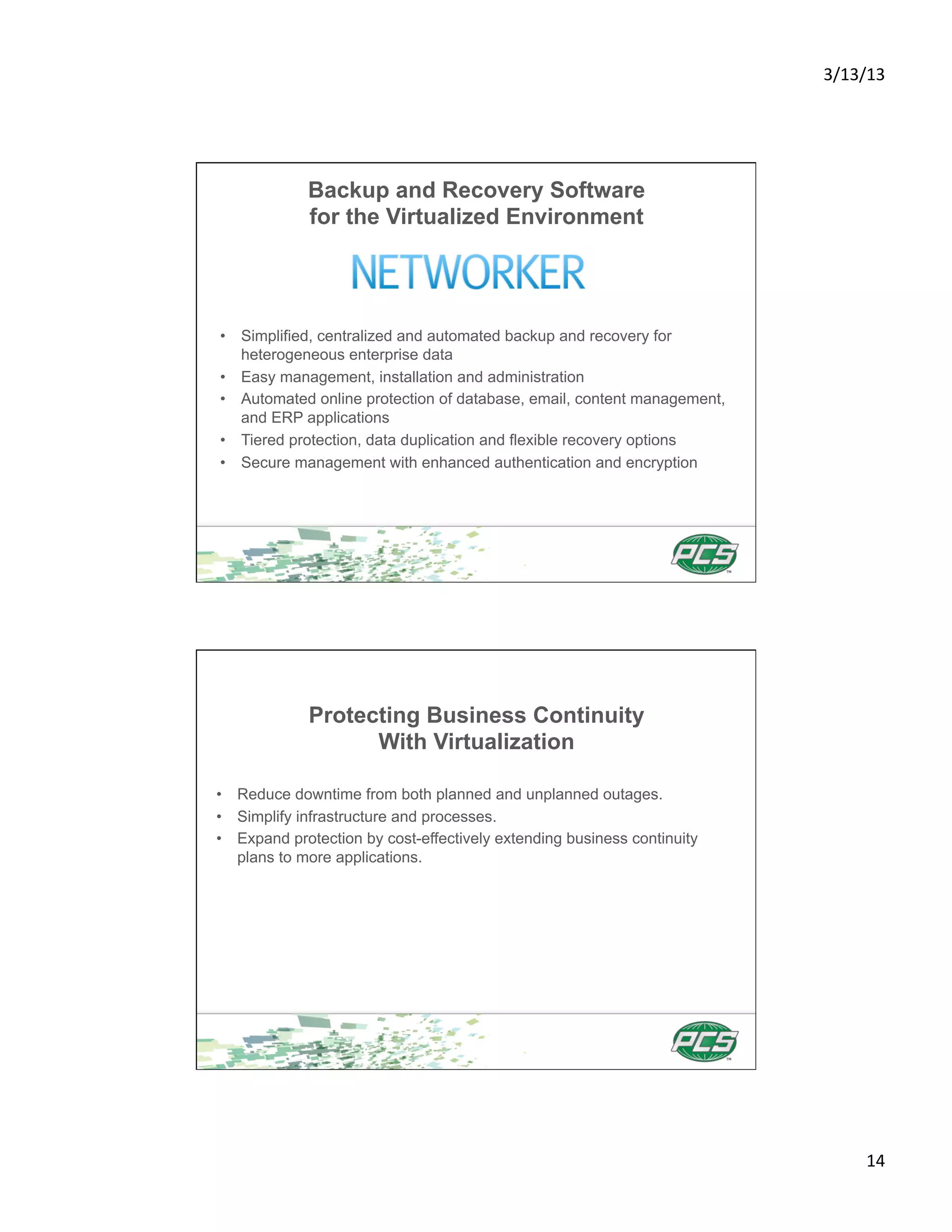
     NetWorker is the only backup software application to provide seamless
     integration with Avamar and Data Domain.


                                                                                    13	
  
3/13/13	


             Backup and Recovery Software
             for the Virtualized Environment


•  Simplified, centralized and automated backup and recovery for
   heterogeneous enterprise data
•  Easy management, installation and administration
•  Automated online protection of database, email, content management,
   and ERP applications
•  Tiered protection, data duplication and flexible recovery options
•  Secure management with enhanced authentication and encryption


             Protecting Business Continuity
                   With Virtualization

•  Reduce downtime from both planned and unplanned outages.
•  Simplify infrastructure and processes.
•  Expand protection by cost-effectively extending business continuity
   plans to more applications.


                                                                                14	
  
3/13/13	


            Business Continuity Ensured


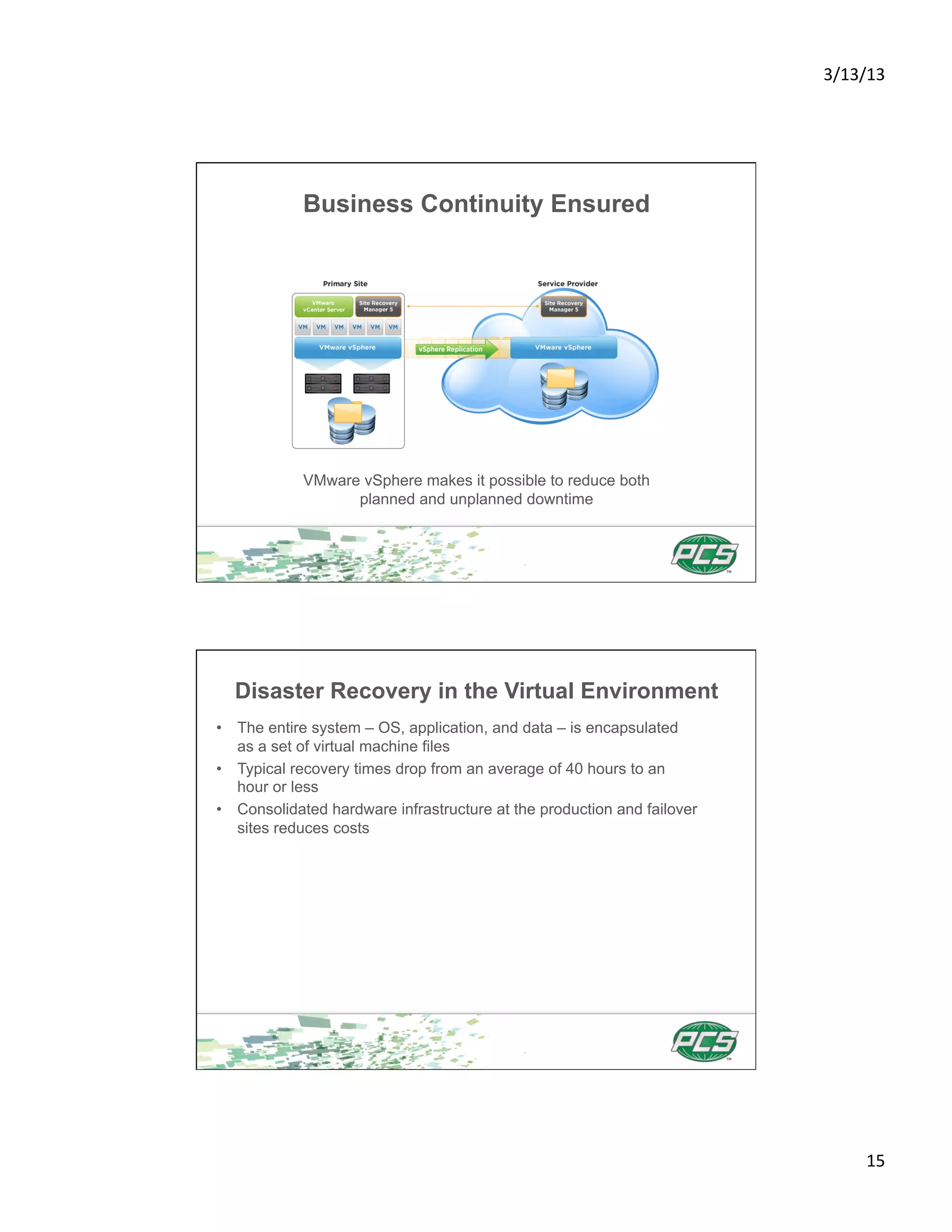
            VMware vSphere makes it possible to reduce both
                  planned and unplanned downtime


  Disaster Recovery in the Virtual Environment
•  The entire system – OS, application, and data – is encapsulated
   as a set of virtual machine files
•  Typical recovery times drop from an average of 40 hours to an
   hour or less
•  Consolidated hardware infrastructure at the production and failover
   sites reduces costs


                                                                                15	
  
3/13/13	


             Disaster Recovery Simplified


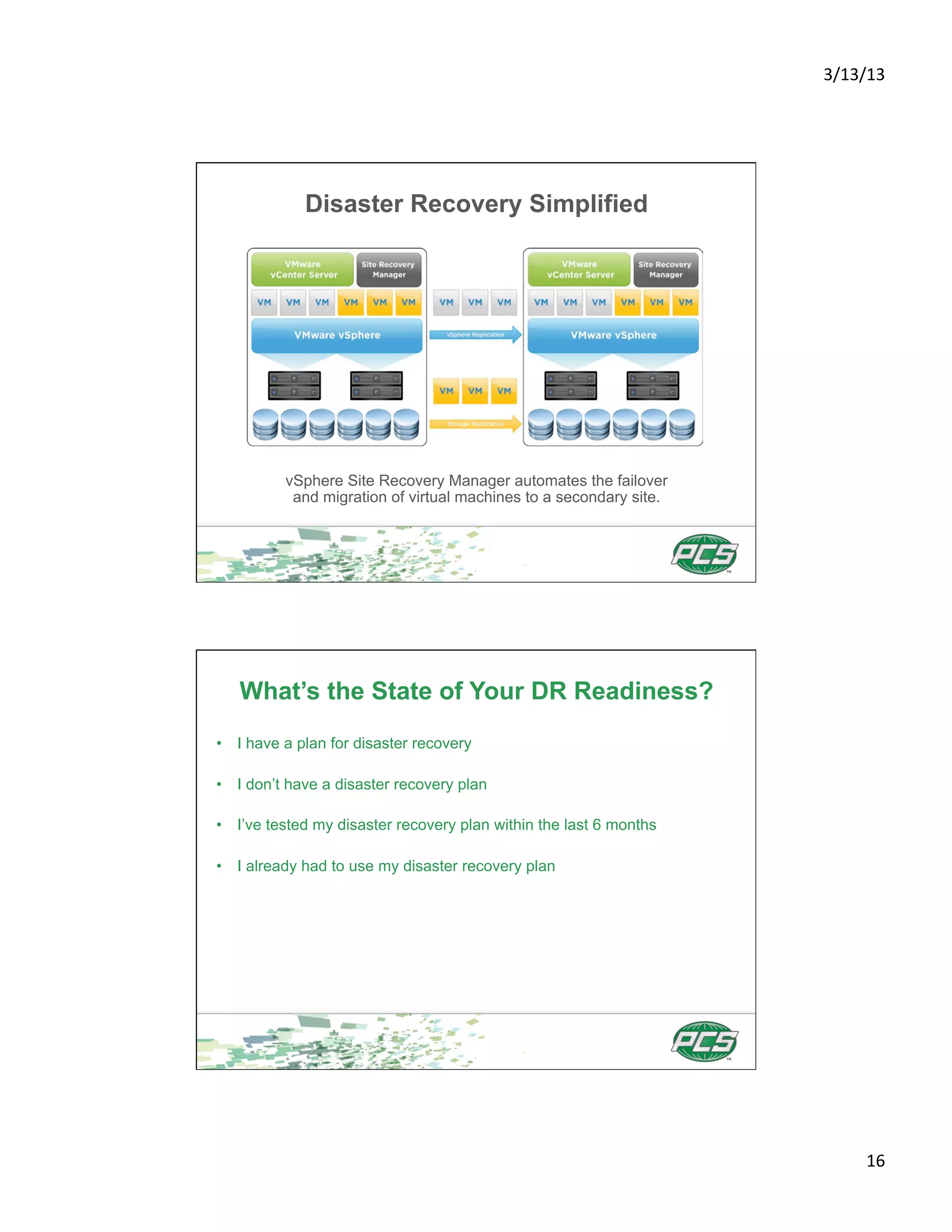
          vSphere Site Recovery Manager automates the failover
           and migration of virtual machines to a secondary site.


   What’s the State of Your DR Readiness?
•  I have a plan for disaster recovery

•  I don’t have a disaster recovery plan

•  I’ve tested my disaster recovery plan within the last 6 months

•  I already had to use my disaster recovery plan


                                                                           16	
  
3/13/13	


                     Desktop Virtualization
•  Delivers rich, personalized virtual desktops as a managed service
•  Provides centralized automated management for increased control
   and cost savings
•  Improves business agility while providing a flexible high performance
   desktop experience for end-users across a variety of network conditions.


                        VDI – is it for you?
•  I’m considering virtual desktops

•  I’ve tried it, and it’s not for me

•  I’m going to VDI in a limited way.


                                                                                     17	
  
3/13/13	


       VMware View Delivers Business Agility
         and Maximum Service Availability
•  Creates desktops from a single integrated platform
•  Dynamically allocates resources to enable highly responsive
   and available environments to end users
•  Provides BYOD (bring your own device) capabilities, with simple
   and secure access for end users


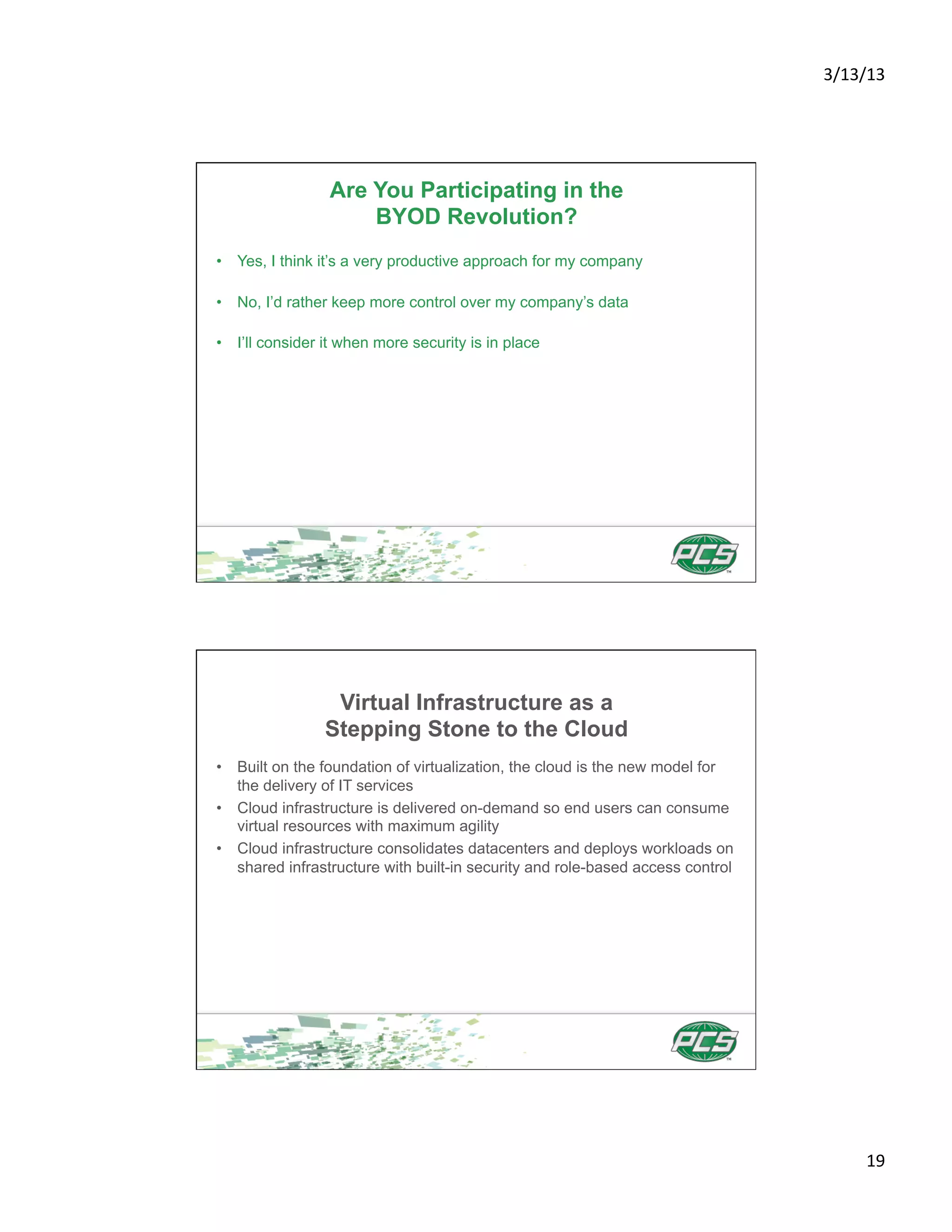
   VMware View for Desktop Virtualization


      VMware View delivers a personalized experience for end-users
                    across sessions and devices.


                                                                            18	
  
3/13/13	


                 Are You Participating in the
                     BYOD Revolution?
•  Yes, I think it’s a very productive approach for my company

•  No, I’d rather keep more control over my company’s data

•  I’ll consider it when more security is in place


                 Virtual Infrastructure as a
                Stepping Stone to the Cloud
•  Built on the foundation of virtualization, the cloud is the new model for
   the delivery of IT services
•  Cloud infrastructure is delivered on-demand so end users can consume
   virtual resources with maximum agility
•  Cloud infrastructure consolidates datacenters and deploys workloads on
   shared infrastructure with built-in security and role-based access control


                                                                                       19	
  
3/13/13	


                Virtual Infrastructure as a
               Stepping Stone to the Cloud
      VMware vCloud Director lowers capital and operating costs of
                           your IT infrastructure:
•  Enables the consolidation of virtual infrastructure across
   multiple clusters
•  Encapsulates application services as portable virtualized apps
•  Deploys services on-demand with isolation and control


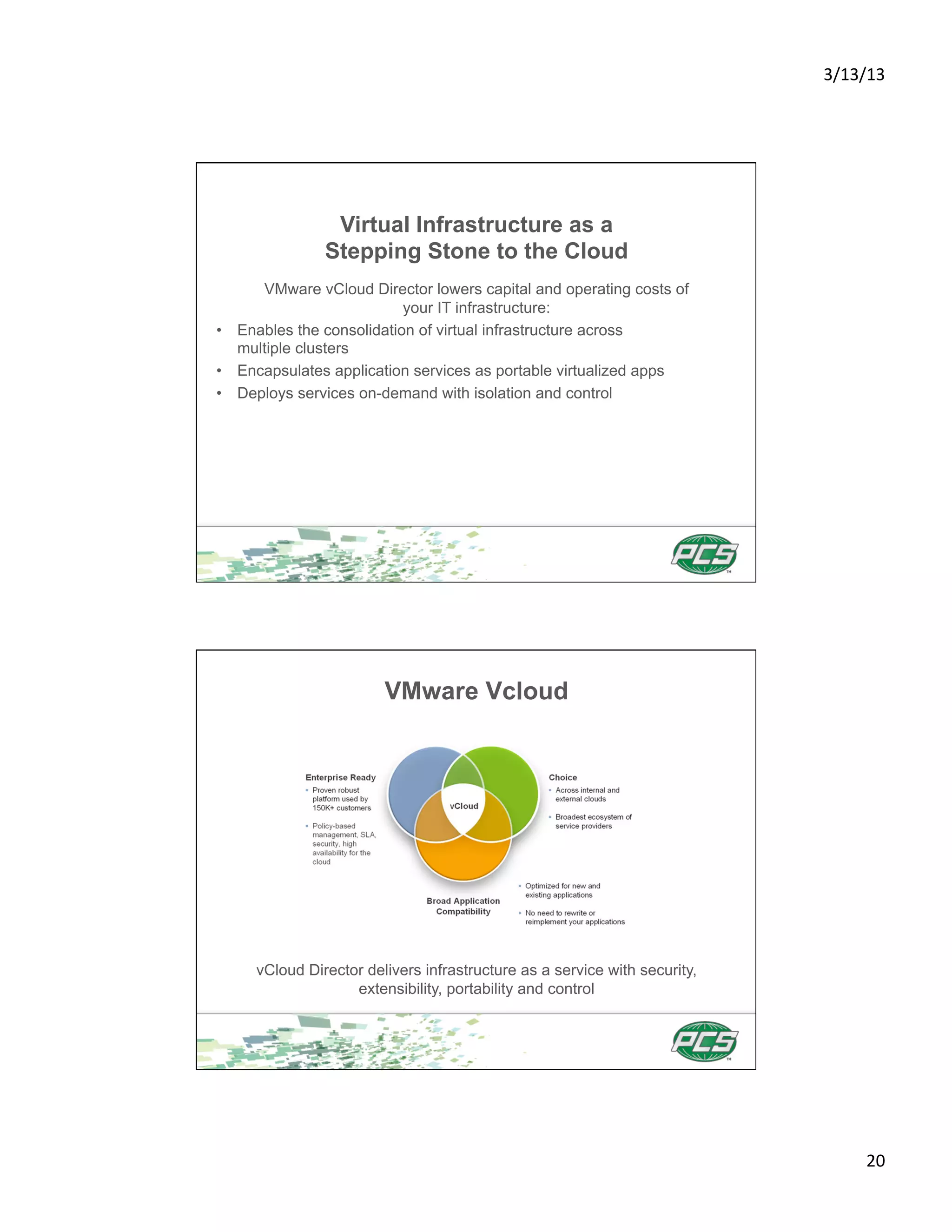
                        VMware Vcloud


     vCloud Director delivers infrastructure as a service with security,
                   extensibility, portability and control


                                                                                  20	
  
3/13/13	


    VMware Automates Datacenters for Greater
          Responsiveness and Agility
•  Eliminates manual and repetitive tasks, increases ROI and frees
   IT for strategic projects
•  Minimizes risk and improve compliance with IT and business policies
•  Reduces configuration issues by maintaining consistent systems
   across the datacenter
•  Allows IT to increase responsiveness and accelerate time-to-deployment
   for new services


        Virtualization is the Foundation of the
             Next Generation Data Center
•  Server virtualization for reliable and high performance mission critical
   applications
•  Storage virtualization for sharing storage resources across the virtual
   environment
•  Business continuity and disaster recovery faster and easier across
   the enterprise
•  Automated datacenter operations for maximum responsiveness
   business agility
•  Desktop virtualization for BYOD support and greater end user
   productivity
•  A stepping stone to the cloud


                                                                                     21	
  
3/13/13	


  Thanks for joining the PCS Webinar
Follow-up Webinar Will be Held on Wednesday, September 12th, 10:30am–11:45am


                                                                                      22	
  

Webinar presentation

  • 1.
    3/13/13   Real World Virtualized Storage, Backup and Recovery Today’s Agenda •  Top 5 Reasons to Obtain Virtualized Storage, Backup and Recovery Solutions •  Virtualizing Mission Critical Business Applications •  Virtualization: A Better Way to Manage Storage Resources •  Business Continuity and Disaster Recovery in a Virtualized Environment •  Desktop Virtualization •  The Virtual Infrastructure as a Stepping Stone to the Cloud 1  
  • 2.
    3/13/13   WhyTurn to PCS for Virtualized Storage, Backup and Recovery Services? Deep technical expertise and premier certifications Why Turn to PCS for Storage Virtualization, Backup and Recovery Solutions? Top-tier partnerships 2  
  • 3.
    3/13/13   Deep Sector-SpecificExpertise for Backup, Recovery and Virtualized Storage Solutions For over two decades, 95% of our clients continue to engage PCS to execute on their vision. Healthcare   Financial   Biotech   U4li4es   Manufacturing   Retail/Online   Top 5 Reasons to Implement Storage Virtualization 1.  Get more out of existing resources by pooling common infrastructure 2.  Reduce datacenter costs by reducing physical infrastructure and improving the server to administrator ratio 3.  Increase availability of hardware and applications for improved business continuity 4.  Respond quickly to market changes through dynamic resource management 5.  Improve desktop manageability and security 3  
  • 4.
    3/13/13   Virtualization Cuts Costs, Reduces Downtime Virtualizing Enterprise Applications •  Run enterprise applications such as Exchange, SQL, Oracle, and SAP with outstanding performance and reliability •  Double the performance of your Exchange Infrastructure •  Guarantee application service levels by scaling applications dynamically •  Accelerate the application lifecycle with provisioning on demand 4  
  • 5.
    3/13/13   Move Applications With Ease vMotion allows administrators to move Exchange workloads to more powerful hardware without outages or costly system re-engineering. Accelerate Application Upgrades A vApp—a golden image of the application—can be provisioned on demand onto the production infrastructure 5  
  • 6.
    3/13/13   Reduce Software License Costs SQL/Oracle Database Consolidation Reduces Software Costs by >70% Which Applications Have You Virtualized? •  Exchange •  SQL Server •  Oracle •  SAP •  SharePoint •  Java •  Hadoop •  None of the above 6  
  • 7.
    3/13/13   Virtualization: A Better Way to Manage Storage Resources •  Significantly improve storage resource utilization and flexibility •  Reduce management overhead and increase application uptime •  Leverage and compliment existing storage infrastructure Zero Downtime Migration of Virtual Machine Disk Files VMware Storage vMotion lets you perform live migration of virtual machine disk files across heterogeneous storage arrays with complete transaction integrity and no interruption in service. 7  
  • 8.
    3/13/13   Scale Storage Across Boundaries •  Virtualized, shared storage can span multiple servers •  All machines can dynamically access shared resources such as storage pools •  VMware VMFS allows virtualization to scale beyond the boundaries of a single system Enterprise Storage Virtualization Virtualized, shared storage can span multiple servers 8  
  • 9.
    3/13/13   VMFS for Access to Pools of Storage •  Increases resource utilization by giving multiple virtual machines shared access to a consolidated pool of clustered storage •  Enables IT organizations to greatly simplify virtual machine provisioning by efficiently storing the entire machine state in a central location •  Provides automated cluster file system capabilities •  Simplifies provisioning and administration of virtual machines VMFS Architecture VMFS allows virtualization to scale beyond the boundaries of a single system. 9  
  • 10.
    3/13/13   Backup and Recovery Strategies for the Virtualized Environment Next generation solutions for backup and recovery: •  Speed Backup—reduce VMware backup times by up to 90% •  Simplify Recovery—get one-step VMware recovery at the file, image, or site level •  Save Resources—reduce backup storage by 40-60X Backup and Recovery Strategies for the Virtualized Environment Most backup solutions backup everything. 10  
  • 11.
    3/13/13   Backup and Recovery Strategies for the Virtualized Environment Deduplicating data at the source reduces data and network use. Backup and Recovery Solutions for the Virtualized Environment Fast, efficient backup and recovery through a complete software and hardware solution. 11  
  • 12.
    3/13/13   Backup and Recovery Solutions for the Virtualized Environment •  Daily full backups in a fraction of the time •  Recover data in a single step •  Reduce backup windows by up to 90% •  Cuts network bandwidth for backup by up to 99% •  Global deduplication reduces total backup storage by up to 95% •  Integrated with EMC Data Domain systems for optimized application- specific backup Backup and Recovery Storage Systems for the Virtualized Environment Reduces storage requirements by 10-30x, making disk cost-effective for onsite retention and highly efficient for network-based replication to disaster recovery sites. 12  
  • 13.
    3/13/13   Backup and Recovery Storage Systems for the Virtualized Environment •  Qualified with leading enterprise backup and archiving applications •  Integrates easily into existing storage infrastructures •  Delivers throughput of up to 31 TB per hour •  Complete more backups sooner while putting less pressure on limited backup windows Backup and Recovery Software for the Virtualized Environment NetWorker is the only backup software application to provide seamless integration with Avamar and Data Domain. 13  
  • 14.
    3/13/13   Backup and Recovery Software for the Virtualized Environment •  Simplified, centralized and automated backup and recovery for heterogeneous enterprise data •  Easy management, installation and administration •  Automated online protection of database, email, content management, and ERP applications •  Tiered protection, data duplication and flexible recovery options •  Secure management with enhanced authentication and encryption Protecting Business Continuity With Virtualization •  Reduce downtime from both planned and unplanned outages. •  Simplify infrastructure and processes. •  Expand protection by cost-effectively extending business continuity plans to more applications. 14  
  • 15.
    3/13/13   Business Continuity Ensured VMware vSphere makes it possible to reduce both planned and unplanned downtime Disaster Recovery in the Virtual Environment •  The entire system – OS, application, and data – is encapsulated as a set of virtual machine files •  Typical recovery times drop from an average of 40 hours to an hour or less •  Consolidated hardware infrastructure at the production and failover sites reduces costs 15  
  • 16.
    3/13/13   Disaster Recovery Simplified vSphere Site Recovery Manager automates the failover and migration of virtual machines to a secondary site. What’s the State of Your DR Readiness? •  I have a plan for disaster recovery •  I don’t have a disaster recovery plan •  I’ve tested my disaster recovery plan within the last 6 months •  I already had to use my disaster recovery plan 16  
  • 17.
    3/13/13   Desktop Virtualization •  Delivers rich, personalized virtual desktops as a managed service •  Provides centralized automated management for increased control and cost savings •  Improves business agility while providing a flexible high performance desktop experience for end-users across a variety of network conditions. VDI – is it for you? •  I’m considering virtual desktops •  I’ve tried it, and it’s not for me •  I’m going to VDI in a limited way. 17  
  • 18.
    3/13/13   VMware View Delivers Business Agility and Maximum Service Availability •  Creates desktops from a single integrated platform •  Dynamically allocates resources to enable highly responsive and available environments to end users •  Provides BYOD (bring your own device) capabilities, with simple and secure access for end users VMware View for Desktop Virtualization VMware View delivers a personalized experience for end-users across sessions and devices. 18  
  • 19.
    3/13/13   Are You Participating in the BYOD Revolution? •  Yes, I think it’s a very productive approach for my company •  No, I’d rather keep more control over my company’s data •  I’ll consider it when more security is in place Virtual Infrastructure as a Stepping Stone to the Cloud •  Built on the foundation of virtualization, the cloud is the new model for the delivery of IT services •  Cloud infrastructure is delivered on-demand so end users can consume virtual resources with maximum agility •  Cloud infrastructure consolidates datacenters and deploys workloads on shared infrastructure with built-in security and role-based access control 19  
  • 20.
    3/13/13   Virtual Infrastructure as a Stepping Stone to the Cloud VMware vCloud Director lowers capital and operating costs of your IT infrastructure: •  Enables the consolidation of virtual infrastructure across multiple clusters •  Encapsulates application services as portable virtualized apps •  Deploys services on-demand with isolation and control VMware Vcloud vCloud Director delivers infrastructure as a service with security, extensibility, portability and control 20  
  • 21.
    3/13/13   VMware Automates Datacenters for Greater Responsiveness and Agility •  Eliminates manual and repetitive tasks, increases ROI and frees IT for strategic projects •  Minimizes risk and improve compliance with IT and business policies •  Reduces configuration issues by maintaining consistent systems across the datacenter •  Allows IT to increase responsiveness and accelerate time-to-deployment for new services Virtualization is the Foundation of the Next Generation Data Center •  Server virtualization for reliable and high performance mission critical applications •  Storage virtualization for sharing storage resources across the virtual environment •  Business continuity and disaster recovery faster and easier across the enterprise •  Automated datacenter operations for maximum responsiveness business agility •  Desktop virtualization for BYOD support and greater end user productivity •  A stepping stone to the cloud 21  
  • 22.
    3/13/13   Thanks for joining the PCS Webinar Follow-up Webinar Will be Held on Wednesday, September 12th, 10:30am–11:45am 22