WHAT IS COMPUTER
HISTORY
GENERATIONS
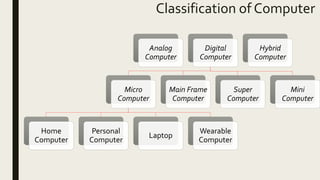
CLASSIFICATIONS
TYPES
HISTORY
Section 1
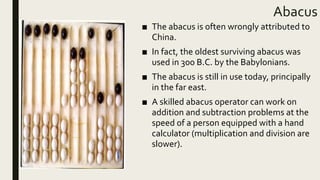
Abacus
■ The abacus is often wrongly attributed to
China.
■ In fact, the oldest surviving abacus was
used in 300 B.C. by the Babylonians.
■ The abacus is still in use today, principally
in the far east.
■ A skilled abacus operator can work on
addition and subtraction problems at the
speed of a person equipped with a hand
calculator (multiplication and division are
slower).
John Napier
■ In 1617 an eccentric (some say mad) Scotsman named John Napier
invented logarithms, which are a technology that allows multiplication
to be performed via addition.
■ Ex: log2x = 5
■ The magic ingredient is the logarithm of each operand, which was
originally obtained from a printed table.
■ But Napier also invented an alternative to tables, where the logarithm
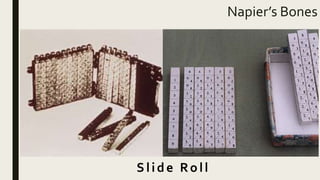
values were carved on ivory sticks which are now called Napier's Bones.
Napier’s Bones
Slide Roll
Slide Rule
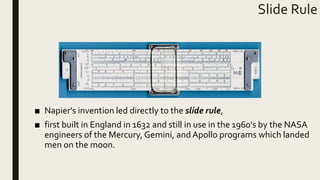
■ Napier's invention led directly to the slide rule,
■ first built in England in 1632 and still in use in the 1960's by the NASA
engineers of the Mercury, Gemini, and Apollo programs which landed
men on the moon.
Blaise Pascal
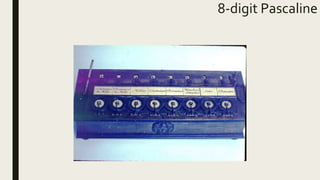
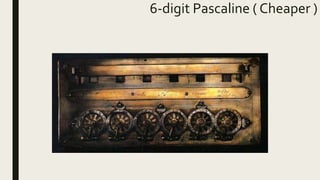
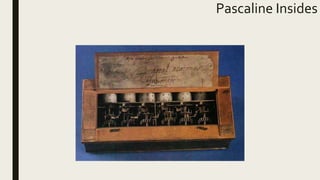
■ In 1642 Blaise Pascal, at age 19, invented the Pascaline as an aid for his father who
was a tax collector.
■ Pascal built 50 of this gear-driven one-function calculator (it could only add) but
couldn't sell many because of their exorbitant cost and because they really weren't
that accurate (at that time it was not possible to fabricate gears with the required
precision).
■ Up until the present age when car dashboards went digital, the odometer portion of
a car's speedometer used the very same mechanism as the Pascaline to increment
the next wheel after each full revolution of the prior wheel.
8-digit Pascaline
6-digit Pascaline ( Cheaper )
Pascaline Insides
Leibniz
■ Just a few years after Pascal, the German Gottfried Wilhelm Leibniz (co-inventor
with Newton of calculus) managed to build a four-function (addition, subtraction,
multiplication, and division) calculator that he called the stepped reckoner.
■ Instead of gears, it employed fluted drums having ten flutes arranged around
their circumference in a stair-step fashion.
■ Although the stepped reckoner employed the decimal number system (each
drum had 10 flutes)
■ Leibniz was the first to advocate use of the binary number system which is
fundamental to the operation of modern computers.
■ Leibniz is considered one of the greatest of the philosophers but he died poor
and alone.
Charle’s Babbage
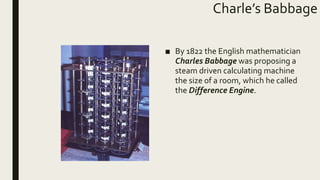
■ By 1822 the English mathematician
Charles Babbage was proposing a
steam driven calculating machine
the size of a room, which he called
the Difference Engine.
Difference Engine
■ This machine would be able to compute tables of numbers, such as
logarithm tables.
■ He obtained government funding for this project due to the importance
of numeric tables in ocean navigation.
■ Construction of Babbage's Difference Engine proved exceedingly
difficult and the project soon became the most expensive government
funded project up to that point in English history.
■ Ten years later the device was still nowhere near complete, acrimony
abounded between all involved, and funding dried up. The device was
never finished.
Babbage-Analytic Engine
■ Babbage was not deterred, and by then was on to his next
brainstorm, which he called the Analytic Engine.
■ This device, large as a house and powered by 6 steam engines,
■ It was programmable, thanks to the punched card technology of
Jacquard.
■ Babbage saw that the pattern of holes in a punch card could be
used to represent an abstract idea such as a problem statement or
the raw data required for that problem's solution.
Babbage-Analytic Engine
■ Babbage realized that punched paper could be employed as a
storage mechanism, holding computed numbers for future
reference.
■ Because of the connection to the Jacquard loom, Babbage
called the two main parts of his Analytic Engine the "Store"
and the "Mill", as both terms are used in the weaving industry.
■ The Store was where numbers were held and the Mill was
where they were "woven" into new results.
■ In a modern computer these same parts are called the
memory unit and the central processing unit (CPU).
Babbage – Analytic Engine
■ TheAnalytic Engine also had a key function that
distinguishes computers from calculators: the conditional
statement.
■ A conditional statement allows a program to achieve
different results each time it is run.
■ Based on the conditional statement, the path of the
program can be determined based upon a situation that is
detected at the very moment the program is running.
US Census
■ The next breakthrough occurred in America.The U.S. Constitution
states that a census should be taken of all U.S. citizens every 10
years in order to determine the representation of the states in
Congress.
■ While the very first census of 1790 had only required 9 months, by
1880 the U.S. population had grown so much that the count for
the 1880 census took 7.5 years. Automation was clearly needed
for the next census.
■ The census bureau offered a prize for an inventor to help with the
1890 census and this prize was won by Herman Hollerith,
Hollerith desk
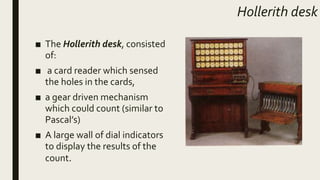
■ The Hollerith desk, consisted
of:
■ a card reader which sensed
the holes in the cards,
■ a gear driven mechanism
which could count (similar to
Pascal’s)
■ A large wall of dial indicators
to display the results of the
count.
Hollerith Desk
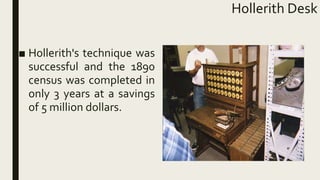
■ Hollerith's technique was
successful and the 1890
census was completed in
only 3 years at a savings
of 5 million dollars.
IBM
■ Hollerith built a company, the
Tabulating Machine Company
which, after a few buyouts,
eventually became International
Business Machines, known today
as IBM.
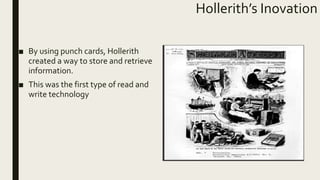
Hollerith’s Inovation
■ By using punch cards, Hollerith
created a way to store and retrieve
information.
■ This was the first type of read and
write technology
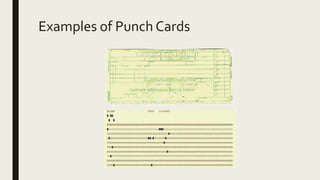
Examples of Punch Cards
US Military
■ The U.S. military desired a mechanical calculator more optimized
for scientific computation.
■ ByWorldWar II the U.S. had battleships that could lob shells
weighing as much as a small car over distances up to 25 miles.
■ Physicists could write the equations that described how
atmospheric drag, wind, gravity, muzzle velocity, etc. would
determine the trajectory of the shell, but solving such equations
was extremely laborious.
US Military
■ Human computers would compute results of these equations and publish them in
ballistic "firing tables"
■ DuringWorldWar II the U.S. military scoured the country looking for (generally
female) math majors to hire for the job of computing these tables, but not enough
humans could be found to keep up with the need for new tables.
■ Sometimes artillery pieces had to be delivered to the battlefield without the
necessary firing tables and this meant they were close to useless because they
couldn't be aimed properly.
■ Faced with this situation, the U.S. military was willing to invest in even hair-
brained schemes to automate this type of computation.
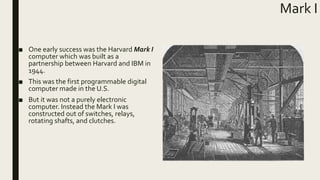
Mark I
■ One early success was the Harvard Mark I
computer which was built as a
partnership between Harvard and IBM in
1944.
■ This was the first programmable digital
computer made in the U.S.
■ But it was not a purely electronic
computer. Instead the Mark I was
constructed out of switches, relays,
rotating shafts, and clutches.
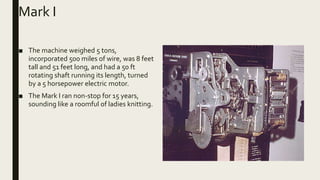
Mark I
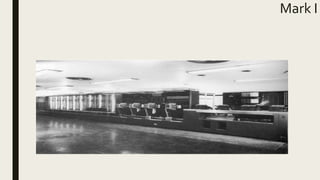
■ The machine weighed 5 tons,
incorporated 500 miles of wire, was 8 feet
tall and 51 feet long, and had a 50 ft
rotating shaft running its length, turned
by a 5 horsepower electric motor.
■ The Mark I ran non-stop for 15 years,
sounding like a roomful of ladies knitting.
Mark I
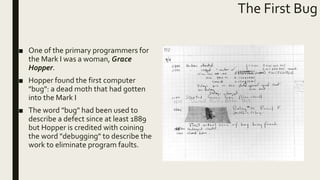
The First Bug
■ One of the primary programmers for
the Mark I was a woman, Grace
Hopper.
■ Hopper found the first computer
"bug": a dead moth that had gotten
into the Mark I
■ The word "bug" had been used to
describe a defect since at least 1889
but Hopper is credited with coining
the word "debugging" to describe the
work to eliminate program faults.
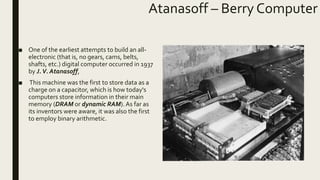
Atanasoff – Berry Computer
■ One of the earliest attempts to build an all-
electronic (that is, no gears, cams, belts,
shafts, etc.) digital computer occurred in 1937
by J.V. Atanasoff,
■ This machine was the first to store data as a
charge on a capacitor, which is how today's
computers store information in their main
memory (DRAM or dynamic RAM). As far as
its inventors were aware, it was also the first
to employ binary arithmetic.
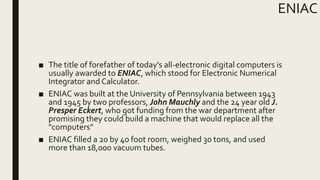
ENIAC
■ The title of forefather of today's all-electronic digital computers is
usually awarded to ENIAC, which stood for Electronic Numerical
Integrator and Calculator.
■ ENIAC was built at the University of Pennsylvania between 1943
and 1945 by two professors, John Mauchly and the 24 year old J.
Presper Eckert, who got funding from the war department after
promising they could build a machine that would replace all the
"computers”
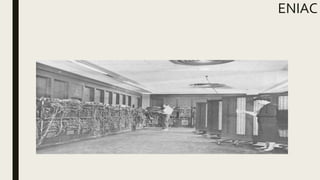
■ ENIAC filled a 20 by 40 foot room, weighed 30 tons, and used
more than 18,000 vacuum tubes.
ENIAC
ENIAC
Programming the ENIAC
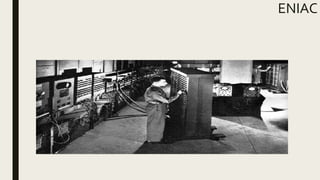
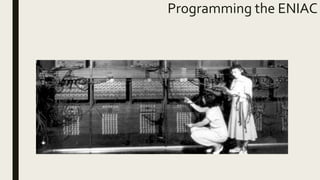
■ To reprogram the ENIAC you had to rearrange the patch cords
that you can observe on the left in the prior photo, and the
settings of 3000 switches that you can observe on the right.
■ To program a modern computer, you type out a program with
statements like:
■ Circumference = 3.14 * diameter
■ To perform this computation on ENIAC you had to rearrange a
large number of patch cords and then locate three particular
knobs on that vast wall of knobs and set them to 3, 1, and 4.
Programming the ENIAC
Problems with the ENIAC
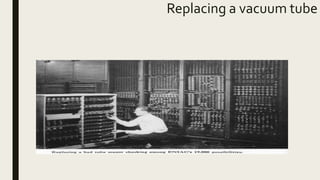
■ The ENIAC used 18,000 vacuum tubes to hold a
charge
■ Vacuum tubes were so notoriously unreliable that
even twenty years later many neighborhood drug
stores provided a "tube tester"
Replacing a vacuum tube
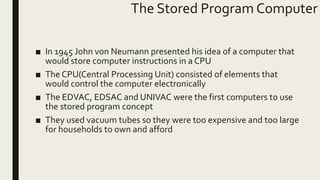
The Stored Program Computer
■ In 1945 John von Neumann presented his idea of a computer that
would store computer instructions in a CPU
■ The CPU(Central Processing Unit) consisted of elements that
would control the computer electronically
■ The EDVAC, EDSAC and UNIVAC were the first computers to use
the stored program concept
■ They used vacuum tubes so they were too expensive and too large
for households to own and afford
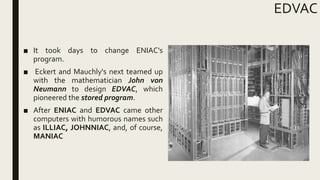
EDVAC
■ It took days to change ENIAC's
program.
■ Eckert and Mauchly's next teamed up
with the mathematician John von
Neumann to design EDVAC, which
pioneered the stored program.
■ After ENIAC and EDVAC came other
computers with humorous names such
as ILLIAC, JOHNNIAC, and, of course,
MANIAC
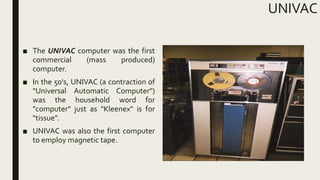
UNIVAC
■ The UNIVAC computer was the first
commercial (mass produced)
computer.
■ In the 50's, UNIVAC (a contraction of
"Universal Automatic Computer")
was the household word for
"computer" just as "Kleenex" is for
"tissue".
■ UNIVAC was also the first computer
to employ magnetic tape.
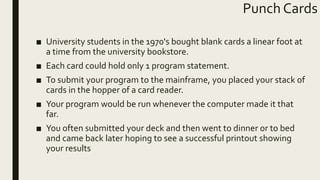
Punch Cards
■ University students in the 1970's bought blank cards a linear foot at
a time from the university bookstore.
■ Each card could hold only 1 program statement.
■ To submit your program to the mainframe, you placed your stack of
cards in the hopper of a card reader.
■ Your program would be run whenever the computer made it that
far.
■ You often submitted your deck and then went to dinner or to bed
and came back later hoping to see a successful printout showing
your results
GENERATIONS
Section 2
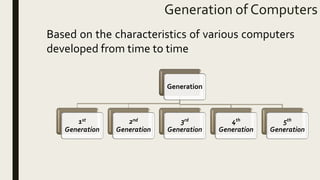
Generation of Computers
Generation
1st
Generation
2nd
Generation
3rd
Generation
4th
Generation
5th
Generation
Based on the characteristics of various computers
developed from time to time
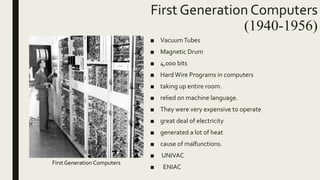
First Generation Computers
(1940-1956)
■ VacuumTubes
■ Magnetic Drum
■ 4,000 bits
■ HardWire Programs in computers
■ taking up entire room.
■ relied on machine language.
■ They were very expensive to operate
■ great deal of electricity
■ generated a lot of heat
■ cause of malfunctions.
■ UNIVAC
■ ENIAC
First Generation Computers
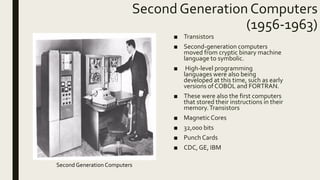
Second Generation Computers
(1956-1963)
■ Transistors
■ Second-generation computers
moved from cryptic binary machine
language to symbolic.
■ High-level programming
languages were also being
developed at this time, such as early
versions of COBOL and FORTRAN.
■ These were also the first computers
that stored their instructions in their
memory.Transistors
■ MagneticCores
■ 32,000 bits
■ Punch Cards
■ CDC, GE, IBM
Second Generation Computers
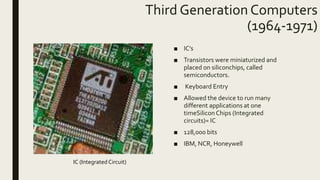
Third Generation Computers
(1964-1971)
■ IC’s
■ Transistors were miniaturized and
placed on siliconchips, called
semiconductors.
■ Keyboard Entry
■ Allowed the device to run many
different applications at one
timeSilicon Chips (Integrated
circuits)= IC
■ 128,000 bits
■ IBM, NCR, Honeywell
IC (Integrated Circuit)
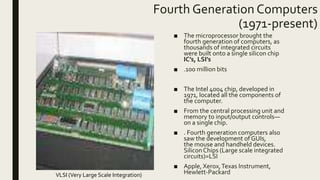
Fourth Generation Computers
(1971-present)
■ The microprocessor brought the
fourth generation of computers, as
thousands of integrated circuits
were built onto a single silicon chip
IC’s, LSI’s
■ .100 million bits
■ The Intel 4004 chip, developed in
1971, located all the components of
the computer.
■ From the central processing unit and
memory to input/output controls—
on a single chip.
■ . Fourth generation computers also
saw the development of GUIs,
the mouse and handheld devices.
SiliconChips (Large scale integrated
circuits)=LSI
■ Apple, Xerox,Texas Instrument,
Hewlett-PackardVLSI (Very Large Scale Integration)
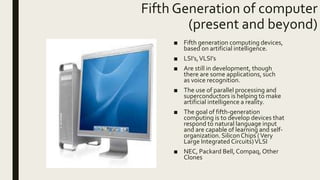
Fifth Generation of computer
(present and beyond)
■ Fifth generation computing devices,
based on artificial intelligence.
■ LSI’s,VLSI’s
■ Are still in development, though
there are some applications, such
as voice recognition.
■ The use of parallel processing and
superconductors is helping to make
artificial intelligence a reality.
■ The goal of fifth-generation
computing is to develop devices that
respond to natural language input
and are capable of learning and self-
organization. SiliconChips (Very
Large Integrated Circuits)VLSI
■ NEC, Packard Bell, Compaq, Other
Clones
CLASSIFICATION
Section 3
Classification of Computer
Analog
Computer
Digital
Computer
Micro
Computer
Home
Computer
Personal
Computer
Laptop
Wearable
Computer
Main Frame
Computer
Super
Computer
Mini
Computer
Hybrid
Computer
ANALOG COMPUTER
Analog computer measures and answer the questions by
the method of “HOW MUCH”.The input data is not a
number infect a physical quantity like tem, pressure,
speed, velocity.
■ Signals are continuous of (0 to 10V)
■ Accuracy 1% Approximately
■ High speed
■ Output is continuous
■ Time is wasted in transmission time
Digital Computer
Digital computer counts and answer the questions by the method of
“HOW Many”.The input data is represented by a number.These are
used for the logical and arithmetic operations.
■ Signals are two level of (0V or 5V)
■ Accuracy unlimited
■ low speed sequential as well as parallel processing
■ Output is continuous but obtain when computation is completed
Micro Computer
Micro computer are the smallest computer system.There size
range from calculator to desktop size. Its CPU is
microprocessor. It also known as Grand child Computer.
■ Application : - personal computer, Multi user system, offices.
Mini Computer
These are also small general purpose system.They are generally
more powerful and most useful as compared to micro
computer. Mini computer are also known as mid range
computer or Child computer.
■ Application :- Departmental systems, Network Servers, work
group system.
Main Frame Computer
Mainframe computers are those computers that offer faster
processing and grater storage area.The word “main frame”
comes from the metal frames. It is also known as Father
computer.
■ Application – Host computer, Central data base server.
Super Computer
■ Super computer are those computer which are designed for
scientific job like whether forecasting and artificial
intelligence etc.They are fastest and expensive. A super
computer contains a number of CPU which operate in parallel
to make it faster. It also known as grand father computer.
■ Application – whether forecasting, weapons research and
development.
Laptops
■ Laptop PCs (also known as notebook computers) are portable computers
weighing around 2 kgs.
■ They have a keyboard, flat screen liquid crystal display, and a Pentium or Power
PC processor. Colour displays are available.
■ They normally run usingWINDOWS OS. Laptops come with hard disk (around
1TB), CDROM and floppy disk.
■ They should run with batteries and are thus designed to conserve energy by using
power efficient chips.
■ Many Laptops can be connected to a network.
■ There is a trend towards providing wireless connectivity to Laptops so that they
can read files from large stationary computers.
■ The most common use of Laptop computers is used for word processing, and
spreadsheet computing.
■ As Laptops use miniature components which have to consume low power and
have to be packaged in small volumes.
Personal Computer
■ The most popular PCs are desktop machines.
■ Early PCs had Intel 8088 microprocessors as their CPU. Currently (2004), Intel Dual Core is the
most popular processor.
■ The machines made by IBM are called IBM PCs.
■ Other manufacturers use IBM’s specifications and design their own PCs.They are known as
IBM compatible PCs. IBM PCs mostly use MS-Windows,WINDOWS –XP or GNU/Linux as
Operating System. IBM PCs, nowadays (2004) have 64 to 256 MB main memory, 40 to 80 GB
of Hard Disk and a floppy disk or flash ROM.
■ Besides these a 650 MB CDROM is also provided in PCs intended for multimedia use. Another
company calledApple also makes pCs.Apple PCs are known as Apple Macintosh.
■ They use Apple’s proprietary OS, which is designed for simplicity of use.
■ Apple Macintosh machines used Motorola 68030 microprocessors but now use Power PC 603
processor.
■ IBM PCs are today the most popular computers with millions of them in use throughout the
world.
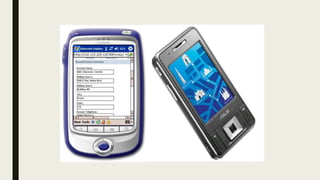
PDA – Personal Digital Assistant
■ Like Mini computer in a general sense
■ Smaller than laptops (can be called Palmtops)
■ Used to store information used frequently wherever
you go
■ Nowadays work with smart cards which has all the
information of a user and his/her transactions
Hybrid Computer
■ Various specifically designed computers are with both digital and
analog characteristics combining the advantages of analog and
digital computers when working as a system. Hybrid computers
are being used extensively in process control system where it is
necessary to have a close representation with the physical world.
■ The hybrid system provides the good precision that can be
attained with analog computers and the greater control that is
possible with digital computers, plus the ability to accept the
input data in either form.

What is computer

  • 1.
  • 2.
  • 3.
    Abacus ■ The abacusis often wrongly attributed to China. ■ In fact, the oldest surviving abacus was used in 300 B.C. by the Babylonians. ■ The abacus is still in use today, principally in the far east. ■ A skilled abacus operator can work on addition and subtraction problems at the speed of a person equipped with a hand calculator (multiplication and division are slower).
  • 4.
    John Napier ■ In1617 an eccentric (some say mad) Scotsman named John Napier invented logarithms, which are a technology that allows multiplication to be performed via addition. ■ Ex: log2x = 5 ■ The magic ingredient is the logarithm of each operand, which was originally obtained from a printed table. ■ But Napier also invented an alternative to tables, where the logarithm values were carved on ivory sticks which are now called Napier's Bones.
  • 5.
  • 6.
    Slide Rule ■ Napier'sinvention led directly to the slide rule, ■ first built in England in 1632 and still in use in the 1960's by the NASA engineers of the Mercury, Gemini, and Apollo programs which landed men on the moon.
  • 7.
    Blaise Pascal ■ In1642 Blaise Pascal, at age 19, invented the Pascaline as an aid for his father who was a tax collector. ■ Pascal built 50 of this gear-driven one-function calculator (it could only add) but couldn't sell many because of their exorbitant cost and because they really weren't that accurate (at that time it was not possible to fabricate gears with the required precision). ■ Up until the present age when car dashboards went digital, the odometer portion of a car's speedometer used the very same mechanism as the Pascaline to increment the next wheel after each full revolution of the prior wheel.
  • 8.
  • 9.
  • 10.
  • 11.
    Leibniz ■ Just afew years after Pascal, the German Gottfried Wilhelm Leibniz (co-inventor with Newton of calculus) managed to build a four-function (addition, subtraction, multiplication, and division) calculator that he called the stepped reckoner. ■ Instead of gears, it employed fluted drums having ten flutes arranged around their circumference in a stair-step fashion. ■ Although the stepped reckoner employed the decimal number system (each drum had 10 flutes) ■ Leibniz was the first to advocate use of the binary number system which is fundamental to the operation of modern computers. ■ Leibniz is considered one of the greatest of the philosophers but he died poor and alone.
  • 12.
    Charle’s Babbage ■ By1822 the English mathematician Charles Babbage was proposing a steam driven calculating machine the size of a room, which he called the Difference Engine.
  • 13.
    Difference Engine ■ Thismachine would be able to compute tables of numbers, such as logarithm tables. ■ He obtained government funding for this project due to the importance of numeric tables in ocean navigation. ■ Construction of Babbage's Difference Engine proved exceedingly difficult and the project soon became the most expensive government funded project up to that point in English history. ■ Ten years later the device was still nowhere near complete, acrimony abounded between all involved, and funding dried up. The device was never finished.
  • 14.
    Babbage-Analytic Engine ■ Babbagewas not deterred, and by then was on to his next brainstorm, which he called the Analytic Engine. ■ This device, large as a house and powered by 6 steam engines, ■ It was programmable, thanks to the punched card technology of Jacquard. ■ Babbage saw that the pattern of holes in a punch card could be used to represent an abstract idea such as a problem statement or the raw data required for that problem's solution.
  • 15.
    Babbage-Analytic Engine ■ Babbagerealized that punched paper could be employed as a storage mechanism, holding computed numbers for future reference. ■ Because of the connection to the Jacquard loom, Babbage called the two main parts of his Analytic Engine the "Store" and the "Mill", as both terms are used in the weaving industry. ■ The Store was where numbers were held and the Mill was where they were "woven" into new results. ■ In a modern computer these same parts are called the memory unit and the central processing unit (CPU).
  • 16.
    Babbage – AnalyticEngine ■ TheAnalytic Engine also had a key function that distinguishes computers from calculators: the conditional statement. ■ A conditional statement allows a program to achieve different results each time it is run. ■ Based on the conditional statement, the path of the program can be determined based upon a situation that is detected at the very moment the program is running.
  • 17.
    US Census ■ Thenext breakthrough occurred in America.The U.S. Constitution states that a census should be taken of all U.S. citizens every 10 years in order to determine the representation of the states in Congress. ■ While the very first census of 1790 had only required 9 months, by 1880 the U.S. population had grown so much that the count for the 1880 census took 7.5 years. Automation was clearly needed for the next census. ■ The census bureau offered a prize for an inventor to help with the 1890 census and this prize was won by Herman Hollerith,
  • 18.
    Hollerith desk ■ TheHollerith desk, consisted of: ■ a card reader which sensed the holes in the cards, ■ a gear driven mechanism which could count (similar to Pascal’s) ■ A large wall of dial indicators to display the results of the count.
  • 19.
    Hollerith Desk ■ Hollerith'stechnique was successful and the 1890 census was completed in only 3 years at a savings of 5 million dollars.
  • 20.
    IBM ■ Hollerith builta company, the Tabulating Machine Company which, after a few buyouts, eventually became International Business Machines, known today as IBM.
  • 21.
    Hollerith’s Inovation ■ Byusing punch cards, Hollerith created a way to store and retrieve information. ■ This was the first type of read and write technology
  • 22.
  • 23.
    US Military ■ TheU.S. military desired a mechanical calculator more optimized for scientific computation. ■ ByWorldWar II the U.S. had battleships that could lob shells weighing as much as a small car over distances up to 25 miles. ■ Physicists could write the equations that described how atmospheric drag, wind, gravity, muzzle velocity, etc. would determine the trajectory of the shell, but solving such equations was extremely laborious.
  • 24.
    US Military ■ Humancomputers would compute results of these equations and publish them in ballistic "firing tables" ■ DuringWorldWar II the U.S. military scoured the country looking for (generally female) math majors to hire for the job of computing these tables, but not enough humans could be found to keep up with the need for new tables. ■ Sometimes artillery pieces had to be delivered to the battlefield without the necessary firing tables and this meant they were close to useless because they couldn't be aimed properly. ■ Faced with this situation, the U.S. military was willing to invest in even hair- brained schemes to automate this type of computation.
  • 25.
    Mark I ■ Oneearly success was the Harvard Mark I computer which was built as a partnership between Harvard and IBM in 1944. ■ This was the first programmable digital computer made in the U.S. ■ But it was not a purely electronic computer. Instead the Mark I was constructed out of switches, relays, rotating shafts, and clutches.
  • 26.
    Mark I ■ Themachine weighed 5 tons, incorporated 500 miles of wire, was 8 feet tall and 51 feet long, and had a 50 ft rotating shaft running its length, turned by a 5 horsepower electric motor. ■ The Mark I ran non-stop for 15 years, sounding like a roomful of ladies knitting.
  • 27.
  • 28.
    The First Bug ■One of the primary programmers for the Mark I was a woman, Grace Hopper. ■ Hopper found the first computer "bug": a dead moth that had gotten into the Mark I ■ The word "bug" had been used to describe a defect since at least 1889 but Hopper is credited with coining the word "debugging" to describe the work to eliminate program faults.
  • 29.
    Atanasoff – BerryComputer ■ One of the earliest attempts to build an all- electronic (that is, no gears, cams, belts, shafts, etc.) digital computer occurred in 1937 by J.V. Atanasoff, ■ This machine was the first to store data as a charge on a capacitor, which is how today's computers store information in their main memory (DRAM or dynamic RAM). As far as its inventors were aware, it was also the first to employ binary arithmetic.
  • 30.
    ENIAC ■ The titleof forefather of today's all-electronic digital computers is usually awarded to ENIAC, which stood for Electronic Numerical Integrator and Calculator. ■ ENIAC was built at the University of Pennsylvania between 1943 and 1945 by two professors, John Mauchly and the 24 year old J. Presper Eckert, who got funding from the war department after promising they could build a machine that would replace all the "computers” ■ ENIAC filled a 20 by 40 foot room, weighed 30 tons, and used more than 18,000 vacuum tubes.
  • 31.
  • 32.
  • 33.
    Programming the ENIAC ■To reprogram the ENIAC you had to rearrange the patch cords that you can observe on the left in the prior photo, and the settings of 3000 switches that you can observe on the right. ■ To program a modern computer, you type out a program with statements like: ■ Circumference = 3.14 * diameter ■ To perform this computation on ENIAC you had to rearrange a large number of patch cords and then locate three particular knobs on that vast wall of knobs and set them to 3, 1, and 4.
  • 34.
  • 35.
    Problems with theENIAC ■ The ENIAC used 18,000 vacuum tubes to hold a charge ■ Vacuum tubes were so notoriously unreliable that even twenty years later many neighborhood drug stores provided a "tube tester"
  • 36.
  • 37.
    The Stored ProgramComputer ■ In 1945 John von Neumann presented his idea of a computer that would store computer instructions in a CPU ■ The CPU(Central Processing Unit) consisted of elements that would control the computer electronically ■ The EDVAC, EDSAC and UNIVAC were the first computers to use the stored program concept ■ They used vacuum tubes so they were too expensive and too large for households to own and afford
  • 38.
    EDVAC ■ It tookdays to change ENIAC's program. ■ Eckert and Mauchly's next teamed up with the mathematician John von Neumann to design EDVAC, which pioneered the stored program. ■ After ENIAC and EDVAC came other computers with humorous names such as ILLIAC, JOHNNIAC, and, of course, MANIAC
  • 39.
    UNIVAC ■ The UNIVACcomputer was the first commercial (mass produced) computer. ■ In the 50's, UNIVAC (a contraction of "Universal Automatic Computer") was the household word for "computer" just as "Kleenex" is for "tissue". ■ UNIVAC was also the first computer to employ magnetic tape.
  • 40.
    Punch Cards ■ Universitystudents in the 1970's bought blank cards a linear foot at a time from the university bookstore. ■ Each card could hold only 1 program statement. ■ To submit your program to the mainframe, you placed your stack of cards in the hopper of a card reader. ■ Your program would be run whenever the computer made it that far. ■ You often submitted your deck and then went to dinner or to bed and came back later hoping to see a successful printout showing your results
  • 41.
  • 42.
  • 43.
    First Generation Computers (1940-1956) ■VacuumTubes ■ Magnetic Drum ■ 4,000 bits ■ HardWire Programs in computers ■ taking up entire room. ■ relied on machine language. ■ They were very expensive to operate ■ great deal of electricity ■ generated a lot of heat ■ cause of malfunctions. ■ UNIVAC ■ ENIAC First Generation Computers
  • 44.
    Second Generation Computers (1956-1963) ■Transistors ■ Second-generation computers moved from cryptic binary machine language to symbolic. ■ High-level programming languages were also being developed at this time, such as early versions of COBOL and FORTRAN. ■ These were also the first computers that stored their instructions in their memory.Transistors ■ MagneticCores ■ 32,000 bits ■ Punch Cards ■ CDC, GE, IBM Second Generation Computers
  • 45.
    Third Generation Computers (1964-1971) ■IC’s ■ Transistors were miniaturized and placed on siliconchips, called semiconductors. ■ Keyboard Entry ■ Allowed the device to run many different applications at one timeSilicon Chips (Integrated circuits)= IC ■ 128,000 bits ■ IBM, NCR, Honeywell IC (Integrated Circuit)
  • 46.
    Fourth Generation Computers (1971-present) ■The microprocessor brought the fourth generation of computers, as thousands of integrated circuits were built onto a single silicon chip IC’s, LSI’s ■ .100 million bits ■ The Intel 4004 chip, developed in 1971, located all the components of the computer. ■ From the central processing unit and memory to input/output controls— on a single chip. ■ . Fourth generation computers also saw the development of GUIs, the mouse and handheld devices. SiliconChips (Large scale integrated circuits)=LSI ■ Apple, Xerox,Texas Instrument, Hewlett-PackardVLSI (Very Large Scale Integration)
  • 47.
    Fifth Generation ofcomputer (present and beyond) ■ Fifth generation computing devices, based on artificial intelligence. ■ LSI’s,VLSI’s ■ Are still in development, though there are some applications, such as voice recognition. ■ The use of parallel processing and superconductors is helping to make artificial intelligence a reality. ■ The goal of fifth-generation computing is to develop devices that respond to natural language input and are capable of learning and self- organization. SiliconChips (Very Large Integrated Circuits)VLSI ■ NEC, Packard Bell, Compaq, Other Clones
  • 48.
  • 49.
  • 50.
    ANALOG COMPUTER Analog computermeasures and answer the questions by the method of “HOW MUCH”.The input data is not a number infect a physical quantity like tem, pressure, speed, velocity. ■ Signals are continuous of (0 to 10V) ■ Accuracy 1% Approximately ■ High speed ■ Output is continuous ■ Time is wasted in transmission time
  • 51.
    Digital Computer Digital computercounts and answer the questions by the method of “HOW Many”.The input data is represented by a number.These are used for the logical and arithmetic operations. ■ Signals are two level of (0V or 5V) ■ Accuracy unlimited ■ low speed sequential as well as parallel processing ■ Output is continuous but obtain when computation is completed
  • 52.
    Micro Computer Micro computerare the smallest computer system.There size range from calculator to desktop size. Its CPU is microprocessor. It also known as Grand child Computer. ■ Application : - personal computer, Multi user system, offices.
  • 53.
    Mini Computer These arealso small general purpose system.They are generally more powerful and most useful as compared to micro computer. Mini computer are also known as mid range computer or Child computer. ■ Application :- Departmental systems, Network Servers, work group system.
  • 54.
    Main Frame Computer Mainframecomputers are those computers that offer faster processing and grater storage area.The word “main frame” comes from the metal frames. It is also known as Father computer. ■ Application – Host computer, Central data base server.
  • 55.
    Super Computer ■ Supercomputer are those computer which are designed for scientific job like whether forecasting and artificial intelligence etc.They are fastest and expensive. A super computer contains a number of CPU which operate in parallel to make it faster. It also known as grand father computer. ■ Application – whether forecasting, weapons research and development.
  • 56.
    Laptops ■ Laptop PCs(also known as notebook computers) are portable computers weighing around 2 kgs. ■ They have a keyboard, flat screen liquid crystal display, and a Pentium or Power PC processor. Colour displays are available. ■ They normally run usingWINDOWS OS. Laptops come with hard disk (around 1TB), CDROM and floppy disk. ■ They should run with batteries and are thus designed to conserve energy by using power efficient chips. ■ Many Laptops can be connected to a network. ■ There is a trend towards providing wireless connectivity to Laptops so that they can read files from large stationary computers. ■ The most common use of Laptop computers is used for word processing, and spreadsheet computing. ■ As Laptops use miniature components which have to consume low power and have to be packaged in small volumes.
  • 57.
    Personal Computer ■ Themost popular PCs are desktop machines. ■ Early PCs had Intel 8088 microprocessors as their CPU. Currently (2004), Intel Dual Core is the most popular processor. ■ The machines made by IBM are called IBM PCs. ■ Other manufacturers use IBM’s specifications and design their own PCs.They are known as IBM compatible PCs. IBM PCs mostly use MS-Windows,WINDOWS –XP or GNU/Linux as Operating System. IBM PCs, nowadays (2004) have 64 to 256 MB main memory, 40 to 80 GB of Hard Disk and a floppy disk or flash ROM. ■ Besides these a 650 MB CDROM is also provided in PCs intended for multimedia use. Another company calledApple also makes pCs.Apple PCs are known as Apple Macintosh. ■ They use Apple’s proprietary OS, which is designed for simplicity of use. ■ Apple Macintosh machines used Motorola 68030 microprocessors but now use Power PC 603 processor. ■ IBM PCs are today the most popular computers with millions of them in use throughout the world.
  • 58.
    PDA – PersonalDigital Assistant ■ Like Mini computer in a general sense ■ Smaller than laptops (can be called Palmtops) ■ Used to store information used frequently wherever you go ■ Nowadays work with smart cards which has all the information of a user and his/her transactions
  • 60.
    Hybrid Computer ■ Variousspecifically designed computers are with both digital and analog characteristics combining the advantages of analog and digital computers when working as a system. Hybrid computers are being used extensively in process control system where it is necessary to have a close representation with the physical world. ■ The hybrid system provides the good precision that can be attained with analog computers and the greater control that is possible with digital computers, plus the ability to accept the input data in either form.