COMPUTER ORGANIZATION
Introduction to Computer
Dr.P.Poongothai
Kristu Jayanti College
Introduction:
 In the modern era, computers are an essential part of our everyday existence.
 That means computers are present in almost every field, making our day-
to- day tasks easier and faster.
 Nowadays, computers can be seen in banks, shops, schools, hospitals,
railways, and many more places, including our home.
 As they are such an essential part of our lives, we must know about the basic
computer introduction.
What is a Computer?
 The meaning of a computer is a machine that can calculate.
 However, modern computers are not just a calculating device anymore.
 They can perform a variety of tasks.
 In simple terms, a computer is a programmable electronic machine used to
store, retrieve, and process data.
(OR)
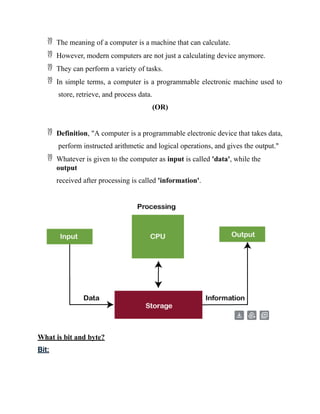
 Definition, "A computer is a programmable electronic device that takes data,
perform instructed arithmetic and logical operations, and gives the output."
 Whatever is given to the computer as input is called 'data', while the
output
received after processing is called 'information'.
What is bit and byte?
Bit:
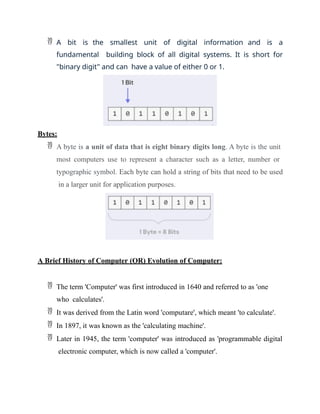
 A bit is the smallest unit of digital information and is a
fundamental building block of all digital systems. It is short for
"binary digit" and can have a value of either 0 or 1.
Bytes:
 A byte is a unit of data that is eight binary digits long. A byte is the unit
most computers use to represent a character such as a letter, number or
typographic symbol. Each byte can hold a string of bits that need to be used
in a larger unit for application purposes.
A Brief History of Computer (OR) Evolution of Computer:
 The term 'Computer' was first introduced in 1640 and referred to as 'one
who calculates'.
 It was derived from the Latin word 'computare', which meant 'to calculate'.
 In 1897, it was known as the 'calculating machine'.
 Later in 1945, the term 'computer' was introduced as 'programmable digital
electronic computer, which is now called a 'computer'.
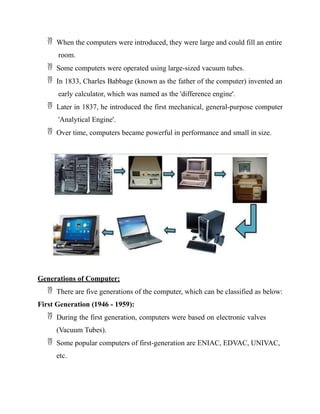
 When the computers were introduced, they were large and could fill an entire
room.
 Some computers were operated using large-sized vacuum tubes.
 In 1833, Charles Babbage (known as the father of the computer) invented an
early calculator, which was named as the 'difference engine'.
 Later in 1837, he introduced the first mechanical, general-purpose computer
'Analytical Engine'.
 Over time, computers became powerful in performance and small in size.
Generations of Computer:
 There are five generations of the computer, which can be classified as below:
First Generation (1946 - 1959):
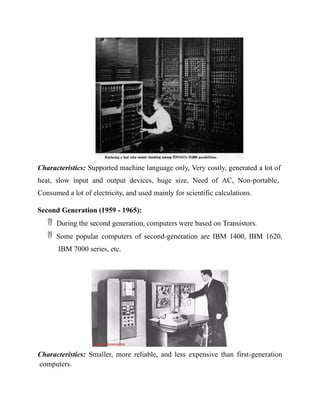
 During the first generation, computers were based on electronic valves
(Vacuum Tubes).
 Some popular computers of first-generation are ENIAC, EDVAC, UNIVAC,
etc.
Characteristics: Supported machine language only, Very costly, generated a lot of
heat, slow input and output devices, huge size, Need of AC, Non-portable,
Consumed a lot of electricity, and used mainly for scientific calculations.
Second Generation (1959 - 1965):
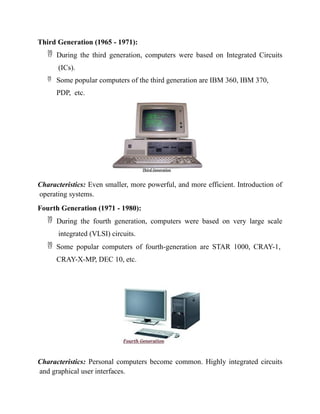
 During the second generation, computers were based on Transistors.
 Some popular computers of second-generation are IBM 1400, IBM 1620,
IBM 7000 series, etc.
Characteristics: Smaller, more reliable, and less expensive than first-generation
computers.
Third Generation (1965 - 1971):
 During the third generation, computers were based on Integrated Circuits
(ICs).
 Some popular computers of the third generation are IBM 360, IBM 370,
PDP, etc.
Characteristics: Even smaller, more powerful, and more efficient. Introduction of
operating systems.
Fourth Generation (1971 - 1980):
 During the fourth generation, computers were based on very large scale
integrated (VLSI) circuits.
 Some popular computers of fourth-generation are STAR 1000, CRAY-1,
CRAY-X-MP, DEC 10, etc.
Characteristics: Personal computers become common. Highly integrated circuits
and graphical user interfaces.
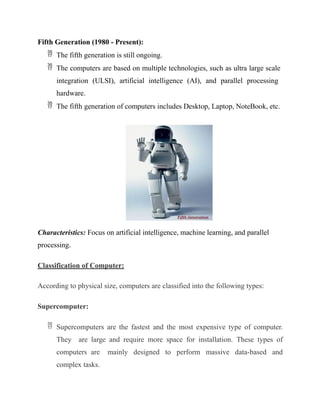
Fifth Generation (1980 - Present):
 The fifth generation is still ongoing.
 The computers are based on multiple technologies, such as ultra large scale
integration (ULSI), artificial intelligence (AI), and parallel processing
hardware.
 The fifth generation of computers includes Desktop, Laptop, NoteBook, etc.
Characteristics: Focus on artificial intelligence, machine learning, and parallel
processing.
Classification of Computer:
According to physical size, computers are classified into the following types:
Supercomputer:
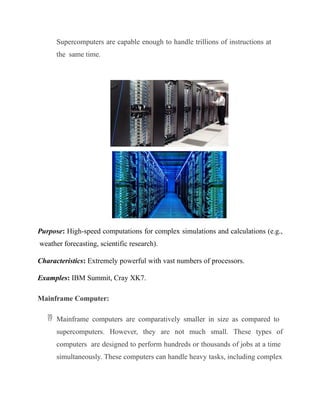
 Supercomputers are the fastest and the most expensive type of computer.
They are large and require more space for installation. These types of
computers are mainly designed to perform massive data-based and
complex tasks.
Supercomputers are capable enough to handle trillions of instructions at
the same time.
Purpose: High-speed computations for complex simulations and calculations (e.g.,
weather forecasting, scientific research).
Characteristics: Extremely powerful with vast numbers of processors.
Examples: IBM Summit, Cray XK7.
Mainframe Computer:
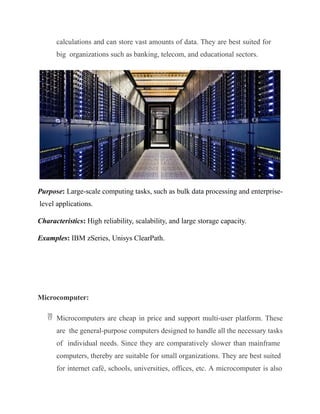
 Mainframe computers are comparatively smaller in size as compared to
supercomputers. However, they are not much small. These types of
computers are designed to perform hundreds or thousands of jobs at a time
simultaneously. These computers can handle heavy tasks, including complex
calculations and can store vast amounts of data. They are best suited for
big organizations such as banking, telecom, and educational sectors.
Purpose: Large-scale computing tasks, such as bulk data processing and enterprise-
level applications.
Characteristics: High reliability, scalability, and large storage capacity.
Examples: IBM zSeries, Unisys ClearPath.
Microcomputer:
 Microcomputers are cheap in price and support multi-user platform. These
are the general-purpose computers designed to handle all the necessary tasks
of individual needs. Since they are comparatively slower than mainframe
computers, thereby are suitable for small organizations. They are best suited
for internet café, schools, universities, offices, etc. A microcomputer is also
referred to as the 'Personal Computer (PC)' in general life. Laptop and
desktop are examples of microcomputers.
Minicomputer:
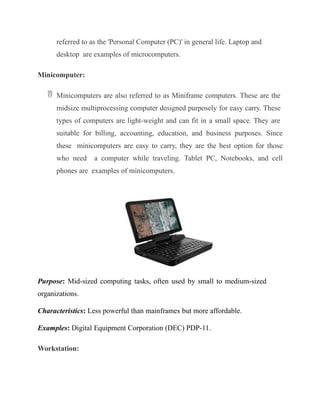
 Minicomputers are also referred to as Miniframe computers. These are the
midsize multiprocessing computer designed purposely for easy carry. These
types of computers are light-weight and can fit in a small space. They are
suitable for billing, accounting, education, and business purposes. Since
these minicomputers are easy to carry, they are the best option for those
who need a computer while traveling. Tablet PC, Notebooks, and cell
phones are examples of minicomputers.
Purpose: Mid-sized computing tasks, often used by small to medium-sized
organizations.
Characteristics: Less powerful than mainframes but more affordable.
Examples: Digital Equipment Corporation (DEC) PDP-11.
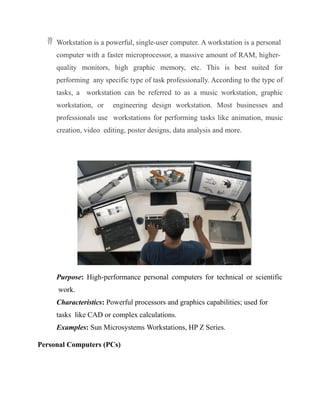
Workstation:
 Workstation is a powerful, single-user computer. A workstation is a personal
computer with a faster microprocessor, a massive amount of RAM, higher-
quality monitors, high graphic memory, etc. This is best suited for
performing any specific type of task professionally. According to the type of
tasks, a workstation can be referred to as a music workstation, graphic
workstation, or engineering design workstation. Most businesses and
professionals use workstations for performing tasks like animation, music
creation, video editing, poster designs, data analysis and more.
Purpose: High-performance personal computers for technical or scientific
work.
Characteristics: Powerful processors and graphics capabilities; used for
tasks like CAD or complex calculations.
Examples: Sun Microsystems Workstations, HP Z Series.
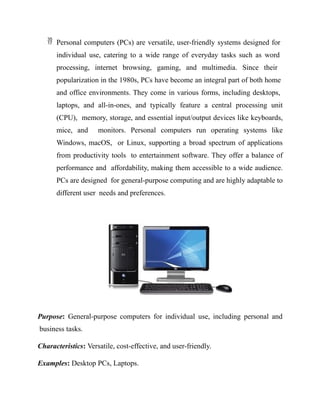
Personal Computers (PCs)
 Personal computers (PCs) are versatile, user-friendly systems designed for
individual use, catering to a wide range of everyday tasks such as word
processing, internet browsing, gaming, and multimedia. Since their
popularization in the 1980s, PCs have become an integral part of both home
and office environments. They come in various forms, including desktops,
laptops, and all-in-ones, and typically feature a central processing unit
(CPU), memory, storage, and essential input/output devices like keyboards,
mice, and monitors. Personal computers run operating systems like
Windows, macOS, or Linux, supporting a broad spectrum of applications
from productivity tools to entertainment software. They offer a balance of
performance and affordability, making them accessible to a wide audience.
PCs are designed for general-purpose computing and are highly adaptable to
different user needs and preferences.
Purpose: General-purpose computers for individual use, including personal and
business tasks.
Characteristics: Versatile, cost-effective, and user-friendly.
Examples: Desktop PCs, Laptops.
BASIC STRUCTURE OF COMPUTER HARDWARE & SOFTWARE:
FUNCTIONAL UNITS,
BASIC OPERATIONAL CONCEPTS,
BUS STRUCTURES.
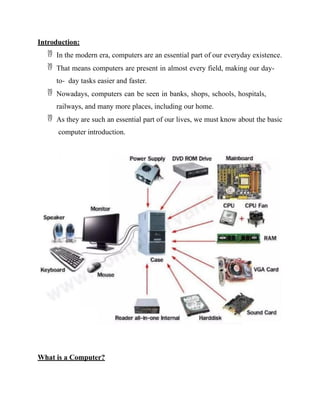
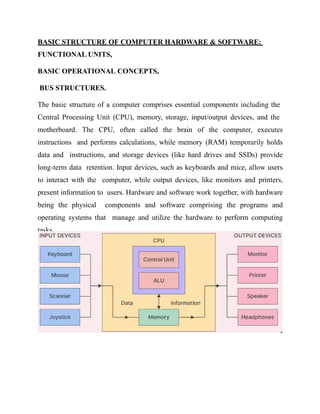
The basic structure of a computer comprises essential components including the
Central Processing Unit (CPU), memory, storage, input/output devices, and the
motherboard. The CPU, often called the brain of the computer, executes
instructions and performs calculations, while memory (RAM) temporarily holds
data and instructions, and storage devices (like hard drives and SSDs) provide
long-term data retention. Input devices, such as keyboards and mice, allow users
to interact with the computer, while output devices, like monitors and printers,
present information to users. Hardware and software work together, with hardware
being the physical components and software comprising the programs and
operating systems that manage and utilize the hardware to perform computing
tasks.
Computer Hardware:
Computer hardware refers to the physical components of a computer system that
are integral to its operation. These components include:
 Central Processing Unit (CPU): Often considered the brain of the
computer, the CPU performs calculations and executes instructions required
by software applications. It includes the Arithmetic Logic Unit (ALU) for
performing mathematical operations and the Control Unit (CU) for directing
the operations of the processor.
 Memory: This includes both volatile and non-volatile memory:
 RAM (Random Access Memory): A type of volatile memory that
temporarily stores data and instructions that the CPU needs while
performing tasks.
 ROM (Read-Only Memory): Non-volatile memory that stores essential
system firmware and instructions needed for the computer’s startup process.
 Storage Devices: Used for long-term data retention:
 Hard Disk Drives (HDDs) and Solid-State Drives (SSDs): Primary
storage devices where the operating system, applications, and user data are
stored.
 Optical Drives: Such as CD/DVD/Blu-ray drives, used for reading and
writing optical discs.
 Motherboard: The main circuit board that houses the CPU, memory, and
other critical components. It facilitates communication between the CPU,
RAM, storage devices, and peripheral devices.
 Input Devices: Tools for entering data into the computer, such as keyboards,
mice, scanners, and webcams.
 Output Devices: Devices that display or produce the results of the
computer’s processing, such as monitors, printers, and speakers.
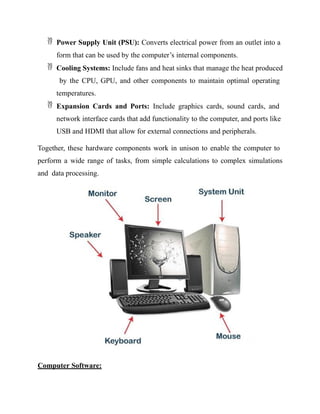
 Power Supply Unit (PSU): Converts electrical power from an outlet into a
form that can be used by the computer’s internal components.
 Cooling Systems: Include fans and heat sinks that manage the heat produced
by the CPU, GPU, and other components to maintain optimal operating
temperatures.
 Expansion Cards and Ports: Include graphics cards, sound cards, and
network interface cards that add functionality to the computer, and ports like
USB and HDMI that allow for external connections and peripherals.
Together, these hardware components work in unison to enable the computer to
perform a wide range of tasks, from simple calculations to complex simulations
and data processing.
Computer Software:
Computer software encompasses all the programs and operating systems that
instruct hardware on how to perform specific tasks and processes. It can be
broadly categorized into three main types:
 Operating System (OS): The fundamental software that manages hardware
resources and provides a user interface. It controls the operation of hardware
components, facilitates the execution of applications, and ensures smooth
interaction between the user and the machine. Examples include Windows,
macOS, Linux, and Android.
 Application Software: Programs designed for end-users to perform specific
tasks. These include productivity tools such as word processors (e.g.,
Microsoft Word), spreadsheets (e.g., Microsoft Excel), and presentation
software (e.g., PowerPoint). Other applications include web browsers (e.g.,
Google Chrome, Mozilla Firefox), email clients (e.g., Outlook), and
multimedia software (e.g., Adobe Photoshop, VLC Media Player).
 Utility Software: Provides maintenance and optimization functions to
ensure the smooth operation of the computer. Utilities include antivirus
programs, disk cleanup tools, file management systems, and system
diagnostic tools. They help manage system resources, enhance performance,
and protect the computer from malware and other security threats.
Together, software and hardware work in tandem to enable computers to execute
tasks efficiently, process data, and perform a wide range of functions from
everyday applications to complex computational tasks.
Basic Parts of Computer (OR) Functional Units:
The essential components of the computer can be defined as follows:
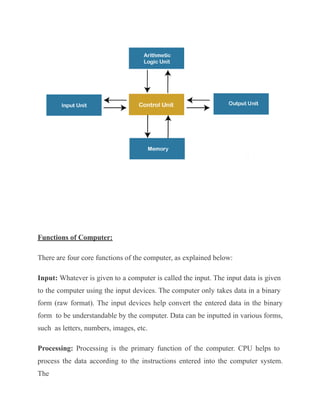
Input Unit: Input Units or devices are used to input the data or instructions into
the computers. Some most common input devices are mouse and keyword.
Output Unit: Output Units or devices are used to provide output to the user in the
desired format. The most popular examples of output devices are the monitor and
the printer.
Control Unit: As its name states, this unit is primarily used to control all the
computer functions and functionalities. All the components or devices attached to a
computer interact with each other through the control unit. In short, the control
unit is referred to as 'CU'.
Arithmetic Logic Unit: The arithmetic logic unit helps perform all the computer
system's arithmetic and logical operations. In short, the arithmetic logic unit is
referred to as 'ALU'.
Memory: Memory is used to store all the input data, instructions, and output data.
Memory usually has two types: Primary Memory and Secondary Memory. The
memory found inside the CPU is called the primary memory, whereas the memory
that is not the integral part of the CPU is called secondary memory.
Note: Control Unit, arithmetic logic unit, and the memory simultaneously
form the central processing unit (called CPU in short).
Functions of Computer:
There are four core functions of the computer, as explained below:
Input: Whatever is given to a computer is called the input. The input data is given
to the computer using the input devices. The computer only takes data in a binary
form (raw format). The input devices help convert the entered data in the binary
form to be understandable by the computer. Data can be inputted in various forms,
such as letters, numbers, images, etc.
Processing: Processing is the primary function of the computer. CPU helps to
process the data according to the instructions entered into the computer system.
The
processing of data is an internal process of the computer system, and the data is
executed in a queue. After the processing has been completed, the data is further
transferred as the output. The processor (CPU) is the computer's brain, and it is a
microchip. The processor's speed varies in different computers because it depends
on several factors, such as the type of CPU, memory, and motherboard.
Typically, the following operations are performed on the data during the
processing:
Arithmetic Operations, such as addition, subtraction, multiplication, differentials,
square root, etc.
Logical Operations, such as equal to, not equal to, greater than, less than,
opposite, etc.
Output: Anything that comes out from the computer is called the output. It is the
human-readable data and displayed on the computer screen (monitor). Output can
be stored in the storage devices if desired. The output devices help convert the
processed data of the CPU into the human-understandable form.
Storage: The device used to store the data of a computer system is called the
storage. Storage devices help to store digital data. They can store the data while
the computer is operating and after processing. There are volatile and non-volatile
storage options. The volatile storage can store the data as long as the power source
is connected, whereas non-volatile can store the data permanently even after the
power source is disconnected.
Characteristics of Computer:
Speed: Computers are a high-speed electronic machine. They can carry around 3-4
million instruction per second. Even advanced computers can handle trillions of
instructions per second, cutting down the time to perform any digital tasks.
Accuracy: Computers are also known for their accurate performance. They can
complete the given jobs at almost 100% accuracy. Although errors may occur in
computers, they are usually caused by incorrect input, incorrect instructions, or
bugs in chips. All of these are human errors.
Storage Capacity: Computers can easily store a massive size of data. Modern
computers come inbuilt with high storage features compared to older days.
Additional data can be stored on secondary devices like external hard disks, or
flash memory, etc. Due to incredible speed, data can be retrieved from storage in
no time.
Reliability: Computers are reliable and consistent; they can process the same tasks
any number of times without throwing any error. Computers don't get tired like
humans, so they are superior to perform rule-based, repetitive tasks.
Versatility: The variety of tasks that a computer can perform are almost infinite.
That means computers can perform different tasks back to back without making
errors; they are no longer just a computing machine. For one moment, a computer
can be used to perform data entry tasks or ticket booking, and the very next
moment, it can be used for complex mathematical calculations or continuous
astronomical observations, etc.
Advantages of Using Computer
The following are the main advantages of using the computer:
 Computers can perform given tasks at incredible speed.
 Computers can perform the same task multiple times with the same accuracy.
 Computers allow doing several tasks simultaneously as they are best
suited for multitasking.
 Computers keep the stored data secure and inaccessible from unauthorized
users.
 Computers can automatically perform routine tasks with automation, making
humans available for more intelligent tasks.
Disadvantages of Using Computer
The following are the main disadvantages of using the computer:
 Computers cannot work on their own. They need instructions from humans
to complete tasks. Moreover, computers follow the given instructions
blindly without thinking about the outcomes.
 Computers need a power supply to work. Without a power supply, they are
just useless.
 Working on a computer continuously for a long period can cause several
health issues.
 Wastage of computers and their parts leave a negative impact on the
environment.
 Computers are taking human jobs in many sectors. They are replacing
human work and thus increasing unemployment.
Bus Structures:
The bus structure of a computer is a crucial component that facilitates
communication between various internal parts of the system. It consists of a set of
pathways or lines that transmit data, addresses, and control signals among the
CPU,
memory, and peripheral devices. The primary components of the bus structure
include:
 Data Bus: The data bus is responsible for transferring data between the
CPU, memory, and other components. It carries the actual data that is being
read from or written to memory or other devices. The width of the data bus
(e.g., 32-bit, 64-bit) determines how much data can be transmitted
simultaneously, impacting the system's performance.
 Address Bus: The address bus carries the addresses of the memory locations
or I/O ports where data is to be read from or written to. It is used by the
CPU to specify the memory location for data transfer. The width of the
address bus (e.g., 16-bit, 32-bit) determines the maximum amount of
addressable memory in the system.
 Control Bus: The control bus carries control signals that manage and
synchronize the operations of the CPU, memory, and peripheral devices. It
includes signals for reading and writing operations, interrupt requests, and
clock pulses that coordinate the timing of operations across the system.
 System Bus: The system bus, also known as the front-side bus (FSB), is the
main data pathway that connects the CPU to the memory and other
components. It integrates the data, address, and control buses into a cohesive
communication system.
 Expansion Bus: The expansion bus allows additional peripheral devices and
expansion cards to be connected to the computer. Examples include the PCI
(Peripheral Component Interconnect) bus and USB (Universal Serial Bus),
which facilitate the addition of devices such as graphics cards, network
adapters, and external drives.
Together, these buses enable efficient communication and data transfer between the
computer's components, supporting the overall functionality and performance of
the system.

Computer Organization Introduction, Generations of Computer.pptx

  • 1.
    COMPUTER ORGANIZATION Introduction toComputer Dr.P.Poongothai Kristu Jayanti College
  • 2.
    Introduction:  In themodern era, computers are an essential part of our everyday existence.  That means computers are present in almost every field, making our day- to- day tasks easier and faster.  Nowadays, computers can be seen in banks, shops, schools, hospitals, railways, and many more places, including our home.  As they are such an essential part of our lives, we must know about the basic computer introduction. What is a Computer?
  • 3.
     The meaningof a computer is a machine that can calculate.  However, modern computers are not just a calculating device anymore.  They can perform a variety of tasks.  In simple terms, a computer is a programmable electronic machine used to store, retrieve, and process data. (OR)  Definition, "A computer is a programmable electronic device that takes data, perform instructed arithmetic and logical operations, and gives the output."  Whatever is given to the computer as input is called 'data', while the output received after processing is called 'information'. What is bit and byte? Bit:
  • 4.
     A bitis the smallest unit of digital information and is a fundamental building block of all digital systems. It is short for "binary digit" and can have a value of either 0 or 1. Bytes:  A byte is a unit of data that is eight binary digits long. A byte is the unit most computers use to represent a character such as a letter, number or typographic symbol. Each byte can hold a string of bits that need to be used in a larger unit for application purposes. A Brief History of Computer (OR) Evolution of Computer:  The term 'Computer' was first introduced in 1640 and referred to as 'one who calculates'.  It was derived from the Latin word 'computare', which meant 'to calculate'.  In 1897, it was known as the 'calculating machine'.  Later in 1945, the term 'computer' was introduced as 'programmable digital electronic computer, which is now called a 'computer'.
  • 5.
     When thecomputers were introduced, they were large and could fill an entire room.  Some computers were operated using large-sized vacuum tubes.  In 1833, Charles Babbage (known as the father of the computer) invented an early calculator, which was named as the 'difference engine'.  Later in 1837, he introduced the first mechanical, general-purpose computer 'Analytical Engine'.  Over time, computers became powerful in performance and small in size. Generations of Computer:  There are five generations of the computer, which can be classified as below: First Generation (1946 - 1959):  During the first generation, computers were based on electronic valves (Vacuum Tubes).  Some popular computers of first-generation are ENIAC, EDVAC, UNIVAC, etc.
  • 6.
    Characteristics: Supported machinelanguage only, Very costly, generated a lot of heat, slow input and output devices, huge size, Need of AC, Non-portable, Consumed a lot of electricity, and used mainly for scientific calculations. Second Generation (1959 - 1965):  During the second generation, computers were based on Transistors.  Some popular computers of second-generation are IBM 1400, IBM 1620, IBM 7000 series, etc. Characteristics: Smaller, more reliable, and less expensive than first-generation computers.
  • 7.
    Third Generation (1965- 1971):  During the third generation, computers were based on Integrated Circuits (ICs).  Some popular computers of the third generation are IBM 360, IBM 370, PDP, etc. Characteristics: Even smaller, more powerful, and more efficient. Introduction of operating systems. Fourth Generation (1971 - 1980):  During the fourth generation, computers were based on very large scale integrated (VLSI) circuits.  Some popular computers of fourth-generation are STAR 1000, CRAY-1, CRAY-X-MP, DEC 10, etc. Characteristics: Personal computers become common. Highly integrated circuits and graphical user interfaces.
  • 8.
    Fifth Generation (1980- Present):  The fifth generation is still ongoing.  The computers are based on multiple technologies, such as ultra large scale integration (ULSI), artificial intelligence (AI), and parallel processing hardware.  The fifth generation of computers includes Desktop, Laptop, NoteBook, etc. Characteristics: Focus on artificial intelligence, machine learning, and parallel processing. Classification of Computer: According to physical size, computers are classified into the following types: Supercomputer:  Supercomputers are the fastest and the most expensive type of computer. They are large and require more space for installation. These types of computers are mainly designed to perform massive data-based and complex tasks.
  • 9.
    Supercomputers are capableenough to handle trillions of instructions at the same time. Purpose: High-speed computations for complex simulations and calculations (e.g., weather forecasting, scientific research). Characteristics: Extremely powerful with vast numbers of processors. Examples: IBM Summit, Cray XK7. Mainframe Computer:  Mainframe computers are comparatively smaller in size as compared to supercomputers. However, they are not much small. These types of computers are designed to perform hundreds or thousands of jobs at a time simultaneously. These computers can handle heavy tasks, including complex
  • 10.
    calculations and canstore vast amounts of data. They are best suited for big organizations such as banking, telecom, and educational sectors. Purpose: Large-scale computing tasks, such as bulk data processing and enterprise- level applications. Characteristics: High reliability, scalability, and large storage capacity. Examples: IBM zSeries, Unisys ClearPath. Microcomputer:  Microcomputers are cheap in price and support multi-user platform. These are the general-purpose computers designed to handle all the necessary tasks of individual needs. Since they are comparatively slower than mainframe computers, thereby are suitable for small organizations. They are best suited for internet café, schools, universities, offices, etc. A microcomputer is also
  • 11.
    referred to asthe 'Personal Computer (PC)' in general life. Laptop and desktop are examples of microcomputers. Minicomputer:  Minicomputers are also referred to as Miniframe computers. These are the midsize multiprocessing computer designed purposely for easy carry. These types of computers are light-weight and can fit in a small space. They are suitable for billing, accounting, education, and business purposes. Since these minicomputers are easy to carry, they are the best option for those who need a computer while traveling. Tablet PC, Notebooks, and cell phones are examples of minicomputers. Purpose: Mid-sized computing tasks, often used by small to medium-sized organizations. Characteristics: Less powerful than mainframes but more affordable. Examples: Digital Equipment Corporation (DEC) PDP-11. Workstation:
  • 12.
     Workstation isa powerful, single-user computer. A workstation is a personal computer with a faster microprocessor, a massive amount of RAM, higher- quality monitors, high graphic memory, etc. This is best suited for performing any specific type of task professionally. According to the type of tasks, a workstation can be referred to as a music workstation, graphic workstation, or engineering design workstation. Most businesses and professionals use workstations for performing tasks like animation, music creation, video editing, poster designs, data analysis and more. Purpose: High-performance personal computers for technical or scientific work. Characteristics: Powerful processors and graphics capabilities; used for tasks like CAD or complex calculations. Examples: Sun Microsystems Workstations, HP Z Series. Personal Computers (PCs)
  • 13.
     Personal computers(PCs) are versatile, user-friendly systems designed for individual use, catering to a wide range of everyday tasks such as word processing, internet browsing, gaming, and multimedia. Since their popularization in the 1980s, PCs have become an integral part of both home and office environments. They come in various forms, including desktops, laptops, and all-in-ones, and typically feature a central processing unit (CPU), memory, storage, and essential input/output devices like keyboards, mice, and monitors. Personal computers run operating systems like Windows, macOS, or Linux, supporting a broad spectrum of applications from productivity tools to entertainment software. They offer a balance of performance and affordability, making them accessible to a wide audience. PCs are designed for general-purpose computing and are highly adaptable to different user needs and preferences. Purpose: General-purpose computers for individual use, including personal and business tasks. Characteristics: Versatile, cost-effective, and user-friendly. Examples: Desktop PCs, Laptops.
  • 14.
    BASIC STRUCTURE OFCOMPUTER HARDWARE & SOFTWARE: FUNCTIONAL UNITS, BASIC OPERATIONAL CONCEPTS, BUS STRUCTURES. The basic structure of a computer comprises essential components including the Central Processing Unit (CPU), memory, storage, input/output devices, and the motherboard. The CPU, often called the brain of the computer, executes instructions and performs calculations, while memory (RAM) temporarily holds data and instructions, and storage devices (like hard drives and SSDs) provide long-term data retention. Input devices, such as keyboards and mice, allow users to interact with the computer, while output devices, like monitors and printers, present information to users. Hardware and software work together, with hardware being the physical components and software comprising the programs and operating systems that manage and utilize the hardware to perform computing tasks.
  • 15.
    Computer Hardware: Computer hardwarerefers to the physical components of a computer system that are integral to its operation. These components include:  Central Processing Unit (CPU): Often considered the brain of the computer, the CPU performs calculations and executes instructions required by software applications. It includes the Arithmetic Logic Unit (ALU) for performing mathematical operations and the Control Unit (CU) for directing the operations of the processor.  Memory: This includes both volatile and non-volatile memory:  RAM (Random Access Memory): A type of volatile memory that temporarily stores data and instructions that the CPU needs while performing tasks.  ROM (Read-Only Memory): Non-volatile memory that stores essential system firmware and instructions needed for the computer’s startup process.  Storage Devices: Used for long-term data retention:  Hard Disk Drives (HDDs) and Solid-State Drives (SSDs): Primary storage devices where the operating system, applications, and user data are stored.  Optical Drives: Such as CD/DVD/Blu-ray drives, used for reading and writing optical discs.  Motherboard: The main circuit board that houses the CPU, memory, and other critical components. It facilitates communication between the CPU, RAM, storage devices, and peripheral devices.  Input Devices: Tools for entering data into the computer, such as keyboards, mice, scanners, and webcams.  Output Devices: Devices that display or produce the results of the computer’s processing, such as monitors, printers, and speakers.
  • 16.
     Power SupplyUnit (PSU): Converts electrical power from an outlet into a form that can be used by the computer’s internal components.  Cooling Systems: Include fans and heat sinks that manage the heat produced by the CPU, GPU, and other components to maintain optimal operating temperatures.  Expansion Cards and Ports: Include graphics cards, sound cards, and network interface cards that add functionality to the computer, and ports like USB and HDMI that allow for external connections and peripherals. Together, these hardware components work in unison to enable the computer to perform a wide range of tasks, from simple calculations to complex simulations and data processing. Computer Software:
  • 17.
    Computer software encompassesall the programs and operating systems that instruct hardware on how to perform specific tasks and processes. It can be broadly categorized into three main types:  Operating System (OS): The fundamental software that manages hardware resources and provides a user interface. It controls the operation of hardware components, facilitates the execution of applications, and ensures smooth interaction between the user and the machine. Examples include Windows, macOS, Linux, and Android.  Application Software: Programs designed for end-users to perform specific tasks. These include productivity tools such as word processors (e.g., Microsoft Word), spreadsheets (e.g., Microsoft Excel), and presentation software (e.g., PowerPoint). Other applications include web browsers (e.g., Google Chrome, Mozilla Firefox), email clients (e.g., Outlook), and multimedia software (e.g., Adobe Photoshop, VLC Media Player).  Utility Software: Provides maintenance and optimization functions to ensure the smooth operation of the computer. Utilities include antivirus programs, disk cleanup tools, file management systems, and system diagnostic tools. They help manage system resources, enhance performance, and protect the computer from malware and other security threats. Together, software and hardware work in tandem to enable computers to execute tasks efficiently, process data, and perform a wide range of functions from everyday applications to complex computational tasks. Basic Parts of Computer (OR) Functional Units: The essential components of the computer can be defined as follows:
  • 18.
    Input Unit: InputUnits or devices are used to input the data or instructions into the computers. Some most common input devices are mouse and keyword. Output Unit: Output Units or devices are used to provide output to the user in the desired format. The most popular examples of output devices are the monitor and the printer. Control Unit: As its name states, this unit is primarily used to control all the computer functions and functionalities. All the components or devices attached to a computer interact with each other through the control unit. In short, the control unit is referred to as 'CU'. Arithmetic Logic Unit: The arithmetic logic unit helps perform all the computer system's arithmetic and logical operations. In short, the arithmetic logic unit is referred to as 'ALU'. Memory: Memory is used to store all the input data, instructions, and output data. Memory usually has two types: Primary Memory and Secondary Memory. The memory found inside the CPU is called the primary memory, whereas the memory that is not the integral part of the CPU is called secondary memory. Note: Control Unit, arithmetic logic unit, and the memory simultaneously form the central processing unit (called CPU in short).
  • 19.
    Functions of Computer: Thereare four core functions of the computer, as explained below: Input: Whatever is given to a computer is called the input. The input data is given to the computer using the input devices. The computer only takes data in a binary form (raw format). The input devices help convert the entered data in the binary form to be understandable by the computer. Data can be inputted in various forms, such as letters, numbers, images, etc. Processing: Processing is the primary function of the computer. CPU helps to process the data according to the instructions entered into the computer system. The
  • 20.
    processing of datais an internal process of the computer system, and the data is executed in a queue. After the processing has been completed, the data is further transferred as the output. The processor (CPU) is the computer's brain, and it is a microchip. The processor's speed varies in different computers because it depends on several factors, such as the type of CPU, memory, and motherboard. Typically, the following operations are performed on the data during the processing: Arithmetic Operations, such as addition, subtraction, multiplication, differentials, square root, etc. Logical Operations, such as equal to, not equal to, greater than, less than, opposite, etc. Output: Anything that comes out from the computer is called the output. It is the human-readable data and displayed on the computer screen (monitor). Output can be stored in the storage devices if desired. The output devices help convert the processed data of the CPU into the human-understandable form. Storage: The device used to store the data of a computer system is called the storage. Storage devices help to store digital data. They can store the data while the computer is operating and after processing. There are volatile and non-volatile storage options. The volatile storage can store the data as long as the power source is connected, whereas non-volatile can store the data permanently even after the power source is disconnected. Characteristics of Computer:
  • 21.
    Speed: Computers area high-speed electronic machine. They can carry around 3-4 million instruction per second. Even advanced computers can handle trillions of instructions per second, cutting down the time to perform any digital tasks. Accuracy: Computers are also known for their accurate performance. They can complete the given jobs at almost 100% accuracy. Although errors may occur in computers, they are usually caused by incorrect input, incorrect instructions, or bugs in chips. All of these are human errors. Storage Capacity: Computers can easily store a massive size of data. Modern computers come inbuilt with high storage features compared to older days. Additional data can be stored on secondary devices like external hard disks, or flash memory, etc. Due to incredible speed, data can be retrieved from storage in no time. Reliability: Computers are reliable and consistent; they can process the same tasks any number of times without throwing any error. Computers don't get tired like humans, so they are superior to perform rule-based, repetitive tasks. Versatility: The variety of tasks that a computer can perform are almost infinite. That means computers can perform different tasks back to back without making errors; they are no longer just a computing machine. For one moment, a computer can be used to perform data entry tasks or ticket booking, and the very next moment, it can be used for complex mathematical calculations or continuous astronomical observations, etc. Advantages of Using Computer The following are the main advantages of using the computer:  Computers can perform given tasks at incredible speed.
  • 22.
     Computers canperform the same task multiple times with the same accuracy.  Computers allow doing several tasks simultaneously as they are best suited for multitasking.  Computers keep the stored data secure and inaccessible from unauthorized users.  Computers can automatically perform routine tasks with automation, making humans available for more intelligent tasks. Disadvantages of Using Computer The following are the main disadvantages of using the computer:  Computers cannot work on their own. They need instructions from humans to complete tasks. Moreover, computers follow the given instructions blindly without thinking about the outcomes.  Computers need a power supply to work. Without a power supply, they are just useless.  Working on a computer continuously for a long period can cause several health issues.  Wastage of computers and their parts leave a negative impact on the environment.  Computers are taking human jobs in many sectors. They are replacing human work and thus increasing unemployment. Bus Structures: The bus structure of a computer is a crucial component that facilitates communication between various internal parts of the system. It consists of a set of pathways or lines that transmit data, addresses, and control signals among the CPU,
  • 23.
    memory, and peripheraldevices. The primary components of the bus structure include:  Data Bus: The data bus is responsible for transferring data between the CPU, memory, and other components. It carries the actual data that is being read from or written to memory or other devices. The width of the data bus (e.g., 32-bit, 64-bit) determines how much data can be transmitted simultaneously, impacting the system's performance.  Address Bus: The address bus carries the addresses of the memory locations or I/O ports where data is to be read from or written to. It is used by the CPU to specify the memory location for data transfer. The width of the address bus (e.g., 16-bit, 32-bit) determines the maximum amount of addressable memory in the system.  Control Bus: The control bus carries control signals that manage and synchronize the operations of the CPU, memory, and peripheral devices. It includes signals for reading and writing operations, interrupt requests, and clock pulses that coordinate the timing of operations across the system.  System Bus: The system bus, also known as the front-side bus (FSB), is the main data pathway that connects the CPU to the memory and other components. It integrates the data, address, and control buses into a cohesive communication system.  Expansion Bus: The expansion bus allows additional peripheral devices and expansion cards to be connected to the computer. Examples include the PCI (Peripheral Component Interconnect) bus and USB (Universal Serial Bus), which facilitate the addition of devices such as graphics cards, network adapters, and external drives.
  • 24.
    Together, these busesenable efficient communication and data transfer between the computer's components, supporting the overall functionality and performance of the system.