Understanding Telnet


● Telnet Data Transaction
● For Using Telnet

● NVT1

● NVT2

● Reference
For     using Telnet
●   When I used Telnet, we must know address of the
    host because host indicate a companion. If we do
    not know address of the host, we can not contact
    companion
●   When we express, we express to use keyboard.
●   Word express based on keyboard, it indicate
    hardware's display.
NVT1
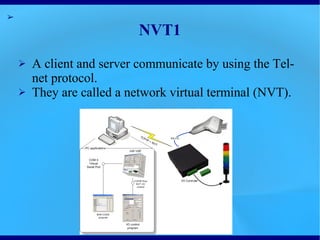
●   A client and server communicate by using the Telnet
    protocol.
●   They are called a network virtual terminal (NVT).
NVT2
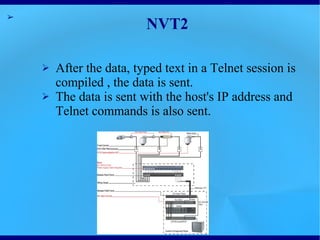
●   After the data, typed text in a Telnet session is
    compiled , the data is sent.
●   The data is sent with the host's IP address and
    Telnet commands is also sent.
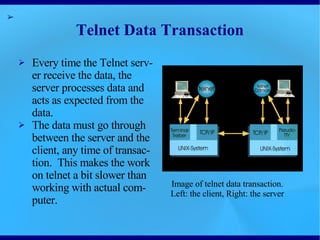
Telnet Data Transaction
●   Every time the Telnet server
    receive the data, the server
    processes data and acts as
    expected from the data.
●   The data must go through
    between the server and the
    client, any time of
    transaction. This makes the
    work on telnet a bit slower
    than working with actual       Image of telnet data transaction.
    computer.                      Left: the client, Right: the server
References
The image that the slide2 uses is in
http://www.hw-group.com/products/hw_vsp/images/VSP_NVT_remote_IO.png

The image that the slide3 uses is in
http://www.keithparkerinc.com/photos/uncategorized/2008/05/20/16ps10.jpg

The image that the slide5 uses is
from ITWissen (written in German)
http://www.itwissen.info/definition/lexikon/Telnet-Protokoll-telnet.html

Telnet

  • 1.
    Understanding Telnet ● TelnetData Transaction ● For Using Telnet ● NVT1 ● NVT2 ● Reference
  • 2.
    For using Telnet ● When I used Telnet, we must know address of the host because host indicate a companion. If we do not know address of the host, we can not contact companion ● When we express, we express to use keyboard. ● Word express based on keyboard, it indicate hardware's display.
  • 3.
    NVT1 ● A client and server communicate by using the Telnet protocol. ● They are called a network virtual terminal (NVT).
  • 4.
    NVT2 ● After the data, typed text in a Telnet session is compiled , the data is sent. ● The data is sent with the host's IP address and Telnet commands is also sent.
  • 5.
    Telnet Data Transaction ● Every time the Telnet server receive the data, the server processes data and acts as expected from the data. ● The data must go through between the server and the client, any time of transaction. This makes the work on telnet a bit slower than working with actual Image of telnet data transaction. computer. Left: the client, Right: the server
  • 6.
    References The image thatthe slide2 uses is in http://www.hw-group.com/products/hw_vsp/images/VSP_NVT_remote_IO.png The image that the slide3 uses is in http://www.keithparkerinc.com/photos/uncategorized/2008/05/20/16ps10.jpg The image that the slide5 uses is from ITWissen (written in German) http://www.itwissen.info/definition/lexikon/Telnet-Protokoll-telnet.html